

Codes
- ASST. PROF. MEENAKSHI PAUL
- G. N. KHALSA COLLEGE
Objective
 1.4 Binary Codes
 1.5 Weighted codes
 Binary Coded Decimal (BCD)
 1.6 Non-weighted codes
 Excess – 3 code,
 Gray code,
 Alphanumeric codes – ASCII Code, EBCDIC, ISCII Code,
 Error detection
1.4 Binary Codes
 When numbers, letters or words are represented by a specific group of
symbols, it is said that the number, letter or word is being encoded.
 The group of symbols is called as a code.
 The digital data is represented, stored and transmitted as group of binary
bits. This group is also called as binary code.
 The binary code is represented by the number as well as alphanumeric
letter.
Advantages of Binary Code
 Binary codes are suitable for the computer applications.
 Binary codes are suitable for the digital communications.
 Binary codes make the analysis and designing of digital
circuits if we use the binary codes.
 Since only 0 & 1 are being used, implementation becomes
easy.
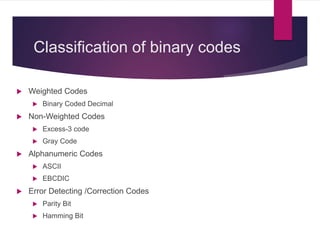
Classification of binary codes
 Weighted Codes
 Binary Coded Decimal
 Non-Weighted Codes
 Excess-3 code
 Gray Code
 Alphanumeric Codes
 ASCII
 EBCDIC
 Error Detecting /Correction Codes
 Parity Bit
 Hamming Bit
1.5 Weighted Codes
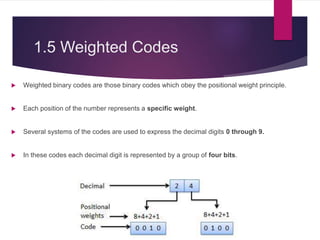
 Weighted binary codes are those binary codes which obey the positional weight principle.
 Each position of the number represents a specific weight.
 Several systems of the codes are used to express the decimal digits 0 through 9.
 In these codes each decimal digit is represented by a group of four bits.
1.5.1 Binary Coded Decimal
(BCD) code
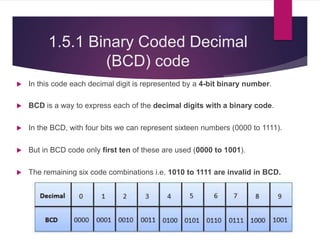
 In this code each decimal digit is represented by a 4-bit binary number.
 BCD is a way to express each of the decimal digits with a binary code.
 In the BCD, with four bits we can represent sixteen numbers (0000 to 1111).
 But in BCD code only first ten of these are used (0000 to 1001).
 The remaining six code combinations i.e. 1010 to 1111 are invalid in BCD.
1.5.1 Binary Coded Decimal
(BCD) code
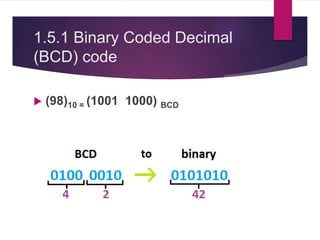
 (98)10 = (1001 1000) BCD
1.5.1 Binary Coded Decimal
(BCD) code
 Advantages of BCD Codes
 It is very similar to decimal system.
 We need to remember binary equivalent of decimal numbers 0 to 9 only.
 Disadvantages of BCD Codes
 BCD needs more number of bits than binary to represent the decimal
number. So BCD is less efficient than binary.
1.6 Non-Weighted Codes
 In this type of binary codes, the positional weights are not assigned.
 The examples of non-weighted codes are
 Excess-3 code
 Gray code
Excess-3 code
16.1 Excess-3 code
 The Excess-3 code is also called as XS-3 code.
 It is non-weighted code used to express decimal numbers.
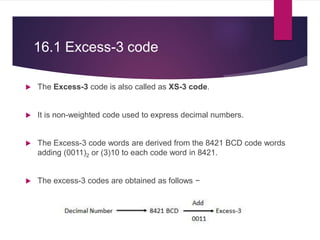
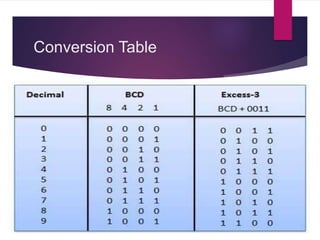
 The Excess-3 code words are derived from the 8421 BCD code words
adding (0011)2 or (3)10 to each code word in 8421.
 The excess-3 codes are obtained as follows −
Conversion Table
Examples
Gray Code
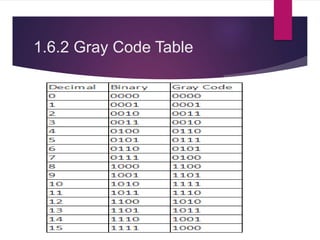
1.6.2 Gray Code
 It is the non-weighted code and it is not arithmetic codes.
 That means there are no specific weights assigned to the bit position.
 It has a very special feature that, only one bit will change each time the
decimal number is incremented as shown in fig.
 As only one bit changes at a time, the gray code is called as a unit distance
code.
 The gray code is a cyclic code.
 Gray code cannot be used for arithmetic operation.
1.6.2 Gray Code Table
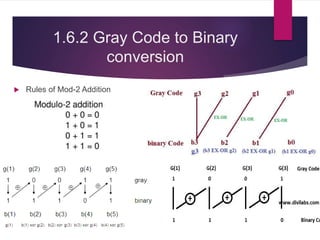
1.6.2 Gray Code to Binary
conversion
 Rules of Mod-2 Addition
1.6.2 Binary Code to Gray
conversion
 (46)10=(?)GRAY
Alphanumeric
Code
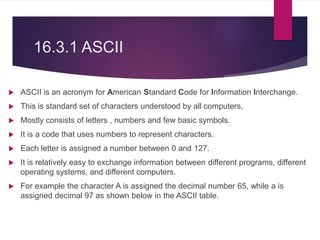
16.3.1 ASCII
 ASCII is an acronym for American Standard Code for Information Interchange.
 This is standard set of characters understood by all computers,
 Mostly consists of letters , numbers and few basic symbols.
 It is a code that uses numbers to represent characters.
 Each letter is assigned a number between 0 and 127.
 It is relatively easy to exchange information between different programs, different
operating systems, and different computers.
 For example the character A is assigned the decimal number 65, while a is
assigned decimal 97 as shown below in the ASCII table.
16.3.2 EBCDIC
 EBCDIC, in full extended binary-coded decimal interchange code.
 It was developed and used by IBM.
 EBCDIC) is an 8-bit binary code for numeric and alphanumeric characters.
 It can represent a total of 256 (28) different characters.
 It is a coding representation in which symbols, letters and numbers are
presented in binary language.
 Provide a larger set of codes than ASCII.
 Less common than ASCII
 Rarely used today
 It is use by IBM mainframes today
Error detection and
correction
16.4 What is an error?
 An error is an action which is inaccurate or incorrect.
 An error is a deviation from accuracy or correctness.
 The condition of having incorrect or false knowledge
 Error is a condition when the output information does not match with
the input information.
Need of error detection and
error correction
 When transmission of digital signals takes place between two system, the signal get
contaminated due to the addition of “Noise” to it.
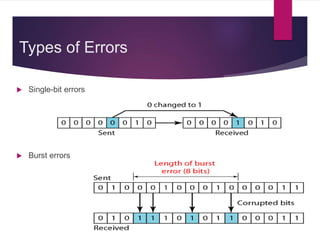
 The noise can introduce an error in the binary bits travelling from one system to the other.
 That means a 0 may change to 1 or 1 may change to 0.
 These error can become a serious threat to the accuracy of the digital system.
 Therefore it is necessary to detect and correct the errors.
Types of Errors
 Single-bit errors
 Burst errors
How to detect and correct
error?
 One or more bits are added to data for error detection /correction.
 These extra bits are called Parity bits.
 The data bits along with the parity bits form a code word.
 Error detection methods:
 Parity checking
 Checksum error detection
 Cyclic redundancy code (CRC)
16.4.1 Parity bit
 It is the simplest technique for detecting and correcting errors.
 The MSB of an 8-bits word is used as the parity bit and the remaining 7 bits are
used as data or message bits.
 The parity of 8-bits transmitted word can be either even parity or odd parity.
 Even parity -- Even parity means the number of 1's in the given word including
the parity bit should be even (2,4,6,....).
 Odd parity -- Odd parity means the number of 1's in the given word including
the parity bit should be odd (1,3,5,....).
Use of Parity Bit
 The parity bit can be set to 0 and 1 depending on the type of the parity
required.
 For even parity, this bit is set to 1 or 0 such that the no. of "1 bits" in the entire
word is even. Shown in fig. (a).
 For odd parity, this bit is set to 1 or 0 such that the no. of "1 bits" in the entire word
is odd. Shown in fig. (b).
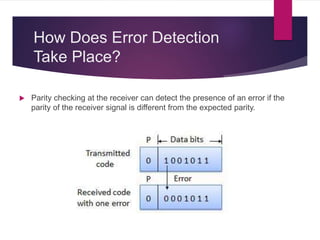
How Does Error Detection
Take Place?
 Parity checking at the receiver can detect the presence of an error if the
parity of the receiver signal is different from the expected parity.
16.4.2 Hamming Code
 Hamming code is error detection and correction (single bit error) method.
 It was developed by R.W. Hamming for error correction.
 In this coding method, the source encodes the message by inserting redundant
bits within the message.
 These redundant bits are extra bits that are generated and inserted at specific
positions in the message .
 When the destination receives this message, it performs recalculations to detect
errors and find the bit position that has error.
16.4.2 Hamming Code contd…
 This code uses multiple parity bits and we have to place these parity bits
in the positions of powers of 2.
 The parity bits are inserted at each 2n bit where n =1,2,3,….. Thus P1 is
at 20= 1, P2 is at 21=2, P4 is as 22 and P8 is as 23
Parity Bit Bits to be checked
P1 1,3,5,7
P2 2,3,6,7
P3 4,5,6,7
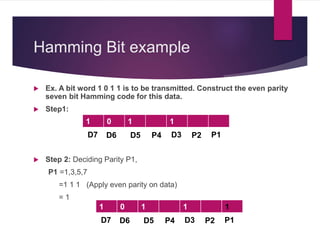
Hamming Bit example
 Ex. A bit word 1 0 1 1 is to be transmitted. Construct the even parity
seven bit Hamming code for this data.
 Step1:
 Step 2: Deciding Parity P1,
P1 =1,3,5,7
=1 1 1 (Apply even parity on data)
= 1
1 0 1 1
D7 D6 D5 P4 D3 P2 P1
1 0 1 1 1
D7 D6 D5 P4 D3 P2 P1
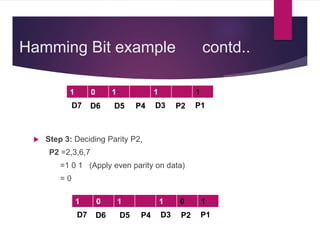
Hamming Bit example contd..
 Step 3: Deciding Parity P2,
P2 =2,3,6,7
=1 0 1 (Apply even parity on data)
= 0
1 0 1 1 1
D7 D6 D5 P4 D3 P2 P1
1 0 1 1 0 1
D7 D6 D5 P4 D3 P2 P1
Hamming Bit example contd..
 Step 4: Deciding Parity P4,
P4 =4,5,6,7
=1 0 1 (Apply even parity on data)
= 0
1 0 1 1 0 1
D7 D6 D5 P4 D3 P2 P1
1 0 1 0 1 0 1
D7 D6 D5 P4 D3 P2 P1
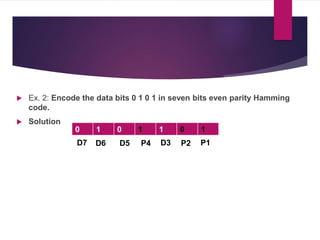
 Ex. 2: Encode the data bits 0 1 0 1 in seven bits even parity Hamming
code.
 Solution
0 1 0 1 1 0 1
D7 D6 D5 P4 D3 P2 P1
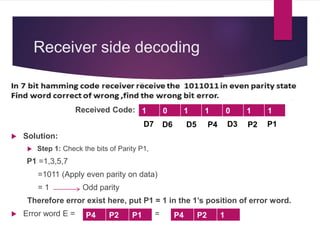
Receiver side decoding
Received Code:
 Solution:
 Step 1: Check the bits of Parity P1,
P1 =1,3,5,7
=1011 (Apply even parity on data)
= 1 Odd parity
Therefore error exist here, put P1 = 1 in the 1’s position of error word.
 Error word E = =
1 0 1 1 0 1 1
D7 D6 D5 P4 D3 P2 P1
P4 P2 P1 P4 P2 1
 Step 2: Check the bits of ParityP2,
P2 =2,3,6,7
=10 0 1 (Apply even parity on data)
= 0 Means no Error
 Step 3: Check the bits of Parity P4,
P4 =4,5,6,7
=1 10 1 (Apply even parity on data)
= 1 Error
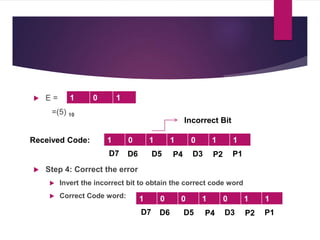
1 0 1
P4 0 1
 E =
=(5) 10
 Step 4: Correct the error
 Invert the incorrect bit to obtain the correct code word
 Correct Code word:
1 0 1
P4 D3 P2 P1
1 0 1 1 0 1 1
D7 D6 D5
Received Code:
Incorrect Bit
P4 D3 P2 P1
1 0 0 1 0 1 1
D7 D6 D5
 A seven bit Hamming code is received as 1 1 1 0 1 0 1. What is the correct
code? Assume the parity to be even.
P4 D3 P2 P1D7 D6 D5
1 0 1 0 1 0 1E= 1 1 0 = 6
Limitation of Hamming Code
 The main limitation of Hamming code is that it can detect
and correct only one error

Codes

  • 1.
    Codes - ASST. PROF.MEENAKSHI PAUL - G. N. KHALSA COLLEGE
  • 2.
    Objective  1.4 BinaryCodes  1.5 Weighted codes  Binary Coded Decimal (BCD)  1.6 Non-weighted codes  Excess – 3 code,  Gray code,  Alphanumeric codes – ASCII Code, EBCDIC, ISCII Code,  Error detection
  • 3.
    1.4 Binary Codes When numbers, letters or words are represented by a specific group of symbols, it is said that the number, letter or word is being encoded.  The group of symbols is called as a code.  The digital data is represented, stored and transmitted as group of binary bits. This group is also called as binary code.  The binary code is represented by the number as well as alphanumeric letter.
  • 4.
    Advantages of BinaryCode  Binary codes are suitable for the computer applications.  Binary codes are suitable for the digital communications.  Binary codes make the analysis and designing of digital circuits if we use the binary codes.  Since only 0 & 1 are being used, implementation becomes easy.
  • 5.
    Classification of binarycodes  Weighted Codes  Binary Coded Decimal  Non-Weighted Codes  Excess-3 code  Gray Code  Alphanumeric Codes  ASCII  EBCDIC  Error Detecting /Correction Codes  Parity Bit  Hamming Bit
  • 6.
    1.5 Weighted Codes Weighted binary codes are those binary codes which obey the positional weight principle.  Each position of the number represents a specific weight.  Several systems of the codes are used to express the decimal digits 0 through 9.  In these codes each decimal digit is represented by a group of four bits.
  • 7.
    1.5.1 Binary CodedDecimal (BCD) code  In this code each decimal digit is represented by a 4-bit binary number.  BCD is a way to express each of the decimal digits with a binary code.  In the BCD, with four bits we can represent sixteen numbers (0000 to 1111).  But in BCD code only first ten of these are used (0000 to 1001).  The remaining six code combinations i.e. 1010 to 1111 are invalid in BCD.
  • 8.
    1.5.1 Binary CodedDecimal (BCD) code  (98)10 = (1001 1000) BCD
  • 9.
    1.5.1 Binary CodedDecimal (BCD) code  Advantages of BCD Codes  It is very similar to decimal system.  We need to remember binary equivalent of decimal numbers 0 to 9 only.  Disadvantages of BCD Codes  BCD needs more number of bits than binary to represent the decimal number. So BCD is less efficient than binary.
  • 10.
    1.6 Non-Weighted Codes In this type of binary codes, the positional weights are not assigned.  The examples of non-weighted codes are  Excess-3 code  Gray code
  • 11.
  • 12.
    16.1 Excess-3 code The Excess-3 code is also called as XS-3 code.  It is non-weighted code used to express decimal numbers.  The Excess-3 code words are derived from the 8421 BCD code words adding (0011)2 or (3)10 to each code word in 8421.  The excess-3 codes are obtained as follows −
  • 13.
  • 14.
  • 15.
  • 16.
    1.6.2 Gray Code It is the non-weighted code and it is not arithmetic codes.  That means there are no specific weights assigned to the bit position.  It has a very special feature that, only one bit will change each time the decimal number is incremented as shown in fig.  As only one bit changes at a time, the gray code is called as a unit distance code.  The gray code is a cyclic code.  Gray code cannot be used for arithmetic operation.
  • 17.
  • 18.
    1.6.2 Gray Codeto Binary conversion  Rules of Mod-2 Addition
  • 19.
    1.6.2 Binary Codeto Gray conversion  (46)10=(?)GRAY
  • 20.
  • 21.
    16.3.1 ASCII  ASCIIis an acronym for American Standard Code for Information Interchange.  This is standard set of characters understood by all computers,  Mostly consists of letters , numbers and few basic symbols.  It is a code that uses numbers to represent characters.  Each letter is assigned a number between 0 and 127.  It is relatively easy to exchange information between different programs, different operating systems, and different computers.  For example the character A is assigned the decimal number 65, while a is assigned decimal 97 as shown below in the ASCII table.
  • 23.
    16.3.2 EBCDIC  EBCDIC,in full extended binary-coded decimal interchange code.  It was developed and used by IBM.  EBCDIC) is an 8-bit binary code for numeric and alphanumeric characters.  It can represent a total of 256 (28) different characters.  It is a coding representation in which symbols, letters and numbers are presented in binary language.  Provide a larger set of codes than ASCII.  Less common than ASCII  Rarely used today  It is use by IBM mainframes today
  • 24.
  • 25.
    16.4 What isan error?  An error is an action which is inaccurate or incorrect.  An error is a deviation from accuracy or correctness.  The condition of having incorrect or false knowledge  Error is a condition when the output information does not match with the input information.
  • 26.
    Need of errordetection and error correction  When transmission of digital signals takes place between two system, the signal get contaminated due to the addition of “Noise” to it.  The noise can introduce an error in the binary bits travelling from one system to the other.  That means a 0 may change to 1 or 1 may change to 0.  These error can become a serious threat to the accuracy of the digital system.  Therefore it is necessary to detect and correct the errors.
  • 27.
    Types of Errors Single-bit errors  Burst errors
  • 28.
    How to detectand correct error?  One or more bits are added to data for error detection /correction.  These extra bits are called Parity bits.  The data bits along with the parity bits form a code word.  Error detection methods:  Parity checking  Checksum error detection  Cyclic redundancy code (CRC)
  • 29.
    16.4.1 Parity bit It is the simplest technique for detecting and correcting errors.  The MSB of an 8-bits word is used as the parity bit and the remaining 7 bits are used as data or message bits.  The parity of 8-bits transmitted word can be either even parity or odd parity.  Even parity -- Even parity means the number of 1's in the given word including the parity bit should be even (2,4,6,....).  Odd parity -- Odd parity means the number of 1's in the given word including the parity bit should be odd (1,3,5,....).
  • 30.
    Use of ParityBit  The parity bit can be set to 0 and 1 depending on the type of the parity required.  For even parity, this bit is set to 1 or 0 such that the no. of "1 bits" in the entire word is even. Shown in fig. (a).  For odd parity, this bit is set to 1 or 0 such that the no. of "1 bits" in the entire word is odd. Shown in fig. (b).
  • 31.
    How Does ErrorDetection Take Place?  Parity checking at the receiver can detect the presence of an error if the parity of the receiver signal is different from the expected parity.
  • 32.
    16.4.2 Hamming Code Hamming code is error detection and correction (single bit error) method.  It was developed by R.W. Hamming for error correction.  In this coding method, the source encodes the message by inserting redundant bits within the message.  These redundant bits are extra bits that are generated and inserted at specific positions in the message .  When the destination receives this message, it performs recalculations to detect errors and find the bit position that has error.
  • 33.
    16.4.2 Hamming Codecontd…  This code uses multiple parity bits and we have to place these parity bits in the positions of powers of 2.  The parity bits are inserted at each 2n bit where n =1,2,3,….. Thus P1 is at 20= 1, P2 is at 21=2, P4 is as 22 and P8 is as 23 Parity Bit Bits to be checked P1 1,3,5,7 P2 2,3,6,7 P3 4,5,6,7
  • 34.
    Hamming Bit example Ex. A bit word 1 0 1 1 is to be transmitted. Construct the even parity seven bit Hamming code for this data.  Step1:  Step 2: Deciding Parity P1, P1 =1,3,5,7 =1 1 1 (Apply even parity on data) = 1 1 0 1 1 D7 D6 D5 P4 D3 P2 P1 1 0 1 1 1 D7 D6 D5 P4 D3 P2 P1
  • 35.
    Hamming Bit examplecontd..  Step 3: Deciding Parity P2, P2 =2,3,6,7 =1 0 1 (Apply even parity on data) = 0 1 0 1 1 1 D7 D6 D5 P4 D3 P2 P1 1 0 1 1 0 1 D7 D6 D5 P4 D3 P2 P1
  • 36.
    Hamming Bit examplecontd..  Step 4: Deciding Parity P4, P4 =4,5,6,7 =1 0 1 (Apply even parity on data) = 0 1 0 1 1 0 1 D7 D6 D5 P4 D3 P2 P1 1 0 1 0 1 0 1 D7 D6 D5 P4 D3 P2 P1
  • 37.
     Ex. 2:Encode the data bits 0 1 0 1 in seven bits even parity Hamming code.  Solution 0 1 0 1 1 0 1 D7 D6 D5 P4 D3 P2 P1
  • 38.
    Receiver side decoding ReceivedCode:  Solution:  Step 1: Check the bits of Parity P1, P1 =1,3,5,7 =1011 (Apply even parity on data) = 1 Odd parity Therefore error exist here, put P1 = 1 in the 1’s position of error word.  Error word E = = 1 0 1 1 0 1 1 D7 D6 D5 P4 D3 P2 P1 P4 P2 P1 P4 P2 1
  • 39.
     Step 2:Check the bits of ParityP2, P2 =2,3,6,7 =10 0 1 (Apply even parity on data) = 0 Means no Error  Step 3: Check the bits of Parity P4, P4 =4,5,6,7 =1 10 1 (Apply even parity on data) = 1 Error 1 0 1 P4 0 1
  • 40.
     E = =(5)10  Step 4: Correct the error  Invert the incorrect bit to obtain the correct code word  Correct Code word: 1 0 1 P4 D3 P2 P1 1 0 1 1 0 1 1 D7 D6 D5 Received Code: Incorrect Bit P4 D3 P2 P1 1 0 0 1 0 1 1 D7 D6 D5
  • 41.
     A sevenbit Hamming code is received as 1 1 1 0 1 0 1. What is the correct code? Assume the parity to be even. P4 D3 P2 P1D7 D6 D5 1 0 1 0 1 0 1E= 1 1 0 = 6
  • 42.
    Limitation of HammingCode  The main limitation of Hamming code is that it can detect and correct only one error