

Human Resources
UMKC Position Management
January 2009
Presented by: Jane Allen
Sr. HR Specialist
Classification & Compensation
Human Resources
What is Position Management?
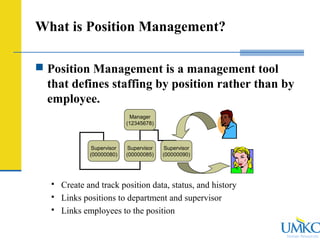
 Position Management is a management tool
that defines staffing by position rather than by
employee.
 Create and track position data, status, and history
 Links positions to department and supervisor
 Links employees to the position
Manager
(12345678)
Supervisor
(00000080)
Supervisor
(00000085)
Supervisor
(00000090)
Human Resources
What is Position Management?
 Position Management Number (000XXXXX) identifies a particular
job, whether vacant or filled, active or inactive, with a department and
supervisor (reports to).
 HR is assigning all jobs (Academic, Administrative, and Student) to
PS Position numbers.
 HR is also cleaning up existing position numbers so that only viable
positions are in active status.
Human Resources
Benefits of Position Management
 Ability to track positions by status – active, vacant, and filled.
 Allows managers to view the overall departmental structure
(organization planning).
 Provides HR with a tool to more effectively assess equity.
 Provides for history of a position (i.e., reclassification or academic
career progression.)
 Implementation of other PS Modules like Time and Labor
Human Resources
Changes in Position Management
Guidelines
 All positions at UMKC will be assigned to a position number.
Position numbers will be assigned as follows:
 Change: All positions will be assigned a unique position number
with a head count of one (one-to-one relationship).
 Change: Temporary and Student positions will no longer be
issued group position numbers effective immediately. (Exception:
Medical Residents)
 Change: Existing group positions will be ‘ungrouped’ and each
headcount will be assigned a unique position number.
Human Resources
Changes in Position Management
 Process Changes
 Academic Positions
 Vacant or New Positions: typically only requires submission of a
Position Management Action Form (PMAF) , and HR will enter the
position changes.
 Filled Positions: will require the PMAF and PAF. {Note: A change
of Job Code may require changing the 6-digit account code.}
 Administrative Positions
 New positions continue to require a PCQ.
 Vacant positions may require a PCQ if the position is inactive or title
changes are required.
Human Resources
Finding Position Data in PeopleSoft
 HR Facilitators have the ability to access the following
data in Position Management:
 Vacant active positions
(Example: Do I have an existing position number job code
XXXX?)
 Details of a Position
 Position History
Human Resources
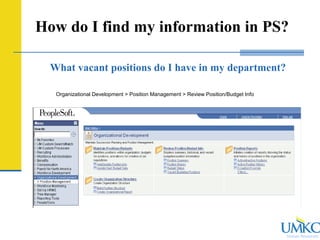
How do I find my information in PS?
What vacant positions do I have in my department?
Organizational Development > Position Management > Review Position/Budget Info
Human Resources
How do I find my information in PS?
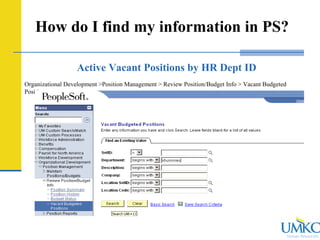
Active Vacant Positions by HR Dept ID
Organizational Development >Position Management > Review Position/Budget Info > Vacant Budgeted
Positions
Human Resources
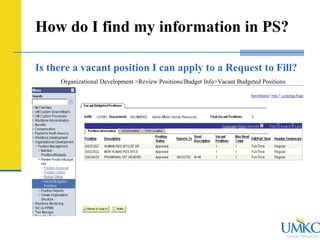
How do I find my information in PS?
Is there a vacant position I can apply to a Request to Fill?
Organizational Development >Review Positions/Budget Info>Vacant Budgeted Positions
Human Resources
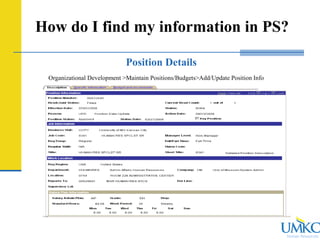
How do I find my information in PS?
Position Details
Organizational Development >Maintain Positions/Budgets>Add/Update Position Info
Human Resources
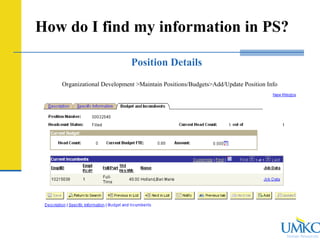
How do I find my information in PS?
Position Details
Organizational Development >Maintain Positions/Budgets>Add/Update Position Info
Human Resources
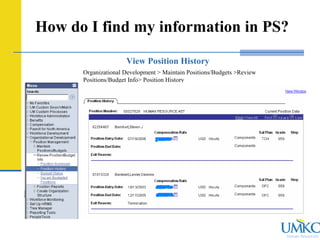
How do I find my information in PS?
View Position History
Organizational Development > Maintain Positions/Budgets >Review
Positions/Budget Info> Position History
Human Resources
How do I find my information in PS?
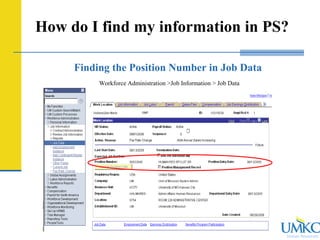
Finding the Position Number in Job Data
Workforce Administration >Job Information > Job Data
Human Resources
How do I find my information in PS?
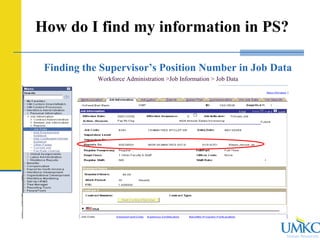
Finding the Supervisor’s Position Number in Job Data
Workforce Administration >Job Information > Job Data
Human Resources
How do I find my information in PS?
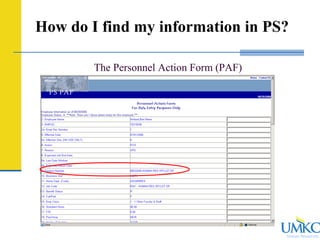
The Personnel Action Form (PAF)
Human Resources
For more questions regarding Position Management,
please contact:
Jane Allen
Sr. HR Specialist – Compensation
x6670
allenja@umkc.edu
Questions

best report on HR

  • 1.
    Human Resources UMKC PositionManagement January 2009 Presented by: Jane Allen Sr. HR Specialist Classification & Compensation
  • 2.
    Human Resources What isPosition Management?  Position Management is a management tool that defines staffing by position rather than by employee.  Create and track position data, status, and history  Links positions to department and supervisor  Links employees to the position Manager (12345678) Supervisor (00000080) Supervisor (00000085) Supervisor (00000090)
  • 3.
    Human Resources What isPosition Management?  Position Management Number (000XXXXX) identifies a particular job, whether vacant or filled, active or inactive, with a department and supervisor (reports to).  HR is assigning all jobs (Academic, Administrative, and Student) to PS Position numbers.  HR is also cleaning up existing position numbers so that only viable positions are in active status.
  • 4.
    Human Resources Benefits ofPosition Management  Ability to track positions by status – active, vacant, and filled.  Allows managers to view the overall departmental structure (organization planning).  Provides HR with a tool to more effectively assess equity.  Provides for history of a position (i.e., reclassification or academic career progression.)  Implementation of other PS Modules like Time and Labor
  • 5.
    Human Resources Changes inPosition Management Guidelines  All positions at UMKC will be assigned to a position number. Position numbers will be assigned as follows:  Change: All positions will be assigned a unique position number with a head count of one (one-to-one relationship).  Change: Temporary and Student positions will no longer be issued group position numbers effective immediately. (Exception: Medical Residents)  Change: Existing group positions will be ‘ungrouped’ and each headcount will be assigned a unique position number.
  • 6.
    Human Resources Changes inPosition Management  Process Changes  Academic Positions  Vacant or New Positions: typically only requires submission of a Position Management Action Form (PMAF) , and HR will enter the position changes.  Filled Positions: will require the PMAF and PAF. {Note: A change of Job Code may require changing the 6-digit account code.}  Administrative Positions  New positions continue to require a PCQ.  Vacant positions may require a PCQ if the position is inactive or title changes are required.
  • 7.
    Human Resources Finding PositionData in PeopleSoft  HR Facilitators have the ability to access the following data in Position Management:  Vacant active positions (Example: Do I have an existing position number job code XXXX?)  Details of a Position  Position History
  • 8.
    Human Resources How doI find my information in PS? What vacant positions do I have in my department? Organizational Development > Position Management > Review Position/Budget Info
  • 9.
    Human Resources How doI find my information in PS? Active Vacant Positions by HR Dept ID Organizational Development >Position Management > Review Position/Budget Info > Vacant Budgeted Positions
  • 10.
    Human Resources How doI find my information in PS? Is there a vacant position I can apply to a Request to Fill? Organizational Development >Review Positions/Budget Info>Vacant Budgeted Positions
  • 11.
    Human Resources How doI find my information in PS? Position Details Organizational Development >Maintain Positions/Budgets>Add/Update Position Info
  • 12.
    Human Resources How doI find my information in PS? Position Details Organizational Development >Maintain Positions/Budgets>Add/Update Position Info
  • 13.
    Human Resources How doI find my information in PS? View Position History Organizational Development > Maintain Positions/Budgets >Review Positions/Budget Info> Position History
  • 14.
    Human Resources How doI find my information in PS? Finding the Position Number in Job Data Workforce Administration >Job Information > Job Data
  • 15.
    Human Resources How doI find my information in PS? Finding the Supervisor’s Position Number in Job Data Workforce Administration >Job Information > Job Data
  • 16.
    Human Resources How doI find my information in PS? The Personnel Action Form (PAF)
  • 17.
    Human Resources For morequestions regarding Position Management, please contact: Jane Allen Sr. HR Specialist – Compensation x6670 allenja@umkc.edu Questions