



Best practices for heat resource
modules and patterns
Long Quan Sha, software engineer at IBM
Ethan Lynn, software engineer at IBM
Tian Hua Huang, software engineer at HuaWei
Agenda
• Heat introduction
• Software deployment introduction
• Hands-on 1
• Heat resource module/deployment pattern
• Demo
• Hands-on 2
• Best practices
• Q&A
Heat Introduction
Heat
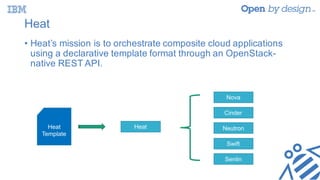
• Heat’s mission is to orchestrate composite cloud applications
using a declarative template format through an OpenStack-
native REST API.
Heat
Template
Heat
Nova
Cinder
Neutron
Swift
Senlin
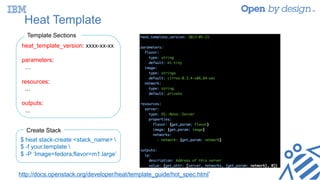
Heat Template
heat_template_version: xxxx-xx-xx
parameters:
…
resources:
...
outputs:
...
Template Sections
$ heat stack-create <stack_name> 
$ -f your.template 
$ -P ’Image=fedora;flavor=m1.large’
Create Stack
http://docs.openstack.org/developer/heat/template_guide/hot_spec.html`
Software Deployment Introduction
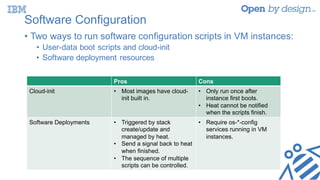
Software Configuration
• Two ways to run software configuration scripts in VM instances:
• User-data boot scripts and cloud-init
• Software deployment resources
Pros Cons
Cloud-init • Most images have cloud-
init built in.
• Only run once after
instance first boots.
• Heat cannot be notified
when the scripts finish.
Software Deployments • Triggered by stack
create/update and
managed by heat.
• Send a signal back to heat
when finished.
• The sequence of multiple
scripts can be controlled.
• Require os-*-config
services running in VM
instances.
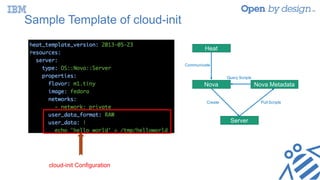
Sample Template of cloud-init
cloud-init Configuration
Heat
Nova
Server
Nova Metadata
Communicate
Create Pull Scripts
Query Scripts
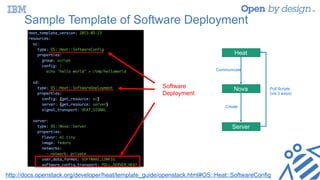
Sample Template of Software Deployment
Heat
Nova
Server
Create
Communicate
Pull Scripts
(via 3 ways)
Software
Deployment
http://docs.openstack.org/developer/heat/template_guide/openstack.html#OS::Heat::SoftwareConfig
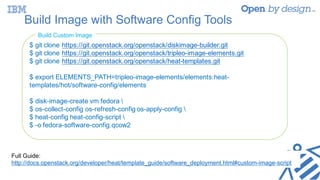
Build Image with Software Config Tools
$ git clone https://git.openstack.org/openstack/diskimage-builder.git
$ git clone https://git.openstack.org/openstack/tripleo-image-elements.git
$ git clone https://git.openstack.org/openstack/heat-templates.git
$ export ELEMENTS_PATH=tripleo-image-elements/elements:heat-
templates/hot/software-config/elements
$ disk-image-create vm fedora 
$ os-collect-config os-refresh-config os-apply-config 
$ heat-config heat-config-script 
$ -o fedora-software-config.qcow2
Build Custom Image
Full Guide:
http://docs.openstack.org/developer/heat/template_guide/software_deployment.html#custom-image-script
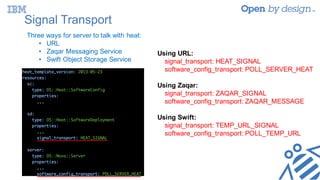
Signal Transport
Three ways for server to talk with heat:
• URL
• Zaqar Messaging Service
• Swift Object Storage Service
Using URL:
signal_transport: HEAT_SIGNAL
software_config_transport: POLL_SERVER_HEAT
Using Zaqar:
signal_transport: ZAQAR_SIGNAL
software_config_transport: ZAQAR_MESSAGE
Using Swift:
signal_transport: TEMP_URL_SIGNAL
software_config_transport: POLL_TEMP_URL
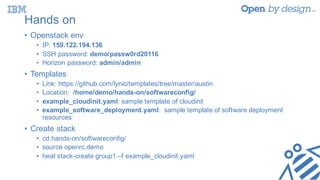
Hands on
• Openstack env
• IP: 159.122.194.136
• SSH password: demo/passw0rd20116
• Horizon password: admin/admin
• Templates
• Link: https://github.com/lynic/templates/tree/master/austin
• Location: /home/demo/hands-on/softwareconfig/
• example_cloudinit.yaml: sample template of cloudinit
• example_software_deployment.yaml: sample template of software deployment
resources
• Create stack
• cd hands-on/softwareconfig/
• source openrc.demo
• heat stack-create group1 –f example_cloudinit.yaml
Resource Modules and Deployment Patterns
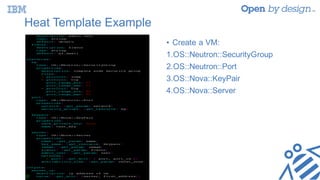
Heat Template Example
• Create a VM:
1.OS::Neutron::SecurityGroup
2.OS::Neutron::Port
3.OS::Nova::KeyPair
4.OS::Nova::Server
Heat Resources – Pain Points
• Based on OpenStack components rather than business
concepts
• Too low-level to use and understand
• Too many properties of each resource
• Too much time invested learning resources before creating a
template
• Difficult to deploy a large scale application in production
Resource Module
• Based on regular Heat resources, abstract business concepts
• Easy to understand, without having to know underlying
technologies of OpenStack
• Extracted from real world deployment experiences
• Easy to adopt deployment patterns for typical scenarios
• Easy to compose a template
Resource module
• https://github.com/shalq/summit-demo/tree/master/resource-
module/heat
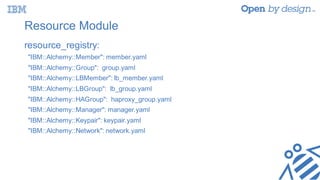
Resource Module
resource_registry:
"IBM::Alchemy::Member": member.yaml
"IBM::Alchemy::Group": group.yaml
"IBM::Alchemy::LBMember": lb_member.yaml
"IBM::Alchemy::LBGroup": lb_group.yaml
"IBM::Alchemy::HAGroup": haproxy_group.yaml
"IBM::Alchemy::Manager": manager.yaml
"IBM::Alchemy::Keypair": keypair.yaml
"IBM::Alchemy::Network": network.yaml
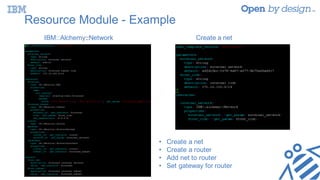
Resource Module - Example
Create a netIBM::Alchemy::Network
• Create a net
• Create a router
• Add net to router
• Set gateway for router
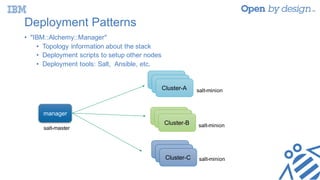
Deployment Patterns
• "IBM::Alchemy::Manager"
• Topology information about the stack
• Deployment scripts to setup other nodes
• Deployment tools: Salt, Ansible, etc.
salt-master
salt-minion
salt-minion
salt-minion
manager
Cluster-A
Cluster-A
Cluster-A
Cluster-ACluster-A
Cluster-B
Cluster-A
Cluster-A
Cluster-C
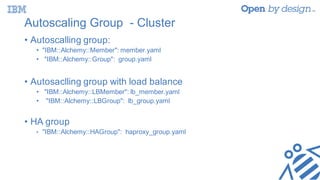
Autoscaling Group - Cluster
• Autoscalling group:
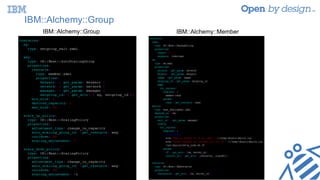
• "IBM::Alchemy::Member": member.yaml
• "IBM::Alchemy::Group": group.yaml
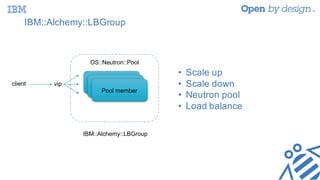
• Autosaclling group with load balance
• "IBM::Alchemy::LBMember": lb_member.yaml
• "IBM::Alchemy::LBGroup": lb_group.yaml
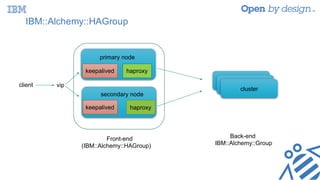
• HA group
• "IBM::Alchemy::HAGroup": haproxy_group.yaml
IBM::Alchemy::Group
IBM::Alchemy::Group IBM::Alchemy::Member
IBM::Alchemy::LBGroup
vip Pool member
Pool member
Pool member
OS::Neutron::Pool
• Scale up
• Scale down
• Neutron pool
• Load balance
client
IBM::Alchemy::HAGroup
vip
Front-end
(IBM::Alchemy::HAGroup)
Back-end
IBM::Alchemy::Group
haproxykeepalived
keepalived haproxy
primary node
secondary node
cluster
cluster
cluster
client
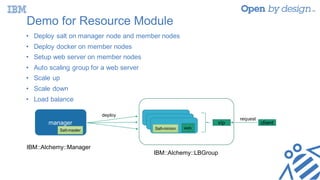
Demo for Resource Module
IBM::Alchemy::LBGroup
• Deploy salt on manager node and member nodes
• Deploy docker on member nodes
• Setup web server on member nodes
• Auto scaling group for a web server
• Scale up
• Scale down
• Load balance
IBM::Alchemy::Manager
manager
Salt-master Salt-minion web
vip client
deploy
request
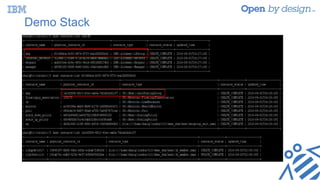
Demo Stack
Hands-on
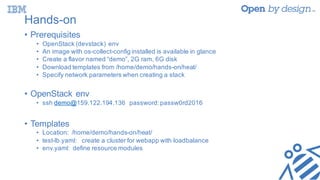
Hands-on
• Prerequisites
• OpenStack (devstack) env
• An image with os-collect-config installed is available in glance
• Create a flavor named “demo”, 2G ram, 6G disk
• Download templates from /home/demo/hands-on/heat/
• Specify network parameters when creating a stack
• OpenStack env
• ssh demo@159.122.194.136 password:passw0rd2016
• Templates
• Location: /home/demo/hands-on/heat/
• test-lb.yaml: create a cluster for webapp with loadbalance
• env.yaml: define resource modules
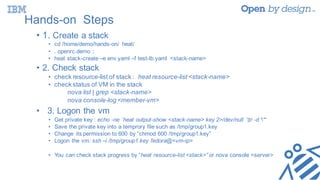
Hands-on Steps
• 1. Create a stack
• cd /home/demo/hands-on/ heat/
• . openrc.demo ;
• heat stack-create –e env.yaml –f test-lb.yaml <stack-name>
• 2. Check stack
• check resource-list of stack : heat resource-list <stack-name>
• check status of VM in the stack
nova list | grep <stack-name>
nova console-log <member-vm>
• 3. Logon the vm
• Get private key : echo -ne `heat output-show <stack-name> key 2>/dev/null `|tr -d '"‘
• Save the private key into a temprory file such as /tmp/group1.key
• Change its permission to 600 by “chmod 600 /tmp/group1.key”
• Logon the vm: ssh –i /tmp/group1.key fedora@<vm-ip>
• You can check stack progress by “heat resource-list <stack>” or nova console <server>
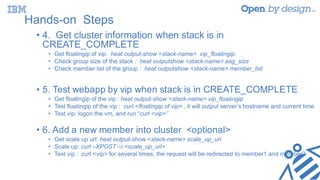
Hands-on Steps
• 4. Get cluster information when stack is in
CREATE_COMPLETE
• Get floatingip of vip: heat output-show <stack-name> vip_floatingip
• Check group size of the stack : heat outputshow <stack-name> asg_size
• Check member list of the group : heat outputshow <stack-name> member_list
• 5. Test webapp by vip when stack is in CREATE_COMPLETE
• Get floatingip of the vip : heat output-show <stack-name> vip_floatingip
• Test floatingip of the vip : curl <floatingip of vip> , it will output server’s hostname and current time
• Test vip: logon the vm, and run “curl <vip>”
• 6. Add a new member into cluster <optional>
• Get scale up url: heat output-show <stack-name> scale_up_url
• Scale up: curl –XPOST –i <scale_up_url>
• Test vip : curl <vip> for several times, the request will be redirected to member1 and member2
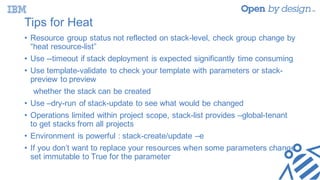
Tips for Heat
• Resource group status not reflected on stack-level, check group change by
“heat resource-list”
• Use --timeout if stack deployment is expected significantly time consuming
• Use template-validate to check your template with parameters or stack-
preview to preview
whether the stack can be created
• Use –dry-run of stack-update to see what would be changed
• Operations limited within project scope, stack-list provides –global-tenant
to get stacks from all projects
• Environment is powerful : stack-create/update –e
• If you don’t want to replace your resources when some parameters change,
set immutable to True for the parameter
Q&A
Thank You

Best Practice for Deploying Application with Heat

  • 1.
    Best practices forheat resource modules and patterns Long Quan Sha, software engineer at IBM Ethan Lynn, software engineer at IBM Tian Hua Huang, software engineer at HuaWei
  • 2.
    Agenda • Heat introduction •Software deployment introduction • Hands-on 1 • Heat resource module/deployment pattern • Demo • Hands-on 2 • Best practices • Q&A
  • 3.
  • 4.
    Heat • Heat’s missionis to orchestrate composite cloud applications using a declarative template format through an OpenStack- native REST API. Heat Template Heat Nova Cinder Neutron Swift Senlin
  • 5.
    Heat Template heat_template_version: xxxx-xx-xx parameters: … resources: ... outputs: ... TemplateSections $ heat stack-create <stack_name> $ -f your.template $ -P ’Image=fedora;flavor=m1.large’ Create Stack http://docs.openstack.org/developer/heat/template_guide/hot_spec.html`
  • 6.
  • 7.
    Software Configuration • Twoways to run software configuration scripts in VM instances: • User-data boot scripts and cloud-init • Software deployment resources Pros Cons Cloud-init • Most images have cloud- init built in. • Only run once after instance first boots. • Heat cannot be notified when the scripts finish. Software Deployments • Triggered by stack create/update and managed by heat. • Send a signal back to heat when finished. • The sequence of multiple scripts can be controlled. • Require os-*-config services running in VM instances.
  • 8.
    Sample Template ofcloud-init cloud-init Configuration Heat Nova Server Nova Metadata Communicate Create Pull Scripts Query Scripts
  • 9.
    Sample Template ofSoftware Deployment Heat Nova Server Create Communicate Pull Scripts (via 3 ways) Software Deployment http://docs.openstack.org/developer/heat/template_guide/openstack.html#OS::Heat::SoftwareConfig
  • 10.
    Build Image withSoftware Config Tools $ git clone https://git.openstack.org/openstack/diskimage-builder.git $ git clone https://git.openstack.org/openstack/tripleo-image-elements.git $ git clone https://git.openstack.org/openstack/heat-templates.git $ export ELEMENTS_PATH=tripleo-image-elements/elements:heat- templates/hot/software-config/elements $ disk-image-create vm fedora $ os-collect-config os-refresh-config os-apply-config $ heat-config heat-config-script $ -o fedora-software-config.qcow2 Build Custom Image Full Guide: http://docs.openstack.org/developer/heat/template_guide/software_deployment.html#custom-image-script
  • 11.
    Signal Transport Three waysfor server to talk with heat: • URL • Zaqar Messaging Service • Swift Object Storage Service Using URL: signal_transport: HEAT_SIGNAL software_config_transport: POLL_SERVER_HEAT Using Zaqar: signal_transport: ZAQAR_SIGNAL software_config_transport: ZAQAR_MESSAGE Using Swift: signal_transport: TEMP_URL_SIGNAL software_config_transport: POLL_TEMP_URL
  • 12.
    Hands on • Openstackenv • IP: 159.122.194.136 • SSH password: demo/passw0rd20116 • Horizon password: admin/admin • Templates • Link: https://github.com/lynic/templates/tree/master/austin • Location: /home/demo/hands-on/softwareconfig/ • example_cloudinit.yaml: sample template of cloudinit • example_software_deployment.yaml: sample template of software deployment resources • Create stack • cd hands-on/softwareconfig/ • source openrc.demo • heat stack-create group1 –f example_cloudinit.yaml
  • 13.
    Resource Modules andDeployment Patterns
  • 14.
    Heat Template Example •Create a VM: 1.OS::Neutron::SecurityGroup 2.OS::Neutron::Port 3.OS::Nova::KeyPair 4.OS::Nova::Server
  • 15.
    Heat Resources –Pain Points • Based on OpenStack components rather than business concepts • Too low-level to use and understand • Too many properties of each resource • Too much time invested learning resources before creating a template • Difficult to deploy a large scale application in production
  • 16.
    Resource Module • Basedon regular Heat resources, abstract business concepts • Easy to understand, without having to know underlying technologies of OpenStack • Extracted from real world deployment experiences • Easy to adopt deployment patterns for typical scenarios • Easy to compose a template
  • 17.
  • 18.
    Resource Module resource_registry: "IBM::Alchemy::Member": member.yaml "IBM::Alchemy::Group":group.yaml "IBM::Alchemy::LBMember": lb_member.yaml "IBM::Alchemy::LBGroup": lb_group.yaml "IBM::Alchemy::HAGroup": haproxy_group.yaml "IBM::Alchemy::Manager": manager.yaml "IBM::Alchemy::Keypair": keypair.yaml "IBM::Alchemy::Network": network.yaml
  • 19.
    Resource Module -Example Create a netIBM::Alchemy::Network • Create a net • Create a router • Add net to router • Set gateway for router
  • 20.
    Deployment Patterns • "IBM::Alchemy::Manager" •Topology information about the stack • Deployment scripts to setup other nodes • Deployment tools: Salt, Ansible, etc. salt-master salt-minion salt-minion salt-minion manager Cluster-A Cluster-A Cluster-A Cluster-ACluster-A Cluster-B Cluster-A Cluster-A Cluster-C
  • 21.
    Autoscaling Group -Cluster • Autoscalling group: • "IBM::Alchemy::Member": member.yaml • "IBM::Alchemy::Group": group.yaml • Autosaclling group with load balance • "IBM::Alchemy::LBMember": lb_member.yaml • "IBM::Alchemy::LBGroup": lb_group.yaml • HA group • "IBM::Alchemy::HAGroup": haproxy_group.yaml
  • 22.
  • 23.
    IBM::Alchemy::LBGroup IBM::Alchemy::LBGroup vip Pool member Poolmember Pool member OS::Neutron::Pool • Scale up • Scale down • Neutron pool • Load balance client
  • 24.
  • 25.
    Demo for ResourceModule IBM::Alchemy::LBGroup • Deploy salt on manager node and member nodes • Deploy docker on member nodes • Setup web server on member nodes • Auto scaling group for a web server • Scale up • Scale down • Load balance IBM::Alchemy::Manager manager Salt-master Salt-minion web vip client deploy request
  • 26.
  • 27.
  • 28.
    Hands-on • Prerequisites • OpenStack(devstack) env • An image with os-collect-config installed is available in glance • Create a flavor named “demo”, 2G ram, 6G disk • Download templates from /home/demo/hands-on/heat/ • Specify network parameters when creating a stack • OpenStack env • ssh demo@159.122.194.136 password:passw0rd2016 • Templates • Location: /home/demo/hands-on/heat/ • test-lb.yaml: create a cluster for webapp with loadbalance • env.yaml: define resource modules
  • 29.
    Hands-on Steps • 1.Create a stack • cd /home/demo/hands-on/ heat/ • . openrc.demo ; • heat stack-create –e env.yaml –f test-lb.yaml <stack-name> • 2. Check stack • check resource-list of stack : heat resource-list <stack-name> • check status of VM in the stack nova list | grep <stack-name> nova console-log <member-vm> • 3. Logon the vm • Get private key : echo -ne `heat output-show <stack-name> key 2>/dev/null `|tr -d '"‘ • Save the private key into a temprory file such as /tmp/group1.key • Change its permission to 600 by “chmod 600 /tmp/group1.key” • Logon the vm: ssh –i /tmp/group1.key fedora@<vm-ip> • You can check stack progress by “heat resource-list <stack>” or nova console <server>
  • 30.
    Hands-on Steps • 4.Get cluster information when stack is in CREATE_COMPLETE • Get floatingip of vip: heat output-show <stack-name> vip_floatingip • Check group size of the stack : heat outputshow <stack-name> asg_size • Check member list of the group : heat outputshow <stack-name> member_list • 5. Test webapp by vip when stack is in CREATE_COMPLETE • Get floatingip of the vip : heat output-show <stack-name> vip_floatingip • Test floatingip of the vip : curl <floatingip of vip> , it will output server’s hostname and current time • Test vip: logon the vm, and run “curl <vip>” • 6. Add a new member into cluster <optional> • Get scale up url: heat output-show <stack-name> scale_up_url • Scale up: curl –XPOST –i <scale_up_url> • Test vip : curl <vip> for several times, the request will be redirected to member1 and member2
  • 31.
    Tips for Heat •Resource group status not reflected on stack-level, check group change by “heat resource-list” • Use --timeout if stack deployment is expected significantly time consuming • Use template-validate to check your template with parameters or stack- preview to preview whether the stack can be created • Use –dry-run of stack-update to see what would be changed • Operations limited within project scope, stack-list provides –global-tenant to get stacks from all projects • Environment is powerful : stack-create/update –e • If you don’t want to replace your resources when some parameters change, set immutable to True for the parameter
  • 32.
  • 33.