Downloaded 106 times
![Heat - Standalone Mode
●Orchestrate Multi openstack setups
●Standalone mode configuration in heat.conf
○[paste_deploy]
flavor = standalone
○[authpassword]
multi_cloud = true
allowed_auth_uris = http://192.168.1.171:5000/v2.0,
http://192.168.1.223:5000/v2.0
●Heat cli to access remote openstack
heat --os-no-client-auth --os-username admin --os-password
openstack --os-tenant-name admin --os-auth-url
http://192.168.1.223:5000/v2.0 --heat-url
http://192.168.1.10:8004/v1/98073903698740af87fb57ca9e41eed5
stack-list](https://image.slidesharecdn.com/openstackheatcloudenablers-150831102853-lva1-app6892/85/Openstack-heat-How-Autoscaling-works-8-320.jpg)
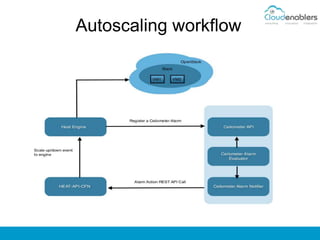
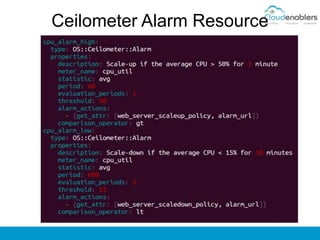
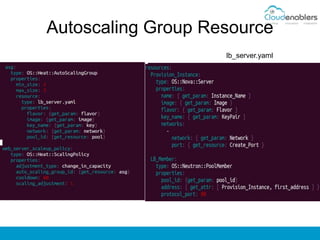


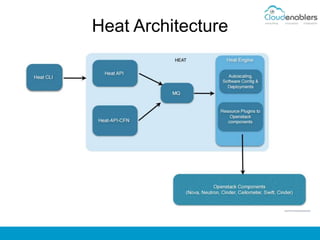
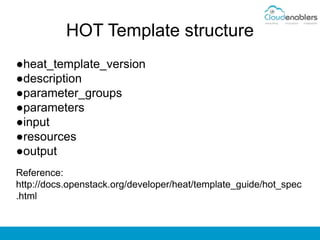
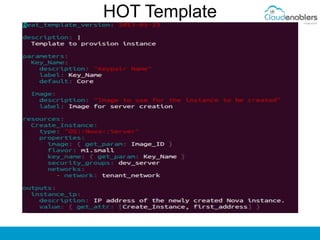
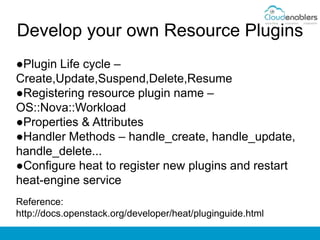
The document provides an overview of OpenStack Heat, its components, architecture, and template structure, emphasizing its orchestration capabilities for deploying and managing infrastructure and applications. It explains autoscaling features that allow automatic adjustments to resource capacity based on defined conditions, utilizing components like Heat and Ceilometer. Additionally, the document discusses how to develop resource plugins and configure Heat for standalone mode.


![[2019] PAYCO 쇼핑 마이크로서비스 아키텍처(MSA) 전환기](https://cdn.slidesharecdn.com/ss_thumbnails/nhnforward201926-200122093003-thumbnail.jpg?width=640&height=640&fit=bounds)


![[OpenStack] 공개 소프트웨어 오픈스택 입문 & 파헤치기](https://cdn.slidesharecdn.com/ss_thumbnails/opensource-skimmingopenstackwithkoreausergroup-180824144737-thumbnail.jpg?width=640&height=640&fit=bounds)


![[오픈소스컨설팅] Open Stack Ceph, Neutron, HA, Multi-Region](https://cdn.slidesharecdn.com/ss_thumbnails/openstackoscv0-160718105826-thumbnail.jpg?width=640&height=640&fit=bounds)


![[Open stack] heat + docker](https://cdn.slidesharecdn.com/ss_thumbnails/openstackheatdocker-131022214649-phpapp02-thumbnail.jpg?width=640&height=640&fit=bounds)


