




2017 Roadshow
High Availability
Max Mether
Field CTO
High
Availability
Defined
In information technology,
high availability refers to a
system or component that is
continuously operational for a
desirably long length of time.
Availability – Wikipedia
up time / total time
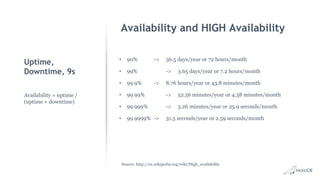
Uptime,
Downtime, 9s
• 90% -> 36.5 days/year or 72 hours/month
• 99% -> 3.65 days/year or 7.2 hours/month
• 99.9% -> 8.76 hours/year or 43.8 minutes/month
• 99.99% -> 52.56 minutes/year or 4.38 minutes/month
• 99.999% -> 5.26 minutes/year or 25.9 seconds/month
• 99.9999% -> 31.5 seconds/year or 2.59 seconds/month
Availability = uptime /
(uptime + downtime)
Availability and HIGH Availability
Source: http://en.wikipedia.org/wiki/High_availability
High Availability Background
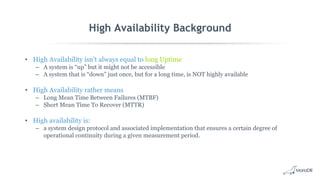
• High Availability isn’t always equal to long Uptime
– A system is “up” but it might not be accessible
– A system that is “down” just once, but for a long time, is NOT highly available
• High Availability rather means
– Long Mean Time Between Failures (MTBF)
– Short Mean Time To Recover (MTTR)
• High availability is:
– a system design protocol and associated implementation that ensures a certain degree of
operational continuity during a given measurement period.
An average of 80 percent of mission-critical application service
downtime is directly caused by people or process failures. The
other 20 percent is caused by technology failure, environmental
failure or a disaster
Gartner Research
High Availability Components
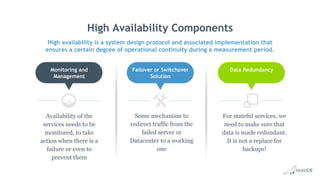
High availability is a system design protocol and associated implementation that
ensures a certain degree of operational continuity during a measurement period.
For stateful services, we
need to make sure that
data is made redundant.
It is not a replace for
backups!
Data Redundancy
Some mechanism to
redirect traffic from the
failed server or
Datacenter to a working
one
Failover or Switchover
Solution
Availability of the
services needs to be
monitored, to take
action when there is a
failure or even to
prevent them
Monitoring and
Management
HA Dictionary
General Terms
• Single Point of Failure (SPOF)
– An element is a SPOF when its failure results in a full stop of the service as no other element
can take over (storage, WAN connection, replication channel)
– It is important to evaluate the costs for eliminating the SPOF, the likelyhood that it fails, the
time required to bring it into service again
• Shared Storage Architecture
– Shared storage systems like SANs can provide built-in high availability, though this comes with
equally high costs
– Not really suitable for Disaster Recover scenario on multiple Data Center
• Shared Nothing Architecture
– Each node is independent and self-sufficient
General Terms
• Split-Brain
– When nodes in the cluster continue running but cannot communicate causing them to be
inconsistent
– To be avoided at all cost
• Switchover
– When a manual process is used to switch from one system to a redundant or standby system in
case of a failure
• Failover
– Automatic switchover, without human intervention
• Failback
– A (often-underestimated) task to handle the recovery of a failed system and how to fail-back to
this system after recovery
Data Redundancy
HA for MariaDB
MariaDB Replication
• Replication enables data from one MariaDB server (the master) to be replicated to one or
more MariaDB servers (the slaves).
• MariaDB Replication is:
– very easy to setup
– used to scale out read workloads
– provide a first level of high availability and geographic redundancy
– offload backups and analytic jobs.
The Binary Log
• Each MariaDB server has a binary log that should be enabled in most cases
• The server stores all changes that happen on the server in the binary log
• The binary log has three modes:
a. ROW: Row change events are stored in the binary log
b. STATEMENT: SQL Statements that change data are stored in the binary log
c. MIXED: Most events are replicated in STATEMENT based but some ROW based
Asynchronous Replication
• MariaDB Replication is asynchronous by default.
• Slave determines how much to read and from which point in the binary log
• Slave can be behind master in reading and applying changes
• If the master crashes, transactions might not have been transmitted to any slave
• Asynchronous replication is great for read scaling as adding more replicas does not
impact replication latency
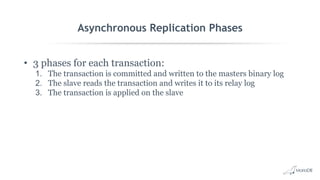
Asynchronous Replication Phases
• 3 phases for each transaction:
1. The transaction is committed and written to the masters binary log
2. The slave reads the transaction and writes it to its relay log
3. The transaction is applied on the slave
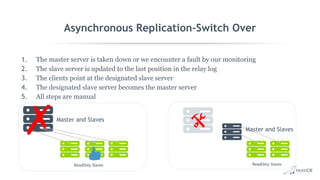
Asynchronous Replication-Switch Over
1. The master server is taken down or we encounter a fault by our monitoring
2. The slave server is updated to the last position in the relay log
3. The clients point at the designated slave server
4. The designated slave server becomes the master server
5. All steps are manual
Master and Slaves
ReadOnly Slaves
Master and Slaves
ReadOnly Slaves
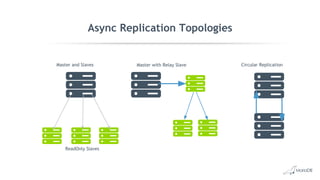
Async Replication Topologies
Master and Slaves
ReadOnly Slaves
Master with Relay Slave Circular Replication
Semi-synchronous Replication
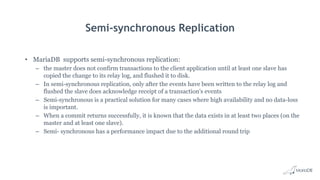
• MariaDB supports semi-synchronous replication:
– the master does not confirm transactions to the client application until at least one slave has
copied the change to its relay log, and flushed it to disk.
– In semi-synchronous replication, only after the events have been written to the relay log and
flushed the slave does acknowledge receipt of a transaction's events
– Semi-synchronous is a practical solution for many cases where high availability and no data-loss
is important.
– When a commit returns successfully, it is known that the data exists in at least two places (on the
master and at least one slave).
– Semi- synchronous has a performance impact due to the additional round trip
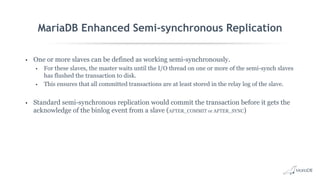
MariaDB Enhanced Semi-synchronous Replication
• One or more slaves can be defined as working semi-synchronously.
• For these slaves, the master waits until the I/O thread on one or more of the semi-synch slaves
has flushed the transaction to disk.
• This ensures that all committed transactions are at least stored in the relay log of the slave.
• Standard semi-synchronous replication would commit the transaction before it gets the
acknowledge of the binlog event from a slave (AFTER_COMMIT or AFTER_SYNC)
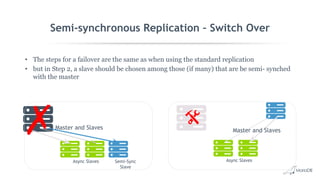
Semi-synchronous Replication – Switch Over
• The steps for a failover are the same as when using the standard replication
• but in Step 2, a slave should be chosen among those (if many) that are be semi- synched
with the master
Master and Slaves
Semi-Sync
Slave
Async Slaves
Master and Slaves
Async Slaves
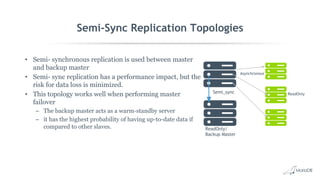
Semi-Sync Replication Topologies
• Semi- synchronous replication is used between master
and backup master
• Semi- sync replication has a performance impact, but the
risk for data loss is minimized.
• This topology works well when performing master
failover
– The backup master acts as a warm-standby server
– it has the highest probability of having up-to-date data if
compared to other slaves.
Semi_sync
Asynchronous
ReadOnly/
Backup Master
ReadOnly
Synchronous Replication
MariaDB Galera Cluster
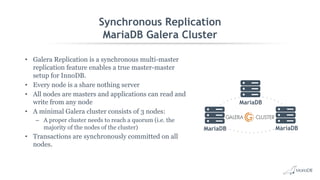
• Galera Replication is a synchronous multi-master
replication feature enables a true master-master
setup for InnoDB.
• Every node is a share nothing server
• All nodes are masters and applications can read and
write from any node
• A minimal Galera cluster consists of 3 nodes:
– A proper cluster needs to reach a quorum (i.e. the
majority of the nodes of the cluster)
• Transactions are synchronously committed on all
nodes.
MariaDB
MariaDB
MariaDB
How it works
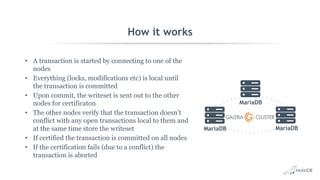
• A transaction is started by connecting to one of the
nodes
• Everything (locks, modifications etc) is local until
the transaction is committed
• Upon commit, the writeset is sent out to the other
nodes for certificaton
• The other nodes verify that the transaction doesn't
conflict with any open transactions local to them and
at the same time store the writeset
• If certified the transaction is committed on all nodes
• If the certification fails (due to a conflict) the
transaction is aborted
MariaDB
MariaDB
MariaDB
MariaDB Cluster Pros
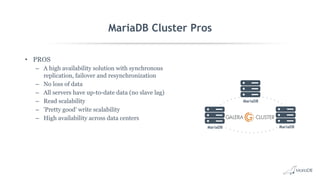
• PROS
– A high availability solution with synchronous
replication, failover and resynchronization
– No loss of data
– All servers have up-to-date data (no slave lag)
– Read scalability
– 'Pretty good' write scalability
– High availability across data centers
MariaDB
MariaDB
MariaDB
MariaDB Cluster Cons
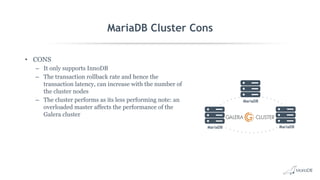
• CONS
– It only supports InnoDB
– The transaction rollback rate and hence the
transaction latency, can increase with the number of
the cluster nodes
– The cluster performs as its less performing note: an
overloaded master affects the performance of the
Galera cluster
MariaDB
MariaDB
MariaDB
MaxScale for HA
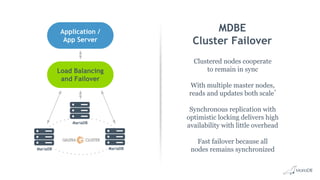
MDBE
Cluster Failover
Clustered nodes cooperate
to remain in sync
With multiple master nodes,
reads and updates both scale*
Synchronous replication with
optimistic locking delivers high
availability with little overhead
Fast failover because all
nodes remains synchronizedMariaDB
MariaDB
MariaDB
Load Balancing
and Failover
Application /
App Server
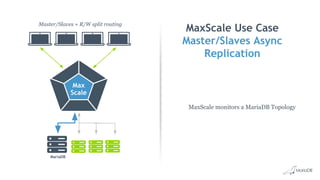
MaxScale Use Case
Master/Slaves Async
Replication
MaxScale monitors a MariaDB Topology
Master/Slaves + R/W split routing
Max
Scale
MariaDB
MaxScale Use Case
Master/Slaves Async
Replication
Master/Slaves + R/W split routing
Max
Scale
MariaDB
1
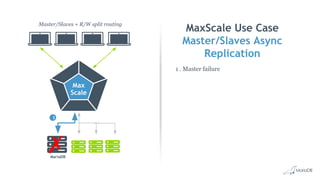
1 . Master failure
MaxScale Use Case
Master/Slaves Async
Replication
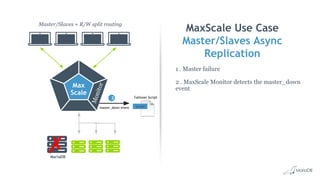
1 . Master failure
2 . MaxScale Monitor detects the master_down
event
Master/Slaves + R/W split routing
Max
Scale
MariaDB
Failover Script
Monitor
master_down event
2
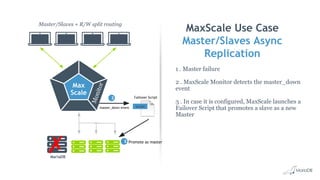
MaxScale Use Case
Master/Slaves Async
Replication
1 . Master failure
2 . MaxScale Monitor detects the master_down
event
3 . In case it is configured, MaxScale launches a
Failover Script that promotes a slave as a new
Master
Master/Slaves + R/W split routing
Max
Scale
MariaDB
Failover Script
Monitor
master_down event
2
Promote as master3
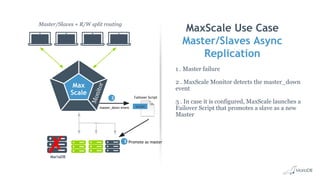
MaxScale Use Case
Master/Slaves Async
Replication
1 . Master failure
2 . MaxScale Monitor detects the master_down
event
3 . In case it is configured, MaxScale launches a
Failover Script that promotes a slave as a new
Master
Master/Slaves + R/W split routing
Max
Scale
MariaDB
Failover Script
Monitor
master_down event
2
Promote as master3
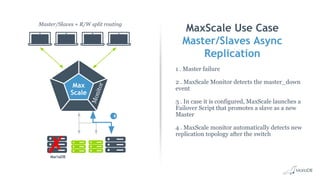
MaxScale Use Case
Master/Slaves Async
Replication
1 . Master failure
2 . MaxScale Monitor detects the master_down
event
3 . In case it is configured, MaxScale launches a
Failover Script that promotes a slave as a new
Master
4 . MaxScale monitor automatically detects new
replication topology after the switch
Master/Slaves + R/W split routing
Max
Scale
MariaDB
Monitor 2
4
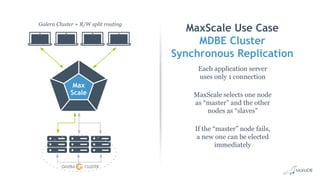
MaxScale Use Case
MDBE Cluster
Synchronous Replication
Each application server
uses only 1 connection
MaxScale selects one node
as “master” and the other
nodes as “slaves”
If the “master” node fails,
a new one can be elected
immediately
Galera Cluster + R/W split routing
Max
Scale
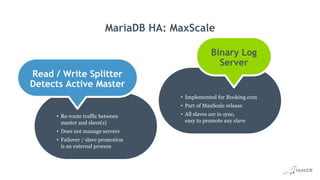
MariaDB HA: MaxScale
• Re-route traffic between
master and slave(s)
• Does not manage servers
• Failover / slave promotion
is an external process
• Implemented for Booking.com
• Part of MaxScale release
• All slaves are in sync,
easy to promote any slave
Read / Write Splitter
Detects Active Master
Binary Log
Server
Thank you
Max Mether
Field CTO
max@mariadb.com

Best Practice for Achieving High Availability in MariaDB

  • 1.
  • 2.
    High Availability Defined In information technology, highavailability refers to a system or component that is continuously operational for a desirably long length of time. Availability – Wikipedia up time / total time
  • 3.
    Uptime, Downtime, 9s • 90%-> 36.5 days/year or 72 hours/month • 99% -> 3.65 days/year or 7.2 hours/month • 99.9% -> 8.76 hours/year or 43.8 minutes/month • 99.99% -> 52.56 minutes/year or 4.38 minutes/month • 99.999% -> 5.26 minutes/year or 25.9 seconds/month • 99.9999% -> 31.5 seconds/year or 2.59 seconds/month Availability = uptime / (uptime + downtime) Availability and HIGH Availability Source: http://en.wikipedia.org/wiki/High_availability
  • 4.
    High Availability Background •High Availability isn’t always equal to long Uptime – A system is “up” but it might not be accessible – A system that is “down” just once, but for a long time, is NOT highly available • High Availability rather means – Long Mean Time Between Failures (MTBF) – Short Mean Time To Recover (MTTR) • High availability is: – a system design protocol and associated implementation that ensures a certain degree of operational continuity during a given measurement period.
  • 5.
    An average of80 percent of mission-critical application service downtime is directly caused by people or process failures. The other 20 percent is caused by technology failure, environmental failure or a disaster Gartner Research
  • 6.
    High Availability Components Highavailability is a system design protocol and associated implementation that ensures a certain degree of operational continuity during a measurement period. For stateful services, we need to make sure that data is made redundant. It is not a replace for backups! Data Redundancy Some mechanism to redirect traffic from the failed server or Datacenter to a working one Failover or Switchover Solution Availability of the services needs to be monitored, to take action when there is a failure or even to prevent them Monitoring and Management
  • 7.
  • 8.
    General Terms • SinglePoint of Failure (SPOF) – An element is a SPOF when its failure results in a full stop of the service as no other element can take over (storage, WAN connection, replication channel) – It is important to evaluate the costs for eliminating the SPOF, the likelyhood that it fails, the time required to bring it into service again • Shared Storage Architecture – Shared storage systems like SANs can provide built-in high availability, though this comes with equally high costs – Not really suitable for Disaster Recover scenario on multiple Data Center • Shared Nothing Architecture – Each node is independent and self-sufficient
  • 9.
    General Terms • Split-Brain –When nodes in the cluster continue running but cannot communicate causing them to be inconsistent – To be avoided at all cost • Switchover – When a manual process is used to switch from one system to a redundant or standby system in case of a failure • Failover – Automatic switchover, without human intervention • Failback – A (often-underestimated) task to handle the recovery of a failed system and how to fail-back to this system after recovery
  • 10.
  • 11.
    MariaDB Replication • Replicationenables data from one MariaDB server (the master) to be replicated to one or more MariaDB servers (the slaves). • MariaDB Replication is: – very easy to setup – used to scale out read workloads – provide a first level of high availability and geographic redundancy – offload backups and analytic jobs.
  • 12.
    The Binary Log •Each MariaDB server has a binary log that should be enabled in most cases • The server stores all changes that happen on the server in the binary log • The binary log has three modes: a. ROW: Row change events are stored in the binary log b. STATEMENT: SQL Statements that change data are stored in the binary log c. MIXED: Most events are replicated in STATEMENT based but some ROW based
  • 13.
    Asynchronous Replication • MariaDBReplication is asynchronous by default. • Slave determines how much to read and from which point in the binary log • Slave can be behind master in reading and applying changes • If the master crashes, transactions might not have been transmitted to any slave • Asynchronous replication is great for read scaling as adding more replicas does not impact replication latency
  • 14.
    Asynchronous Replication Phases •3 phases for each transaction: 1. The transaction is committed and written to the masters binary log 2. The slave reads the transaction and writes it to its relay log 3. The transaction is applied on the slave
  • 15.
    Asynchronous Replication-Switch Over 1.The master server is taken down or we encounter a fault by our monitoring 2. The slave server is updated to the last position in the relay log 3. The clients point at the designated slave server 4. The designated slave server becomes the master server 5. All steps are manual Master and Slaves ReadOnly Slaves Master and Slaves ReadOnly Slaves
  • 16.
    Async Replication Topologies Masterand Slaves ReadOnly Slaves Master with Relay Slave Circular Replication
  • 17.
    Semi-synchronous Replication • MariaDBsupports semi-synchronous replication: – the master does not confirm transactions to the client application until at least one slave has copied the change to its relay log, and flushed it to disk. – In semi-synchronous replication, only after the events have been written to the relay log and flushed the slave does acknowledge receipt of a transaction's events – Semi-synchronous is a practical solution for many cases where high availability and no data-loss is important. – When a commit returns successfully, it is known that the data exists in at least two places (on the master and at least one slave). – Semi- synchronous has a performance impact due to the additional round trip
  • 18.
    MariaDB Enhanced Semi-synchronousReplication • One or more slaves can be defined as working semi-synchronously. • For these slaves, the master waits until the I/O thread on one or more of the semi-synch slaves has flushed the transaction to disk. • This ensures that all committed transactions are at least stored in the relay log of the slave. • Standard semi-synchronous replication would commit the transaction before it gets the acknowledge of the binlog event from a slave (AFTER_COMMIT or AFTER_SYNC)
  • 19.
    Semi-synchronous Replication –Switch Over • The steps for a failover are the same as when using the standard replication • but in Step 2, a slave should be chosen among those (if many) that are be semi- synched with the master Master and Slaves Semi-Sync Slave Async Slaves Master and Slaves Async Slaves
  • 20.
    Semi-Sync Replication Topologies •Semi- synchronous replication is used between master and backup master • Semi- sync replication has a performance impact, but the risk for data loss is minimized. • This topology works well when performing master failover – The backup master acts as a warm-standby server – it has the highest probability of having up-to-date data if compared to other slaves. Semi_sync Asynchronous ReadOnly/ Backup Master ReadOnly
  • 21.
    Synchronous Replication MariaDB GaleraCluster • Galera Replication is a synchronous multi-master replication feature enables a true master-master setup for InnoDB. • Every node is a share nothing server • All nodes are masters and applications can read and write from any node • A minimal Galera cluster consists of 3 nodes: – A proper cluster needs to reach a quorum (i.e. the majority of the nodes of the cluster) • Transactions are synchronously committed on all nodes. MariaDB MariaDB MariaDB
  • 22.
    How it works •A transaction is started by connecting to one of the nodes • Everything (locks, modifications etc) is local until the transaction is committed • Upon commit, the writeset is sent out to the other nodes for certificaton • The other nodes verify that the transaction doesn't conflict with any open transactions local to them and at the same time store the writeset • If certified the transaction is committed on all nodes • If the certification fails (due to a conflict) the transaction is aborted MariaDB MariaDB MariaDB
  • 23.
    MariaDB Cluster Pros •PROS – A high availability solution with synchronous replication, failover and resynchronization – No loss of data – All servers have up-to-date data (no slave lag) – Read scalability – 'Pretty good' write scalability – High availability across data centers MariaDB MariaDB MariaDB
  • 24.
    MariaDB Cluster Cons •CONS – It only supports InnoDB – The transaction rollback rate and hence the transaction latency, can increase with the number of the cluster nodes – The cluster performs as its less performing note: an overloaded master affects the performance of the Galera cluster MariaDB MariaDB MariaDB
  • 25.
  • 26.
    MDBE Cluster Failover Clustered nodescooperate to remain in sync With multiple master nodes, reads and updates both scale* Synchronous replication with optimistic locking delivers high availability with little overhead Fast failover because all nodes remains synchronizedMariaDB MariaDB MariaDB Load Balancing and Failover Application / App Server
  • 27.
    MaxScale Use Case Master/SlavesAsync Replication MaxScale monitors a MariaDB Topology Master/Slaves + R/W split routing Max Scale MariaDB
  • 28.
    MaxScale Use Case Master/SlavesAsync Replication Master/Slaves + R/W split routing Max Scale MariaDB 1 1 . Master failure
  • 29.
    MaxScale Use Case Master/SlavesAsync Replication 1 . Master failure 2 . MaxScale Monitor detects the master_down event Master/Slaves + R/W split routing Max Scale MariaDB Failover Script Monitor master_down event 2
  • 30.
    MaxScale Use Case Master/SlavesAsync Replication 1 . Master failure 2 . MaxScale Monitor detects the master_down event 3 . In case it is configured, MaxScale launches a Failover Script that promotes a slave as a new Master Master/Slaves + R/W split routing Max Scale MariaDB Failover Script Monitor master_down event 2 Promote as master3
  • 31.
    MaxScale Use Case Master/SlavesAsync Replication 1 . Master failure 2 . MaxScale Monitor detects the master_down event 3 . In case it is configured, MaxScale launches a Failover Script that promotes a slave as a new Master Master/Slaves + R/W split routing Max Scale MariaDB Failover Script Monitor master_down event 2 Promote as master3
  • 32.
    MaxScale Use Case Master/SlavesAsync Replication 1 . Master failure 2 . MaxScale Monitor detects the master_down event 3 . In case it is configured, MaxScale launches a Failover Script that promotes a slave as a new Master 4 . MaxScale monitor automatically detects new replication topology after the switch Master/Slaves + R/W split routing Max Scale MariaDB Monitor 2 4
  • 33.
    MaxScale Use Case MDBECluster Synchronous Replication Each application server uses only 1 connection MaxScale selects one node as “master” and the other nodes as “slaves” If the “master” node fails, a new one can be elected immediately Galera Cluster + R/W split routing Max Scale
  • 34.
    MariaDB HA: MaxScale •Re-route traffic between master and slave(s) • Does not manage servers • Failover / slave promotion is an external process • Implemented for Booking.com • Part of MaxScale release • All slaves are in sync, easy to promote any slave Read / Write Splitter Detects Active Master Binary Log Server
  • 35.
    Thank you Max Mether FieldCTO max@mariadb.com