HTML Lesson
GRADE 11
Ms Mofokeng 201518293
What is HTML
HTML is a format that tells a computer how to display a web page.
The documents themselves are plain text files with special "tags" or
codes that a web browser uses to interpret and display information on
your computer screen.
● HTML stands for Hyper Text Markup Language
● An HTML file is a text file containing small markup tags
● The markup tags tell the Web browser how to display the page
● An HTML file must have an htm or html file extension
HTML tags
HTML tags are used to mark-up HTML elements
● HTML tags are surrounded by the two angle brackets (< and >)
● HTML tags normally come in pairs like <html> (start tag) and
</html> (end tag)
● The text between the start and end tags is the element content
● HTML tags are not case sensitive, <b> means the same as <B>
Explanation of basic tags
● <html> and </html> indicates that you are going to use html to
create a web page.
● <head> contains the title of the webpage </head>
● <title> container tag </title>
● <body> main content </body>
● <h1> heading tag </h6>, up to <h6> </h6>
● <p> paragraph </p>
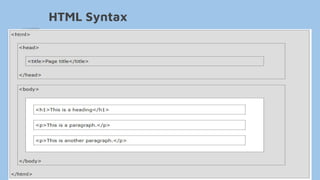
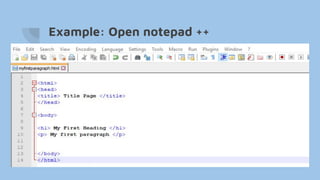
HTML Syntax
Example: Open notepad ++
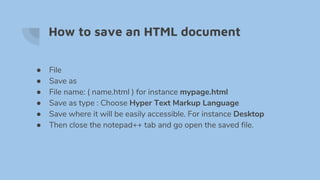
How to save an HTML document
● File
● Save as
● File name: ( name.html ) for instance mypage.html
● Save as type : Choose Hyper Text Markup Language
● Save where it will be easily accessible. For instance Desktop
● Then close the notepad++ tab and go open the saved file.
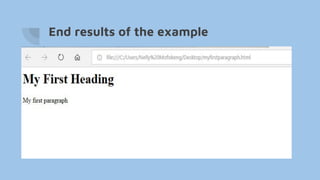
End results of the example
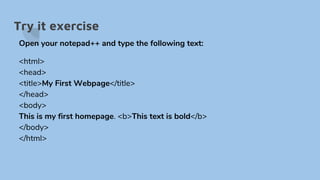
Try it exercise
Open your notepad++ and type the following text:
<html>
<head>
<title>My First Webpage</title>
</head>
<body>
This is my first homepage. <b>This text is bold</b>
</body>
</html>
Next Session.
● We will go through the given exercise.
● We will go further with HTML tags.
THANK YOU

Html grade 11

  • 1.
    HTML Lesson GRADE 11 MsMofokeng 201518293
  • 2.
    What is HTML HTMLis a format that tells a computer how to display a web page. The documents themselves are plain text files with special "tags" or codes that a web browser uses to interpret and display information on your computer screen. ● HTML stands for Hyper Text Markup Language ● An HTML file is a text file containing small markup tags ● The markup tags tell the Web browser how to display the page ● An HTML file must have an htm or html file extension
  • 3.
    HTML tags HTML tagsare used to mark-up HTML elements ● HTML tags are surrounded by the two angle brackets (< and >) ● HTML tags normally come in pairs like <html> (start tag) and </html> (end tag) ● The text between the start and end tags is the element content ● HTML tags are not case sensitive, <b> means the same as <B>
  • 4.
    Explanation of basictags ● <html> and </html> indicates that you are going to use html to create a web page. ● <head> contains the title of the webpage </head> ● <title> container tag </title> ● <body> main content </body> ● <h1> heading tag </h6>, up to <h6> </h6> ● <p> paragraph </p>
  • 5.
  • 6.
  • 7.
    How to savean HTML document ● File ● Save as ● File name: ( name.html ) for instance mypage.html ● Save as type : Choose Hyper Text Markup Language ● Save where it will be easily accessible. For instance Desktop ● Then close the notepad++ tab and go open the saved file.
  • 8.
    End results ofthe example
  • 9.
    Try it exercise Openyour notepad++ and type the following text: <html> <head> <title>My First Webpage</title> </head> <body> This is my first homepage. <b>This text is bold</b> </body> </html>
  • 10.
    Next Session. ● Wewill go through the given exercise. ● We will go further with HTML tags. THANK YOU