Intro to HTML 4.01 Instructor: Dawn Friedman The Fuse Factory Electronic  and Digital Arts Lab 09.16.09
Workshop Outline Presentation: How a web site works (understanding elements and tags: the DNA of HTML) Presentation part 2: Rules “beautiful” HTML code adheres to Hands on exercise: Getting started in HTML 09.16.09
What is HTML? Hyper Text Markup Language Hyper : You can go anywhere and everywhere on a browser Text : You are working primarily with text Markup : The code necessary for making the HTML readable by a browser Language : Refers to the specific syntax of a programming or scripting language 09.16.09
What is HTML? HTML is a markup (or scripting) language - not a programming language A markup language contains markup tags that describe how the text is to be formatted 09.16.09
09.16.09
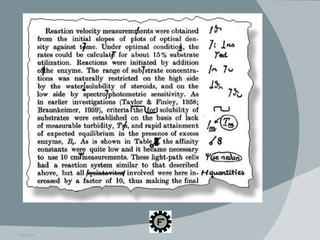
What is HTML? In the same way that proofreader marks help editors format an essay, HTML tells browsers how to format your page 09.16.09
HTML vs. CSS HTML for content (think of a scaffold), CSS for presentation (color, fonts, advanced layout) Many HTML elements and attributes declaring colors, fonts, background, etc. are deprecated Deprecated means the code will not be (or is not) supported by the most recent versions of HTML and web browsers 09.16.09
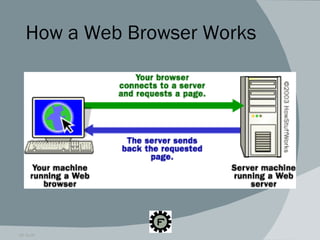
What is a Web Browser? A web browser is a computer application that does two things: It goes to a web server on the internet and requests a page, so it can pull the page through the network and into your machine It interprets the HTML elements and tags within the page in order to display it on the screen as the page’s creator intended 09.16.09
How a Web Browser Works 09.16.09
Viewing the Page Source Viewing the page source is like popping up the hood of a car to look at the engine Don’t be intimidated by the code! It will become more familiar with practice Viewing source code is a great way to learn Check out:  www.w3schools.com/html/html_intro.asp 09.16.09
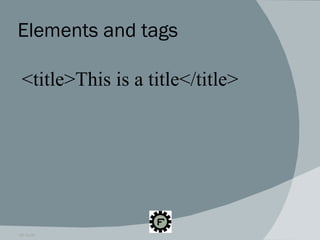
Elements and tags 09.16.09 <title>This is a title</title>
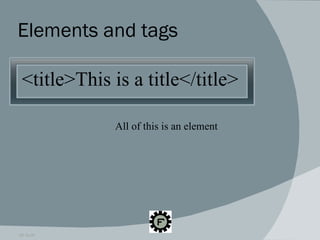
Elements and tags 09.16.09 <title>This is a title</title> All of this is an element
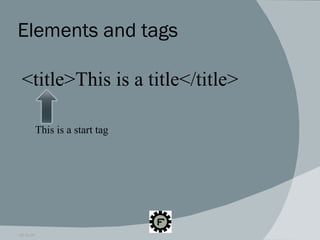
Elements and tags 09.16.09 <title>This is a title</title> This is a start tag
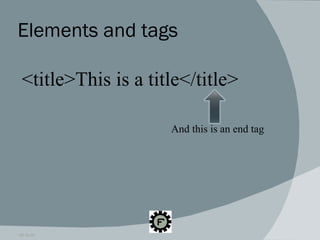
Elements and tags 09.16.09 <title>This is a title</title> And this is an end tag
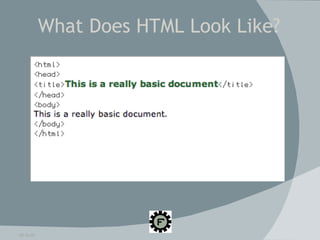
09.16.09 What Does HTML Look Like?
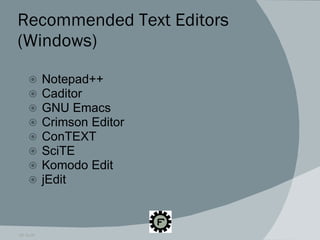
Recommended Text Editors (Windows) Notepad++ Caditor GNU Emacs Crimson Editor ConTEXT SciTE Komodo Edit jEdit 09.16.09
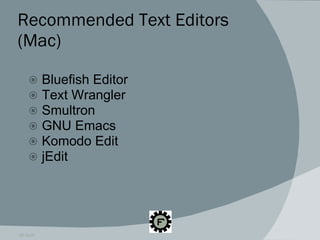
Recommended Text Editors (Mac) Bluefish Editor Text Wrangler Smultron GNU Emacs Komodo Edit jEdit 09.16.09
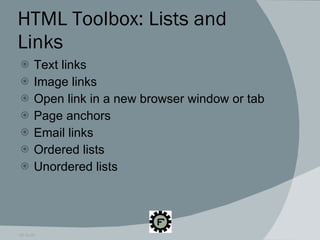
HTML Toolbox: Lists and Links Text links  Image links Open link in a new browser window or tab Page anchors Email links Ordered lists Unordered lists 09.16.09
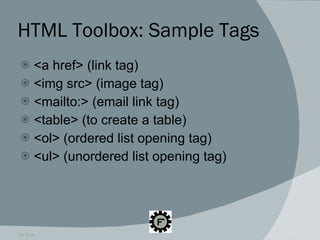
HTML Toolbox: Sample Tags <a href> (link tag) <img src> (image tag) <mailto:> (email link tag) <table> (to create a table) <ol> (ordered list opening tag) <ul> (unordered list opening tag) 09.16.09
Validating Your HTML Making sure your HTML is “clean” HTML errors are not necessarily reflected in the appearance of your page http://validator.w3.org http://htmlhelp.com/tools/valet/ Firefox add-ons 09.16.09
Special HTML Characters HTML renders them with numeric or character encoding so that they can be included in the document properly There are several characters that should not be left unencoded Left unencoded, they can confuse the browser and not show up correctly 09.16.09
Special HTML Characters Less-than sign: < Greater-than sign: > Ampersand: & Quotation marks “ ” 09.16.09
Special HTML Characters Done Right Less-than sign: & it; Greater-than sign: & gt; Ampersand: & amp; Quotation mark: & quot Full list of special characters:  degraeve.com/reference/specialcharacters.php  09.16.09
Skills Supplementing HTML XHTML CSS Javascript JQuery Moo Tools Flash PHP CMS (Content Management System) 09.16.09
Difference Between HTML  and XHTML Since 2000, W3C recommendations based on XML Provides more robust and rigorous documentation All tags must be closed All attributes have to be in quotes All lower case 09.16.09
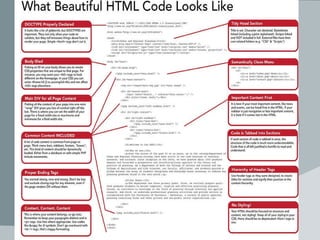
What Beautiful HTML Code Looks Like DOCTYPE properly declared Tidy head section Body ID’ed Semantically clean menu Important content first css-tricks.com/what-beautiful-html-code-looks-like/ 09.16.09
What Beautiful HTML Code Looks Like DOCTYPE properly declared Tidy head section Body ID’ed Semantically clean menu webdesignfromscratch.com/html-css/semantic-html.php Important content first 09.16.09
What Beautiful HTML Code Looks Like Proper ending tags Code is tabbed into sections Hierarchy of header tags Content, content, content No styling! Leave it to CSS! 09.16.09
09.16.09
http://css-tricks.com/ what-beautiful-html-code-looks-like/ What Beautiful HTML Code Looks Like 09.16.09
Now on to part two: The hands-on make your first web page with HTML part! 09.16.09

Intro To HTML

  • 1.
    Intro to HTML4.01 Instructor: Dawn Friedman The Fuse Factory Electronic and Digital Arts Lab 09.16.09
  • 2.
    Workshop Outline Presentation:How a web site works (understanding elements and tags: the DNA of HTML) Presentation part 2: Rules “beautiful” HTML code adheres to Hands on exercise: Getting started in HTML 09.16.09
  • 3.
    What is HTML?Hyper Text Markup Language Hyper : You can go anywhere and everywhere on a browser Text : You are working primarily with text Markup : The code necessary for making the HTML readable by a browser Language : Refers to the specific syntax of a programming or scripting language 09.16.09
  • 4.
    What is HTML?HTML is a markup (or scripting) language - not a programming language A markup language contains markup tags that describe how the text is to be formatted 09.16.09
  • 5.
  • 6.
    What is HTML?In the same way that proofreader marks help editors format an essay, HTML tells browsers how to format your page 09.16.09
  • 7.
    HTML vs. CSSHTML for content (think of a scaffold), CSS for presentation (color, fonts, advanced layout) Many HTML elements and attributes declaring colors, fonts, background, etc. are deprecated Deprecated means the code will not be (or is not) supported by the most recent versions of HTML and web browsers 09.16.09
  • 8.
    What is aWeb Browser? A web browser is a computer application that does two things: It goes to a web server on the internet and requests a page, so it can pull the page through the network and into your machine It interprets the HTML elements and tags within the page in order to display it on the screen as the page’s creator intended 09.16.09
  • 9.
    How a WebBrowser Works 09.16.09
  • 10.
    Viewing the PageSource Viewing the page source is like popping up the hood of a car to look at the engine Don’t be intimidated by the code! It will become more familiar with practice Viewing source code is a great way to learn Check out: www.w3schools.com/html/html_intro.asp 09.16.09
  • 11.
    Elements and tags09.16.09 <title>This is a title</title>
  • 12.
    Elements and tags09.16.09 <title>This is a title</title> All of this is an element
  • 13.
    Elements and tags09.16.09 <title>This is a title</title> This is a start tag
  • 14.
    Elements and tags09.16.09 <title>This is a title</title> And this is an end tag
  • 15.
    09.16.09 What DoesHTML Look Like?
  • 16.
    Recommended Text Editors(Windows) Notepad++ Caditor GNU Emacs Crimson Editor ConTEXT SciTE Komodo Edit jEdit 09.16.09
  • 17.
    Recommended Text Editors(Mac) Bluefish Editor Text Wrangler Smultron GNU Emacs Komodo Edit jEdit 09.16.09
  • 18.
    HTML Toolbox: Listsand Links Text links Image links Open link in a new browser window or tab Page anchors Email links Ordered lists Unordered lists 09.16.09
  • 19.
    HTML Toolbox: SampleTags <a href> (link tag) <img src> (image tag) <mailto:> (email link tag) <table> (to create a table) <ol> (ordered list opening tag) <ul> (unordered list opening tag) 09.16.09
  • 20.
    Validating Your HTMLMaking sure your HTML is “clean” HTML errors are not necessarily reflected in the appearance of your page http://validator.w3.org http://htmlhelp.com/tools/valet/ Firefox add-ons 09.16.09
  • 21.
    Special HTML CharactersHTML renders them with numeric or character encoding so that they can be included in the document properly There are several characters that should not be left unencoded Left unencoded, they can confuse the browser and not show up correctly 09.16.09
  • 22.
    Special HTML CharactersLess-than sign: < Greater-than sign: > Ampersand: & Quotation marks “ ” 09.16.09
  • 23.
    Special HTML CharactersDone Right Less-than sign: & it; Greater-than sign: & gt; Ampersand: & amp; Quotation mark: & quot Full list of special characters: degraeve.com/reference/specialcharacters.php 09.16.09
  • 24.
    Skills Supplementing HTMLXHTML CSS Javascript JQuery Moo Tools Flash PHP CMS (Content Management System) 09.16.09
  • 25.
    Difference Between HTML and XHTML Since 2000, W3C recommendations based on XML Provides more robust and rigorous documentation All tags must be closed All attributes have to be in quotes All lower case 09.16.09
  • 26.
    What Beautiful HTMLCode Looks Like DOCTYPE properly declared Tidy head section Body ID’ed Semantically clean menu Important content first css-tricks.com/what-beautiful-html-code-looks-like/ 09.16.09
  • 27.
    What Beautiful HTMLCode Looks Like DOCTYPE properly declared Tidy head section Body ID’ed Semantically clean menu webdesignfromscratch.com/html-css/semantic-html.php Important content first 09.16.09
  • 28.
    What Beautiful HTMLCode Looks Like Proper ending tags Code is tabbed into sections Hierarchy of header tags Content, content, content No styling! Leave it to CSS! 09.16.09
  • 29.
  • 30.
  • 31.
    Now on topart two: The hands-on make your first web page with HTML part! 09.16.09