EECL 309B 
VHDL 
Behavioral Modeling 
Spring 2014 Semester
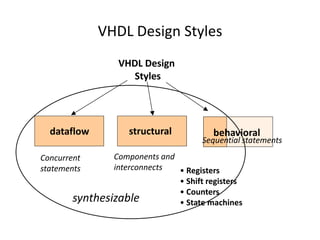
VHDL Design Styles 
VHDL Design 
Styles 
structural 
Components and 
interconnects 
dataflow 
Concurrent 
statements 
behavioral 
Sequential statements 
• Registers 
• Shift registers 
• Counters 
• State machines 
synthesizable
Behavioral Design/Modelling 
• Functional performance is the goal of behavioral modeling 
• Timing optionally included in the model 
• Software engineering practices should be used to develop 
behavioral models 
• Sequential, inside a process 
• Just like a sequential program 
• The main character is ‘process(sensitivity list)’ 
3
Anatomy of a Process 
• The process statement is a concurrent statement , which 
delineates a part of an architecture where sequential statements 
are executed. 
• Syntax 
[label:] process [(sensitivity list )] 
declarations 
begin 
sequential statements 
end process [label];
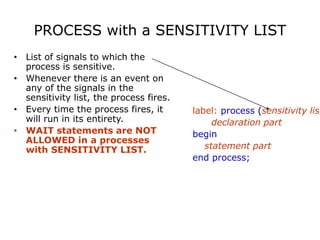
PROCESS with a SENSITIVITY LIST 
• List of signals to which the 
process is sensitive. 
• Whenever there is an event on 
any of the signals in the 
sensitivity list, the process fires. 
• Every time the process fires, it 
will run in its entirety. 
• WAIT statements are NOT 
ALLOWED in a processes 
with SENSITIVITY LIST. 
label: process (sensitivity list) 
declaration part 
begin 
statement part 
end process;
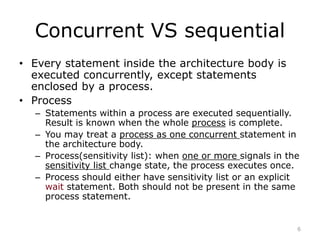
Concurrent VS sequential 
• Every statement inside the architecture body is 
executed concurrently, except statements 
enclosed by a process. 
• Process 
– Statements within a process are executed sequentially. 
Result is known when the whole process is complete. 
– You may treat a process as one concurrent statement in 
the architecture body. 
– Process(sensitivity list): when one or more signals in the 
sensitivity list change state, the process executes once. 
– Process should either have sensitivity list or an explicit 
wait statement. Both should not be present in the same 
process statement. 
6
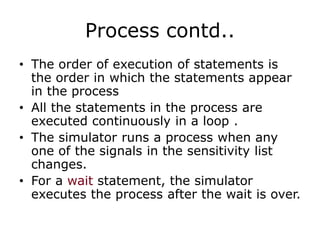
Process contd.. 
• The order of execution of statements is 
the order in which the statements appear 
in the process 
• All the statements in the process are 
executed continuously in a loop . 
• The simulator runs a process when any 
one of the signals in the sensitivity list 
changes. 
• For a wait statement, the simulator 
executes the process after the wait is over.
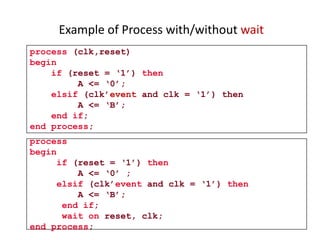
Example of Process with/without wait 
process (clk,reset) 
begin 
if (reset = ‘1’) then 
A <= ‘0’; 
elsif (clk’event and clk = ‘1’) then 
A <= ‘B’; 
end if; 
end process; 
process 
begin 
if (reset = ‘1’) then 
A <= ‘0’ ; 
elsif (clk’event and clk = ‘1’) then 
A <= ‘B’; 
end if; 
wait on reset, clk; 
end process;
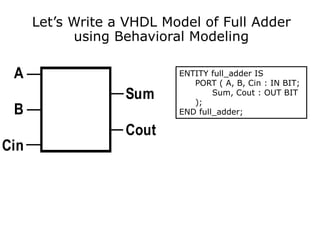
Let’s Write a VHDL Model of Full Adder 
using Behavioral Modeling 
ENTITY full_adder IS 
PORT ( A, B, Cin : IN BIT; 
Sum, Cout : OUT BIT 
); 
END full_adder; 
A 
B 
Cin 
Sum 
Cout
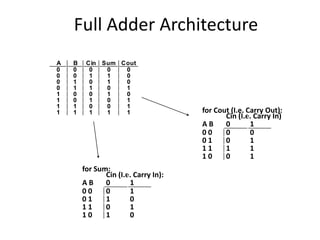
Full Adder Architecture 
A B Cin Sum Cout 
0 0 0 0 0 
0 0 1 1 0 
0 1 0 1 0 
0 1 1 0 1 
1 0 0 1 0 
1 0 1 0 1 
1 1 0 0 1 
1 1 1 1 1 
for Sum: 
Cin (I.e. Carry In): 
A B 0 1 
0 0 0 1 
0 1 1 0 
1 1 0 1 
1 0 1 0 
for Cout (I.e. Carry Out): 
Cin (I.e. Carry In) 
A B 0 1 
0 0 0 0 
0 1 0 1 
1 1 1 1 
1 0 0 1
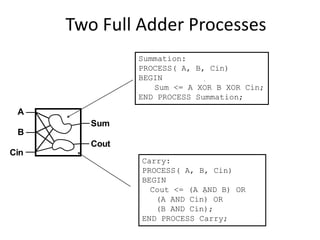
Two Full Adder Processes 
A 
B 
Cin 
Sum 
Cout 
Summation: 
PROCESS( A, B, Cin) 
BEGIN 
Sum <= A XOR B XOR Cin; 
END PROCESS Summation; 
Carry: 
PROCESS( A, B, Cin) 
BEGIN 
Cout <= (A AND B) OR 
(A AND Cin) OR 
(B AND Cin); 
END PROCESS Carry;
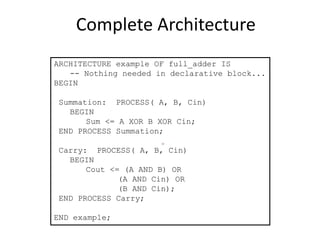
Complete Architecture 
ARCHITECTURE example OF full_adder IS 
-- Nothing needed in declarative block... 
BEGIN 
Summation: PROCESS( A, B, Cin) 
BEGIN 
Sum <= A XOR B XOR Cin; 
END PROCESS Summation; 
Carry: PROCESS( A, B, Cin) 
BEGIN 
Cout <= (A AND B) OR 
(A AND Cin) OR 
(B AND Cin); 
END PROCESS Carry; 
END example;
VHDL Sequential Statements 
• Assignments executed sequentially in processes 
• Sequential statements 
– {Signal, variable} assignments 
– Flow control 
• IF <condition> THEN <statements> [ELSIF <statements] [ELSE 
<statements>] END IF; 
• FOR <range> LOOP <statements> END LOOP; 
• WHILE <condition> LOOP <statements> END LOOP; 
• CASE <condition> IS WHEN <value> => <statements> 
{WHEN <value> => <statements>} 
[WHEN others => <statements>] 
END CASE; 
– WAIT [ON <signal>] [UNTIL <expression>] [FOR <time>] ; 
– ASSERT <condition> [REPORT <string>] [SEVERITY <level>] ;
The if statement 
• Syntax 
if condition1 then 
statements 
[elsif condition2 then 
statements] 
[else 
statements] 
end if; 
Priority 
• An if statement selects one or none of a sequence of 
events to execute . The choice depends on one or more 
conditions.
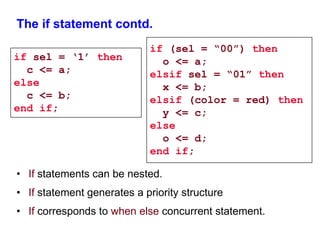
The if statement contd. 
if sel = ‘1’ then 
c <= a; 
else 
c <= b; 
end if; 
if (sel = “00”) then 
• If statements can be nested. 
o <= a; 
elsif sel = “01” then 
x <= b; 
elsif (color = red) then 
y <= c; 
else 
o <= d; 
end if; 
• If statement generates a priority structure 
• If corresponds to when else concurrent statement.
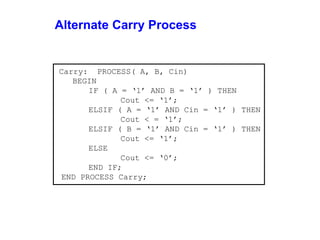
Alternate Carry Process 
Carry: PROCESS( A, B, Cin) 
BEGIN 
IF ( A = ‘1’ AND B = ‘1’ ) THEN 
Cout <= ‘1’; 
ELSIF ( A = ‘1’ AND Cin = ‘1’ ) THEN 
Cout < = ‘1’; 
ELSIF ( B = ‘1’ AND Cin = ‘1’ ) THEN 
Cout <= ‘1’; 
ELSE 
Cout <= ‘0’; 
END IF; 
END PROCESS Carry;
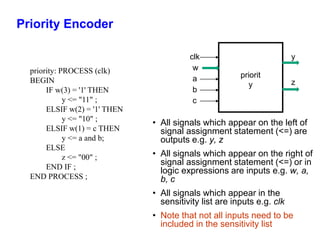
Priority Encoder 
clk 
• All signals which appear on the left of 
signal assignment statement (<=) are 
outputs e.g. y, z 
• All signals which appear on the right of 
signal assignment statement (<=) or in 
logic expressions are inputs e.g. w, a, 
b, c 
• All signals which appear in the 
sensitivity list are inputs e.g. clk 
• Note that not all inputs need to be 
included in the sensitivity list 
priority: PROCESS (clk) 
BEGIN 
IF w(3) = '1' THEN 
y <= "11" ; 
ELSIF w(2) = '1' THEN 
y <= "10" ; 
ELSIF w(1) = c THEN 
y <= a and b; 
ELSE 
z <= "00" ; 
END IF ; 
END PROCESS ; 
w 
a 
y 
z 
priorit 
y 
b 
c
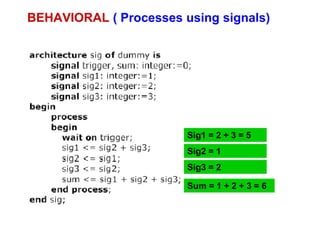
BEHAVIORAL ( Processes using signals) 
Sig1 = 2 + 3 = 5 
Sig2 = 1 
Sig3 = 2 
Sum = 1 + 2 + 3 = 6
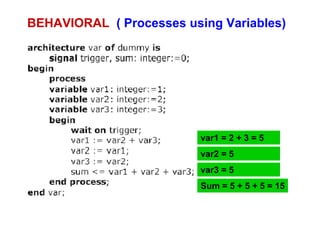
BEHAVIORAL ( Processes using Variables) 
var1 = 2 + 3 = 5 
var2 = 5 
var3 = 5 
Sum = 5 + 5 + 5 = 15
Loop, While & For Statement 
 Syntax 
[label:] loop 
{sequential_statement} 
end loop [label]; 
 Syntax 
[label:] while condition loop 
{sequential_statement} 
end loop [label]; 
 Syntax 
[label:] for identifier in discrete_range 
loop 
{sequential_statement} 
end loop [label];
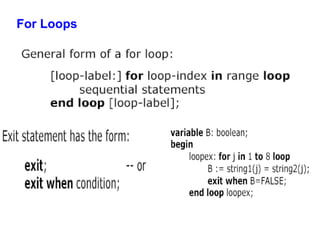
For Loops
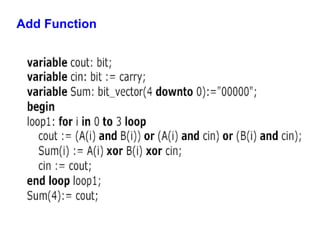
Add Function
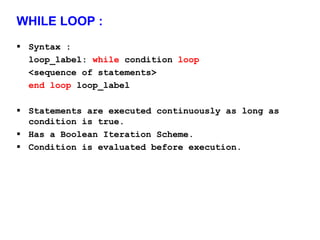
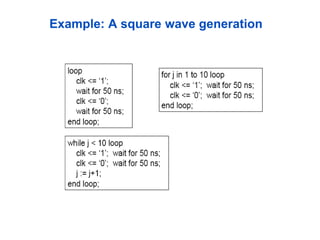
WHILE LOOP : 
 Syntax : 
loop_label: while condition loop 
<sequence of statements> 
end loop loop_label 
 Statements are executed continuously as long as 
condition is true. 
 Has a Boolean Iteration Scheme. 
 Condition is evaluated before execution.
Example: A square wave generation
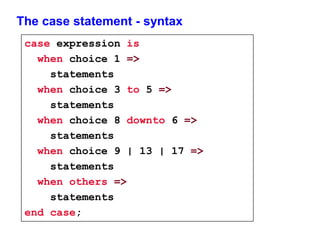
The case statement - syntax 
case expression is 
when choice 1 => 
statements 
when choice 3 to 5 => 
statements 
when choice 8 downto 6 => 
statements 
when choice 9 | 13 | 17 => 
statements 
when others => 
statements 
end case;
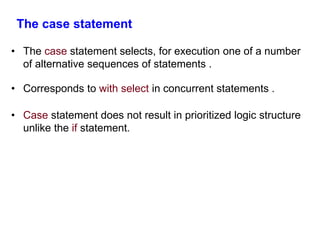
The case statement 
• The case statement selects, for execution one of a number 
of alternative sequences of statements . 
• Corresponds to with select in concurrent statements . 
• Case statement does not result in prioritized logic structure 
unlike the if statement.
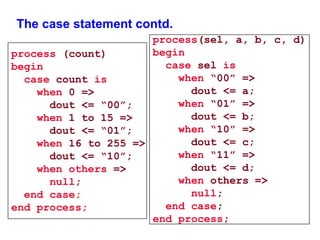
The case statement contd. 
process(sel, a, b, c, d) 
begin 
case sel is 
when “00” => 
dout <= a; 
when “01” => 
dout <= b; 
when “10” => 
dout <= c; 
when “11” => 
dout <= d; 
when others => 
null; 
end case; 
end process; 
process (count) 
begin 
case count is 
when 0 => 
dout <= “00”; 
when 1 to 15 => 
dout <= “01”; 
when 16 to 255 => 
dout <= “10”; 
when others => 
null; 
end case; 
end process;
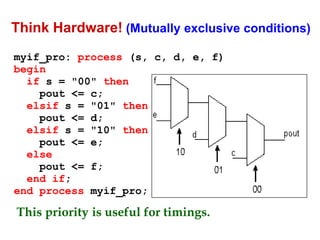
Think Hardware! (Mutually exclusive conditions) 
myif_pro: process (s, c, d, e, f) 
begin 
if s = "00" then 
pout <= c; 
elsif s = "01" then 
pout <= d; 
elsif s = "10" then 
pout <= e; 
else 
pout <= f; 
end if; 
end process myif_pro; 
This priority is useful for timings.
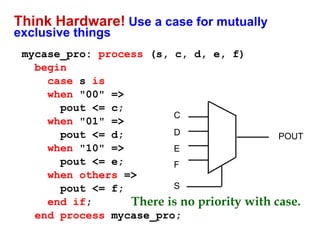
Think Hardware! Use a case for mutually 
exclusive things 
mycase_pro: process (s, c, d, e, f) 
begin 
case s is 
when "00" => 
pout <= c; 
when "01" => 
pout <= d; 
when "10" => 
pout <= e; 
when others => 
pout <= f; 
end if; 
C 
D 
E 
F 
S 
end process mycase_pro; 
POUT 
There is no priority with case.
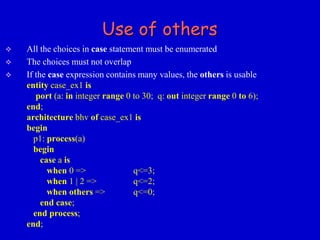
Use of others 
 All the choices in case statement must be enumerated 
 The choices must not overlap 
 If the case expression contains many values, the others is usable 
entity case_ex1 is 
port (a: in integer range 0 to 30; q: out integer range 0 to 6); 
end; 
architecture bhv of case_ex1 is 
begin 
p1: process(a) 
begin 
case a is 
when 0 => q<=3; 
when 1 | 2 => q<=2; 
when others => q<=0; 
end case; 
end process; 
end;
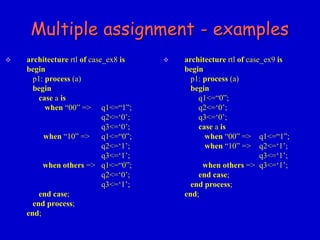
Multiple assignment - examples 
 architecture rtl of case_ex8 is 
begin 
p1: process (a) 
begin 
case a is 
when “00” => q1<=“1”; 
q2<=‘0’; 
q3<=‘0’; 
when “10” => q1<=“0”; 
q2<=‘1’; 
q3<=‘1’; 
when others => q1<=“0”; 
q2<=‘0’; 
q3<=‘1’; 
end case; 
end process; 
end; 
 architecture rtl of case_ex9 is 
begin 
p1: process (a) 
begin 
q1<=“0”; 
q2<=‘0’; 
q3<=‘0’; 
case a is 
when “00” => q1<=“1”; 
when “10” => q2<=‘1’; 
q3<=‘1’; 
when others => q3<=‘1’; 
end case; 
end process; 
end;
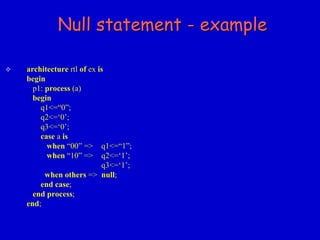
Null statement 
null_statement::= 
[ label : ] null ; 
 The null - statement explicitly prevents any action from being carried out. 
 This statement means “do nothing”. 
 This command can, for example, be used if default signal assignments have 
been used in a process and an alternative in the case statement must not change 
that value.
Null statement - example 
 architecture rtl of ex is 
begin 
p1: process (a) 
begin 
q1<=“0”; 
q2<=‘0’; 
q3<=‘0’; 
case a is 
when “00” => q1<=“1”; 
when “10” => q2<=‘1’; 
q3<=‘1’; 
when others => null; 
end case; 
end process; 
end;
Wait statement 
 wait_statement::= 
[ label : ] wait [ sensitivity_clause ] 
[ condition_clause ] 
[ timeout_clause ] ; 
 Examples: 
 wait ; 
 The process is permanently interrupted. 
 wait for 5 ns ; 
 The process is interrupted for 5 ns. 
 wait on sig_1, sig_2 ; 
 The process is interrupted until the value of one of the 
two signals changes. 
 wait until clock = '1' ; 
 The process is interrupted until the value of clock is 1.
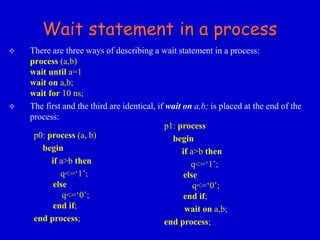
Wait statement in a process 
 There are three ways of describing a wait statement in a process: 
process (a,b) 
wait until a=1 
wait on a,b; 
wait for 10 ns; 
 The first and the third are identical, if wait on a,b; is placed at the end of the 
process: 
p0: process (a, b) 
begin 
if a>b then 
q<=‘1’; 
else 
q<=‘0’; 
end if; 
end process; 
p1: process 
begin 
if a>b then 
q<=‘1’; 
else 
q<=‘0’; 
end if; 
wait on a,b; 
end process;
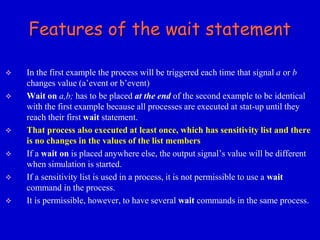
Features of the wait statement 
 In the first example the process will be triggered each time that signal a or b 
changes value (a’event or b’event) 
 Wait on a,b; has to be placed at the end of the second example to be identical 
with the first example because all processes are executed at stat-up until they 
reach their first wait statement. 
 That process also executed at least once, which has sensitivity list and there 
is no changes in the values of the list members 
 If a wait on is placed anywhere else, the output signal’s value will be different 
when simulation is started. 
 If a sensitivity list is used in a process, it is not permissible to use a wait 
command in the process. 
 It is permissible, however, to have several wait commands in the same process.
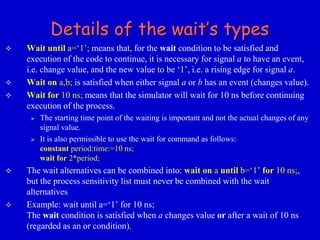
Details of the wait’s types 
 Wait until a=‘1’; means that, for the wait condition to be satisfied and 
execution of the code to continue, it is necessary for signal a to have an event, 
i.e. change value, and the new value to be ‘1’, i.e. a rising edge for signal a. 
 Wait on a,b; is satisfied when either signal a or b has an event (changes value). 
 Wait for 10 ns; means that the simulator will wait for 10 ns before continuing 
execution of the process. 
 The starting time point of the waiting is important and not the actual changes of any 
signal value. 
 It is also permissible to use the wait for command as follows: 
constant period:time:=10 ns; 
wait for 2*period; 
 The wait alternatives can be combined into: wait on a until b=‘1’ for 10 ns;, 
but the process sensitivity list must never be combined with the wait 
alternatives 
 Example: wait until a=‘1’ for 10 ns; 
The wait condition is satisfied when a changes value or after a wait of 10 ns 
(regarded as an or condition).
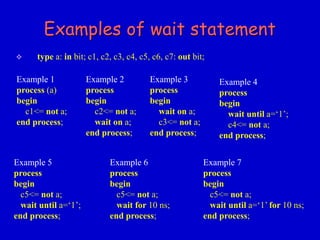
Examples of wait statement 
 type a: in bit; c1, c2, c3, c4, c5, c6, c7: out bit; 
Example 1 
process (a) 
begin 
c1<= not a; 
end process; 
Example 2 
process 
begin 
c2<= not a; 
wait on a; 
end process; 
Example 3 
process 
begin 
wait on a; 
c3<= not a; 
end process; 
Example 4 
process 
begin 
wait until a=‘1’; 
c4<= not a; 
end process; 
Example 5 
process 
begin 
c5<= not a; 
wait until a=‘1’; 
end process; 
Example 6 
process 
begin 
c5<= not a; 
wait for 10 ns; 
end process; 
Example 7 
process 
begin 
c5<= not a; 
wait until a=‘1’ for 10 ns; 
end process;
Simulation results 
10 20 30 40 50 60 time [ns] 
A 
C1 
C2 
C3 
C4 
C5 
C6 
10 ns 20 ns 
C7
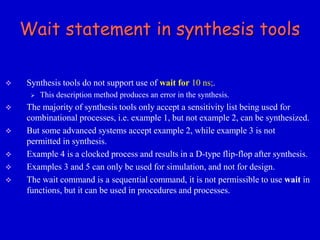
Wait statement in synthesis tools 
 Synthesis tools do not support use of wait for 10 ns;. 
 This description method produces an error in the synthesis. 
 The majority of synthesis tools only accept a sensitivity list being used for 
combinational processes, i.e. example 1, but not example 2, can be synthesized. 
 But some advanced systems accept example 2, while example 3 is not 
permitted in synthesis. 
 Example 4 is a clocked process and results in a D-type flip-flop after synthesis. 
 Examples 3 and 5 can only be used for simulation, and not for design. 
 The wait command is a sequential command, it is not permissible to use wait in 
functions, but it can be used in procedures and processes.
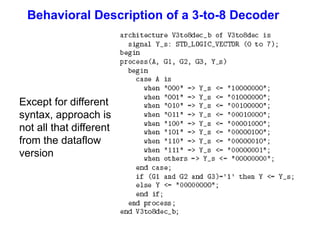
Behavioral Description of a 3-to-8 Decoder 
Except for different 
syntax, approach is 
not all that different 
from the dataflow 
version
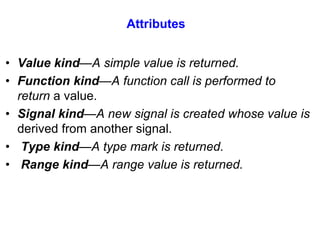
Attributes 
• Value kind—A simple value is returned. 
• Function kind—A function call is performed to 
return a value. 
• Signal kind—A new signal is created whose value is 
derived from another signal. 
• Type kind—A type mark is returned. 
• Range kind—A range value is returned.
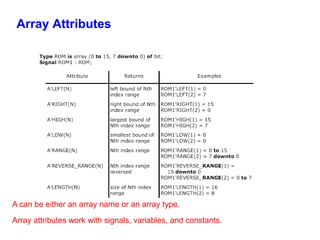
Array Attributes 
A can be either an array name or an array type. 
Array attributes work with signals, variables, and constants.
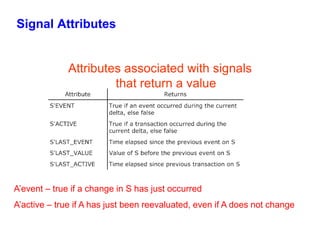
Signal Attributes 
Attributes associated with signals 
that return a value 
A’event – true if a change in S has just occurred 
A’active – true if A has just been reevaluated, even if A does not change
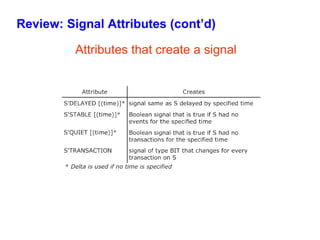
Review: Signal Attributes (cont’d) 
Attributes that create a signal
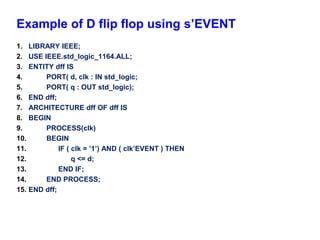
Example of D flip flop using s’EVENT 
1. LIBRARY IEEE; 
2. USE IEEE.std_logic_1164.ALL; 
3. ENTITY dff IS 
4. PORT( d, clk : IN std_logic; 
5. PORT( q : OUT std_logic); 
6. END dff; 
7. ARCHITECTURE dff OF dff IS 
8. BEGIN 
9. PROCESS(clk) 
10. BEGIN 
11. IF ( clk = ’1’) AND ( clk’EVENT ) THEN 
12. q <= d; 
13. END IF; 
14. END PROCESS; 
15. END dff;
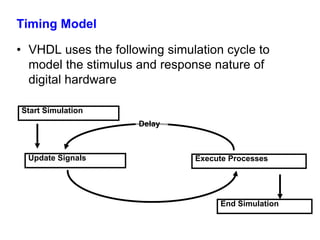
Timing Model 
• VHDL uses the following simulation cycle to 
model the stimulus and response nature of 
digital hardware 
Delay 
Start Simulation 
Update Signals Execute Processes 
End Simulation
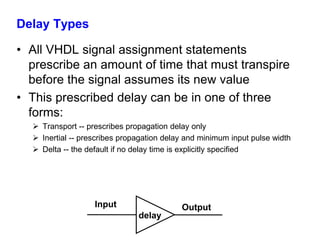
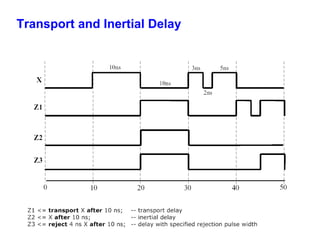
Delay Types 
• All VHDL signal assignment statements 
prescribe an amount of time that must transpire 
before the signal assumes its new value 
• This prescribed delay can be in one of three 
forms: 
 Transport -- prescribes propagation delay only 
 Inertial -- prescribes propagation delay and minimum input pulse width 
 Delta -- the default if no delay time is explicitly specified 
Input 
delay 
Output
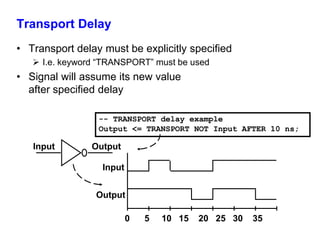
Transport Delay 
• Transport delay must be explicitly specified 
 I.e. keyword “TRANSPORT” must be used 
• Signal will assume its new value 
after specified delay 
-- TRANSPORT delay example 
Output <= TRANSPORT NOT Input AFTER 10 ns; 
Input Output 
0 5 10 15 20 25 30 35 
Input 
Output
Inertial Delay 
• Provides for specification propagation delay and input 
pulse width, i.e. ‘inertia’ of output: 
target <= [REJECT time_expression] INERTIAL waveform; 
• Inertial delay is default and REJECT is optional: 
Output <= NOT Input AFTER 10 ns; 
-- Propagation delay and minimum pulse width are 10ns 
Input 
Output 
0 5 10 15 20 25 30 35 
Input Output
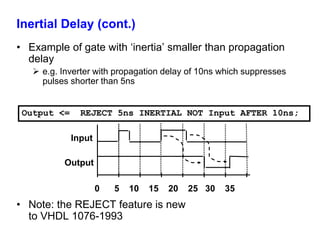
Inertial Delay (cont.) 
• Example of gate with ‘inertia’ smaller than propagation 
delay 
 e.g. Inverter with propagation delay of 10ns which suppresses 
pulses shorter than 5ns 
Output <= REJECT 5ns INERTIAL NOT Input AFTER 10ns; 
Input 
Output 
0 5 10 15 20 25 30 35 
• Note: the REJECT feature is new 
to VHDL 1076-1993
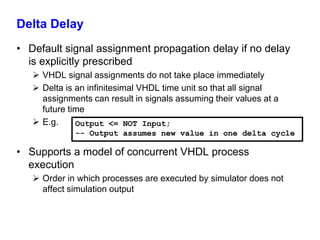
Delta Delay 
• Default signal assignment propagation delay if no delay 
is explicitly prescribed 
 VHDL signal assignments do not take place immediately 
 Delta is an infinitesimal VHDL time unit so that all signal 
assignments can result in signals assuming their values at a 
future time 
 E.g. 
Output <= NOT Input; 
-- Output assumes new value in one delta cycle 
• Supports a model of concurrent VHDL process 
execution 
 Order in which processes are executed by simulator does not 
affect simulation output
Transport and Inertial Delay
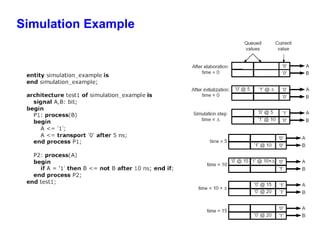
Simulation Example
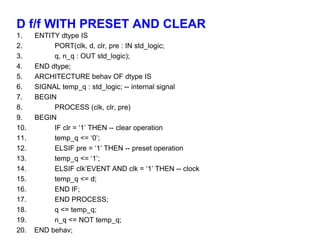
D f/f WITH PRESET AND CLEAR 
1. ENTITY dtype IS 
2. PORT(clk, d, clr, pre : IN std_logic; 
3. q, n_q : OUT std_logic); 
4. END dtype; 
5. ARCHITECTURE behav OF dtype IS 
6. SIGNAL temp_q : std_logic; -- internal signal 
7. BEGIN 
8. PROCESS (clk, clr, pre) 
9. BEGIN 
10. IF clr = ‘1’ THEN -- clear operation 
11. temp_q <= ‘0’; 
12. ELSIF pre = ‘1’ THEN -- preset operation 
13. temp_q <= ‘1’; 
14. ELSIF clk’EVENT AND clk = ‘1’ THEN -- clock 
15. temp_q <= d; 
16. END IF; 
17. END PROCESS; 
18. q <= temp_q; 
19. n_q <= NOT temp_q; 
20. END behav;

Behavioral modelling in VHDL

  • 1.
    EECL 309B VHDL Behavioral Modeling Spring 2014 Semester
  • 2.
    VHDL Design Styles VHDL Design Styles structural Components and interconnects dataflow Concurrent statements behavioral Sequential statements • Registers • Shift registers • Counters • State machines synthesizable
  • 3.
    Behavioral Design/Modelling •Functional performance is the goal of behavioral modeling • Timing optionally included in the model • Software engineering practices should be used to develop behavioral models • Sequential, inside a process • Just like a sequential program • The main character is ‘process(sensitivity list)’ 3
  • 4.
    Anatomy of aProcess • The process statement is a concurrent statement , which delineates a part of an architecture where sequential statements are executed. • Syntax [label:] process [(sensitivity list )] declarations begin sequential statements end process [label];
  • 5.
    PROCESS with aSENSITIVITY LIST • List of signals to which the process is sensitive. • Whenever there is an event on any of the signals in the sensitivity list, the process fires. • Every time the process fires, it will run in its entirety. • WAIT statements are NOT ALLOWED in a processes with SENSITIVITY LIST. label: process (sensitivity list) declaration part begin statement part end process;
  • 6.
    Concurrent VS sequential • Every statement inside the architecture body is executed concurrently, except statements enclosed by a process. • Process – Statements within a process are executed sequentially. Result is known when the whole process is complete. – You may treat a process as one concurrent statement in the architecture body. – Process(sensitivity list): when one or more signals in the sensitivity list change state, the process executes once. – Process should either have sensitivity list or an explicit wait statement. Both should not be present in the same process statement. 6
  • 7.
    Process contd.. •The order of execution of statements is the order in which the statements appear in the process • All the statements in the process are executed continuously in a loop . • The simulator runs a process when any one of the signals in the sensitivity list changes. • For a wait statement, the simulator executes the process after the wait is over.
  • 8.
    Example of Processwith/without wait process (clk,reset) begin if (reset = ‘1’) then A <= ‘0’; elsif (clk’event and clk = ‘1’) then A <= ‘B’; end if; end process; process begin if (reset = ‘1’) then A <= ‘0’ ; elsif (clk’event and clk = ‘1’) then A <= ‘B’; end if; wait on reset, clk; end process;
  • 9.
    Let’s Write aVHDL Model of Full Adder using Behavioral Modeling ENTITY full_adder IS PORT ( A, B, Cin : IN BIT; Sum, Cout : OUT BIT ); END full_adder; A B Cin Sum Cout
  • 10.
    Full Adder Architecture A B Cin Sum Cout 0 0 0 0 0 0 0 1 1 0 0 1 0 1 0 0 1 1 0 1 1 0 0 1 0 1 0 1 0 1 1 1 0 0 1 1 1 1 1 1 for Sum: Cin (I.e. Carry In): A B 0 1 0 0 0 1 0 1 1 0 1 1 0 1 1 0 1 0 for Cout (I.e. Carry Out): Cin (I.e. Carry In) A B 0 1 0 0 0 0 0 1 0 1 1 1 1 1 1 0 0 1
  • 11.
    Two Full AdderProcesses A B Cin Sum Cout Summation: PROCESS( A, B, Cin) BEGIN Sum <= A XOR B XOR Cin; END PROCESS Summation; Carry: PROCESS( A, B, Cin) BEGIN Cout <= (A AND B) OR (A AND Cin) OR (B AND Cin); END PROCESS Carry;
  • 12.
    Complete Architecture ARCHITECTUREexample OF full_adder IS -- Nothing needed in declarative block... BEGIN Summation: PROCESS( A, B, Cin) BEGIN Sum <= A XOR B XOR Cin; END PROCESS Summation; Carry: PROCESS( A, B, Cin) BEGIN Cout <= (A AND B) OR (A AND Cin) OR (B AND Cin); END PROCESS Carry; END example;
  • 13.
    VHDL Sequential Statements • Assignments executed sequentially in processes • Sequential statements – {Signal, variable} assignments – Flow control • IF <condition> THEN <statements> [ELSIF <statements] [ELSE <statements>] END IF; • FOR <range> LOOP <statements> END LOOP; • WHILE <condition> LOOP <statements> END LOOP; • CASE <condition> IS WHEN <value> => <statements> {WHEN <value> => <statements>} [WHEN others => <statements>] END CASE; – WAIT [ON <signal>] [UNTIL <expression>] [FOR <time>] ; – ASSERT <condition> [REPORT <string>] [SEVERITY <level>] ;
  • 14.
    The if statement • Syntax if condition1 then statements [elsif condition2 then statements] [else statements] end if; Priority • An if statement selects one or none of a sequence of events to execute . The choice depends on one or more conditions.
  • 15.
    The if statementcontd. if sel = ‘1’ then c <= a; else c <= b; end if; if (sel = “00”) then • If statements can be nested. o <= a; elsif sel = “01” then x <= b; elsif (color = red) then y <= c; else o <= d; end if; • If statement generates a priority structure • If corresponds to when else concurrent statement.
  • 16.
    Alternate Carry Process Carry: PROCESS( A, B, Cin) BEGIN IF ( A = ‘1’ AND B = ‘1’ ) THEN Cout <= ‘1’; ELSIF ( A = ‘1’ AND Cin = ‘1’ ) THEN Cout < = ‘1’; ELSIF ( B = ‘1’ AND Cin = ‘1’ ) THEN Cout <= ‘1’; ELSE Cout <= ‘0’; END IF; END PROCESS Carry;
  • 17.
    Priority Encoder clk • All signals which appear on the left of signal assignment statement (<=) are outputs e.g. y, z • All signals which appear on the right of signal assignment statement (<=) or in logic expressions are inputs e.g. w, a, b, c • All signals which appear in the sensitivity list are inputs e.g. clk • Note that not all inputs need to be included in the sensitivity list priority: PROCESS (clk) BEGIN IF w(3) = '1' THEN y <= "11" ; ELSIF w(2) = '1' THEN y <= "10" ; ELSIF w(1) = c THEN y <= a and b; ELSE z <= "00" ; END IF ; END PROCESS ; w a y z priorit y b c
  • 18.
    BEHAVIORAL ( Processesusing signals) Sig1 = 2 + 3 = 5 Sig2 = 1 Sig3 = 2 Sum = 1 + 2 + 3 = 6
  • 19.
    BEHAVIORAL ( Processesusing Variables) var1 = 2 + 3 = 5 var2 = 5 var3 = 5 Sum = 5 + 5 + 5 = 15
  • 20.
    Loop, While &For Statement  Syntax [label:] loop {sequential_statement} end loop [label];  Syntax [label:] while condition loop {sequential_statement} end loop [label];  Syntax [label:] for identifier in discrete_range loop {sequential_statement} end loop [label];
  • 21.
  • 22.
  • 23.
    WHILE LOOP :  Syntax : loop_label: while condition loop <sequence of statements> end loop loop_label  Statements are executed continuously as long as condition is true.  Has a Boolean Iteration Scheme.  Condition is evaluated before execution.
  • 24.
    Example: A squarewave generation
  • 25.
    The case statement- syntax case expression is when choice 1 => statements when choice 3 to 5 => statements when choice 8 downto 6 => statements when choice 9 | 13 | 17 => statements when others => statements end case;
  • 26.
    The case statement • The case statement selects, for execution one of a number of alternative sequences of statements . • Corresponds to with select in concurrent statements . • Case statement does not result in prioritized logic structure unlike the if statement.
  • 27.
    The case statementcontd. process(sel, a, b, c, d) begin case sel is when “00” => dout <= a; when “01” => dout <= b; when “10” => dout <= c; when “11” => dout <= d; when others => null; end case; end process; process (count) begin case count is when 0 => dout <= “00”; when 1 to 15 => dout <= “01”; when 16 to 255 => dout <= “10”; when others => null; end case; end process;
  • 28.
    Think Hardware! (Mutuallyexclusive conditions) myif_pro: process (s, c, d, e, f) begin if s = "00" then pout <= c; elsif s = "01" then pout <= d; elsif s = "10" then pout <= e; else pout <= f; end if; end process myif_pro; This priority is useful for timings.
  • 29.
    Think Hardware! Usea case for mutually exclusive things mycase_pro: process (s, c, d, e, f) begin case s is when "00" => pout <= c; when "01" => pout <= d; when "10" => pout <= e; when others => pout <= f; end if; C D E F S end process mycase_pro; POUT There is no priority with case.
  • 30.
    Use of others  All the choices in case statement must be enumerated  The choices must not overlap  If the case expression contains many values, the others is usable entity case_ex1 is port (a: in integer range 0 to 30; q: out integer range 0 to 6); end; architecture bhv of case_ex1 is begin p1: process(a) begin case a is when 0 => q<=3; when 1 | 2 => q<=2; when others => q<=0; end case; end process; end;
  • 31.
    Multiple assignment -examples  architecture rtl of case_ex8 is begin p1: process (a) begin case a is when “00” => q1<=“1”; q2<=‘0’; q3<=‘0’; when “10” => q1<=“0”; q2<=‘1’; q3<=‘1’; when others => q1<=“0”; q2<=‘0’; q3<=‘1’; end case; end process; end;  architecture rtl of case_ex9 is begin p1: process (a) begin q1<=“0”; q2<=‘0’; q3<=‘0’; case a is when “00” => q1<=“1”; when “10” => q2<=‘1’; q3<=‘1’; when others => q3<=‘1’; end case; end process; end;
  • 32.
    Null statement null_statement::= [ label : ] null ;  The null - statement explicitly prevents any action from being carried out.  This statement means “do nothing”.  This command can, for example, be used if default signal assignments have been used in a process and an alternative in the case statement must not change that value.
  • 33.
    Null statement -example  architecture rtl of ex is begin p1: process (a) begin q1<=“0”; q2<=‘0’; q3<=‘0’; case a is when “00” => q1<=“1”; when “10” => q2<=‘1’; q3<=‘1’; when others => null; end case; end process; end;
  • 34.
    Wait statement wait_statement::= [ label : ] wait [ sensitivity_clause ] [ condition_clause ] [ timeout_clause ] ;  Examples:  wait ;  The process is permanently interrupted.  wait for 5 ns ;  The process is interrupted for 5 ns.  wait on sig_1, sig_2 ;  The process is interrupted until the value of one of the two signals changes.  wait until clock = '1' ;  The process is interrupted until the value of clock is 1.
  • 35.
    Wait statement ina process  There are three ways of describing a wait statement in a process: process (a,b) wait until a=1 wait on a,b; wait for 10 ns;  The first and the third are identical, if wait on a,b; is placed at the end of the process: p0: process (a, b) begin if a>b then q<=‘1’; else q<=‘0’; end if; end process; p1: process begin if a>b then q<=‘1’; else q<=‘0’; end if; wait on a,b; end process;
  • 36.
    Features of thewait statement  In the first example the process will be triggered each time that signal a or b changes value (a’event or b’event)  Wait on a,b; has to be placed at the end of the second example to be identical with the first example because all processes are executed at stat-up until they reach their first wait statement.  That process also executed at least once, which has sensitivity list and there is no changes in the values of the list members  If a wait on is placed anywhere else, the output signal’s value will be different when simulation is started.  If a sensitivity list is used in a process, it is not permissible to use a wait command in the process.  It is permissible, however, to have several wait commands in the same process.
  • 37.
    Details of thewait’s types  Wait until a=‘1’; means that, for the wait condition to be satisfied and execution of the code to continue, it is necessary for signal a to have an event, i.e. change value, and the new value to be ‘1’, i.e. a rising edge for signal a.  Wait on a,b; is satisfied when either signal a or b has an event (changes value).  Wait for 10 ns; means that the simulator will wait for 10 ns before continuing execution of the process.  The starting time point of the waiting is important and not the actual changes of any signal value.  It is also permissible to use the wait for command as follows: constant period:time:=10 ns; wait for 2*period;  The wait alternatives can be combined into: wait on a until b=‘1’ for 10 ns;, but the process sensitivity list must never be combined with the wait alternatives  Example: wait until a=‘1’ for 10 ns; The wait condition is satisfied when a changes value or after a wait of 10 ns (regarded as an or condition).
  • 38.
    Examples of waitstatement  type a: in bit; c1, c2, c3, c4, c5, c6, c7: out bit; Example 1 process (a) begin c1<= not a; end process; Example 2 process begin c2<= not a; wait on a; end process; Example 3 process begin wait on a; c3<= not a; end process; Example 4 process begin wait until a=‘1’; c4<= not a; end process; Example 5 process begin c5<= not a; wait until a=‘1’; end process; Example 6 process begin c5<= not a; wait for 10 ns; end process; Example 7 process begin c5<= not a; wait until a=‘1’ for 10 ns; end process;
  • 39.
    Simulation results 1020 30 40 50 60 time [ns] A C1 C2 C3 C4 C5 C6 10 ns 20 ns C7
  • 40.
    Wait statement insynthesis tools  Synthesis tools do not support use of wait for 10 ns;.  This description method produces an error in the synthesis.  The majority of synthesis tools only accept a sensitivity list being used for combinational processes, i.e. example 1, but not example 2, can be synthesized.  But some advanced systems accept example 2, while example 3 is not permitted in synthesis.  Example 4 is a clocked process and results in a D-type flip-flop after synthesis.  Examples 3 and 5 can only be used for simulation, and not for design.  The wait command is a sequential command, it is not permissible to use wait in functions, but it can be used in procedures and processes.
  • 41.
    Behavioral Description ofa 3-to-8 Decoder Except for different syntax, approach is not all that different from the dataflow version
  • 42.
    Attributes • Valuekind—A simple value is returned. • Function kind—A function call is performed to return a value. • Signal kind—A new signal is created whose value is derived from another signal. • Type kind—A type mark is returned. • Range kind—A range value is returned.
  • 43.
    Array Attributes Acan be either an array name or an array type. Array attributes work with signals, variables, and constants.
  • 44.
    Signal Attributes Attributesassociated with signals that return a value A’event – true if a change in S has just occurred A’active – true if A has just been reevaluated, even if A does not change
  • 45.
    Review: Signal Attributes(cont’d) Attributes that create a signal
  • 46.
    Example of Dflip flop using s’EVENT 1. LIBRARY IEEE; 2. USE IEEE.std_logic_1164.ALL; 3. ENTITY dff IS 4. PORT( d, clk : IN std_logic; 5. PORT( q : OUT std_logic); 6. END dff; 7. ARCHITECTURE dff OF dff IS 8. BEGIN 9. PROCESS(clk) 10. BEGIN 11. IF ( clk = ’1’) AND ( clk’EVENT ) THEN 12. q <= d; 13. END IF; 14. END PROCESS; 15. END dff;
  • 47.
    Timing Model •VHDL uses the following simulation cycle to model the stimulus and response nature of digital hardware Delay Start Simulation Update Signals Execute Processes End Simulation
  • 48.
    Delay Types •All VHDL signal assignment statements prescribe an amount of time that must transpire before the signal assumes its new value • This prescribed delay can be in one of three forms:  Transport -- prescribes propagation delay only  Inertial -- prescribes propagation delay and minimum input pulse width  Delta -- the default if no delay time is explicitly specified Input delay Output
  • 49.
    Transport Delay •Transport delay must be explicitly specified  I.e. keyword “TRANSPORT” must be used • Signal will assume its new value after specified delay -- TRANSPORT delay example Output <= TRANSPORT NOT Input AFTER 10 ns; Input Output 0 5 10 15 20 25 30 35 Input Output
  • 50.
    Inertial Delay •Provides for specification propagation delay and input pulse width, i.e. ‘inertia’ of output: target <= [REJECT time_expression] INERTIAL waveform; • Inertial delay is default and REJECT is optional: Output <= NOT Input AFTER 10 ns; -- Propagation delay and minimum pulse width are 10ns Input Output 0 5 10 15 20 25 30 35 Input Output
  • 51.
    Inertial Delay (cont.) • Example of gate with ‘inertia’ smaller than propagation delay  e.g. Inverter with propagation delay of 10ns which suppresses pulses shorter than 5ns Output <= REJECT 5ns INERTIAL NOT Input AFTER 10ns; Input Output 0 5 10 15 20 25 30 35 • Note: the REJECT feature is new to VHDL 1076-1993
  • 52.
    Delta Delay •Default signal assignment propagation delay if no delay is explicitly prescribed  VHDL signal assignments do not take place immediately  Delta is an infinitesimal VHDL time unit so that all signal assignments can result in signals assuming their values at a future time  E.g. Output <= NOT Input; -- Output assumes new value in one delta cycle • Supports a model of concurrent VHDL process execution  Order in which processes are executed by simulator does not affect simulation output
  • 53.
  • 54.
  • 55.
    D f/f WITHPRESET AND CLEAR 1. ENTITY dtype IS 2. PORT(clk, d, clr, pre : IN std_logic; 3. q, n_q : OUT std_logic); 4. END dtype; 5. ARCHITECTURE behav OF dtype IS 6. SIGNAL temp_q : std_logic; -- internal signal 7. BEGIN 8. PROCESS (clk, clr, pre) 9. BEGIN 10. IF clr = ‘1’ THEN -- clear operation 11. temp_q <= ‘0’; 12. ELSIF pre = ‘1’ THEN -- preset operation 13. temp_q <= ‘1’; 14. ELSIF clk’EVENT AND clk = ‘1’ THEN -- clock 15. temp_q <= d; 16. END IF; 17. END PROCESS; 18. q <= temp_q; 19. n_q <= NOT temp_q; 20. END behav;