What is LINUX
Linux is a free Unix-type operating system originally created
by Linus Torvalds with the assistance of developers around
the world.
It originated in 1991 as a personal project of Linus Torvalds,
a Finnish graduate student.
The Kernel version 1.0 was released in 1994 and today the
most recent stable version is 2.6.9
Developed under the GNU General Public License , the
source code for Linux is freely available to everyone.
Introduction to Linux
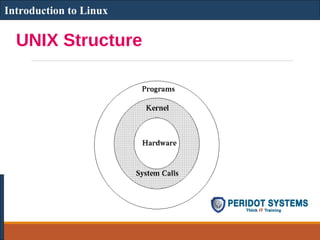
UNIX Structure
Introduction to Linux
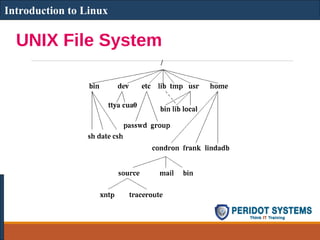
UNIX File System
Introduction to Linux
File System
The Unix file system looks like an inverted tree structure.
You start with the root directory, denoted by /, at the top
and work down through sub-directories underneath it.
Introduction to Linux
File System
Each node is either a file or a directory of files, where the
latter can contain other files and directories.
You specify a file or directory by its path name, either the
full, or absolute, path name or the one relative to a location.
The full path name starts with the root, /, and follows the
branches of the file system, each separated by /, until you
reach the desired file, e.g.:
/home/condron/source/xntp
Introduction to Linux
Thank you
More details visit the site:
www.thinkittraining.in
Thank you
More details visit the site:
www.thinkittraining.in

Introduction to Linux

  • 1.
    What is LINUX Linuxis a free Unix-type operating system originally created by Linus Torvalds with the assistance of developers around the world. It originated in 1991 as a personal project of Linus Torvalds, a Finnish graduate student. The Kernel version 1.0 was released in 1994 and today the most recent stable version is 2.6.9 Developed under the GNU General Public License , the source code for Linux is freely available to everyone. Introduction to Linux
  • 2.
  • 3.
  • 4.
    File System The Unixfile system looks like an inverted tree structure. You start with the root directory, denoted by /, at the top and work down through sub-directories underneath it. Introduction to Linux
  • 5.
    File System Each nodeis either a file or a directory of files, where the latter can contain other files and directories. You specify a file or directory by its path name, either the full, or absolute, path name or the one relative to a location. The full path name starts with the root, /, and follows the branches of the file system, each separated by /, until you reach the desired file, e.g.: /home/condron/source/xntp Introduction to Linux
  • 6.
    Thank you More detailsvisit the site: www.thinkittraining.in
  • 7.
    Thank you More detailsvisit the site: www.thinkittraining.in