MIS 760
DATA COMMUNICATIONS
Network Design
Introduction
 Issues in the design of a Local Area Network
(LAN):
 Needs analysis – What do the users need from
this network?
 Technological design – What devices are needed
to properly support the demands that will be put
on the network?
 Cost assessment – Can I afford it?!
Looking For Hardware?
 CDW:
 www.cdw.com
 Useful catalog of basic and professional grade
networking equipment
White’s LAN Example
 What type of system will interconnect
twenty workstations in one room and 15
workstations in another room to a central
server, which offers:
 Internal e-mail
 A database that contains all customer
information
 High quality printer access
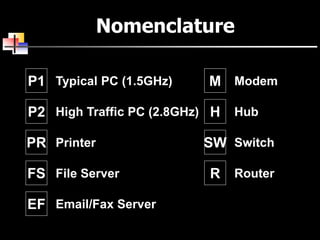
Nomenclature
P1 Typical PC (1.5GHz)
P2 High Traffic PC (2.8GHz)
PR Printer
FS File Server
EF Email/Fax Server
M Modem
H Hub
SW Switch
R Router
An easier way to draw (ALT I)
P1 P1SWSW
x16 x12
Technical
Services
Administrative
Services
Cat5e
Cat5e
Wiring
Closet
FO
FS
FO
Maintenance
Room
P1 P1PR PR
x4 x3
Cat5e
R
T1
An easier way to draw (ALT II)
P1 P1SWSW
x20 x15
Technical
Services
Administrative
Services
Cat5e Cat5eCat5e
DS
FO
Maintenance
Room
SW Cat5e
MS
FO
PR PR
x4 x2
Cat5e Cat5e
DSL
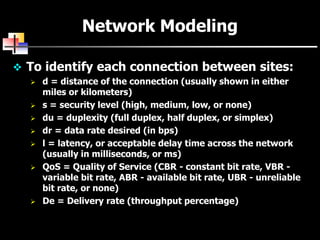
 To identify each connection between sites:
 d = distance of the connection (usually shown in either
miles or kilometers)
 s = security level (high, medium, low, or none)
 du = duplexity (full duplex, half duplex, or simplex)
 dr = data rate desired (in bps)
 l = latency, or acceptable delay time across the network
(usually in milliseconds, or ms)
 QoS = Quality of Service (CBR - constant bit rate, VBR -
variable bit rate, ABR - available bit rate, UBR - unreliable
bit rate, or none)
 De = Delivery rate (throughput percentage)
Network Modeling
Summary
 In order to construct a LAN, you must:
 Carry out a needs analysis, in order to develop a
technological design, and cost assessment
 You need to know the needs of the company before you
can design the LAN, but not every company can afford
the LAN they need!
 The designs should:
 Show the logical connection of users
 Show the support for traffic between nodes
(connectivity maps)
 Allow a technically-competent technician to install the
physical LAN layout
Design 1
Overview
 Designing a LAN for a small company
 Needs analysis
 Technology design
 Cost assessment
Design in threes
1. Cheapest alternative:
 Meets only the core requirements, but
cheap
2. Most likely:
 Meets critical requirements close to the
stated budget
3. Gold-plated
 Takes advantage of the best of available
products
Nomenclature
P1 Typical PC (1.5GHz)
P2 High Traffic PC (2.8GHz)
PR Printer
FS File Server
EF Email/Fax Server
M Modem
H Hub
SW Switch
R Router
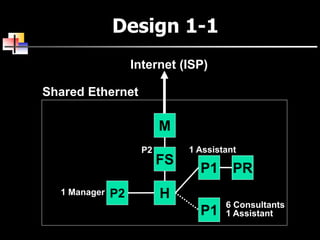
Design 1-1
H
FS
M
Internet (ISP)
Shared Ethernet
P2
P2
P1
P1
PR
6 Consultants
1 Assistant
1 Manager
1 Assistant
Design 1-2
SW
SW
Travel Consultants Management/Clerical
Internet (ISP)
M
FS
EF
P2
P1
P1PR P2
P2
P2 PR
1 Manager2 Assistant
6 Consultants
Design 1-3
R SWSW
Travel Consultants Management/Clerical
Internet (T1)
FS
EF
P2
PR
P2
P2
PR
FS
P2
PR
P2
P2
FO FO
6 Consultants
2 Assistants
Manager
2 Printers
Decision time!
 Which one will work?
 Which one works best?
 Which is best value for money?
 Therefore, which one would you
recommend?
Design 2
Overview
 Designing a LAN for a medium-sized
company
 Needs Analysis
 Technology Design
 Cost Assessment
Issues with multi-floor designs
 Can design top-down (backbone to
segments), or bottom-up (segments to
backbone). Will probably need:
 Backbone to connect the floors
 Wiring closet to store connection devices
 At least one Router
 A server farm in a secure room
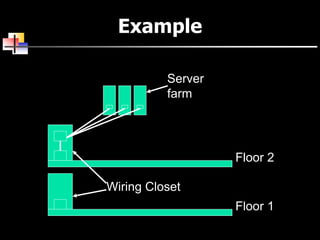
Example
Wiring Closet
Server
farm
Floor 2
Floor 1
Design in threes
 Cheapest alternative:
 Meets only the core requirements, but cheap
 Most likely:
 Meets critical requirements close to the stated
budget
 Gold-plated
 Takes advantage of the best of available products
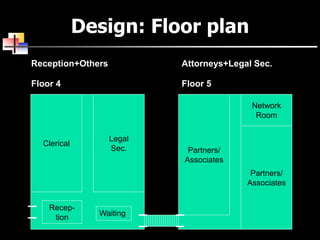
Design: Floor plan
Floor 4 Floor 5
Attorneys+Legal Sec.Reception+Others
Recep-
tion
Clerical
Legal
Sec. Partners/
Associates
Partners/
Associates
Network
Room
Waiting
Design: The segments
5th
4th4th Floor
Wiring Closet
5th Floor
Wiring Closet
Server
Farm
30 Attorneys
+ 10 Legal Sec.
10 Legal
Sec.
6 Clerical
+ Office Mgr
Design 1
5th
4th
R
P1
PR
SW
T1
FS EF
SW
P1
PR
10 Legal Sec.
6 Clerical
1 Mgr.
24 port
48 port
X3
20 Attorneys
10 Legal Sec.
P2
Design 2: 4th Floor
SW
5th Floor
SW
P1
PR 6 Clerical
1 Mgr.
SW
P1
PR
10 Legal Sec.
8 port
16 port
8 port
X2
X5
X7
Design 2: 5th Floor
R
4th Floor
T1
SW
SW
16 port
FS EF
8 port
P2
X5
8 port
SW PR
20 Attorneys
X4
SW
P1
PR
10 Legal Sec.
8 port
X2
P2
X5
Design 3: 4th Floor
R
5th Floor
SW
P2
PR
6 Clerical
SW
P2
PR
10 Legal Sec.
8 port
16 port
8 port
X2
X6
X5
P2 PR Mgr.
X2
FO
FOFO
Design 3: 5th Floor
R
4th Floor
DSL
SW
SW
16 port
EFFS
8 port
LC
X5
8 port
SW PR
20 Attorneys
X4
SW P2
10 Legal Sec.8 port
X2
P2
PR
X5
AP
FO
FO
FO
Decision time!
 Which one will work?
 Which one works best?
 Which is best value for money?
 Therefore, which one would you
recommend?
Part 3
Cost Assessment
Costs
 Can be radically different depending on the
actual devices to be used (hubs, switches,
etc., etc.)
Summary
 For a medium-sized company LAN:
 Extra issues in the size of the network and the
fact that it is split across two floors
 Will need a backbone connecting the floors, and a
secure room to house the server “farm”
 Most traffic will be concentrated on the Legal
Secretaries

Network design 1

  • 1.
  • 2.
    Introduction  Issues inthe design of a Local Area Network (LAN):  Needs analysis – What do the users need from this network?  Technological design – What devices are needed to properly support the demands that will be put on the network?  Cost assessment – Can I afford it?!
  • 3.
    Looking For Hardware? CDW:  www.cdw.com  Useful catalog of basic and professional grade networking equipment
  • 4.
    White’s LAN Example What type of system will interconnect twenty workstations in one room and 15 workstations in another room to a central server, which offers:  Internal e-mail  A database that contains all customer information  High quality printer access
  • 8.
    Nomenclature P1 Typical PC(1.5GHz) P2 High Traffic PC (2.8GHz) PR Printer FS File Server EF Email/Fax Server M Modem H Hub SW Switch R Router
  • 9.
    An easier wayto draw (ALT I) P1 P1SWSW x16 x12 Technical Services Administrative Services Cat5e Cat5e Wiring Closet FO FS FO Maintenance Room P1 P1PR PR x4 x3 Cat5e R T1
  • 10.
    An easier wayto draw (ALT II) P1 P1SWSW x20 x15 Technical Services Administrative Services Cat5e Cat5eCat5e DS FO Maintenance Room SW Cat5e MS FO PR PR x4 x2 Cat5e Cat5e DSL
  • 11.
     To identifyeach connection between sites:  d = distance of the connection (usually shown in either miles or kilometers)  s = security level (high, medium, low, or none)  du = duplexity (full duplex, half duplex, or simplex)  dr = data rate desired (in bps)  l = latency, or acceptable delay time across the network (usually in milliseconds, or ms)  QoS = Quality of Service (CBR - constant bit rate, VBR - variable bit rate, ABR - available bit rate, UBR - unreliable bit rate, or none)  De = Delivery rate (throughput percentage) Network Modeling
  • 13.
    Summary  In orderto construct a LAN, you must:  Carry out a needs analysis, in order to develop a technological design, and cost assessment  You need to know the needs of the company before you can design the LAN, but not every company can afford the LAN they need!  The designs should:  Show the logical connection of users  Show the support for traffic between nodes (connectivity maps)  Allow a technically-competent technician to install the physical LAN layout
  • 14.
  • 15.
    Overview  Designing aLAN for a small company  Needs analysis  Technology design  Cost assessment
  • 16.
    Design in threes 1.Cheapest alternative:  Meets only the core requirements, but cheap 2. Most likely:  Meets critical requirements close to the stated budget 3. Gold-plated  Takes advantage of the best of available products
  • 17.
    Nomenclature P1 Typical PC(1.5GHz) P2 High Traffic PC (2.8GHz) PR Printer FS File Server EF Email/Fax Server M Modem H Hub SW Switch R Router
  • 18.
    Design 1-1 H FS M Internet (ISP) SharedEthernet P2 P2 P1 P1 PR 6 Consultants 1 Assistant 1 Manager 1 Assistant
  • 19.
    Design 1-2 SW SW Travel ConsultantsManagement/Clerical Internet (ISP) M FS EF P2 P1 P1PR P2 P2 P2 PR 1 Manager2 Assistant 6 Consultants
  • 20.
    Design 1-3 R SWSW TravelConsultants Management/Clerical Internet (T1) FS EF P2 PR P2 P2 PR FS P2 PR P2 P2 FO FO 6 Consultants 2 Assistants Manager 2 Printers
  • 21.
    Decision time!  Whichone will work?  Which one works best?  Which is best value for money?  Therefore, which one would you recommend?
  • 22.
  • 23.
    Overview  Designing aLAN for a medium-sized company  Needs Analysis  Technology Design  Cost Assessment
  • 24.
    Issues with multi-floordesigns  Can design top-down (backbone to segments), or bottom-up (segments to backbone). Will probably need:  Backbone to connect the floors  Wiring closet to store connection devices  At least one Router  A server farm in a secure room
  • 25.
  • 26.
    Design in threes Cheapest alternative:  Meets only the core requirements, but cheap  Most likely:  Meets critical requirements close to the stated budget  Gold-plated  Takes advantage of the best of available products
  • 27.
    Design: Floor plan Floor4 Floor 5 Attorneys+Legal Sec.Reception+Others Recep- tion Clerical Legal Sec. Partners/ Associates Partners/ Associates Network Room Waiting
  • 28.
    Design: The segments 5th 4th4thFloor Wiring Closet 5th Floor Wiring Closet Server Farm 30 Attorneys + 10 Legal Sec. 10 Legal Sec. 6 Clerical + Office Mgr
  • 29.
    Design 1 5th 4th R P1 PR SW T1 FS EF SW P1 PR 10Legal Sec. 6 Clerical 1 Mgr. 24 port 48 port X3 20 Attorneys 10 Legal Sec. P2
  • 30.
    Design 2: 4thFloor SW 5th Floor SW P1 PR 6 Clerical 1 Mgr. SW P1 PR 10 Legal Sec. 8 port 16 port 8 port X2 X5 X7
  • 31.
    Design 2: 5thFloor R 4th Floor T1 SW SW 16 port FS EF 8 port P2 X5 8 port SW PR 20 Attorneys X4 SW P1 PR 10 Legal Sec. 8 port X2 P2 X5
  • 32.
    Design 3: 4thFloor R 5th Floor SW P2 PR 6 Clerical SW P2 PR 10 Legal Sec. 8 port 16 port 8 port X2 X6 X5 P2 PR Mgr. X2 FO FOFO
  • 33.
    Design 3: 5thFloor R 4th Floor DSL SW SW 16 port EFFS 8 port LC X5 8 port SW PR 20 Attorneys X4 SW P2 10 Legal Sec.8 port X2 P2 PR X5 AP FO FO FO
  • 34.
    Decision time!  Whichone will work?  Which one works best?  Which is best value for money?  Therefore, which one would you recommend?
  • 35.
  • 36.
    Costs  Can beradically different depending on the actual devices to be used (hubs, switches, etc., etc.)
  • 37.
    Summary  For amedium-sized company LAN:  Extra issues in the size of the network and the fact that it is split across two floors  Will need a backbone connecting the floors, and a secure room to house the server “farm”  Most traffic will be concentrated on the Legal Secretaries