Basics of File
 Handling
  Name-Pinkpreet Kaur
      Section-N1
    Roll no.-115329
Contents of presentation
 Using input/output files
 General files I/O steps
 Using input/output files
 Streams
 Predifined console streams
 File modes
 File pointers
 Binary file operations
Using Input/Output Files
 Files in C++ are interpreted as a sequence of bytes stored on
    some storage media.
   The data of a file is stored in either readable form or in binary
    code called as text file or binary file.
   The flow of data from any source to a sink is called as a stream
   Computer programs are associated to work with files as it helps
    in storing data & information permanently.
   File - itself a bunch of bytes stored on some storage devices.
   In C++ this is achieved through a component header file called
    fstream.h
   The I/O library manages two aspects- as interface and for
    transfer of data.
   The library predefine a set of operations for all file related
    handling through certain classes.
Using Input/Output Files
A computer file
   is stored on a secondary storage device
    (e.g., disk);
   is permanent;
   can be used to provide input data to a
    program or receive output data from a
    program, or both;
   must be opened before it is used.
General File I/O Steps
 Declare a file name variable
 Associate the file name variable with the   disk
  file name
 Open the file
 Use the file
 Close the file
Using Input/Output Files
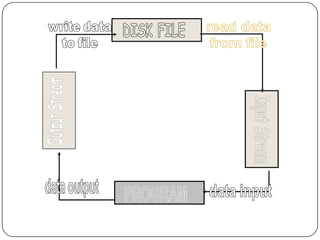
 Streams act as an interface between files and programs. In C++ .
    A stream is used to refer to the flow of data from a particular
    device to the program’s variablesThe device here refers to files,
    keyboard, console, memory arrays. In C++ these streams are
    treated as objects to support consistent access interface.
   They represent as a sequence of bytes and deals with the flow of
    data.
   Every stream is associated with a class having member
    functions and operations for a particular kind of data flow.
   File -> Program ( Input stream) - reads
   Program -> File (Output stream) – write

 All designed into fstream.h and hence needs to be included in all
  file handling programs.
 Diagrammatically as shown in next slide
Using Input/Output Files
         stream - a sequence of characters
            interactive (iostream)
               cin - input stream associated with keyboard.
               cout - output stream associated with display.
            file (fstream)
               ifstream - defines new input stream (normally associated
                 with a file).
               ofstream - defines new output stream (normally associated
                 with a file).


• Stream of bytes to do input and output to different devices.
• Stream is the basic concepts which can be attached to files, strings, console
and other devices.
• User can also create their own stream to cater specific device or user defined
Streams
 A stream is a series of bytes, which act either as a
  source from which data can be extracted or as a
  destination to which the output can be sent. Streams
  resemble the producer and consumer model
 The producer produces the items to be consumed by
  the consumer. The producer and the consumers are
  connected by the C++ operators >> or <<. For
  instance , the keyboard exhibits the nature of only a
  producer,printer or monitor screen exhibit the nature
  of only a consumer. Whereas , a file stored on the
  disk , can behave as a producer or consumer,
  depending upon the operation initiated on it.
Predefined console streams
C++ contains several predefined streams that are
    opened automatically when the execution of a
    program starts.
1) cin :standard input (usually keyboard) corresponding
    to stdio in C
2) cout :standard output (usually screen) corresponding
    to stdout in C
3) cerr :standard error output (usually screen)
    corresponding to stderr in C
4) clog : A fully buffered version of cerr (No C equivalent)
Why to use Files
 Convenient way to deal large quantities of
    data.
   Store data permanently (until file is deleted).
   Avoid typing data into program multiple times.
   Share data between programs.
   We need to know:
       how to "connect" file to program
       how to tell the program to read data
       how to tell the program to write data
       error checking and handling EOF
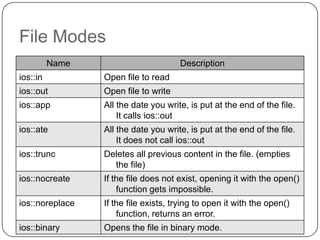
File Modes
          Name                        Description
ios::in          Open file to read
ios::out         Open file to write
ios::app         All the date you write, is put at the end of the file.
                     It calls ios::out
ios::ate         All the date you write, is put at the end of the file.
                     It does not call ios::out
ios::trunc       Deletes all previous content in the file. (empties
                   the file)
ios::nocreate    If the file does not exist, opening it with the open()
                     function gets impossible.
ios::noreplace   If the file exists, trying to open it with the open()
                     function, returns an error.
ios::binary      Opens the file in binary mode.
File Modes
 Opening a file in ios::out mode also opens it in the
  ios::trunc mode by default. That is, if the file already
  exists, it is truncated
 Both ios::app and ios::ate set the pointers to the end
  of file, but they differ in terms of the types of
  operations permitted on a file. The ios::app allows to
  add data from end of file, whereas ios::ate mode
  allows to add or modify the existing data anywhere in
  the file. In both the cases the file is created if it is non
  existent.
 The mode ios::app can be used only with output files
 The stream classes ifstream and ofstream open files
  in read and write modes by default.
File pointers
 Each file has two associated pointers known as the file pointers.

  One of them is called the input pointer or get pointer.
  The get pointer specifies a location from which the current reading
  operation is initiated
  Other is called the output pointer or put pointer.
  The put pointer specifies a location from where the current writing
  operation is initiated
  We can use these pointers to move through the files while reading or
  writing.
  The input pointer is used for reading the contents of a given file
  location and the output pointer is used for writing to a given file
  location.
  Functions for manipulation of file pointers
  seekg() Moves get pointer (input) to a specified location.
  seekp() Moves put pointer (output) to a specified location.
  tellg() Gives the current position of the get pointer.
  tellp() Gives the current position of the put pointer.
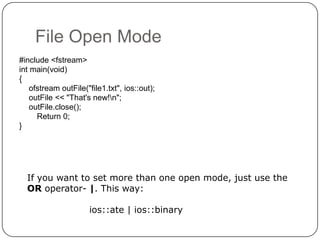
File Open Mode
#include <fstream>
int main(void)
{
    ofstream outFile("file1.txt", ios::out);
    outFile << "That's new!n";
    outFile.close();
      Return 0;
}


  If you want to set more than one open mode, just use the
  OR operator- |. This way:

                      ios::ate | ios::binary
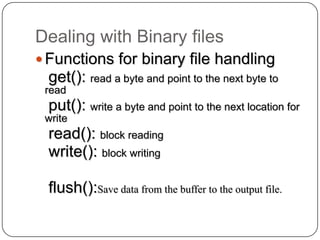
Dealing with Binary files
 Functions for binary file handling
 get(): read a byte and point to the next byte to
 read
 put(): write a byte and point to the next location for
 write
 read(): block reading
 write(): block writing

 flush():Save data from the buffer to the output file.
Reading /Writing from/to Textual Files

                                              #include <fstream.h>
To write:                                        main()
    put() – writing single character             {
    << operator – writing an object                     // Writing to file
                                                        ofstream OutFile("my_file.txt");
To read:
                                                        OutFile<<"Hello "<<5<<endl;
    get() – reading a single character of a             OutFile.close();
    buffer
    getline() – reading a single line                  int number;
    >> operator – reading a object                     char dummy[15];


                                                // Reading from file
                                                       ifstream InFile("my_file.txt");
                                                       InFile>>dummy>>number;


                                                InFile.seekg(0);

                                                InFile.getline(dummy,sizeof(dummy));
                                                       InFile.close();
                                                }
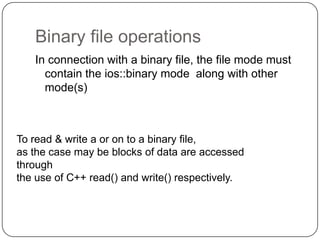
Binary file operations
   In connection with a binary file, the file mode must
     contain the ios::binary mode along with other
     mode(s)


To read & write a or on to a binary file,
as the case may be blocks of data are accessed
through
the use of C++ read() and write() respectively.
Handling binary data

#include <fstream>
using namespace std;

int main(){

ifstream in(“binfile.dat”);
ofstream out(“out.dat”);
if(!in || !out) { // return}
unsigned int buf[1024];
while(!in){
    in.read(buf, sizeof(unsigned
int)*1024);
    out.write(buf, sizeof(unsigned
int)*1024);
}
THANKS

Basics of file handling

  • 1.
    Basics of File Handling Name-Pinkpreet Kaur Section-N1 Roll no.-115329
  • 2.
    Contents of presentation Using input/output files  General files I/O steps  Using input/output files  Streams  Predifined console streams  File modes  File pointers  Binary file operations
  • 3.
    Using Input/Output Files Files in C++ are interpreted as a sequence of bytes stored on some storage media.  The data of a file is stored in either readable form or in binary code called as text file or binary file.  The flow of data from any source to a sink is called as a stream  Computer programs are associated to work with files as it helps in storing data & information permanently.  File - itself a bunch of bytes stored on some storage devices.  In C++ this is achieved through a component header file called fstream.h  The I/O library manages two aspects- as interface and for transfer of data.  The library predefine a set of operations for all file related handling through certain classes.
  • 4.
    Using Input/Output Files Acomputer file  is stored on a secondary storage device (e.g., disk);  is permanent;  can be used to provide input data to a program or receive output data from a program, or both;  must be opened before it is used.
  • 5.
    General File I/OSteps  Declare a file name variable  Associate the file name variable with the disk file name  Open the file  Use the file  Close the file
  • 6.
    Using Input/Output Files Streams act as an interface between files and programs. In C++ . A stream is used to refer to the flow of data from a particular device to the program’s variablesThe device here refers to files, keyboard, console, memory arrays. In C++ these streams are treated as objects to support consistent access interface.  They represent as a sequence of bytes and deals with the flow of data.  Every stream is associated with a class having member functions and operations for a particular kind of data flow.  File -> Program ( Input stream) - reads  Program -> File (Output stream) – write  All designed into fstream.h and hence needs to be included in all file handling programs.  Diagrammatically as shown in next slide
  • 8.
    Using Input/Output Files  stream - a sequence of characters  interactive (iostream)  cin - input stream associated with keyboard.  cout - output stream associated with display.  file (fstream)  ifstream - defines new input stream (normally associated with a file).  ofstream - defines new output stream (normally associated with a file). • Stream of bytes to do input and output to different devices. • Stream is the basic concepts which can be attached to files, strings, console and other devices. • User can also create their own stream to cater specific device or user defined
  • 9.
    Streams  A streamis a series of bytes, which act either as a source from which data can be extracted or as a destination to which the output can be sent. Streams resemble the producer and consumer model  The producer produces the items to be consumed by the consumer. The producer and the consumers are connected by the C++ operators >> or <<. For instance , the keyboard exhibits the nature of only a producer,printer or monitor screen exhibit the nature of only a consumer. Whereas , a file stored on the disk , can behave as a producer or consumer, depending upon the operation initiated on it.
  • 10.
    Predefined console streams C++contains several predefined streams that are opened automatically when the execution of a program starts. 1) cin :standard input (usually keyboard) corresponding to stdio in C 2) cout :standard output (usually screen) corresponding to stdout in C 3) cerr :standard error output (usually screen) corresponding to stderr in C 4) clog : A fully buffered version of cerr (No C equivalent)
  • 11.
    Why to useFiles  Convenient way to deal large quantities of data.  Store data permanently (until file is deleted).  Avoid typing data into program multiple times.  Share data between programs.  We need to know:  how to "connect" file to program  how to tell the program to read data  how to tell the program to write data  error checking and handling EOF
  • 12.
    File Modes Name Description ios::in Open file to read ios::out Open file to write ios::app All the date you write, is put at the end of the file. It calls ios::out ios::ate All the date you write, is put at the end of the file. It does not call ios::out ios::trunc Deletes all previous content in the file. (empties the file) ios::nocreate If the file does not exist, opening it with the open() function gets impossible. ios::noreplace If the file exists, trying to open it with the open() function, returns an error. ios::binary Opens the file in binary mode.
  • 13.
    File Modes  Openinga file in ios::out mode also opens it in the ios::trunc mode by default. That is, if the file already exists, it is truncated  Both ios::app and ios::ate set the pointers to the end of file, but they differ in terms of the types of operations permitted on a file. The ios::app allows to add data from end of file, whereas ios::ate mode allows to add or modify the existing data anywhere in the file. In both the cases the file is created if it is non existent.  The mode ios::app can be used only with output files  The stream classes ifstream and ofstream open files in read and write modes by default.
  • 14.
    File pointers  Eachfile has two associated pointers known as the file pointers. One of them is called the input pointer or get pointer. The get pointer specifies a location from which the current reading operation is initiated Other is called the output pointer or put pointer. The put pointer specifies a location from where the current writing operation is initiated We can use these pointers to move through the files while reading or writing. The input pointer is used for reading the contents of a given file location and the output pointer is used for writing to a given file location. Functions for manipulation of file pointers seekg() Moves get pointer (input) to a specified location. seekp() Moves put pointer (output) to a specified location. tellg() Gives the current position of the get pointer. tellp() Gives the current position of the put pointer.
  • 15.
    File Open Mode #include<fstream> int main(void) { ofstream outFile("file1.txt", ios::out); outFile << "That's new!n"; outFile.close(); Return 0; } If you want to set more than one open mode, just use the OR operator- |. This way: ios::ate | ios::binary
  • 16.
    Dealing with Binaryfiles  Functions for binary file handling get(): read a byte and point to the next byte to read put(): write a byte and point to the next location for write read(): block reading write(): block writing flush():Save data from the buffer to the output file.
  • 17.
    Reading /Writing from/toTextual Files #include <fstream.h> To write: main() put() – writing single character { << operator – writing an object // Writing to file ofstream OutFile("my_file.txt"); To read: OutFile<<"Hello "<<5<<endl; get() – reading a single character of a OutFile.close(); buffer getline() – reading a single line int number; >> operator – reading a object char dummy[15]; // Reading from file ifstream InFile("my_file.txt"); InFile>>dummy>>number; InFile.seekg(0); InFile.getline(dummy,sizeof(dummy)); InFile.close(); }
  • 18.
    Binary file operations In connection with a binary file, the file mode must contain the ios::binary mode along with other mode(s) To read & write a or on to a binary file, as the case may be blocks of data are accessed through the use of C++ read() and write() respectively.
  • 19.
    Handling binary data #include<fstream> using namespace std; int main(){ ifstream in(“binfile.dat”); ofstream out(“out.dat”); if(!in || !out) { // return} unsigned int buf[1024]; while(!in){ in.read(buf, sizeof(unsigned int)*1024); out.write(buf, sizeof(unsigned int)*1024); }
  • 20.