.
FILES IN C++
TITLES:
• Use of header file fstream.h
• Types of stream objects
• Open() and close() functions
• File mode constants
• Reading and writing characters from to disk
• Reading and writing objects from to disk
FILE STREAM:
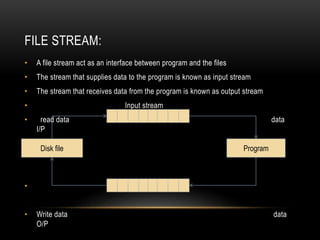
• A file stream act as an interface between program and the files
• The stream that supplies data to the program is known as input stream
• The stream that receives data from the program is known as output stream
• Input stream
• read data data
I/P
• Output stream
• Write data data
O/P
ProgramDisk file
CLASSES FOR FILE STREAM OPERATIONS:
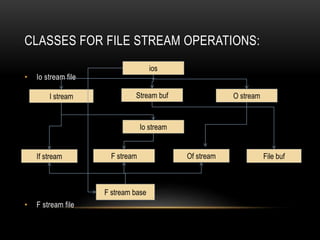
• Io stream file
• F stream file
ios
Stream buf O streamI stream
Io stream
If stream F stream Of stream File buf
F stream base
USING F STREAM.H:
• A stream is a sequence of bytes.
• It is general name given to a flow of data.
• Different streams are used to represent different kinds of data flow.
• ifstream class represents input disk files.
• Ofstream class represents output disk files.
• Fstream for both input and output
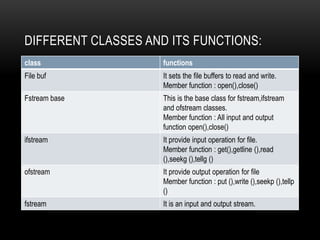
DIFFERENT CLASSES AND ITS FUNCTIONS:
class functions
File buf It sets the file buffers to read and write.
Member function : open(),close()
Fstream base This is the base class for fstream,ifstream
and ofstream classes.
Member function : All input and output
function open(),close()
ifstream It provide input operation for file.
Member function : get(),getline (),read
(),seekg (),tellg ()
ofstream It provide output operation for file
Member function : put (),write (),seekp (),tellp
()
fstream It is an input and output stream.
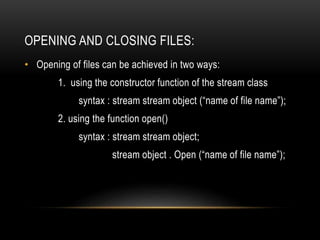
OPENING AND CLOSING FILES:
• Opening of files can be achieved in two ways:
1. using the constructor function of the stream class
syntax : stream stream object (“name of file name”);
2. using the function open()
syntax : stream stream object;
stream object . Open (“name of file name”);
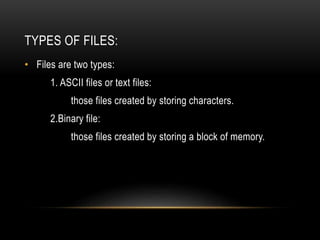
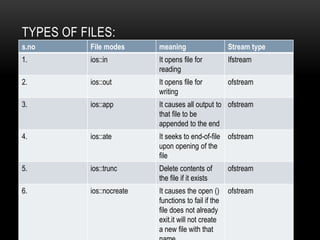
TYPES OF FILES:
• Files are two types:
1. ASCII files or text files:
those files created by storing characters.
2.Binary file:
those files created by storing a block of memory.
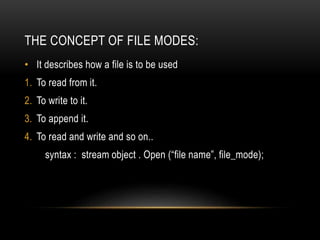
THE CONCEPT OF FILE MODES:
• It describes how a file is to be used
1. To read from it.
2. To write to it.
3. To append it.
4. To read and write and so on..
syntax : stream object . Open (“file name”, file_mode);
TYPES OF FILES:
s.no File modes meaning Stream type
1. ios::in It opens file for
reading
Ifstream
2. ios::out It opens file for
writing
ofstream
3. ios::app It causes all output to
that file to be
appended to the end
ofstream
4. ios::ate It seeks to end-of-file
upon opening of the
file
ofstream
5. ios::trunc Delete contents of
the file if it exists
ofstream
6. ios::nocreate It causes the open ()
functions to fail if the
file does not already
exit.it will not create
a new file with that
ofstream
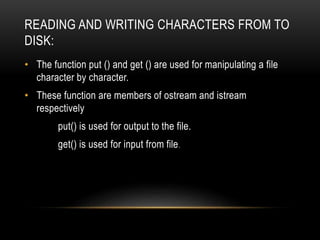
READING AND WRITING CHARACTERS FROM TO
DISK:
• The function put () and get () are used for manipulating a file
character by character.
• These function are members of ostream and istream
respectively
put() is used for output to the file.
get() is used for input from file.
#include <fstream.h>
Void main()
{
char ch;
ifstream infile (“out.txt”);
while (infile)
{
infile.get (ch);
cout << ch;
}
infile . Close();l
}
#include <fstream.h>
void main()
{
ofstream outfile (“out.txt”);
char str[]=“This is a text file”;
int i=0;
while (str[i])
outfile.put (str [i++]);
outfile.close ();
}
EXAMPLE PROGRAMS:
To create a file using put() To read a file using get()
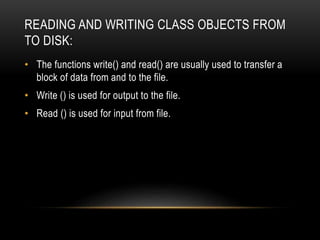
READING AND WRITING CLASS OBJECTS FROM
TO DISK:
• The functions write() and read() are usually used to transfer a
block of data from and to the file.
• Write () is used for output to the file.
• Read () is used for input from file.
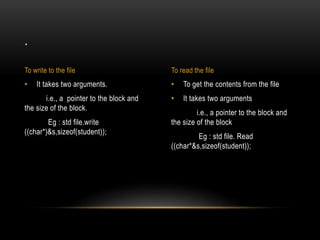
• To get the contents from the file
• It takes two arguments
i.e., a pointer to the block and
the size of the block
Eg : std file. Read
((char*&s,sizeof(student));
• It takes two arguments.
i.e., a pointer to the block and
the size of the block.
Eg : std file.write
((char*)&s,sizeof(student));
.
To write to the file To read the file
PROGRAM TO CREATE A STUDENT FILE:
#include<fstream.h>
Class student
{
private :
int regno,mark;
char name [20];
public :
void getdata ();
};
void student :: getdata ()
{
cout <<“n enter reg.number :”;
cin >> reg no;
cout <<“n enter name of students”;
gets (name);
cout <<“nenter marks:”;
cin >> marksw;
}
.
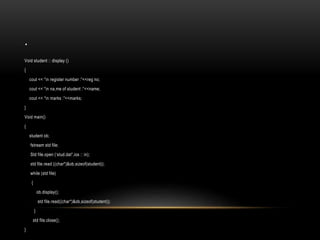
Void student :: display ()
{
cout << “n register number :”<<reg no;
cout << “n na,me of student :”<<name;
cout << “n marks :”<<marks;
}
Void main()
{
student ob;
fstream std file;
Std file.open (‘stud.dat”,ios :: in);
std file.read ((char*)&ob,sizeof(student));
while (std file)
{
ob.display();
std file.read((char*)&ob,sizeof(student));
}
std file.close();
}
OUTPUT:
• Open for reading only
• I/P POINTER
• Open for writing only
• O/P POINTER
• Open for append mode
H A I
H A I

Files in c++

  • 1.
  • 2.
    TITLES: • Use ofheader file fstream.h • Types of stream objects • Open() and close() functions • File mode constants • Reading and writing characters from to disk • Reading and writing objects from to disk
  • 3.
    FILE STREAM: • Afile stream act as an interface between program and the files • The stream that supplies data to the program is known as input stream • The stream that receives data from the program is known as output stream • Input stream • read data data I/P • Output stream • Write data data O/P ProgramDisk file
  • 4.
    CLASSES FOR FILESTREAM OPERATIONS: • Io stream file • F stream file ios Stream buf O streamI stream Io stream If stream F stream Of stream File buf F stream base
  • 5.
    USING F STREAM.H: •A stream is a sequence of bytes. • It is general name given to a flow of data. • Different streams are used to represent different kinds of data flow. • ifstream class represents input disk files. • Ofstream class represents output disk files. • Fstream for both input and output
  • 6.
    DIFFERENT CLASSES ANDITS FUNCTIONS: class functions File buf It sets the file buffers to read and write. Member function : open(),close() Fstream base This is the base class for fstream,ifstream and ofstream classes. Member function : All input and output function open(),close() ifstream It provide input operation for file. Member function : get(),getline (),read (),seekg (),tellg () ofstream It provide output operation for file Member function : put (),write (),seekp (),tellp () fstream It is an input and output stream.
  • 7.
    OPENING AND CLOSINGFILES: • Opening of files can be achieved in two ways: 1. using the constructor function of the stream class syntax : stream stream object (“name of file name”); 2. using the function open() syntax : stream stream object; stream object . Open (“name of file name”);
  • 8.
    TYPES OF FILES: •Files are two types: 1. ASCII files or text files: those files created by storing characters. 2.Binary file: those files created by storing a block of memory.
  • 9.
    THE CONCEPT OFFILE MODES: • It describes how a file is to be used 1. To read from it. 2. To write to it. 3. To append it. 4. To read and write and so on.. syntax : stream object . Open (“file name”, file_mode);
  • 10.
    TYPES OF FILES: s.noFile modes meaning Stream type 1. ios::in It opens file for reading Ifstream 2. ios::out It opens file for writing ofstream 3. ios::app It causes all output to that file to be appended to the end ofstream 4. ios::ate It seeks to end-of-file upon opening of the file ofstream 5. ios::trunc Delete contents of the file if it exists ofstream 6. ios::nocreate It causes the open () functions to fail if the file does not already exit.it will not create a new file with that ofstream
  • 11.
    READING AND WRITINGCHARACTERS FROM TO DISK: • The function put () and get () are used for manipulating a file character by character. • These function are members of ostream and istream respectively put() is used for output to the file. get() is used for input from file.
  • 12.
    #include <fstream.h> Void main() { charch; ifstream infile (“out.txt”); while (infile) { infile.get (ch); cout << ch; } infile . Close();l } #include <fstream.h> void main() { ofstream outfile (“out.txt”); char str[]=“This is a text file”; int i=0; while (str[i]) outfile.put (str [i++]); outfile.close (); } EXAMPLE PROGRAMS: To create a file using put() To read a file using get()
  • 13.
    READING AND WRITINGCLASS OBJECTS FROM TO DISK: • The functions write() and read() are usually used to transfer a block of data from and to the file. • Write () is used for output to the file. • Read () is used for input from file.
  • 14.
    • To getthe contents from the file • It takes two arguments i.e., a pointer to the block and the size of the block Eg : std file. Read ((char*&s,sizeof(student)); • It takes two arguments. i.e., a pointer to the block and the size of the block. Eg : std file.write ((char*)&s,sizeof(student)); . To write to the file To read the file
  • 15.
    PROGRAM TO CREATEA STUDENT FILE: #include<fstream.h> Class student { private : int regno,mark; char name [20]; public : void getdata (); }; void student :: getdata () { cout <<“n enter reg.number :”; cin >> reg no; cout <<“n enter name of students”; gets (name); cout <<“nenter marks:”; cin >> marksw; }
  • 16.
    . Void student ::display () { cout << “n register number :”<<reg no; cout << “n na,me of student :”<<name; cout << “n marks :”<<marks; } Void main() { student ob; fstream std file; Std file.open (‘stud.dat”,ios :: in); std file.read ((char*)&ob,sizeof(student)); while (std file) { ob.display(); std file.read((char*)&ob,sizeof(student)); } std file.close(); }
  • 17.
    OUTPUT: • Open forreading only • I/P POINTER • Open for writing only • O/P POINTER • Open for append mode H A I H A I