STAFF NAME: B.RAMA PRABHA,
ASSISTANT PROFESSOR,
DEPARTMENT OF COMPUTER SCIENCE,
K.C.S.KASI NADAR COLLEGE OF ARTS & SCIENCE
MICROPROCESSOR AND ITS
APPLICATION
SUBJECT CODE:SAZ3B
Unit 1:
Introduction to microcomputers-microprocessor and assembly languages-
microprocessor architecture and its operations-8085 MPU-8085 instruction set and
classifications
Unit 2:
Writing assembly level programs-programming techniques such as
looping-counting and indexing addressing modes-data transfer instructions-
arithmetic and log ic operations-dynamic debugging
Unit 3:
Counters and time delays-hexadecimal counter modulo 10 counter-pulse
timings for flashing lights-debugging counter and time delay program-stack-
subroutine-conditional call and return instructions
SYALLABUS
Unit 4:
BCD to binary and binary to BCD conversions-BCD to HEX and HEX to
BCD conversions-ASCII to BCD to ASCII conversions-BCD to seven segment LED
code conversions-binary to ASCII and ASCII to binary conversions-multi byte
addition-multi byte subtraction-BCD addition-BCD subtraction-multiplication and
division
Unit 5:
Interrupt-implementing interrupts-multiple interrupt 8085-trap-problems on
implementing 8085 interrupt-DMA memory interfaces-RAM & ROM –I/O interface-
direct I/O memory mapped I/O.
SYLLABUS(contd…)
 SOFTWARE:
A Software is a set of programs, which is designed to
perform a well-defined function.
A program is a sequence of instructions written to solve a
particular problem.
BASIC TERMS USED IN MICROPROCESSOR
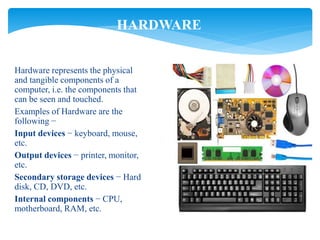
Hardware represents the physical
and tangible components of a
computer, i.e. the components that
can be seen and touched.
Examples of Hardware are the
following −
Input devices − keyboard, mouse,
etc.
Output devices − printer, monitor,
etc.
Secondary storage devices − Hard
disk, CD, DVD, etc.
Internal components − CPU,
motherboard, RAM, etc.
HARDWARE
DATA
 BIT :
A bit (short for binary digit) is the smallest unit of data in a
computer. A bit has a Single binary value, either 0 or 1.
 NIBBLE :
A group of 4 bits is called nibble. (Eg:1011)
 BYTE :
A group of 8 bits is called byte. A byte is the smallest unit,
which can represent a data item or a character. (Eg:10111100)
DATA
 WORD :
A computer word, like a byte, is a group of fixed number of
bits processed as a unit, which varies from computer to computer but
is fixed for each computer.
 WORD SIZE:
The length of a computer word is called word-size or word
length. It may be as small as 8 bits or may be as long as 96 bits. A
computer stores the information in the form of computer words.
MEMORY
 A memory is just like a human brain.
 It is used to store data and instructions.
 Computer memory is the storage space in the computer, where data is to
be processed and instructions required for processing are stored.
 The memory is divided into large number of small parts called cells.
Each location or cell has a unique address, which varies from zero to
memory size minus one.
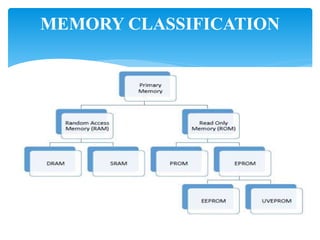
MEMORY CLASSIFICATION
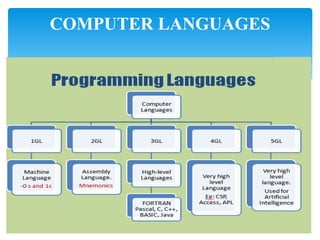
COMPUTER LANGUAGES
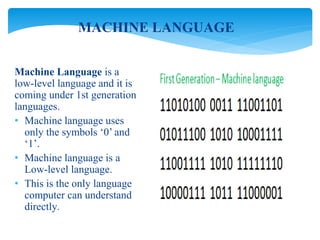
Machine Language is a
low-level language and it is
coming under 1st generation
languages.
• Machine language uses
only the symbols ‘0’ and
‘1’.
• Machine language is a
Low-level language.
• This is the only language
computer can understand
directly.
MACHINE LANGUAGE
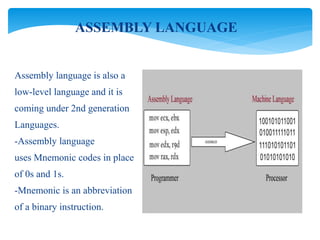
Assembly language is also a
low-level language and it is
coming under 2nd generation
Languages.
-Assembly language
uses Mnemonic codes in place
of 0s and 1s.
-Mnemonic is an abbreviation
of a binary instruction.
ASSEMBLY LANGUAGE
Third generation languages also called as High-level languages.
• Programs are written in English like manner.
• As this language is close to English programmers finds it easy to
learn and use.
• A language translator is required to convert high-level language
programs.
• Examples: C, C++, Java, BASIC, Pascal, FORTRAN, etc.
HIGHLEVEL LANGUAGES
4GL are called as very high level languages.
• They have user-friendly interfaces.
• They are easier than high-level languages.
• They are very close to English language structure.
• Examples: APL, CSP, Power Builder, Access.
VERY HIGH LEVEL LANGUAGES
• 5GL closely resemble to human speech.
• 5GL designed to make the computer solve a problem without a
program written by programmer.
• Fifth Generation languages are used in Artificial Intelligence research.
Examples: LISP (List processing), PROLOG
5TH GENERATION LANGUAGES
 Since computer only understands binary codes, 0 and 1, all
programs written in any other language need to be translated to
machine language before execution. There are three types of
translator programs.
THEY ARE:
 Assembler
 Compiler.
 Interpreter.
TRANSLATOR
ASSEMBLER:
Assembler is a system software which translates assembly
language to machine language.
INTERPRETER:
Interpreter is a system software which translates high-level
languages to machine language. Interpreter translates and executes the
programs line-by-line.
COMPILER:
Compiler is a system software which translates high level
language programs to machine language. Compiler translates the whole
program first and then start executing the program.
Bus is a group of conducting wires which carries
information, all the peripherals are connected to
microprocessor through Bus.
BUS
• Every microprocessor has a certain set of instructions
that it is capable of executing.
• This group of instructions is referred to as its instruction
set.
• Each type of microprocessor will have its own
instruction set it can interpret and executive.
Instruction Set
Basic terms used in microprocessor

Basic terms used in microprocessor

  • 1.
    STAFF NAME: B.RAMAPRABHA, ASSISTANT PROFESSOR, DEPARTMENT OF COMPUTER SCIENCE, K.C.S.KASI NADAR COLLEGE OF ARTS & SCIENCE MICROPROCESSOR AND ITS APPLICATION SUBJECT CODE:SAZ3B
  • 2.
    Unit 1: Introduction tomicrocomputers-microprocessor and assembly languages- microprocessor architecture and its operations-8085 MPU-8085 instruction set and classifications Unit 2: Writing assembly level programs-programming techniques such as looping-counting and indexing addressing modes-data transfer instructions- arithmetic and log ic operations-dynamic debugging Unit 3: Counters and time delays-hexadecimal counter modulo 10 counter-pulse timings for flashing lights-debugging counter and time delay program-stack- subroutine-conditional call and return instructions SYALLABUS
  • 3.
    Unit 4: BCD tobinary and binary to BCD conversions-BCD to HEX and HEX to BCD conversions-ASCII to BCD to ASCII conversions-BCD to seven segment LED code conversions-binary to ASCII and ASCII to binary conversions-multi byte addition-multi byte subtraction-BCD addition-BCD subtraction-multiplication and division Unit 5: Interrupt-implementing interrupts-multiple interrupt 8085-trap-problems on implementing 8085 interrupt-DMA memory interfaces-RAM & ROM –I/O interface- direct I/O memory mapped I/O. SYLLABUS(contd…)
  • 4.
     SOFTWARE: A Softwareis a set of programs, which is designed to perform a well-defined function. A program is a sequence of instructions written to solve a particular problem. BASIC TERMS USED IN MICROPROCESSOR
  • 5.
    Hardware represents thephysical and tangible components of a computer, i.e. the components that can be seen and touched. Examples of Hardware are the following − Input devices − keyboard, mouse, etc. Output devices − printer, monitor, etc. Secondary storage devices − Hard disk, CD, DVD, etc. Internal components − CPU, motherboard, RAM, etc. HARDWARE
  • 6.
    DATA  BIT : Abit (short for binary digit) is the smallest unit of data in a computer. A bit has a Single binary value, either 0 or 1.  NIBBLE : A group of 4 bits is called nibble. (Eg:1011)  BYTE : A group of 8 bits is called byte. A byte is the smallest unit, which can represent a data item or a character. (Eg:10111100)
  • 7.
    DATA  WORD : Acomputer word, like a byte, is a group of fixed number of bits processed as a unit, which varies from computer to computer but is fixed for each computer.  WORD SIZE: The length of a computer word is called word-size or word length. It may be as small as 8 bits or may be as long as 96 bits. A computer stores the information in the form of computer words.
  • 8.
    MEMORY  A memoryis just like a human brain.  It is used to store data and instructions.  Computer memory is the storage space in the computer, where data is to be processed and instructions required for processing are stored.  The memory is divided into large number of small parts called cells. Each location or cell has a unique address, which varies from zero to memory size minus one.
  • 9.
  • 10.
  • 11.
    Machine Language isa low-level language and it is coming under 1st generation languages. • Machine language uses only the symbols ‘0’ and ‘1’. • Machine language is a Low-level language. • This is the only language computer can understand directly. MACHINE LANGUAGE
  • 12.
    Assembly language isalso a low-level language and it is coming under 2nd generation Languages. -Assembly language uses Mnemonic codes in place of 0s and 1s. -Mnemonic is an abbreviation of a binary instruction. ASSEMBLY LANGUAGE
  • 13.
    Third generation languagesalso called as High-level languages. • Programs are written in English like manner. • As this language is close to English programmers finds it easy to learn and use. • A language translator is required to convert high-level language programs. • Examples: C, C++, Java, BASIC, Pascal, FORTRAN, etc. HIGHLEVEL LANGUAGES
  • 14.
    4GL are calledas very high level languages. • They have user-friendly interfaces. • They are easier than high-level languages. • They are very close to English language structure. • Examples: APL, CSP, Power Builder, Access. VERY HIGH LEVEL LANGUAGES
  • 15.
    • 5GL closelyresemble to human speech. • 5GL designed to make the computer solve a problem without a program written by programmer. • Fifth Generation languages are used in Artificial Intelligence research. Examples: LISP (List processing), PROLOG 5TH GENERATION LANGUAGES
  • 16.
     Since computeronly understands binary codes, 0 and 1, all programs written in any other language need to be translated to machine language before execution. There are three types of translator programs. THEY ARE:  Assembler  Compiler.  Interpreter. TRANSLATOR
  • 17.
    ASSEMBLER: Assembler is asystem software which translates assembly language to machine language. INTERPRETER: Interpreter is a system software which translates high-level languages to machine language. Interpreter translates and executes the programs line-by-line. COMPILER: Compiler is a system software which translates high level language programs to machine language. Compiler translates the whole program first and then start executing the program.
  • 18.
    Bus is agroup of conducting wires which carries information, all the peripherals are connected to microprocessor through Bus. BUS
  • 19.
    • Every microprocessorhas a certain set of instructions that it is capable of executing. • This group of instructions is referred to as its instruction set. • Each type of microprocessor will have its own instruction set it can interpret and executive. Instruction Set