Objective: Group up Career Awareness For
DIU Students
Workshop on Basic Computer
Skills
Workshop would cover the following topics:
1.Brief of Computer Hardware
2. Brief of Computer Software
3. Brief of Internet
4. Brief of Network
5. Brief of Career
What is inside the PC?
Mother Board & BIOS
CPU
RAM
Hard disk drive
Concept of Hardware Architecture
I-3
Type of Operating System
(OS)
1. Stand Alone
2. Client/Server
3. Virtual/Cloud
Type of Application Software
1. Stand Alone
2. Client/Server
3. Virtual/Cloud
I-4
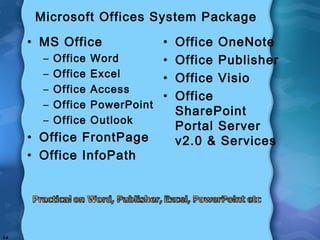
Microsoft Offices System Package
• MS Office
– Office Word
– Office Excel
– Office Access
– Office PowerPoint
– Office Outlook
• Office FrontPage
• Office InfoPath
• Office OneNote
• Office Publisher
• Office Visio
• Office
SharePoint
Portal Server
v2.0 & Services
I-5
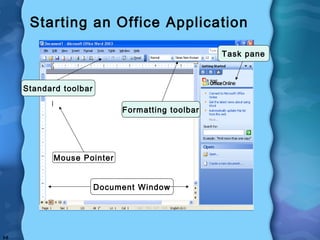
Starting an Office Application
Document Window
Mouse Pointer
Formatting toolbar
Standard toolbar
Task pane
Introduction to the Internet
What is the Internet?
• A worldwide network of computers
• Current information on almost any
topic
• Communicate worldwide
Introduction to the Internet
Internet Explorer (IE)
• A Web browser used to navigate through
pages on the Internet
• Web pages are accessed by hyperlinks or
typed addresses
• A group of Web pages owned by one
organization is a Web site
• The main page in a Web site is the home
page
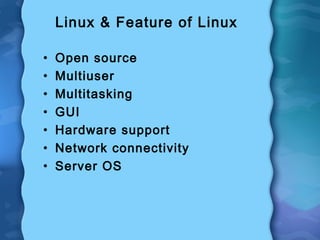
Linux & Feature of Linux
• Open source
• Multiuser
• Multitasking
• GUI
• Hardware support
• Network connectivity
• Server OS
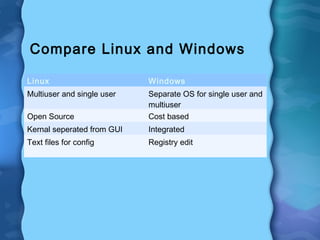
Compare Linux and Windows
Linux Windows
Multiuser and single user Separate OS for single user and
multiuser
Open Source Cost based
Kernal seperated from GUI Integrated
Text files for config Registry edit
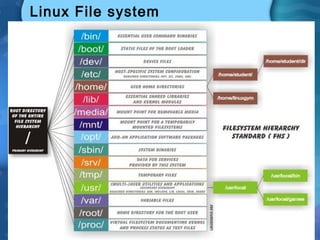
Linux File system
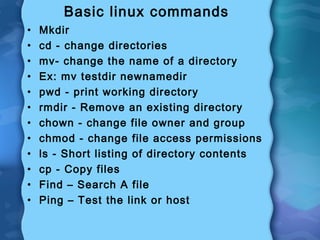
Basic linux commands
• Mkdir
• cd - change directories
• mv- change the name of a directory
• Ex: mv testdir newnamedir
• pwd - print working directory
• rmdir - Remove an existing directory
• chown - change file owner and group
• chmod - change file access permissions
• ls - Short listing of directory contents
• cp - Copy files
• Find – Search A file
• Ping – Test the link or host
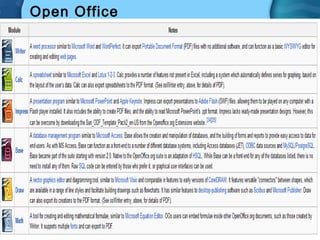
Open Office
Static Web Page
• send exactly the same response
to every request
Dynamic Pages
• Customized response-Typically
written in various scripting
languages such as ASP, PHP,
Perl or JSP.
Internet protocols
• Layer= 7, 6, 5 (App, Presentation, Session) –
HTTP, SMTP, FTP, SNMP
• Layer= 4 (Transportation) – TCP
• Layer= 3 (Network) – Routing Protocol, IP
• Layer= 2 (Data Link) - Ethertype, ATM, FDDI,
Token Ring
• Layer= 1 (Physical) – Ethernet, Radio, Fiber
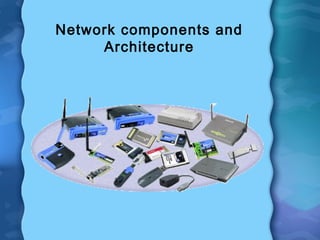
Network components and
Architecture
Network Components
• Network Adapter
• Modem
• Repeater and Bridge
• Hub and Switch
• Wireless Access Point
• Router
• Residential Gateway and
• Gateway
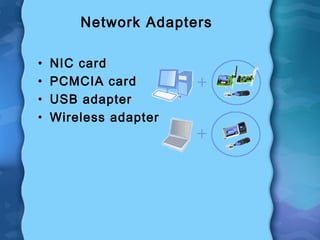
Network Adapters
• NIC card
• PCMCIA card
• USB adapter
• Wireless adapter
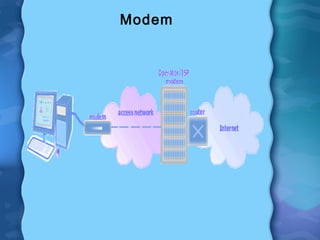
Modem
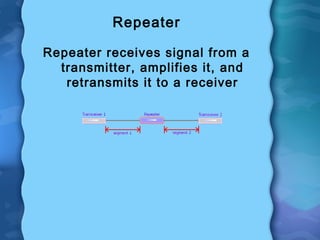
Repeater
Repeater receives signal from a
transmitter, amplifies it, and
retransmits it to a receiver
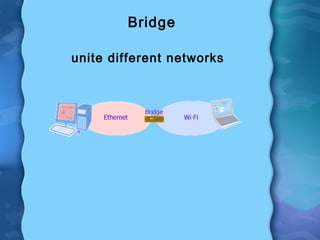
Bridge
unite different networks
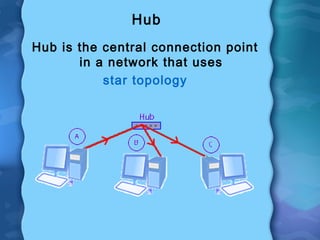
Hub
Hub is the central connection point
in a network that uses
star topology
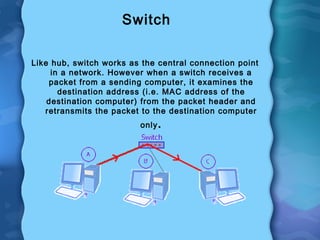
Switch
Like hub, switch works as the central connection point
in a network. However when a switch receives a
packet from a sending computer, it examines the
destination address (i.e. MAC address of the
destination computer) from the packet header and
retransmits the packet to the destination computer
only.
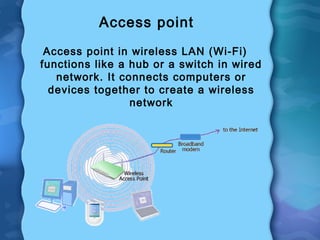
Access point
Access point in wireless LAN (Wi-Fi)
functions like a hub or a switch in wired
network. It connects computers or
devices together to create a wireless
network
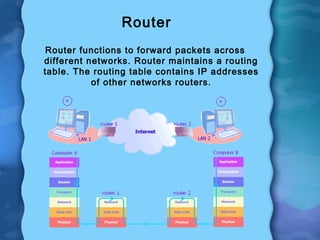
Router
Router functions to forward packets across
different networks. Router maintains a routing
table. The routing table contains IP addresses
of other networks routers.
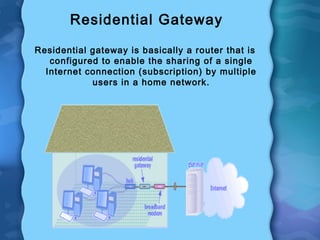
Residential Gateway
Residential gateway is basically a router that is
configured to enable the sharing of a single
Internet connection (subscription) by multiple
users in a home network.
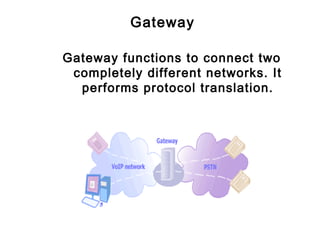
Gateway
Gateway functions to connect two
completely different networks. It
performs protocol translation.
IP Address
• 4 Octets
• 32 bits
• 128 bits
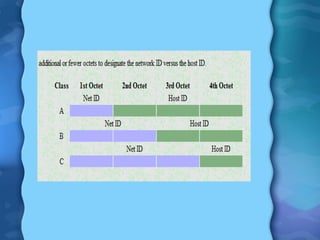
IP Address – Two Parts
• Network part
• Host part
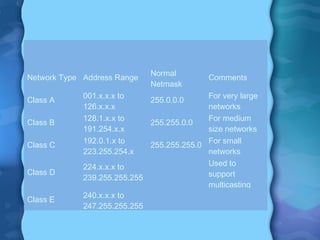
Network Type Address Range
Normal
Netmask
Comments
Class A
001.x.x.x to
126.x.x.x
255.0.0.0
For very large
networks
Class B
128.1.x.x to
191.254.x.x
255.255.0.0
For medium
size networks
Class C
192.0.1.x to
223.255.254.x
255.255.255.0
For small
networks
Class D
224.x.x.x to
239.255.255.255
Used to
support
multicasting
Class E
240.x.x.x to
247.255.255.255
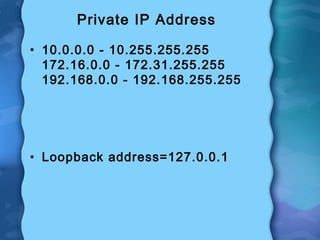
Private IP Address
• 10.0.0.0 - 10.255.255.255
172.16.0.0 - 172.31.255.255
192.168.0.0 - 192.168.255.255
• Loopback address=127.0.0.1
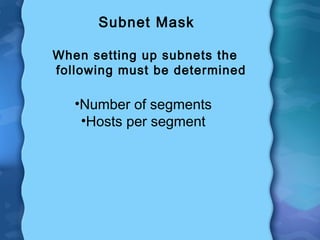
Subnet Mask
When setting up subnets the
following must be determined
•Number of segments
•Hosts per segment
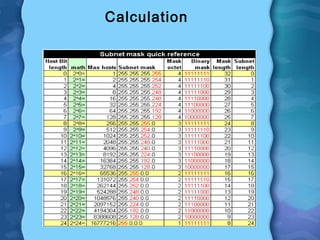
Calculation
Network Operating system
Functions
• File and print sharing.
• Account administration for users.
• Security.
Example for NOS
• JUNOS, used in routers and
switches from Juniper Networks.
• Cisco IOS
• Linux
• Microsoft Windows Server
• Novell Netware
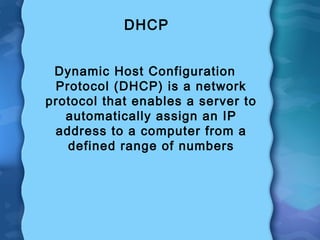
DHCP
Dynamic Host Configuration
Protocol (DHCP) is a network
protocol that enables a server to
automatically assign an IP
address to a computer from a
defined range of numbers
Background:
• DIU’s Vision is to guide to build-up
desire career for every students in
DIU
• To accomplish the goal DIU has
taken series of short & long career
related workshops to bloom their
talents
• We can’t put a student in a career
relevant job, but we can train them
to be better able to find a career
relevant job themselves
Continue---
• Most employers today ONLY
process applicants via on-line
applications
• This allows them to store, search,
and contact prospective
employees in a much easier way
then through hard copy
applications
• But the employers have indicated
that many area applicants are not
comfortable applying on-line; they
don’t have basic computer skills
Continue --------
So our ending session is focusing
on
- Defining Career path
- Getting Career Advices
- Creating web email address
- Performing on-line application
- Finding desire career relevant
jobs
Example: Google
(effective use to increase productivity)
Increase Office Productivity Using
Google Tools.
• If you are thinking of reducing paper costing,
monetize your employee activity, or working
together at a time from different places &
network;
• If you are thinking of introduce your business to
over the world & community;
• If you are thinking of a virtual personal
assistant;
• If you are thinking of publish your own business
news & views;
• If you are thinking of free online storage & back
up;
• If you are thinking of appoint an interpreter;
Increase Office Productivity Using
Google Tools (Cont…..).
Need to Learn:
• Effective Communication
• Collaboration
• Sharing
• Real time Work
• No Hassle of IT Maintenance
Increase Office Productivity Using
Google Tools (Cont…..).
Need to learn google features
• Google mail
• Google Drive
• Google Calendar
• Google Maps
• Google Translate
• Blogger
• Google Plus
• Google Talk
• Google Group
• YouTube
Increase Office Productivity Using
Google Tools (Cont…..).
Need to learn to increase productivity
on
• Connection 
• Communication
• Collaboration
• Synchronization
• Delegation
• Sharing
Thanks For Your Active
Participation
You Are Welcome For Relevant
Constructive Question

Basic of computers

  • 1.
    Objective: Group upCareer Awareness For DIU Students Workshop on Basic Computer Skills Workshop would cover the following topics: 1.Brief of Computer Hardware 2. Brief of Computer Software 3. Brief of Internet 4. Brief of Network 5. Brief of Career
  • 2.
    What is insidethe PC? Mother Board & BIOS CPU RAM Hard disk drive Concept of Hardware Architecture
  • 3.
    I-3 Type of OperatingSystem (OS) 1. Stand Alone 2. Client/Server 3. Virtual/Cloud Type of Application Software 1. Stand Alone 2. Client/Server 3. Virtual/Cloud
  • 4.
    I-4 Microsoft Offices SystemPackage • MS Office – Office Word – Office Excel – Office Access – Office PowerPoint – Office Outlook • Office FrontPage • Office InfoPath • Office OneNote • Office Publisher • Office Visio • Office SharePoint Portal Server v2.0 & Services
  • 5.
    I-5 Starting an OfficeApplication Document Window Mouse Pointer Formatting toolbar Standard toolbar Task pane
  • 6.
    Introduction to theInternet What is the Internet? • A worldwide network of computers • Current information on almost any topic • Communicate worldwide
  • 7.
    Introduction to theInternet Internet Explorer (IE) • A Web browser used to navigate through pages on the Internet • Web pages are accessed by hyperlinks or typed addresses • A group of Web pages owned by one organization is a Web site • The main page in a Web site is the home page
  • 8.
    Linux & Featureof Linux • Open source • Multiuser • Multitasking • GUI • Hardware support • Network connectivity • Server OS
  • 9.
    Compare Linux andWindows Linux Windows Multiuser and single user Separate OS for single user and multiuser Open Source Cost based Kernal seperated from GUI Integrated Text files for config Registry edit
  • 10.
  • 11.
    Basic linux commands •Mkdir • cd - change directories • mv- change the name of a directory • Ex: mv testdir newnamedir • pwd - print working directory • rmdir - Remove an existing directory • chown - change file owner and group • chmod - change file access permissions • ls - Short listing of directory contents • cp - Copy files • Find – Search A file • Ping – Test the link or host
  • 12.
  • 13.
    Static Web Page •send exactly the same response to every request Dynamic Pages • Customized response-Typically written in various scripting languages such as ASP, PHP, Perl or JSP.
  • 14.
    Internet protocols • Layer=7, 6, 5 (App, Presentation, Session) – HTTP, SMTP, FTP, SNMP • Layer= 4 (Transportation) – TCP • Layer= 3 (Network) – Routing Protocol, IP • Layer= 2 (Data Link) - Ethertype, ATM, FDDI, Token Ring • Layer= 1 (Physical) – Ethernet, Radio, Fiber
  • 15.
  • 16.
    Network Components • NetworkAdapter • Modem • Repeater and Bridge • Hub and Switch • Wireless Access Point • Router • Residential Gateway and • Gateway
  • 17.
    Network Adapters • NICcard • PCMCIA card • USB adapter • Wireless adapter
  • 18.
  • 19.
    Repeater Repeater receives signalfrom a transmitter, amplifies it, and retransmits it to a receiver
  • 20.
  • 21.
    Hub Hub is thecentral connection point in a network that uses star topology
  • 22.
    Switch Like hub, switchworks as the central connection point in a network. However when a switch receives a packet from a sending computer, it examines the destination address (i.e. MAC address of the destination computer) from the packet header and retransmits the packet to the destination computer only.
  • 23.
    Access point Access pointin wireless LAN (Wi-Fi) functions like a hub or a switch in wired network. It connects computers or devices together to create a wireless network
  • 24.
    Router Router functions toforward packets across different networks. Router maintains a routing table. The routing table contains IP addresses of other networks routers.
  • 25.
    Residential Gateway Residential gatewayis basically a router that is configured to enable the sharing of a single Internet connection (subscription) by multiple users in a home network.
  • 26.
    Gateway Gateway functions toconnect two completely different networks. It performs protocol translation.
  • 27.
    IP Address • 4Octets • 32 bits • 128 bits
  • 28.
    IP Address –Two Parts • Network part • Host part
  • 30.
    Network Type AddressRange Normal Netmask Comments Class A 001.x.x.x to 126.x.x.x 255.0.0.0 For very large networks Class B 128.1.x.x to 191.254.x.x 255.255.0.0 For medium size networks Class C 192.0.1.x to 223.255.254.x 255.255.255.0 For small networks Class D 224.x.x.x to 239.255.255.255 Used to support multicasting Class E 240.x.x.x to 247.255.255.255
  • 31.
    Private IP Address •10.0.0.0 - 10.255.255.255 172.16.0.0 - 172.31.255.255 192.168.0.0 - 192.168.255.255 • Loopback address=127.0.0.1
  • 32.
    Subnet Mask When settingup subnets the following must be determined •Number of segments •Hosts per segment
  • 33.
  • 34.
    Network Operating system Functions •File and print sharing. • Account administration for users. • Security.
  • 35.
    Example for NOS •JUNOS, used in routers and switches from Juniper Networks. • Cisco IOS • Linux • Microsoft Windows Server • Novell Netware
  • 36.
    DHCP Dynamic Host Configuration Protocol(DHCP) is a network protocol that enables a server to automatically assign an IP address to a computer from a defined range of numbers
  • 37.
    Background: • DIU’s Visionis to guide to build-up desire career for every students in DIU • To accomplish the goal DIU has taken series of short & long career related workshops to bloom their talents • We can’t put a student in a career relevant job, but we can train them to be better able to find a career relevant job themselves
  • 38.
    Continue--- • Most employerstoday ONLY process applicants via on-line applications • This allows them to store, search, and contact prospective employees in a much easier way then through hard copy applications • But the employers have indicated that many area applicants are not comfortable applying on-line; they don’t have basic computer skills
  • 39.
    Continue -------- So ourending session is focusing on - Defining Career path - Getting Career Advices - Creating web email address - Performing on-line application - Finding desire career relevant jobs Example: Google (effective use to increase productivity)
  • 40.
    Increase Office ProductivityUsing Google Tools. • If you are thinking of reducing paper costing, monetize your employee activity, or working together at a time from different places & network; • If you are thinking of introduce your business to over the world & community; • If you are thinking of a virtual personal assistant; • If you are thinking of publish your own business news & views; • If you are thinking of free online storage & back up; • If you are thinking of appoint an interpreter;
  • 41.
    Increase Office ProductivityUsing Google Tools (Cont…..). Need to Learn: • Effective Communication • Collaboration • Sharing • Real time Work • No Hassle of IT Maintenance
  • 42.
    Increase Office ProductivityUsing Google Tools (Cont…..). Need to learn google features • Google mail • Google Drive • Google Calendar • Google Maps • Google Translate • Blogger • Google Plus • Google Talk • Google Group • YouTube
  • 43.
    Increase Office ProductivityUsing Google Tools (Cont…..). Need to learn to increase productivity on • Connection  • Communication • Collaboration • Synchronization • Delegation • Sharing
  • 44.
    Thanks For YourActive Participation You Are Welcome For Relevant Constructive Question