Mithilesh Singh
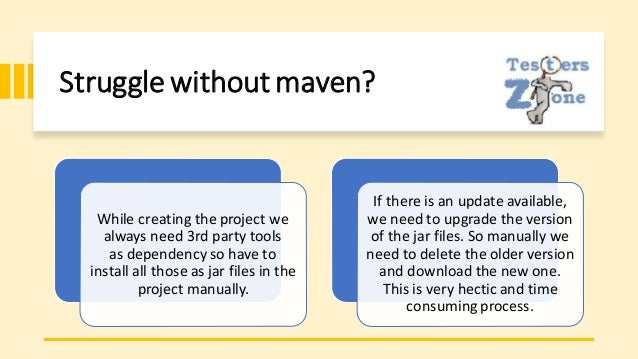
Struggle without maven?
While creating the project we
always need 3rd party tools
as dependency so have to
install all those as jar files in the
project manually.
If there is an update available,
we need to upgrade the version
of the jar files. So manually we
need to delete the older version
and download the new one.
This is very hectic and time
consuming process.
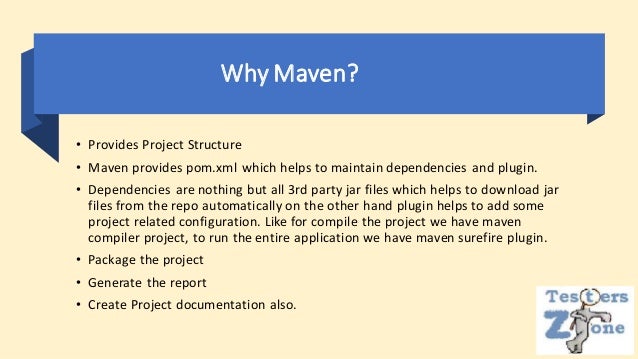
Why Maven?
• Provides Project Structure
• Maven provides pom.xml which helps to maintain dependencies and plugin.
• Dependencies are nothing but all 3rd party jar files which helps to download jar
files from the repo automatically on the other hand plugin helps to add some
project related configuration. Like for compile the project we have maven
compiler project, to run the entire application we have maven surefire plugin.
• Package the project
• Generate the report
• Create Project documentation also.
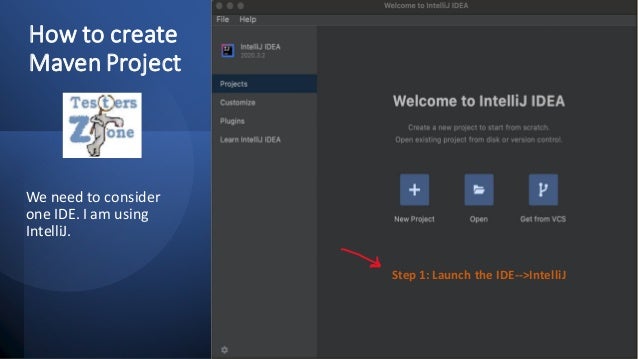
How to create
Maven Project
We need to consider
one IDE. I am using
IntelliJ.
Step 1: Launch the IDE-->IntelliJ
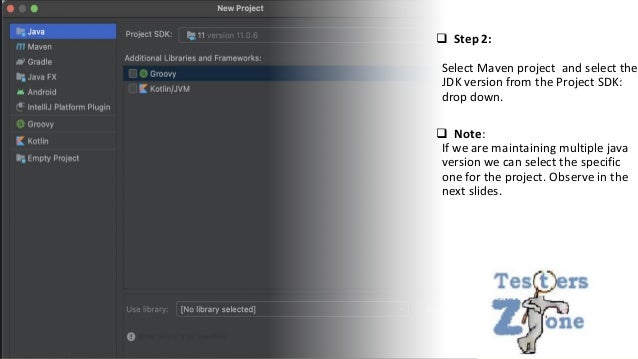
❑ Step 2:
Select Maven project and select the
JDK version from the Project SDK:
drop down.
❑ Note:
If we are maintaining multiple java
version we can select the specific
one for the project. Observe in the
next slides.
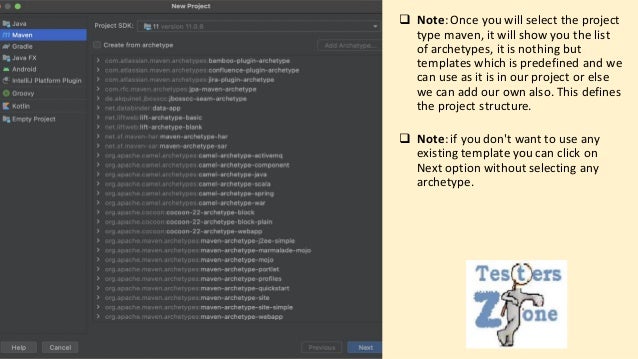
❑ Note:Once you will select the project
type maven, it will show you the list
of archetypes, it is nothing but
templates which is predefined and we
can use as it is in our project or else
we can add our own also. This defines
the project structure.
❑ Note:if you don't want to use any
existing template you can click on
Next option without selecting any
archetype.
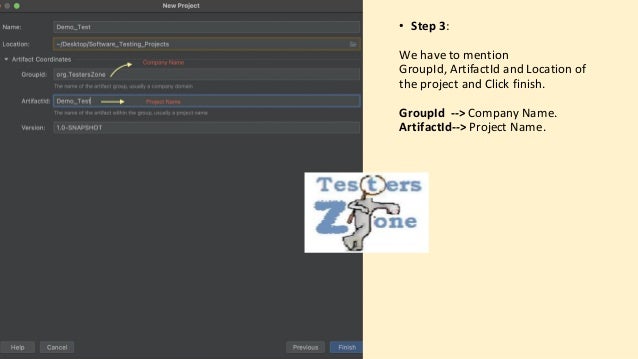
• Step 3:
We have to mention
GroupId, ArtifactId and Location of
the project and Click finish.
GroupId --> Company Name.
ArtifactId--> Project Name.
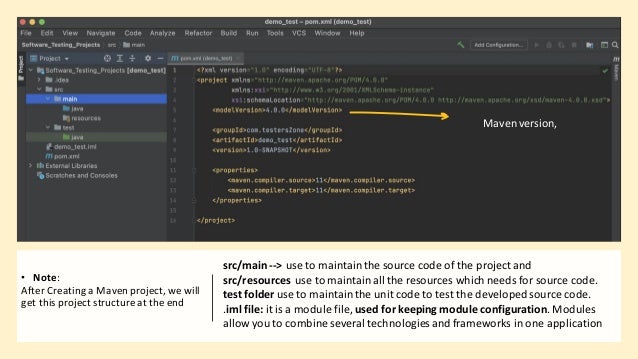
• Note:
After Creating a Maven project,we will
get this project structureat the end
src/main--> use to maintainthe source code of the project and
src/resources use to maintainall the resources which needs for source code.
test folder use to maintainthe unit code to test the developedsource code.
.iml file: it is a module file, used for keeping module configuration. Modules
allow you to combine several technologies and frameworks in one application
Mavenversion,
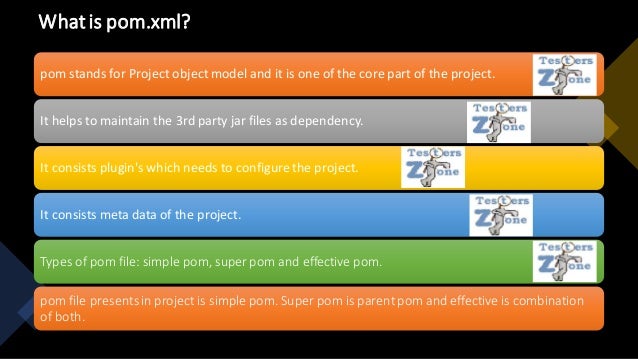
Whatis pom.xml?
pom stands for Project object model and it is one of the core part of the project.
It helps to maintain the 3rd party jar files as dependency.
It consists plugin's which needs to configurethe project.
It consists meta data of the project.
Types of pom file: simple pom, super pom and effective pom.
pom file presentsin project is simple pom. Super pom is parentpom and effective is combination
of both.
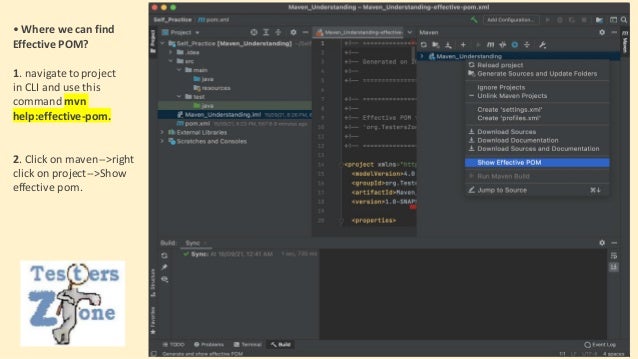
• Where we can find
Effective POM?
1. navigateto project
in CLI and use this
command mvn
help:effective-pom.
2. Click on maven-->right
click on project-->Show
effective pom.​
What is
1.0-SNAPSHOT
meaning under pom.xml ?
As we know maven is a build tool, snapshot tells about
the dynamic nature of the build. Since during
development phase different developers will be adding
the codes so jar file which will be creating at the end
that is just a screenshot means not a fixed build. Final
snapshot means overall development of the project
and that might deploy in the production that comes
under release.
So different branches with day to day development of
project is just a snapshot of actual one which will be
deployed after complete development.
How Mavenworks?
As soon we create a maven project a pom.xml file will create inside the project and
also one local maven repo will create which holds all the dependencies.
All the dependencies will be getting downloaded from the Maven remote repo for
first time and it will get stored in local maven repo.
Note: Internet connection is needed to download the dependencies from the maven
remote repo.
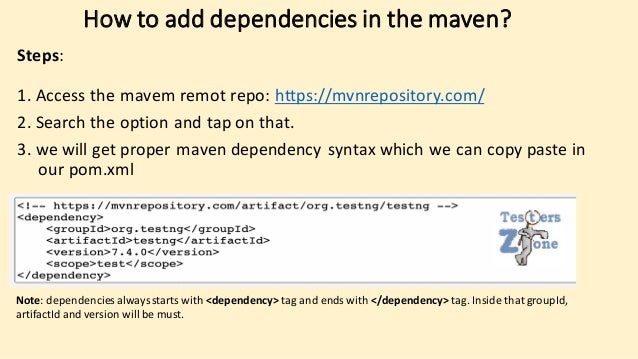
How to add dependencies in the maven?
Steps:
1. Access the mavem remot repo: https://mvnrepository.com/
2. Search the option and tap on that.
3. we will get proper maven dependency syntax which we can copy paste in
our pom.xml
Note: dependencies alwaysstarts with <dependency> tag and ends with </dependency> tag. Inside that groupId,
artifactId and version will be must.
Maven Dependency Scopes
Maven dependency scope attribute is used to specify the
visibility of a dependency.
Maven provides six scopes
i.e. compile, provided, runtime, test, system, and import.
Table of Contents:
1. Compile Scope. 2. Provided Scope. 3. Runtime Scope
4. Test Scope. 5. System Scope 6. Import Scope
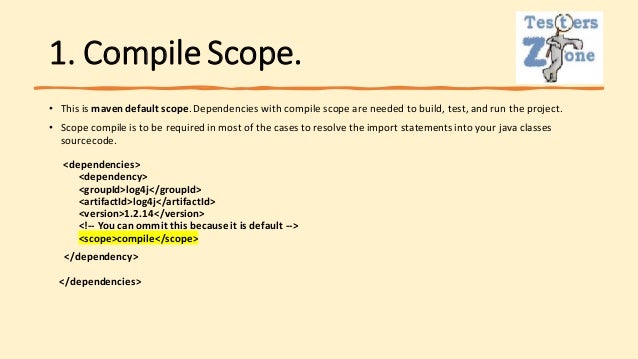
1. Compile Scope.
• This is maven default scope.Dependencies with compile scope are needed to build, test, and run the project.
• Scope compile is to be required in most of the cases to resolve the import statementsinto your java classes
sourcecode.
<dependencies>
<dependency>
<groupId>log4j</groupId>
<artifactId>log4j</artifactId>
<version>1.2.14</version>
<!-- You can ommit this becauseit is default -->
<scope>compile</scope>
</dependency>
</dependencies>
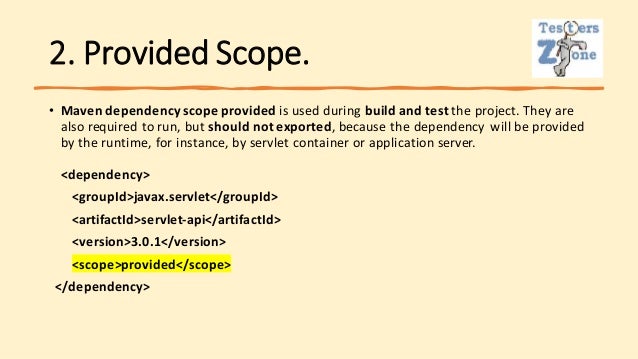
2. Provided Scope.
• Maven dependency scope provided is used during build and test the project. They are
also required to run, but should not exported, because the dependency will be provided
by the runtime, for instance, by servlet container or application server.
<dependency>
<groupId>javax.servlet</groupId>
<artifactId>servlet-api</artifactId>
<version>3.0.1</version>
<scope>provided</scope>
</dependency>
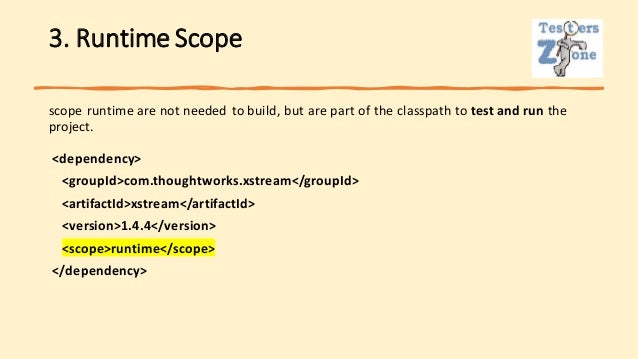
3. Runtime Scope
scope runtime are not needed to build, but are part of the classpath to test and run the
project.
<dependency>
<groupId>com.thoughtworks.xstream</groupId>
<artifactId>xstream</artifactId>
<version>1.4.4</version>
<scope>runtime</scope>
</dependency>
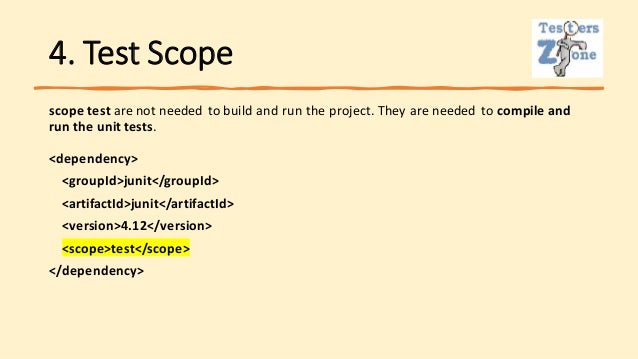
4. Test Scope
scope test are not needed to build and run the project. They are needed to compile and
run the unit tests.
<dependency>
<groupId>junit</groupId>
<artifactId>junit</artifactId>
<version>4.12</version>
<scope>test</scope>
</dependency>
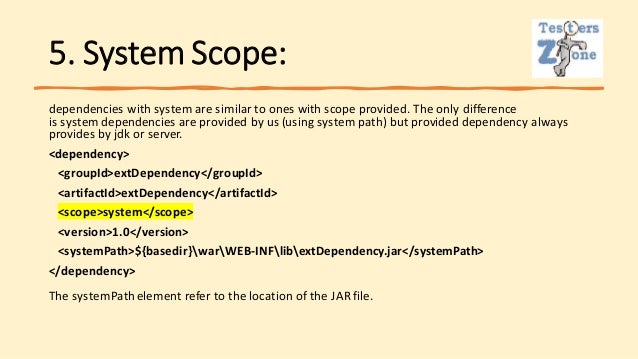
5. System Scope:
dependencies with system are similar to ones with scope provided. The only difference
is system dependencies are provided by us (using system path) but provided dependency always
provides by jdk or server.
<dependency>
<groupId>extDependency</groupId>
<artifactId>extDependency</artifactId>
<scope>system</scope>
<version>1.0</version>
<systemPath>${basedir}warWEB-INFlibextDependency.jar</systemPath>
</dependency>
The systemPathelement refer to the location of the JAR file.
Types of
Maven
dependencies
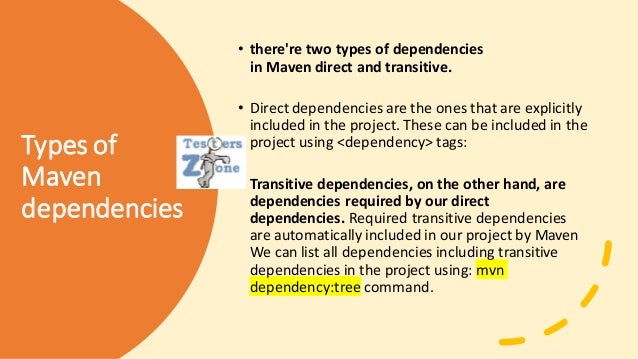
• there're two types of dependencies
in Maven direct and transitive.
• Direct dependencies are the ones that are explicitly
included in the project. These can be included in the
project using <dependency> tags:
• Transitive dependencies, on the other hand, are
dependencies required by our direct
dependencies. Required transitive dependencies
are automatically included in our project by Maven
We can list all dependencies including transitive
dependencies in the project using: mvn
dependency:tree command.
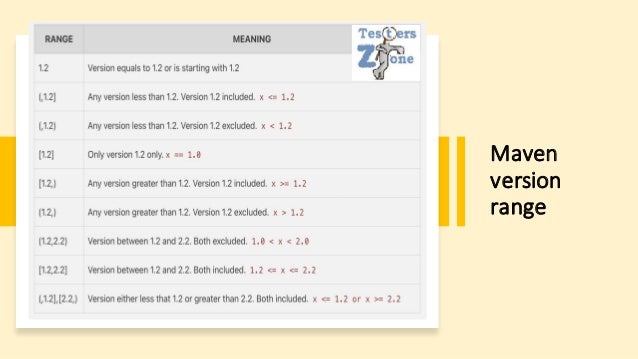
Maven
version
range
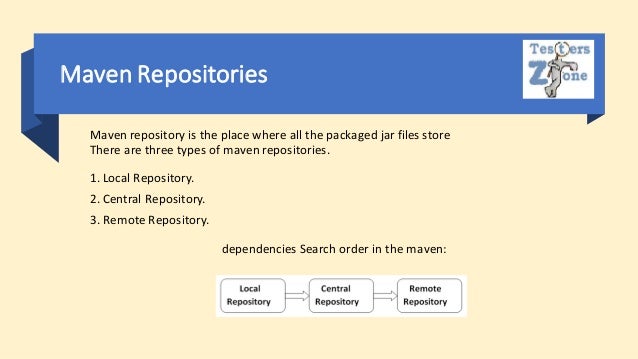
Maven Repositories
Maven repository is the place where all the packaged jar files store
There are three types of maven repositories.
1. Local Repository.
2. Central Repository.
3. Remote Repository.
dependencies Search order in the maven:
Local Repository
• This is created by maven in local system when any maven commandruns.
• Maven repository presents under .m2
directory [%USER_HOME%/.m2] e.g. /Users/<name_of_user>/.m2
• Note
Maven local repository keeps your project's all dependencies (library jars, plugin jars
etc.). When you run a Maven build, then Maven automatically downloads all the
dependency jars into the local repository. It helps to avoid references to dependencies
stored on remote machine every time a project is build.
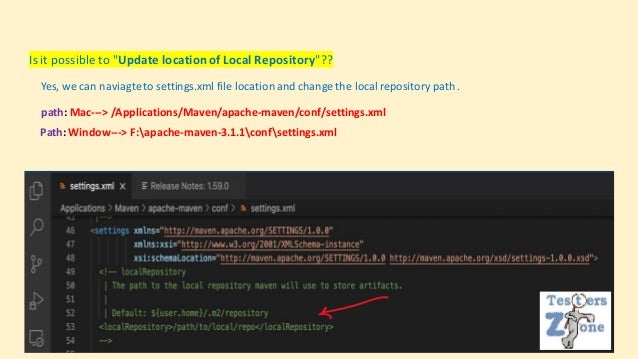
Is it possible to "Update locationof Local Repository"??
Yes, we can naviagteto settings.xml file locationand change the local repository path .
path: Mac---> /Applications/Maven/apache-maven/conf/settings.xml
Path: Window---> F:apache-maven-3.1.1confsettings.xml
Central
Repository
• Maven central repository is located on the
web. It has been created by the apache
maven community itself.
• The path of central repository
is: http://repo1.maven.org/maven2/.
• Key concepts of Central repository are as
follows:
• It is not required to be configured.
• It requires internet access to be searched.
• To browse the content of central maven
repository, maven community has provided
a URL − https://search.maven.org/#browse.
Using this library, a developer can search all
the available libraries in central repository.
Remote
Repository
• Sometimes, Maven does not find a mentioned dependency in
central repository as well. It then stops the build process and
output error messageto console. To prevent such situation,
Maven provides concept of Remote Repository,which is
developer's own custom repository containing required
libraries or other project jars.
• You can configure a remote repository in the POM file or super
POM file in remote repository itself.
<repositories>
<repository>
<id>org.source.repo</id>
<url>http://maven.orgName.com/maven2/</url>
</repository>
</repositories>
Maven DependencySearch Sequence
When we execute Maven build commands, Maven starts looking for dependency libraries in
the following sequence −
• Step 1 − Search dependency in local repository, if not found, move to step 2 else perform the further
processing.
• Step 2 − Search dependency in central repository, if not found and remote repository/repositories is/are
mentioned then move to step 4. Else it is downloaded to local repository for future reference.i
• Step 3 − If a remote repository has not been mentioned, Maven simply stops the processingand throws
error (Unable to find dependency).
• Step 4 − Search dependency in remote repository or repositories, if found then it is downloaded to local
repository for future reference. Otherwise, Maven stopsprocessing and throws error (Unable to find
dependency).
Notes:
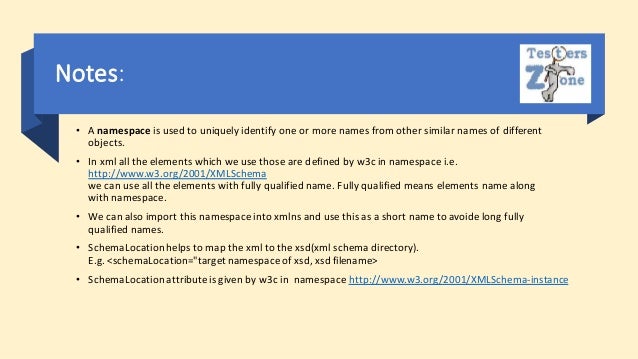
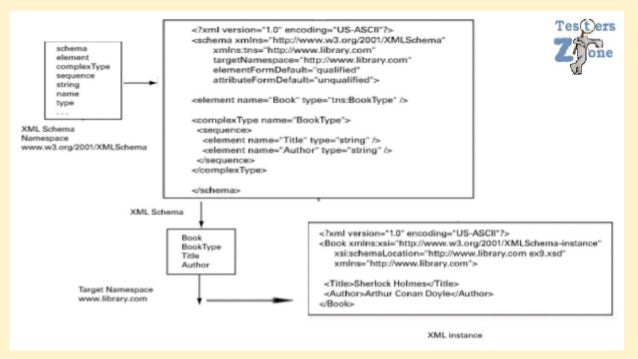
• A namespace is used to uniquely identify one or more names from other similar names of different
objects.
• In xml all the elements which we use those are defined by w3c in namespace i.e.
http://www.w3.org/2001/XMLSchema
we can use all the elements with fully qualified name. Fully qualified means elements name along
with namespace.
• We can also import this namespace into xmlns and use this as a short name to avoide long fully
qualified names.
• SchemaLocationhelps to map the xml to the xsd(xml schema directory).
E.g. <schemaLocation="targetnamespace of xsd, xsd filename>
• SchemaLocationattributeis given by w3c in namespace http://www.w3.org/2001/XMLSchema-instance
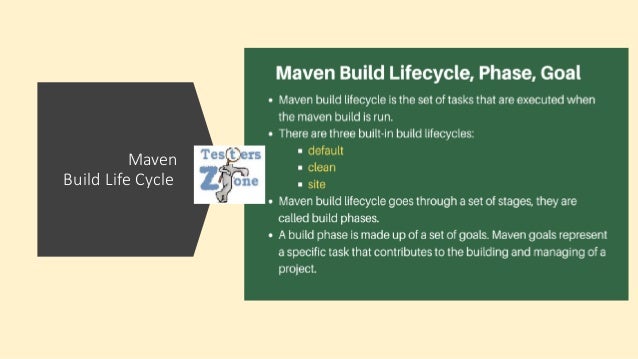
Maven
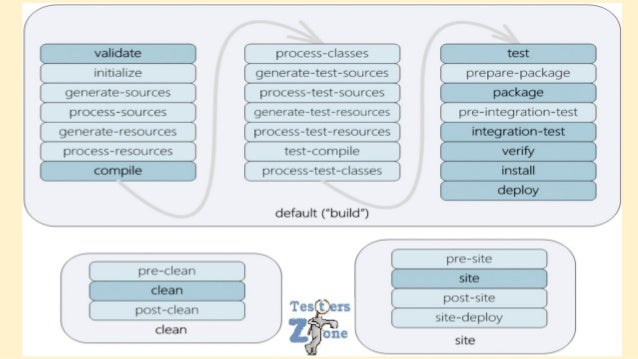
Build Life Cycle
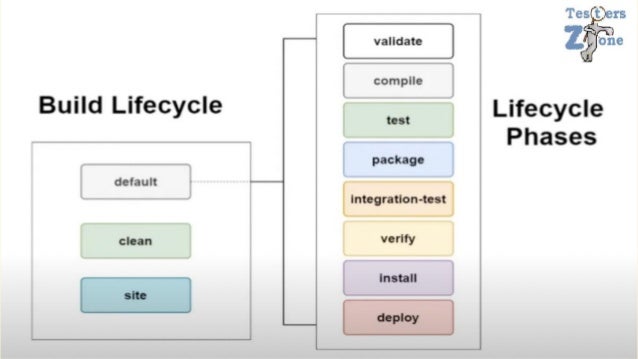
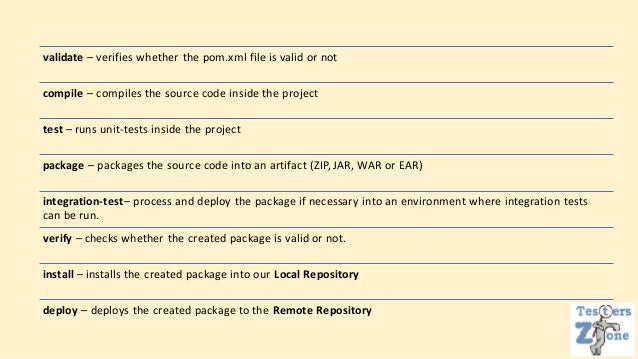
validate – verifies whether the pom.xml file is valid or not
compile – compiles the source code inside the project
test – runs unit-tests inside the project
package – packages the source code into an artifact (ZIP, JAR, WAR or EAR)
integration-test– process and deploy the package if necessary into an environment where integration tests
can be run.
verify – checks whether the created package is valid or not.
install – installs the created package into our Local Repository
deploy – deploys the created package to the Remote Repository
Note
Each Lifecycle is independent of each other and they can be executed together.
The clean lifecycle is mainly responsible to clean the .class and meta-datagenerated duing default life
cycle phases.
The site lifecycle phase is responsible to generate Java Documentation.
To be able to execute these Lifecycle Phases, Maven provides us with Plugins to perform each task.
Each plugin is associated with a particular Goal
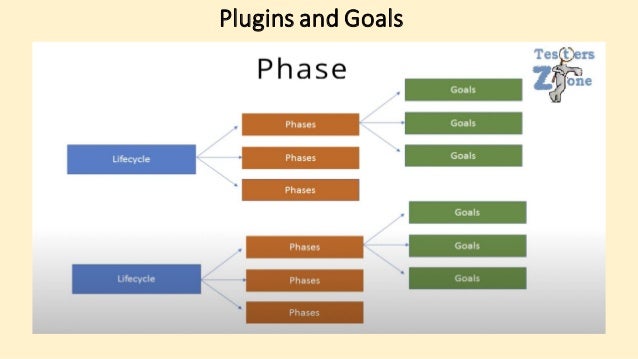
Plugins and Goals
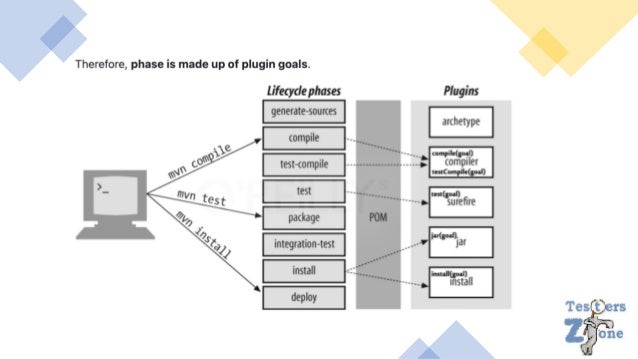
• Each phase is a sequence of goals, and each goal is responsible for a specific task.
• When we run a phase - all goals bound to this phase are executed in order.
• Compiler:compile - the compile goal from the compiler plugin is bound to the compile phase
• compiler:testCompile- is bound to the test-compile phase
• Surefire:test - is bound to test phase
• Install:install - is bound to install phase
• Jar:jar and war:war. - is bound to package phase
** We can list all goals bound to a specific phase and their plugins using the command:
mvn help:describe -Dcmd=PHASENAME.
e.g. mvn help:describe -Dcmd=compile
Output:
compile' is a phase corresponding to this plugin:
org.apache.maven.plugins:maven-compiler-plugin:3.1:compile
Which, as mentioned above, means the compile goal from compiler plugin is bound to
the compile phase.
** We can use the following command to listall goals in a specific plugin:
mvn <PLUGIN>:help
e.g. mvn surefire:help
** We can also run only a specific goal of the plugin:
e.g. mvn compiler:compile
Plugin
goal
Maven
Compile Plu
gin
<build>​
<plugins>​
<plugin>​
<groupId>org.apache.maven.plugins</groupId>​
<artifactId>maven-compiler-plugin</artifactId>​
<version>3.8.1</version>​
</plugin>​
</plugins>​
</build>​
Maven
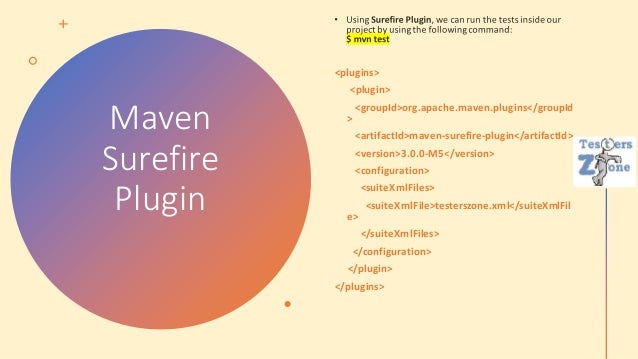
Surefire
Plugin
<plugins>
<plugin>
<groupId>org.apache.maven.plugins</groupId
>
<artifactId>maven-surefire-plugin</artifactId>
<version>3.0.0-M5</version>
<configuration>
<suiteXmlFiles>
<suiteXmlFile>testerszone.xml</suiteXmlFil
e>
</suiteXmlFiles>
</configuration>
</plugin>
</plugins>
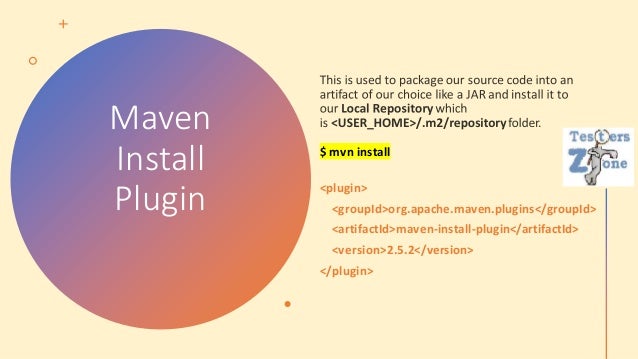
Maven
Install
Plugin
$ mvn install
<plugin>
<groupId>org.apache.maven.plugins</groupId>
<artifactId>maven-install-plugin</artifactId>
<version>2.5.2</version>
</plugin>
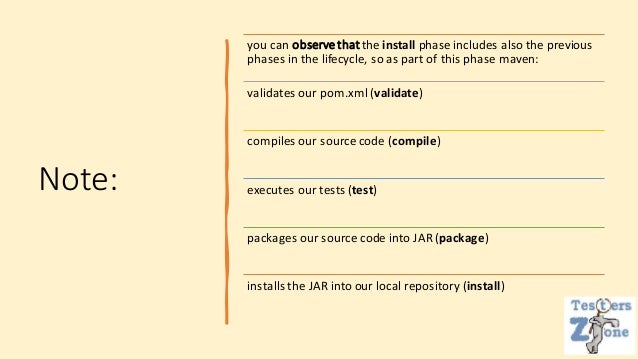
Note:
you can observethatthe install phase includes also the previous
phases in the lifecycle, so as part of this phase maven:
validates our pom.xml(validate)
compiles our source code (compile)
executes our tests (test)
packages our source code into JAR (package)
installs the JAR into our local repository (install)
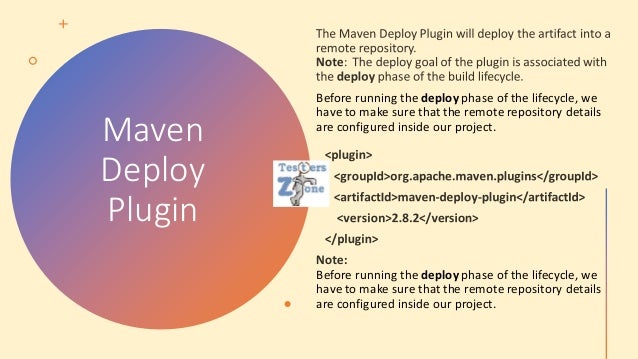
Maven
Deploy
Plugin
Before running the deploy phase of the lifecycle, we
have to make sure that the remote repository details
are configured inside our project.
Before running the deploy phase of the lifecycle, we
have to make sure that the remote repository details
are configured inside our project.
Note:
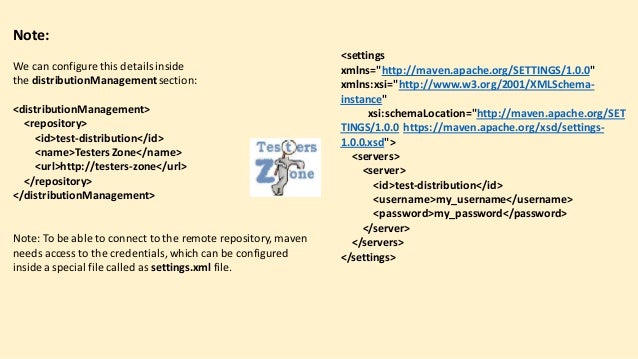
We can configure this detailsinside
the distributionManagementsection:
<distributionManagement>
<repository>
<id>test-distribution</id>
<name>TestersZone</name>
<url>http://testers-zone</url>
</repository>
</distributionManagement>
Note: To be able to connect to the remote repository, maven
needs access to the credentials, which can be configured
inside a special file called as settings.xml file.
<settings
xmlns="http://maven.apache.org/SETTINGS/1.0.0"
xmlns:xsi="http://www.w3.org/2001/XMLSchema-
instance"
xsi:schemaLocation="http://maven.apache.org/SET
TINGS/1.0.0 https://maven.apache.org/xsd/settings-
1.0.0.xsd">
<servers>
<server>
<id>test-distribution</id>
<username>my_username</username>
<password>my_password</password>
</server>
</servers>
</settings>
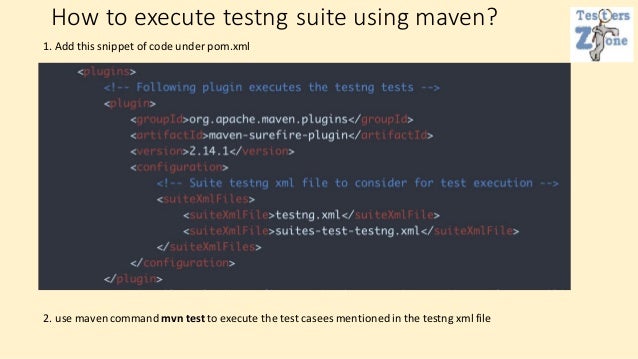
How to execute testng suite using maven?
1. Add this snippet of code under pom.xml
2. use maven command mvn test to execute the test casees mentionedin the testng xml file
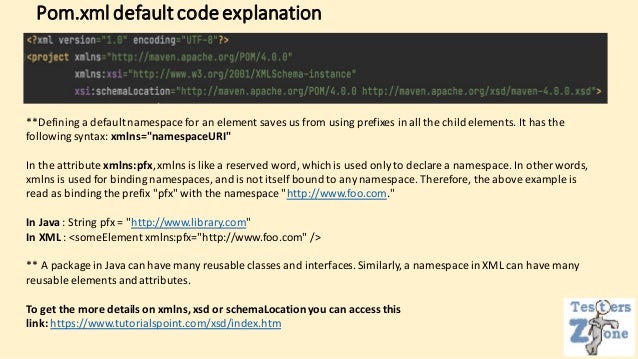
Pom.xmldefaultcodeexplanation
**Defining a default namespace for an element saves us from using prefixes in all the child elements. It has the
following syntax: xmlns="namespaceURI"
In the attribute xmlns:pfx,xmlns is like a reserved word, which is used only to declare a namespace. In other words,
xmlns is used for binding namespaces, and is not itself bound to any namespace. Therefore, the above example is
read as binding the prefix "pfx" with the namespace "http://www.foo.com."
In Java : String pfx = "http://www.library.com"
In XML : <someElement xmlns:pfx="http://www.foo.com" />
** A package in Java can have many reusable classes and interfaces. Similarly, a namespace in XML can have many
reusable elements and attributes.
To get the more details on xmlns, xsd or schemaLocationyou can access this
link: https://www.tutorialspoint.com/xsd/index.htm
Few attachments for
the learning reference
Mithilesh Singh

A-Z_Maven.pdf

  • 1.
  • 2.
    Struggle without maven? Whilecreating the project we always need 3rd party tools as dependency so have to install all those as jar files in the project manually. If there is an update available, we need to upgrade the version of the jar files. So manually we need to delete the older version and download the new one. This is very hectic and time consuming process.
  • 3.
    Why Maven? • ProvidesProject Structure • Maven provides pom.xml which helps to maintain dependencies and plugin. • Dependencies are nothing but all 3rd party jar files which helps to download jar files from the repo automatically on the other hand plugin helps to add some project related configuration. Like for compile the project we have maven compiler project, to run the entire application we have maven surefire plugin. • Package the project • Generate the report • Create Project documentation also.
  • 4.
    How to create MavenProject We need to consider one IDE. I am using IntelliJ. Step 1: Launch the IDE-->IntelliJ
  • 5.
    ❑ Step 2: SelectMaven project and select the JDK version from the Project SDK: drop down. ❑ Note: If we are maintaining multiple java version we can select the specific one for the project. Observe in the next slides.
  • 6.
    ❑ Note:Once youwill select the project type maven, it will show you the list of archetypes, it is nothing but templates which is predefined and we can use as it is in our project or else we can add our own also. This defines the project structure. ❑ Note:if you don't want to use any existing template you can click on Next option without selecting any archetype.
  • 7.
    • Step 3: Wehave to mention GroupId, ArtifactId and Location of the project and Click finish. GroupId --> Company Name. ArtifactId--> Project Name.
  • 8.
    • Note: After Creatinga Maven project,we will get this project structureat the end src/main--> use to maintainthe source code of the project and src/resources use to maintainall the resources which needs for source code. test folder use to maintainthe unit code to test the developedsource code. .iml file: it is a module file, used for keeping module configuration. Modules allow you to combine several technologies and frameworks in one application Mavenversion,
  • 9.
    Whatis pom.xml? pom standsfor Project object model and it is one of the core part of the project. It helps to maintain the 3rd party jar files as dependency. It consists plugin's which needs to configurethe project. It consists meta data of the project. Types of pom file: simple pom, super pom and effective pom. pom file presentsin project is simple pom. Super pom is parentpom and effective is combination of both.
  • 10.
    • Where wecan find Effective POM? 1. navigateto project in CLI and use this command mvn help:effective-pom. 2. Click on maven-->right click on project-->Show effective pom.​
  • 11.
    What is 1.0-SNAPSHOT meaning underpom.xml ? As we know maven is a build tool, snapshot tells about the dynamic nature of the build. Since during development phase different developers will be adding the codes so jar file which will be creating at the end that is just a screenshot means not a fixed build. Final snapshot means overall development of the project and that might deploy in the production that comes under release. So different branches with day to day development of project is just a snapshot of actual one which will be deployed after complete development.
  • 12.
    How Mavenworks? As soonwe create a maven project a pom.xml file will create inside the project and also one local maven repo will create which holds all the dependencies. All the dependencies will be getting downloaded from the Maven remote repo for first time and it will get stored in local maven repo. Note: Internet connection is needed to download the dependencies from the maven remote repo.
  • 13.
    How to adddependencies in the maven? Steps: 1. Access the mavem remot repo: https://mvnrepository.com/ 2. Search the option and tap on that. 3. we will get proper maven dependency syntax which we can copy paste in our pom.xml Note: dependencies alwaysstarts with <dependency> tag and ends with </dependency> tag. Inside that groupId, artifactId and version will be must.
  • 14.
    Maven Dependency Scopes Mavendependency scope attribute is used to specify the visibility of a dependency. Maven provides six scopes i.e. compile, provided, runtime, test, system, and import. Table of Contents: 1. Compile Scope. 2. Provided Scope. 3. Runtime Scope 4. Test Scope. 5. System Scope 6. Import Scope
  • 15.
    1. Compile Scope. •This is maven default scope.Dependencies with compile scope are needed to build, test, and run the project. • Scope compile is to be required in most of the cases to resolve the import statementsinto your java classes sourcecode. <dependencies> <dependency> <groupId>log4j</groupId> <artifactId>log4j</artifactId> <version>1.2.14</version> <!-- You can ommit this becauseit is default --> <scope>compile</scope> </dependency> </dependencies>
  • 16.
    2. Provided Scope. •Maven dependency scope provided is used during build and test the project. They are also required to run, but should not exported, because the dependency will be provided by the runtime, for instance, by servlet container or application server. <dependency> <groupId>javax.servlet</groupId> <artifactId>servlet-api</artifactId> <version>3.0.1</version> <scope>provided</scope> </dependency>
  • 17.
    3. Runtime Scope scoperuntime are not needed to build, but are part of the classpath to test and run the project. <dependency> <groupId>com.thoughtworks.xstream</groupId> <artifactId>xstream</artifactId> <version>1.4.4</version> <scope>runtime</scope> </dependency>
  • 18.
    4. Test Scope scopetest are not needed to build and run the project. They are needed to compile and run the unit tests. <dependency> <groupId>junit</groupId> <artifactId>junit</artifactId> <version>4.12</version> <scope>test</scope> </dependency>
  • 19.
    5. System Scope: dependencieswith system are similar to ones with scope provided. The only difference is system dependencies are provided by us (using system path) but provided dependency always provides by jdk or server. <dependency> <groupId>extDependency</groupId> <artifactId>extDependency</artifactId> <scope>system</scope> <version>1.0</version> <systemPath>${basedir}warWEB-INFlibextDependency.jar</systemPath> </dependency> The systemPathelement refer to the location of the JAR file.
  • 20.
    Types of Maven dependencies • there'retwo types of dependencies in Maven direct and transitive. • Direct dependencies are the ones that are explicitly included in the project. These can be included in the project using <dependency> tags: • Transitive dependencies, on the other hand, are dependencies required by our direct dependencies. Required transitive dependencies are automatically included in our project by Maven We can list all dependencies including transitive dependencies in the project using: mvn dependency:tree command.
  • 21.
  • 22.
    Maven Repositories Maven repositoryis the place where all the packaged jar files store There are three types of maven repositories. 1. Local Repository. 2. Central Repository. 3. Remote Repository. dependencies Search order in the maven:
  • 23.
    Local Repository • Thisis created by maven in local system when any maven commandruns. • Maven repository presents under .m2 directory [%USER_HOME%/.m2] e.g. /Users/<name_of_user>/.m2 • Note Maven local repository keeps your project's all dependencies (library jars, plugin jars etc.). When you run a Maven build, then Maven automatically downloads all the dependency jars into the local repository. It helps to avoid references to dependencies stored on remote machine every time a project is build.
  • 24.
    Is it possibleto "Update locationof Local Repository"?? Yes, we can naviagteto settings.xml file locationand change the local repository path . path: Mac---> /Applications/Maven/apache-maven/conf/settings.xml Path: Window---> F:apache-maven-3.1.1confsettings.xml
  • 25.
    Central Repository • Maven centralrepository is located on the web. It has been created by the apache maven community itself. • The path of central repository is: http://repo1.maven.org/maven2/. • Key concepts of Central repository are as follows: • It is not required to be configured. • It requires internet access to be searched. • To browse the content of central maven repository, maven community has provided a URL − https://search.maven.org/#browse. Using this library, a developer can search all the available libraries in central repository.
  • 26.
    Remote Repository • Sometimes, Mavendoes not find a mentioned dependency in central repository as well. It then stops the build process and output error messageto console. To prevent such situation, Maven provides concept of Remote Repository,which is developer's own custom repository containing required libraries or other project jars. • You can configure a remote repository in the POM file or super POM file in remote repository itself. <repositories> <repository> <id>org.source.repo</id> <url>http://maven.orgName.com/maven2/</url> </repository> </repositories>
  • 27.
    Maven DependencySearch Sequence Whenwe execute Maven build commands, Maven starts looking for dependency libraries in the following sequence − • Step 1 − Search dependency in local repository, if not found, move to step 2 else perform the further processing. • Step 2 − Search dependency in central repository, if not found and remote repository/repositories is/are mentioned then move to step 4. Else it is downloaded to local repository for future reference.i • Step 3 − If a remote repository has not been mentioned, Maven simply stops the processingand throws error (Unable to find dependency). • Step 4 − Search dependency in remote repository or repositories, if found then it is downloaded to local repository for future reference. Otherwise, Maven stopsprocessing and throws error (Unable to find dependency).
  • 28.
    Notes: • A namespaceis used to uniquely identify one or more names from other similar names of different objects. • In xml all the elements which we use those are defined by w3c in namespace i.e. http://www.w3.org/2001/XMLSchema we can use all the elements with fully qualified name. Fully qualified means elements name along with namespace. • We can also import this namespace into xmlns and use this as a short name to avoide long fully qualified names. • SchemaLocationhelps to map the xml to the xsd(xml schema directory). E.g. <schemaLocation="targetnamespace of xsd, xsd filename> • SchemaLocationattributeis given by w3c in namespace http://www.w3.org/2001/XMLSchema-instance
  • 29.
  • 31.
    validate – verifieswhether the pom.xml file is valid or not compile – compiles the source code inside the project test – runs unit-tests inside the project package – packages the source code into an artifact (ZIP, JAR, WAR or EAR) integration-test– process and deploy the package if necessary into an environment where integration tests can be run. verify – checks whether the created package is valid or not. install – installs the created package into our Local Repository deploy – deploys the created package to the Remote Repository
  • 32.
    Note Each Lifecycle isindependent of each other and they can be executed together. The clean lifecycle is mainly responsible to clean the .class and meta-datagenerated duing default life cycle phases. The site lifecycle phase is responsible to generate Java Documentation. To be able to execute these Lifecycle Phases, Maven provides us with Plugins to perform each task. Each plugin is associated with a particular Goal
  • 33.
  • 34.
    • Each phaseis a sequence of goals, and each goal is responsible for a specific task. • When we run a phase - all goals bound to this phase are executed in order. • Compiler:compile - the compile goal from the compiler plugin is bound to the compile phase • compiler:testCompile- is bound to the test-compile phase • Surefire:test - is bound to test phase • Install:install - is bound to install phase • Jar:jar and war:war. - is bound to package phase
  • 35.
    ** We canlist all goals bound to a specific phase and their plugins using the command: mvn help:describe -Dcmd=PHASENAME. e.g. mvn help:describe -Dcmd=compile Output: compile' is a phase corresponding to this plugin: org.apache.maven.plugins:maven-compiler-plugin:3.1:compile Which, as mentioned above, means the compile goal from compiler plugin is bound to the compile phase. ** We can use the following command to listall goals in a specific plugin: mvn <PLUGIN>:help e.g. mvn surefire:help ** We can also run only a specific goal of the plugin: e.g. mvn compiler:compile Plugin goal
  • 36.
  • 37.
  • 38.
  • 39.
    Note: you can observethattheinstall phase includes also the previous phases in the lifecycle, so as part of this phase maven: validates our pom.xml(validate) compiles our source code (compile) executes our tests (test) packages our source code into JAR (package) installs the JAR into our local repository (install)
  • 40.
    Maven Deploy Plugin Before running thedeploy phase of the lifecycle, we have to make sure that the remote repository details are configured inside our project. Before running the deploy phase of the lifecycle, we have to make sure that the remote repository details are configured inside our project.
  • 41.
    Note: We can configurethis detailsinside the distributionManagementsection: <distributionManagement> <repository> <id>test-distribution</id> <name>TestersZone</name> <url>http://testers-zone</url> </repository> </distributionManagement> Note: To be able to connect to the remote repository, maven needs access to the credentials, which can be configured inside a special file called as settings.xml file. <settings xmlns="http://maven.apache.org/SETTINGS/1.0.0" xmlns:xsi="http://www.w3.org/2001/XMLSchema- instance" xsi:schemaLocation="http://maven.apache.org/SET TINGS/1.0.0 https://maven.apache.org/xsd/settings- 1.0.0.xsd"> <servers> <server> <id>test-distribution</id> <username>my_username</username> <password>my_password</password> </server> </servers> </settings>
  • 42.
    How to executetestng suite using maven? 1. Add this snippet of code under pom.xml 2. use maven command mvn test to execute the test casees mentionedin the testng xml file
  • 43.
    Pom.xmldefaultcodeexplanation **Defining a defaultnamespace for an element saves us from using prefixes in all the child elements. It has the following syntax: xmlns="namespaceURI" In the attribute xmlns:pfx,xmlns is like a reserved word, which is used only to declare a namespace. In other words, xmlns is used for binding namespaces, and is not itself bound to any namespace. Therefore, the above example is read as binding the prefix "pfx" with the namespace "http://www.foo.com." In Java : String pfx = "http://www.library.com" In XML : <someElement xmlns:pfx="http://www.foo.com" /> ** A package in Java can have many reusable classes and interfaces. Similarly, a namespace in XML can have many reusable elements and attributes. To get the more details on xmlns, xsd or schemaLocationyou can access this link: https://www.tutorialspoint.com/xsd/index.htm
  • 44.
    Few attachments for thelearning reference
  • 48.