Data Migration
BY MITHILESH SINGH
data
migration?
DATA MIGRATION CAN BE DEFINED AS:
TRANSFER OF DATA BETWEEN DIFFERENT TYPES
OF FILE FORMATS, DATABASES, AND STORAGE
SYSTEMS OR AS TRANSFER OF DATA FROM
ONE REPOSITORY TO ANOTHER.
Requirements to be remembered:
➢ Data quality must be assessed and
documented before migration to ensure
implementation is without data loss.
➢ The data type of the columns in the table
must be the same in most cases.
➢ Emphasis must be given to the primary kind
of data duringmigration.
➢ Duringmigration, one can increase the no.
of the columns as per requirements but are
not allowed to remove any column without
specific reason to prevent risk of data loss.
➢ Schema and table name can be modified
as per need, but data content must be the
same.
➢ The Table should not be restricted to limited
entries (less than the data that is going to
be migrated).
➢ If there exists a correlation between the
tables before migration, the same should
be maintained correctly after successful
migration.
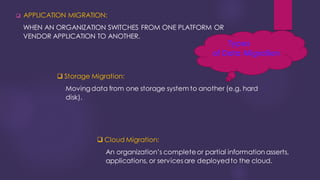
❑ APPLICATION MIGRATION:
WHEN AN ORGANIZATION SWITCHES FROM ONE PLATFORM OR
VENDOR APPLICATION TO ANOTHER.
Types
of Data Migration
❑ Cloud Migration:
An organization’s completeor partial information asserts,
applications, or servicesare deployedto the cloud.
❑ Storage Migration:
Movingdata from one storage system to another (e.g. hard
disk).
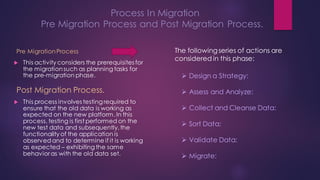
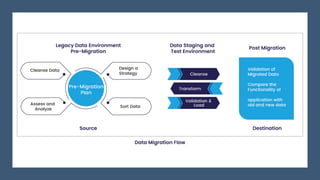
Process In Migration
Pre Migration Process and Post Migration Process.
Pre MigrationProcess
 This activity considers the prerequisites for
the migrationsuch as planning tasks for
the pre-migration phase.
Post Migration Process.
 This process involves testing required to
ensure that the old data is working as
expected on the new platform. In this
process, testing is first performed on the
new test data and subsequently,the
functionality of the application is
observedand to determine if it is working
as expected – exhibiting the same
behavior as with the old data set.
The followingseries of actions are
considered in this phase:
➢ Design a Strategy:
➢ Assess and Analyze:
➢ Collect and Cleanse Data:
➢ Sort Data:
➢ Validate Data:
➢ Migrate:
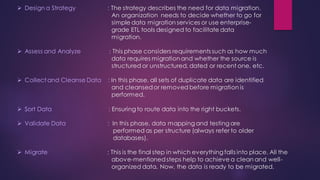
➢ Design a Strategy : The strategy describes the need for data migration.
An organization needs to decide whether to go for
simple data migration services or use enterprise-
grade ETL tools designed to facilitate data
migration.
➢ Assess and Analyze : This phase considers requirements such as how much
data requires migrationand whether the source is
structured or unstructured, dated or recent one, etc.
➢ Collect and Cleanse Data : In this phase, all sets of duplicate data are identified
and cleansedor removed before migration is
performed.
➢ Sort Data : Ensuring to route data into the right buckets.
➢ Validate Data : In this phase, data mapping and testing are
performed as per structure (always refer to older
databases).
➢ Migrate : This is the final step in which everything falls into place. All the
above-mentionedsteps help to achieve a clean and well-
organized data. Now, the data is ready to be migrated.
Benefits of
data
migration
➢ Improved data consistency across
systems, processes and
organizations
➢ Increased responsiveness to the
business changes
➢ Faster, lower-cost data migration
possibilities
➢ Reduced risk of data leakage and
compliance slips
Challenges of migrating
data
Older and legacy
systems require
specialized and costly
skills to access the data.
Systems tend to lack
up-to-date
documentation, so
data content and
quality are unknown.
Often multiple systems
are migrated to a single
system, creating a
need to resolve
significant redundancy
and inconsistency
Disadvantages of
unplanned data
migration
➢ Time Consuming: Migration is a
continuous process, which must be
repeated every time a
medium/assetreaches
obsolescence, for all data objects
stored on a certain media.
➢ Data migrationinvolves planning,
executing and testing in equal
measure to ensure the desired
outcome is achieved– to keep the
systems up to date with the current
data.
Note:
Since a script is run (executed) to
migrate data in bulk in a single click,
it would be helpful to maintain a log
for the input tables configured to
store the initial data, to be
recoverable in case of data
migration failures. Finally, there will
need to be a clear count of data
after migration.
Mithilesh Singh

Data Migration.pdf

  • 1.
  • 2.
    data migration? DATA MIGRATION CANBE DEFINED AS: TRANSFER OF DATA BETWEEN DIFFERENT TYPES OF FILE FORMATS, DATABASES, AND STORAGE SYSTEMS OR AS TRANSFER OF DATA FROM ONE REPOSITORY TO ANOTHER.
  • 3.
    Requirements to beremembered: ➢ Data quality must be assessed and documented before migration to ensure implementation is without data loss. ➢ The data type of the columns in the table must be the same in most cases. ➢ Emphasis must be given to the primary kind of data duringmigration. ➢ Duringmigration, one can increase the no. of the columns as per requirements but are not allowed to remove any column without specific reason to prevent risk of data loss. ➢ Schema and table name can be modified as per need, but data content must be the same. ➢ The Table should not be restricted to limited entries (less than the data that is going to be migrated). ➢ If there exists a correlation between the tables before migration, the same should be maintained correctly after successful migration.
  • 4.
    ❑ APPLICATION MIGRATION: WHENAN ORGANIZATION SWITCHES FROM ONE PLATFORM OR VENDOR APPLICATION TO ANOTHER. Types of Data Migration ❑ Cloud Migration: An organization’s completeor partial information asserts, applications, or servicesare deployedto the cloud. ❑ Storage Migration: Movingdata from one storage system to another (e.g. hard disk).
  • 5.
    Process In Migration PreMigration Process and Post Migration Process. Pre MigrationProcess  This activity considers the prerequisites for the migrationsuch as planning tasks for the pre-migration phase. Post Migration Process.  This process involves testing required to ensure that the old data is working as expected on the new platform. In this process, testing is first performed on the new test data and subsequently,the functionality of the application is observedand to determine if it is working as expected – exhibiting the same behavior as with the old data set. The followingseries of actions are considered in this phase: ➢ Design a Strategy: ➢ Assess and Analyze: ➢ Collect and Cleanse Data: ➢ Sort Data: ➢ Validate Data: ➢ Migrate:
  • 6.
    ➢ Design aStrategy : The strategy describes the need for data migration. An organization needs to decide whether to go for simple data migration services or use enterprise- grade ETL tools designed to facilitate data migration. ➢ Assess and Analyze : This phase considers requirements such as how much data requires migrationand whether the source is structured or unstructured, dated or recent one, etc. ➢ Collect and Cleanse Data : In this phase, all sets of duplicate data are identified and cleansedor removed before migration is performed. ➢ Sort Data : Ensuring to route data into the right buckets. ➢ Validate Data : In this phase, data mapping and testing are performed as per structure (always refer to older databases). ➢ Migrate : This is the final step in which everything falls into place. All the above-mentionedsteps help to achieve a clean and well- organized data. Now, the data is ready to be migrated.
  • 7.
    Benefits of data migration ➢ Improveddata consistency across systems, processes and organizations ➢ Increased responsiveness to the business changes ➢ Faster, lower-cost data migration possibilities ➢ Reduced risk of data leakage and compliance slips
  • 8.
    Challenges of migrating data Olderand legacy systems require specialized and costly skills to access the data. Systems tend to lack up-to-date documentation, so data content and quality are unknown. Often multiple systems are migrated to a single system, creating a need to resolve significant redundancy and inconsistency
  • 9.
    Disadvantages of unplanned data migration ➢Time Consuming: Migration is a continuous process, which must be repeated every time a medium/assetreaches obsolescence, for all data objects stored on a certain media. ➢ Data migrationinvolves planning, executing and testing in equal measure to ensure the desired outcome is achieved– to keep the systems up to date with the current data.
  • 11.
    Note: Since a scriptis run (executed) to migrate data in bulk in a single click, it would be helpful to maintain a log for the input tables configured to store the initial data, to be recoverable in case of data migration failures. Finally, there will need to be a clear count of data after migration.
  • 12.