Intelligent Projects with 
Maven 
We’ll examine Maven framework with its architecture and 
create some sample projects! 
Dev Fest Istanbul 
December 2014 
Mert ÇALIŞKAN 
@mertcal
Mert ÇALIŞKAN 
• ’02 Hacettepe Graduate 
• Lecturer @ Hacettepe 
• 10+ Years of Enterprise Java Experience 
• Coder @ t2.com.tr 
• Author 
• Open Source Software Advocate 
• Founder of Ankara JUG 
• Linkedin Profile available @ 
bit.ly/mertcaliskan
My Books 
Details available at http://amazon.com/author/mert
How many of you heard 
about Maven? 
Or using it?
Maven is… 
• A project management framework from ASF. 
• It’s a Uniform Build System. 
• Making the build as easy as possible. 
• Comprehensive model for software projects.
And Maven also is…
What Maven provides 
• Convention over Configuration 
(konfigurasyon yerine kurallar) 
• Common Interfaces 
The time of build engineers is over 
Stop building the build and focus on development ! 
• Dependency Management 
Public repositories 
• Plugin Architecture 
• Documentation 
Generate documentation, reports ...
Installing Maven 
• You need JDK (not the JRE). 
• Just download the binary from 
http://maven.apache.org/download.cgi. 
• Current latest version is 3.2.3. 
• Open it up to a folder and add it to the path of the 
OS / Environment Variable.
To understand Maven 
one first need to 
understand 
the 
Project Object Model 
(POM)
POM 
• It is what makes your project a Maven Project. 
• It’s an XML file. 
• Not just for building the project; but also, 
project’s relationship, list of team members, 
license, SCM and etc. 
• Not only for Java projects 
• you can build FLEX code with appropriate 
plugins 
• you can build Microsoft binaries from C# code
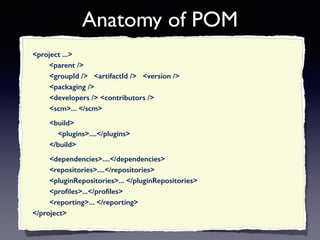
Anatomy of POM 
<project ...> 
<parent /> 
<groupId /> <artifactId /> <version /> 
<packaging /> 
<developers /> <contributors /> 
<scm>... </scm> 
<build> 
<plugins>....</plugins> 
</build> 
<dependencies>....</dependencies> 
<repositories>....</repositories> 
<pluginRepositories>... </pluginRepositories> 
<profiles>...</profiles> 
<reporting>... </reporting> 
</project>
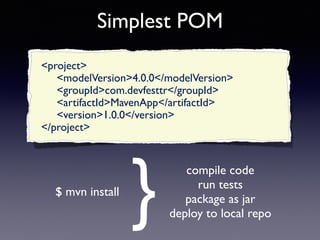
Simplest POM 
<project> 
<modelVersion>4.0.0</modelVersion> 
<groupId>com.devfesttr</groupId> 
<artifactId>MavenApp</artifactId> 
<version>1.0.0</version> 
</project> 
$ mvn install 
} 
compile code 
run tests 
package as jar 
deploy to local repo
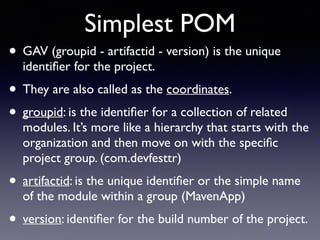
Simplest POM 
• GAV (groupid - artifactid - version) is the unique 
identifier for the project. 
• They are also called as the coordinates. 
• groupid: is the identifier for a collection of related 
modules. It’s more like a hierarchy that starts with the 
organization and then move on with the specific 
project group. (com.devfesttr) 
• artifactid: is the unique identifier or the simple name 
of the module within a group (MavenApp) 
• version: identifier for the build number of the project.
Question here is 
How is that possible with 6 lines 
of XML? 
Where do I define the source 
folders, test folders and all other 
stuff ?
Super POM 
• Same analogy with java.lang.Object 
• usr/share/Java/maven/lib/maven-model-builder- 
3.2.3.jar:org/apache/maven/model/ 
pom-4.0.0.xml 
• Standard directory layout 
• Repo def. for http://repo1.maven.org/maven2 
• To see the merged POM: 
mvn help:effective-pom
Let’s create a 
Maven Project 
• We’ll be using Eclipse Kepler 
• IDE for version JavaEE Developers is shipping with 
Maven Plugins. 
• We’ll also create a project with the archetype soon.
Build LifeCycle 
• Process for building and distributing an 
artefact is clearly defined. 
• 3 built-in Life Cycles 
default: handles project deployment 
clean: clean project files generated by a build 
site: generate project’s site doc. 
• Each lifecycle consists of phases in specific order. 
• Zero or more goals attached to each phase.
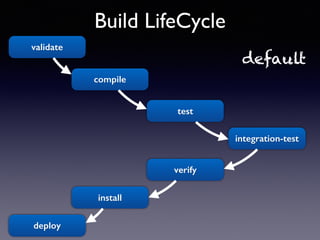
Build LifeCycle 
default 
integration-test 
validate 
compile 
test 
verify 
install 
deploy
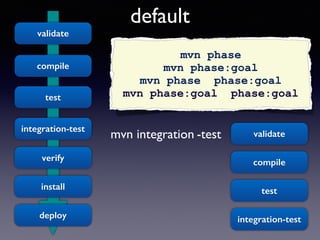
default 
mvn integration -test 
validate 
compile 
test 
integration-test 
verify 
install 
deploy 
mvn phase 
mvn phase:goal 
mvn phase phase:goal 
mvn phase:goal phase:goal 
validate 
compile 
test 
integration-test
Build LifeCycle 
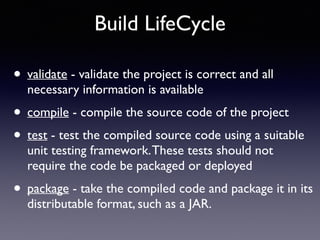
• validate - validate the project is correct and all 
necessary information is available 
• compile - compile the source code of the project 
• test - test the compiled source code using a suitable 
unit testing framework. These tests should not 
require the code be packaged or deployed 
• package - take the compiled code and package it in its 
distributable format, such as a JAR.
Build LifeCycle 
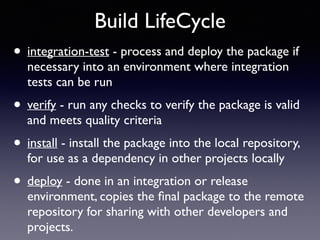
• integration-test - process and deploy the package if 
necessary into an environment where integration 
tests can be run 
• verify - run any checks to verify the package is valid 
and meets quality criteria 
• install - install the package into the local repository, 
for use as a dependency in other projects locally 
• deploy - done in an integration or release 
environment, copies the final package to the remote 
repository for sharing with other developers and 
projects.
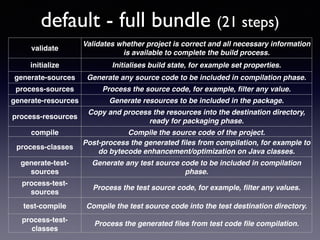
default - full bundle (21 steps) 
validate 
Validates whether project is correct and all necessary information 
is available to complete the build process. 
initialize Initialises build state, for example set properties. 
generate-sources Generate any source code to be included in compilation phase. 
process-sources Process the source code, for example, filter any value. 
generate-resources Generate resources to be included in the package. 
process-resources 
Copy and process the resources into the destination directory, 
ready for packaging phase. 
compile Compile the source code of the project. 
process-classes 
Post-process the generated files from compilation, for example to 
do bytecode enhancement/optimization on Java classes. 
generate-test-sources 
Generate any test source code to be included in compilation 
phase. 
process-test-sources 
Process the test source code, for example, filter any values. 
test-compile Compile the test source code into the test destination directory. 
process-test-classes 
Process the generated files from test code file compilation.
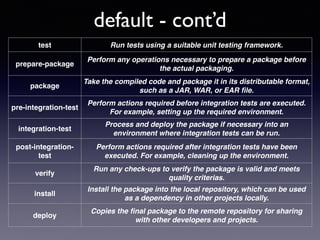
default - cont’d 
test Run tests using a suitable unit testing framework. 
prepare-package 
Perform any operations necessary to prepare a package before 
the actual packaging. 
package 
Take the compiled code and package it in its distributable format, 
such as a JAR, WAR, or EAR file. 
pre-integration-test 
Perform actions required before integration tests are executed. 
For example, setting up the required environment. 
integration-test 
Process and deploy the package if necessary into an 
environment where integration tests can be run. 
post-integration-test 
Perform actions required after integration tests have been 
executed. For example, cleaning up the environment. 
verify 
Run any check-ups to verify the package is valid and meets 
quality criterias. 
install 
Install the package into the local repository, which can be used 
as a dependency in other projects locally. 
deploy 
Copies the final package to the remote repository for sharing 
with other developers and projects.
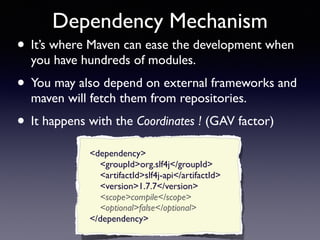
Dependency Mechanism 
• It’s where Maven can ease the development when 
you have hundreds of modules. 
• You may also depend on external frameworks and 
maven will fetch them from repositories. 
• It happens with the Coordinates ! (GAV factor) 
<dependency> 
<groupId>org.slf4j</groupId> 
<artifactId>slf4j-api</artifactId> 
<version>1.7.7</version> 
<scope>compile</scope> 
<optional>false</optional> 
</dependency>
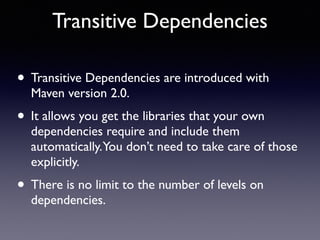
Transitive Dependencies 
• Transitive Dependencies are introduced with 
Maven version 2.0. 
• It allows you get the libraries that your own 
dependencies require and include them 
automatically. You don’t need to take care of those 
explicitly. 
• There is no limit to the number of levels on 
dependencies.
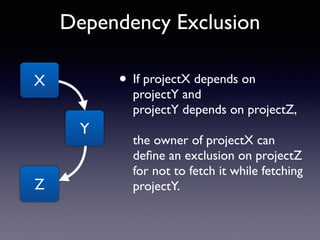
Dependency Exclusion 
• If projectX depends on 
projectY and 
projectY depends on projectZ, 
the owner of projectX can 
define an exclusion on projectZ 
for not to fetch it while fetching 
projectY. 
X 
Y 
Z
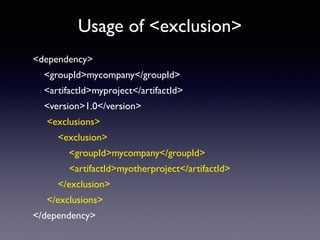
Usage of <exclusion> 
<dependency> 
<groupId>mycompany</groupId> 
<artifactId>myproject</artifactId> 
<version>1.0</version> 
<exclusions> 
<exclusion> 
<groupId>mycompany</groupId> 
<artifactId>myotherproject</artifactId> 
</exclusion> 
</exclusions> 
</dependency>
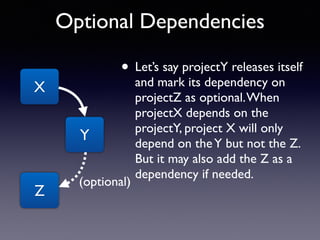
Optional Dependencies 
• Let’s say projectY releases itself 
and mark its dependency on 
projectZ as optional. When 
projectX depends on the 
projectY, project X will only 
depend on the Y but not the Z. 
But it may also add the Z as a 
dependency if needed. 
X 
Y 
Z 
(optional)
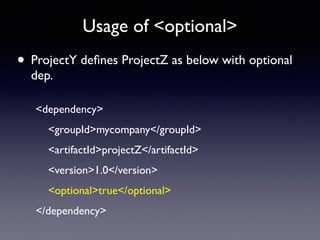
Usage of <optional> 
• ProjectY defines ProjectZ as below with optional 
dep. 
<dependency> 
<groupId>mycompany</groupId> 
<artifactId>projectZ</artifactId> 
<version>1.0</version> 
<optional>true</optional> 
</dependency>
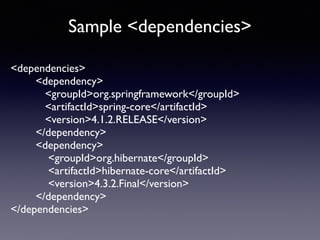
Sample <dependencies> 
<dependencies> 
<dependency> 
<groupId>org.springframework</groupId> 
<artifactId>spring-core</artifactId> 
<version>4.1.2.RELEASE</version> 
</dependency> 
<dependency> 
<groupId>org.hibernate</groupId> 
<artifactId>hibernate-core</artifactId> 
<version>4.3.2.Final</version> 
</dependency> 
</dependencies>
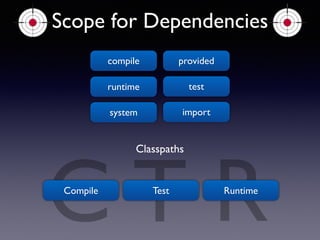
Scope for Dependencies 
compile 
provided 
runtime test 
system import 
CCompile T Classpaths 
Test R 
Runtime
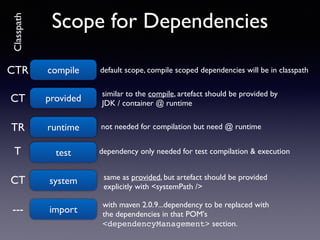
Scope for Dependencies 
compile default scope, compile scoped CTR dependencies will be in classpath 
provided similar to the compile, artefact should be provided by 
JDK / container @ runtime CT 
TR runtime not needed for compilation but need @ runtime 
T test dependency only needed for test compilation & execution 
CT system same as provided, but artefact should be provided 
with maven 2.0.9...dependency to be replaced with 
the dependencies in that POM's 
<dependencyManagement> section. 
--- import 
explicitly with <systemPath /> 
Classpath
Versioning and Ranges 
<major>.<minor>.<incremental> - <qualifier> 
1.2.3 / 1.2.3-alpha-01 
Be careful with string comparison, ordering at the qualifiers... 
1.2.3-alpha-2 > 1.2.3-alpha-10 
(, ) - Exclusive 
[, ] - Inclusive 
<version>[3.8 , 4.11)</version> 
<version>[3.8]</version> 
Dependency <version>[ , 3.8]</version> 
Mediation
Release and Snapshot 
Versioning 
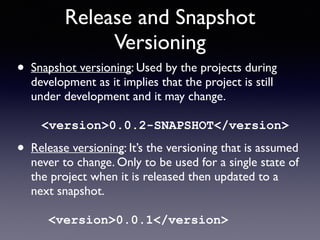
• Snapshot versioning: Used by the projects during 
development as it implies that the project is still 
under development and it may change. 
<version>0.0.2-SNAPSHOT</version> 
• Release versioning: It’s the versioning that is assumed 
never to change. Only to be used for a single state of 
the project when it is released then updated to a 
next snapshot. 
<version>0.0.1</version>
Archetypes 
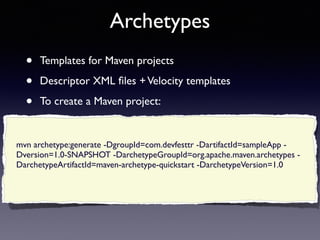
• Templates for Maven projects 
• Descriptor XML files + Velocity templates 
• To create a Maven project: 
mvn archetype:generate -DgroupId=com.devfesttr -DartifactId=sampleApp - 
Dversion=1.0-SNAPSHOT -DarchetypeGroupId=org.apache.maven.archetypes - 
DarchetypeArtifactId=maven-archetype-quickstart -DarchetypeVersion=1.0
Let’s create a 
Maven Project 
with an archetype 
• By using an archetype from JBOSS repository 
• https://repository.jboss.org/nexus/content/ 
repositories/releases/archetype-catalog.xml 
• We will have Domain classes, Web Pages, in 
memory database, REST services and etc.
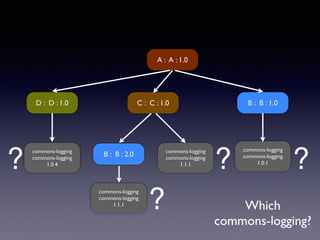
How Maven resolve 
versions?
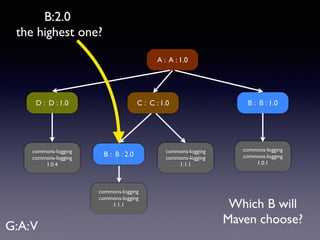
A : A : 1.0 
C : C : 1.0 B : B : 1.0 
B : B : 2.0 
commons-logging 
commons-logging 
1.0.1 
commons-logging 
commons-logging 
1.1.1 
commons-logging 
commons-logging 
1.1.1 
D : D : 1.0 
commons-logging 
commons-logging 
1.0.4 
Which B will 
Maven choose? 
B:2.0 
the highest one? 
G:A: V
A : A : 1.0 
C : C : 1.0 B : B : 1.0 
B : B : 2.0 
commons-logging 
commons-logging 
1.0.1 
commons-logging 
commons-logging 
1.1.1 
commons-logging 
commons-logging 
1.1.1 
D : D : 1.0 
commons-logging 
commons-logging 
1.0.4 
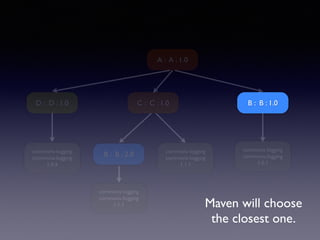
Maven will choose 
the closest one.
A : A : 1.0 
C : C : 1.0 B : B : 1.0 
B : B : 2.0 
? commons-logging 
commons-logging 
1.0.1 
? 
commons-logging 
commons-logging 
1.1.1 
commons-logging 
commons-logging 
1.1.1 
D : D : 1.0 
commons-logging 
commons-logging 
1.0.4 
Which 
commons-logging? 
? 
?
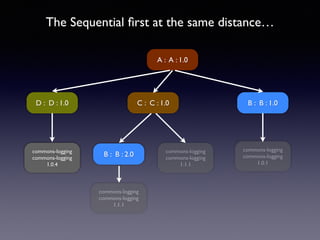
The Sequential first at the same distance… 
A : A : 1.0 
C : C : 1.0 B : B : 1.0 
B : B : 2.0 
commons-logging 
commons-logging 
1.0.1 
commons-logging 
commons-logging 
1.1.1 
commons-logging 
commons-logging 
1.1.1 
D : D : 1.0 
commons-logging 
commons-logging 
1.0.4
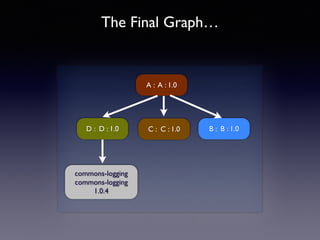
The Final Graph… 
A : A : 1.0 
C : C : 1.0 B : B : 1.0 
D : D : 1.0 
commons-logging 
commons-logging 
1.0.4
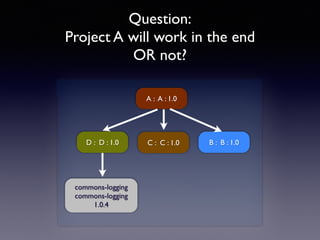
Question: 
Project A will work in the end 
OR not? 
A : A : 1.0 
C : C : 1.0 B : B : 1.0 
D : D : 1.0 
commons-logging 
commons-logging 
1.0.4
Managing 
Projects’ Dependencies
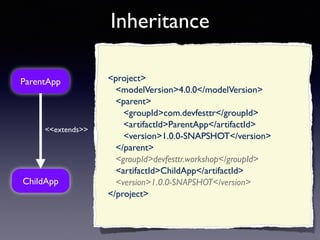
Inheritance 
ParentApp 
<<extends>> 
ChildApp 
<project> 
<modelVersion>4.0.0</modelVersion> 
<parent> 
<groupId>com.devfesttr</groupId> 
<artifactId>ParentApp</artifactId> 
<version>1.0.0-SNAPSHOT</version> 
</parent> 
<groupId>devfesttr.workshop</groupId> 
<artifactId>ChildApp</artifactId> 
<version>1.0.0-SNAPSHOT</version> 
</project>
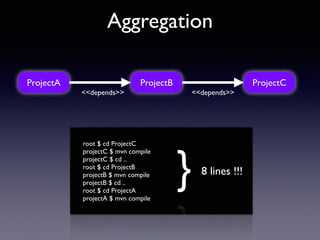
Aggregation 
ProjectA ProjectB ProjectC 
<<depends>> <<depends>> 
root $ cd ProjectC 
projectC $ mvn compile 
projectC $ cd .. 
root $ cd ProjectB 
projectB $ mvn compile 
projectB $ cd .. 
root $ cd ProjectA 
projectA $ mvn compile 
} 8 lines !!!
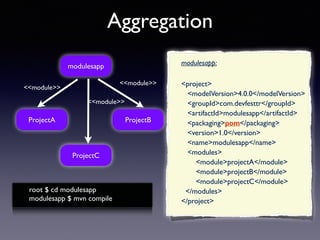
Aggregation 
modulesapp 
ProjectA ProjectB 
ProjectC 
<<module>> 
<<module>> 
<<module>> 
root $ cd modulesapp 
modulesapp $ mvn compile 
modulesapp: 
<project> 
<modelVersion>4.0.0</modelVersion> 
<groupId>com.devfesttr</groupId> 
<artifactId>modulesapp</artifactId> 
<packaging>pom</packaging> 
<version>1.0</version> 
<name>modulesapp</name> 
<modules> 
<module>projectA</module> 
<module>projectB</module> 
<module>projectC</module> 
</modules> 
</project>
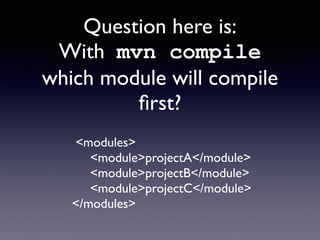
Question here is: 
With mvn compile 
which module will compile 
first? 
<modules> 
<module>projectA</module> 
<module>projectB</module> 
<module>projectC</module> 
</modules>
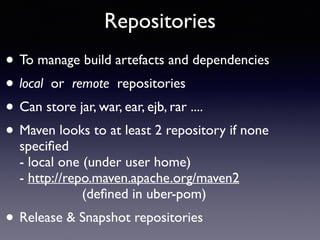
Repositories 
• To manage build artefacts and dependencies 
• local or remote repositories 
• Can store jar, war, ear, ejb, rar .... 
• Maven looks to at least 2 repository if none 
specified 
- local one (under user home) 
- http://repo.maven.apache.org/maven2 
(defined in uber-pom) 
• Release & Snapshot repositories
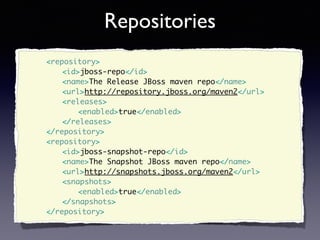
Repositories 
<repository> 
<id>jboss-repo</id> 
<name>The Release JBoss maven repo</name> 
<url>http://repository.jboss.org/maven2</url> 
<releases> 
<enabled>true</enabled> 
</releases> 
</repository> 
<repository> 
<id>jboss-snapshot-repo</id> 
<name>The Snapshot JBoss maven repo</name> 
<url>http://snapshots.jboss.org/maven2</url> 
<snapshots> 
<enabled>true</enabled> 
</snapshots> 
</repository>
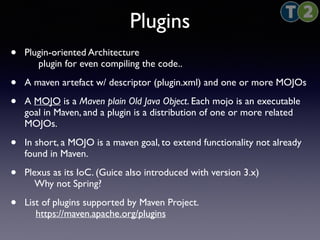
Plugins 
• Plugin-oriented Architecture 
plugin for even compiling the code.. 
• A maven artefact w/ descriptor (plugin.xml) and one or more MOJOs 
• A MOJO is a Maven plain Old Java Object. Each mojo is an executable 
goal in Maven, and a plugin is a distribution of one or more related 
MOJOs. 
• In short, a MOJO is a maven goal, to extend functionality not already 
found in Maven. 
• Plexus as its IoC. (Guice also introduced with version 3.x) 
Why not Spring? 
• List of plugins supported by Maven Project. 
https://maven.apache.org/plugins
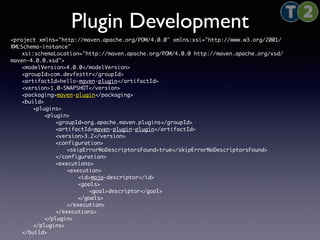
Plugin Development 
<project xmlns="http://maven.apache.org/POM/4.0.0" xmlns:xsi="http://www.w3.org/2001/ 
XMLSchema-instance" 
xsi:schemaLocation="http://maven.apache.org/POM/4.0.0 http://maven.apache.org/xsd/ 
maven-4.0.0.xsd"> 
<modelVersion>4.0.0</modelVersion> 
<groupId>com.devfesttr</groupId> 
<artifactId>hello-maven-plugin</artifactId> 
<version>1.0-SNAPSHOT</version> 
<packaging>maven-plugin</packaging> 
<build> 
<plugins> 
<plugin> 
<groupId>org.apache.maven.plugins</groupId> 
<artifactId>maven-plugin-plugin</artifactId> 
<version>3.2</version> 
<configuration> 
<skipErrorNoDescriptorsFound>true</skipErrorNoDescriptorsFound> 
</configuration> 
<executions> 
<execution> 
<id>mojo-descriptor</id> 
<goals> 
<goal>descriptor</goal> 
</goals> 
</execution> 
</executions> 
</plugin> 
</plugins> 
</build>
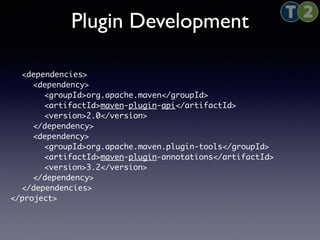
Plugin Development 
<dependencies> 
<dependency> 
<groupId>org.apache.maven</groupId> 
<artifactId>maven-plugin-api</artifactId> 
<version>2.0</version> 
</dependency> 
<dependency> 
<groupId>org.apache.maven.plugin-tools</groupId> 
<artifactId>maven-plugin-annotations</artifactId> 
<version>3.2</version> 
</dependency> 
</dependencies> 
</project>
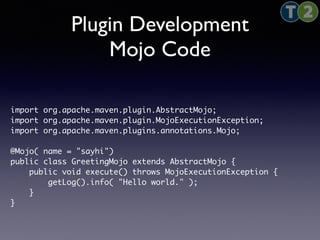
Plugin Development 
Mojo Code 
import org.apache.maven.plugin.AbstractMojo; 
import org.apache.maven.plugin.MojoExecutionException; 
import org.apache.maven.plugins.annotations.Mojo; 
@Mojo( name = "sayhi") 
public class GreetingMojo extends AbstractMojo { 
public void execute() throws MojoExecutionException { 
getLog().info( "Hello world." ); 
} 
}
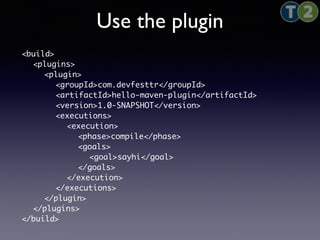
Use the plugin 
<build> 
<plugins> 
<plugin> 
<groupId>com.devfesttr</groupId> 
<artifactId>hello-maven-plugin</artifactId> 
<version>1.0-SNAPSHOT</version> 
<executions> 
<execution> 
<phase>compile</phase> 
<goals> 
<goal>sayhi</goal> 
</goals> 
</execution> 
</executions> 
</plugin> 
</plugins> 
</build>
What we did w/ plugins in 
PrimeFaces 
• maven-jsf-plugin 
• Component Class 
• Tag Handler Class 
• Declare Component, Tag, Renderer classes in faces-config.xml 
• Declare facelet tag definition 
• Declare tld tag definition 
• plugin available @ 
http://repository.primefaces.org/org/primefaces/maven-jsf-plugin
settings.xml 
• Maven provides 2 settings file, 
• Local settings.xml at %USER_HOME%/.m2/settings.xml 
• Global settings.xml at %M2_HOME%/conf/settings.xml 
• These files are not bundled with Maven project and don’t get 
distributed. 
• If both files exist, their contents get merged. 
• Local settings.xml overrides the global one.
Thank you..!

Intelligent Projects with Maven - DevFest Istanbul

  • 1.
    Intelligent Projects with Maven We’ll examine Maven framework with its architecture and create some sample projects! Dev Fest Istanbul December 2014 Mert ÇALIŞKAN @mertcal
  • 2.
    Mert ÇALIŞKAN •’02 Hacettepe Graduate • Lecturer @ Hacettepe • 10+ Years of Enterprise Java Experience • Coder @ t2.com.tr • Author • Open Source Software Advocate • Founder of Ankara JUG • Linkedin Profile available @ bit.ly/mertcaliskan
  • 3.
    My Books Detailsavailable at http://amazon.com/author/mert
  • 4.
    How many ofyou heard about Maven? Or using it?
  • 5.
    Maven is… •A project management framework from ASF. • It’s a Uniform Build System. • Making the build as easy as possible. • Comprehensive model for software projects.
  • 6.
  • 7.
    What Maven provides • Convention over Configuration (konfigurasyon yerine kurallar) • Common Interfaces The time of build engineers is over Stop building the build and focus on development ! • Dependency Management Public repositories • Plugin Architecture • Documentation Generate documentation, reports ...
  • 8.
    Installing Maven •You need JDK (not the JRE). • Just download the binary from http://maven.apache.org/download.cgi. • Current latest version is 3.2.3. • Open it up to a folder and add it to the path of the OS / Environment Variable.
  • 9.
    To understand Maven one first need to understand the Project Object Model (POM)
  • 10.
    POM • Itis what makes your project a Maven Project. • It’s an XML file. • Not just for building the project; but also, project’s relationship, list of team members, license, SCM and etc. • Not only for Java projects • you can build FLEX code with appropriate plugins • you can build Microsoft binaries from C# code
  • 11.
    Anatomy of POM <project ...> <parent /> <groupId /> <artifactId /> <version /> <packaging /> <developers /> <contributors /> <scm>... </scm> <build> <plugins>....</plugins> </build> <dependencies>....</dependencies> <repositories>....</repositories> <pluginRepositories>... </pluginRepositories> <profiles>...</profiles> <reporting>... </reporting> </project>
  • 12.
    Simplest POM <project> <modelVersion>4.0.0</modelVersion> <groupId>com.devfesttr</groupId> <artifactId>MavenApp</artifactId> <version>1.0.0</version> </project> $ mvn install } compile code run tests package as jar deploy to local repo
  • 13.
    Simplest POM •GAV (groupid - artifactid - version) is the unique identifier for the project. • They are also called as the coordinates. • groupid: is the identifier for a collection of related modules. It’s more like a hierarchy that starts with the organization and then move on with the specific project group. (com.devfesttr) • artifactid: is the unique identifier or the simple name of the module within a group (MavenApp) • version: identifier for the build number of the project.
  • 14.
    Question here is How is that possible with 6 lines of XML? Where do I define the source folders, test folders and all other stuff ?
  • 15.
    Super POM •Same analogy with java.lang.Object • usr/share/Java/maven/lib/maven-model-builder- 3.2.3.jar:org/apache/maven/model/ pom-4.0.0.xml • Standard directory layout • Repo def. for http://repo1.maven.org/maven2 • To see the merged POM: mvn help:effective-pom
  • 16.
    Let’s create a Maven Project • We’ll be using Eclipse Kepler • IDE for version JavaEE Developers is shipping with Maven Plugins. • We’ll also create a project with the archetype soon.
  • 17.
    Build LifeCycle •Process for building and distributing an artefact is clearly defined. • 3 built-in Life Cycles default: handles project deployment clean: clean project files generated by a build site: generate project’s site doc. • Each lifecycle consists of phases in specific order. • Zero or more goals attached to each phase.
  • 18.
    Build LifeCycle default integration-test validate compile test verify install deploy
  • 19.
    default mvn integration-test validate compile test integration-test verify install deploy mvn phase mvn phase:goal mvn phase phase:goal mvn phase:goal phase:goal validate compile test integration-test
  • 20.
    Build LifeCycle •validate - validate the project is correct and all necessary information is available • compile - compile the source code of the project • test - test the compiled source code using a suitable unit testing framework. These tests should not require the code be packaged or deployed • package - take the compiled code and package it in its distributable format, such as a JAR.
  • 21.
    Build LifeCycle •integration-test - process and deploy the package if necessary into an environment where integration tests can be run • verify - run any checks to verify the package is valid and meets quality criteria • install - install the package into the local repository, for use as a dependency in other projects locally • deploy - done in an integration or release environment, copies the final package to the remote repository for sharing with other developers and projects.
  • 22.
    default - fullbundle (21 steps) validate Validates whether project is correct and all necessary information is available to complete the build process. initialize Initialises build state, for example set properties. generate-sources Generate any source code to be included in compilation phase. process-sources Process the source code, for example, filter any value. generate-resources Generate resources to be included in the package. process-resources Copy and process the resources into the destination directory, ready for packaging phase. compile Compile the source code of the project. process-classes Post-process the generated files from compilation, for example to do bytecode enhancement/optimization on Java classes. generate-test-sources Generate any test source code to be included in compilation phase. process-test-sources Process the test source code, for example, filter any values. test-compile Compile the test source code into the test destination directory. process-test-classes Process the generated files from test code file compilation.
  • 23.
    default - cont’d test Run tests using a suitable unit testing framework. prepare-package Perform any operations necessary to prepare a package before the actual packaging. package Take the compiled code and package it in its distributable format, such as a JAR, WAR, or EAR file. pre-integration-test Perform actions required before integration tests are executed. For example, setting up the required environment. integration-test Process and deploy the package if necessary into an environment where integration tests can be run. post-integration-test Perform actions required after integration tests have been executed. For example, cleaning up the environment. verify Run any check-ups to verify the package is valid and meets quality criterias. install Install the package into the local repository, which can be used as a dependency in other projects locally. deploy Copies the final package to the remote repository for sharing with other developers and projects.
  • 24.
    Dependency Mechanism •It’s where Maven can ease the development when you have hundreds of modules. • You may also depend on external frameworks and maven will fetch them from repositories. • It happens with the Coordinates ! (GAV factor) <dependency> <groupId>org.slf4j</groupId> <artifactId>slf4j-api</artifactId> <version>1.7.7</version> <scope>compile</scope> <optional>false</optional> </dependency>
  • 25.
    Transitive Dependencies •Transitive Dependencies are introduced with Maven version 2.0. • It allows you get the libraries that your own dependencies require and include them automatically. You don’t need to take care of those explicitly. • There is no limit to the number of levels on dependencies.
  • 26.
    Dependency Exclusion •If projectX depends on projectY and projectY depends on projectZ, the owner of projectX can define an exclusion on projectZ for not to fetch it while fetching projectY. X Y Z
  • 27.
    Usage of <exclusion> <dependency> <groupId>mycompany</groupId> <artifactId>myproject</artifactId> <version>1.0</version> <exclusions> <exclusion> <groupId>mycompany</groupId> <artifactId>myotherproject</artifactId> </exclusion> </exclusions> </dependency>
  • 28.
    Optional Dependencies •Let’s say projectY releases itself and mark its dependency on projectZ as optional. When projectX depends on the projectY, project X will only depend on the Y but not the Z. But it may also add the Z as a dependency if needed. X Y Z (optional)
  • 29.
    Usage of <optional> • ProjectY defines ProjectZ as below with optional dep. <dependency> <groupId>mycompany</groupId> <artifactId>projectZ</artifactId> <version>1.0</version> <optional>true</optional> </dependency>
  • 30.
    Sample <dependencies> <dependencies> <dependency> <groupId>org.springframework</groupId> <artifactId>spring-core</artifactId> <version>4.1.2.RELEASE</version> </dependency> <dependency> <groupId>org.hibernate</groupId> <artifactId>hibernate-core</artifactId> <version>4.3.2.Final</version> </dependency> </dependencies>
  • 31.
    Scope for Dependencies compile provided runtime test system import CCompile T Classpaths Test R Runtime
  • 32.
    Scope for Dependencies compile default scope, compile scoped CTR dependencies will be in classpath provided similar to the compile, artefact should be provided by JDK / container @ runtime CT TR runtime not needed for compilation but need @ runtime T test dependency only needed for test compilation & execution CT system same as provided, but artefact should be provided with maven 2.0.9...dependency to be replaced with the dependencies in that POM's <dependencyManagement> section. --- import explicitly with <systemPath /> Classpath
  • 33.
    Versioning and Ranges <major>.<minor>.<incremental> - <qualifier> 1.2.3 / 1.2.3-alpha-01 Be careful with string comparison, ordering at the qualifiers... 1.2.3-alpha-2 > 1.2.3-alpha-10 (, ) - Exclusive [, ] - Inclusive <version>[3.8 , 4.11)</version> <version>[3.8]</version> Dependency <version>[ , 3.8]</version> Mediation
  • 34.
    Release and Snapshot Versioning • Snapshot versioning: Used by the projects during development as it implies that the project is still under development and it may change. <version>0.0.2-SNAPSHOT</version> • Release versioning: It’s the versioning that is assumed never to change. Only to be used for a single state of the project when it is released then updated to a next snapshot. <version>0.0.1</version>
  • 35.
    Archetypes • Templatesfor Maven projects • Descriptor XML files + Velocity templates • To create a Maven project: mvn archetype:generate -DgroupId=com.devfesttr -DartifactId=sampleApp - Dversion=1.0-SNAPSHOT -DarchetypeGroupId=org.apache.maven.archetypes - DarchetypeArtifactId=maven-archetype-quickstart -DarchetypeVersion=1.0
  • 36.
    Let’s create a Maven Project with an archetype • By using an archetype from JBOSS repository • https://repository.jboss.org/nexus/content/ repositories/releases/archetype-catalog.xml • We will have Domain classes, Web Pages, in memory database, REST services and etc.
  • 37.
  • 38.
    A : A: 1.0 C : C : 1.0 B : B : 1.0 B : B : 2.0 commons-logging commons-logging 1.0.1 commons-logging commons-logging 1.1.1 commons-logging commons-logging 1.1.1 D : D : 1.0 commons-logging commons-logging 1.0.4 Which B will Maven choose? B:2.0 the highest one? G:A: V
  • 39.
    A : A: 1.0 C : C : 1.0 B : B : 1.0 B : B : 2.0 commons-logging commons-logging 1.0.1 commons-logging commons-logging 1.1.1 commons-logging commons-logging 1.1.1 D : D : 1.0 commons-logging commons-logging 1.0.4 Maven will choose the closest one.
  • 40.
    A : A: 1.0 C : C : 1.0 B : B : 1.0 B : B : 2.0 ? commons-logging commons-logging 1.0.1 ? commons-logging commons-logging 1.1.1 commons-logging commons-logging 1.1.1 D : D : 1.0 commons-logging commons-logging 1.0.4 Which commons-logging? ? ?
  • 41.
    The Sequential firstat the same distance… A : A : 1.0 C : C : 1.0 B : B : 1.0 B : B : 2.0 commons-logging commons-logging 1.0.1 commons-logging commons-logging 1.1.1 commons-logging commons-logging 1.1.1 D : D : 1.0 commons-logging commons-logging 1.0.4
  • 42.
    The Final Graph… A : A : 1.0 C : C : 1.0 B : B : 1.0 D : D : 1.0 commons-logging commons-logging 1.0.4
  • 43.
    Question: Project Awill work in the end OR not? A : A : 1.0 C : C : 1.0 B : B : 1.0 D : D : 1.0 commons-logging commons-logging 1.0.4
  • 44.
  • 45.
    Inheritance ParentApp <<extends>> ChildApp <project> <modelVersion>4.0.0</modelVersion> <parent> <groupId>com.devfesttr</groupId> <artifactId>ParentApp</artifactId> <version>1.0.0-SNAPSHOT</version> </parent> <groupId>devfesttr.workshop</groupId> <artifactId>ChildApp</artifactId> <version>1.0.0-SNAPSHOT</version> </project>
  • 46.
    Aggregation ProjectA ProjectBProjectC <<depends>> <<depends>> root $ cd ProjectC projectC $ mvn compile projectC $ cd .. root $ cd ProjectB projectB $ mvn compile projectB $ cd .. root $ cd ProjectA projectA $ mvn compile } 8 lines !!!
  • 47.
    Aggregation modulesapp ProjectAProjectB ProjectC <<module>> <<module>> <<module>> root $ cd modulesapp modulesapp $ mvn compile modulesapp: <project> <modelVersion>4.0.0</modelVersion> <groupId>com.devfesttr</groupId> <artifactId>modulesapp</artifactId> <packaging>pom</packaging> <version>1.0</version> <name>modulesapp</name> <modules> <module>projectA</module> <module>projectB</module> <module>projectC</module> </modules> </project>
  • 48.
    Question here is: With mvn compile which module will compile first? <modules> <module>projectA</module> <module>projectB</module> <module>projectC</module> </modules>
  • 49.
    Repositories • Tomanage build artefacts and dependencies • local or remote repositories • Can store jar, war, ear, ejb, rar .... • Maven looks to at least 2 repository if none specified - local one (under user home) - http://repo.maven.apache.org/maven2 (defined in uber-pom) • Release & Snapshot repositories
  • 50.
    Repositories <repository> <id>jboss-repo</id> <name>The Release JBoss maven repo</name> <url>http://repository.jboss.org/maven2</url> <releases> <enabled>true</enabled> </releases> </repository> <repository> <id>jboss-snapshot-repo</id> <name>The Snapshot JBoss maven repo</name> <url>http://snapshots.jboss.org/maven2</url> <snapshots> <enabled>true</enabled> </snapshots> </repository>
  • 51.
    Plugins • Plugin-orientedArchitecture plugin for even compiling the code.. • A maven artefact w/ descriptor (plugin.xml) and one or more MOJOs • A MOJO is a Maven plain Old Java Object. Each mojo is an executable goal in Maven, and a plugin is a distribution of one or more related MOJOs. • In short, a MOJO is a maven goal, to extend functionality not already found in Maven. • Plexus as its IoC. (Guice also introduced with version 3.x) Why not Spring? • List of plugins supported by Maven Project. https://maven.apache.org/plugins
  • 52.
    Plugin Development <projectxmlns="http://maven.apache.org/POM/4.0.0" xmlns:xsi="http://www.w3.org/2001/ XMLSchema-instance" xsi:schemaLocation="http://maven.apache.org/POM/4.0.0 http://maven.apache.org/xsd/ maven-4.0.0.xsd"> <modelVersion>4.0.0</modelVersion> <groupId>com.devfesttr</groupId> <artifactId>hello-maven-plugin</artifactId> <version>1.0-SNAPSHOT</version> <packaging>maven-plugin</packaging> <build> <plugins> <plugin> <groupId>org.apache.maven.plugins</groupId> <artifactId>maven-plugin-plugin</artifactId> <version>3.2</version> <configuration> <skipErrorNoDescriptorsFound>true</skipErrorNoDescriptorsFound> </configuration> <executions> <execution> <id>mojo-descriptor</id> <goals> <goal>descriptor</goal> </goals> </execution> </executions> </plugin> </plugins> </build>
  • 53.
    Plugin Development <dependencies> <dependency> <groupId>org.apache.maven</groupId> <artifactId>maven-plugin-api</artifactId> <version>2.0</version> </dependency> <dependency> <groupId>org.apache.maven.plugin-tools</groupId> <artifactId>maven-plugin-annotations</artifactId> <version>3.2</version> </dependency> </dependencies> </project>
  • 54.
    Plugin Development MojoCode import org.apache.maven.plugin.AbstractMojo; import org.apache.maven.plugin.MojoExecutionException; import org.apache.maven.plugins.annotations.Mojo; @Mojo( name = "sayhi") public class GreetingMojo extends AbstractMojo { public void execute() throws MojoExecutionException { getLog().info( "Hello world." ); } }
  • 55.
    Use the plugin <build> <plugins> <plugin> <groupId>com.devfesttr</groupId> <artifactId>hello-maven-plugin</artifactId> <version>1.0-SNAPSHOT</version> <executions> <execution> <phase>compile</phase> <goals> <goal>sayhi</goal> </goals> </execution> </executions> </plugin> </plugins> </build>
  • 56.
    What we didw/ plugins in PrimeFaces • maven-jsf-plugin • Component Class • Tag Handler Class • Declare Component, Tag, Renderer classes in faces-config.xml • Declare facelet tag definition • Declare tld tag definition • plugin available @ http://repository.primefaces.org/org/primefaces/maven-jsf-plugin
  • 57.
    settings.xml • Mavenprovides 2 settings file, • Local settings.xml at %USER_HOME%/.m2/settings.xml • Global settings.xml at %M2_HOME%/conf/settings.xml • These files are not bundled with Maven project and don’t get distributed. • If both files exist, their contents get merged. • Local settings.xml overrides the global one.
  • 58.