Introduction to Maven
Or, why should I bother with this
complicated, confusing, frustrating tool!??!
Ken Rimple, Chariot Solutions
Agenda
• What is Maven? How does it compare to Ant?
• Projects, dependencies, and artifacts
• Creating a maven build file
• Issuing builds
• Managing dependencies
• Multi‐project builds
• IDEs, searching repositories
• Reporting
What is Maven?
• A build tool
• Convention (over?) configuration
– Ant builds are procedural
– Maven builds are structural
• Manages dependencies
– You describe your dependencies, Maven downloads
and includes in your build path
• Manages repositories
– Your projects share a common set of artifacts/jar files
– No need to check in JAR files to version control
Maven is extensible
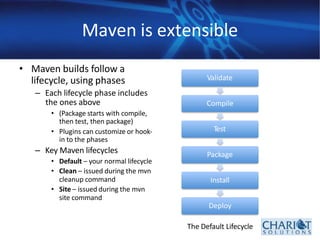
• Maven builds follow a
lifecycle, using phases
– Each lifecycle phase includes
the ones above
• (Package starts with compile,
then test, then package)
• Plugins can customize or hook‐
in to the phases
– Key Maven lifecycles
• Default – your normal lifecycle
• Clean – issued during the mvn
cleanup command
• Site – issued during the mvn
site command
Validate
Compile
Test
Package
Install
Deploy
The Default Lifecycle
Getting Started
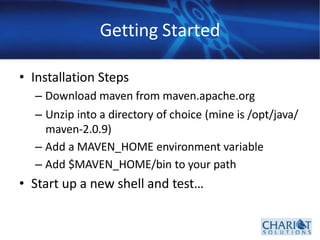
• Installation Steps
– Download maven from maven.apache.org
– Unzip into a directory of choice (mine is /opt/java/
maven‐2.0.9)
– Add a MAVEN_HOME environment variable
– Add $MAVEN_HOME/bin to your path
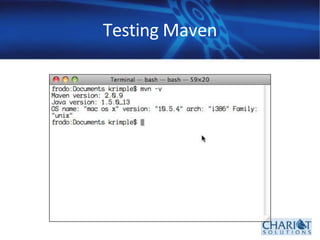
• Start up a new shell and test…
Testing Maven
Creating a Maven Project…
• Create a root project directory
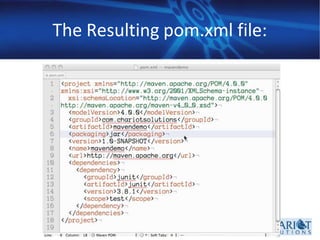
• Create a pom.xml file (Project Object Model)
– Three methods
• Slug it out (not recommended)
• Find a prototypical example and steal it
(recommended)
• Use a Maven archetype (sometimes recommended)
What is a POM file?
• Contains configuration information about your
project
• Key items
– Project Identification
– Dependencies
– Plug‐Ins
– Other Settings
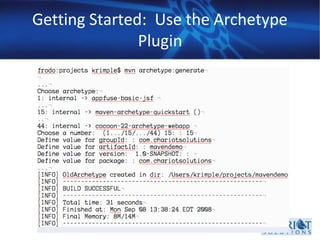
Getting Started: Use the Archetype
Plugin
The Resulting pom.xml file:
What just happened?
• We let Maven build a project skeleton
– Maven used its’ conventions to place files in the
right places
– Issuing “mvn package” will place a jar file in
target/, after compiling and running unit tests
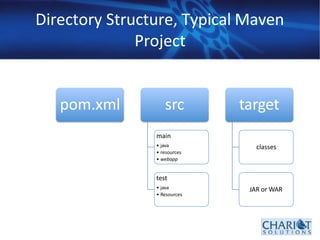
• Let’s look at the directory structure…
Directory Structure, Typical Maven
Project
pom.xml src
main
• java
• resources
• webapp
test
• java
• Resources
target
classes
JAR or WAR
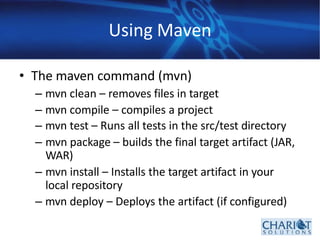
Using Maven
• The maven command (mvn)
– mvn clean – removes files in target
– mvn compile – compiles a project
– mvn test – Runs all tests in the src/test directory
– mvn package – builds the final target artifact (JAR,
WAR)
– mvn install – Installs the target artifact in your
local repository
– mvn deploy – Deploys the artifact (if configured)
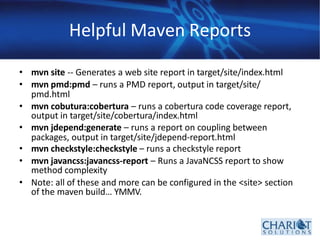
Helpful Maven Reports
• mvn site ‐‐ Generates a web site report in target/site/index.html
• mvn pmd:pmd – runs a PMD report, output in target/site/
pmd.html
• mvn cobutura:cobertura – runs a cobertura code coverage report,
output in target/site/cobertura/index.html
• mvn jdepend:generate – runs a report on coupling between
packages, output in target/site/jdepend‐report.html
• mvn checkstyle:checkstyle – runs a checkstyle report
• mvn javancss:javancss‐report – Runs a JavaNCSS report to show
method complexity
• Note: all of these and more can be configured in the <site> section
of the maven build… YMMV.
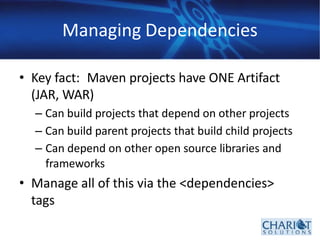
Managing Dependencies
• Key fact: Maven projects have ONE Artifact
(JAR, WAR)
– Can build projects that depend on other projects
– Can build parent projects that build child projects
– Can depend on other open source libraries and
frameworks
• Manage all of this via the <dependencies>
tags
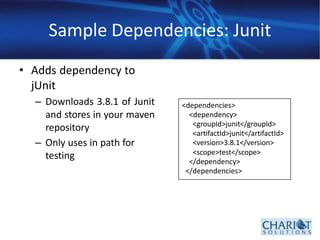
Sample Dependencies: Junit
• Adds dependency to
jUnit
– Downloads 3.8.1 of Junit
and stores in your maven
repository
– Only uses in path for
testing
<dependencies>
<dependency>
<groupId>junit</groupId>
<artifactId>junit</artifactId>
<version>3.8.1</version>
<scope>test</scope>
</dependency>
</dependencies>
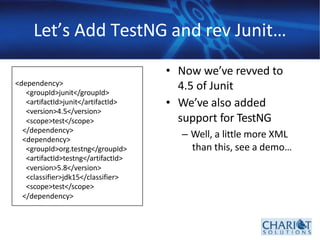
Let’s Add TestNG and rev Junit…
• Now we’ve revved to
4.5 of Junit
• We’ve also added
support for TestNG
– Well, a little more XML
than this, see a demo…
<dependency>
<groupId>junit</groupId>
<artifactId>junit</artifactId>
<version>4.5</version>
<scope>test</scope>
</dependency>
<dependency>
<groupId>org.testng</groupId>
<artifactId>testng</artifactId>
<version>5.8</version>
<classifier>jdk15</classifier>
<scope>test</scope>
</dependency>
Dependency Tips…
• Look for public dependencies on
www.mvnrepository.com
• Split out re‐usable functionality into JAR
projects
– Create top‐level projects with a “pom” target
which coordinate the build of subordinate projects
– Manage your own shared projects using a
company repository (Archiva, others)
Open up your Toolset
• With Maven, you can create projects for major
IDEs this way:
• mvn eclipse:eclipse – Builds a .classpath
and .project file for eclipse
• mvn idea:idea – Builds an idea 6.0 project. Idea 7
can directly read POM files and build an idea
project automatically
• Netbeans can import maven projects directly if
configured with the Maven support plugin
What we didn’t cover…
• Transitive dependencies
– If one dependency needs version A of a project, but
another needs version B… You have to exclude the
download of the wrong version
• We didn’t cover multiple projects
• We didn’t talk much about plugins
• We didn’t show you anything about version
control
• Sites?
• But this will get you started
Resources
• Maven web site: http://maven.apache.org
• Download “Better Builds with Maven” for a
more detailed overview

Introduction to Maven for beginners and DevOps

  • 1.
    Introduction to Maven Or,why should I bother with this complicated, confusing, frustrating tool!??! Ken Rimple, Chariot Solutions
  • 2.
    Agenda • What isMaven? How does it compare to Ant? • Projects, dependencies, and artifacts • Creating a maven build file • Issuing builds • Managing dependencies • Multi‐project builds • IDEs, searching repositories • Reporting
  • 3.
    What is Maven? •A build tool • Convention (over?) configuration – Ant builds are procedural – Maven builds are structural • Manages dependencies – You describe your dependencies, Maven downloads and includes in your build path • Manages repositories – Your projects share a common set of artifacts/jar files – No need to check in JAR files to version control
  • 4.
    Maven is extensible •Maven builds follow a lifecycle, using phases – Each lifecycle phase includes the ones above • (Package starts with compile, then test, then package) • Plugins can customize or hook‐ in to the phases – Key Maven lifecycles • Default – your normal lifecycle • Clean – issued during the mvn cleanup command • Site – issued during the mvn site command Validate Compile Test Package Install Deploy The Default Lifecycle
  • 5.
    Getting Started • InstallationSteps – Download maven from maven.apache.org – Unzip into a directory of choice (mine is /opt/java/ maven‐2.0.9) – Add a MAVEN_HOME environment variable – Add $MAVEN_HOME/bin to your path • Start up a new shell and test…
  • 6.
  • 7.
    Creating a MavenProject… • Create a root project directory • Create a pom.xml file (Project Object Model) – Three methods • Slug it out (not recommended) • Find a prototypical example and steal it (recommended) • Use a Maven archetype (sometimes recommended)
  • 8.
    What is aPOM file? • Contains configuration information about your project • Key items – Project Identification – Dependencies – Plug‐Ins – Other Settings
  • 9.
    Getting Started: Usethe Archetype Plugin
  • 10.
  • 11.
    What just happened? •We let Maven build a project skeleton – Maven used its’ conventions to place files in the right places – Issuing “mvn package” will place a jar file in target/, after compiling and running unit tests • Let’s look at the directory structure…
  • 12.
    Directory Structure, TypicalMaven Project pom.xml src main • java • resources • webapp test • java • Resources target classes JAR or WAR
  • 13.
    Using Maven • Themaven command (mvn) – mvn clean – removes files in target – mvn compile – compiles a project – mvn test – Runs all tests in the src/test directory – mvn package – builds the final target artifact (JAR, WAR) – mvn install – Installs the target artifact in your local repository – mvn deploy – Deploys the artifact (if configured)
  • 14.
    Helpful Maven Reports •mvn site ‐‐ Generates a web site report in target/site/index.html • mvn pmd:pmd – runs a PMD report, output in target/site/ pmd.html • mvn cobutura:cobertura – runs a cobertura code coverage report, output in target/site/cobertura/index.html • mvn jdepend:generate – runs a report on coupling between packages, output in target/site/jdepend‐report.html • mvn checkstyle:checkstyle – runs a checkstyle report • mvn javancss:javancss‐report – Runs a JavaNCSS report to show method complexity • Note: all of these and more can be configured in the <site> section of the maven build… YMMV.
  • 15.
    Managing Dependencies • Keyfact: Maven projects have ONE Artifact (JAR, WAR) – Can build projects that depend on other projects – Can build parent projects that build child projects – Can depend on other open source libraries and frameworks • Manage all of this via the <dependencies> tags
  • 16.
    Sample Dependencies: Junit •Adds dependency to jUnit – Downloads 3.8.1 of Junit and stores in your maven repository – Only uses in path for testing <dependencies> <dependency> <groupId>junit</groupId> <artifactId>junit</artifactId> <version>3.8.1</version> <scope>test</scope> </dependency> </dependencies>
  • 17.
    Let’s Add TestNGand rev Junit… • Now we’ve revved to 4.5 of Junit • We’ve also added support for TestNG – Well, a little more XML than this, see a demo… <dependency> <groupId>junit</groupId> <artifactId>junit</artifactId> <version>4.5</version> <scope>test</scope> </dependency> <dependency> <groupId>org.testng</groupId> <artifactId>testng</artifactId> <version>5.8</version> <classifier>jdk15</classifier> <scope>test</scope> </dependency>
  • 18.
    Dependency Tips… • Lookfor public dependencies on www.mvnrepository.com • Split out re‐usable functionality into JAR projects – Create top‐level projects with a “pom” target which coordinate the build of subordinate projects – Manage your own shared projects using a company repository (Archiva, others)
  • 19.
    Open up yourToolset • With Maven, you can create projects for major IDEs this way: • mvn eclipse:eclipse – Builds a .classpath and .project file for eclipse • mvn idea:idea – Builds an idea 6.0 project. Idea 7 can directly read POM files and build an idea project automatically • Netbeans can import maven projects directly if configured with the Maven support plugin
  • 20.
    What we didn’tcover… • Transitive dependencies – If one dependency needs version A of a project, but another needs version B… You have to exclude the download of the wrong version • We didn’t cover multiple projects • We didn’t talk much about plugins • We didn’t show you anything about version control • Sites? • But this will get you started
  • 21.
    Resources • Maven website: http://maven.apache.org • Download “Better Builds with Maven” for a more detailed overview