June 21, 2017 www.snipe.co.in 1
Prepared :Snipe Team
June 21, 2017 2
MAVEN
June 21, 2017 3
• Maven is a project management and comprehension tool.
• Maven projects is powerful tool for Java projects
• What is Maven ?
Maven is a software management and comprehension tool based on
the concept of Project Object Model (POM) which can manage project
build, reporting, and documentation from a central piece of
information.
• What is POM ?
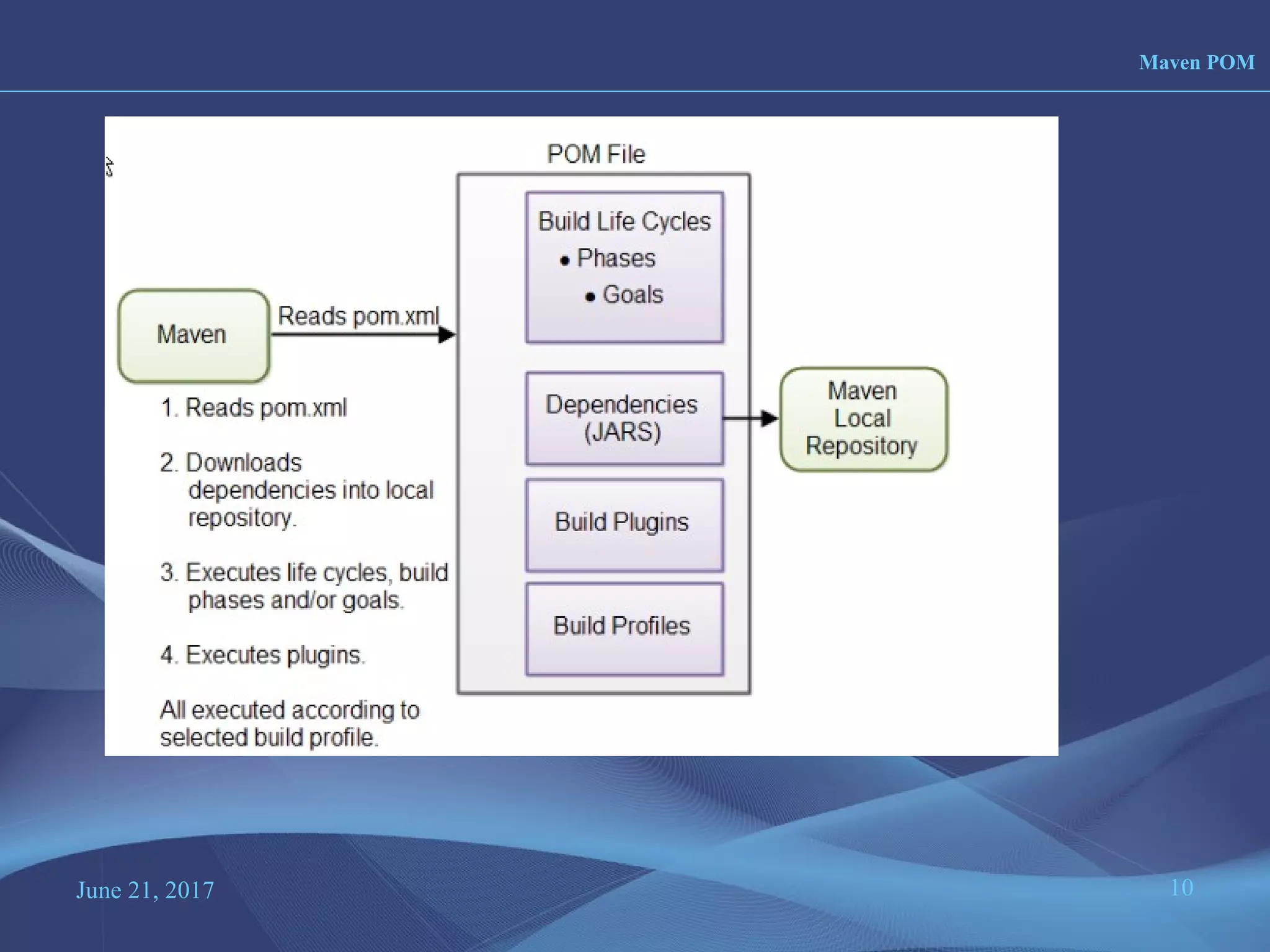
As a fundamental unit of work in Maven, POM is an XML file that
contains information about project and configuration details used by
Maven to build the project.
Overview ?
June 21, 2017 4
• Maven is more than just Build tool.
• Characteristics
– Visibility
– Reusability
– Maintainability
– Comprehensibility “Accumulator of knowledge”
• Objectives
– Easy build process
– Uniform build system
– Quality Project Information
– Guidelines for Best Practices Development
Objectives and Characteristics ?
June 21, 2017 5
1. One level above ANT
2. Higher level of reusability between builds
3. Faster turn around time to set up a powerful build
4. Project website generation
5. Less maintenance
6. Greater momentum
7. Repository management
8. Automatic downloads
Maven website
http://maven.apache.org
Comparision with ANT
ANT MAVEN
Target
build.xml
Goal
pom.xml
June 21, 2017 6
• Download MAVEN http://maven.apache.org/download.cgi
and unzip Maven.
• Set the M2_HOME environment variable to point to the directory you unzipped
Maven to.
• Set the M2 environment variable to point to M2_HOME/bin (%M2_HOME%bin on
Windows, $M2_HOME/bin on unix).
• Add M2 to the PATH environment variable (%M2% on Windows, $M2 on unix).
• Open a command prompt and type 'mvn' (without quotes) and press enter.
Installation of MAVEN
June 21, 2017 7
• Apache project
– Sponsored by sonatype
• History
– Maven 1 (2003)
• Very Ugly
• Used in Stack 1
– Maven 2 (2005)
• Complete rewrite
• Not backwards Compatible
• Used in Stack 2.0,2.1,2.2,3.0
– Maven 3 (2010)
• Same as Maven 2 but more stable
• Used in Stack 2.3, 3.1,3.2.1
History
June 21, 2017 8
• Maven Homepage
– http://maven.apache.org
• Reference Documentation for Maven
• Reference Documentation for core Plugins
• Sonatype Resources
– http://www.sonatype.com/resource-center.html
• Free Books
• Videos
Maven learning Courses
June 21, 2017 9
• Stands for Project Object Model
• Describes a project
– Name and Version
– Artifact Type
– Source Code Locations
– Dependencies
– Plugins
– Profiles (Alternate build configurations)
• Uses XML by Default
– Not the way Ant uses XML
Maven POM
June 21, 2017 10
Maven POM
June 21, 2017 11
Project Name
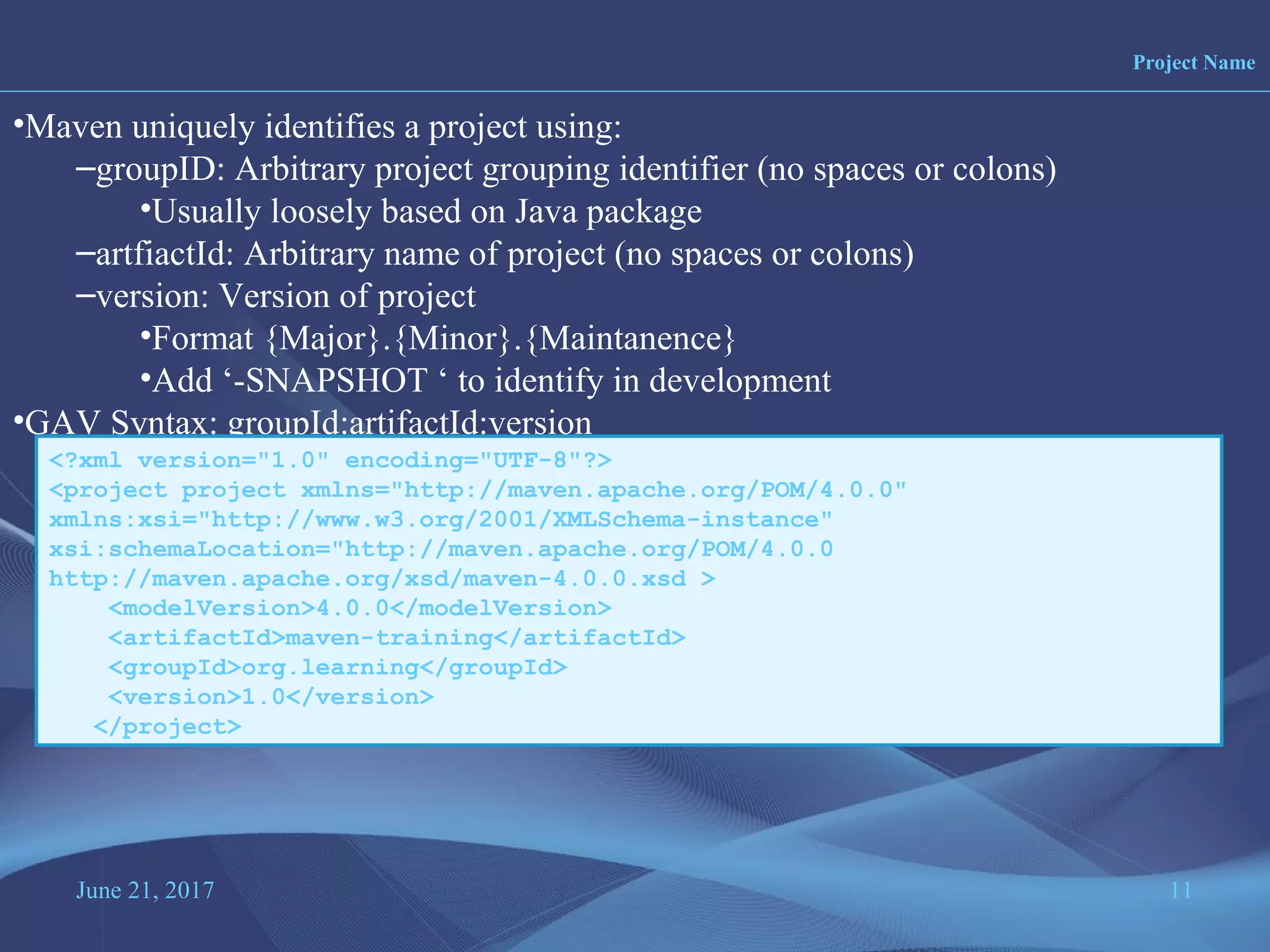
•Maven uniquely identifies a project using:
–groupID: Arbitrary project grouping identifier (no spaces or colons)
•Usually loosely based on Java package
–artfiactId: Arbitrary name of project (no spaces or colons)
–version: Version of project
•Format {Major}.{Minor}.{Maintanence}
•Add ‘-SNAPSHOT ‘ to identify in development
•GAV Syntax: groupId:artifactId:version
<?xml version="1.0" encoding="UTF-8"?>
<project project xmlns="http://maven.apache.org/POM/4.0.0"
xmlns:xsi="http://www.w3.org/2001/XMLSchema-instance"
xsi:schemaLocation="http://maven.apache.org/POM/4.0.0
http://maven.apache.org/xsd/maven-4.0.0.xsd >
<modelVersion>4.0.0</modelVersion>
<artifactId>maven-training</artifactId>
<groupId>org.learning</groupId>
<version>1.0</version>
</project>
June 21, 2017 12
Packaging
•Build type identified using the “packaging” element
•Tells Maven how to build the project
•Example packaging types:
–pom, jar, war, ear, custom
–Default is jar
<?xml version="1.0" encoding="UTF-8"?>
<project>
<modelVersion>4.0.0</modelVersion>
<artifactId>maven-training</artifactId>
<groupId>org.learning</groupId>
<version>1.0</version>
<packaging>jar</packaging>
</project>
June 21, 2017 13
Project Inheritance
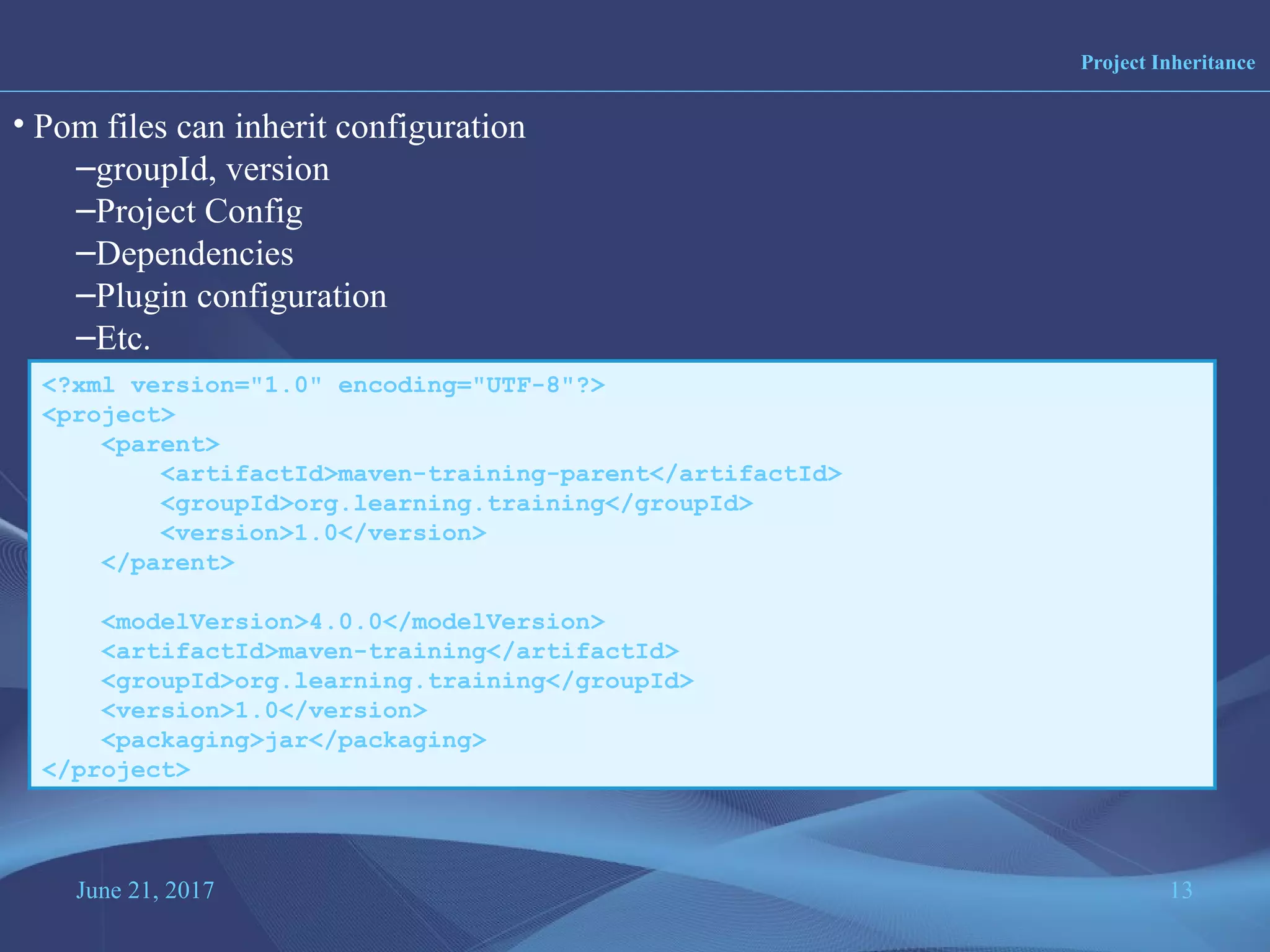
• Pom files can inherit configuration
–groupId, version
–Project Config
–Dependencies
–Plugin configuration
–Etc.
<?xml version="1.0" encoding="UTF-8"?>
<project>
<parent>
<artifactId>maven-training-parent</artifactId>
<groupId>org.learning.training</groupId>
<version>1.0</version>
</parent>
<modelVersion>4.0.0</modelVersion>
<artifactId>maven-training</artifactId>
<groupId>org.learning.training</groupId>
<version>1.0</version>
<packaging>jar</packaging>
</project>
June 21, 2017 14
Multi Module Project
• Pom Maven has 1st class multi-module support
• Each maven project creates 1 primary artifact
• A parent pom is used to group modules
<project>
...
<packaging>pom</packaging>
<modules>
<module>maven-training</module>
<module>maven-training-web</module>
</modules>
</project>
June 21, 2017 15
Maven Conventions
•Maven is opinionated about project structure
•target: Default work directory
•src: All project source files go in this directory
•src/main: All sources that go into primary artifact
•src/test: All sources contributing to testing project
•src/main/java: All java source files
•src/main/webapp: All web source files
•src/main/resources: All non compiled source files
•src/test/java: All java test source files
•src/test/resources: All non compiled test source files
June 21, 2017 16
Maven Build life cycles
• A Maven build follow a lifecycle
• Default lifecycle
–generate-sources/generate-resources
–compile
–test
–package
–integration-test (pre and post)
–Install
–deploy
• There is also a Clean lifecycle
June 21, 2017 17
Example Maven Goals
• To invoke a Maven build you set a lifecycle “goal”
• mvn install
–Invokes generate* and compile, test, package, integration-test, install
• mvn clean
–Invokes just clean
• mvn clean compile
–Clean old builds and execute generate*, compile
• mvn compile install
–Invokes generate*, compile, test, integration-test, package, install
• mvn test clean
–Invokes generate*, compile, test then cleans
June 21, 2017 18
Profile
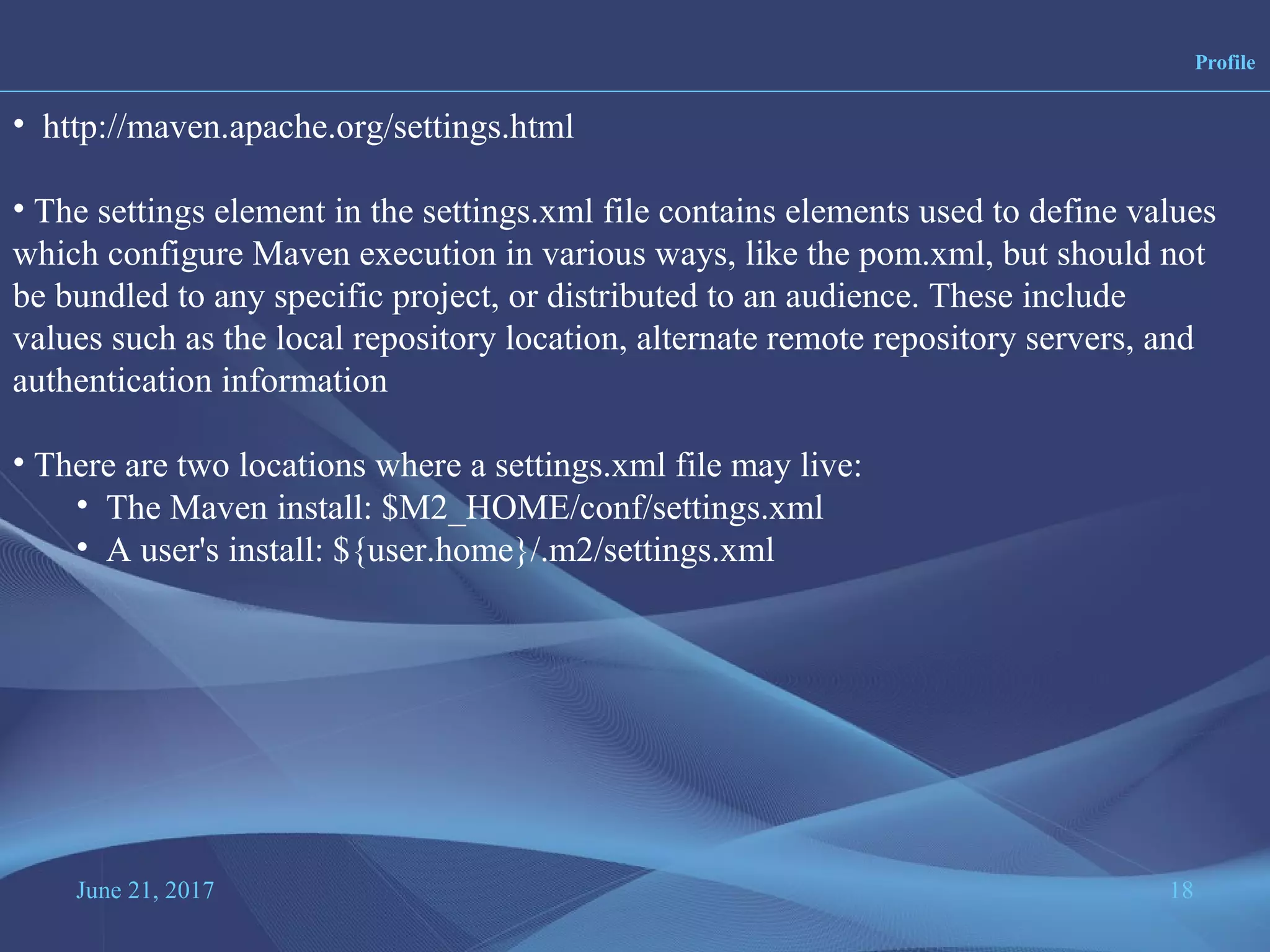
• http://maven.apache.org/settings.html
• The settings element in the settings.xml file contains elements used to define values
which configure Maven execution in various ways, like the pom.xml, but should not
be bundled to any specific project, or distributed to an audience. These include
values such as the local repository location, alternate remote repository servers, and
authentication information
• There are two locations where a settings.xml file may live:
• The Maven install: $M2_HOME/conf/settings.xml
• A user's install: ${user.home}/.m2/settings.xml
June 21, 2017 19
Maven Repository
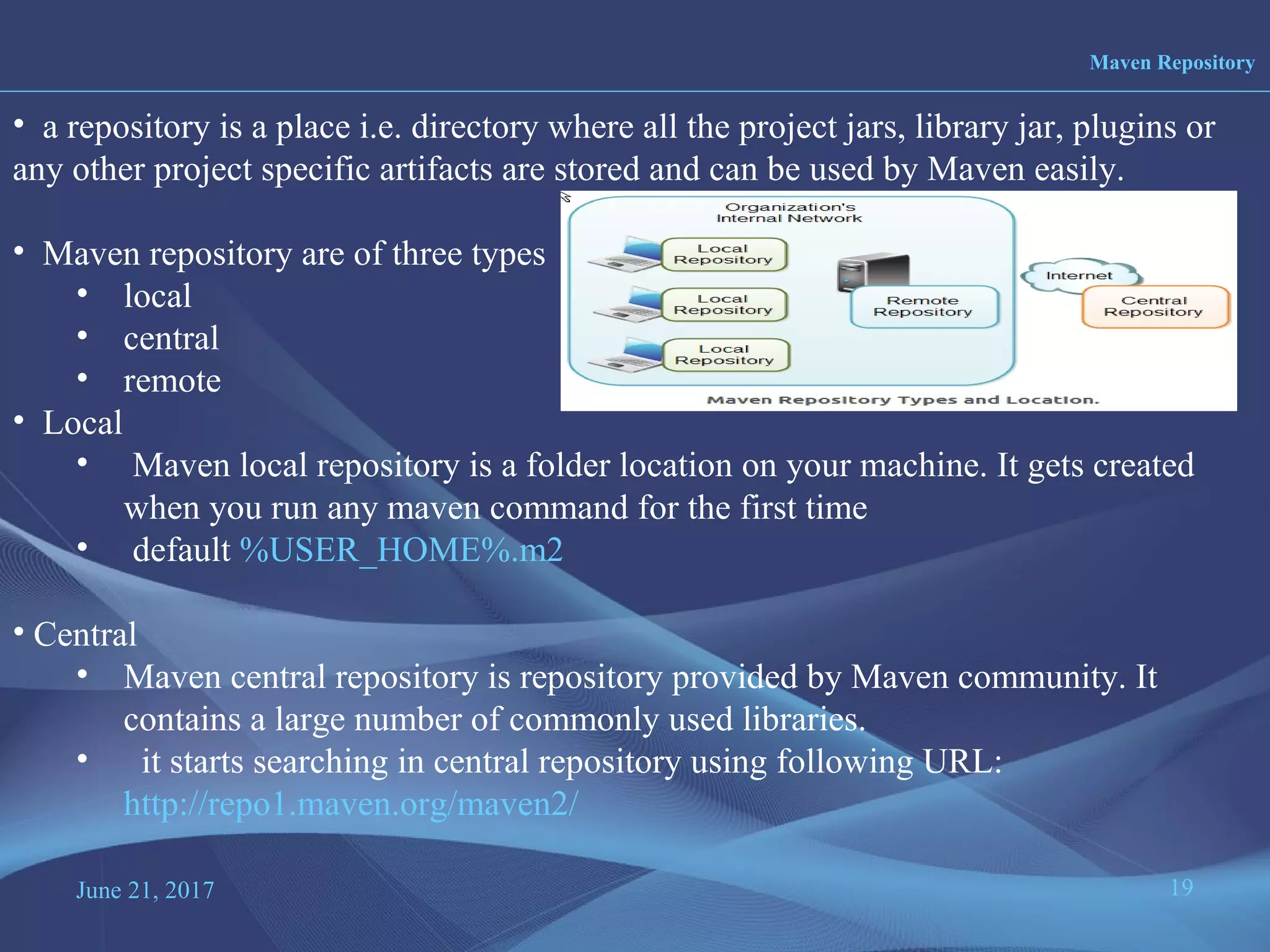
• a repository is a place i.e. directory where all the project jars, library jar, plugins or
any other project specific artifacts are stored and can be used by Maven easily.
• Maven repository are of three types
• local
• central
• remote
• Local
• Maven local repository is a folder location on your machine. It gets created
when you run any maven command for the first time
• default %USER_HOME%.m2
• Central
• Maven central repository is repository provided by Maven community. It
contains a large number of commonly used libraries.
• it starts searching in central repository using following URL:
http://repo1.maven.org/maven2/
June 21, 2017 20
Maven Repository
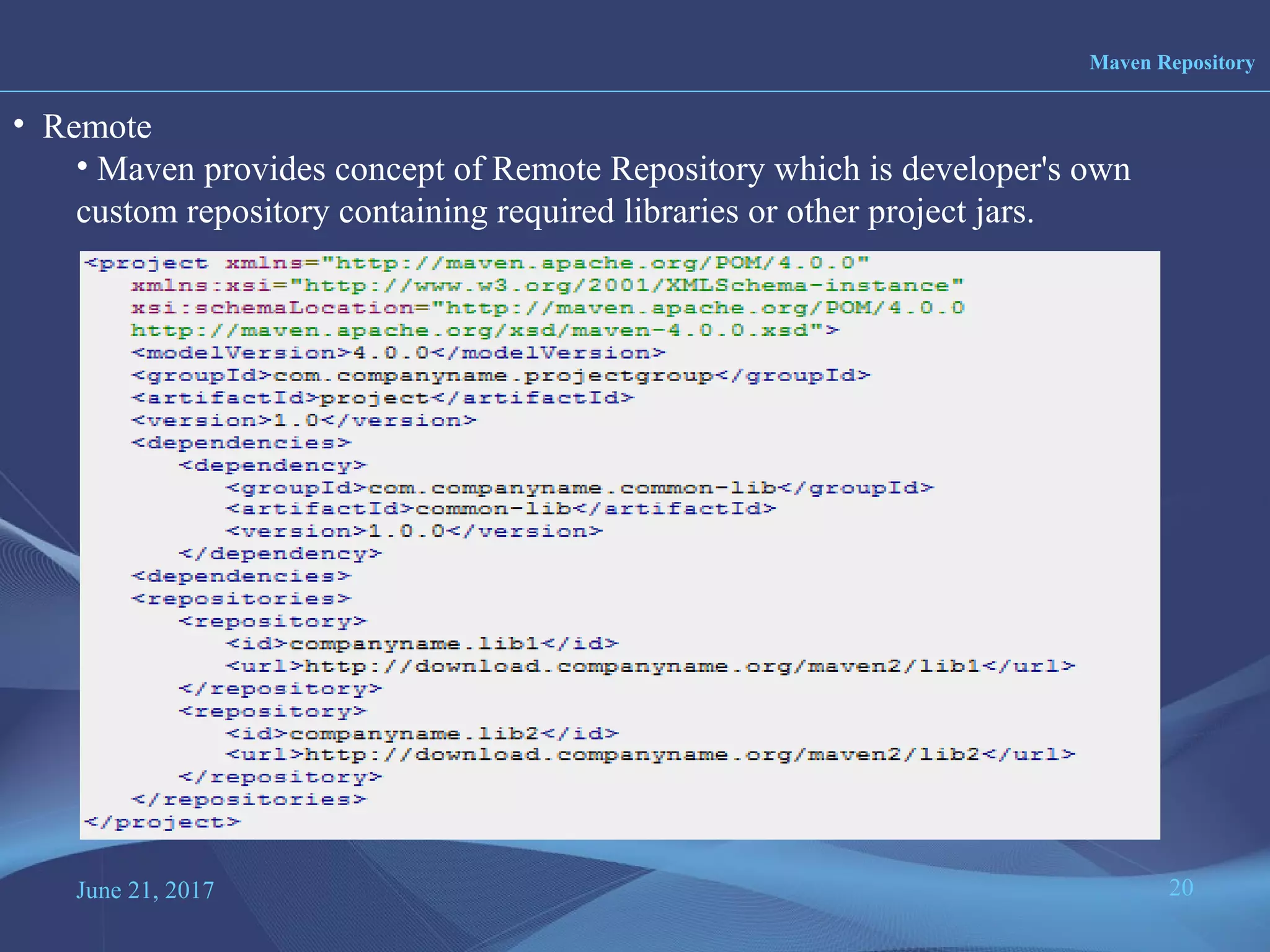
• Remote
• Maven provides concept of Remote Repository which is developer's own
custom repository containing required libraries or other project jars.
June 21, 2017 21
Search Sequence of Maven Repository
Step 1 - Search dependency in local repository, if not found, move to step 2 else if
found then do the further processing.
Step 2 - Search dependency in central repository, if not found and remote
repository/repositories is/are mentioned then move to step 4 else if found, then it is
downloaded to local repository for future reference.
Step 3 - If a remote repository has not been mentioned, Maven simply stops the
processing and throws error (Unable to find dependency).
Step 4 - Search dependency in remote repository or repositories, if found then it is
downloaded to local repository for future reference otherwise Maven as expected
stop processing and throws error (Unable to find dependency).
•
June 21, 2017 22
Transitive Depenency
• Transitive Dependency Definition:
–A dependency that should be included when declaring project itself is a
dependency
•ProjectA depends on ProjectB
•If ProjectC depends on ProjectA then ProjectB is automatically included
•Only compile and runtime scopes are transitive
•Transitive dependencies are controlled using:
–Exclusions
–Optional declarations
June 21, 2017 23
Depedency Management
<project>
...
<dependencyManagement>
<dependencies>
<dependency>
<groupId>org.springframework</groupId>
<artifactId>spring-core</artifactId>
<version>3.0.5.RELEASE</version>
</dependency>
</dependencies>
</dependencyManagement>
<dependencies>
<dependency>
<groupId>org.springframework</groupId>
<artifactId>spring-core</artifactId>
</dependency> <!-- Look no version! -->
</dependencies>
</project>
June 21, 2017 24
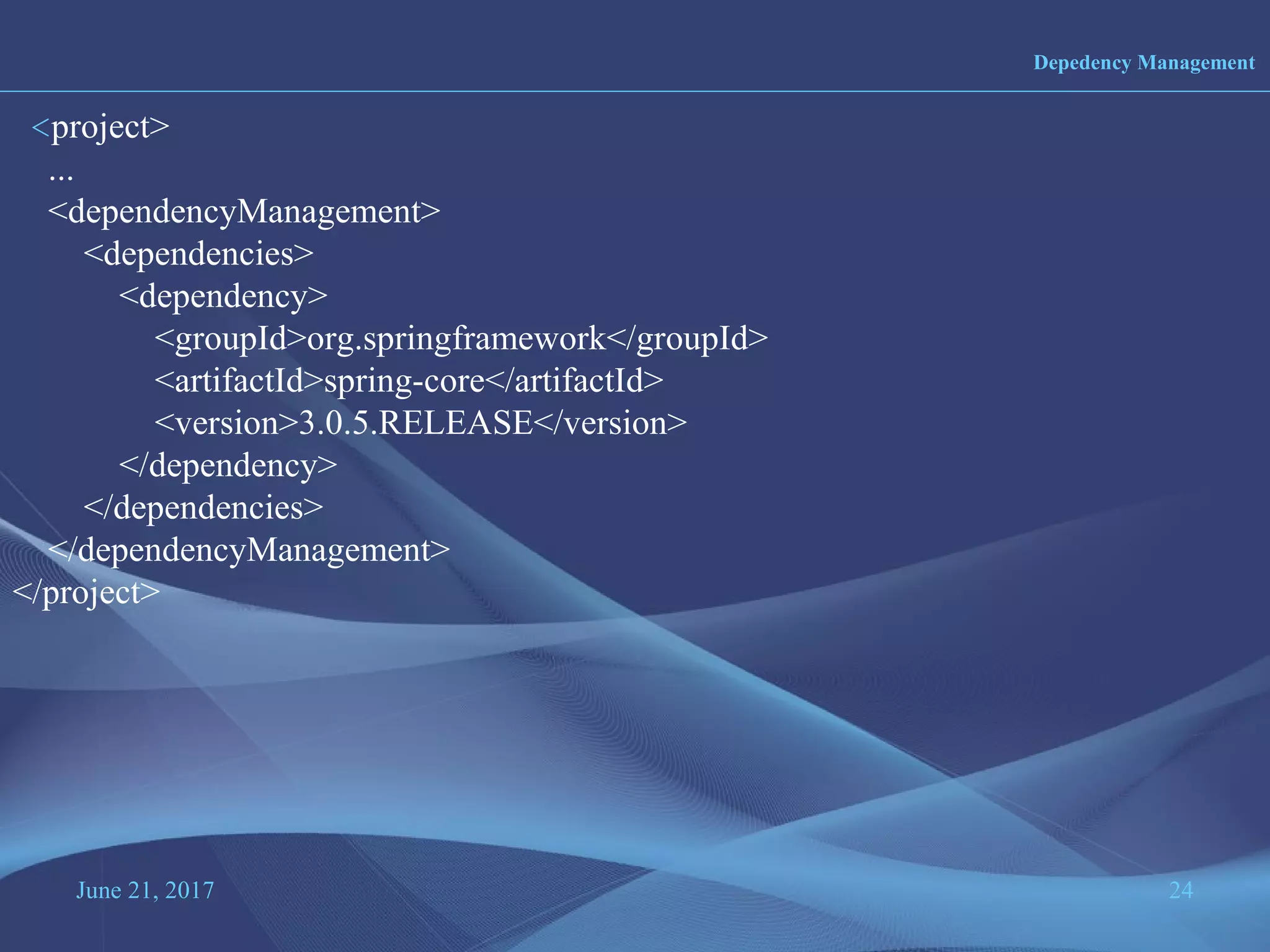
Depedency Management
<project>
...
<dependencyManagement>
<dependencies>
<dependency>
<groupId>org.springframework</groupId>
<artifactId>spring-core</artifactId>
<version>3.0.5.RELEASE</version>
</dependency>
</dependencies>
</dependencyManagement>
</project>
June 21, 2017 25
Maven Directory structure
• http://maven.apache.org/guides/introduction/introduction-to-the-standard-
directory-layout.html
June 21, 2017 26
Build Life cycle, phase and Goals t
Build Life cycles
1. Default
-related to compiling and packaging your project
2. clean
-related to removing temporary files from the output directory ,
including source file, compiled classes and previous JAR’s
3. site
- generating the documentation for the project
June 21, 2017 27
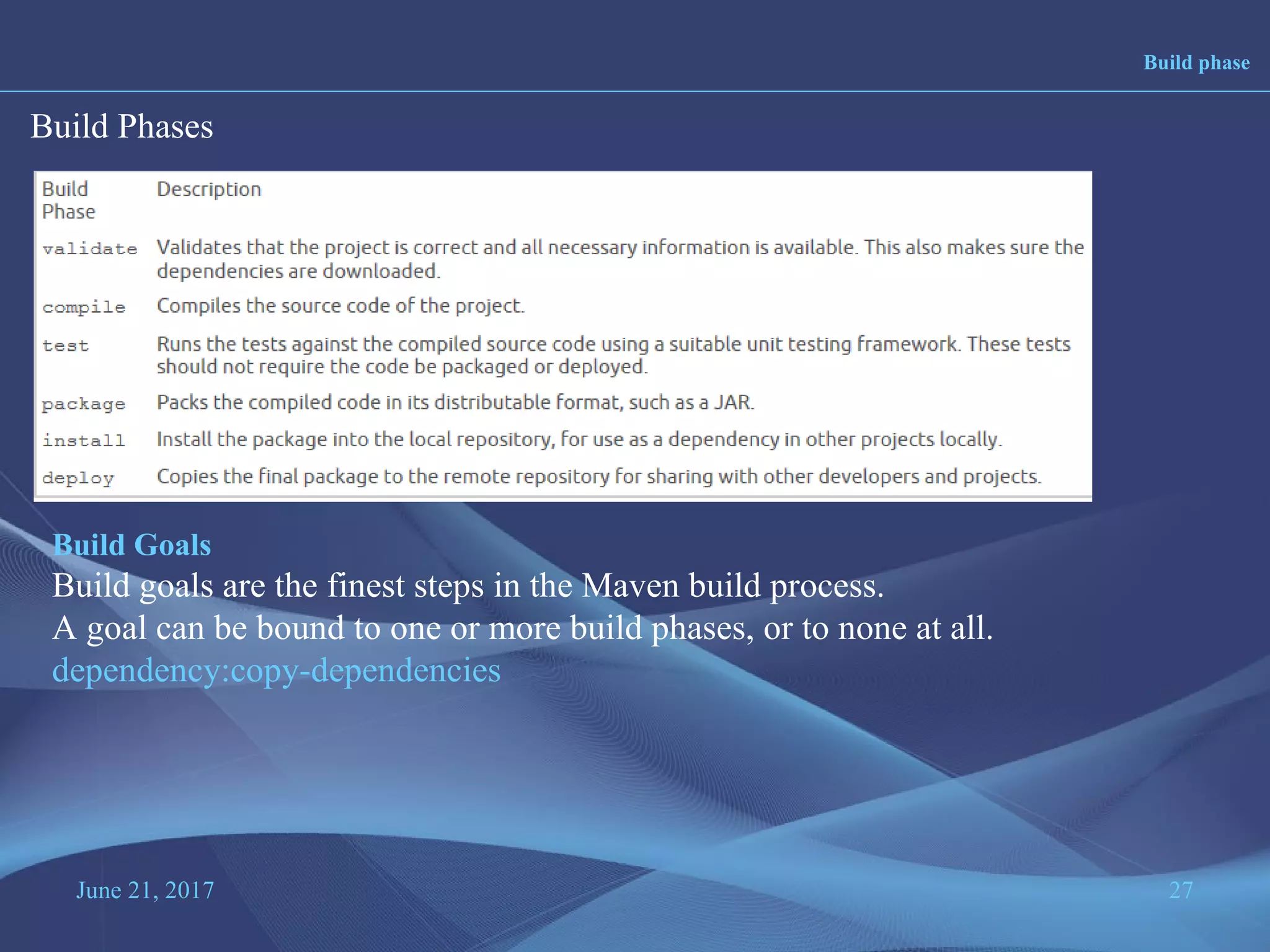
Build phase
Build Phases
Build Goals
Build goals are the finest steps in the Maven build process.
A goal can be bound to one or more build phases, or to none at all.
dependency:copy-dependencies
June 21, 2017 28
Maven Examples
mvn archetype:generate -DgroupId={project-packaging} -DartifactId={project-
name} -DarchetypeArtifactId=maven-archetype-quickstart
-DinteractiveMode=false

Maven

  • 1.
    June 21, 2017www.snipe.co.in 1 Prepared :Snipe Team
  • 2.
  • 3.
    June 21, 20173 • Maven is a project management and comprehension tool. • Maven projects is powerful tool for Java projects • What is Maven ? Maven is a software management and comprehension tool based on the concept of Project Object Model (POM) which can manage project build, reporting, and documentation from a central piece of information. • What is POM ? As a fundamental unit of work in Maven, POM is an XML file that contains information about project and configuration details used by Maven to build the project. Overview ?
  • 4.
    June 21, 20174 • Maven is more than just Build tool. • Characteristics – Visibility – Reusability – Maintainability – Comprehensibility “Accumulator of knowledge” • Objectives – Easy build process – Uniform build system – Quality Project Information – Guidelines for Best Practices Development Objectives and Characteristics ?
  • 5.
    June 21, 20175 1. One level above ANT 2. Higher level of reusability between builds 3. Faster turn around time to set up a powerful build 4. Project website generation 5. Less maintenance 6. Greater momentum 7. Repository management 8. Automatic downloads Maven website http://maven.apache.org Comparision with ANT ANT MAVEN Target build.xml Goal pom.xml
  • 6.
    June 21, 20176 • Download MAVEN http://maven.apache.org/download.cgi and unzip Maven. • Set the M2_HOME environment variable to point to the directory you unzipped Maven to. • Set the M2 environment variable to point to M2_HOME/bin (%M2_HOME%bin on Windows, $M2_HOME/bin on unix). • Add M2 to the PATH environment variable (%M2% on Windows, $M2 on unix). • Open a command prompt and type 'mvn' (without quotes) and press enter. Installation of MAVEN
  • 7.
    June 21, 20177 • Apache project – Sponsored by sonatype • History – Maven 1 (2003) • Very Ugly • Used in Stack 1 – Maven 2 (2005) • Complete rewrite • Not backwards Compatible • Used in Stack 2.0,2.1,2.2,3.0 – Maven 3 (2010) • Same as Maven 2 but more stable • Used in Stack 2.3, 3.1,3.2.1 History
  • 8.
    June 21, 20178 • Maven Homepage – http://maven.apache.org • Reference Documentation for Maven • Reference Documentation for core Plugins • Sonatype Resources – http://www.sonatype.com/resource-center.html • Free Books • Videos Maven learning Courses
  • 9.
    June 21, 20179 • Stands for Project Object Model • Describes a project – Name and Version – Artifact Type – Source Code Locations – Dependencies – Plugins – Profiles (Alternate build configurations) • Uses XML by Default – Not the way Ant uses XML Maven POM
  • 10.
    June 21, 201710 Maven POM
  • 11.
    June 21, 201711 Project Name •Maven uniquely identifies a project using: –groupID: Arbitrary project grouping identifier (no spaces or colons) •Usually loosely based on Java package –artfiactId: Arbitrary name of project (no spaces or colons) –version: Version of project •Format {Major}.{Minor}.{Maintanence} •Add ‘-SNAPSHOT ‘ to identify in development •GAV Syntax: groupId:artifactId:version <?xml version="1.0" encoding="UTF-8"?> <project project xmlns="http://maven.apache.org/POM/4.0.0" xmlns:xsi="http://www.w3.org/2001/XMLSchema-instance" xsi:schemaLocation="http://maven.apache.org/POM/4.0.0 http://maven.apache.org/xsd/maven-4.0.0.xsd > <modelVersion>4.0.0</modelVersion> <artifactId>maven-training</artifactId> <groupId>org.learning</groupId> <version>1.0</version> </project>
  • 12.
    June 21, 201712 Packaging •Build type identified using the “packaging” element •Tells Maven how to build the project •Example packaging types: –pom, jar, war, ear, custom –Default is jar <?xml version="1.0" encoding="UTF-8"?> <project> <modelVersion>4.0.0</modelVersion> <artifactId>maven-training</artifactId> <groupId>org.learning</groupId> <version>1.0</version> <packaging>jar</packaging> </project>
  • 13.
    June 21, 201713 Project Inheritance • Pom files can inherit configuration –groupId, version –Project Config –Dependencies –Plugin configuration –Etc. <?xml version="1.0" encoding="UTF-8"?> <project> <parent> <artifactId>maven-training-parent</artifactId> <groupId>org.learning.training</groupId> <version>1.0</version> </parent> <modelVersion>4.0.0</modelVersion> <artifactId>maven-training</artifactId> <groupId>org.learning.training</groupId> <version>1.0</version> <packaging>jar</packaging> </project>
  • 14.
    June 21, 201714 Multi Module Project • Pom Maven has 1st class multi-module support • Each maven project creates 1 primary artifact • A parent pom is used to group modules <project> ... <packaging>pom</packaging> <modules> <module>maven-training</module> <module>maven-training-web</module> </modules> </project>
  • 15.
    June 21, 201715 Maven Conventions •Maven is opinionated about project structure •target: Default work directory •src: All project source files go in this directory •src/main: All sources that go into primary artifact •src/test: All sources contributing to testing project •src/main/java: All java source files •src/main/webapp: All web source files •src/main/resources: All non compiled source files •src/test/java: All java test source files •src/test/resources: All non compiled test source files
  • 16.
    June 21, 201716 Maven Build life cycles • A Maven build follow a lifecycle • Default lifecycle –generate-sources/generate-resources –compile –test –package –integration-test (pre and post) –Install –deploy • There is also a Clean lifecycle
  • 17.
    June 21, 201717 Example Maven Goals • To invoke a Maven build you set a lifecycle “goal” • mvn install –Invokes generate* and compile, test, package, integration-test, install • mvn clean –Invokes just clean • mvn clean compile –Clean old builds and execute generate*, compile • mvn compile install –Invokes generate*, compile, test, integration-test, package, install • mvn test clean –Invokes generate*, compile, test then cleans
  • 18.
    June 21, 201718 Profile • http://maven.apache.org/settings.html • The settings element in the settings.xml file contains elements used to define values which configure Maven execution in various ways, like the pom.xml, but should not be bundled to any specific project, or distributed to an audience. These include values such as the local repository location, alternate remote repository servers, and authentication information • There are two locations where a settings.xml file may live: • The Maven install: $M2_HOME/conf/settings.xml • A user's install: ${user.home}/.m2/settings.xml
  • 19.
    June 21, 201719 Maven Repository • a repository is a place i.e. directory where all the project jars, library jar, plugins or any other project specific artifacts are stored and can be used by Maven easily. • Maven repository are of three types • local • central • remote • Local • Maven local repository is a folder location on your machine. It gets created when you run any maven command for the first time • default %USER_HOME%.m2 • Central • Maven central repository is repository provided by Maven community. It contains a large number of commonly used libraries. • it starts searching in central repository using following URL: http://repo1.maven.org/maven2/
  • 20.
    June 21, 201720 Maven Repository • Remote • Maven provides concept of Remote Repository which is developer's own custom repository containing required libraries or other project jars.
  • 21.
    June 21, 201721 Search Sequence of Maven Repository Step 1 - Search dependency in local repository, if not found, move to step 2 else if found then do the further processing. Step 2 - Search dependency in central repository, if not found and remote repository/repositories is/are mentioned then move to step 4 else if found, then it is downloaded to local repository for future reference. Step 3 - If a remote repository has not been mentioned, Maven simply stops the processing and throws error (Unable to find dependency). Step 4 - Search dependency in remote repository or repositories, if found then it is downloaded to local repository for future reference otherwise Maven as expected stop processing and throws error (Unable to find dependency). •
  • 22.
    June 21, 201722 Transitive Depenency • Transitive Dependency Definition: –A dependency that should be included when declaring project itself is a dependency •ProjectA depends on ProjectB •If ProjectC depends on ProjectA then ProjectB is automatically included •Only compile and runtime scopes are transitive •Transitive dependencies are controlled using: –Exclusions –Optional declarations
  • 23.
    June 21, 201723 Depedency Management <project> ... <dependencyManagement> <dependencies> <dependency> <groupId>org.springframework</groupId> <artifactId>spring-core</artifactId> <version>3.0.5.RELEASE</version> </dependency> </dependencies> </dependencyManagement> <dependencies> <dependency> <groupId>org.springframework</groupId> <artifactId>spring-core</artifactId> </dependency> <!-- Look no version! --> </dependencies> </project>
  • 24.
    June 21, 201724 Depedency Management <project> ... <dependencyManagement> <dependencies> <dependency> <groupId>org.springframework</groupId> <artifactId>spring-core</artifactId> <version>3.0.5.RELEASE</version> </dependency> </dependencies> </dependencyManagement> </project>
  • 25.
    June 21, 201725 Maven Directory structure • http://maven.apache.org/guides/introduction/introduction-to-the-standard- directory-layout.html
  • 26.
    June 21, 201726 Build Life cycle, phase and Goals t Build Life cycles 1. Default -related to compiling and packaging your project 2. clean -related to removing temporary files from the output directory , including source file, compiled classes and previous JAR’s 3. site - generating the documentation for the project
  • 27.
    June 21, 201727 Build phase Build Phases Build Goals Build goals are the finest steps in the Maven build process. A goal can be bound to one or more build phases, or to none at all. dependency:copy-dependencies
  • 28.
    June 21, 201728 Maven Examples mvn archetype:generate -DgroupId={project-packaging} -DartifactId={project- name} -DarchetypeArtifactId=maven-archetype-quickstart -DinteractiveMode=false