AMAZON EC2
STUDY NOTES
SECTIONS
1. Amazon EC2 instance types
2. Amazon Machine Images (AMI)
3. Instance Lifecycle
4. Root device volumes
5. Types of EBS volumes
6. Instance Metadata and User data
7. Security
8. Networking
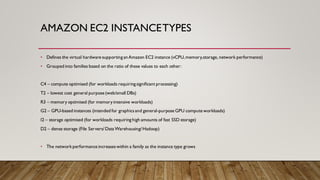
AMAZON EC2 INSTANCETYPES
• Defines the virtual hardware supporting anAmazon EC2 instance (vCPU,memory,storage, network performance)
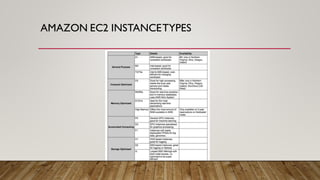
• Grouped into families based on the ratio of these values to each other:
C4 – compute optimised (for workloads requiring significant processing)
T2 – lowest cost general purpose (web/small DBs)
R3 – memory optimised (for memoryintensive workloads)
G2 – GPU-based instances (intended for graphicsand general-purpose GPU compute workloads)
I2 – storage optimised (for workloads requiring high amounts of fast SSD storage)
D2 – dense storage (File Servers/Data Warehousing/Hadoop)
• The network performance increaseswithin a family as the instance type grows
AMAZON EC2 INSTANCETYPES
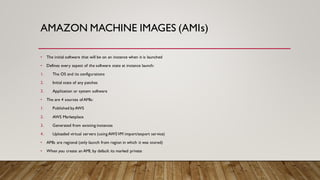
AMAZON MACHINE IMAGES (AMIs)
• The initial software that will be on an instance when it is launched
• Defines every aspect of the software state at instance launch:
1. The OS and its configurations
2. Initial state of any patches
3. Application or system software
• The are 4 sources of AMIs:
1. Published byAWS
2. AWS Marketplace
3. Generated from existing instances
4. Uploaded virtual servers (using AWSVM import/export service)
• AMIs are regional (only launch from region in which it was stored)
• When you create an AMI, by default its marked private
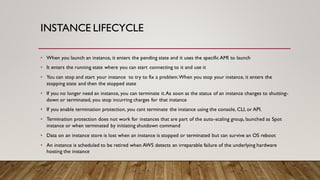
INSTANCE LIFECYCLE
• When you launch an instance, it enters the pending state and it uses the specific AMI to launch
• It enters the running state where you can start connecting to it and use it
• You can stop and start your instance to try to fix a problem.When you stop your instance, it enters the
stopping state and then the stopped state
• If you no longer need an instance, you can terminate it.As soon as the status of an instance changes to shutting-
down or terminated, you stop incurring charges for that instance
• If you enable termination protection, you csnt terminate the instance using the console, CLI, or API.
• Termination protection does not work for instances that are part of the auto-scaling group, launched as Spot
instance or when terminated by initiating shutdown command
• Data on an instance store is lost when an instance is stopped or terminated but can survive an OS reboot
• An instance is scheduled to be retired when AWS detects an irreparable failure of the underlying hardware
hosting the instance
ROT DEVICEVOLUMES
• Root volumes cannot be encrypted by default,you need a third party utility.Other
volumes can be encrypted
• Non-root EBS volumes attached to the instance are preserved if you delete the instance
• Amazon EC2 supports 2 types of block storage,Instance stores and elastic block storage.
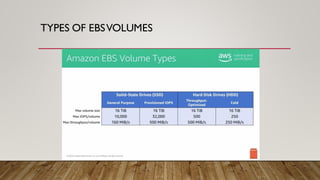
TYPES OF EBSVOLUMES
INSTANCE METADATAAND USER DATA
• Metadata is data about an EC2 instance.AMI ID, host name,instance ID, instance type,
private IP address, public IP address,and so on, are metadata of the instances
• User data is limited to 16kb
SECURITY
Virtual Firewall protection (security groups) and identity and access management (IAM)
VIRTUAL FIREWALL PROTECTION (SECURITY
GROUPS)
• AWS allows you to control traffic in and out of your instances through virtual firewalls called
security groups
• Security groups allow you to control traffic based on port, protocol, and source/destination
• Security groups are associated with instances when they are launched.Every instance must
have at least one security group but can have more
• When an instance is associated with multiple security groups,the rules are aggregated and all
traffic allowed by each of the individual groups is allowed
• Security groups are applied at the instance level
IDENTITYANDACCESS MANAGEMENT (IAM)
• An IAM policy must grant or deny permissions to use one or moreAmazon EC2 actions
• You can use IAM roles to grant permissions to applications running on your instances
• You cannot attach multiple IAM roles to a single instance,but you can attach a single IAM
role to multiple instances
NETWORKING
Addressing instances, placement groups, and elastic network interfaces
ADDRESSINGAN INSTANCE
• An instance can be addressed upon creation in several ways:
1. DNS name
2. Public IP
3. Private IP and Elastic Network Interfaces (ENIs) are additional methods of addressing instances that
are available in the context of an AmazonVPC
• An Elastic IP address is a public IPv4 address,which is reachable from the internet
• To use an Elastic IP address,you first allocate one to your account,and then associate it with your
instance or a network interface
• You can disassociate an Elastic IP address from a resource,and reassociate it with a different resource
PLACEMENT GROUPS
• Logical grouping of instances within a single availability zone
• Enable applications to participate in a low-latency,10 Gbps network
• Recommended for applications that benefit from low network latency,high network
throughput,or both
• To fully use this network performance for your placement group,choose an instance type
that supports enhanced networking and 10 Gbps network performance
ELASTIC NETWORK INTERFACES
• Logical networking component in aVPC that represents a virtual network card
• You can create and configure network interfaces in your account and attach them to instances in your
VPC
• Can have 1 public IP address and multiple private addresses
• You can create a network interface,attach it to an instance,detach it from an instance,and attach it to
another instance
• You cannot detach a primary network interface from an instance
• When you create a network interface,it inherits the public IPv4 addressing attribute from the subnet
• An ENI created independently of a particular instance persists regardless of the lifetime of any instance
to which it is attached
MONITORING
• You can monitor the status of your instances by viewing status checks and scheduled events
for your instances
• You can monitor your instances using Amazon CloudWatch, which collects and processes raw
data from Amazon EC2 into readable, near real-time metrics
• By default,Amazon EC2 sends metric data to CloudWatch in 5 minute periods
• You can use the CloudWatch agent to collect both system metrics and log files from Amazon
EC2 instances
• CloudTrail captures all API calls for Amazon EC2 and Amazon EBS as events, including calls
from the console and from code calls to the APIs

Amazon EC2 notes.pdf

  • 1.
  • 2.
    SECTIONS 1. Amazon EC2instance types 2. Amazon Machine Images (AMI) 3. Instance Lifecycle 4. Root device volumes 5. Types of EBS volumes 6. Instance Metadata and User data 7. Security 8. Networking
  • 3.
    AMAZON EC2 INSTANCETYPES •Defines the virtual hardware supporting anAmazon EC2 instance (vCPU,memory,storage, network performance) • Grouped into families based on the ratio of these values to each other: C4 – compute optimised (for workloads requiring significant processing) T2 – lowest cost general purpose (web/small DBs) R3 – memory optimised (for memoryintensive workloads) G2 – GPU-based instances (intended for graphicsand general-purpose GPU compute workloads) I2 – storage optimised (for workloads requiring high amounts of fast SSD storage) D2 – dense storage (File Servers/Data Warehousing/Hadoop) • The network performance increaseswithin a family as the instance type grows
  • 4.
  • 5.
    AMAZON MACHINE IMAGES(AMIs) • The initial software that will be on an instance when it is launched • Defines every aspect of the software state at instance launch: 1. The OS and its configurations 2. Initial state of any patches 3. Application or system software • The are 4 sources of AMIs: 1. Published byAWS 2. AWS Marketplace 3. Generated from existing instances 4. Uploaded virtual servers (using AWSVM import/export service) • AMIs are regional (only launch from region in which it was stored) • When you create an AMI, by default its marked private
  • 6.
    INSTANCE LIFECYCLE • Whenyou launch an instance, it enters the pending state and it uses the specific AMI to launch • It enters the running state where you can start connecting to it and use it • You can stop and start your instance to try to fix a problem.When you stop your instance, it enters the stopping state and then the stopped state • If you no longer need an instance, you can terminate it.As soon as the status of an instance changes to shutting- down or terminated, you stop incurring charges for that instance • If you enable termination protection, you csnt terminate the instance using the console, CLI, or API. • Termination protection does not work for instances that are part of the auto-scaling group, launched as Spot instance or when terminated by initiating shutdown command • Data on an instance store is lost when an instance is stopped or terminated but can survive an OS reboot • An instance is scheduled to be retired when AWS detects an irreparable failure of the underlying hardware hosting the instance
  • 7.
    ROT DEVICEVOLUMES • Rootvolumes cannot be encrypted by default,you need a third party utility.Other volumes can be encrypted • Non-root EBS volumes attached to the instance are preserved if you delete the instance • Amazon EC2 supports 2 types of block storage,Instance stores and elastic block storage.
  • 8.
  • 9.
    INSTANCE METADATAAND USERDATA • Metadata is data about an EC2 instance.AMI ID, host name,instance ID, instance type, private IP address, public IP address,and so on, are metadata of the instances • User data is limited to 16kb
  • 10.
    SECURITY Virtual Firewall protection(security groups) and identity and access management (IAM)
  • 11.
    VIRTUAL FIREWALL PROTECTION(SECURITY GROUPS) • AWS allows you to control traffic in and out of your instances through virtual firewalls called security groups • Security groups allow you to control traffic based on port, protocol, and source/destination • Security groups are associated with instances when they are launched.Every instance must have at least one security group but can have more • When an instance is associated with multiple security groups,the rules are aggregated and all traffic allowed by each of the individual groups is allowed • Security groups are applied at the instance level
  • 12.
    IDENTITYANDACCESS MANAGEMENT (IAM) •An IAM policy must grant or deny permissions to use one or moreAmazon EC2 actions • You can use IAM roles to grant permissions to applications running on your instances • You cannot attach multiple IAM roles to a single instance,but you can attach a single IAM role to multiple instances
  • 13.
    NETWORKING Addressing instances, placementgroups, and elastic network interfaces
  • 14.
    ADDRESSINGAN INSTANCE • Aninstance can be addressed upon creation in several ways: 1. DNS name 2. Public IP 3. Private IP and Elastic Network Interfaces (ENIs) are additional methods of addressing instances that are available in the context of an AmazonVPC • An Elastic IP address is a public IPv4 address,which is reachable from the internet • To use an Elastic IP address,you first allocate one to your account,and then associate it with your instance or a network interface • You can disassociate an Elastic IP address from a resource,and reassociate it with a different resource
  • 15.
    PLACEMENT GROUPS • Logicalgrouping of instances within a single availability zone • Enable applications to participate in a low-latency,10 Gbps network • Recommended for applications that benefit from low network latency,high network throughput,or both • To fully use this network performance for your placement group,choose an instance type that supports enhanced networking and 10 Gbps network performance
  • 16.
    ELASTIC NETWORK INTERFACES •Logical networking component in aVPC that represents a virtual network card • You can create and configure network interfaces in your account and attach them to instances in your VPC • Can have 1 public IP address and multiple private addresses • You can create a network interface,attach it to an instance,detach it from an instance,and attach it to another instance • You cannot detach a primary network interface from an instance • When you create a network interface,it inherits the public IPv4 addressing attribute from the subnet • An ENI created independently of a particular instance persists regardless of the lifetime of any instance to which it is attached
  • 17.
    MONITORING • You canmonitor the status of your instances by viewing status checks and scheduled events for your instances • You can monitor your instances using Amazon CloudWatch, which collects and processes raw data from Amazon EC2 into readable, near real-time metrics • By default,Amazon EC2 sends metric data to CloudWatch in 5 minute periods • You can use the CloudWatch agent to collect both system metrics and log files from Amazon EC2 instances • CloudTrail captures all API calls for Amazon EC2 and Amazon EBS as events, including calls from the console and from code calls to the APIs