Avoiding Catastrophic
Performance Loss
Detecting CPU-GPU Sync Points
John McDonald, NVIDIA Corporation
Topics
● D3D/GL Driver Models
● Types of Sync Points
● How bad are they, really?
● Detection
● Repair
● Summary
D3D Driver Model
● Multithreaded
● Client Thread (Your Application + D3D
Runtime)
● Server Thread (D3D Runtime [DDI] + Driver)
● GPU (??)
● Remains in user-mode for as long as
possible
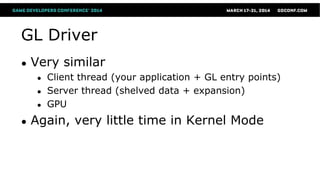
GL Driver
● Very similar
● Client thread (your application + GL entry points)
● Server thread (shelved data + expansion)
● GPU
● Again, very little time in Kernel Mode
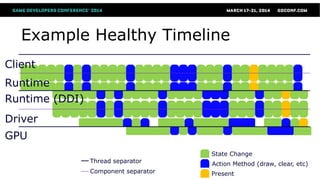
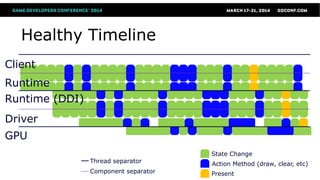
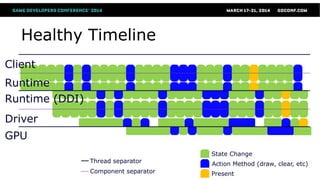
Example Healthy Timeline
Client
Driver
Runtime
GPU
Runtime (DDI)
Thread separator
Component separator
State Change
Action Method (draw, clear, etc)
Present
Types of Sync Points
● Driver Sync Point  
● CPU-GPU Sync Point
● Can be Server->GPU   
● Can be Client->GPU     
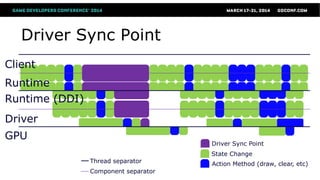
Driver Sync Point
● Major concern in OpenGL
● Minor concern in D3D
● Caused when Client thread would need
information available only to Server thread
● In GL, any function that returns a value
● In D3D, certain State-getting operations
Healthy Timeline
Client
Driver
Runtime
GPU
Runtime (DDI)
Thread separator
Component separator
State Change
Action Method (draw, clear, etc)
Present
Driver Sync Point
Client
Driver
Runtime
GPU
Runtime (DDI)
Thread separator
Component separator
State Change
Action Method (draw, clear, etc)
Driver Sync Point
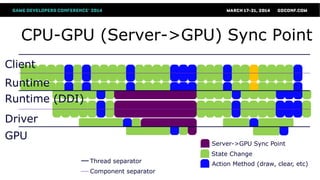
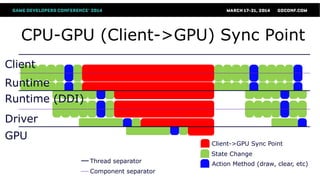
CPU-GPU Sync Point: Defined
When an application-side operation requires
GPU work to finish prior to the completion
of the provoking operation, a CPU-GPU
Sync Point has been introduced.
CPU-GPU Sync Point (cont’d)
● Primary causes are buffer updates and
obtaining query results
● GPU readback
● e.g. ReadPixels
● Locking the Backbuffer
● Complete list of entry points in Appendix
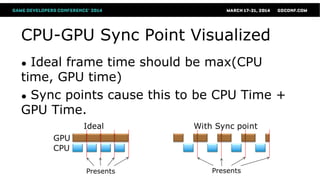
CPU-GPU Sync Point Visualized
● Ideal frame time should be max(CPU
time, GPU time)
● Sync points cause this to be CPU Time +
GPU Time.
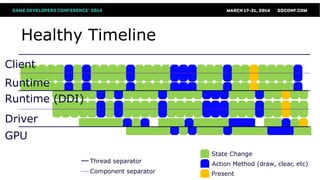
Healthy Timeline
Client
Driver
Runtime
GPU
Runtime (DDI)
Thread separator
Component separator
State Change
Action Method (draw, clear, etc)
Present
CPU-GPU (Server->GPU) Sync Point
Client
Driver
Runtime
GPU
Runtime (DDI)
Thread separator
Component separator
State Change
Action Method (draw, clear, etc)
Server->GPU Sync Point
Healthy Timeline
Client
Driver
Runtime
GPU
Runtime (DDI)
Thread separator
Component separator
State Change
Action Method (draw, clear, etc)
Present
CPU-GPU (Client->GPU) Sync Point
Client
Driver
Runtime
GPU
Runtime (DDI)
Thread separator
Component separator
State Change
Action Method (draw, clear, etc)
Client->GPU Sync Point
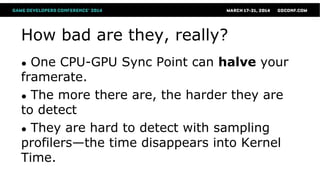
How bad are they, really?
● One CPU-GPU Sync Point can halve your
framerate.
● The more there are, the harder they are
to detect
● They are hard to detect with sampling
profilers—the time disappears into Kernel
Time.
We get it. They suck. Now what?
● GPU Timestamp Queries to the rescue!
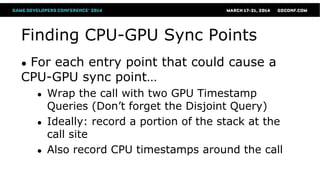
Finding CPU-GPU Sync Points
● For each entry point that could cause a
CPU-GPU sync point…
● Wrap the call with two GPU Timestamp
Queries (Don’t forget the Disjoint Query)
● Ideally: record a portion of the stack at the
call site
● Also record CPU timestamps around the call
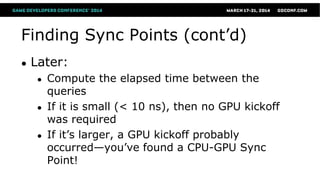
Finding Sync Points (cont’d)
● Later:
● Compute the elapsed time between the
queries
● If it is small (< 10 ns), then no GPU kickoff
was required
● If it’s larger, a GPU kickoff probably
occurred—you’ve found a CPU-GPU Sync
Point!
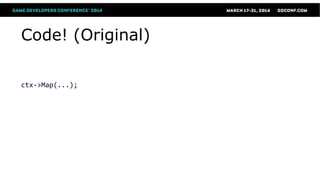
Code! (Original)
ctx->Map(...);
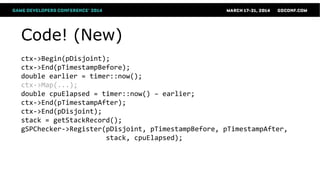
Code! (New)
ctx->Begin(pDisjoint);
ctx->End(pTimestampBefore);
double earlier = timer::now();
ctx->Map(...);
double cpuElapsed = timer::now() – earlier;
ctx->End(pTimestampAfter);
ctx->End(pDisjoint);
stack = getStackRecord();
gSPChecker->Register(pDisjoint, pTimestampBefore, pTimestampAfter,
stack, cpuElapsed);
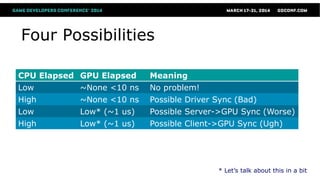
Four Possibilities
CPU Elapsed GPU Elapsed Meaning
Low ~None <10 ns No problem!
High ~None <10 ns Possible Driver Sync (Bad)
Low Low* (~1 us) Possible Server->GPU Sync (Worse)
High Low* (~1 us) Possible Client->GPU Sync (Ugh)
* Let’s talk about this in a bit
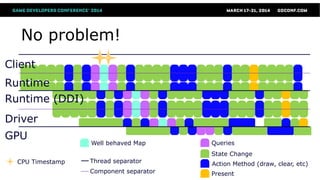
No problem!
Client
Driver
Runtime
GPU
Runtime (DDI)
Thread separator
Component separator
State Change
Action Method (draw, clear, etc)
Present
QueriesWell behaved Map
CPU Timestamp
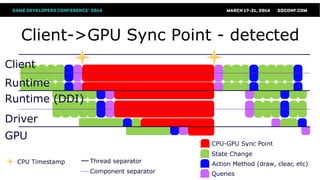
Client->GPU Sync Point - detected
Client
Driver
Runtime
GPU
Runtime (DDI)
Thread separator
Component separator
State Change
Action Method (draw, clear, etc)
Queries
CPU-GPU Sync Point
CPU Timestamp
Low elapsed GPU?
● GPU is fed commands in FIFO order
● Likely only command caught is WFI
● Which is ~1,000 clocks, or ~1 us or more.
● Subject for future improvements
Split push buffer?
● Two calls right next to each other may
wind up in different pushbuffer fragments
● And different GPU kickoffs
● This doesn’t hurt our scheme—Timestamp
queries occur after “all results of previous
commands are realized.”
● This means the timestamp is from the end of
the pipeline—not the beginning.
Split Pushbuffer (cont’d)
● Shouldn’t be an issue unless you are CPU-
bound and barely using the GPU
● Workarounds. Only report:
● Violators that have either large elapsed GPU
times (>1 us); or
● Hash the call stack, look for those that show
up repeatedly.
Fixing CPU-GPU Sync Points
● Adjust flags
● E.g. D3D9, never lock a default buffer with Flags=0
● Be wary of using nearly all GPU memory
● May not be enough room for DISCARD operations
● Spin-locking on query results—that’s definitely
a CPU-GPU Sync Point, regardless of API.
Fixing CPU-GPU Sync Points (cont’d)
● Use NO_OVERWRITE in combination with
GPU fences (or event queries) to ensure
safe, contention-free updates
● Defer Query resolution until at least one
frame later
● Use PBOs to do asynchronous readbacks
● And wait “awhile” before mapping.
Summary
CPU-GPU Sync Points. Not even one.
Questions
● jmcdonald at nvidia dot com
Appendix
GPU Timestamp Queries
● Tells you the GPU-time when preceeding
operations have completed—including
writes to the FB.
● Two timestamp queries adjacent in the
pushbuffer will have an elapsed time of
1/(Clock Frequency). (Very, very small).
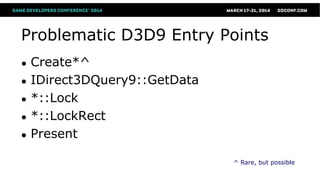
Problematic D3D9 Entry Points
● Create*^
● IDirect3DQuery9::GetData
● *::Lock
● *::LockRect
● Present
^ Rare, but possible
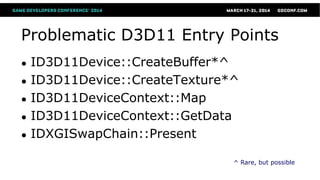
Problematic D3D11 Entry Points
● ID3D11Device::CreateBuffer*^
● ID3D11Device::CreateTexture*^
● ID3D11DeviceContext::Map
● ID3D11DeviceContext::GetData
● IDXGISwapChain::Present
^ Rare, but possible
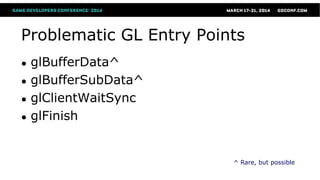
Problematic GL Entry Points
● glBufferData^
● glBufferSubData^
● glClientWaitSync
● glFinish
^ Rare, but possible
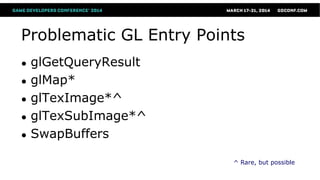
Problematic GL Entry Points
● glGetQueryResult
● glMap*
● glTexImage*^
● glTexSubImage*^
● SwapBuffers
^ Rare, but possible

Avoiding Catastrophic Performance Loss

  • 1.
    Avoiding Catastrophic Performance Loss DetectingCPU-GPU Sync Points John McDonald, NVIDIA Corporation
  • 2.
    Topics ● D3D/GL DriverModels ● Types of Sync Points ● How bad are they, really? ● Detection ● Repair ● Summary
  • 3.
    D3D Driver Model ●Multithreaded ● Client Thread (Your Application + D3D Runtime) ● Server Thread (D3D Runtime [DDI] + Driver) ● GPU (??) ● Remains in user-mode for as long as possible
  • 4.
    GL Driver ● Verysimilar ● Client thread (your application + GL entry points) ● Server thread (shelved data + expansion) ● GPU ● Again, very little time in Kernel Mode
  • 5.
    Example Healthy Timeline Client Driver Runtime GPU Runtime(DDI) Thread separator Component separator State Change Action Method (draw, clear, etc) Present
  • 6.
    Types of SyncPoints ● Driver Sync Point   ● CPU-GPU Sync Point ● Can be Server->GPU    ● Can be Client->GPU     
  • 7.
    Driver Sync Point ●Major concern in OpenGL ● Minor concern in D3D ● Caused when Client thread would need information available only to Server thread ● In GL, any function that returns a value ● In D3D, certain State-getting operations
  • 8.
    Healthy Timeline Client Driver Runtime GPU Runtime (DDI) Threadseparator Component separator State Change Action Method (draw, clear, etc) Present
  • 9.
    Driver Sync Point Client Driver Runtime GPU Runtime(DDI) Thread separator Component separator State Change Action Method (draw, clear, etc) Driver Sync Point
  • 10.
    CPU-GPU Sync Point:Defined When an application-side operation requires GPU work to finish prior to the completion of the provoking operation, a CPU-GPU Sync Point has been introduced.
  • 11.
    CPU-GPU Sync Point(cont’d) ● Primary causes are buffer updates and obtaining query results ● GPU readback ● e.g. ReadPixels ● Locking the Backbuffer ● Complete list of entry points in Appendix
  • 12.
    CPU-GPU Sync PointVisualized ● Ideal frame time should be max(CPU time, GPU time) ● Sync points cause this to be CPU Time + GPU Time.
  • 13.
    Healthy Timeline Client Driver Runtime GPU Runtime (DDI) Threadseparator Component separator State Change Action Method (draw, clear, etc) Present
  • 14.
    CPU-GPU (Server->GPU) SyncPoint Client Driver Runtime GPU Runtime (DDI) Thread separator Component separator State Change Action Method (draw, clear, etc) Server->GPU Sync Point
  • 15.
    Healthy Timeline Client Driver Runtime GPU Runtime (DDI) Threadseparator Component separator State Change Action Method (draw, clear, etc) Present
  • 16.
    CPU-GPU (Client->GPU) SyncPoint Client Driver Runtime GPU Runtime (DDI) Thread separator Component separator State Change Action Method (draw, clear, etc) Client->GPU Sync Point
  • 17.
    How bad arethey, really? ● One CPU-GPU Sync Point can halve your framerate. ● The more there are, the harder they are to detect ● They are hard to detect with sampling profilers—the time disappears into Kernel Time.
  • 18.
    We get it.They suck. Now what? ● GPU Timestamp Queries to the rescue!
  • 19.
    Finding CPU-GPU SyncPoints ● For each entry point that could cause a CPU-GPU sync point… ● Wrap the call with two GPU Timestamp Queries (Don’t forget the Disjoint Query) ● Ideally: record a portion of the stack at the call site ● Also record CPU timestamps around the call
  • 20.
    Finding Sync Points(cont’d) ● Later: ● Compute the elapsed time between the queries ● If it is small (< 10 ns), then no GPU kickoff was required ● If it’s larger, a GPU kickoff probably occurred—you’ve found a CPU-GPU Sync Point!
  • 21.
  • 22.
    Code! (New) ctx->Begin(pDisjoint); ctx->End(pTimestampBefore); double earlier= timer::now(); ctx->Map(...); double cpuElapsed = timer::now() – earlier; ctx->End(pTimestampAfter); ctx->End(pDisjoint); stack = getStackRecord(); gSPChecker->Register(pDisjoint, pTimestampBefore, pTimestampAfter, stack, cpuElapsed);
  • 23.
    Four Possibilities CPU ElapsedGPU Elapsed Meaning Low ~None <10 ns No problem! High ~None <10 ns Possible Driver Sync (Bad) Low Low* (~1 us) Possible Server->GPU Sync (Worse) High Low* (~1 us) Possible Client->GPU Sync (Ugh) * Let’s talk about this in a bit
  • 24.
    No problem! Client Driver Runtime GPU Runtime (DDI) Threadseparator Component separator State Change Action Method (draw, clear, etc) Present QueriesWell behaved Map CPU Timestamp
  • 25.
    Client->GPU Sync Point- detected Client Driver Runtime GPU Runtime (DDI) Thread separator Component separator State Change Action Method (draw, clear, etc) Queries CPU-GPU Sync Point CPU Timestamp
  • 26.
    Low elapsed GPU? ●GPU is fed commands in FIFO order ● Likely only command caught is WFI ● Which is ~1,000 clocks, or ~1 us or more. ● Subject for future improvements
  • 27.
    Split push buffer? ●Two calls right next to each other may wind up in different pushbuffer fragments ● And different GPU kickoffs ● This doesn’t hurt our scheme—Timestamp queries occur after “all results of previous commands are realized.” ● This means the timestamp is from the end of the pipeline—not the beginning.
  • 28.
    Split Pushbuffer (cont’d) ●Shouldn’t be an issue unless you are CPU- bound and barely using the GPU ● Workarounds. Only report: ● Violators that have either large elapsed GPU times (>1 us); or ● Hash the call stack, look for those that show up repeatedly.
  • 29.
    Fixing CPU-GPU SyncPoints ● Adjust flags ● E.g. D3D9, never lock a default buffer with Flags=0 ● Be wary of using nearly all GPU memory ● May not be enough room for DISCARD operations ● Spin-locking on query results—that’s definitely a CPU-GPU Sync Point, regardless of API.
  • 30.
    Fixing CPU-GPU SyncPoints (cont’d) ● Use NO_OVERWRITE in combination with GPU fences (or event queries) to ensure safe, contention-free updates ● Defer Query resolution until at least one frame later ● Use PBOs to do asynchronous readbacks ● And wait “awhile” before mapping.
  • 31.
  • 32.
  • 33.
  • 34.
    GPU Timestamp Queries ●Tells you the GPU-time when preceeding operations have completed—including writes to the FB. ● Two timestamp queries adjacent in the pushbuffer will have an elapsed time of 1/(Clock Frequency). (Very, very small).
  • 35.
    Problematic D3D9 EntryPoints ● Create*^ ● IDirect3DQuery9::GetData ● *::Lock ● *::LockRect ● Present ^ Rare, but possible
  • 36.
    Problematic D3D11 EntryPoints ● ID3D11Device::CreateBuffer*^ ● ID3D11Device::CreateTexture*^ ● ID3D11DeviceContext::Map ● ID3D11DeviceContext::GetData ● IDXGISwapChain::Present ^ Rare, but possible
  • 37.
    Problematic GL EntryPoints ● glBufferData^ ● glBufferSubData^ ● glClientWaitSync ● glFinish ^ Rare, but possible
  • 38.
    Problematic GL EntryPoints ● glGetQueryResult ● glMap* ● glTexImage*^ ● glTexSubImage*^ ● SwapBuffers ^ Rare, but possible

Editor's Notes

  • #4 GPU is not really one thread. But conversations with the CPU are effectively single-threaded, via a pushbuffer.ThePushbuffer doesn’t work the way it did on PS3.
  • #5 Basically the same as D3D
  • #28 As a result, the timestamp queries will likely get squeezed together in the GPU.