Avaya Session Border Controller for
Enterprise (ASBCE) Overview
© 2012 Avaya Inc. All rights reserved. 2
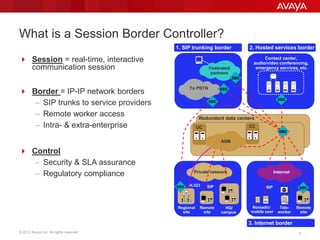
What is a Session Border Controller?
 Session = real-time, interactive
communication session
 Border = IP-IP network borders
– SIP trunks to service providers
– Remote worker access
– Intra- & extra-enterprise
 Control
– Security & SLA assurance
– Regulatory compliance
Redundant data centers
Contact center,
audio/video conferencing,
emergency services, etc.
To PSTN
SIP
Tele-
worker
Nomadic/
mobile user
SIP
Remote
site
1. SIP trunking border 2. Hosted services border
3. Internet border
HQ/
campus
Remote
site
CCUC
H.323
Regional
site
Federated
partners
InternetPrivate network
ASM
© 2012 Avaya Inc. All rights reserved. 3
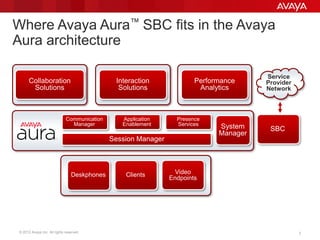
Where Avaya Aura™ SBC fits in the Avaya
Aura architecture
Unified Communications Contact Center
Collaboration
Solutions
Interaction
Solutions
Performance
Analytics
System
Manager
Session Manager
Communication
Manager
Application
Enablement
Presence
Services
Service
Provider
Network
Deskphones Clients Video
Endpoints
SBC
© 2012 Avaya Inc. All rights reserved. 4
Why use an SBC?
 Security
– Enforces a customer’s unique security policies
– SIP trunk provider’s own SBC (if private SIP trunk service) focuses on the
providers security concerns
– Complete network topology hiding
– Interoperability problems between multivendor solutions will occur
 Flexibility
– Provides layer of independence from Service Provider – allows enterprise to
make changes more quickly vs. negotiating / relying on Service Provider if
needs change
– Normalization point for signaling and RTP media streams
– Allows for multiple SIP trunk provider access points
– Support of enterprise-specific call flows that may not be directy supported by
SIP trunk provider
 Accountability
– Per call status – QoS, SLA monitoring
– Report on intrusion attempts
– Session recording
© 2012 Avaya Inc. All rights reserved. 5
How are SBCs different from firewalls?
 Traditional firewalls cannot:
– Prevent SIP-specific overload conditions and malicious attacks
– Open / close RTP media ports in sync with SIP signaling
– Track session state and provide uninterrupted service
– Perform interworking or security on encrypted sessions
– Scale to handle thousands of real-time sessions
– Provide carrier-class availability
– Solve multi-vendor SIP interoperability problems
 InfoSec best practice = deploy defense-in-depth model with application-
level security proxies for email and web applications
– This means firewalls alone are not sufficient
– Same model applies for IP telephony, UC and CC applications
© 2012 Avaya Inc. All rights reserved. 7
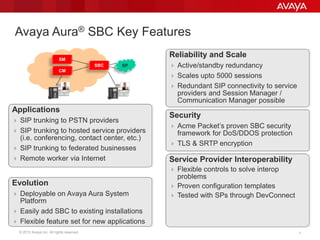
Reliability and Scale
 Active/standby redundancy
 Scales upto 5000 sessions
 Redundant SIP connectivity to service
providers and Session Manager /
Communication Manager possible
Avaya Aura® SBC Key Features
Applications
 SIP trunking to PSTN providers
 SIP trunking to hosted service providers
(i.e. conferencing, contact center, etc.)
 SIP trunking to federated businesses
 Remote worker via Internet
Security
 Acme Packet’s proven SBC security
framework for DoS/DDOS protection
 TLS & SRTP encryption
Service Provider Interoperability
 Flexible controls to solve interop
problems
 Proven configuration templates
 Tested with SPs through DevConnect
Evolution
 Deployable on Avaya Aura System
Platform
 Easily add SBC to existing installations
 Flexible feature set for new applications
SM
SP
CM
SBC
© 2012 Avaya Inc. All rights reserved. 8
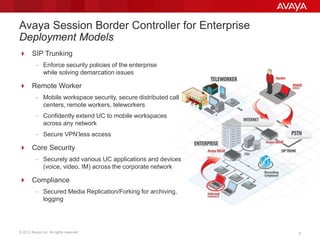
Avaya Session Border Controller for Enterprise
Deployment Models
 SIP Trunking
– Enforce security policies of the enterprise
while solving demarcation issues
 Remote Worker
– Mobile workspace security, secure distributed call
centers, remote workers, teleworkers
– Confidently extend UC to mobile workspaces
across any network
– Secure VPN’less access
 Core Security
– Securely add various UC applications and devices
(voice, video, IM) across the corporate network
 Compliance
– Secured Media Replication/Forking for archiving,
logging
© 2012 Avaya Inc. All rights reserved. 9
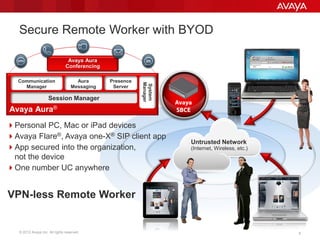
Secure Remote Worker with BYOD
Personal PC, Mac or iPad devices
Avaya Flare®, Avaya one-X® SIP client app
App secured into the organization,
not the device
One number UC anywhere
Avaya
SBCEAvaya Aura®
Presence
Server
System
Manager
Communication
Manager
Avaya Aura
Conferencing
Aura
Messaging
Session Manager
Untrusted Network
(Internet, Wireless, etc.)
VPN-less Remote Worker
© 2012 Avaya Inc. All rights reserved. 10
Remote Worker: VPN vs VPNless Endpoints
VPN Endpoint
 VPN Headers add additional
size to traffic. In aggregate
reduces bandwidth.
 Encrypts traffic, yet does not
validate it. (Encrypting and
distributing a virus isn’t helpful)
 No ability at VPN head-end to
distinguish between voice and
data traffic. Ultimately voice
quality suffers.
 Cumbersome user experience
for real-time communication
application
VPNless Endpoint
 TLS/SRTP encrypts the traffic
with a smaller bandwidth
footprint than VPN
 Signaling and media are
unencrypted at the SBC and
inspected at Layer 7 to
validate the traffic before it is
allowed through
 Numerous policies allow
Enterprise control of
endpoints.
 Consistent user experience for
applications
© 2012 Avaya Inc. All rights reserved. 11
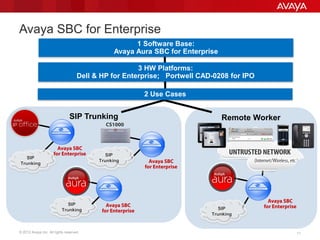
SIP Trunking Remote Worker
Avaya SBC for Enterprise
SIP
Trunking
Avaya SBC
for Enterprise SIP
Trunking Avaya SBC
for Enterprise
CS1000
SIP
Trunking
Avaya SBC
for Enterprise
1 Software Base:
Avaya Aura SBC for Enterprise
3 HW Platforms:
Dell & HP for Enterprise; Portwell CAD-0208 for IPO
2 Use Cases
Avaya SBC
for Enterprise
SIP
Trunking
© 2012 Avaya Inc. All rights reserved. 1212
What’s a DMZ?
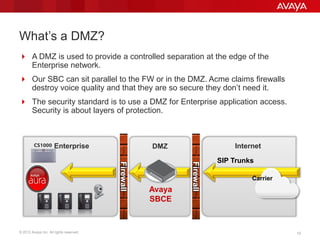
 A DMZ is used to provide a controlled separation at the edge of the
Enterprise network.
 Our SBC can sit parallel to the FW or in the DMZ. Acme claims firewalls
destroy voice quality and that they are so secure they don’t need it.
 The security standard is to use a DMZ for Enterprise application access.
Security is about layers of protection.
Firewall
InternetEnterprise
Avaya
SBCE
DMZ
SIP Trunks
Firewall
Carrier
CS1000
© 2012 Avaya Inc. All rights reserved. 1313
Avaya SBCE: SIP Trunking Architecture
Use Case: SIP Trunking to Carrier
Carrier offering SIP trunks as lower-cost alternative to TDM
Heavy driver for Enterprise adoption of SBC
Support Aura, IPO and CS1K
From a SECURITY Stand Point, it is recommended the SBCE be in the DMZ
Carrier SIP trunks to the Avaya Session Border Controller for Enterprise
Avaya SBCE is located in a DMZ behind the Enterprise firewall
Services: security and demarcation device between the IP-PBX and the Carrier
− NAT traversal,
− Securely anchors signaling and media, and can
− Normalize SIP protocol
Firewall
InternetEnterprise
Avaya
SBCE
DMZ
SIP Trunks
Firewall
Carrier
CS1000
© 2012 Avaya Inc. All rights reserved. 14
Avaya SBCE: Remote Worker Architecture
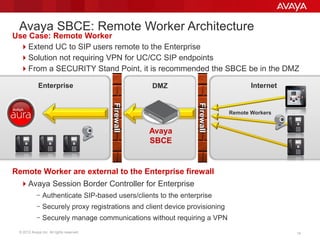
Use Case: Remote Worker
Extend UC to SIP users remote to the Enterprise
Solution not requiring VPN for UC/CC SIP endpoints
From a SECURITY Stand Point, it is recommended the SBCE be in the DMZ
Remote Worker are external to the Enterprise firewall
Avaya Session Border Controller for Enterprise
− Authenticate SIP-based users/clients to the enterprise
− Securely proxy registrations and client device provisioning
− Securely manage communications without requiring a VPN
Firewall
InternetEnterprise
Avaya
SBCE
DMZ
Firewall Remote Workers
© 2012 Avaya Inc. All rights reserved. 15
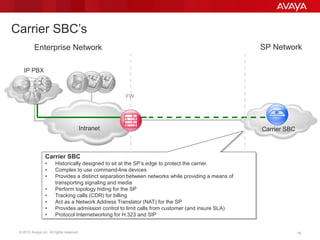
Carrier SBC’s
Carrier SBC
IP PBX
Intranet
FW
Carrier SBC
• Historically designed to sit at the SP’s edge to protect the carrier.
• Complex to use command-line devices
• Provides a distinct separation between networks while providing a means of
transporting signaling and media
• Perform topology hiding for the SP
• Tracking calls (CDR) for billing
• Act as a Network Address Translator (NAT) for the SP
• Provides admission control to limit calls from customer (and insure SLA)
• Protocol Internetworking for H.323 and SIP
Enterprise Network SP Network
15
© 2012 Avaya Inc. All rights reserved. 16
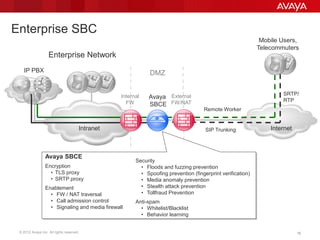
Enterprise SBC
Internet
IP PBX
Intranet
DMZ
Avaya
SBCE
Internal
FW
External
FW/NAT
Mobile Users,
Telecommuters
SRTP/
RTP
Remote Worker
Avaya SBCE
Encryption
• TLS proxy
• SRTP proxy
Enablement
• FW / NAT traversal
• Call admission control
• Signaling and media firewall
Enterprise Network
Security
• Floods and fuzzing prevention
• Spoofing prevention (fingerprint verification)
• Media anomaly prevention
• Stealth attack prevention
• Tollfraud Prevention
Anti-spam
• Whitelist/Blacklist
• Behavior learning
SIP Trunking
16
© 2012 Avaya Inc. All rights reserved. 1717
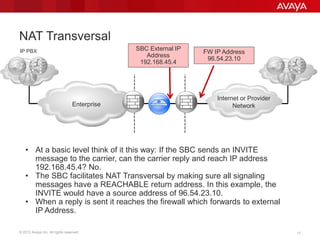
NAT Transversal
Enterprise
IP PBX
Internet or Provider
Network
FW IP Address
96.54.23.10
SBC External IP
Address
192.168.45.4
• At a basic level think of it this way: If the SBC sends an INVITE
message to the carrier, can the carrier reply and reach IP address
192.168.45.4? No.
• The SBC facilitates NAT Transversal by making sure all signaling
messages have a REACHABLE return address. In this example, the
INVITE would have a source address of 96.54.23.10.
• When a reply is sent it reaches the firewall which forwards to external
IP Address.
© 2012 Avaya Inc. All rights reserved. 1818
Avaya Session Border Controller for Enterprise 6.2
- A new but already proven solution
ASBCE 6.2 is further enhancing the Sipera E-SBC with…
 Substantial interoperability testing and improvements in Avaya UC
environments especially for VPN’less remote worker
 Testing against all Avaya UC platforms
– Avaya Aura®
– IP Office
– CS 1000
 New hardware platform targeted at SMEs
 New product structure
– Separation of ordering hardware and software
– Fully supported in Support Advantage (enterprise) and IPOSS (IP Office)
 Fully integrated into Avaya processes and tools
– Ordering and Logistics
– Services access
– Available in ASD and EC (spring 2013)
 Migration path for existing Avaya Aura® SBC customers
© 2012 Avaya Inc. All rights reserved. 1919
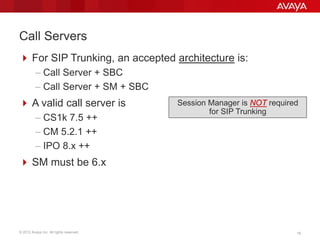
Call Servers
 For SIP Trunking, an accepted architecture is:
– Call Server + SBC
– Call Server + SM + SBC
 A valid call server is
– CS1k 7.5 ++
– CM 5.2.1 ++
– IPO 8.x ++
 SM must be 6.x
Session Manager is NOT required
for SIP Trunking
© 2012 Avaya Inc. All rights reserved. 2020
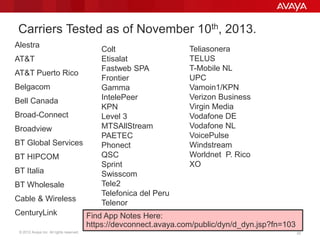
Carriers Tested as of November 10th, 2013.
Alestra
AT&T
AT&T Puerto Rico
Belgacom
Bell Canada
Broad-Connect
Broadview
BT Global Services
BT HIPCOM
BT Italia
BT Wholesale
Cable & Wireless
CenturyLink
Teliasonera
TELUS
T-Mobile NL
UPC
Vamoin1/KPN
Verizon Business
Virgin Media
Vodafone DE
Vodafone NL
VoicePulse
Windstream
Worldnet P. Rico
XO
Colt
Etisalat
Fastweb SPA
Frontier
Gamma
IntelePeer
KPN
Level 3
MTSAllStream
PAETEC
Phonect
QSC
Sprint
Swisscom
Tele2
Telefonica del Peru
Telenor
Find App Notes Here:
https://devconnect.avaya.com/public/dyn/d_dyn.jsp?fn=103
© 2012 Avaya Inc. All rights reserved. 2121
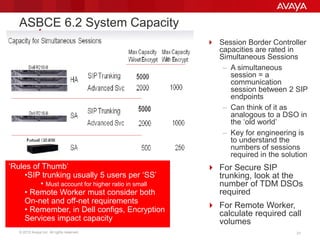
 Session Border Controller
capacities are rated in
Simultaneous Sessions
– A simultaneous
session = a
communication
session between 2 SIP
endpoints
– Can think of it as
analogous to a DSO in
the ‘old world’
– Key for engineering is
to understand the
numbers of sessions
required in the solution
 For Secure SIP
trunking, look at the
number of TDM DSOs
required
 For Remote Worker,
calculate required call
volumes
ASBCE 6.2 System Capacity
‘Rules of Thumb’
•SIP trunking usually 5 users per ‘SS’
• Must account for higher ratio in small
• Remote Worker must consider both
On-net and off-net requirements
• Remember, in Dell configs, Encryption
Services impact capacity
© 2012 Avaya Inc. All rights reserved. 22
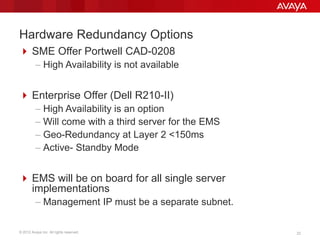
Hardware Redundancy Options
 SME Offer Portwell CAD-0208
– High Availability is not available
 Enterprise Offer (Dell R210-II)
– High Availability is an option
– Will come with a third server for the EMS
– Geo-Redundancy at Layer 2 <150ms
– Active- Standby Mode
 EMS will be on board for all single server
implementations
– Management IP must be a separate subnet.
© 2012 Avaya Inc. All rights reserved. 2323
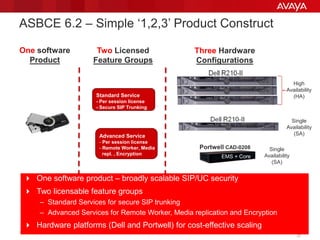
 One software product – broadly scalable SIP/UC security
 Two licensable feature groups
– Standard Services for secure SIP trunking
– Advanced Services for Remote Worker, Media replication and Encryption
 Hardware platforms (Dell and Portwell) for cost-effective scaling
ASBCE 6.2 – Simple ‘1,2,3’ Product Construct
Standard Service
- Per session license
- Secure SIP Trunking
Advanced Service
- Per session license
- Remote Worker, Media
repl. , Encryption
One software
Product
Two Licensed
Feature Groups
Three Hardware
Configurations
Portwell CAD-0208
EMS
Core
Core
High
Availability
(HA)
Single
Availability
(SA)
Single
Availability
(SA)
EMS + Core
EMS + Core
23
© 2012 Avaya Inc. All rights reserved. 24
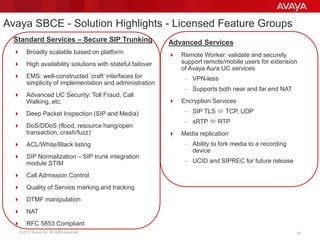
Avaya SBCE - Solution Highlights - Licensed Feature Groups
Standard Services – Secure SIP Trunking
 Broadly scalable based on platform
 High availability solutions with stateful failover
 EMS: well-constructed ‘craft’ interfaces for
simplicity of implementation and administration
 Advanced UC Security: Toll Fraud, Call
Walking, etc.
 Deep Packet Inspection (SIP and Media)
 DoS/DDoS (flood, resource hang/open
transaction, crash/fuzz)
 ACL/White/Black listing
 SIP Normalization – SIP trunk integration
module STIM
 Call Admission Control
 Quality of Service marking and tracking
 DTMF manipulation
 NAT
 RFC 5853 Compliant
Advanced Services
 Remote Worker: validate and securely
support remote/mobile users for extension
of Avaya Aura UC services
– VPN-less
– Supports both near and far end NAT
 Encryption Services
– SIP TLS  TCP, UDP
– sRTP  RTP
 Media replication
– Ability to fork media to a recording
device
– UCID and SIPREC for future release
© 2012 Avaya Inc. All rights reserved. 25
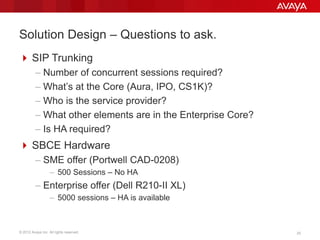
Solution Design – Questions to ask.
 SIP Trunking
– Number of concurrent sessions required?
– What’s at the Core (Aura, IPO, CS1K)?
– Who is the service provider?
– What other elements are in the Enterprise Core?
– Is HA required?
 SBCE Hardware
– SME offer (Portwell CAD-0208)
– 500 Sessions – No HA
– Enterprise offer (Dell R210-II XL)
– 5000 sessions – HA is available
© 2012 Avaya Inc. All rights reserved. 26
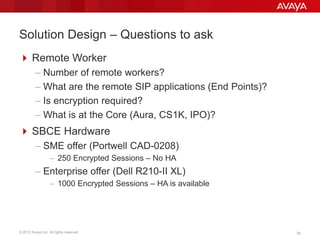
Solution Design – Questions to ask
 Remote Worker
– Number of remote workers?
– What are the remote SIP applications (End Points)?
– Is encryption required?
– What is at the Core (Aura, CS1K, IPO)?
 SBCE Hardware
– SME offer (Portwell CAD-0208)
– 250 Encrypted Sessions – No HA
– Enterprise offer (Dell R210-II XL)
– 1000 Encrypted Sessions – HA is available

Avaya Session Border Controller (SBC)

  • 1.
    Avaya Session BorderController for Enterprise (ASBCE) Overview
  • 2.
    © 2012 AvayaInc. All rights reserved. 2 What is a Session Border Controller?  Session = real-time, interactive communication session  Border = IP-IP network borders – SIP trunks to service providers – Remote worker access – Intra- & extra-enterprise  Control – Security & SLA assurance – Regulatory compliance Redundant data centers Contact center, audio/video conferencing, emergency services, etc. To PSTN SIP Tele- worker Nomadic/ mobile user SIP Remote site 1. SIP trunking border 2. Hosted services border 3. Internet border HQ/ campus Remote site CCUC H.323 Regional site Federated partners InternetPrivate network ASM
  • 3.
    © 2012 AvayaInc. All rights reserved. 3 Where Avaya Aura™ SBC fits in the Avaya Aura architecture Unified Communications Contact Center Collaboration Solutions Interaction Solutions Performance Analytics System Manager Session Manager Communication Manager Application Enablement Presence Services Service Provider Network Deskphones Clients Video Endpoints SBC
  • 4.
    © 2012 AvayaInc. All rights reserved. 4 Why use an SBC?  Security – Enforces a customer’s unique security policies – SIP trunk provider’s own SBC (if private SIP trunk service) focuses on the providers security concerns – Complete network topology hiding – Interoperability problems between multivendor solutions will occur  Flexibility – Provides layer of independence from Service Provider – allows enterprise to make changes more quickly vs. negotiating / relying on Service Provider if needs change – Normalization point for signaling and RTP media streams – Allows for multiple SIP trunk provider access points – Support of enterprise-specific call flows that may not be directy supported by SIP trunk provider  Accountability – Per call status – QoS, SLA monitoring – Report on intrusion attempts – Session recording
  • 5.
    © 2012 AvayaInc. All rights reserved. 5 How are SBCs different from firewalls?  Traditional firewalls cannot: – Prevent SIP-specific overload conditions and malicious attacks – Open / close RTP media ports in sync with SIP signaling – Track session state and provide uninterrupted service – Perform interworking or security on encrypted sessions – Scale to handle thousands of real-time sessions – Provide carrier-class availability – Solve multi-vendor SIP interoperability problems  InfoSec best practice = deploy defense-in-depth model with application- level security proxies for email and web applications – This means firewalls alone are not sufficient – Same model applies for IP telephony, UC and CC applications
  • 6.
    © 2012 AvayaInc. All rights reserved. 7 Reliability and Scale  Active/standby redundancy  Scales upto 5000 sessions  Redundant SIP connectivity to service providers and Session Manager / Communication Manager possible Avaya Aura® SBC Key Features Applications  SIP trunking to PSTN providers  SIP trunking to hosted service providers (i.e. conferencing, contact center, etc.)  SIP trunking to federated businesses  Remote worker via Internet Security  Acme Packet’s proven SBC security framework for DoS/DDOS protection  TLS & SRTP encryption Service Provider Interoperability  Flexible controls to solve interop problems  Proven configuration templates  Tested with SPs through DevConnect Evolution  Deployable on Avaya Aura System Platform  Easily add SBC to existing installations  Flexible feature set for new applications SM SP CM SBC
  • 7.
    © 2012 AvayaInc. All rights reserved. 8 Avaya Session Border Controller for Enterprise Deployment Models  SIP Trunking – Enforce security policies of the enterprise while solving demarcation issues  Remote Worker – Mobile workspace security, secure distributed call centers, remote workers, teleworkers – Confidently extend UC to mobile workspaces across any network – Secure VPN’less access  Core Security – Securely add various UC applications and devices (voice, video, IM) across the corporate network  Compliance – Secured Media Replication/Forking for archiving, logging
  • 8.
    © 2012 AvayaInc. All rights reserved. 9 Secure Remote Worker with BYOD Personal PC, Mac or iPad devices Avaya Flare®, Avaya one-X® SIP client app App secured into the organization, not the device One number UC anywhere Avaya SBCEAvaya Aura® Presence Server System Manager Communication Manager Avaya Aura Conferencing Aura Messaging Session Manager Untrusted Network (Internet, Wireless, etc.) VPN-less Remote Worker
  • 9.
    © 2012 AvayaInc. All rights reserved. 10 Remote Worker: VPN vs VPNless Endpoints VPN Endpoint  VPN Headers add additional size to traffic. In aggregate reduces bandwidth.  Encrypts traffic, yet does not validate it. (Encrypting and distributing a virus isn’t helpful)  No ability at VPN head-end to distinguish between voice and data traffic. Ultimately voice quality suffers.  Cumbersome user experience for real-time communication application VPNless Endpoint  TLS/SRTP encrypts the traffic with a smaller bandwidth footprint than VPN  Signaling and media are unencrypted at the SBC and inspected at Layer 7 to validate the traffic before it is allowed through  Numerous policies allow Enterprise control of endpoints.  Consistent user experience for applications
  • 10.
    © 2012 AvayaInc. All rights reserved. 11 SIP Trunking Remote Worker Avaya SBC for Enterprise SIP Trunking Avaya SBC for Enterprise SIP Trunking Avaya SBC for Enterprise CS1000 SIP Trunking Avaya SBC for Enterprise 1 Software Base: Avaya Aura SBC for Enterprise 3 HW Platforms: Dell & HP for Enterprise; Portwell CAD-0208 for IPO 2 Use Cases Avaya SBC for Enterprise SIP Trunking
  • 11.
    © 2012 AvayaInc. All rights reserved. 1212 What’s a DMZ?  A DMZ is used to provide a controlled separation at the edge of the Enterprise network.  Our SBC can sit parallel to the FW or in the DMZ. Acme claims firewalls destroy voice quality and that they are so secure they don’t need it.  The security standard is to use a DMZ for Enterprise application access. Security is about layers of protection. Firewall InternetEnterprise Avaya SBCE DMZ SIP Trunks Firewall Carrier CS1000
  • 12.
    © 2012 AvayaInc. All rights reserved. 1313 Avaya SBCE: SIP Trunking Architecture Use Case: SIP Trunking to Carrier Carrier offering SIP trunks as lower-cost alternative to TDM Heavy driver for Enterprise adoption of SBC Support Aura, IPO and CS1K From a SECURITY Stand Point, it is recommended the SBCE be in the DMZ Carrier SIP trunks to the Avaya Session Border Controller for Enterprise Avaya SBCE is located in a DMZ behind the Enterprise firewall Services: security and demarcation device between the IP-PBX and the Carrier − NAT traversal, − Securely anchors signaling and media, and can − Normalize SIP protocol Firewall InternetEnterprise Avaya SBCE DMZ SIP Trunks Firewall Carrier CS1000
  • 13.
    © 2012 AvayaInc. All rights reserved. 14 Avaya SBCE: Remote Worker Architecture Use Case: Remote Worker Extend UC to SIP users remote to the Enterprise Solution not requiring VPN for UC/CC SIP endpoints From a SECURITY Stand Point, it is recommended the SBCE be in the DMZ Remote Worker are external to the Enterprise firewall Avaya Session Border Controller for Enterprise − Authenticate SIP-based users/clients to the enterprise − Securely proxy registrations and client device provisioning − Securely manage communications without requiring a VPN Firewall InternetEnterprise Avaya SBCE DMZ Firewall Remote Workers
  • 14.
    © 2012 AvayaInc. All rights reserved. 15 Carrier SBC’s Carrier SBC IP PBX Intranet FW Carrier SBC • Historically designed to sit at the SP’s edge to protect the carrier. • Complex to use command-line devices • Provides a distinct separation between networks while providing a means of transporting signaling and media • Perform topology hiding for the SP • Tracking calls (CDR) for billing • Act as a Network Address Translator (NAT) for the SP • Provides admission control to limit calls from customer (and insure SLA) • Protocol Internetworking for H.323 and SIP Enterprise Network SP Network 15
  • 15.
    © 2012 AvayaInc. All rights reserved. 16 Enterprise SBC Internet IP PBX Intranet DMZ Avaya SBCE Internal FW External FW/NAT Mobile Users, Telecommuters SRTP/ RTP Remote Worker Avaya SBCE Encryption • TLS proxy • SRTP proxy Enablement • FW / NAT traversal • Call admission control • Signaling and media firewall Enterprise Network Security • Floods and fuzzing prevention • Spoofing prevention (fingerprint verification) • Media anomaly prevention • Stealth attack prevention • Tollfraud Prevention Anti-spam • Whitelist/Blacklist • Behavior learning SIP Trunking 16
  • 16.
    © 2012 AvayaInc. All rights reserved. 1717 NAT Transversal Enterprise IP PBX Internet or Provider Network FW IP Address 96.54.23.10 SBC External IP Address 192.168.45.4 • At a basic level think of it this way: If the SBC sends an INVITE message to the carrier, can the carrier reply and reach IP address 192.168.45.4? No. • The SBC facilitates NAT Transversal by making sure all signaling messages have a REACHABLE return address. In this example, the INVITE would have a source address of 96.54.23.10. • When a reply is sent it reaches the firewall which forwards to external IP Address.
  • 17.
    © 2012 AvayaInc. All rights reserved. 1818 Avaya Session Border Controller for Enterprise 6.2 - A new but already proven solution ASBCE 6.2 is further enhancing the Sipera E-SBC with…  Substantial interoperability testing and improvements in Avaya UC environments especially for VPN’less remote worker  Testing against all Avaya UC platforms – Avaya Aura® – IP Office – CS 1000  New hardware platform targeted at SMEs  New product structure – Separation of ordering hardware and software – Fully supported in Support Advantage (enterprise) and IPOSS (IP Office)  Fully integrated into Avaya processes and tools – Ordering and Logistics – Services access – Available in ASD and EC (spring 2013)  Migration path for existing Avaya Aura® SBC customers
  • 18.
    © 2012 AvayaInc. All rights reserved. 1919 Call Servers  For SIP Trunking, an accepted architecture is: – Call Server + SBC – Call Server + SM + SBC  A valid call server is – CS1k 7.5 ++ – CM 5.2.1 ++ – IPO 8.x ++  SM must be 6.x Session Manager is NOT required for SIP Trunking
  • 19.
    © 2012 AvayaInc. All rights reserved. 2020 Carriers Tested as of November 10th, 2013. Alestra AT&T AT&T Puerto Rico Belgacom Bell Canada Broad-Connect Broadview BT Global Services BT HIPCOM BT Italia BT Wholesale Cable & Wireless CenturyLink Teliasonera TELUS T-Mobile NL UPC Vamoin1/KPN Verizon Business Virgin Media Vodafone DE Vodafone NL VoicePulse Windstream Worldnet P. Rico XO Colt Etisalat Fastweb SPA Frontier Gamma IntelePeer KPN Level 3 MTSAllStream PAETEC Phonect QSC Sprint Swisscom Tele2 Telefonica del Peru Telenor Find App Notes Here: https://devconnect.avaya.com/public/dyn/d_dyn.jsp?fn=103
  • 20.
    © 2012 AvayaInc. All rights reserved. 2121  Session Border Controller capacities are rated in Simultaneous Sessions – A simultaneous session = a communication session between 2 SIP endpoints – Can think of it as analogous to a DSO in the ‘old world’ – Key for engineering is to understand the numbers of sessions required in the solution  For Secure SIP trunking, look at the number of TDM DSOs required  For Remote Worker, calculate required call volumes ASBCE 6.2 System Capacity ‘Rules of Thumb’ •SIP trunking usually 5 users per ‘SS’ • Must account for higher ratio in small • Remote Worker must consider both On-net and off-net requirements • Remember, in Dell configs, Encryption Services impact capacity
  • 21.
    © 2012 AvayaInc. All rights reserved. 22 Hardware Redundancy Options  SME Offer Portwell CAD-0208 – High Availability is not available  Enterprise Offer (Dell R210-II) – High Availability is an option – Will come with a third server for the EMS – Geo-Redundancy at Layer 2 <150ms – Active- Standby Mode  EMS will be on board for all single server implementations – Management IP must be a separate subnet.
  • 22.
    © 2012 AvayaInc. All rights reserved. 2323  One software product – broadly scalable SIP/UC security  Two licensable feature groups – Standard Services for secure SIP trunking – Advanced Services for Remote Worker, Media replication and Encryption  Hardware platforms (Dell and Portwell) for cost-effective scaling ASBCE 6.2 – Simple ‘1,2,3’ Product Construct Standard Service - Per session license - Secure SIP Trunking Advanced Service - Per session license - Remote Worker, Media repl. , Encryption One software Product Two Licensed Feature Groups Three Hardware Configurations Portwell CAD-0208 EMS Core Core High Availability (HA) Single Availability (SA) Single Availability (SA) EMS + Core EMS + Core 23
  • 23.
    © 2012 AvayaInc. All rights reserved. 24 Avaya SBCE - Solution Highlights - Licensed Feature Groups Standard Services – Secure SIP Trunking  Broadly scalable based on platform  High availability solutions with stateful failover  EMS: well-constructed ‘craft’ interfaces for simplicity of implementation and administration  Advanced UC Security: Toll Fraud, Call Walking, etc.  Deep Packet Inspection (SIP and Media)  DoS/DDoS (flood, resource hang/open transaction, crash/fuzz)  ACL/White/Black listing  SIP Normalization – SIP trunk integration module STIM  Call Admission Control  Quality of Service marking and tracking  DTMF manipulation  NAT  RFC 5853 Compliant Advanced Services  Remote Worker: validate and securely support remote/mobile users for extension of Avaya Aura UC services – VPN-less – Supports both near and far end NAT  Encryption Services – SIP TLS  TCP, UDP – sRTP  RTP  Media replication – Ability to fork media to a recording device – UCID and SIPREC for future release
  • 24.
    © 2012 AvayaInc. All rights reserved. 25 Solution Design – Questions to ask.  SIP Trunking – Number of concurrent sessions required? – What’s at the Core (Aura, IPO, CS1K)? – Who is the service provider? – What other elements are in the Enterprise Core? – Is HA required?  SBCE Hardware – SME offer (Portwell CAD-0208) – 500 Sessions – No HA – Enterprise offer (Dell R210-II XL) – 5000 sessions – HA is available
  • 25.
    © 2012 AvayaInc. All rights reserved. 26 Solution Design – Questions to ask  Remote Worker – Number of remote workers? – What are the remote SIP applications (End Points)? – Is encryption required? – What is at the Core (Aura, CS1K, IPO)?  SBCE Hardware – SME offer (Portwell CAD-0208) – 250 Encrypted Sessions – No HA – Enterprise offer (Dell R210-II XL) – 1000 Encrypted Sessions – HA is available