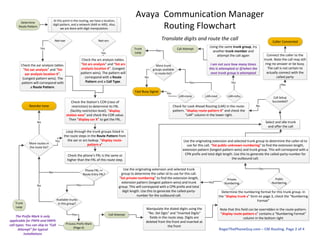
Capture digits dialed until a pattern is matched in the
dialplan-analysis table. “List dialplan analysis” and “list
dialplan analysis location X” (longest pattern wins)
AAR
or
ARS
Extension Loop
Yes
Yes
Yes
EXT FAC
DAC
Check the feature-access-code table
“display feature-access-codes”. The middle of page 1
contains the AAR and ARS access codes
AAR
or ARS feature
code?
Any other
feature code?
Pattern is used as a dial access code,
typically a trunk access code (TAC). “list
trunk-group” to see the TACs in use.
Typically analog trunk groups are the only
type that can be dialed via TAC.
Yes
Yes
Check the diaplan-parameters table to determine if
the uniform-dialplan table takes priority. “display
dialplan parameters” and check value of ‘UDP
Extension Search Order’. Location-specific parameters
win (“list dialplan parameters location X”)
Perform the feature defined in the
feature-access-code table
TAC
allowed?
Connect caller to the trunk
Reorder tone
Yes
No
Local
extensions
first
UDP table
first
Check the following for a pattern match:
· extensions
· VDNs
· hunt group pilot numbers
· Announcements
· Attendants
Pattern
match?
Use the uniform-dialplan table for this pattern to
manipulate digits and call-type. “list uniform-dialplan”.
Use the “conv” column to determine if additional
translations are allowed after this one (there is no
location-specific uniform-dialplan table – it is global)
EXT
ARSAAR
Yes
Yes
Route the call to the appropriate
object (telephone, pilot number,
VDN, attendant, etc)
Yes
Yes
AAR/ARS
Loop
Check the AAR digit conversion table to determine if this
digit pattern should be converted. “list aar digit-
conversion” and “list aar digit-conversion location X”
(longest pattern wins) Use the “conv” column to determine
if additional translations are allowed after this one
Conv
allowed?
Exist in
table?
Addl
Conv
Allowed?
Net=ext?
Yes
Yes
Yes
Yes
No
No
Determine
Route Pattern
(Page 2)
Yes AAR/ARS
Loop
No
No
Net=ext? No
Extension Loop
Yes
Check the ARS digit conversion table to determine if this
digit pattern should be converted. “list ars digit-
conversion” and “list ars digit-conversion location X”
(longest pattern wins) Use the “conv” column to determine
if additional translations are allowed after this one
Yes
Conv
allowed?
Yes
No
Determine
Route Pattern
(Page 2)
AAR/ARS
Loop
Yes
Reorder toneNo
Collect Digits
(i.e. user picks up phone
and dials digits)
RogerThePhoneGuy.com – CM Routing. Page 1 of 4
Avaya Communication Manager
Routing Flowchart
Collect the dialed digits and select the network (aar, ars, or ext),
then continue to page 2
Digit pattern matching is often
based upon the “location” of the
station. Location flowchart is
found on page 3
Determine
Route Pattern
Net=aar
At this point in the routing, we have a location,
digit pattern, and a network (AAR or ARS). Also,
we are done with digit manipulation.
Check the aar analysis tables.
“list aar analysis” and “list
aar analysis location X”.
(Longest pattern wins). The
pattern will correspond with
a Route Pattern.
Check the ars analysis tables.
“list ars analysis” and “list ars
analysis location X”. (Longest
pattern wins). The pattern will
correspond with a Route
Pattern and a Call Type.
Net=ars
Yes
Yes
Check the Station’s COR (class of
restriction) to determine its FRL
(facility restriction level). “display
station xxxx” and check the COR value.
Then “display cor X” to get the FRL.
Loop through the trunk groups listed in
the route steps in the Route Pattern from
the aar or ars lookup. “display route-
pattern x”
Check the phone’s FRL is the same or
higher than the FRL of this route step.
Phone FRL >=
Route Entry FRL?
More routes in
the route list?
Reorder tone
No
Yes Use the originating extension and selected trunk group to determine the caller-id to
use for this call. “list public-unknown-numbering” to find the extension length,
extension pattern (longest pattern wins) and trunk group. This will correspond with a
CPN prefix and total digit length. Use this to generate the called-party-number for
the outbound call.
Available trunks
in this group?Trunk
Loop
YesNo
Select and idle trunk
and offer the call
Yes
Call Setup
Succeeded?
Connect the caller to the
trunk. Note the call may still
ring-no-answer or be busy.
The call is not certain to
actually connect with the
called party
Caller Connected
Yes
Determine the numbering format for this trunk group. In
the “display trunk x” form on page 3, check the “Numbering
Format”
Note that this field can be overridden in the route-pattern.
“display route-pattern x” contains a “Numbering Format”
column in the bottom right
Public
Numbering
Private
Numbering
YesUse the originating extension and selected trunk
group to determine the caller-id to use for this call.
“list private-numbering” to find the extension length,
extension pattern (longest pattern wins) and trunk
group. This will correspond with a CPN prefix and total
digit length. Use this to generate the called-party-
number for the outbound call.
Yes
Check for Look Ahead Routing (LAR) in the route-
pattern. “display route-pattern X” and check the
“LAR” column in the lower right.
LAR=none LAR=next LAR=rehu
More trunk
groups available
in route-list?
Trunk
Loop
Yes
Yes
Fast Busy Signal
Using the same trunk group, try
another trunk member and
attempt the call again
I am not sure how many times
this is attempted or if/when the
next trunk group is attempted
Call Attempt
Call Attempt
Yes
No
Yes
No
Process Prefix Mark
(Page 4)
Manipulate the dialed digits using the
“No. Del Dgts” and “Inserted Digits”
fields in the route step. Digits are
deleted from the front and inserted at
the front
The Prefix Mark is only
applicable for FNPA and HNPA
call types. You can skip to “Call
Attempt” for typical
installations
RogerThePhoneGuy.com – CM Routing. Page 2 of 4
No
Avaya Communication Manager
Routing Flowchart
Translate digits and route the call
Avaya Communication Manager
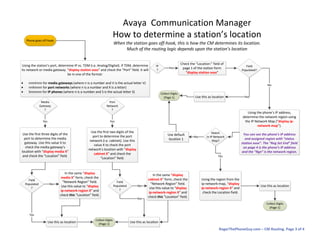
How to determine a station’s location
When the station goes off-hook, this is how the CM determines its location.
Much of the routing logic depends upon the station’s location
Phone goes off-hook
Check the “Location:” field of
page 1 of the station form
“display station xxxx”
Field
Populated?
Use this as location
Collect Digits
(Page 1) Yes
Using the phone’s IP address,
determine the network region using
the IP Network Map (“display ip-
network-map”).
You can see the phone’s IP address
and assigned region with “status
station xxxx”. The “Reg Set End” field
on page 4 is the phone’s IP address
and the “Rgn” is the network region.
IP
?
Yes
No
Match
in IP Network
Map?
Using the station’s port, determine IP vs. TDM (i.e. Analog/Digital). If TDM, determine
its network or media gateway. “display station xxxx” and check the “Port” field. It will
be in one of the format:
· nnnVnnn for media gateways (where n is a number and V is the actual letter V)
· nnXnnnn for port networks (where n is a number and X is a letter)
· Snnnnnn for IP phones (where n is a number and S is the actual letter S)
Port
Network
?
Media
Gateway
?
Use the first three digits of the
port to determine the media
gateway. Use this value X to
check the media gateway’s
location with “display media X”
and check the “Location” field.
Field
Populated
?
Yes
Yes
Use this as location
In the same “display
media X” form, check the
“Network Region” field.
Use this value to “display
ip-network-region X” and
check this “Location” field.
No
Use the first two digits of the
port to determine the port
network (i.e. cabinet). Use this
value X to check the port
network’s location with “display
cabinet X” and check the
“Location” field.
Field
Populated
?
Yes
Use this as location
In the same “display
cabinet X” form, check the
“Network Region” field.
Use this value to “display
ip-network-region X” and
check this “Location” field.
No
Yes
Collect Digits
(Page 1)
Use default
location 1
Using the region from the
ip-network-map, “display
ip-network-region X” and
check the Location field.
Use this as location
Collect Digits
(Page 1)
No
Yes
RogerThePhoneGuy.com – CM Routing. Page 3 of 4
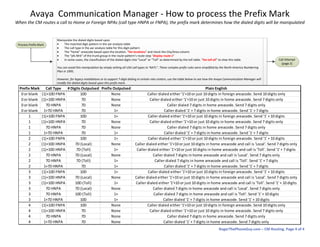
Process Prefix Mark
Manipulate the dialed digits based upon
· The matched digit pattern in the aar analysis table
· The call type in the aar analysis table for this digit pattern
· The “home” areacode based upon the location. “list locations” and check the City/Area column
· The “pfx Mrk” of the trunk group in the route-pattern’s route step “display route x”
· In some cases, the classification of the dialed digits into “Local” or “Toll” as determined by the toll table. “list toll all” to view this table.
You can avoid this manipulation by simply setting all USA call types to ‘NATL”. These complex prefix rules were simplified by the North America Numbering
Plan in 1995.
However, for legacy installations or to support 7-digit dialing in certain rate centers, use the table below to see how the Avaya Communication Manager will
modify the dialed digits based upon this prefix mark.
Prefix Mark Call Type # Digits Outpulsed Prefix Outpulsed Plain English
0 or blank (1)+10D FNPA 10D None Caller dialed either '1'+10 or just 10 digits in foreign areacode. Send 10 digits only
0 or blank (1)+10D HNPA 7D None Caller dialed either '1'+10 or just 10 digits in home areacode. Send 7 digits only
0 or blank 7D HNPA 7D None Caller dialed 7 digits in home areacode. Send 7 digits only
0 or blank 1+7D HNPA 7D 1+ Caller dialed '1' + 7 digits in home areacode. Send '1' + 7 digits
1 (1)+10D FNPA 10D 1+ Caller dialed either '1'+10 or just 10 digits in foreign areacode. Send '1' + 10 digits
1 (1)+10D HNPA 7D None Caller dialed either '1'+10 or just 10 digits in home areacode. Send 7 digits only
1 7D HNPA 7D None Caller dialed 7 digits in home areacode. Send 7 digits only
1 1+7D HNPA 7D 1+ Caller dialed '1' + 7 digits in home areacode. Send '1' + 7 digits
2 (1)+10D FNPA 10D 1+ Caller dialed either '1'+10 or just 10 digits in foreign areacode. Send '1' + 10 digits
2 (1)+10D HNPA 7D (Local) None Caller dialed either '1'+10 or just 10 digits in home areacode and call is 'Local'. Send 7 digits only
2 (1)+10D HNPA 7D (Toll) 1+ Caller dialed either '1'+10 or just 10 digits in home areacode and call is 'Toll'. Send '1' + 7 digits
2 7D HNPA 7D (Local) None Caller dialed 7 digits in home areacode and call is 'Local'. Send 7 digits only
2 7D HNPA 7D (Toll) 1+ Caller dialed 7 digits in home areacode and call is 'Toll'. Send '1' + 7 digits
2 1+7D HNPA 7D 1+ Caller dialed '1' + 7 digits in home areacode. Send '1' + 7 digits
3 (1)+10D FNPA 10D 1+ Caller dialed either '1'+10 or just 10 digits in foreign areacode. Send '1' + 10 digits
3 (1)+10D HNPA 7D (Local) None Caller dialed either '1'+10 or just 10 digits in home areacode and call is 'Local'. Send 7 digits only
3 (1)+10D HNPA 10D (Toll) 1+ Caller dialed either '1'+10 or just 10 digits in home areacode and call is 'Toll'. Send '1' + 10 digits
3 7D HNPA 7D (Local) None Caller dialed 7 digits in home areacode and call is 'Local'. Send 7 digits only
3 7D HNPA 10D (Toll) 1+ Caller dialed 7 digits in home areacode and call is 'Toll'. Send '1' + 10 digits
3 1+7D HNPA 10D 1+ Caller dialed '1' + 7 digits in home areacode. Send '1' + 10 digits
4 (1)+10D FNPA 10D None Caller dialed either '1'+10 or just 10 digits in foreign areacode. Send 10 digits only
4 (1)+10D HNPA 7D None Caller dialed either '1'+10 or just 10 digits in home areacode. Send 7 digits only
4 7D HNPA 7D None Caller dialed 7 digits in home areacode. Send 7 digits only
4 1+7D HNPA 7D None Caller dialed '1' + 7 digits in home areacode. Send 7 digits only
Call Attempt
(page 2)
RogerThePhoneGuy.com – CM Routing. Page 4 of 4
Avaya Communication Manager - How to process the Prefix Mark
When the CM routes a call to Home or Foreign NPAs (call type HNPA or FNPA), the prefix mark determines how the dialed digits will be manipulated

Avaya call routing_flowchart

  • 1.
    Capture digits dialeduntil a pattern is matched in the dialplan-analysis table. “List dialplan analysis” and “list dialplan analysis location X” (longest pattern wins) AAR or ARS Extension Loop Yes Yes Yes EXT FAC DAC Check the feature-access-code table “display feature-access-codes”. The middle of page 1 contains the AAR and ARS access codes AAR or ARS feature code? Any other feature code? Pattern is used as a dial access code, typically a trunk access code (TAC). “list trunk-group” to see the TACs in use. Typically analog trunk groups are the only type that can be dialed via TAC. Yes Yes Check the diaplan-parameters table to determine if the uniform-dialplan table takes priority. “display dialplan parameters” and check value of ‘UDP Extension Search Order’. Location-specific parameters win (“list dialplan parameters location X”) Perform the feature defined in the feature-access-code table TAC allowed? Connect caller to the trunk Reorder tone Yes No Local extensions first UDP table first Check the following for a pattern match: · extensions · VDNs · hunt group pilot numbers · Announcements · Attendants Pattern match? Use the uniform-dialplan table for this pattern to manipulate digits and call-type. “list uniform-dialplan”. Use the “conv” column to determine if additional translations are allowed after this one (there is no location-specific uniform-dialplan table – it is global) EXT ARSAAR Yes Yes Route the call to the appropriate object (telephone, pilot number, VDN, attendant, etc) Yes Yes AAR/ARS Loop Check the AAR digit conversion table to determine if this digit pattern should be converted. “list aar digit- conversion” and “list aar digit-conversion location X” (longest pattern wins) Use the “conv” column to determine if additional translations are allowed after this one Conv allowed? Exist in table? Addl Conv Allowed? Net=ext? Yes Yes Yes Yes No No Determine Route Pattern (Page 2) Yes AAR/ARS Loop No No Net=ext? No Extension Loop Yes Check the ARS digit conversion table to determine if this digit pattern should be converted. “list ars digit- conversion” and “list ars digit-conversion location X” (longest pattern wins) Use the “conv” column to determine if additional translations are allowed after this one Yes Conv allowed? Yes No Determine Route Pattern (Page 2) AAR/ARS Loop Yes Reorder toneNo Collect Digits (i.e. user picks up phone and dials digits) RogerThePhoneGuy.com – CM Routing. Page 1 of 4 Avaya Communication Manager Routing Flowchart Collect the dialed digits and select the network (aar, ars, or ext), then continue to page 2 Digit pattern matching is often based upon the “location” of the station. Location flowchart is found on page 3
  • 2.
    Determine Route Pattern Net=aar At thispoint in the routing, we have a location, digit pattern, and a network (AAR or ARS). Also, we are done with digit manipulation. Check the aar analysis tables. “list aar analysis” and “list aar analysis location X”. (Longest pattern wins). The pattern will correspond with a Route Pattern. Check the ars analysis tables. “list ars analysis” and “list ars analysis location X”. (Longest pattern wins). The pattern will correspond with a Route Pattern and a Call Type. Net=ars Yes Yes Check the Station’s COR (class of restriction) to determine its FRL (facility restriction level). “display station xxxx” and check the COR value. Then “display cor X” to get the FRL. Loop through the trunk groups listed in the route steps in the Route Pattern from the aar or ars lookup. “display route- pattern x” Check the phone’s FRL is the same or higher than the FRL of this route step. Phone FRL >= Route Entry FRL? More routes in the route list? Reorder tone No Yes Use the originating extension and selected trunk group to determine the caller-id to use for this call. “list public-unknown-numbering” to find the extension length, extension pattern (longest pattern wins) and trunk group. This will correspond with a CPN prefix and total digit length. Use this to generate the called-party-number for the outbound call. Available trunks in this group?Trunk Loop YesNo Select and idle trunk and offer the call Yes Call Setup Succeeded? Connect the caller to the trunk. Note the call may still ring-no-answer or be busy. The call is not certain to actually connect with the called party Caller Connected Yes Determine the numbering format for this trunk group. In the “display trunk x” form on page 3, check the “Numbering Format” Note that this field can be overridden in the route-pattern. “display route-pattern x” contains a “Numbering Format” column in the bottom right Public Numbering Private Numbering YesUse the originating extension and selected trunk group to determine the caller-id to use for this call. “list private-numbering” to find the extension length, extension pattern (longest pattern wins) and trunk group. This will correspond with a CPN prefix and total digit length. Use this to generate the called-party- number for the outbound call. Yes Check for Look Ahead Routing (LAR) in the route- pattern. “display route-pattern X” and check the “LAR” column in the lower right. LAR=none LAR=next LAR=rehu More trunk groups available in route-list? Trunk Loop Yes Yes Fast Busy Signal Using the same trunk group, try another trunk member and attempt the call again I am not sure how many times this is attempted or if/when the next trunk group is attempted Call Attempt Call Attempt Yes No Yes No Process Prefix Mark (Page 4) Manipulate the dialed digits using the “No. Del Dgts” and “Inserted Digits” fields in the route step. Digits are deleted from the front and inserted at the front The Prefix Mark is only applicable for FNPA and HNPA call types. You can skip to “Call Attempt” for typical installations RogerThePhoneGuy.com – CM Routing. Page 2 of 4 No Avaya Communication Manager Routing Flowchart Translate digits and route the call
  • 3.
    Avaya Communication Manager Howto determine a station’s location When the station goes off-hook, this is how the CM determines its location. Much of the routing logic depends upon the station’s location Phone goes off-hook Check the “Location:” field of page 1 of the station form “display station xxxx” Field Populated? Use this as location Collect Digits (Page 1) Yes Using the phone’s IP address, determine the network region using the IP Network Map (“display ip- network-map”). You can see the phone’s IP address and assigned region with “status station xxxx”. The “Reg Set End” field on page 4 is the phone’s IP address and the “Rgn” is the network region. IP ? Yes No Match in IP Network Map? Using the station’s port, determine IP vs. TDM (i.e. Analog/Digital). If TDM, determine its network or media gateway. “display station xxxx” and check the “Port” field. It will be in one of the format: · nnnVnnn for media gateways (where n is a number and V is the actual letter V) · nnXnnnn for port networks (where n is a number and X is a letter) · Snnnnnn for IP phones (where n is a number and S is the actual letter S) Port Network ? Media Gateway ? Use the first three digits of the port to determine the media gateway. Use this value X to check the media gateway’s location with “display media X” and check the “Location” field. Field Populated ? Yes Yes Use this as location In the same “display media X” form, check the “Network Region” field. Use this value to “display ip-network-region X” and check this “Location” field. No Use the first two digits of the port to determine the port network (i.e. cabinet). Use this value X to check the port network’s location with “display cabinet X” and check the “Location” field. Field Populated ? Yes Use this as location In the same “display cabinet X” form, check the “Network Region” field. Use this value to “display ip-network-region X” and check this “Location” field. No Yes Collect Digits (Page 1) Use default location 1 Using the region from the ip-network-map, “display ip-network-region X” and check the Location field. Use this as location Collect Digits (Page 1) No Yes RogerThePhoneGuy.com – CM Routing. Page 3 of 4
  • 4.
    Process Prefix Mark Manipulatethe dialed digits based upon · The matched digit pattern in the aar analysis table · The call type in the aar analysis table for this digit pattern · The “home” areacode based upon the location. “list locations” and check the City/Area column · The “pfx Mrk” of the trunk group in the route-pattern’s route step “display route x” · In some cases, the classification of the dialed digits into “Local” or “Toll” as determined by the toll table. “list toll all” to view this table. You can avoid this manipulation by simply setting all USA call types to ‘NATL”. These complex prefix rules were simplified by the North America Numbering Plan in 1995. However, for legacy installations or to support 7-digit dialing in certain rate centers, use the table below to see how the Avaya Communication Manager will modify the dialed digits based upon this prefix mark. Prefix Mark Call Type # Digits Outpulsed Prefix Outpulsed Plain English 0 or blank (1)+10D FNPA 10D None Caller dialed either '1'+10 or just 10 digits in foreign areacode. Send 10 digits only 0 or blank (1)+10D HNPA 7D None Caller dialed either '1'+10 or just 10 digits in home areacode. Send 7 digits only 0 or blank 7D HNPA 7D None Caller dialed 7 digits in home areacode. Send 7 digits only 0 or blank 1+7D HNPA 7D 1+ Caller dialed '1' + 7 digits in home areacode. Send '1' + 7 digits 1 (1)+10D FNPA 10D 1+ Caller dialed either '1'+10 or just 10 digits in foreign areacode. Send '1' + 10 digits 1 (1)+10D HNPA 7D None Caller dialed either '1'+10 or just 10 digits in home areacode. Send 7 digits only 1 7D HNPA 7D None Caller dialed 7 digits in home areacode. Send 7 digits only 1 1+7D HNPA 7D 1+ Caller dialed '1' + 7 digits in home areacode. Send '1' + 7 digits 2 (1)+10D FNPA 10D 1+ Caller dialed either '1'+10 or just 10 digits in foreign areacode. Send '1' + 10 digits 2 (1)+10D HNPA 7D (Local) None Caller dialed either '1'+10 or just 10 digits in home areacode and call is 'Local'. Send 7 digits only 2 (1)+10D HNPA 7D (Toll) 1+ Caller dialed either '1'+10 or just 10 digits in home areacode and call is 'Toll'. Send '1' + 7 digits 2 7D HNPA 7D (Local) None Caller dialed 7 digits in home areacode and call is 'Local'. Send 7 digits only 2 7D HNPA 7D (Toll) 1+ Caller dialed 7 digits in home areacode and call is 'Toll'. Send '1' + 7 digits 2 1+7D HNPA 7D 1+ Caller dialed '1' + 7 digits in home areacode. Send '1' + 7 digits 3 (1)+10D FNPA 10D 1+ Caller dialed either '1'+10 or just 10 digits in foreign areacode. Send '1' + 10 digits 3 (1)+10D HNPA 7D (Local) None Caller dialed either '1'+10 or just 10 digits in home areacode and call is 'Local'. Send 7 digits only 3 (1)+10D HNPA 10D (Toll) 1+ Caller dialed either '1'+10 or just 10 digits in home areacode and call is 'Toll'. Send '1' + 10 digits 3 7D HNPA 7D (Local) None Caller dialed 7 digits in home areacode and call is 'Local'. Send 7 digits only 3 7D HNPA 10D (Toll) 1+ Caller dialed 7 digits in home areacode and call is 'Toll'. Send '1' + 10 digits 3 1+7D HNPA 10D 1+ Caller dialed '1' + 7 digits in home areacode. Send '1' + 10 digits 4 (1)+10D FNPA 10D None Caller dialed either '1'+10 or just 10 digits in foreign areacode. Send 10 digits only 4 (1)+10D HNPA 7D None Caller dialed either '1'+10 or just 10 digits in home areacode. Send 7 digits only 4 7D HNPA 7D None Caller dialed 7 digits in home areacode. Send 7 digits only 4 1+7D HNPA 7D None Caller dialed '1' + 7 digits in home areacode. Send 7 digits only Call Attempt (page 2) RogerThePhoneGuy.com – CM Routing. Page 4 of 4 Avaya Communication Manager - How to process the Prefix Mark When the CM routes a call to Home or Foreign NPAs (call type HNPA or FNPA), the prefix mark determines how the dialed digits will be manipulated