





11
Roman Chobik
23 May 2018
Automated Testing for Embedded Systems
2
Agenda
1. About our project, team and customer
2. Why we decided to create ATS?
3. The process of creation
4. HW components, connections
5. ATS current state
6. SW: scripts, repo, Jenkins, pipelines
7. Demo?
33
Our project, team and customer
4
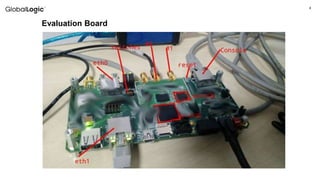
Evaluation Board
55
Why we decided to create ATS
6
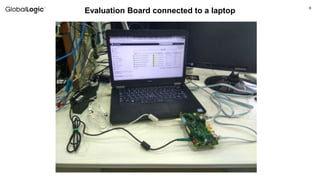
Evaluation Board connected to a laptop
77
The process of creation
8
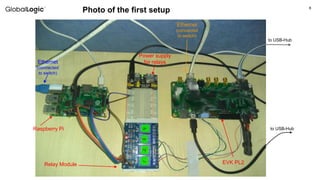
Photo of the first setup
to USB-Hub
to USB-HubRaspberry Pi
Power supply
for relays
Relay Module EVK PL2
Ethernet
(connected
to switch)
Ethernet
(connected
to switch)
9
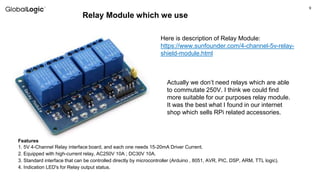
Relay Module which we use
Here is description of Relay Module:
https://www.sunfounder.com/4-channel-5v-relay-
shield-module.html
Features
1. 5V 4-Channel Relay interface board, and each one needs 15-20mA Driver Current.
2. Equipped with high-current relay, AC250V 10A ; DC30V 10A.
3. Standard interface that can be controlled directly by microcontroller (Arduino , 8051, AVR, PIC, DSP, ARM, TTL logic).
4. Indication LED's for Relay output status.
Actually we don’t need relays which are able
to commutate 250V. I think we could find
more suitable for our purposes relay module.
It was the best what I found in our internet
shop which sells RPi related accessories.
10
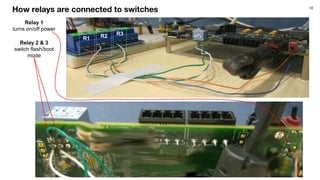
How relays are connected to switches
Relay 1
turns on/off power
Relay 2 & 3
switch flash/boot
mode
R1 R2 R3
11
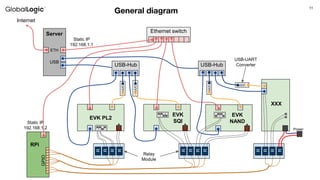
General diagram
Ethernet switch
USB-Hub USB-Hub
RPi
R
R
R
R
GPIO
Server
UUC
EVK PL2
R
R
R
R
UUC
EVK
SQI
EVK
NAND
UUC
R
R
R
R
XXX
UUC
Power
Internet
Static IP
192.168.1.1
Static IP
192.168.1.2
ETH
USB
USB-UART
Converter
Relay
Module
12
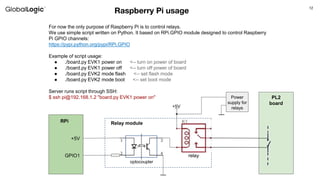
Raspberry Pi usage
For now the only purpose of Raspberry Pi is to control relays.
We use simple script written on Python. It based on RPi.GPIO module designed to control Raspberry
Pi GPIO channels:
https://pypi.python.org/pypi/RPi.GPIO
Example of script usage:
● ./board.py EVK1 power on <-- turn on power of board
● ./board.py EVK1 power off <-- turn off power of board
● ./board.py EVK2 mode flash <-- set flash mode
● ./board.py EVK2 mode boot <-- set boot mode
Server runs script through SSH:
$ ssh pi@192.168.1.2 "board.py EVK1 power on"
+5V
RPi
GPIO1
+5V
Relay module
Power
supply for
relays
PL2
board
optocoupler
relay
13
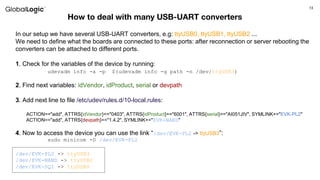
How to deal with many USB-UART converters
In our setup we have several USB-UART converters, e.g: ttyUSB0, ttyUSB1, ttyUSB2 ...
We need to define what the boards are connected to these ports: after reconnection or server rebooting the
converters can be attached to different ports.
1. Check for the variables of the device by running:
udevadm info -a -p $(udevadm info -q path -n /dev/ttyUSB3)
2. Find next variables: idVendor, idProduct, serial or devpath
3. Add next line to file /etc/udev/rules.d/10-local.rules:
ACTION=="add", ATTRS{idVendor}=="0403", ATTRS{idProduct}=="6001", ATTRS{serial}=="AI051JIV", SYMLINK+="EVK-PL2"
ACTION=="add", ATTRS{devpath}=="1.4.2", SYMLINK+="EVK-NAND"
4. Now to access the device you can use the link “/dev/EVK-PL2 -> ttyUSB3”:
sudo minicom -D /dev/EVK-PL2
/dev/EVK-PL2 -> ttyUSB3
/dev/EVK-NAND -> ttyUSB2
/dev/EVK-SQI -> ttyUSB0
1414
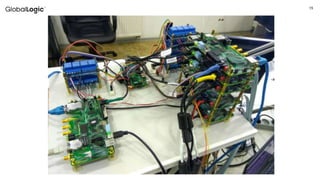
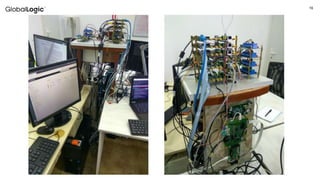
What we have currently
15
16
1717
Software
18
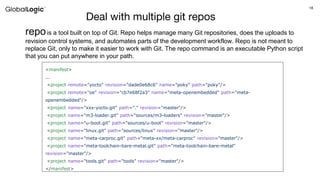
Deal with multiple git repos
repois a tool built on top of Git. Repo helps manage many Git repositories, does the uploads to
revision control systems, and automates parts of the development workflow. Repo is not meant to
replace Git, only to make it easier to work with Git. The repo command is an executable Python script
that you can put anywhere in your path.
<manifest>
...
<project remote="yocto" revision="dade0e68c6" name="poky" path="poky"/>
<project remote="oe" revision="cb7e68f2a3" name="meta-openembedded" path="meta-
openembedded"/>
<project name="xxx-yocto.git" path="." revision="master"/>
<project name="m3-loader.git" path="sources/m3-loaders" revision="master"/>
<project name="u-boot.git" path="sources/u-boot" revision="master"/>
<project name="linux.git" path="sources/linux" revision="master"/>
<project name="meta-carproc.git" path="meta-xx/meta-carproc" revision="master"/>
<project name="meta-toolchain-bare-metal.git" path="meta-toolchain-bare-metal"
revision="master"/>
<project name="tools.git" path="tools" revision="master"/>
</manifest>
19
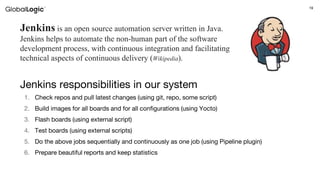
Jenkins responsibilities in our system
1. Check repos and pull latest changes (using git, repo, some script)
2. Build images for all boards and for all configurations (using Yocto)
3. Flash boards (using external script)
4. Test boards (using external scripts)
5. Do the above jobs sequentially and continuously as one job (using Pipeline plugin)
6. Prepare beautiful reports and keep statistics
Jenkins is an open source automation server written in Java.
Jenkins helps to automate the non-human part of the software
development process, with continuous integration and facilitating
technical aspects of continuous delivery (Wikipedia).
20
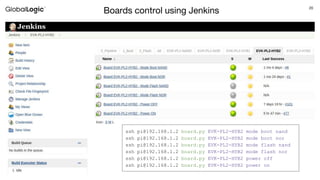
ssh pi@192.168.1.2 board.py EVK-PL2-HYB2 mode boot nand
ssh pi@192.168.1.2 board.py EVK-PL2-HYB2 mode boot nor
ssh pi@192.168.1.2 board.py EVK-PL2-HYB2 mode flash nand
ssh pi@192.168.1.2 board.py EVK-PL2-HYB2 mode flash nor
ssh pi@192.168.1.2 board.py EVK-PL2-HYB2 power off
ssh pi@192.168.1.2 board.py EVK-PL2-HYB2 power on
Boards control using Jenkins
21
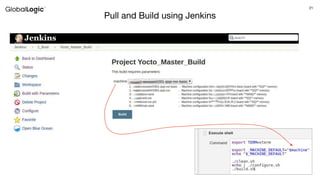
Pull and Build using Jenkins
22
Automation of Flashing process
$ ./flashLoader-sqi.pl -f "USB DFU" -p "USB Fastboot" -l 0,1,2,3,4,5,6,7,8 $CONFIG_FILE
[-f] comport : first stage communication port name see list below
[-p] comport : flashing communication port name see list below
[-e] : Erase all before flashing
[-l] list: comma separated partition list numbers eg: 0,1,2,3,4
<file> : STA Config file (partitioning + other parameters)
board_ctl "EVK1 power off"
sleep 1
board_ctl "EVK1 mode flash nand"
sleep 1
board_ctl "EVK1 power on"
cd $FLASHER_DIR
./$FLASHER_NAME -e -f "USB DFU" -p "USB Fastboot" $CONFIG_FILE
RES="$?"
board_ctl "EVK1 power off"
if [ $RES -ne 0 ]; then echo "Flashing failed!"; exit -1; fi
echo "Flashing completed successfully!"
sleep 1
board_ctl "EVK1 mode boot nand"
sleep 1
board_ctl "EVK1 power on"
board_ctl - function which runs relay
control script on RPi through SSH
STA_Flashloader erases whole memory
(option -e) and flashes all partitions (-l
not specified), uses info from config file
Booting board after flashing
Fragment of script which is run on the Server
23
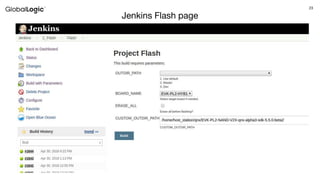
Jenkins Flash page
24
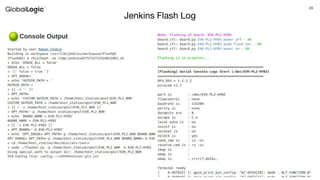
Jenkins Flash Log
2525
Testing
26
Board testing from Server
We write python scripts which use module “pexpect”, designed to automate interactive applications
#!/usr/bin/python
import pexpect
child = pexpect.spawn('minicom -D /dev/EVK-PL1') # open minicom
child.sendline('') # send empty line "Enter"
child.expect('root@board:.*# ') # wait for prompt
child.sendline('mount | grep ubi') # send command
child.expect('rn') # wait for Enter (scip our command)
child.expect('root@board:.*# ') # wait for prompt
ubis = child.before[:-2] # save output between our command and
prompt
child.sendline('echo $LD_LIBRARY_PATH') # send command
child.expect('rn') # wait for Enter (scip our command)
child.expect('root@board:.*# ') # wait for prompt
libp = child.before[:-2] # save output between our command and
prompt
print "LIB: %snUBI: %s" % (libp, ubis)
server:~$ sudo ./test_expect.py
LIB: /lib:/usr/lib:/home/root/ext-fs/lib:/home/root/ext-fs/usr/lib
UBI: ubi0_0 on /home/root/ext-fs type ubifs (rw,relatime)
Result of script execution:
Using this approach we can run any application on the board and
check its output.
The “expect” function can wait for some specific words which
denote that application runs successfully, otherwise the timeout
exception will be raised and script completed with failure.
Also in this way we can check exit status of applications.
27
import pytest
import pexpect
@pytest.fixture(scope="module")
def minicom():
# Opening minicom
minicom = pexpect.spawn('minicom -D /dev/EVK-PL1')
minicom.sendline('')
minicom.expect('root@board:.*# ')
yield minicom
# Terminating minicom
minicom.terminate(force=True)
def test_ubi_mount(minicom):
minicom.sendline('mount | grep ubi')
minicom.expect('rn')
minicom.expect('root@board:.*# ')
ubi = minicom.before[:-2]
assert ubi == "ubi0_0 on /home/root/ext-fs type ubifs (rw,relatime)"
def test_ld_library_path(minicom):
minicom.sendline('echo $LD_LIBRARY_PATH')
minicom.expect('rn')
minicom.expect('root@board:.*# ')
libp = minicom.before[:-2]
assert libp == "/lib:/usr/lib:/home/root/ext-fs/lib:/home/root/ext-
server:~$ pytest -v -s test_evk_pl2.py
=================== test session starts ====================
platform linux2 -- Python 2.7.12, pytest-3.2.2, py-1.4.34,
pluggy-0.4.0 -- /usr/bin/python
cachedir: .cache
rootdir: /home/host_station/dev/misc/evkctl/tests, inifile:
collected 2 items
test_evk_pl2.py::test_ubi_mount PASSED
test_evk_pl2.py::test_ld_library_path PASSED
================ 2 passed in 1.57 seconds ==================
Result of executing the test:
Board testing with Pytest
With pytest framework we can easily write automated
tests and verify specific functionality.
2828
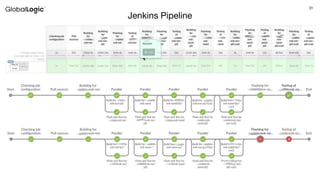
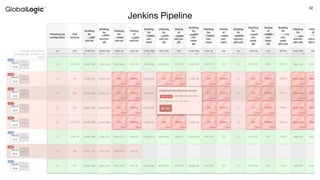
Jenkins Pipeline
29
Jenkins Pipeline syntax
Jenkinsfile (Declarative Pipeline)
pipeline {
agent any
stages {
stage('Build') {
steps {
sh 'make'
}
}
stage('Test'){
steps {
sh 'make check'
junit 'reports/**/*.xml'
}
}
stage('Deploy') {
steps {
sh 'make publish'
}
}
}
}
Jenkinsfile (Scripted Pipeline)
node {
stage('Build') {
sh 'make'
}
stage('Test') {
sh 'make check'
junit 'reports/**/*.xml'
}
stage('Deploy') {
sh 'make publish'
}
}
30
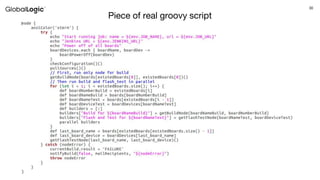
Piece of real groovy script
31
Jenkins Pipeline
32
Jenkins Pipeline
33
Thank you

“Automation Testing for Embedded Systems”

  • 1.
    11 Roman Chobik 23 May2018 Automated Testing for Embedded Systems
  • 2.
    2 Agenda 1. About ourproject, team and customer 2. Why we decided to create ATS? 3. The process of creation 4. HW components, connections 5. ATS current state 6. SW: scripts, repo, Jenkins, pipelines 7. Demo?
  • 3.
  • 4.
  • 5.
    55 Why we decidedto create ATS
  • 6.
  • 7.
  • 8.
    8 Photo of thefirst setup to USB-Hub to USB-HubRaspberry Pi Power supply for relays Relay Module EVK PL2 Ethernet (connected to switch) Ethernet (connected to switch)
  • 9.
    9 Relay Module whichwe use Here is description of Relay Module: https://www.sunfounder.com/4-channel-5v-relay- shield-module.html Features 1. 5V 4-Channel Relay interface board, and each one needs 15-20mA Driver Current. 2. Equipped with high-current relay, AC250V 10A ; DC30V 10A. 3. Standard interface that can be controlled directly by microcontroller (Arduino , 8051, AVR, PIC, DSP, ARM, TTL logic). 4. Indication LED's for Relay output status. Actually we don’t need relays which are able to commutate 250V. I think we could find more suitable for our purposes relay module. It was the best what I found in our internet shop which sells RPi related accessories.
  • 10.
    10 How relays areconnected to switches Relay 1 turns on/off power Relay 2 & 3 switch flash/boot mode R1 R2 R3
  • 11.
    11 General diagram Ethernet switch USB-HubUSB-Hub RPi R R R R GPIO Server UUC EVK PL2 R R R R UUC EVK SQI EVK NAND UUC R R R R XXX UUC Power Internet Static IP 192.168.1.1 Static IP 192.168.1.2 ETH USB USB-UART Converter Relay Module
  • 12.
    12 Raspberry Pi usage Fornow the only purpose of Raspberry Pi is to control relays. We use simple script written on Python. It based on RPi.GPIO module designed to control Raspberry Pi GPIO channels: https://pypi.python.org/pypi/RPi.GPIO Example of script usage: ● ./board.py EVK1 power on <-- turn on power of board ● ./board.py EVK1 power off <-- turn off power of board ● ./board.py EVK2 mode flash <-- set flash mode ● ./board.py EVK2 mode boot <-- set boot mode Server runs script through SSH: $ ssh pi@192.168.1.2 "board.py EVK1 power on" +5V RPi GPIO1 +5V Relay module Power supply for relays PL2 board optocoupler relay
  • 13.
    13 How to dealwith many USB-UART converters In our setup we have several USB-UART converters, e.g: ttyUSB0, ttyUSB1, ttyUSB2 ... We need to define what the boards are connected to these ports: after reconnection or server rebooting the converters can be attached to different ports. 1. Check for the variables of the device by running: udevadm info -a -p $(udevadm info -q path -n /dev/ttyUSB3) 2. Find next variables: idVendor, idProduct, serial or devpath 3. Add next line to file /etc/udev/rules.d/10-local.rules: ACTION=="add", ATTRS{idVendor}=="0403", ATTRS{idProduct}=="6001", ATTRS{serial}=="AI051JIV", SYMLINK+="EVK-PL2" ACTION=="add", ATTRS{devpath}=="1.4.2", SYMLINK+="EVK-NAND" 4. Now to access the device you can use the link “/dev/EVK-PL2 -> ttyUSB3”: sudo minicom -D /dev/EVK-PL2 /dev/EVK-PL2 -> ttyUSB3 /dev/EVK-NAND -> ttyUSB2 /dev/EVK-SQI -> ttyUSB0
  • 14.
  • 15.
  • 16.
  • 17.
  • 18.
    18 Deal with multiplegit repos repois a tool built on top of Git. Repo helps manage many Git repositories, does the uploads to revision control systems, and automates parts of the development workflow. Repo is not meant to replace Git, only to make it easier to work with Git. The repo command is an executable Python script that you can put anywhere in your path. <manifest> ... <project remote="yocto" revision="dade0e68c6" name="poky" path="poky"/> <project remote="oe" revision="cb7e68f2a3" name="meta-openembedded" path="meta- openembedded"/> <project name="xxx-yocto.git" path="." revision="master"/> <project name="m3-loader.git" path="sources/m3-loaders" revision="master"/> <project name="u-boot.git" path="sources/u-boot" revision="master"/> <project name="linux.git" path="sources/linux" revision="master"/> <project name="meta-carproc.git" path="meta-xx/meta-carproc" revision="master"/> <project name="meta-toolchain-bare-metal.git" path="meta-toolchain-bare-metal" revision="master"/> <project name="tools.git" path="tools" revision="master"/> </manifest>
  • 19.
    19 Jenkins responsibilities inour system 1. Check repos and pull latest changes (using git, repo, some script) 2. Build images for all boards and for all configurations (using Yocto) 3. Flash boards (using external script) 4. Test boards (using external scripts) 5. Do the above jobs sequentially and continuously as one job (using Pipeline plugin) 6. Prepare beautiful reports and keep statistics Jenkins is an open source automation server written in Java. Jenkins helps to automate the non-human part of the software development process, with continuous integration and facilitating technical aspects of continuous delivery (Wikipedia).
  • 20.
    20 ssh pi@192.168.1.2 board.pyEVK-PL2-HYB2 mode boot nand ssh pi@192.168.1.2 board.py EVK-PL2-HYB2 mode boot nor ssh pi@192.168.1.2 board.py EVK-PL2-HYB2 mode flash nand ssh pi@192.168.1.2 board.py EVK-PL2-HYB2 mode flash nor ssh pi@192.168.1.2 board.py EVK-PL2-HYB2 power off ssh pi@192.168.1.2 board.py EVK-PL2-HYB2 power on Boards control using Jenkins
  • 21.
    21 Pull and Buildusing Jenkins
  • 22.
    22 Automation of Flashingprocess $ ./flashLoader-sqi.pl -f "USB DFU" -p "USB Fastboot" -l 0,1,2,3,4,5,6,7,8 $CONFIG_FILE [-f] comport : first stage communication port name see list below [-p] comport : flashing communication port name see list below [-e] : Erase all before flashing [-l] list: comma separated partition list numbers eg: 0,1,2,3,4 <file> : STA Config file (partitioning + other parameters) board_ctl "EVK1 power off" sleep 1 board_ctl "EVK1 mode flash nand" sleep 1 board_ctl "EVK1 power on" cd $FLASHER_DIR ./$FLASHER_NAME -e -f "USB DFU" -p "USB Fastboot" $CONFIG_FILE RES="$?" board_ctl "EVK1 power off" if [ $RES -ne 0 ]; then echo "Flashing failed!"; exit -1; fi echo "Flashing completed successfully!" sleep 1 board_ctl "EVK1 mode boot nand" sleep 1 board_ctl "EVK1 power on" board_ctl - function which runs relay control script on RPi through SSH STA_Flashloader erases whole memory (option -e) and flashes all partitions (-l not specified), uses info from config file Booting board after flashing Fragment of script which is run on the Server
  • 23.
  • 24.
  • 25.
  • 26.
    26 Board testing fromServer We write python scripts which use module “pexpect”, designed to automate interactive applications #!/usr/bin/python import pexpect child = pexpect.spawn('minicom -D /dev/EVK-PL1') # open minicom child.sendline('') # send empty line "Enter" child.expect('root@board:.*# ') # wait for prompt child.sendline('mount | grep ubi') # send command child.expect('rn') # wait for Enter (scip our command) child.expect('root@board:.*# ') # wait for prompt ubis = child.before[:-2] # save output between our command and prompt child.sendline('echo $LD_LIBRARY_PATH') # send command child.expect('rn') # wait for Enter (scip our command) child.expect('root@board:.*# ') # wait for prompt libp = child.before[:-2] # save output between our command and prompt print "LIB: %snUBI: %s" % (libp, ubis) server:~$ sudo ./test_expect.py LIB: /lib:/usr/lib:/home/root/ext-fs/lib:/home/root/ext-fs/usr/lib UBI: ubi0_0 on /home/root/ext-fs type ubifs (rw,relatime) Result of script execution: Using this approach we can run any application on the board and check its output. The “expect” function can wait for some specific words which denote that application runs successfully, otherwise the timeout exception will be raised and script completed with failure. Also in this way we can check exit status of applications.
  • 27.
    27 import pytest import pexpect @pytest.fixture(scope="module") defminicom(): # Opening minicom minicom = pexpect.spawn('minicom -D /dev/EVK-PL1') minicom.sendline('') minicom.expect('root@board:.*# ') yield minicom # Terminating minicom minicom.terminate(force=True) def test_ubi_mount(minicom): minicom.sendline('mount | grep ubi') minicom.expect('rn') minicom.expect('root@board:.*# ') ubi = minicom.before[:-2] assert ubi == "ubi0_0 on /home/root/ext-fs type ubifs (rw,relatime)" def test_ld_library_path(minicom): minicom.sendline('echo $LD_LIBRARY_PATH') minicom.expect('rn') minicom.expect('root@board:.*# ') libp = minicom.before[:-2] assert libp == "/lib:/usr/lib:/home/root/ext-fs/lib:/home/root/ext- server:~$ pytest -v -s test_evk_pl2.py =================== test session starts ==================== platform linux2 -- Python 2.7.12, pytest-3.2.2, py-1.4.34, pluggy-0.4.0 -- /usr/bin/python cachedir: .cache rootdir: /home/host_station/dev/misc/evkctl/tests, inifile: collected 2 items test_evk_pl2.py::test_ubi_mount PASSED test_evk_pl2.py::test_ld_library_path PASSED ================ 2 passed in 1.57 seconds ================== Result of executing the test: Board testing with Pytest With pytest framework we can easily write automated tests and verify specific functionality.
  • 28.
  • 29.
    29 Jenkins Pipeline syntax Jenkinsfile(Declarative Pipeline) pipeline { agent any stages { stage('Build') { steps { sh 'make' } } stage('Test'){ steps { sh 'make check' junit 'reports/**/*.xml' } } stage('Deploy') { steps { sh 'make publish' } } } } Jenkinsfile (Scripted Pipeline) node { stage('Build') { sh 'make' } stage('Test') { sh 'make check' junit 'reports/**/*.xml' } stage('Deploy') { sh 'make publish' } }
  • 30.
    30 Piece of realgroovy script
  • 31.
  • 32.
  • 33.