SR-IOV and KVM virtual machines
under GNU/Linux Debian
Emulex OneConnect (OCm14102) 10Gbps cards
Yoann Juet @ University of Nantes, France
Information Technology Services
Version 1.0 (26 Dec 2014)
2/20
Our goal
• Virtualize high-performance servers, firewalls
requiring:
- Low network latency and jitter
- Low processor impact (I/O)
- High throughput (10Gbps)
• Solution: Single Root – IO Virtualization (SR-IOV)
- A single PCI card is showed up as multiple virtual PCI cards
- Exposes n virtual interfaces from a single physical interface
> Shared bandwidth
3/20
Prerequisites
• Virtualization Technology for Directed I/O: Intel VT-d
or AMD-Vi
- Must be supported by both the CPU and the chipset
- Guest machines gain direct memory access (DMA) to PCI(e)
devices, such as Ethernet cards
• PCI-SIG Single Root I/O Virtualization: SR-IOV
- Must be supported by both the Ethernet cards and the BIOS
- Guest machines are able to achieve ~ bare metal performance
4/20
Technical environment
• Dell PowerEdge M620
- Intel Xeon CPU E5-2660
- Dual QLogic ISP8214 10Gbps interfaces
> Logical names eth0, eth1
- Dual Emulex (OCm14102) SFP+ 10Gbps interfaces
> SR-IOV compatible card
> Logical names eth2, eth3
- Operating System Debian 7 (code name "Wheezy")
> Installed on both hosts and guests machines
5/20
BIOS
Host machine
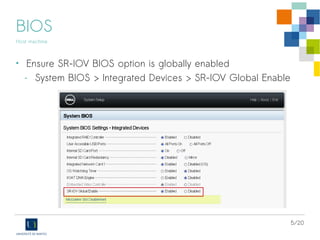
• Ensure SR-IOV BIOS option is globally enabled
- System BIOS > Integrated Devices > SR-IOV Global Enable
6/20
BIOS
Host machine
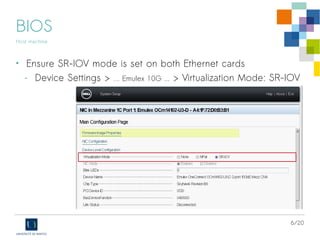
• Ensure SR-IOV mode is set on both Ethernet cards
- Device Settings > … Emulex 10G ... > Virtualization Mode: SR-IOV
7/20
Debian: Starting with SR-IOV
Host machine
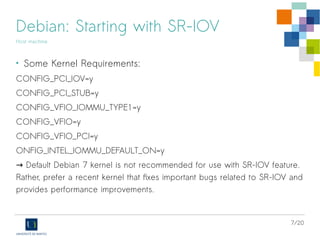
• Some Kernel Requirements:
CONFIG_PCI_IOV=y
CONFIG_PCI_STUB=y
CONFIG_VFIO_IOMMU_TYPE1=y
CONFIG_VFIO=y
CONFIG_VFIO_PCI=y
ONFIG_INTEL_IOMMU_DEFAULT_ON=y
→ Default Debian 7 kernel is not recommended for use with SR-IOV feature.
Rather, prefer a recent kernel that fixes important bugs related to SR-IOV and
provides performance improvements.
8/20
Debian: Starting with SR-IOV
Host machine
• Check for SR-IOV hardware support:
# lspci -v
…
04:00.0 Ethernet controller: Emulex Corporation OneConnect NIC (Skyhawk) (rev 10)
...
Capabilities: [180 v1] Single Root I/O Virtualization (SR-IOV)
...
Initial VFs: 64, Total VFs: 64, Number of VFs: 64, Function Dependency Link: 00
Kernel driver in use: be2net
04:00.1 Ethernet controller: Emulex Corporation OneConnect NIC (Skyhawk) (rev 10)
...
Capabilities: [180 v1] Single Root I/O Virtualization (SR-IOV)
Kernel driver in use: be2net
eth2
eth3
9/20
Debian: Starting with SR-IOV
Host machine
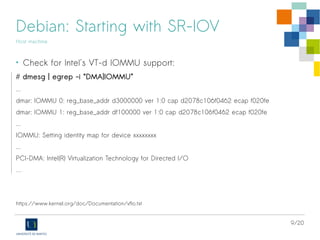
• Check for Intel's VT-d IOMMU support:
# dmesg | egrep -i “DMA|IOMMU”
...
dmar: IOMMU 0: reg_base_addr d3000000 ver 1:0 cap d2078c106f0462 ecap f020fe
dmar: IOMMU 1: reg_base_addr df100000 ver 1:0 cap d2078c106f0462 ecap f020fe
...
IOMMU: Setting identity map for device xxxxxxxx
...
PCI-DMA: Intel(R) Virtualization Technology for Directed I/O
…
https://www.kernel.org/doc/Documentation/vfio.txt
10/20
Debian: Starting with SR-IOV
Host machine
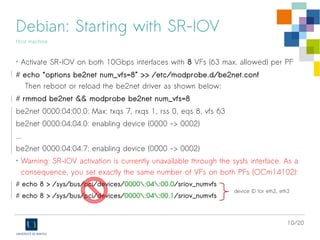
• Activate SR-IOV on both 10Gbps interfaces with 8 VFs (63 max. allowed) per PF
# echo “options be2net num_vfs=8” >> /etc/modprobe.d/be2net.conf
Then reboot or reload the be2net driver as shown below:
# rmmod be2net && modprobe be2net num_vfs=8
be2net 0000:04:00.0: Max: txqs 7, rxqs 1, rss 0, eqs 8, vfs 63
be2net 0000:04:04.0: enabling device (0000 -> 0002)
...
be2net 0000:04:04.7: enabling device (0000 -> 0002)
• Warning: SR-IOV activation is currently unavailable through the sysfs interface. As a
consequence, you set exactly the same number of VFs on both PFs (OCm14102):
# echo 8 > /sys/bus/pci/devices/0000:04:00.0/sriov_numvfs
# echo 8 > /sys/bus/pci/devices/0000:04:00.1/sriov_numvfs
device ID for eth2, eth3
11/20
Debian: Starting with SR-IOV
Host machine
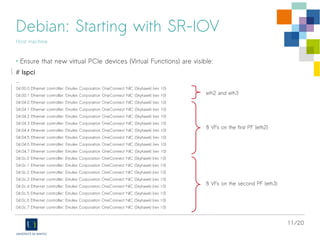
• Ensure that new virtual PCIe devices (Virtual Functions) are visible:
# lspci
...
04:00.0 Ethernet controller: Emulex Corporation OneConnect NIC (Skyhawk) (rev 10)
04:00.1 Ethernet controller: Emulex Corporation OneConnect NIC (Skyhawk) (rev 10)
04:04.0 Ethernet controller: Emulex Corporation OneConnect NIC (Skyhawk) (rev 10)
04:04.1 Ethernet controller: Emulex Corporation OneConnect NIC (Skyhawk) (rev 10)
04:04.2 Ethernet controller: Emulex Corporation OneConnect NIC (Skyhawk) (rev 10)
04:04.3 Ethernet controller: Emulex Corporation OneConnect NIC (Skyhawk) (rev 10)
04:04.4 Ethernet controller: Emulex Corporation OneConnect NIC (Skyhawk) (rev 10)
04:04.5 Ethernet controller: Emulex Corporation OneConnect NIC (Skyhawk) (rev 10)
04:04.6 Ethernet controller: Emulex Corporation OneConnect NIC (Skyhawk) (rev 10)
04:04.7 Ethernet controller: Emulex Corporation OneConnect NIC (Skyhawk) (rev 10)
04:0c.0 Ethernet controller: Emulex Corporation OneConnect NIC (Skyhawk) (rev 10)
04:0c.1 Ethernet controller: Emulex Corporation OneConnect NIC (Skyhawk) (rev 10)
04:0c.2 Ethernet controller: Emulex Corporation OneConnect NIC (Skyhawk) (rev 10)
04:0c.3 Ethernet controller: Emulex Corporation OneConnect NIC (Skyhawk) (rev 10)
04:0c.4 Ethernet controller: Emulex Corporation OneConnect NIC (Skyhawk) (rev 10)
04:0c.5 Ethernet controller: Emulex Corporation OneConnect NIC (Skyhawk) (rev 10)
04:0c.6 Ethernet controller: Emulex Corporation OneConnect NIC (Skyhawk) (rev 10)
04:0c.7 Ethernet controller: Emulex Corporation OneConnect NIC (Skyhawk) (rev 10)
8 VFs on the second PF (eth3)
8 VFs on the first PF (eth2)
eth2 and eth3
12/20
Debian: Starting with SR-IOV
Host machine
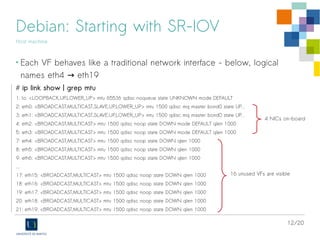
• Each VF behaves like a traditional network interface - below, logical
names eth4 eth19→
# ip link show | grep mtu
1: lo: <LOOPBACK,UP,LOWER_UP> mtu 65536 qdisc noqueue state UNKNOWN mode DEFAULT
2: eth0: <BROADCAST,MULTICAST,SLAVE,UP,LOWER_UP> mtu 1500 qdisc mq master bond0 state UP...
3: eth1: <BROADCAST,MULTICAST,SLAVE,UP,LOWER_UP> mtu 1500 qdisc mq master bond0 state UP...
4: eth2: <BROADCAST,MULTICAST> mtu 1500 qdisc noop state DOWN mode DEFAULT qlen 1000
5: eth3: <BROADCAST,MULTICAST> mtu 1500 qdisc noop state DOWN mode DEFAULT qlen 1000
7: eth4: <BROADCAST,MULTICAST> mtu 1500 qdisc noop state DOWN qlen 1000
8: eth5: <BROADCAST,MULTICAST> mtu 1500 qdisc noop state DOWN qlen 1000
9: eth6: <BROADCAST,MULTICAST> mtu 1500 qdisc noop state DOWN qlen 1000
...
17: eth15: <BROADCAST,MULTICAST> mtu 1500 qdisc noop state DOWN qlen 1000
18: eth16: <BROADCAST,MULTICAST> mtu 1500 qdisc noop state DOWN qlen 1000
19: eth17: <BROADCAST,MULTICAST> mtu 1500 qdisc noop state DOWN qlen 1000
20: eth18: <BROADCAST,MULTICAST> mtu 1500 qdisc noop state DOWN qlen 1000
21: eth19: <BROADCAST,MULTICAST> mtu 1500 qdisc noop state DOWN qlen 1000
16 unused VFs are visible
4 NICs on-board
13/20
Debian: PCI passthrough with libvirt
Host machine
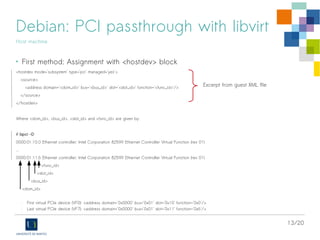
• First method: Assignment with <hostdev> block
<hostdev mode='subsystem' type='pci' managed='yes'>
<source>
<address domain='<dom_id>' bus='<bus_id>' slot='<slot_id>' function='<func_id>'/>
</source>
</hostdev>
Where <dom_id>, <bus_id>, <slot_id> and <func_id> are given by:
# lspci -D
0000:01:10.0 Ethernet controller: Intel Corporation 82599 Ethernet Controller Virtual Function (rev 01)
...
0000:01:11.6 Ethernet controller: Intel Corporation 82599 Ethernet Controller Virtual Function (rev 01)
<func_id>
<slot_id>
<bus_id>
<dom_id>
- First virtual PCIe device (VF0): <address domain='0x0000' bus='0x01' slot='0x10' function='0x0'/>
- Last virtual PCIe device (VF7): <address domain='0x0000' bus='0x01' slot='0x11' function='0x6'/>
Excerpt from guest XML file
14/20
Debian: PCI passthrough with libvirt
Host machine
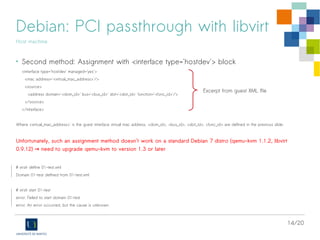
• Second method: Assignment with <interface type='hostdev'> block
<interface type='hostdev' managed='yes'>
<mac address='<virtual_mac_address>'/>
<source>
<address domain='<dom_id>' bus='<bus_id>' slot='<slot_id>' function='<func_id>'/>
</source>
</interface>
Where <virtual_mac_address>' is the guest interface virtual mac address. <dom_id>, <bus_id>, <slot_id>, <func_id> are defined in the previous slide.
Unfortunately, such an assignment method doesn't work on a standard Debian 7 distro (qemu-kvm 1.1.2, libvirt
0.9.12) need to upgrade qemu-kvm to version 1.3 or later→
# virsh define 01-test.xml
Domain 01-test defined from 01-test.xml
# virsh start 01-test
error: Failed to start domain 01-test
error: An error occurred, but the cause is unknown
Excerpt from guest XML file
15/20
Debian: PCI passthrough with libvirt
Host machine
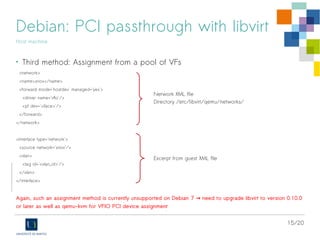
• Third method: Assignment from a pool of VFs
<network>
<name>sriov</name>
<forward mode='hostdev' managed='yes'>
<driver name='vfio'/>
<pf dev='<iface>'/>
</forward>
</network>
<interface type='network'>
<source network='sriov'/>
<vlan>
<tag id='<vlan_id>'/>
</vlan>
</interface>
Again, such an assignment method is currently unsupported on Debian 7 need to upgrade libvirt to version 0.10.0→
or later as well as qemu-kvm for VFIO PCI device assignment
Network XML file
Directory /etc/libvirt/qemu/networks/
Excerpt from guest XML file
16/20
Debian: PCI passthrough with libvirt
Host machine
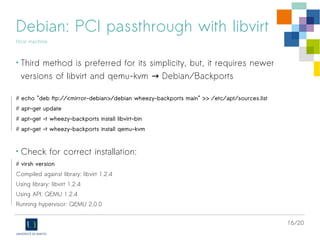
• Third method is preferred for its simplicity, but, it requires newer
versions of libvirt and qemu-kvm Debian/Backports→
# echo "deb ftp://<mirror-debian>/debian wheezy-backports main" >> /etc/apt/sources.list
# apt-get update
# apt-get -t wheezy-backports install libvirt-bin
# apt-get -t wheezy-backports install qemu-kvm
• Check for correct installation:
# virsh version
Compiled against library: libvirt 1.2.4
Using library: libvirt 1.2.4
Using API: QEMU 1.2.4
Running hypervisor: QEMU 2.0.0
17/20
Debian: PCI passthrough with libvirt
Host machine
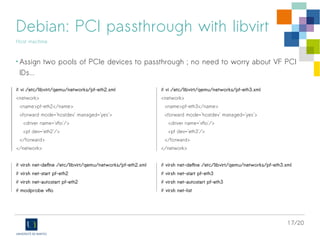
• Assign two pools of PCIe devices to passthrough ; no need to worry about VF PCI
IDs...
# vi /etc/libvirt/qemu/networks/pf-eth2.xml
<network>
<name>pf-eth2</name>
<forward mode='hostdev' managed='yes'>
<driver name='vfio'/>
<pf dev='eth2'/>
</forward>
</network>
# virsh net-define /etc/libvirt/qemu/networks/pf-eth2.xml
# virsh net-start pf-eth2
# virsh net-autostart pf-eth2
# modprobe vfio
# vi /etc/libvirt/qemu/networks/pf-eth3.xml
<network>
<name>pf-eth3</name>
<forward mode='hostdev' managed='yes'>
<driver name='vfio'/>
<pf dev='eth3'/>
</forward>
</network>
# virsh net-define /etc/libvirt/qemu/networks/pf-eth3.xml
# virsh net-start pf-eth3
# virsh net-autostart pf-eth3
# virsh net-list
18/20
Debian: PCI passthrough with libvirt
Host machine
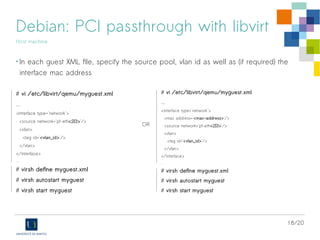
• In each guest XML file, specify the source pool, vlan id as well as (if required) the
interface mac address
# vi /etc/libvirt/qemu/myguest.xml
...
<interface type='network'>
<source network='pf-eth<2|3>'/>
<vlan>
<tag id='<vlan_id>'/>
</vlan>
</interface>
...
# virsh define myguest.xml
# virsh autostart myguest
# virsh start myguest
# vi /etc/libvirt/qemu/myguest.xml
...
<interface type='network'>
<mac address='<mac-address>'/>
<source network='pf-eth<2|3>'/>
<vlan>
<tag id='<vlan_id>'/>
</vlan>
</interface>
...
# virsh define myguest.xml
# virsh autostart myguest
# virsh start myguest
OR
19/20
Debian: Starting
Guest machine
• “a pure” Debian 7 (kernel 3.2.x) works
perfectly on guest machines
• Virtual interfaces are using the driver
be2net
20/20
University of Nantes – IT Services
Questions
Yoann (dot) Juet (at) univ–nantes.fr

SR-IOV, KVM and Emulex OneConnect 10Gbps cards on Debian/Stable

  • 1.
    SR-IOV and KVMvirtual machines under GNU/Linux Debian Emulex OneConnect (OCm14102) 10Gbps cards Yoann Juet @ University of Nantes, France Information Technology Services Version 1.0 (26 Dec 2014)
  • 2.
    2/20 Our goal • Virtualizehigh-performance servers, firewalls requiring: - Low network latency and jitter - Low processor impact (I/O) - High throughput (10Gbps) • Solution: Single Root – IO Virtualization (SR-IOV) - A single PCI card is showed up as multiple virtual PCI cards - Exposes n virtual interfaces from a single physical interface > Shared bandwidth
  • 3.
    3/20 Prerequisites • Virtualization Technologyfor Directed I/O: Intel VT-d or AMD-Vi - Must be supported by both the CPU and the chipset - Guest machines gain direct memory access (DMA) to PCI(e) devices, such as Ethernet cards • PCI-SIG Single Root I/O Virtualization: SR-IOV - Must be supported by both the Ethernet cards and the BIOS - Guest machines are able to achieve ~ bare metal performance
  • 4.
    4/20 Technical environment • DellPowerEdge M620 - Intel Xeon CPU E5-2660 - Dual QLogic ISP8214 10Gbps interfaces > Logical names eth0, eth1 - Dual Emulex (OCm14102) SFP+ 10Gbps interfaces > SR-IOV compatible card > Logical names eth2, eth3 - Operating System Debian 7 (code name "Wheezy") > Installed on both hosts and guests machines
  • 5.
    5/20 BIOS Host machine • EnsureSR-IOV BIOS option is globally enabled - System BIOS > Integrated Devices > SR-IOV Global Enable
  • 6.
    6/20 BIOS Host machine • EnsureSR-IOV mode is set on both Ethernet cards - Device Settings > … Emulex 10G ... > Virtualization Mode: SR-IOV
  • 7.
    7/20 Debian: Starting withSR-IOV Host machine • Some Kernel Requirements: CONFIG_PCI_IOV=y CONFIG_PCI_STUB=y CONFIG_VFIO_IOMMU_TYPE1=y CONFIG_VFIO=y CONFIG_VFIO_PCI=y ONFIG_INTEL_IOMMU_DEFAULT_ON=y → Default Debian 7 kernel is not recommended for use with SR-IOV feature. Rather, prefer a recent kernel that fixes important bugs related to SR-IOV and provides performance improvements.
  • 8.
    8/20 Debian: Starting withSR-IOV Host machine • Check for SR-IOV hardware support: # lspci -v … 04:00.0 Ethernet controller: Emulex Corporation OneConnect NIC (Skyhawk) (rev 10) ... Capabilities: [180 v1] Single Root I/O Virtualization (SR-IOV) ... Initial VFs: 64, Total VFs: 64, Number of VFs: 64, Function Dependency Link: 00 Kernel driver in use: be2net 04:00.1 Ethernet controller: Emulex Corporation OneConnect NIC (Skyhawk) (rev 10) ... Capabilities: [180 v1] Single Root I/O Virtualization (SR-IOV) Kernel driver in use: be2net eth2 eth3
  • 9.
    9/20 Debian: Starting withSR-IOV Host machine • Check for Intel's VT-d IOMMU support: # dmesg | egrep -i “DMA|IOMMU” ... dmar: IOMMU 0: reg_base_addr d3000000 ver 1:0 cap d2078c106f0462 ecap f020fe dmar: IOMMU 1: reg_base_addr df100000 ver 1:0 cap d2078c106f0462 ecap f020fe ... IOMMU: Setting identity map for device xxxxxxxx ... PCI-DMA: Intel(R) Virtualization Technology for Directed I/O … https://www.kernel.org/doc/Documentation/vfio.txt
  • 10.
    10/20 Debian: Starting withSR-IOV Host machine • Activate SR-IOV on both 10Gbps interfaces with 8 VFs (63 max. allowed) per PF # echo “options be2net num_vfs=8” >> /etc/modprobe.d/be2net.conf Then reboot or reload the be2net driver as shown below: # rmmod be2net && modprobe be2net num_vfs=8 be2net 0000:04:00.0: Max: txqs 7, rxqs 1, rss 0, eqs 8, vfs 63 be2net 0000:04:04.0: enabling device (0000 -> 0002) ... be2net 0000:04:04.7: enabling device (0000 -> 0002) • Warning: SR-IOV activation is currently unavailable through the sysfs interface. As a consequence, you set exactly the same number of VFs on both PFs (OCm14102): # echo 8 > /sys/bus/pci/devices/0000:04:00.0/sriov_numvfs # echo 8 > /sys/bus/pci/devices/0000:04:00.1/sriov_numvfs device ID for eth2, eth3
  • 11.
    11/20 Debian: Starting withSR-IOV Host machine • Ensure that new virtual PCIe devices (Virtual Functions) are visible: # lspci ... 04:00.0 Ethernet controller: Emulex Corporation OneConnect NIC (Skyhawk) (rev 10) 04:00.1 Ethernet controller: Emulex Corporation OneConnect NIC (Skyhawk) (rev 10) 04:04.0 Ethernet controller: Emulex Corporation OneConnect NIC (Skyhawk) (rev 10) 04:04.1 Ethernet controller: Emulex Corporation OneConnect NIC (Skyhawk) (rev 10) 04:04.2 Ethernet controller: Emulex Corporation OneConnect NIC (Skyhawk) (rev 10) 04:04.3 Ethernet controller: Emulex Corporation OneConnect NIC (Skyhawk) (rev 10) 04:04.4 Ethernet controller: Emulex Corporation OneConnect NIC (Skyhawk) (rev 10) 04:04.5 Ethernet controller: Emulex Corporation OneConnect NIC (Skyhawk) (rev 10) 04:04.6 Ethernet controller: Emulex Corporation OneConnect NIC (Skyhawk) (rev 10) 04:04.7 Ethernet controller: Emulex Corporation OneConnect NIC (Skyhawk) (rev 10) 04:0c.0 Ethernet controller: Emulex Corporation OneConnect NIC (Skyhawk) (rev 10) 04:0c.1 Ethernet controller: Emulex Corporation OneConnect NIC (Skyhawk) (rev 10) 04:0c.2 Ethernet controller: Emulex Corporation OneConnect NIC (Skyhawk) (rev 10) 04:0c.3 Ethernet controller: Emulex Corporation OneConnect NIC (Skyhawk) (rev 10) 04:0c.4 Ethernet controller: Emulex Corporation OneConnect NIC (Skyhawk) (rev 10) 04:0c.5 Ethernet controller: Emulex Corporation OneConnect NIC (Skyhawk) (rev 10) 04:0c.6 Ethernet controller: Emulex Corporation OneConnect NIC (Skyhawk) (rev 10) 04:0c.7 Ethernet controller: Emulex Corporation OneConnect NIC (Skyhawk) (rev 10) 8 VFs on the second PF (eth3) 8 VFs on the first PF (eth2) eth2 and eth3
  • 12.
    12/20 Debian: Starting withSR-IOV Host machine • Each VF behaves like a traditional network interface - below, logical names eth4 eth19→ # ip link show | grep mtu 1: lo: <LOOPBACK,UP,LOWER_UP> mtu 65536 qdisc noqueue state UNKNOWN mode DEFAULT 2: eth0: <BROADCAST,MULTICAST,SLAVE,UP,LOWER_UP> mtu 1500 qdisc mq master bond0 state UP... 3: eth1: <BROADCAST,MULTICAST,SLAVE,UP,LOWER_UP> mtu 1500 qdisc mq master bond0 state UP... 4: eth2: <BROADCAST,MULTICAST> mtu 1500 qdisc noop state DOWN mode DEFAULT qlen 1000 5: eth3: <BROADCAST,MULTICAST> mtu 1500 qdisc noop state DOWN mode DEFAULT qlen 1000 7: eth4: <BROADCAST,MULTICAST> mtu 1500 qdisc noop state DOWN qlen 1000 8: eth5: <BROADCAST,MULTICAST> mtu 1500 qdisc noop state DOWN qlen 1000 9: eth6: <BROADCAST,MULTICAST> mtu 1500 qdisc noop state DOWN qlen 1000 ... 17: eth15: <BROADCAST,MULTICAST> mtu 1500 qdisc noop state DOWN qlen 1000 18: eth16: <BROADCAST,MULTICAST> mtu 1500 qdisc noop state DOWN qlen 1000 19: eth17: <BROADCAST,MULTICAST> mtu 1500 qdisc noop state DOWN qlen 1000 20: eth18: <BROADCAST,MULTICAST> mtu 1500 qdisc noop state DOWN qlen 1000 21: eth19: <BROADCAST,MULTICAST> mtu 1500 qdisc noop state DOWN qlen 1000 16 unused VFs are visible 4 NICs on-board
  • 13.
    13/20 Debian: PCI passthroughwith libvirt Host machine • First method: Assignment with <hostdev> block <hostdev mode='subsystem' type='pci' managed='yes'> <source> <address domain='<dom_id>' bus='<bus_id>' slot='<slot_id>' function='<func_id>'/> </source> </hostdev> Where <dom_id>, <bus_id>, <slot_id> and <func_id> are given by: # lspci -D 0000:01:10.0 Ethernet controller: Intel Corporation 82599 Ethernet Controller Virtual Function (rev 01) ... 0000:01:11.6 Ethernet controller: Intel Corporation 82599 Ethernet Controller Virtual Function (rev 01) <func_id> <slot_id> <bus_id> <dom_id> - First virtual PCIe device (VF0): <address domain='0x0000' bus='0x01' slot='0x10' function='0x0'/> - Last virtual PCIe device (VF7): <address domain='0x0000' bus='0x01' slot='0x11' function='0x6'/> Excerpt from guest XML file
  • 14.
    14/20 Debian: PCI passthroughwith libvirt Host machine • Second method: Assignment with <interface type='hostdev'> block <interface type='hostdev' managed='yes'> <mac address='<virtual_mac_address>'/> <source> <address domain='<dom_id>' bus='<bus_id>' slot='<slot_id>' function='<func_id>'/> </source> </interface> Where <virtual_mac_address>' is the guest interface virtual mac address. <dom_id>, <bus_id>, <slot_id>, <func_id> are defined in the previous slide. Unfortunately, such an assignment method doesn't work on a standard Debian 7 distro (qemu-kvm 1.1.2, libvirt 0.9.12) need to upgrade qemu-kvm to version 1.3 or later→ # virsh define 01-test.xml Domain 01-test defined from 01-test.xml # virsh start 01-test error: Failed to start domain 01-test error: An error occurred, but the cause is unknown Excerpt from guest XML file
  • 15.
    15/20 Debian: PCI passthroughwith libvirt Host machine • Third method: Assignment from a pool of VFs <network> <name>sriov</name> <forward mode='hostdev' managed='yes'> <driver name='vfio'/> <pf dev='<iface>'/> </forward> </network> <interface type='network'> <source network='sriov'/> <vlan> <tag id='<vlan_id>'/> </vlan> </interface> Again, such an assignment method is currently unsupported on Debian 7 need to upgrade libvirt to version 0.10.0→ or later as well as qemu-kvm for VFIO PCI device assignment Network XML file Directory /etc/libvirt/qemu/networks/ Excerpt from guest XML file
  • 16.
    16/20 Debian: PCI passthroughwith libvirt Host machine • Third method is preferred for its simplicity, but, it requires newer versions of libvirt and qemu-kvm Debian/Backports→ # echo "deb ftp://<mirror-debian>/debian wheezy-backports main" >> /etc/apt/sources.list # apt-get update # apt-get -t wheezy-backports install libvirt-bin # apt-get -t wheezy-backports install qemu-kvm • Check for correct installation: # virsh version Compiled against library: libvirt 1.2.4 Using library: libvirt 1.2.4 Using API: QEMU 1.2.4 Running hypervisor: QEMU 2.0.0
  • 17.
    17/20 Debian: PCI passthroughwith libvirt Host machine • Assign two pools of PCIe devices to passthrough ; no need to worry about VF PCI IDs... # vi /etc/libvirt/qemu/networks/pf-eth2.xml <network> <name>pf-eth2</name> <forward mode='hostdev' managed='yes'> <driver name='vfio'/> <pf dev='eth2'/> </forward> </network> # virsh net-define /etc/libvirt/qemu/networks/pf-eth2.xml # virsh net-start pf-eth2 # virsh net-autostart pf-eth2 # modprobe vfio # vi /etc/libvirt/qemu/networks/pf-eth3.xml <network> <name>pf-eth3</name> <forward mode='hostdev' managed='yes'> <driver name='vfio'/> <pf dev='eth3'/> </forward> </network> # virsh net-define /etc/libvirt/qemu/networks/pf-eth3.xml # virsh net-start pf-eth3 # virsh net-autostart pf-eth3 # virsh net-list
  • 18.
    18/20 Debian: PCI passthroughwith libvirt Host machine • In each guest XML file, specify the source pool, vlan id as well as (if required) the interface mac address # vi /etc/libvirt/qemu/myguest.xml ... <interface type='network'> <source network='pf-eth<2|3>'/> <vlan> <tag id='<vlan_id>'/> </vlan> </interface> ... # virsh define myguest.xml # virsh autostart myguest # virsh start myguest # vi /etc/libvirt/qemu/myguest.xml ... <interface type='network'> <mac address='<mac-address>'/> <source network='pf-eth<2|3>'/> <vlan> <tag id='<vlan_id>'/> </vlan> </interface> ... # virsh define myguest.xml # virsh autostart myguest # virsh start myguest OR
  • 19.
    19/20 Debian: Starting Guest machine •“a pure” Debian 7 (kernel 3.2.x) works perfectly on guest machines • Virtual interfaces are using the driver be2net
  • 20.
    20/20 University of Nantes– IT Services Questions Yoann (dot) Juet (at) univ–nantes.fr