Attacking and Defending Mobile Applications
Jerod Brennen, Jacadis
Agenda
•
•
•
•

AppSec in the SDLC
Mobile Apps From an Attacker’s POV
Defensive Tools and Techniques
Resources
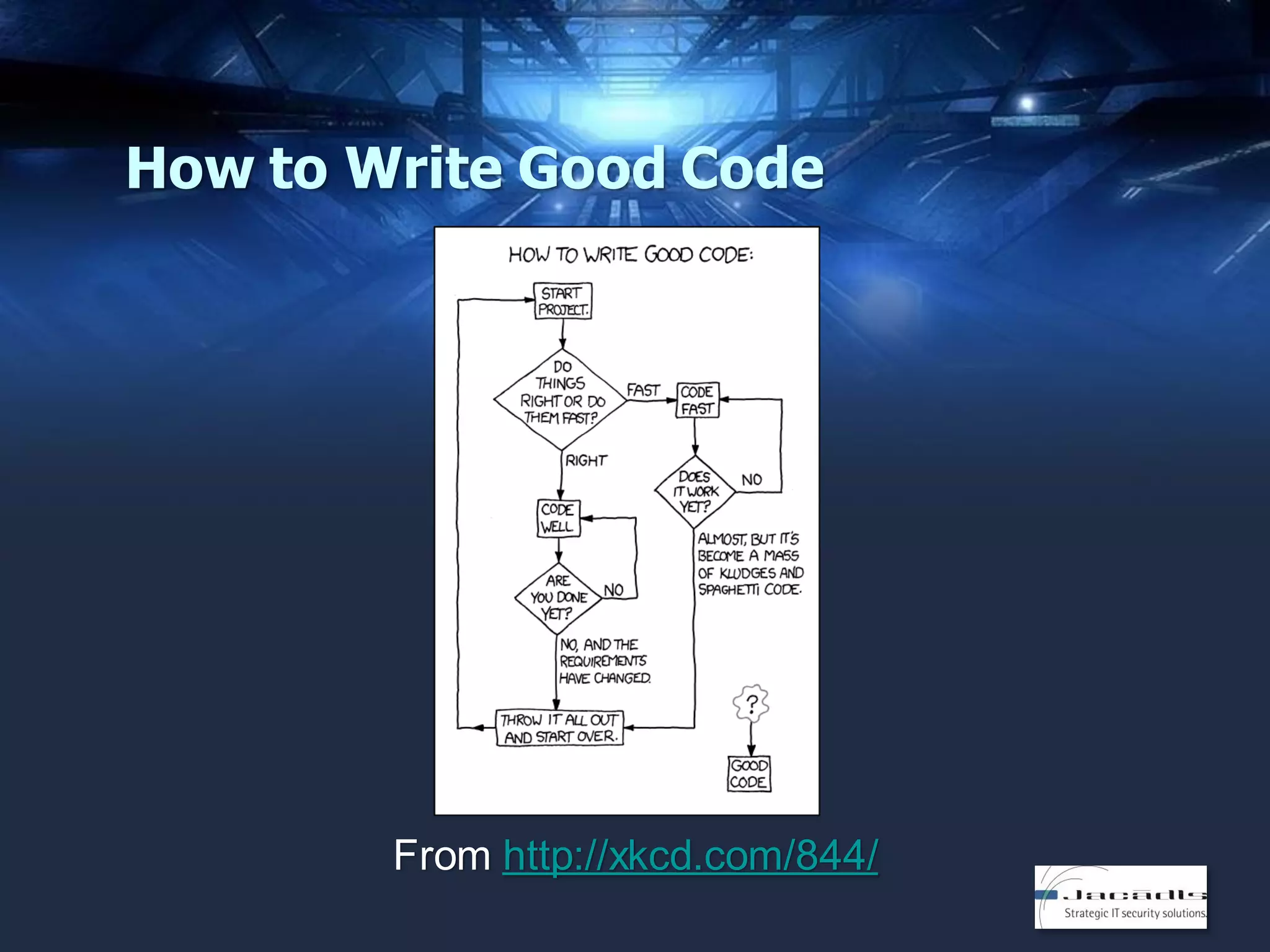
How to Write Good Code

From http://xkcd.com/844/
The Secret to Learning Code

“One of the best techniques to learn to code is
to reverse engineer existing code.”
From http://lifehacker.com/learn-to-code-by-breaking-someone-elses-code-1442438673 &
http://blog.teamtreehouse.com/the-secret-to-learning-code
APPSEC IN THE SDLC
Understand Your Environment
• What development methodologies do we
follow?
• What programming languages do we use?
• What risk/security frameworks do we follow?
• What third-party libraries do we use?
• What stages in the development process
require approval from the security team?
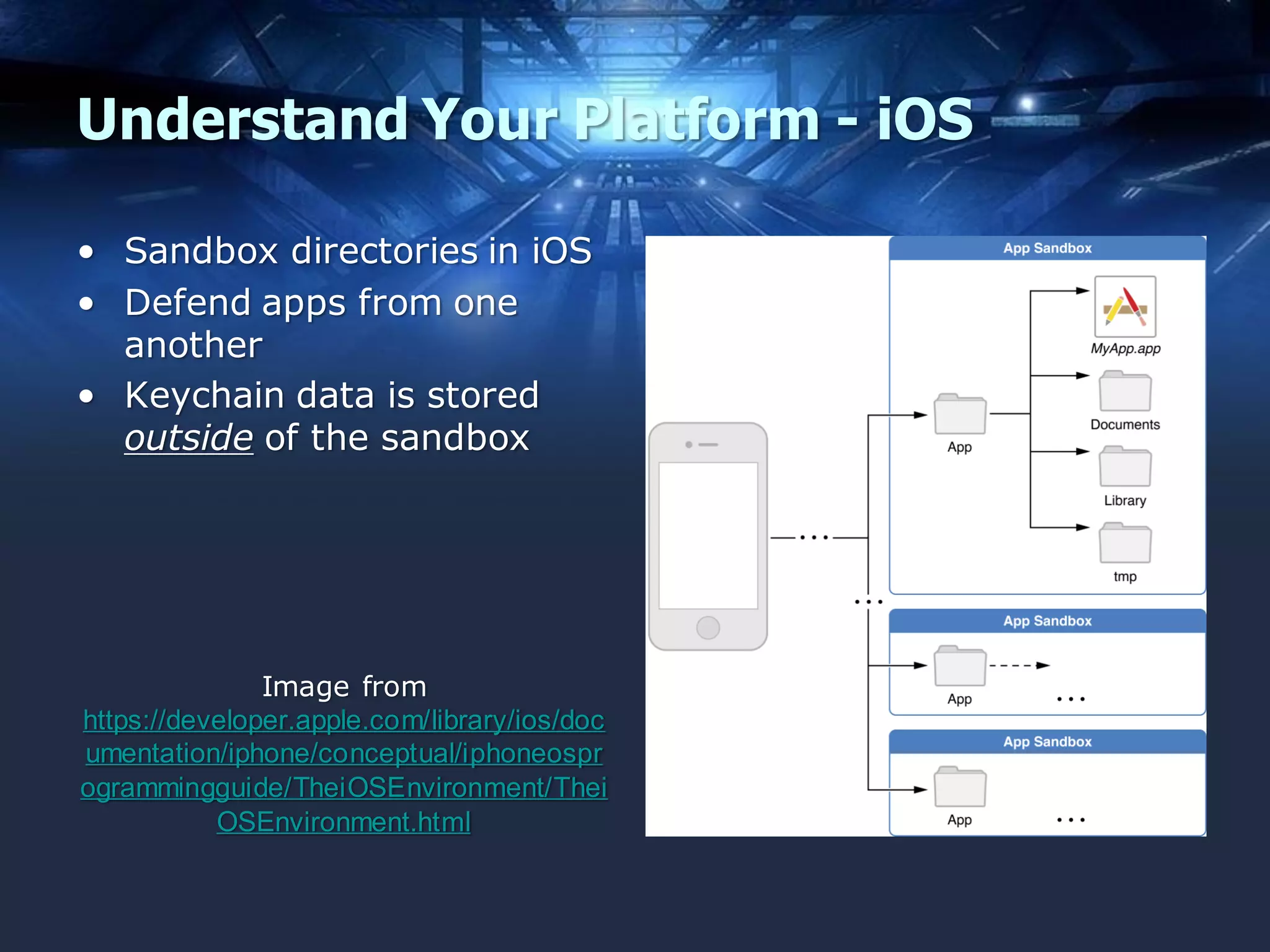
Understand Your Platform - iOS
• Sandbox directories in iOS
• Defend apps from one
another
• Keychain data is stored
outside of the sandbox

Image from
https://developer.apple.com/library/ios/doc
umentation/iphone/conceptual/iphoneospr
ogrammingguide/TheiOSEnvironment/Thei
OSEnvironment.html
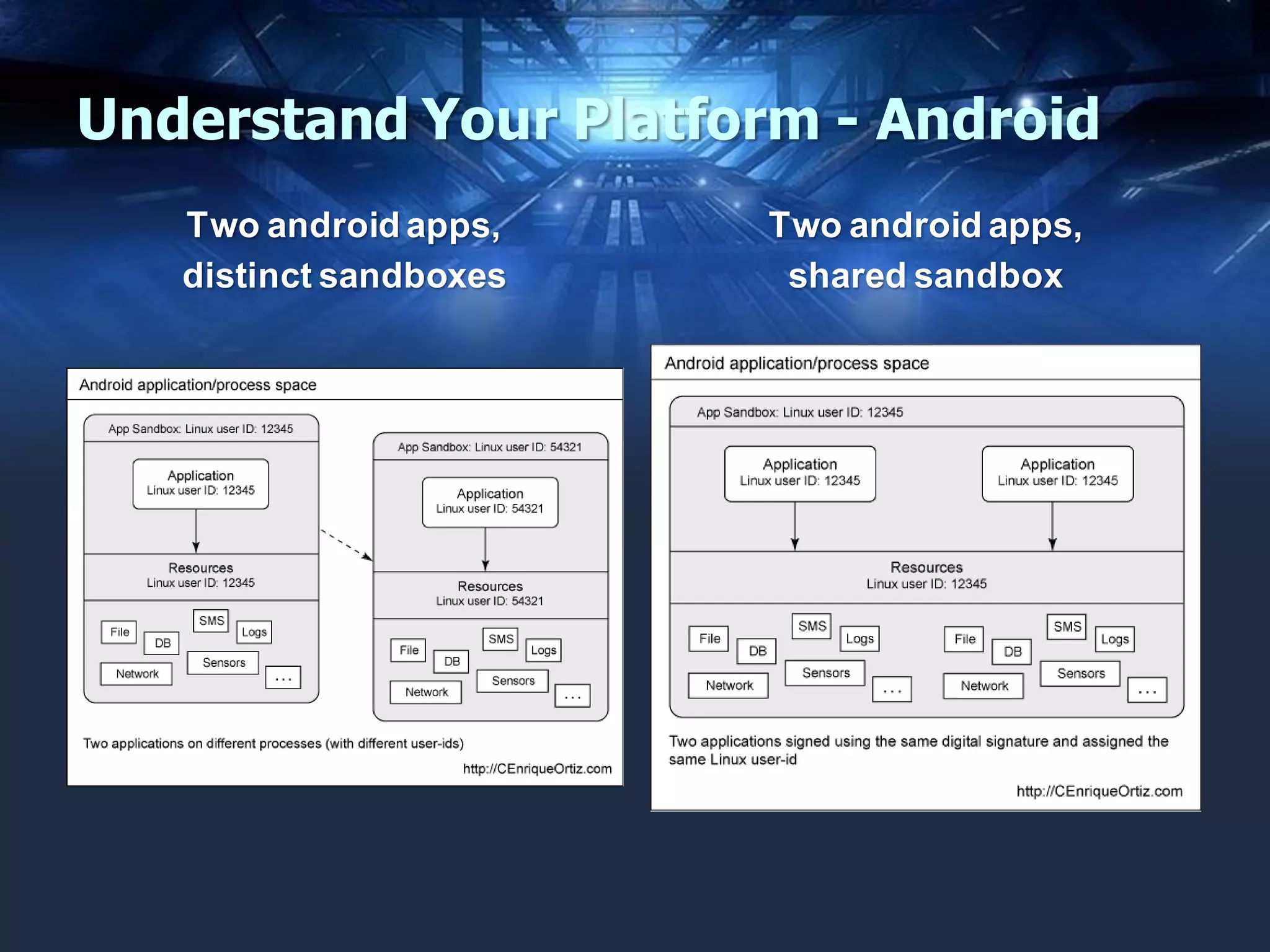
Understand Your Platform - Android
Two android apps,
distinct sandboxes

Two android apps,
shared sandbox
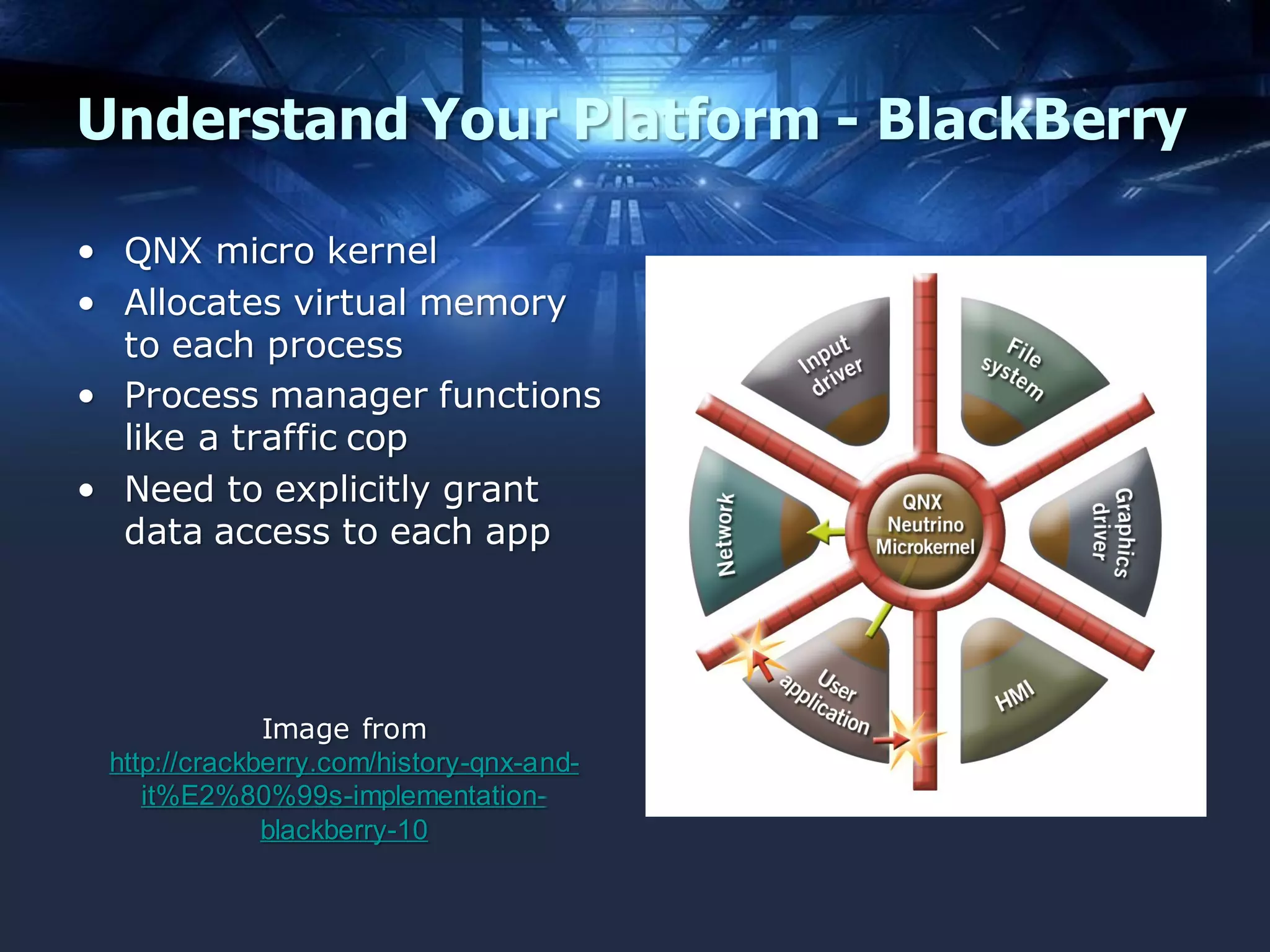
Understand Your Platform - BlackBerry
• QNX micro kernel
• Allocates virtual memory
to each process
• Process manager functions
like a traffic cop
• Need to explicitly grant
data access to each app

Image from
http://crackberry.com/history-qnx-andit%E2%80%99s-implementationblackberry-10
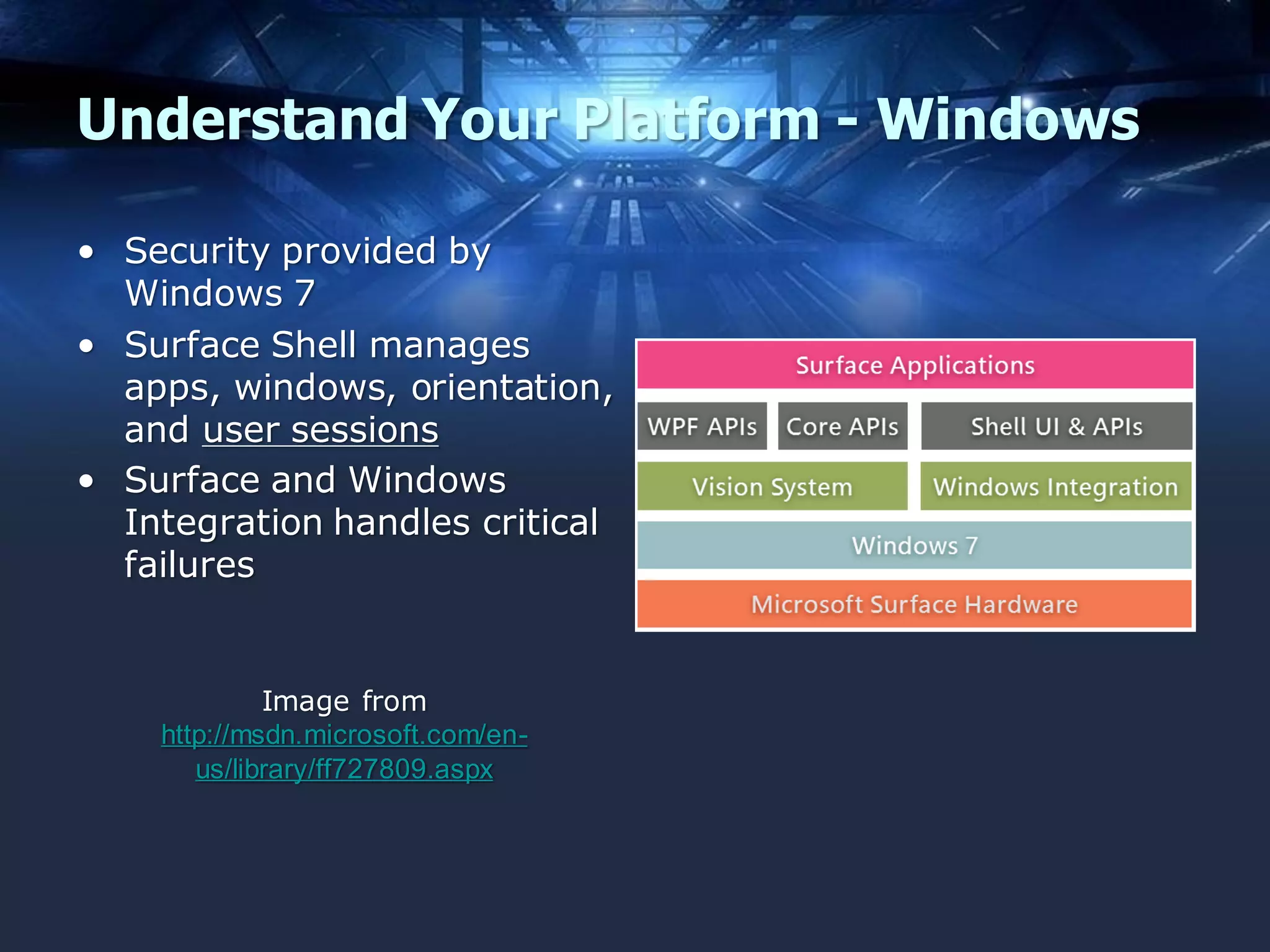
Understand Your Platform - Windows
• Security provided by
Windows 7
• Surface Shell manages
apps, windows, orientation,
and user sessions
• Surface and Windows
Integration handles critical
failures

Image from
http://msdn.microsoft.com/enus/library/ff727809.aspx
Three Key Security Checks
• Source Code Security Reviews
– Manual Reviews
– Reverse Binaries

• Security Tests in QA

– Positive AND Negative Test Cases

• Analysis of “Deployed” Apps
– Automated Scans
– Manual Analysis
Source Code Reviews (OWASP)
• Methodology (v1.1, current)
–
–
–
–
–

Preparation
Security Code Review in the SDLC
Security Code Review Coverage
Application Threat Modeling
Code Review Metrics

• Methodology (v2.0, due in January 2014)
–
–
–
–
–
–

Preparation
Application Threat Modeling
Understanding Code Layout/Design/Architecture
Reviewing by Technical Control
Reviewing by Vulnerability
Security Code Review for Agile Development
The SQA Process
•
•
•
•
•
•
•
•
•

Initiation
Planning
Tracking
Training
Reviews
Issue Resolution
Testing
Audit
Process Improvement
List from http://www.verndale.com/Our-Thinking/9-Steps-of-the-SQA-Process.aspx
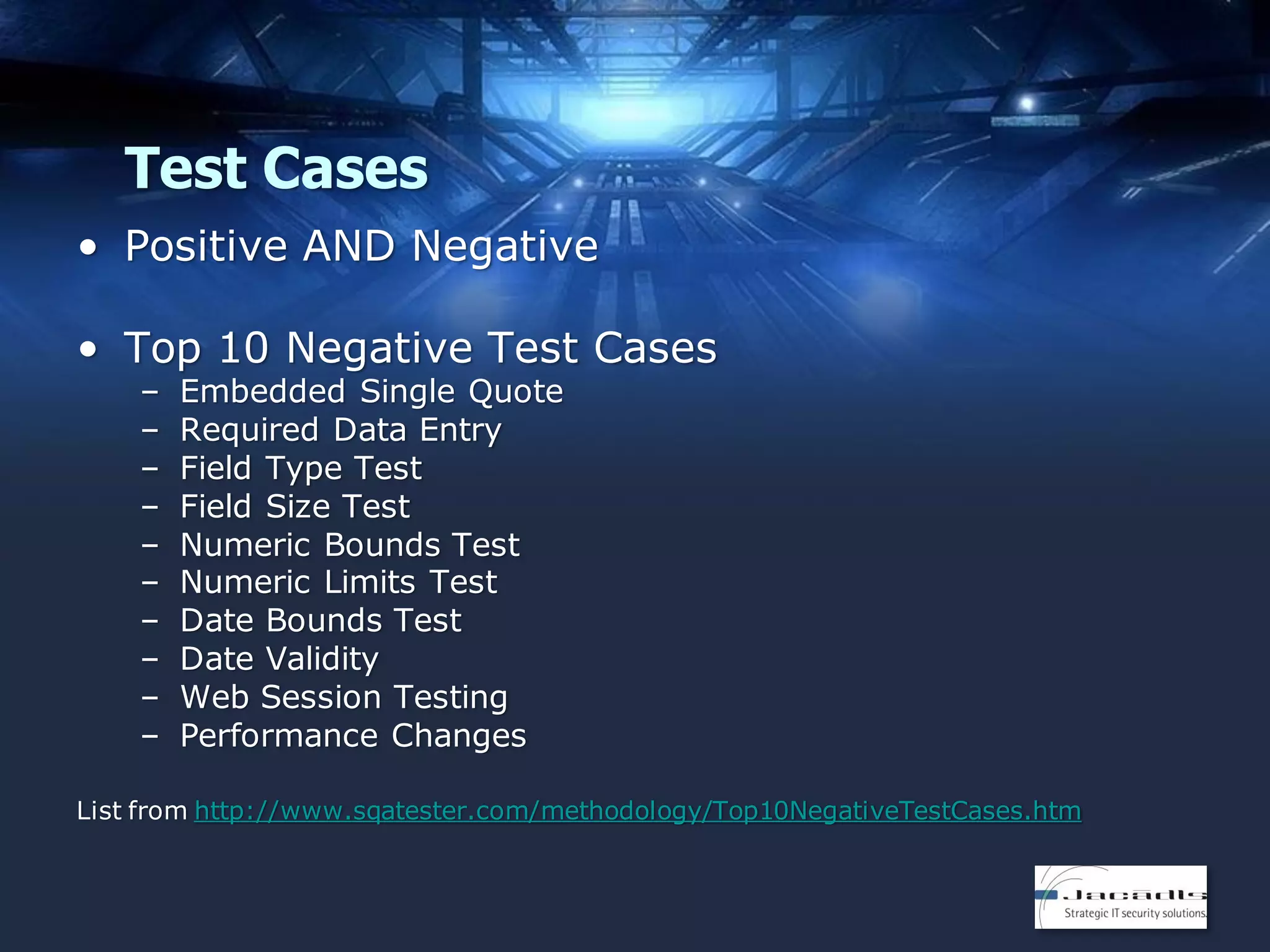
Test Cases
• Positive AND Negative
• Top 10 Negative Test Cases
–
–
–
–
–
–
–
–
–
–

Embedded Single Quote
Required Data Entry
Field Type Test
Field Size Test
Numeric Bounds Test
Numeric Limits Test
Date Bounds Test
Date Validity
Web Session Testing
Performance Changes

List from http://www.sqatester.com/methodology/Top10NegativeTestCases.htm
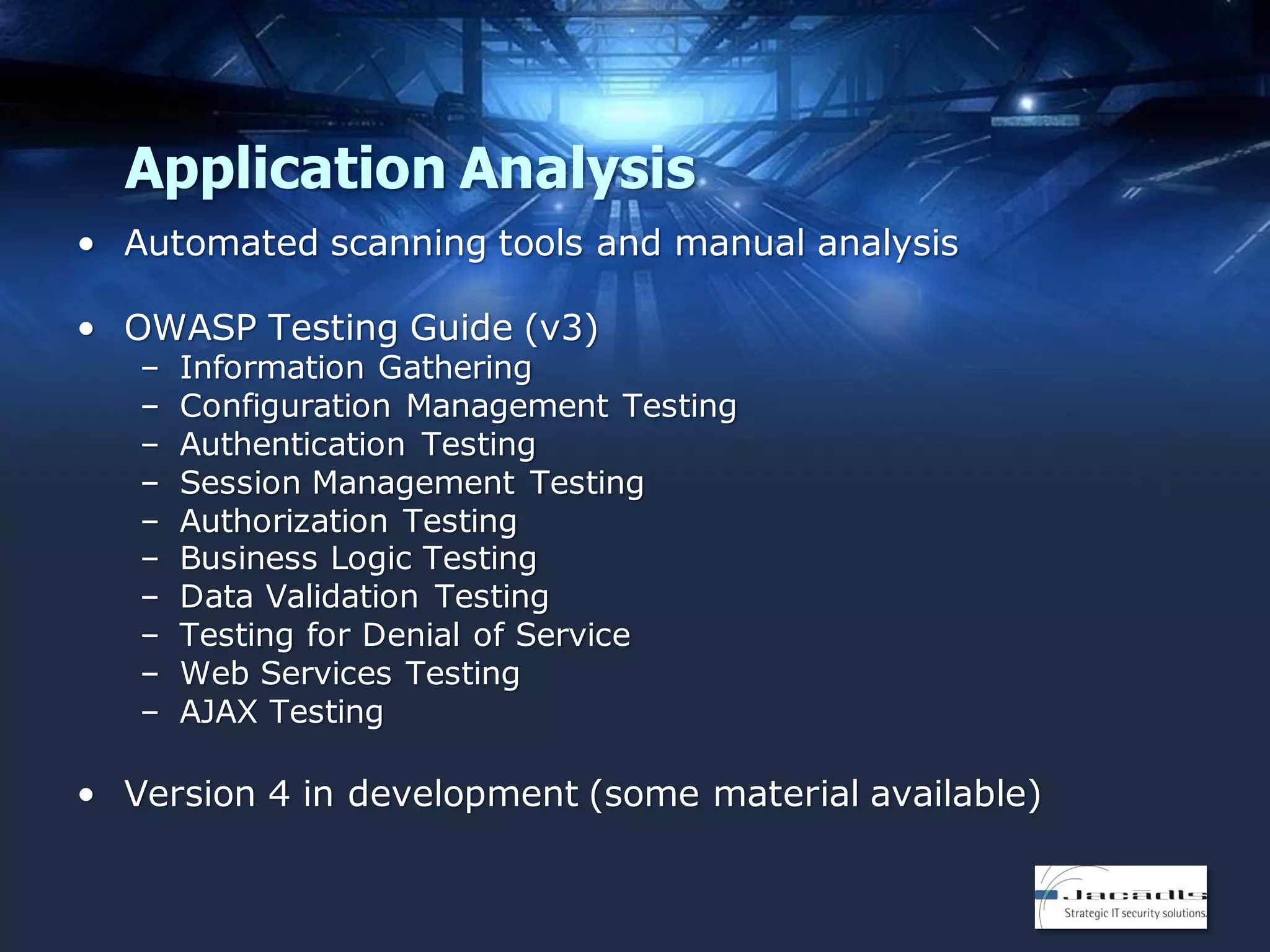
Application Analysis
• Automated scanning tools and manual analysis
• OWASP Testing Guide (v3)
–
–
–
–
–
–
–
–
–
–

Information Gathering
Configuration Management Testing
Authentication Testing
Session Management Testing
Authorization Testing
Business Logic Testing
Data Validation Testing
Testing for Denial of Service
Web Services Testing
AJAX Testing

• Version 4 in development (some material available)
MOBILE APPS FROM
AN ATTACKER’S POV
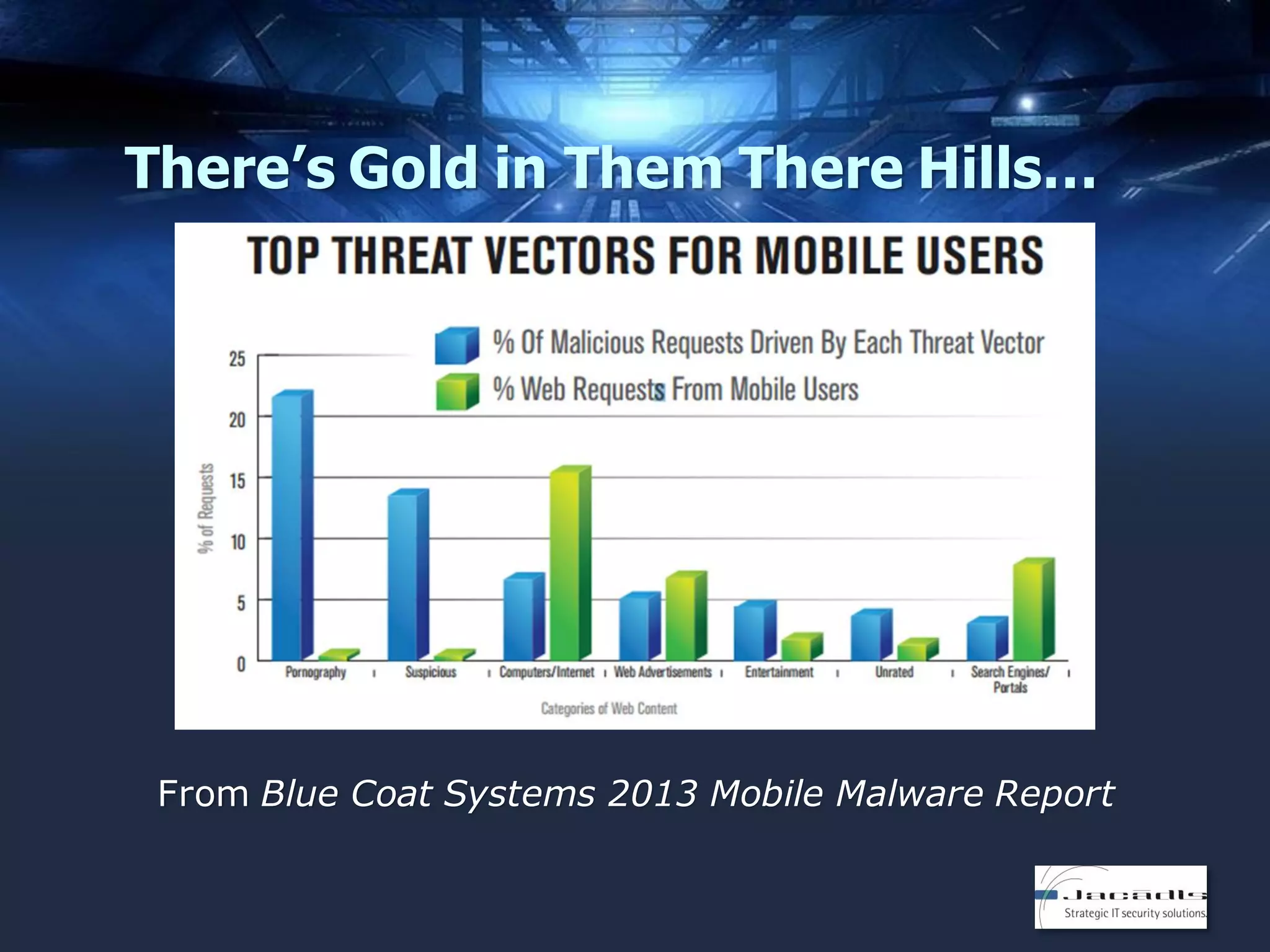
There’s Gold in Them There Hills…

From Blue Coat Systems 2013 Mobile Malware Report
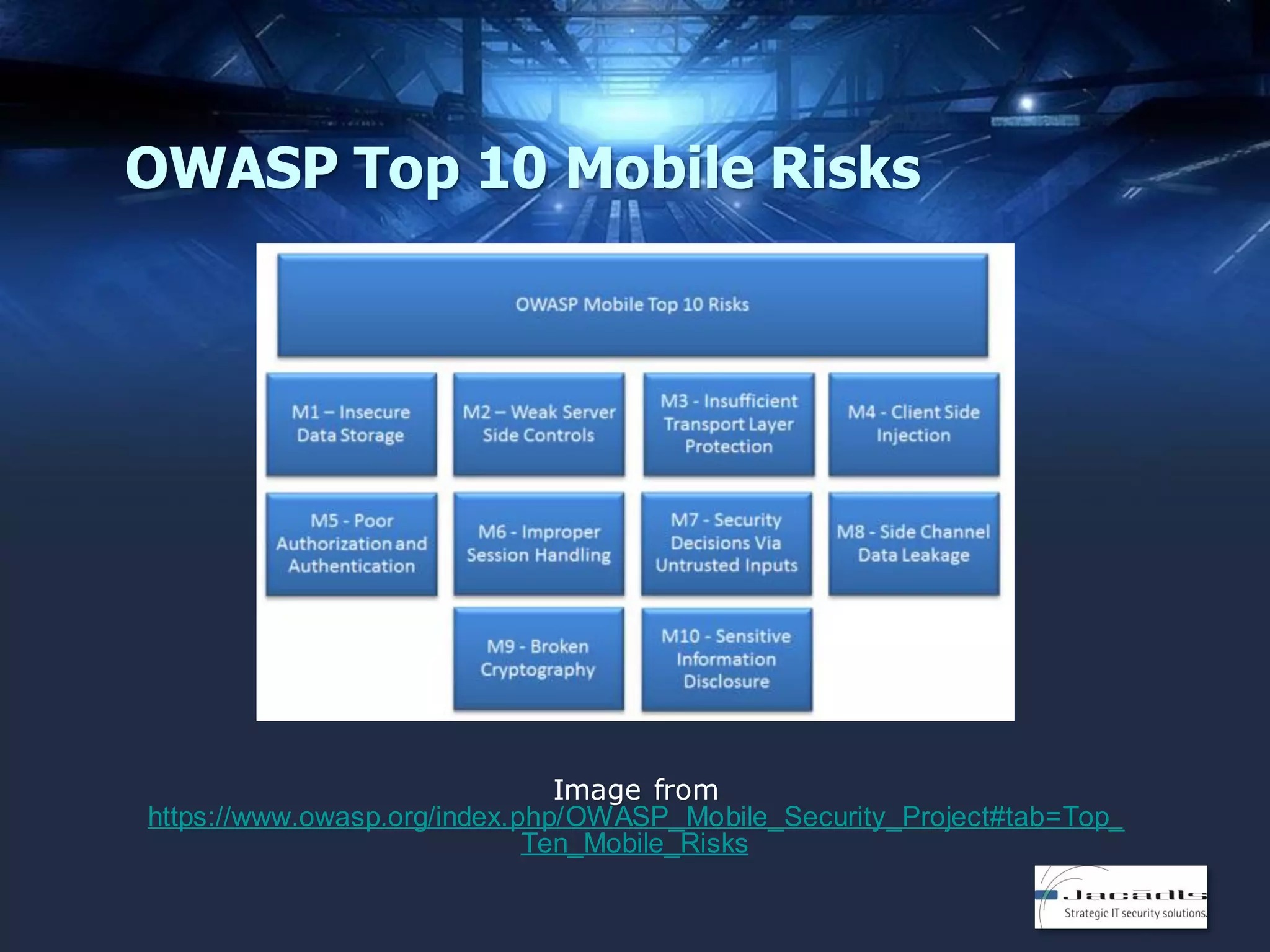
OWASP Top 10 Mobile Risks

Image from
https://www.owasp.org/index.php/OWASP_Mobile_Security_Project#tab=Top_
Ten_Mobile_Risks
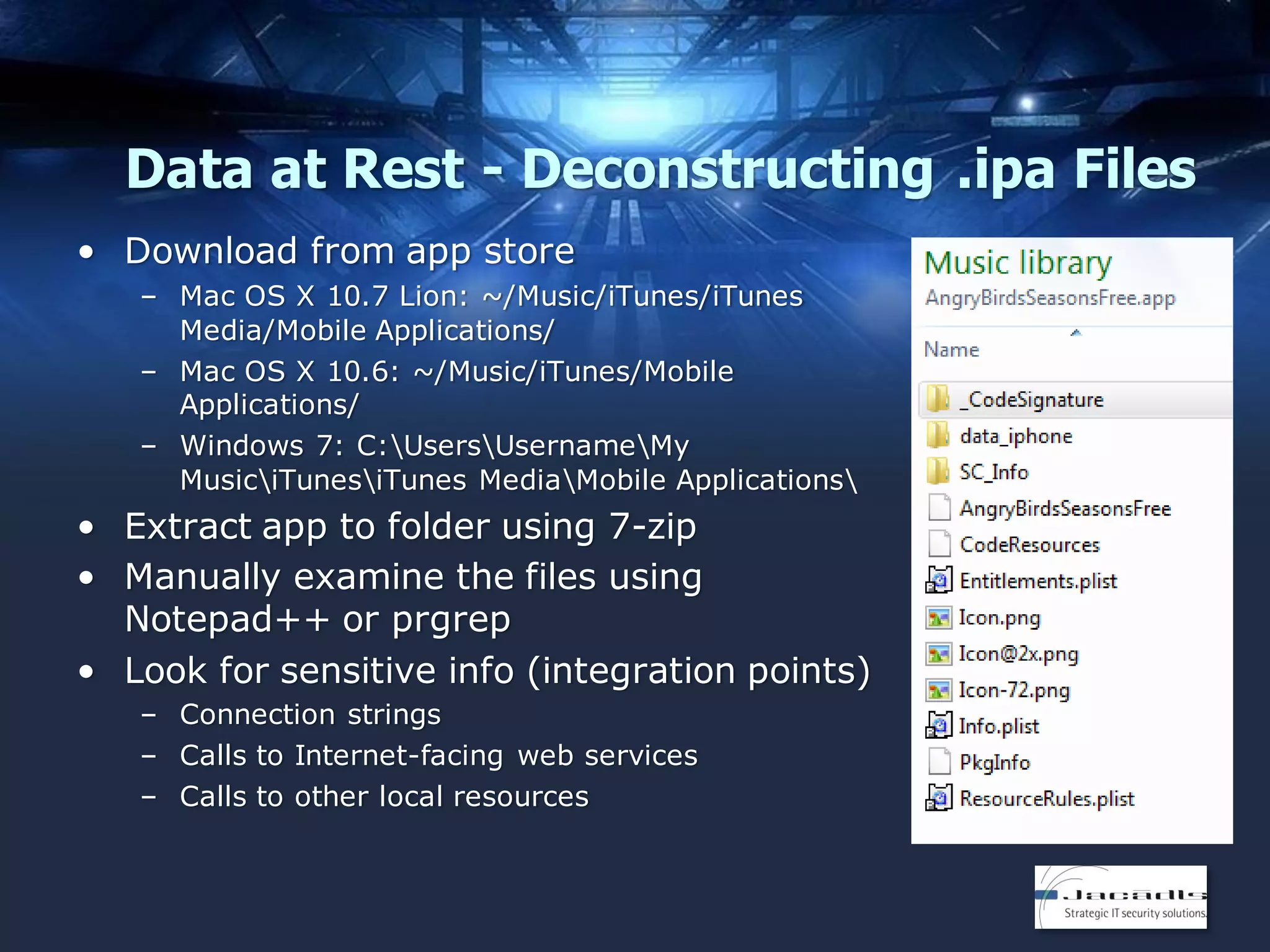
Data at Rest - Deconstructing .ipa Files
• Download from app store
– Mac OS X 10.7 Lion: ~/Music/iTunes/iTunes
Media/Mobile Applications/
– Mac OS X 10.6: ~/Music/iTunes/Mobile
Applications/
– Windows 7: C:UsersUsernameMy
MusiciTunesiTunes MediaMobile Applications

• Extract app to folder using 7-zip
• Manually examine the files using
Notepad++ or prgrep
• Look for sensitive info (integration points)
– Connection strings
– Calls to Internet-facing web services
– Calls to other local resources
Advanced App Analysis - iOS
• otool (run on binary, get size of encrypted payload)
– https://developer.apple.com/library/mac/documentation/Darwin/Referen
ce/ManPages/man1/otool.1.html

• gdb (dump payload and payload size)
– https://www.gnu.org/software/gdb/

• ldid (sign new binary)

– http://gitweb.saurik.com/ldid.git

• IDA Pro with objc-helper
– https://www.hex-rays.com/products/ida/support/download.shtml
– https://code.google.com/p/zynamics/source/checkout?repo=objc-helper

• Class Dump
– http://cydia.saurik.com/info/class-dump/

• Theos

– http://iphonedevwiki.net/index.php/Theos
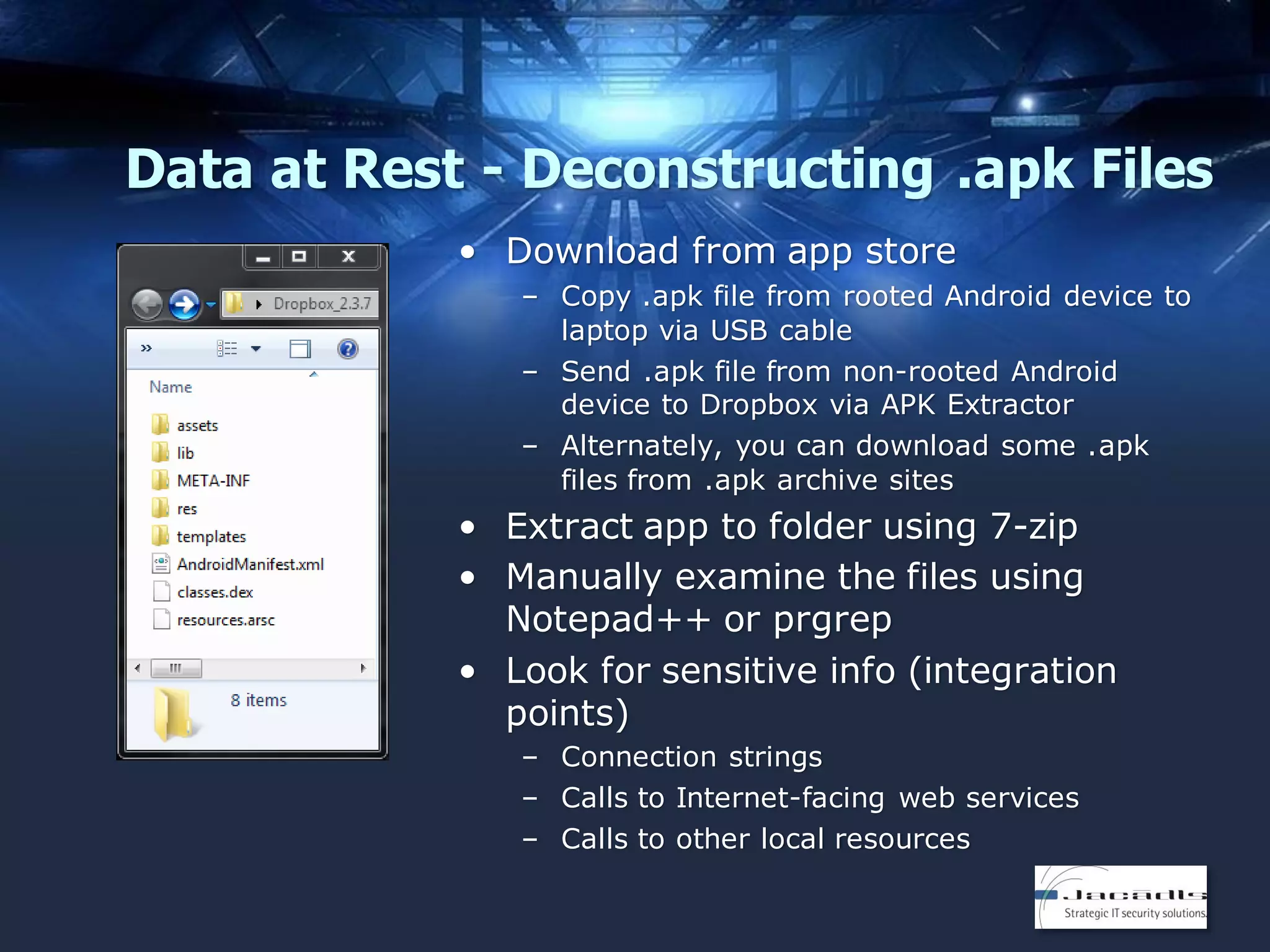
Data at Rest - Deconstructing .apk Files
• Download from app store
– Copy .apk file from rooted Android device to
laptop via USB cable
– Send .apk file from non-rooted Android
device to Dropbox via APK Extractor
– Alternately, you can download some .apk
files from .apk archive sites

• Extract app to folder using 7-zip
• Manually examine the files using
Notepad++ or prgrep
• Look for sensitive info (integration
points)
– Connection strings
– Calls to Internet-facing web services
– Calls to other local resources
Advanced App Analysis - Android
• APKTool
– https://code.google.com/p/android-apktool/

• dex2jar

– https://code.google.com/p/dex2jar/

• Smali

– https://code.google.com/p/smali/

• androguard

– https://code.google.com/p/androguard/

• APKManager

– http://xdafileserver.nl/index.php?dir=Samsung%2FGalaxy+S
+III%2FCUSTOM+ROMS%2Fwanamlite%2FApkManager%2FV
6.1

• Obfuscate your code with ProGuard and DexGuard
– http://proguard.sourceforge.net/
– ProGuard is included in Android SDK; DexGuard is not
Data in Motion - Monitoring App Traffic
• Plug laptop into wired network connection
• Created an ad hoc wireless network on laptop

• Connect mobile device to ad hoc wireless network
• Start Wireshark on laptop
– Capture ALL packets between mobile device and server

• Use mobile device as a normal end user
• Analyze Wireshark traffic
– Unencrypted credentials
– Unencrypted account information
– Connection strings to servers (including third parties)
DEFENSIVE TOOLS & TECHNIQUES
Developer Training
• OWASP Resources
–
–
–
–
–

Top 10 Application Security Risks
Top 10 Mobile Security Risks
WebGoat Project (Java)
Mutillidae (PHP)
Bricks (PHP and MySQL)

• SANS Courses
–
–
–
–

SEC542:
DEV522:
DEV541:
DEV544:

Web App Penetration Testing and Ethical Hacking
Defending Web Applications Security Essentials
Secure Coding in Java/JEE
Secure Coding in .NET

• Web Application Security Consortium
–
–
–
–

Web Security Articles
Web Security Glossary
Web Hacking Incidents Database (WHID)
WASC Threat Classification v2
Code Obfuscation Techniques
• Implement anti-debug techniques

– Limit runtime manipulation
– Write critical portions of code in low-level C

• Restrict debuggers

– Tell the OS to prohibit debuggers from attaching to process
– Android apps – android:debuggable=“false” in manifest

• Trace checking

– When trace detected, take defensive action

• Optimizations

– Hide complex logic with built-in compiler optimizations

• Stripping binaries

– Strips the symbol table

List from https://viaforensics.com/resources/reports/best-practicesios-android-secure-mobile-development/code-complexity-obfuscation/
Santoku Linux
• Sponsored by viaForensics
• ‘Three uses’
– Mobile Forensics
• Firmware flashing tools
• Imaging tools
• Forensics tools (free + commercial)

– Mobile Malware Analysis

• Mobile device emulators
• Network service simulators
• Decompilation and disassembly
tools
• Access to malware databases

– Mobile Security Testing

• Decompilation and disassembly
tools
• Customized app analysis scripts
MobiSec Linux
• More robust than Santoku
• Includes Blackberry tools
• Includes emulators and
simulators
• Includes links to mobile
infrastructure tools
– BES Express
– Google Mobile Management
– iPhone Configuration Tool

• Includes Smartphone
Pentest Framework (SPF)
Windows App Security Tools
• Microsoft SDL Threat Modeling Tool
• FxCop
– Static analyzer

• BinScope
– Binary analyzer

• MiniFuzz File Fuzzer
– Analyzes file-handling code

• Banned.h
– Header file
– Remove banned functions from code

All five (5) tools can be downloaded from
http://msdn.microsoft.com/en-us/library/windowsphone/develop/ff402533(v=vs.105).aspx
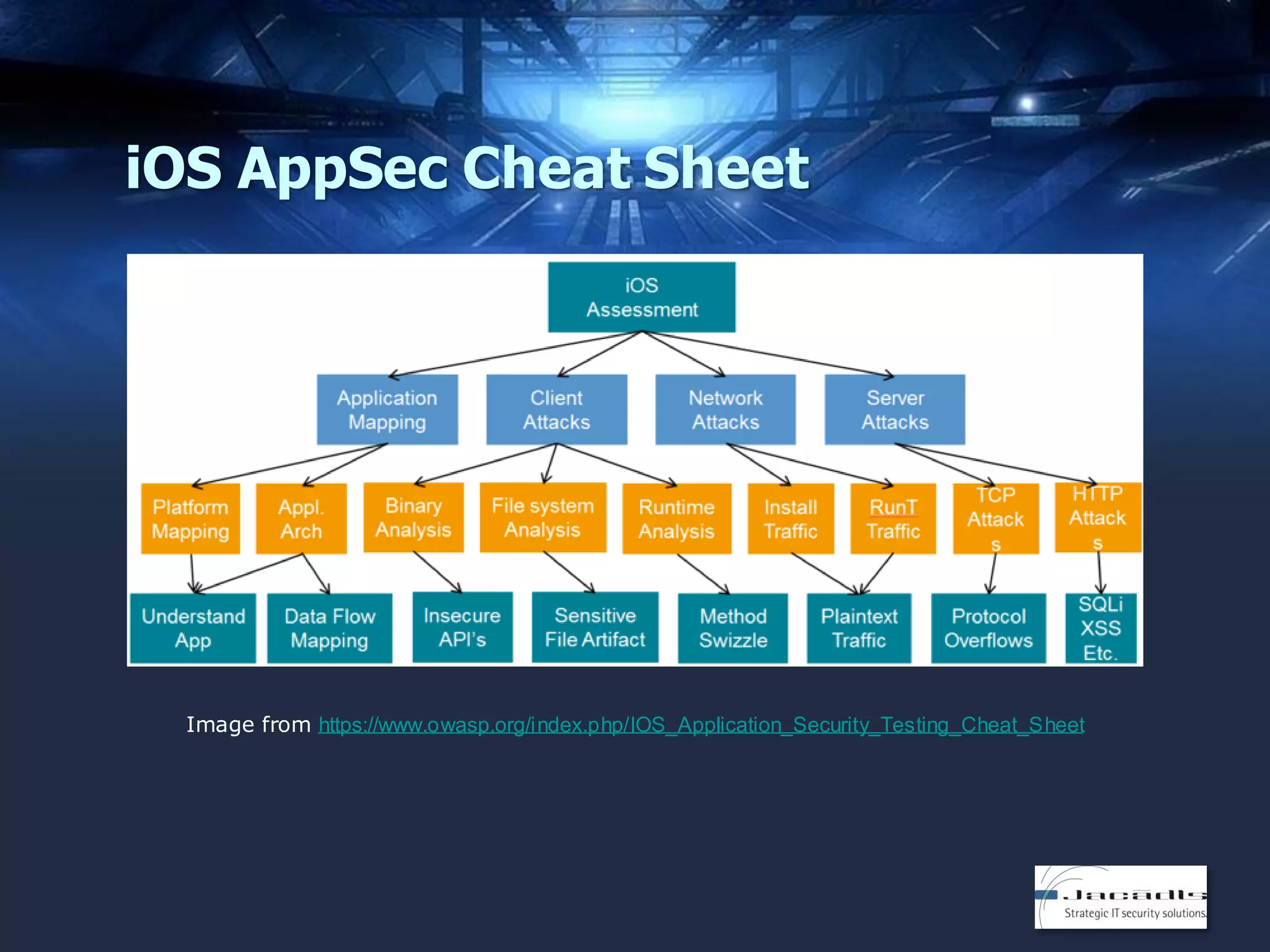
iOS AppSec Cheat Sheet

Image from https://www.owasp.org/index.php/IOS_Application_Security_Testing_Cheat_Sheet
RESOURCES
Resources - General
•

Secure Mobile Development: 42+ Best Practices for Secure iOS
and Android Development

– https://viaforensics.com/mobile-security/secure-mobile-development42-practices-secure-ios-android-development.html

•

Secure Mobile Application Development Reference

•

Developing Secure Mobile Applications

•

Security Assessment of BlackBerry Applications

•

Mobile App Security Code Reviews

– http://www.denimgroup.com/media/pdfs/MobileDevReference.pdf
– http://www.slideshare.net/denimgroup/developing-secure-mobileapplications-17732256
– http://resources.infosecinstitute.com/security-assessment-ofblackberry-applications/
http://www.slideshare.net/denimgroup/mobile-application-security-code-reviews

–

•

–

https://www.owasp.org/index.php/File:OWASP_Advanced_Mobile_Application_Co
de_Review_Techniques.pptx

OWASP Advanced Mobile Application Code Review Techniques

•

Santoku Linux

•

MobiSec Linux

– https://santoku-linux.com/
– http://mobisec.secureideas.net/
Resources - Android
• Understanding Android’s Security Framework (Tutorial)
– http://siis.cse.psu.edu/android_sec_tutorial.html

• Android Developer Security Tips

– http://developer.android.com/training/articles/securitytips.html

• Understanding Security on Android

– http://www.ibm.com/developerworks/library/xandroidsecurity/

• Creating Secure (BlackBerry) Apps

– http://developer.blackberry.com/bbos/java/documentation/sec
urity_overview_1981777_11.html

• BlackBerry 10 Security Considerations

– http://developer.blackberry.com/native/documentation/cascad
es/best_practices/security/
Resources - Windows
• Security for Windows Phone (includes tool links)

– http://msdn.microsoft.com/enus/library/windowsphone/develop/ff402533(v=vs.105).aspx

• WebBrowser control security best practices for Windows
Phone

– http://msdn.microsoft.com/enus/library/windowsphone/develop/ff462081(v=vs.105).aspx

• Web service security for Windows Phone

– http://msdn.microsoft.com/enus/library/windowsphone/develop/gg521147(v=vs.105).aspx

• How to encrypt data in a Windows Phone app

– http://msdn.microsoft.com/enus/library/windowsphone/develop/hh487164(v=vs.105).aspx

• Data for Windows Phone

– http://msdn.microsoft.com/enus/library/windowsphone/develop/ff402541(v=vs.105).aspx

• Hardening Windows 8 Apps for the Windows Store
– http://www.youtube.com/watch?v=5pxfy5GyQ5g
Resources - iOS
• iOS Application Security tutorial series (pen testing)

– http://resources.infosecinstitute.com/ios-application-securitypart-1-setting-up-a-mobile-pentesting-platform/

• iOS Introduction to Secure Coding Guide

– https://developer.apple.com/library/ios/documentation/Securit
y/Conceptual/SecureCodingGuide/Introduction.html#//apple_r
ef/doc/uid/TP40002415

• iOS App Sandboxing

– https://developer.apple.com/app-sandboxing/

• Reverse Engineering an iOS Application

– http://dinezhshetty.blogspot.com/2013/01/reverseengineering-ios-application.html

• iOS Applications Reverse Engineering

– http://media.hackinglab.com/scs3/scs3_pdf/SCS3_2011_Bachmann.pdf

• Secure Development on iOS

– https://www.isecpartners.com/media/12985/secure_developm
ent_on_ios.pdf
Contact Info

Jerod Brennen, CISSP
CTO & Principal Security Consultant, Jacadis
LinkedIn: http://www.linkedin/com/in/slandail
Twitter: https://twitter.com/slandail
http://www.jacadis.com/
contact@jacadis.com

Attacking and Defending Mobile Applications

  • 1.
    Attacking and DefendingMobile Applications Jerod Brennen, Jacadis
  • 2.
    Agenda • • • • AppSec in theSDLC Mobile Apps From an Attacker’s POV Defensive Tools and Techniques Resources
  • 3.
    How to WriteGood Code From http://xkcd.com/844/
  • 4.
    The Secret toLearning Code “One of the best techniques to learn to code is to reverse engineer existing code.” From http://lifehacker.com/learn-to-code-by-breaking-someone-elses-code-1442438673 & http://blog.teamtreehouse.com/the-secret-to-learning-code
  • 5.
  • 6.
    Understand Your Environment •What development methodologies do we follow? • What programming languages do we use? • What risk/security frameworks do we follow? • What third-party libraries do we use? • What stages in the development process require approval from the security team?
  • 7.
    Understand Your Platform- iOS • Sandbox directories in iOS • Defend apps from one another • Keychain data is stored outside of the sandbox Image from https://developer.apple.com/library/ios/doc umentation/iphone/conceptual/iphoneospr ogrammingguide/TheiOSEnvironment/Thei OSEnvironment.html
  • 8.
    Understand Your Platform- Android Two android apps, distinct sandboxes Two android apps, shared sandbox
  • 9.
    Understand Your Platform- BlackBerry • QNX micro kernel • Allocates virtual memory to each process • Process manager functions like a traffic cop • Need to explicitly grant data access to each app Image from http://crackberry.com/history-qnx-andit%E2%80%99s-implementationblackberry-10
  • 10.
    Understand Your Platform- Windows • Security provided by Windows 7 • Surface Shell manages apps, windows, orientation, and user sessions • Surface and Windows Integration handles critical failures Image from http://msdn.microsoft.com/enus/library/ff727809.aspx
  • 11.
    Three Key SecurityChecks • Source Code Security Reviews – Manual Reviews – Reverse Binaries • Security Tests in QA – Positive AND Negative Test Cases • Analysis of “Deployed” Apps – Automated Scans – Manual Analysis
  • 12.
    Source Code Reviews(OWASP) • Methodology (v1.1, current) – – – – – Preparation Security Code Review in the SDLC Security Code Review Coverage Application Threat Modeling Code Review Metrics • Methodology (v2.0, due in January 2014) – – – – – – Preparation Application Threat Modeling Understanding Code Layout/Design/Architecture Reviewing by Technical Control Reviewing by Vulnerability Security Code Review for Agile Development
  • 13.
    The SQA Process • • • • • • • • • Initiation Planning Tracking Training Reviews IssueResolution Testing Audit Process Improvement List from http://www.verndale.com/Our-Thinking/9-Steps-of-the-SQA-Process.aspx
  • 14.
    Test Cases • PositiveAND Negative • Top 10 Negative Test Cases – – – – – – – – – – Embedded Single Quote Required Data Entry Field Type Test Field Size Test Numeric Bounds Test Numeric Limits Test Date Bounds Test Date Validity Web Session Testing Performance Changes List from http://www.sqatester.com/methodology/Top10NegativeTestCases.htm
  • 15.
    Application Analysis • Automatedscanning tools and manual analysis • OWASP Testing Guide (v3) – – – – – – – – – – Information Gathering Configuration Management Testing Authentication Testing Session Management Testing Authorization Testing Business Logic Testing Data Validation Testing Testing for Denial of Service Web Services Testing AJAX Testing • Version 4 in development (some material available)
  • 16.
    MOBILE APPS FROM ANATTACKER’S POV
  • 17.
    There’s Gold inThem There Hills… From Blue Coat Systems 2013 Mobile Malware Report
  • 18.
    OWASP Top 10Mobile Risks Image from https://www.owasp.org/index.php/OWASP_Mobile_Security_Project#tab=Top_ Ten_Mobile_Risks
  • 19.
    Data at Rest- Deconstructing .ipa Files • Download from app store – Mac OS X 10.7 Lion: ~/Music/iTunes/iTunes Media/Mobile Applications/ – Mac OS X 10.6: ~/Music/iTunes/Mobile Applications/ – Windows 7: C:UsersUsernameMy MusiciTunesiTunes MediaMobile Applications • Extract app to folder using 7-zip • Manually examine the files using Notepad++ or prgrep • Look for sensitive info (integration points) – Connection strings – Calls to Internet-facing web services – Calls to other local resources
  • 20.
    Advanced App Analysis- iOS • otool (run on binary, get size of encrypted payload) – https://developer.apple.com/library/mac/documentation/Darwin/Referen ce/ManPages/man1/otool.1.html • gdb (dump payload and payload size) – https://www.gnu.org/software/gdb/ • ldid (sign new binary) – http://gitweb.saurik.com/ldid.git • IDA Pro with objc-helper – https://www.hex-rays.com/products/ida/support/download.shtml – https://code.google.com/p/zynamics/source/checkout?repo=objc-helper • Class Dump – http://cydia.saurik.com/info/class-dump/ • Theos – http://iphonedevwiki.net/index.php/Theos
  • 21.
    Data at Rest- Deconstructing .apk Files • Download from app store – Copy .apk file from rooted Android device to laptop via USB cable – Send .apk file from non-rooted Android device to Dropbox via APK Extractor – Alternately, you can download some .apk files from .apk archive sites • Extract app to folder using 7-zip • Manually examine the files using Notepad++ or prgrep • Look for sensitive info (integration points) – Connection strings – Calls to Internet-facing web services – Calls to other local resources
  • 22.
    Advanced App Analysis- Android • APKTool – https://code.google.com/p/android-apktool/ • dex2jar – https://code.google.com/p/dex2jar/ • Smali – https://code.google.com/p/smali/ • androguard – https://code.google.com/p/androguard/ • APKManager – http://xdafileserver.nl/index.php?dir=Samsung%2FGalaxy+S +III%2FCUSTOM+ROMS%2Fwanamlite%2FApkManager%2FV 6.1 • Obfuscate your code with ProGuard and DexGuard – http://proguard.sourceforge.net/ – ProGuard is included in Android SDK; DexGuard is not
  • 23.
    Data in Motion- Monitoring App Traffic • Plug laptop into wired network connection • Created an ad hoc wireless network on laptop • Connect mobile device to ad hoc wireless network • Start Wireshark on laptop – Capture ALL packets between mobile device and server • Use mobile device as a normal end user • Analyze Wireshark traffic – Unencrypted credentials – Unencrypted account information – Connection strings to servers (including third parties)
  • 24.
  • 25.
    Developer Training • OWASPResources – – – – – Top 10 Application Security Risks Top 10 Mobile Security Risks WebGoat Project (Java) Mutillidae (PHP) Bricks (PHP and MySQL) • SANS Courses – – – – SEC542: DEV522: DEV541: DEV544: Web App Penetration Testing and Ethical Hacking Defending Web Applications Security Essentials Secure Coding in Java/JEE Secure Coding in .NET • Web Application Security Consortium – – – – Web Security Articles Web Security Glossary Web Hacking Incidents Database (WHID) WASC Threat Classification v2
  • 26.
    Code Obfuscation Techniques •Implement anti-debug techniques – Limit runtime manipulation – Write critical portions of code in low-level C • Restrict debuggers – Tell the OS to prohibit debuggers from attaching to process – Android apps – android:debuggable=“false” in manifest • Trace checking – When trace detected, take defensive action • Optimizations – Hide complex logic with built-in compiler optimizations • Stripping binaries – Strips the symbol table List from https://viaforensics.com/resources/reports/best-practicesios-android-secure-mobile-development/code-complexity-obfuscation/
  • 27.
    Santoku Linux • Sponsoredby viaForensics • ‘Three uses’ – Mobile Forensics • Firmware flashing tools • Imaging tools • Forensics tools (free + commercial) – Mobile Malware Analysis • Mobile device emulators • Network service simulators • Decompilation and disassembly tools • Access to malware databases – Mobile Security Testing • Decompilation and disassembly tools • Customized app analysis scripts
  • 28.
    MobiSec Linux • Morerobust than Santoku • Includes Blackberry tools • Includes emulators and simulators • Includes links to mobile infrastructure tools – BES Express – Google Mobile Management – iPhone Configuration Tool • Includes Smartphone Pentest Framework (SPF)
  • 29.
    Windows App SecurityTools • Microsoft SDL Threat Modeling Tool • FxCop – Static analyzer • BinScope – Binary analyzer • MiniFuzz File Fuzzer – Analyzes file-handling code • Banned.h – Header file – Remove banned functions from code All five (5) tools can be downloaded from http://msdn.microsoft.com/en-us/library/windowsphone/develop/ff402533(v=vs.105).aspx
  • 30.
    iOS AppSec CheatSheet Image from https://www.owasp.org/index.php/IOS_Application_Security_Testing_Cheat_Sheet
  • 31.
  • 32.
    Resources - General • SecureMobile Development: 42+ Best Practices for Secure iOS and Android Development – https://viaforensics.com/mobile-security/secure-mobile-development42-practices-secure-ios-android-development.html • Secure Mobile Application Development Reference • Developing Secure Mobile Applications • Security Assessment of BlackBerry Applications • Mobile App Security Code Reviews – http://www.denimgroup.com/media/pdfs/MobileDevReference.pdf – http://www.slideshare.net/denimgroup/developing-secure-mobileapplications-17732256 – http://resources.infosecinstitute.com/security-assessment-ofblackberry-applications/ http://www.slideshare.net/denimgroup/mobile-application-security-code-reviews – • – https://www.owasp.org/index.php/File:OWASP_Advanced_Mobile_Application_Co de_Review_Techniques.pptx OWASP Advanced Mobile Application Code Review Techniques • Santoku Linux • MobiSec Linux – https://santoku-linux.com/ – http://mobisec.secureideas.net/
  • 33.
    Resources - Android •Understanding Android’s Security Framework (Tutorial) – http://siis.cse.psu.edu/android_sec_tutorial.html • Android Developer Security Tips – http://developer.android.com/training/articles/securitytips.html • Understanding Security on Android – http://www.ibm.com/developerworks/library/xandroidsecurity/ • Creating Secure (BlackBerry) Apps – http://developer.blackberry.com/bbos/java/documentation/sec urity_overview_1981777_11.html • BlackBerry 10 Security Considerations – http://developer.blackberry.com/native/documentation/cascad es/best_practices/security/
  • 34.
    Resources - Windows •Security for Windows Phone (includes tool links) – http://msdn.microsoft.com/enus/library/windowsphone/develop/ff402533(v=vs.105).aspx • WebBrowser control security best practices for Windows Phone – http://msdn.microsoft.com/enus/library/windowsphone/develop/ff462081(v=vs.105).aspx • Web service security for Windows Phone – http://msdn.microsoft.com/enus/library/windowsphone/develop/gg521147(v=vs.105).aspx • How to encrypt data in a Windows Phone app – http://msdn.microsoft.com/enus/library/windowsphone/develop/hh487164(v=vs.105).aspx • Data for Windows Phone – http://msdn.microsoft.com/enus/library/windowsphone/develop/ff402541(v=vs.105).aspx • Hardening Windows 8 Apps for the Windows Store – http://www.youtube.com/watch?v=5pxfy5GyQ5g
  • 35.
    Resources - iOS •iOS Application Security tutorial series (pen testing) – http://resources.infosecinstitute.com/ios-application-securitypart-1-setting-up-a-mobile-pentesting-platform/ • iOS Introduction to Secure Coding Guide – https://developer.apple.com/library/ios/documentation/Securit y/Conceptual/SecureCodingGuide/Introduction.html#//apple_r ef/doc/uid/TP40002415 • iOS App Sandboxing – https://developer.apple.com/app-sandboxing/ • Reverse Engineering an iOS Application – http://dinezhshetty.blogspot.com/2013/01/reverseengineering-ios-application.html • iOS Applications Reverse Engineering – http://media.hackinglab.com/scs3/scs3_pdf/SCS3_2011_Bachmann.pdf • Secure Development on iOS – https://www.isecpartners.com/media/12985/secure_developm ent_on_ios.pdf
  • 36.
    Contact Info Jerod Brennen,CISSP CTO & Principal Security Consultant, Jacadis LinkedIn: http://www.linkedin/com/in/slandail Twitter: https://twitter.com/slandail http://www.jacadis.com/ contact@jacadis.com