OpenStack
Identity Service
Codename: Keystone
Deepti Ramakrishna
Software Engineer, Intel
What is Keystone?
● Keystone is the identity service used by OpenStack for
● Authentication (authN)
● Authorization (authZ)
● What is the difference between the two?
● Identity service has two primary functions:
● User management
● Service catalog
● In general deployment cases, Keystone will be the first service
to be installed
Keystone terminologies
● User
● Users are digital representations of a person, system, or service
● Project/Tenant
● A project is a group used to isolate resources and/or users
● Credentials
● Credentials are data known only by a specific user which proves his or her identity
● E.g: username and password, an authentication token
● Token
● A token is an arbitrary bit of text used to access resources
● Each token has a scope describing accessible resources
● A token may be revoked at any time and is valid for a finite duration
Keystone terminologies - continued
● Role
● Set of assigned user rights and privileges for performing a specific set of
operations
● A user token issued by Keystone includes a list of that user’s roles. Services then
determine how to interpret those roles.
● Endpoint
● An endpoint is a network-accessible address, usually described by URL, from
which services are accessed.
● Service
● An OpenStack service, such as Compute (Nova), Object Storage (Swift), or Image
Service (Glance) which provides one or more endpoints through which users can
access resources and perform operations.
● Service catalog = Services list + Endpoints
Uses of Identity API
● As a User:
● Get a token
● Get the service catalog
● As an admin:
● Define
● Users
● Projects
● Roles
● Roles for users on a project (RBAC - Role Based Access Control)
● Services, endpoints for services
● As a service:
● Validate a token
● Tracks what services are installed and where to locate them on the network
● Get a trust to impersonate user
http://www.slideshare.net/SteveMartinelli1/openstack-toronto-meetup-keystone-101
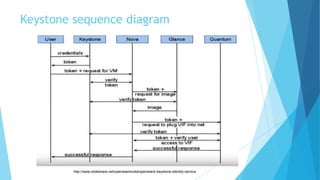
Keystone sequence diagram
http://www.slideshare.net/openstackindia/openstack-keystone-identity-service
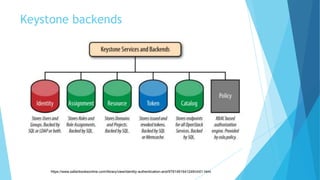
Keystone backends
https://www.safaribooksonline.com/library/view/identity-authentication-and/9781491941249/ch01.html
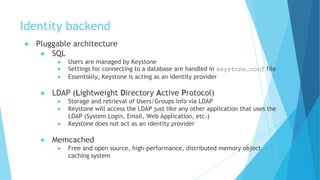
Identity backend
● Pluggable architecture
● SQL
● Users are managed by Keystone
● Settings for connecting to a database are handled in keystone.conf file
● Essentially, Keystone is acting as an identity provider
● LDAP (Lightweight Directory Active Protocol)
● Storage and retrieval of Users/Groups info via LDAP
● Keystone will access the LDAP just like any other application that uses the
LDAP (System Login, Email, Web Application, etc.)
● Keystone does not act as an identity provider
● Memcached
● Free and open source, high-performance, distributed memory object
caching system
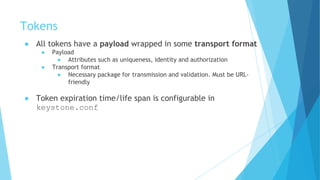
Tokens
● All tokens have a payload wrapped in some transport format
● Payload
● Attributes such as uniqueness, identity and authorization
● Transport format
● Necessary package for transmission and validation. Must be URL-
friendly
● Token expiration time/life span is configurable in
keystone.conf
Token formats - UUID
● UUID - Universally Unique Identifier
● Randomly generated UUID4 values that provide nothing more than
uniqueness. Looks like a 32 character string.
● Payload
● UUID4
● Format
● Hexadecimal
● Pros
● Better user experience
● Cons
● Goes back to keystone server for validation
● E.g:
● 53f7f6ef0cc344b5be706bcc8b1479e1
Token formats - PKI/PKIZ
● PKI - Public Key Infrastructure
● PKI and PKIZ tokens are nearly identical (and in fact share the same
payload), but PKIZ tokens add compression to the mix
● Payload
● JSON response that would normally be produced as a result of online
token validation
● Format
● CMS (Cryptographic Message Syntax) + [zlib] + base64
● Pros
● Does not go back to keystone for validation
● Cons
● Complex to setup
● E.g
● MIIKtgYJKoZIhvcNAQcCoIIKpzCCCqMCAQExCTAHBgUrDgMCGjCCCY8GCSqGSIb3DQEHAaCCCYAEggl8eyJhY2Nlc3MiOiB7InRva2VuIj
oMFQxNTo1MjowNi43MzMxOTgiLCAiZXhwaXJlcyI6ICIyMDEzLTA1LTMxVDE1OjUyOjA2WiIsICJpZCI6ICJwbGFjZWhvbGRlciIsICJ0ZW
5bCwgImVuYWJsZWQiOiB0cnVlLCAiaWQiOiAiYzJjNTliNGQzZDI4NGQ4ZmEwOWYxNjljYjE4MDBlMDYiLCAibmFtZSI6ICJkZW1vIn19L
Cb2ludHMiOiBbeyJhZG1pblVSTCI6ICJodHRwOi8vMTkyLjE2OC4yNy4xMDA6OD
http://docs.openstack.org/admin-guide/keystone_certificates_for_pki.html
Identity v3 API
● python-keystoneclient doesn't expose v3 functionalities but
python-openstackclient does.
● Term “tenant” is officially replaced with “project”
● New features/concepts:
● Domains
● A high-level container for projects
● Groups
● A container representing a collection of users
● Federation authentication
Useful links
● Current (v3) API
● http://developer.openstack.org/api-ref/identity/v3/
● Source code
● https://github.com/openstack/keystone
● Blueprints
● https://blueprints.launchpad.net/keystone
● Bugs
● https://bugs.launchpad.net/keystone/+bugs
● Code Review
● https://review.openstack.org/#/q/project:+openstack/keystone
Lab session
CLI commands
● Let’s use OpenStack-client for this lab!
● python-keystoneclient only supports v2 API and not v3
● Verify Keystone service is running
● $ sudo pgrep -l apache2
● Admin endpoint
● $ sudo lsof -i | grep 35357
● Non-admin endpoint
● $ sudo lsof -i | grep 5000
● Source as a admin (user) of admin (project)
● Check the auth_url
● $ printenv | grep OS_
● Get a token
● $ openstack token issue
● Show usage of debug command and explain about
● $ openstack --debug cinder list
● Review “X-Auth-Token” and why it is SHA1 encrypted
● Openstack help command
● $ openstack help
CLI commands - continued
● Source as a admin (user) of admin (project)
● Endpoint
● $ openstack endpoint list and $ openstack endpoint show <ENDPOINT-ID or NAME>
● Service
● $ openstack service list and $ openstack service show <SERVICE-ID or NAME>
● Project
● $ openstack project list and $ openstack project show <PROJECT-ID or NAME>
● User
● $ openstack user list and $ openstack user show <USER-ID or NAME>
● $ openstack user role list
● $ openstack user create <NEW-USER-NAME>
● $ openstack user delete <NAME>
● Role
● $ openstack role list and $ openstack role show <ROLE-ID or NAME>
● Source as a demo (user) of demo (project)
● Try some of the above commands and see it doesn’t work!
● List services in the service catalog
● $ openstack catalog list and $ openstack catalog show <CATALOG-ID or NAME>
● Try creating a new user and see how it fails. In fact list users itself fails.
● $ openstack user create <NEW-USER-NAME>
Advanced
● OpenStack Keystone installation and manually configuring
other services
● https://www.youtube.com/watch?v=0jNdlSBm1JA
OR
● https://www.youtube.com/watch?v=BGsCErR9A2s
Thank You!

OpenStack Keystone

  • 1.
    OpenStack Identity Service Codename: Keystone DeeptiRamakrishna Software Engineer, Intel
  • 2.
    What is Keystone? ●Keystone is the identity service used by OpenStack for ● Authentication (authN) ● Authorization (authZ) ● What is the difference between the two? ● Identity service has two primary functions: ● User management ● Service catalog ● In general deployment cases, Keystone will be the first service to be installed
  • 3.
    Keystone terminologies ● User ●Users are digital representations of a person, system, or service ● Project/Tenant ● A project is a group used to isolate resources and/or users ● Credentials ● Credentials are data known only by a specific user which proves his or her identity ● E.g: username and password, an authentication token ● Token ● A token is an arbitrary bit of text used to access resources ● Each token has a scope describing accessible resources ● A token may be revoked at any time and is valid for a finite duration
  • 4.
    Keystone terminologies -continued ● Role ● Set of assigned user rights and privileges for performing a specific set of operations ● A user token issued by Keystone includes a list of that user’s roles. Services then determine how to interpret those roles. ● Endpoint ● An endpoint is a network-accessible address, usually described by URL, from which services are accessed. ● Service ● An OpenStack service, such as Compute (Nova), Object Storage (Swift), or Image Service (Glance) which provides one or more endpoints through which users can access resources and perform operations. ● Service catalog = Services list + Endpoints
  • 5.
    Uses of IdentityAPI ● As a User: ● Get a token ● Get the service catalog ● As an admin: ● Define ● Users ● Projects ● Roles ● Roles for users on a project (RBAC - Role Based Access Control) ● Services, endpoints for services ● As a service: ● Validate a token ● Tracks what services are installed and where to locate them on the network ● Get a trust to impersonate user http://www.slideshare.net/SteveMartinelli1/openstack-toronto-meetup-keystone-101
  • 6.
  • 7.
  • 8.
    Identity backend ● Pluggablearchitecture ● SQL ● Users are managed by Keystone ● Settings for connecting to a database are handled in keystone.conf file ● Essentially, Keystone is acting as an identity provider ● LDAP (Lightweight Directory Active Protocol) ● Storage and retrieval of Users/Groups info via LDAP ● Keystone will access the LDAP just like any other application that uses the LDAP (System Login, Email, Web Application, etc.) ● Keystone does not act as an identity provider ● Memcached ● Free and open source, high-performance, distributed memory object caching system
  • 9.
    Tokens ● All tokenshave a payload wrapped in some transport format ● Payload ● Attributes such as uniqueness, identity and authorization ● Transport format ● Necessary package for transmission and validation. Must be URL- friendly ● Token expiration time/life span is configurable in keystone.conf
  • 10.
    Token formats -UUID ● UUID - Universally Unique Identifier ● Randomly generated UUID4 values that provide nothing more than uniqueness. Looks like a 32 character string. ● Payload ● UUID4 ● Format ● Hexadecimal ● Pros ● Better user experience ● Cons ● Goes back to keystone server for validation ● E.g: ● 53f7f6ef0cc344b5be706bcc8b1479e1
  • 11.
    Token formats -PKI/PKIZ ● PKI - Public Key Infrastructure ● PKI and PKIZ tokens are nearly identical (and in fact share the same payload), but PKIZ tokens add compression to the mix ● Payload ● JSON response that would normally be produced as a result of online token validation ● Format ● CMS (Cryptographic Message Syntax) + [zlib] + base64 ● Pros ● Does not go back to keystone for validation ● Cons ● Complex to setup ● E.g ● MIIKtgYJKoZIhvcNAQcCoIIKpzCCCqMCAQExCTAHBgUrDgMCGjCCCY8GCSqGSIb3DQEHAaCCCYAEggl8eyJhY2Nlc3MiOiB7InRva2VuIj oMFQxNTo1MjowNi43MzMxOTgiLCAiZXhwaXJlcyI6ICIyMDEzLTA1LTMxVDE1OjUyOjA2WiIsICJpZCI6ICJwbGFjZWhvbGRlciIsICJ0ZW 5bCwgImVuYWJsZWQiOiB0cnVlLCAiaWQiOiAiYzJjNTliNGQzZDI4NGQ4ZmEwOWYxNjljYjE4MDBlMDYiLCAibmFtZSI6ICJkZW1vIn19L Cb2ludHMiOiBbeyJhZG1pblVSTCI6ICJodHRwOi8vMTkyLjE2OC4yNy4xMDA6OD http://docs.openstack.org/admin-guide/keystone_certificates_for_pki.html
  • 12.
    Identity v3 API ●python-keystoneclient doesn't expose v3 functionalities but python-openstackclient does. ● Term “tenant” is officially replaced with “project” ● New features/concepts: ● Domains ● A high-level container for projects ● Groups ● A container representing a collection of users ● Federation authentication
  • 13.
    Useful links ● Current(v3) API ● http://developer.openstack.org/api-ref/identity/v3/ ● Source code ● https://github.com/openstack/keystone ● Blueprints ● https://blueprints.launchpad.net/keystone ● Bugs ● https://bugs.launchpad.net/keystone/+bugs ● Code Review ● https://review.openstack.org/#/q/project:+openstack/keystone
  • 14.
  • 15.
    CLI commands ● Let’suse OpenStack-client for this lab! ● python-keystoneclient only supports v2 API and not v3 ● Verify Keystone service is running ● $ sudo pgrep -l apache2 ● Admin endpoint ● $ sudo lsof -i | grep 35357 ● Non-admin endpoint ● $ sudo lsof -i | grep 5000 ● Source as a admin (user) of admin (project) ● Check the auth_url ● $ printenv | grep OS_ ● Get a token ● $ openstack token issue ● Show usage of debug command and explain about ● $ openstack --debug cinder list ● Review “X-Auth-Token” and why it is SHA1 encrypted ● Openstack help command ● $ openstack help
  • 16.
    CLI commands -continued ● Source as a admin (user) of admin (project) ● Endpoint ● $ openstack endpoint list and $ openstack endpoint show <ENDPOINT-ID or NAME> ● Service ● $ openstack service list and $ openstack service show <SERVICE-ID or NAME> ● Project ● $ openstack project list and $ openstack project show <PROJECT-ID or NAME> ● User ● $ openstack user list and $ openstack user show <USER-ID or NAME> ● $ openstack user role list ● $ openstack user create <NEW-USER-NAME> ● $ openstack user delete <NAME> ● Role ● $ openstack role list and $ openstack role show <ROLE-ID or NAME> ● Source as a demo (user) of demo (project) ● Try some of the above commands and see it doesn’t work! ● List services in the service catalog ● $ openstack catalog list and $ openstack catalog show <CATALOG-ID or NAME> ● Try creating a new user and see how it fails. In fact list users itself fails. ● $ openstack user create <NEW-USER-NAME>
  • 17.
    Advanced ● OpenStack Keystoneinstallation and manually configuring other services ● https://www.youtube.com/watch?v=0jNdlSBm1JA OR ● https://www.youtube.com/watch?v=BGsCErR9A2s
  • 18.