Keystone
OpenStack Identity Service
Prasad Mukhedkar
Red Hat Technical Support Team
Agenda
Introduction Identity Concept in Openstack
- Project
- Domains
- Actors (Groups and Users)
- Service Catalogs
- Identity Providers (Multi Backend)
Tokens
- UUID
- PKI (PKIz)
- Fernet
Troubleshooting
- Logs, Enabling Debug
- Most common Problems
Hands-On Lab
- Keystone Basic Operations
- Keystone Integration with Active Directory Server for
authentication.
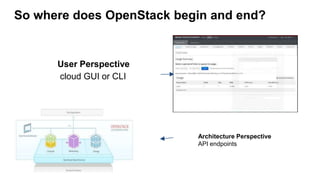
So where does OpenStack begin and end?
User Perspective
cloud GUI or CLI
Architecture Perspective
API endpoints
Many OpenStack Services, Many API Endpoints!
How to authenticate them? Who will manage the authorization?
How will I come to know what is the endpoint of the service that I
want to access? Example Nova?
Openstack Keystone Service.
"Keystone provides Identity, Token, Catalog and Policy services for use
specifically by projects in the OpenStack family.“
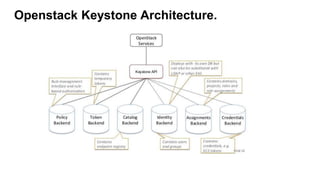
Openstack Keystone Architecture.
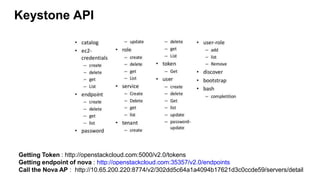
Keystone API
Getting Token : http://openstackcloud.com:5000/v2.0/tokens
Getting endpoint of nova : http://openstackcloud.com:35357/v2.0/endpoints
Call the Nova AP : http://10.65.200.220:8774/v2/302dd5c64a1a4094b17621d3c0ccde59/servers/detail
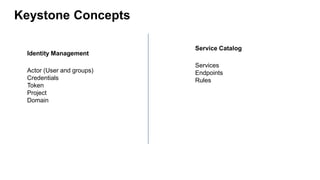
Keystone Concepts
Identity Management
Actor (User and groups)
Credentials
Token
Project
Domain
Service Catalog
Services
Endpoints
Rules
Identity Management : Actors
In the Keystone realm, Users and User Groups are the entities given access to resour‐
ces that are isolated in Domains and Projects. Groups are a collection of Users. Users
are individuals who will end up using your cloud. We refer to Users and Groups as
Actors since, when assigning a role, these are the entities to which the role is “assigned
to.
Identity Management : Project
- In Keystone, a Project is an abstraction used by other OpenStack services to group
and isolate resources (e.g., servers, images, etc.).
- Earlier known as Tenant
- Projects themselves don’t own Users, but Users or User Groups are given access to a Project
using the concept of Role Assignments.
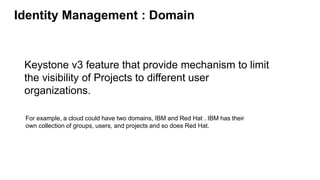
Identity Management : Domain
Keystone v3 feature that provide mechanism to limit
the visibility of Projects to different user
organizations.
For example, a cloud could have two domains, IBM and Red Hat . IBM has their
own collection of groups, users, and projects and so does Red Hat.
Identity Management: Tokens :
An arbitrary bit of test taht is used to access resources. Each token has a scope
which described which resources are accessible with it.
There are four types of token that you can use with OpenStack.
"keystone.token.providers.[fernet|pkiz|pki|uuid].Provider".
Tokens : UUID
Pros :
- Simplest and Most Light Weight
- The UUID token is simply a randomly generated
UUID 32-character string (Version 4 UUID ) getuuid
- The token is extremely small and easy to use when
accessing Keystone through a
cURL command.
Cons :
-Server side validation (Disadvantage with this
token format is that Keystone can become a
bottleneck due to the tremendous amount of
communication that occurs when Keystone is
needed to validate the token.)
- Revoked tokens are not removed from the
database. Need to manually flush the
database. "keystone-manage token_flush"
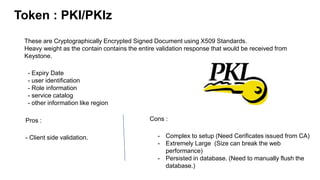
Token : PKI/PKIz
These are Cryptographically Encrypted Signed Document using X509 Standards.
Heavy weight as the contain contains the entire validation response that would be received from
Keystone.
- Expiry Date
- user identification
- Role information
- service catalog
- other information like region
Pros :
- Client side validation.
Cons :
- Complex to setup (Need Cerificates issued from CA)
- Extremely Large (Size can break the web
performance)
- Persisted in database. (Need to manually flush the
database.)
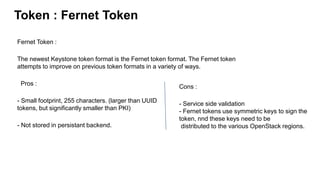
Token : Fernet Token
Fernet Token :
The newest Keystone token format is the Fernet token format. The Fernet token
attempts to improve on previous token formats in a variety of ways.
Pros :
- Small footprint, 255 characters. (larger than UUID
tokens, but significantly smaller than PKI)
- Not stored in persistant backend.
Cons :
- Service side validation
- Fernet tokens use symmetric keys to sign the
token, nnd these keys need to be
distributed to the various OpenStack regions.
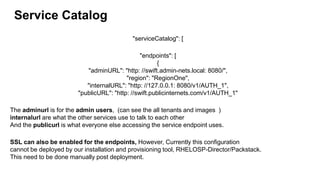
Service Catalog
"serviceCatalog": [
"endpoints": [
{
"adminURL": "http: //swift.admin-nets.local: 8080/",
"region": "RegionOne",
"internalURL": "http: //127.0.0.1: 8080/v1/AUTH_1",
"publicURL": "http: //swift.publicinternets.com/v1/AUTH_1"
The adminurl is for the admin users, (can see the all tenants and images )
internalurl are what the other services use to talk to each other
And the publicurl is what everyone else accessing the service endpoint uses.
SSL can also be enabled for the endpoints, However, Currently this configuration
cannot be deployed by our installation and provisioning tool, RHELOSP-Director/Packstack.
This need to be done manually post deployment.
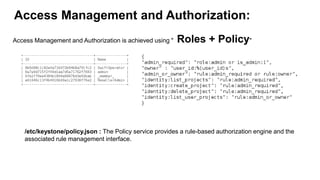
Access Management and Authorization:
Access Management and Authorization is achieved using " Roles + Policy"
/etc/keystone/policy.json : The Policy service provides a rule-based authorization engine and the
associated rule management interface.
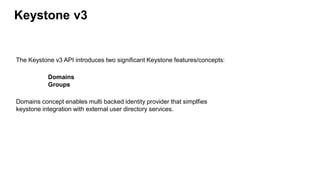
Keystone v3
The Keystone v3 API introduces two significant Keystone features/concepts:
Domains
Groups
Domains concept enables multi backed identity provider that simplfies
keystone integration with external user directory services.
Configuration file (keystone.conf)
/etc/keystone/keystone.conf
[DEFAULT] - general configuration
[sql] - optional storage backend configuration
[ec2] - Amazon EC2 authentication driver configuration
[s3] - Amazon S3 authentication driver configuration.
[oauth1] - Oauth 1.0a system driver configuration
[identity] - identity system driver configuration
[catalog] - service catalog driver configuration
[token] - token driver & token provider configuration
[cache] - caching layer configuration
[policy] - policy system driver configuration for RBAC
[signing] - cryptographic signatures for PKI based tokens
[ssl] - SSL configuration
[auth] - Authentication plugin configuration
[os_inherit] - Inherited Role Assignment extension
[paste_deploy] - Pointer to the PasteDeploy configuration file
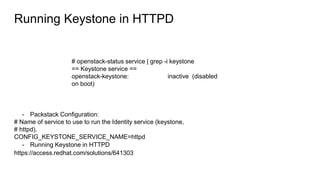
Running Keystone in HTTPD
# openstack-status service | grep -i keystone
== Keystone service ==
openstack-keystone: inactive (disabled
on boot)
- Packstack Configuration:
# Name of service to use to run the Identity service (keystone,
# httpd).
CONFIG_KEYSTONE_SERVICE_NAME=httpd
- Running Keystone in HTTPD
https://access.redhat.com/solutions/641303
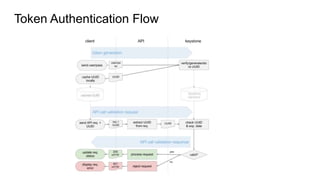
Token Authentication Flow
Keystone Troubleshooting
Keystone Log file :
/var/log/keystone
Enabling Debug output: Set debug to True in the
/etc/keystone/keystone.conf configuration file
Raw
# Print debugging output (set logging level to DEBUG instead
# of default WARNING level). (boolean value)
#debug=false
debug=True
- Debug keystone tokens :
https://access.redhat.com/solutions/2166921
Access database
#mysql
MariaDB [(none)]> use keystone;
MariaDB [keystone]> show tables;
+------------------------+
| Tables_in_keystone |
+------------------------+
| access_token |
| assignment |
| consumer |
| credential |
| domain |
| endpoint |
| endpoint_group |
--------------------------
Thank You!

Keystone - Openstack Identity Service

  • 1.
    Keystone OpenStack Identity Service PrasadMukhedkar Red Hat Technical Support Team
  • 2.
    Agenda Introduction Identity Conceptin Openstack - Project - Domains - Actors (Groups and Users) - Service Catalogs - Identity Providers (Multi Backend) Tokens - UUID - PKI (PKIz) - Fernet Troubleshooting - Logs, Enabling Debug - Most common Problems Hands-On Lab - Keystone Basic Operations - Keystone Integration with Active Directory Server for authentication.
  • 3.
    So where doesOpenStack begin and end? User Perspective cloud GUI or CLI Architecture Perspective API endpoints
  • 4.
    Many OpenStack Services,Many API Endpoints! How to authenticate them? Who will manage the authorization? How will I come to know what is the endpoint of the service that I want to access? Example Nova? Openstack Keystone Service. "Keystone provides Identity, Token, Catalog and Policy services for use specifically by projects in the OpenStack family.“
  • 5.
  • 6.
    Keystone API Getting Token: http://openstackcloud.com:5000/v2.0/tokens Getting endpoint of nova : http://openstackcloud.com:35357/v2.0/endpoints Call the Nova AP : http://10.65.200.220:8774/v2/302dd5c64a1a4094b17621d3c0ccde59/servers/detail
  • 7.
    Keystone Concepts Identity Management Actor(User and groups) Credentials Token Project Domain Service Catalog Services Endpoints Rules
  • 8.
    Identity Management :Actors In the Keystone realm, Users and User Groups are the entities given access to resour‐ ces that are isolated in Domains and Projects. Groups are a collection of Users. Users are individuals who will end up using your cloud. We refer to Users and Groups as Actors since, when assigning a role, these are the entities to which the role is “assigned to.
  • 9.
    Identity Management :Project - In Keystone, a Project is an abstraction used by other OpenStack services to group and isolate resources (e.g., servers, images, etc.). - Earlier known as Tenant - Projects themselves don’t own Users, but Users or User Groups are given access to a Project using the concept of Role Assignments.
  • 10.
    Identity Management :Domain Keystone v3 feature that provide mechanism to limit the visibility of Projects to different user organizations. For example, a cloud could have two domains, IBM and Red Hat . IBM has their own collection of groups, users, and projects and so does Red Hat.
  • 11.
    Identity Management: Tokens: An arbitrary bit of test taht is used to access resources. Each token has a scope which described which resources are accessible with it. There are four types of token that you can use with OpenStack. "keystone.token.providers.[fernet|pkiz|pki|uuid].Provider".
  • 12.
    Tokens : UUID Pros: - Simplest and Most Light Weight - The UUID token is simply a randomly generated UUID 32-character string (Version 4 UUID ) getuuid - The token is extremely small and easy to use when accessing Keystone through a cURL command. Cons : -Server side validation (Disadvantage with this token format is that Keystone can become a bottleneck due to the tremendous amount of communication that occurs when Keystone is needed to validate the token.) - Revoked tokens are not removed from the database. Need to manually flush the database. "keystone-manage token_flush"
  • 13.
    Token : PKI/PKIz Theseare Cryptographically Encrypted Signed Document using X509 Standards. Heavy weight as the contain contains the entire validation response that would be received from Keystone. - Expiry Date - user identification - Role information - service catalog - other information like region Pros : - Client side validation. Cons : - Complex to setup (Need Cerificates issued from CA) - Extremely Large (Size can break the web performance) - Persisted in database. (Need to manually flush the database.)
  • 14.
    Token : FernetToken Fernet Token : The newest Keystone token format is the Fernet token format. The Fernet token attempts to improve on previous token formats in a variety of ways. Pros : - Small footprint, 255 characters. (larger than UUID tokens, but significantly smaller than PKI) - Not stored in persistant backend. Cons : - Service side validation - Fernet tokens use symmetric keys to sign the token, nnd these keys need to be distributed to the various OpenStack regions.
  • 15.
    Service Catalog "serviceCatalog": [ "endpoints":[ { "adminURL": "http: //swift.admin-nets.local: 8080/", "region": "RegionOne", "internalURL": "http: //127.0.0.1: 8080/v1/AUTH_1", "publicURL": "http: //swift.publicinternets.com/v1/AUTH_1" The adminurl is for the admin users, (can see the all tenants and images ) internalurl are what the other services use to talk to each other And the publicurl is what everyone else accessing the service endpoint uses. SSL can also be enabled for the endpoints, However, Currently this configuration cannot be deployed by our installation and provisioning tool, RHELOSP-Director/Packstack. This need to be done manually post deployment.
  • 16.
    Access Management andAuthorization: Access Management and Authorization is achieved using " Roles + Policy" /etc/keystone/policy.json : The Policy service provides a rule-based authorization engine and the associated rule management interface.
  • 17.
    Keystone v3 The Keystonev3 API introduces two significant Keystone features/concepts: Domains Groups Domains concept enables multi backed identity provider that simplfies keystone integration with external user directory services.
  • 18.
    Configuration file (keystone.conf) /etc/keystone/keystone.conf [DEFAULT]- general configuration [sql] - optional storage backend configuration [ec2] - Amazon EC2 authentication driver configuration [s3] - Amazon S3 authentication driver configuration. [oauth1] - Oauth 1.0a system driver configuration [identity] - identity system driver configuration [catalog] - service catalog driver configuration [token] - token driver & token provider configuration [cache] - caching layer configuration [policy] - policy system driver configuration for RBAC [signing] - cryptographic signatures for PKI based tokens [ssl] - SSL configuration [auth] - Authentication plugin configuration [os_inherit] - Inherited Role Assignment extension [paste_deploy] - Pointer to the PasteDeploy configuration file
  • 19.
    Running Keystone inHTTPD # openstack-status service | grep -i keystone == Keystone service == openstack-keystone: inactive (disabled on boot) - Packstack Configuration: # Name of service to use to run the Identity service (keystone, # httpd). CONFIG_KEYSTONE_SERVICE_NAME=httpd - Running Keystone in HTTPD https://access.redhat.com/solutions/641303
  • 20.
  • 21.
    Keystone Troubleshooting Keystone Logfile : /var/log/keystone Enabling Debug output: Set debug to True in the /etc/keystone/keystone.conf configuration file Raw # Print debugging output (set logging level to DEBUG instead # of default WARNING level). (boolean value) #debug=false debug=True - Debug keystone tokens : https://access.redhat.com/solutions/2166921 Access database #mysql MariaDB [(none)]> use keystone; MariaDB [keystone]> show tables; MariaDB [keystone]> show tables; +------------------------+ | Tables_in_keystone | +------------------------+ | access_token | | assignment | | consumer | | credential | | domain | | endpoint | | endpoint_group | --------------------------
  • 22.