Assistive Technologies for students with special needs
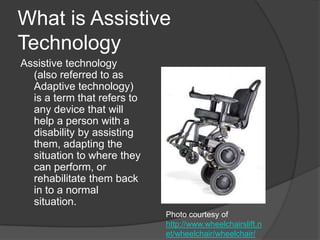
What is Assistive TechnologyAssistive technology (also referred to as Adaptive technology) is a term that refers to any device that will help a person with a disability by assisting them, adapting the situation to where they can perform, or rehabilitate them back in to a normal situation.  Photo courtesy of http://www.wheelchairslift.net/wheelchair/wheelchair/
The Goal of any Assistive TechnologyGive the person a greater deal of independence in their lives!
Use a Process to Find ATMake sure everyone the person interacts with on a weekly basis is involvedMake sure the student is involved!  If the student knows they would never use it, then do not waste the money on it.Be prepared to try many options!
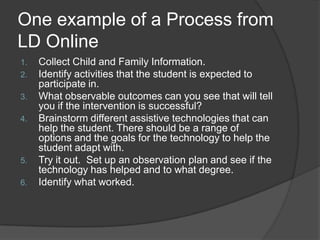
One example of a Process from LD OnlineCollect Child and Family Information.Identify activities that the student is expected to participate in.What observable outcomes can you see that will tell you if the intervention is successful?Brainstorm different assistive technologies that can help the student. There should be a range of options and the goals for the technology to help the student adapt with.Try it out.  Set up an observation plan and see if the technology has helped and to what degree.Identify what worked.
One good rule of thumb . . . Keep it as simple as possible!During the space race, the US scientist knew that a normal pen would not work because there is no gravity to make the ink work.  They spent thousands of dollars developing a pen that will work in space.The Soviets had the same problem.  They decided to use a pencil in space.
One good rule of thumb . . . Keep it as simple as possible! (Cont)If the student has problems writing with a normal pencil, you could modify the IEP to let the student carry around a laptop for their work but if the student is able to write with a larger pencil, then just get a box of larger pencils instead of buying a laptop for the child! Some of the devices can range from $15 to $3,000.  Also, ask if you can try out the technology before you have to buy!
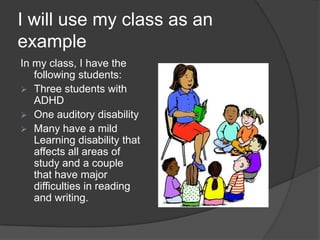
I will use my class as an exampleIn my class, I have the following students:Three students with ADHD
One auditory disability
Many have a mild Learning disability that affects all areas of study and a couple that have major difficulties in reading and writing.Students with Attention Deficient-Hyperactivity DisorderWhat to do when the student can not pay attention?
Some General Tips . . . No TechSome common things you can do that do not require any AT are as follows.Create a RoutineGet OrganizedAvoid DistractionsLimit ChoicesChange your Interactions with your student – Use clear, brief directions instead of speeches about responsibilitiesUse goals and rewardsDiscipline effectively – Time-outs or removing privileges Help them find a talent
Some Assistive Technology for ADHDPersonal FM Listening devices – These devices sends the source of the sound (a movie, a lecture, etc) directly into the listener’s ears and helps the students focus on the material at hand.
Information data managers – If the student has trouble organizing data like calendars, to-do lists, etc. then these devices can help.  They can be hand-held, computer software, or a combination that “shares” the data.Some Assistive Technology for ADHD (Cont.)http://www.fffbi.comThis website, for the FFFBI Academy (the Fin, Fur, and Feather Bureau of Investigation) was designed to help upper level elementary and middle school students and is especially designed to help students with attention problems.  They have games, assignments, and even homework help.
Auditory DisabilityWhat to do if they cannot hear you?
Some General Tips . . . No TechDistance between the listener and the source – the further away the person is to the source of the sound, the harder it is to hear it.Competing sound in the environment – If the students have to hear something over another sound in the background, even the whine of a fan in the computer, it might become too much for the student to be able to hear.Poor room acoustics/reverberations – If the room has a lot of empty space and walls and hard floors for sound waves to bounce off of, then you will get echoes, or reverberations.  These sounds will affect the student’s ability to hear because it will cause distortions in the sound and make it harder to hear.
Some Assistive Technology for Auditory DisabilitiesFrom http://www.nsnet.org/start/deaf.pdfAmplification Technologies – If the student is just a little hard of hearing, then these devices will help boost the sounds to help the student.Hearing aidsCochlear implantPersonal FM SystemSound Field FM Equipment on Freefield Amplification – Unlike the personal system, these use speakers to project the teacher’s voice.  I have been told this works for students without disabilities as well!
Some Assistive Technology for Auditory Disabilities (Cont.)Other technologiesTelecommunications Devices for the Deaf (TDD) – Text telephone that sends typed messages back and forth.  If the person is trying to communicate to a hearing person without a TDD, they can call the operator who will place the call to a hearing person with a TDD who acts as a relay.Closed Caption DecoderLaptops – lets the student see the teacher speak and let the student take notes.Overhead projectors – Lets the students see the teacher while they explain the visual materials.
Learning DisabilitiesWhat to do to help students that have trouble learning the material?
Some General Tips . . . No TechCommon skills that are often affected by learning disabilities are as followsReadingWritingListeningSpeakingReasoningDoing mathAs many as 1 in 5 people in the US have LDAccording to http://www.medicinenet.com/learning_disability/article.htm
Some Assistive Technology for Learning DisabilitiesThe following information came from the following website:http://www.greatschools.org/special-education/assistive-technology/702-assistive-technology-for-kids-with-learning-disabilities-an-overview.gs
Some Assistive Technology for Learning Disabilities (Cont.)Different assistive technologies that can help students with LD in general:Electronic math worksheets – If they have problems writing or organizing problems in math, this software can help the student keep everything organized.Graphic organizers – This can help the student keep organized while writing.Information data managersPersonal FM Listening device
Some Assistive Technology for Learning Disabilities (Cont.)Different assistive technologies that can help students with LD in reading and writingAbbreviation expanders – software that the student can use to store commonly used abbreviations that will change into the full word when typed.Alternate keyboards – some keyboards can be used that will reduce the number of options on the board that is often beneficial to LD studentsAudio books and publications – If the student has a problem with reading, then the student might benefit from audio booksOptical Character Recognition – If the student has trouble reading, these devices will help the student by scanning the material and then reading it aloud to the student.  This can be used as a handheld device, software on a computer, or stand-alone units.
What I will do . . .One option that seems to help a lot of students is a Sound Field FM Equipment on Freefield Amplification or even just a personal tool.  But in the end, I must take each student and check them independently!
In Conclusion . . . Assistive Technology (AT) is supposed to help the student gain independence from their disability!Each student is different, have them become involved!Keep it as simple as possible.

Assistive technologies for students with special needs

  • 1.
    Assistive Technologies forstudents with special needs
  • 2.
    What is AssistiveTechnologyAssistive technology (also referred to as Adaptive technology) is a term that refers to any device that will help a person with a disability by assisting them, adapting the situation to where they can perform, or rehabilitate them back in to a normal situation. Photo courtesy of http://www.wheelchairslift.net/wheelchair/wheelchair/
  • 3.
    The Goal ofany Assistive TechnologyGive the person a greater deal of independence in their lives!
  • 4.
    Use a Processto Find ATMake sure everyone the person interacts with on a weekly basis is involvedMake sure the student is involved! If the student knows they would never use it, then do not waste the money on it.Be prepared to try many options!
  • 5.
    One example ofa Process from LD OnlineCollect Child and Family Information.Identify activities that the student is expected to participate in.What observable outcomes can you see that will tell you if the intervention is successful?Brainstorm different assistive technologies that can help the student. There should be a range of options and the goals for the technology to help the student adapt with.Try it out. Set up an observation plan and see if the technology has helped and to what degree.Identify what worked.
  • 6.
    One good ruleof thumb . . . Keep it as simple as possible!During the space race, the US scientist knew that a normal pen would not work because there is no gravity to make the ink work. They spent thousands of dollars developing a pen that will work in space.The Soviets had the same problem. They decided to use a pencil in space.
  • 7.
    One good ruleof thumb . . . Keep it as simple as possible! (Cont)If the student has problems writing with a normal pencil, you could modify the IEP to let the student carry around a laptop for their work but if the student is able to write with a larger pencil, then just get a box of larger pencils instead of buying a laptop for the child! Some of the devices can range from $15 to $3,000. Also, ask if you can try out the technology before you have to buy!
  • 8.
    I will usemy class as an exampleIn my class, I have the following students:Three students with ADHD
  • 9.
  • 10.
    Many have amild Learning disability that affects all areas of study and a couple that have major difficulties in reading and writing.Students with Attention Deficient-Hyperactivity DisorderWhat to do when the student can not pay attention?
  • 11.
    Some General Tips. . . No TechSome common things you can do that do not require any AT are as follows.Create a RoutineGet OrganizedAvoid DistractionsLimit ChoicesChange your Interactions with your student – Use clear, brief directions instead of speeches about responsibilitiesUse goals and rewardsDiscipline effectively – Time-outs or removing privileges Help them find a talent
  • 12.
    Some Assistive Technologyfor ADHDPersonal FM Listening devices – These devices sends the source of the sound (a movie, a lecture, etc) directly into the listener’s ears and helps the students focus on the material at hand.
  • 13.
    Information data managers– If the student has trouble organizing data like calendars, to-do lists, etc. then these devices can help. They can be hand-held, computer software, or a combination that “shares” the data.Some Assistive Technology for ADHD (Cont.)http://www.fffbi.comThis website, for the FFFBI Academy (the Fin, Fur, and Feather Bureau of Investigation) was designed to help upper level elementary and middle school students and is especially designed to help students with attention problems. They have games, assignments, and even homework help.
  • 14.
    Auditory DisabilityWhat todo if they cannot hear you?
  • 15.
    Some General Tips. . . No TechDistance between the listener and the source – the further away the person is to the source of the sound, the harder it is to hear it.Competing sound in the environment – If the students have to hear something over another sound in the background, even the whine of a fan in the computer, it might become too much for the student to be able to hear.Poor room acoustics/reverberations – If the room has a lot of empty space and walls and hard floors for sound waves to bounce off of, then you will get echoes, or reverberations. These sounds will affect the student’s ability to hear because it will cause distortions in the sound and make it harder to hear.
  • 16.
    Some Assistive Technologyfor Auditory DisabilitiesFrom http://www.nsnet.org/start/deaf.pdfAmplification Technologies – If the student is just a little hard of hearing, then these devices will help boost the sounds to help the student.Hearing aidsCochlear implantPersonal FM SystemSound Field FM Equipment on Freefield Amplification – Unlike the personal system, these use speakers to project the teacher’s voice. I have been told this works for students without disabilities as well!
  • 17.
    Some Assistive Technologyfor Auditory Disabilities (Cont.)Other technologiesTelecommunications Devices for the Deaf (TDD) – Text telephone that sends typed messages back and forth. If the person is trying to communicate to a hearing person without a TDD, they can call the operator who will place the call to a hearing person with a TDD who acts as a relay.Closed Caption DecoderLaptops – lets the student see the teacher speak and let the student take notes.Overhead projectors – Lets the students see the teacher while they explain the visual materials.
  • 18.
    Learning DisabilitiesWhat todo to help students that have trouble learning the material?
  • 19.
    Some General Tips. . . No TechCommon skills that are often affected by learning disabilities are as followsReadingWritingListeningSpeakingReasoningDoing mathAs many as 1 in 5 people in the US have LDAccording to http://www.medicinenet.com/learning_disability/article.htm
  • 20.
    Some Assistive Technologyfor Learning DisabilitiesThe following information came from the following website:http://www.greatschools.org/special-education/assistive-technology/702-assistive-technology-for-kids-with-learning-disabilities-an-overview.gs
  • 21.
    Some Assistive Technologyfor Learning Disabilities (Cont.)Different assistive technologies that can help students with LD in general:Electronic math worksheets – If they have problems writing or organizing problems in math, this software can help the student keep everything organized.Graphic organizers – This can help the student keep organized while writing.Information data managersPersonal FM Listening device
  • 22.
    Some Assistive Technologyfor Learning Disabilities (Cont.)Different assistive technologies that can help students with LD in reading and writingAbbreviation expanders – software that the student can use to store commonly used abbreviations that will change into the full word when typed.Alternate keyboards – some keyboards can be used that will reduce the number of options on the board that is often beneficial to LD studentsAudio books and publications – If the student has a problem with reading, then the student might benefit from audio booksOptical Character Recognition – If the student has trouble reading, these devices will help the student by scanning the material and then reading it aloud to the student. This can be used as a handheld device, software on a computer, or stand-alone units.
  • 23.
    What I willdo . . .One option that seems to help a lot of students is a Sound Field FM Equipment on Freefield Amplification or even just a personal tool. But in the end, I must take each student and check them independently!
  • 24.
    In Conclusion .. . Assistive Technology (AT) is supposed to help the student gain independence from their disability!Each student is different, have them become involved!Keep it as simple as possible.