Assistive Tech Exploration
What is Assistive
              Technology?
· The amendments to the Individuals with
  Disabilities Education Act (IDEA) require that
  the Individualized Education Program (IEP)
  team consider whether the child requires
  assistive technology and services (20 U.S.C.
  Section 1414[d] [3] [B] [v]).


·
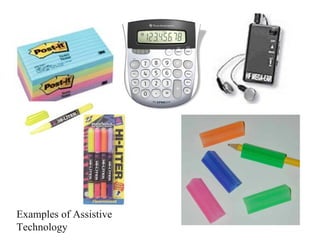
Examples of Assistive
Technology
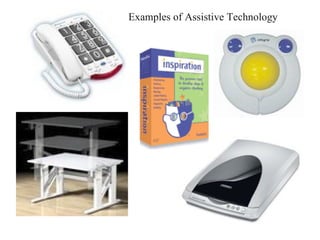
Examples of Assistive Technology
What is Assistive
                   Technology?
· IDEA (20 U.S.C. Section 1401) includes the following
  definitions:
· 1. ASSISTIVE TECHNOLOGY DEVICE: The term ‘assistive
  technology device’ means any item, piece of equipment or
  product system, whether acquired commercially off the shelf,
  modified, or customized, that is used to increase, maintain, or
  improve functional capabilities of a child with a disability.
· 2. ASSISTIVE TECHNOLOGY SERVICE: The term ‘assistive
  technology service’ means any service that directly assists a
  child with a disability in the selection, acquisition, or use of an
  assistive technology device. Such term includes—
ASSISTIVE TECHNOLOGY
          SERVICE:
 the evaluation of the needs of such child, including a functional
  evaluation of the child in the child’s customary environment;
 purchasing, leasing, or otherwise providing for the acquisition of
  assistive technology devices by such child;
 selecting, designing, fitting, customizing, adapting, applying,
  maintaining, repairing, or replacing of assistive technology
  devices;
 coordinating and using other therapies, interventions, or services
  with assistive technology devices, such as those associated with
  existing education and rehabilitation plans and programs;
 training or technical assistance for such child, or, when
  appropriate, the family of such child; and
 training or technical assistance for professionals (including
  individuals providing education and rehabilitation services) to,
  employ, or otherwise substantially involved in the major life
  functions of such child
Assistive Tech Tools

 AT tools can greatly improve success in
  school, work and life and increase self-
  reliance and independence.
 Cost can vary and range from a few dollars
  for “low tech” tools such as pencil grips or
  a large button calculator to several
  thousand dollars or more for “high-tech”
  hardware and software.
Assistive Tech - “Low-tech”
       and “Hi-tech”
· Low tech examples:
  ·   Pencil grips
  ·   Highlighting pens
  ·   Post-it Notes
  ·   Talking calculators, spell check
· Mid to Hi- tech examples:
  ·   Tape recorders
  ·   Portable keyboards
  ·   Optical character Recognition
  ·   Mind mapping software - Inspiration
Assistive Tech Tools

DO-IT
Disabilities, Opportunities, Internetworking, and Technology

·   DO-IT serves to increase the participation of individuals with disabilities in
    challenging academic programs and careers. It promotes the use of computer
    and networking technologies to increase independence, productivity, and
    participation in education and employment.

·   Go to the following website and select a streaming video to learn more about
    individuals with disabilities and how technology has improved their lives.

· http://www.washington.edu/doit/Video/

Assistive tech definition

  • 1.
  • 2.
    What is Assistive Technology? · The amendments to the Individuals with Disabilities Education Act (IDEA) require that the Individualized Education Program (IEP) team consider whether the child requires assistive technology and services (20 U.S.C. Section 1414[d] [3] [B] [v]). ·
  • 3.
  • 4.
  • 5.
    What is Assistive Technology? · IDEA (20 U.S.C. Section 1401) includes the following definitions: · 1. ASSISTIVE TECHNOLOGY DEVICE: The term ‘assistive technology device’ means any item, piece of equipment or product system, whether acquired commercially off the shelf, modified, or customized, that is used to increase, maintain, or improve functional capabilities of a child with a disability. · 2. ASSISTIVE TECHNOLOGY SERVICE: The term ‘assistive technology service’ means any service that directly assists a child with a disability in the selection, acquisition, or use of an assistive technology device. Such term includes—
  • 6.
    ASSISTIVE TECHNOLOGY SERVICE:  the evaluation of the needs of such child, including a functional evaluation of the child in the child’s customary environment;  purchasing, leasing, or otherwise providing for the acquisition of assistive technology devices by such child;  selecting, designing, fitting, customizing, adapting, applying, maintaining, repairing, or replacing of assistive technology devices;  coordinating and using other therapies, interventions, or services with assistive technology devices, such as those associated with existing education and rehabilitation plans and programs;  training or technical assistance for such child, or, when appropriate, the family of such child; and  training or technical assistance for professionals (including individuals providing education and rehabilitation services) to, employ, or otherwise substantially involved in the major life functions of such child
  • 7.
    Assistive Tech Tools AT tools can greatly improve success in school, work and life and increase self- reliance and independence.  Cost can vary and range from a few dollars for “low tech” tools such as pencil grips or a large button calculator to several thousand dollars or more for “high-tech” hardware and software.
  • 8.
    Assistive Tech -“Low-tech” and “Hi-tech” · Low tech examples: · Pencil grips · Highlighting pens · Post-it Notes · Talking calculators, spell check · Mid to Hi- tech examples: · Tape recorders · Portable keyboards · Optical character Recognition · Mind mapping software - Inspiration
  • 9.
    Assistive Tech Tools DO-IT Disabilities,Opportunities, Internetworking, and Technology · DO-IT serves to increase the participation of individuals with disabilities in challenging academic programs and careers. It promotes the use of computer and networking technologies to increase independence, productivity, and participation in education and employment. · Go to the following website and select a streaming video to learn more about individuals with disabilities and how technology has improved their lives. · http://www.washington.edu/doit/Video/