EDUC9701 Reading
      Discussion
Weaving a Personal Web: Using online
 technologies to create customized,
  connected, and dynamic learning
           environments

          Jessica McElvaney
             Zane Berge
Main points


 How learners can use personal web
  technologies (PWTs)
 PWTs and connectivist learning
  principles
 Description and application of various
  PWTs
 Personal learning environments (PLEs)
  and personal learning networks (PLNs)
 Disadvantages of using PWTs
 People can personalise their experiences
  with the internet use by creating their
  own personal web
 “The 2009 Horizon Report defines
  personal webs as "customized, personal
  web-based environments . . . that
  explicitly support one's social,
  professional, [and] learning . . . activities
  via highly personalized windows to the
  networked world" (Johnson, Levine &
  Smith, 2009, p. 19)”
Connectivism and PWTs

 Employees can use PWTs and make their own
   PLEs

 Whenever individuals need knowledge they can
   use their PLEs to get it

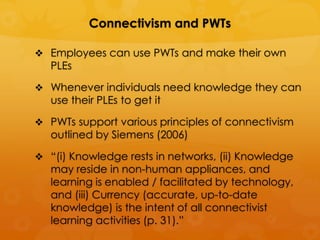
 PWTs support various principles of connectivism
   outlined by Siemens (2006)

 “(i) Knowledge rests in networks, (ii) Knowledge
   may reside in non-human appliances, and
   learning is enabled / facilitated by technology,
   and (iii) Currency (accurate, up-to-date
   knowledge) is the intent of all connectivist
   learning activities (p. 31).”
 PWTs enables learners to increase
  their ability for knowledge by linking
  to external resources
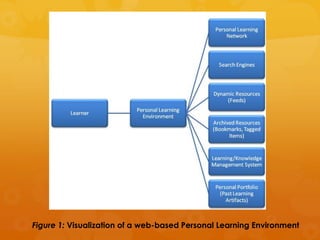
Figure 1: Visualization of a web-based Personal Learning Environment
Overview of Personal Web Technologies

 “When personal web technologies are
  used for educational or training purposes,
  they offer learners the flexibility to choose
  from a variety of tools and methods to
  accomplish their goals. Each individual
  has the opportunity to choose how they
  manage online resources according to
  their own preferences.” (p. 3)
   Social bookmarking and research tools
   Personal publishing tools
   Aggregators
   Widgets
Social Bookmarking and Research Tools


 These tools allow to save online resources
  and organise them for later use
 Can be shared with colleagues, friends
  and the public
        Delicious
        Diigo
        Twine
        Connotea
        Zotero
Personal Publishing Tools


 Examine and evaluate topics (King,
  2009)
 Micro-blogging allows questioning and
  collaborative brain storming (King, 2009)
 “Camplese (2009) proposes that
  blogging be used to create an
  individualized content management
  system that publishes, organizes, and
  archives an on-going activity feed of a
  student's learning (“Blogs at Penn State”
  section, para. 3, line 4).”
Personal Publishing Tools


 Blogs can incorporate multimedia

 “Twitter are user-friendly tools that allow
  them to easily "ask and answer
  questions, learn from experts, share
  resources, and react to events on the
  fly" (Boss, 2008, para. 4, line 3).”
Aggregators


 “These tools filter online information
  and collect articles, media, and
  conversations customized to the
  user's needs; saving time and effort
  (King, 2009).”
Widgets


 “Widgets are small, adaptable,
  programmable, web-based gadgets
  that can be embedded into a variety
  of sites or used on mobile phones or
  desktops (Guess, 2008).”
 many sites allow users to create their
  own widgets.
 “Learners can use widgets to make
  other personal web technologies more
  portable…”
Using Personal Web Technologies to Create
               PLEs and PLNs

  PWTs can be put together to make an
   individual PLE and to manage a PLN

  “… a PLE is the sum of websites and
   technologies that an individual makes use of
   to learn. PLEs may range in complexity from a
   single blog to an inter-connected web of
   social bookmarking tools, personal publishing
   platforms, search engines, social networks,
   aggregators, etc.”

  Users can create an online PLN of colleagues
   and friends and can be shared in the virtual
   environment
 PLE and PLN can be mobile

 Most PWTs provide mobile-friendly
   versions
 “Instead of limiting learning to traditional
   environments, mobile versions of PWTs
   give learners more options on where and
   when to learn”
 Mobile devices are handy and learning
   can be recorded the site and instantly.
Learning Applications of PWTs

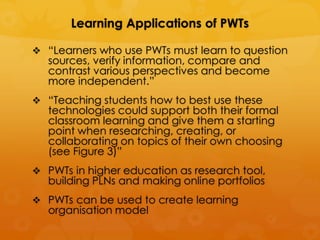
 “Learners who use PWTs must learn to question
   sources, verify information, compare and
   contrast various perspectives and become
   more independent.”
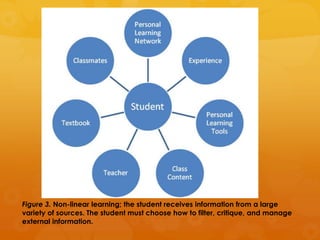
 “Teaching students how to best use these
   technologies could support both their formal
   classroom learning and give them a starting
   point when researching, creating, or
   collaborating on topics of their own choosing
   (see Figure 3)”
 PWTs in higher education as research tool,
   building PLNs and making online portfolios
 PWTs can be used to create learning
   organisation model
Figure 3. Non-linear learning; the student receives information from a large
variety of sources. The student must choose how to filter, critique, and manage
external information.
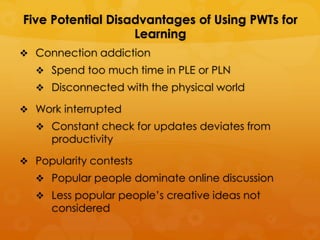
Five Potential Disadvantages of Using PWTs for
                   Learning
 Connection addiction
   Spend too much time in PLE or PLN
   Disconnected with the physical world

 Work interrupted
   Constant check for updates deviates from
     productivity

 Popularity contests
   Popular people dominate online discussion
   Less popular people’s creative ideas not
     considered
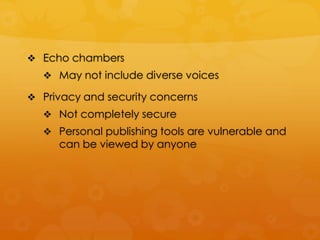
 Echo chambers
   May not include diverse voices

 Privacy and security concerns
   Not completely secure
   Personal publishing tools are vulnerable and
     can be viewed by anyone
Conclusion

 PWTs allows learners to take an active role

 To effectively use PWTs leaners need to
  be able to evaluate content and
  resources
 Learners choose how to interact with
  PWTs
 PWTs offer new learning opportunities for
  self-directed and critical thinking learners
Discussion


 How does PWTs enhance diverse learning?

 How can teachers develop critical media
   and information literacy in their students so
   that they can use PWTs effectively?

 How can we overcome/minimise the five
   potential disadvantages PWTs?

 How does your institution/school use PLEs and
   PLNs?

Assignment 1 educ9701

  • 1.
    EDUC9701 Reading Discussion Weaving a Personal Web: Using online technologies to create customized, connected, and dynamic learning environments Jessica McElvaney Zane Berge
  • 2.
    Main points  Howlearners can use personal web technologies (PWTs)  PWTs and connectivist learning principles  Description and application of various PWTs  Personal learning environments (PLEs) and personal learning networks (PLNs)  Disadvantages of using PWTs
  • 3.
     People canpersonalise their experiences with the internet use by creating their own personal web  “The 2009 Horizon Report defines personal webs as "customized, personal web-based environments . . . that explicitly support one's social, professional, [and] learning . . . activities via highly personalized windows to the networked world" (Johnson, Levine & Smith, 2009, p. 19)”
  • 4.
    Connectivism and PWTs Employees can use PWTs and make their own PLEs  Whenever individuals need knowledge they can use their PLEs to get it  PWTs support various principles of connectivism outlined by Siemens (2006)  “(i) Knowledge rests in networks, (ii) Knowledge may reside in non-human appliances, and learning is enabled / facilitated by technology, and (iii) Currency (accurate, up-to-date knowledge) is the intent of all connectivist learning activities (p. 31).”
  • 5.
     PWTs enableslearners to increase their ability for knowledge by linking to external resources
  • 6.
    Figure 1: Visualizationof a web-based Personal Learning Environment
  • 7.
    Overview of PersonalWeb Technologies  “When personal web technologies are used for educational or training purposes, they offer learners the flexibility to choose from a variety of tools and methods to accomplish their goals. Each individual has the opportunity to choose how they manage online resources according to their own preferences.” (p. 3)  Social bookmarking and research tools  Personal publishing tools  Aggregators  Widgets
  • 8.
    Social Bookmarking andResearch Tools  These tools allow to save online resources and organise them for later use  Can be shared with colleagues, friends and the public  Delicious  Diigo  Twine  Connotea  Zotero
  • 9.
    Personal Publishing Tools Examine and evaluate topics (King, 2009)  Micro-blogging allows questioning and collaborative brain storming (King, 2009)  “Camplese (2009) proposes that blogging be used to create an individualized content management system that publishes, organizes, and archives an on-going activity feed of a student's learning (“Blogs at Penn State” section, para. 3, line 4).”
  • 10.
    Personal Publishing Tools Blogs can incorporate multimedia  “Twitter are user-friendly tools that allow them to easily "ask and answer questions, learn from experts, share resources, and react to events on the fly" (Boss, 2008, para. 4, line 3).”
  • 11.
    Aggregators  “These toolsfilter online information and collect articles, media, and conversations customized to the user's needs; saving time and effort (King, 2009).”
  • 12.
    Widgets  “Widgets aresmall, adaptable, programmable, web-based gadgets that can be embedded into a variety of sites or used on mobile phones or desktops (Guess, 2008).”  many sites allow users to create their own widgets.  “Learners can use widgets to make other personal web technologies more portable…”
  • 13.
    Using Personal WebTechnologies to Create PLEs and PLNs  PWTs can be put together to make an individual PLE and to manage a PLN  “… a PLE is the sum of websites and technologies that an individual makes use of to learn. PLEs may range in complexity from a single blog to an inter-connected web of social bookmarking tools, personal publishing platforms, search engines, social networks, aggregators, etc.”  Users can create an online PLN of colleagues and friends and can be shared in the virtual environment
  • 14.
     PLE andPLN can be mobile  Most PWTs provide mobile-friendly versions  “Instead of limiting learning to traditional environments, mobile versions of PWTs give learners more options on where and when to learn”  Mobile devices are handy and learning can be recorded the site and instantly.
  • 15.
    Learning Applications ofPWTs  “Learners who use PWTs must learn to question sources, verify information, compare and contrast various perspectives and become more independent.”  “Teaching students how to best use these technologies could support both their formal classroom learning and give them a starting point when researching, creating, or collaborating on topics of their own choosing (see Figure 3)”  PWTs in higher education as research tool, building PLNs and making online portfolios  PWTs can be used to create learning organisation model
  • 16.
    Figure 3. Non-linearlearning; the student receives information from a large variety of sources. The student must choose how to filter, critique, and manage external information.
  • 17.
    Five Potential Disadvantagesof Using PWTs for Learning  Connection addiction  Spend too much time in PLE or PLN  Disconnected with the physical world  Work interrupted  Constant check for updates deviates from productivity  Popularity contests  Popular people dominate online discussion  Less popular people’s creative ideas not considered
  • 18.
     Echo chambers  May not include diverse voices  Privacy and security concerns  Not completely secure  Personal publishing tools are vulnerable and can be viewed by anyone
  • 19.
    Conclusion  PWTs allowslearners to take an active role  To effectively use PWTs leaners need to be able to evaluate content and resources  Learners choose how to interact with PWTs  PWTs offer new learning opportunities for self-directed and critical thinking learners
  • 20.
    Discussion  How doesPWTs enhance diverse learning?  How can teachers develop critical media and information literacy in their students so that they can use PWTs effectively?  How can we overcome/minimise the five potential disadvantages PWTs?  How does your institution/school use PLEs and PLNs?