Veille technologique en TIC Aspects stratégiques des réseaux Eric Vyncke [email_address] Dernière mise à jour: 7 novembre 2007
References & Misc Slides on http://mastertic.blogspot.com/ Contacts Main job: Cisco Systems as Distinguished Engineer Email:  [email_address] Mobile: +32 475 312458
Agenda Introduction to network The acronym soup The impact of security The impact of wireless The impact of IP telephony Wrap-up: The Questions to be asked
Introduction to Network
Why a Section on Networks? TIC = Technologie  de l’Information et Communication    pas de TIC sans réseaux   Connaître les réseaux = faire des bons choix    les réseaux ont impacté le business depuis la fin de 90’s
The Acronyms Soup Or a small touch of technology
Importance de la standardisation peu de domaines ont autant besoin de standards la communication est un domaine complexe: besoin de spécifications précises communication entre diverses machines communication entre divers constructeurs informatiques plusieurs types de standards: standards propriétaires: parfois non public, réservé à un constructeur: SNA d’IBM, NetWare de Novell, DECnet de Digital, Transdata de Siemens Nixdorf, ... Presque disparus mais encore actifs dans les domaines ‘pre-standard’ Voix sur IP: SCCP de Cisco, wireless security, … standards ouverts  de jure : OSI de l’ISO, IEEE 802.*, X.25, ... standards ouverts  de facto:  TCP/IP, Ethernet, ...
Généralités les communications sont un domaine complexe et en évolution constante => besoin d’un modèle: établir des spécifications et les tests comparer des solutions établir des théories le modèle sera en plusieurs couches simples à vocation précise afin de faciliter la compréhension et l’implémentation
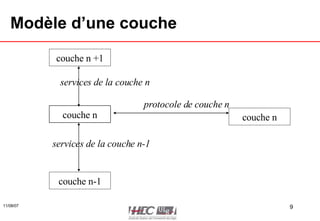
Modèle d’une couche couche n couche n couche n +1 couche n-1 protocole de couche n services de la couche n services de la couche n-1
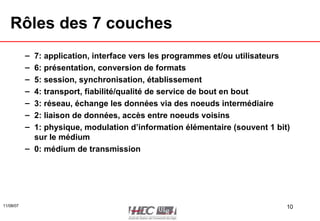
Rôles des 7 couches 7: application, interface vers les programmes et/ou utilisateurs 6: présentation, conversion de formats 5: session, synchronisation, établissement 4: transport, fiabilité/qualité de service de bout en bout 3: réseau, échange les données via des noeuds intermédiaire 2: liaison de données, accès entre noeuds voisins 1: physique, modulation d’information élémentaire (souvent 1 bit) sur le médium 0: médium de transmission
0: medium de transmission Onde hertzienne: distance faible (line of sight), sensibilité au bruit mais pas besoin de câble câble coaxial: bonne résistance au bruit câble torsadé: bon marché, simple à mettre en œuvre => le plus répandu en entreprise fibre optique: chère, complexe à mettre en oeuvre, très résistante au bruit
1: couche physique deux classes de modulation pour un signal informatique bande de base: le signal est directement transmis (comme le télégraphe) exemple: Ethernet bande large  broadband : utilisation d’une porteuse modulée (comme la radio) exemples: ADSL, WiFi 1 0 0 1 0 0
2: couche liaison de données gestion de l’accès au médium Qui peut transmettre quand? Notion de protocole d’accès Qui est le destinataire pour la trame? Notion d’adresse unique sur le médium  (Medium Access Control MAC address) Qui est la source de la trame? Notion d’adresse unique sur le médium Dans quel ordre transmettre les données? La source et la destination sont sur le même media Détection des erreurs liées au media (parasites, …) Pertes possibles exemples: Ethernet, Token Ring
...AN Based on the Span A lot of acronym ending with ...AN Area Network Like LAN Local Area Network: several 100’s of meters MAN Metropolitan Area Network: a city, 10’s of km WAN Wide Area Network: the whole Earth PAN Personal Area Network: one meter or so RAN Radio Area Network: from a single antenna
Local Area Network: LAN LAN are usually a layer 2 technology Using a single media Most common Ethernet over twisted pair 10 Mbps, 100 Mbps (= Fast Ethernet), 1 Gbps, ... Standard IEEE 802.3 Before over a coax cable now over twisted pair and hub/switch Unique Ethernet address on each Network Interface Card (NIC) 24 bits unique per vendor: 00-02-8A (Cisco) 24 bits assigned by vendor: 09-07-CF     48-bits unique global address: 00-02-8A-09-07-CF
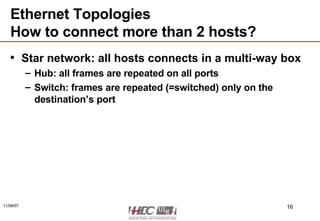
Ethernet Topologies How to connect more than 2 hosts? Star network: all hosts connects in a multi-way box Hub: all frames are repeated on all ports Switch: frames are repeated (=switched) only on the destination’s port
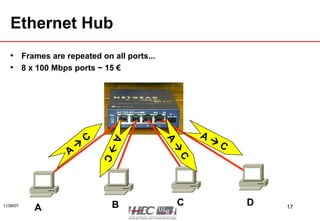
Ethernet Hub Frames are repeated on all ports... 8 x 100 Mbps ports ~ 15 € A    C A B C D A    C A    C A    C
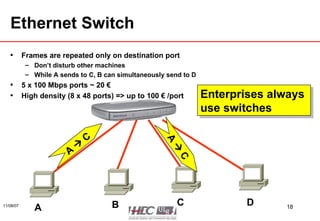
Ethernet Switch Frames are repeated only on destination port Don’t disturb other machines While A sends to C, B can simultaneously send to D 5 x 100 Mbps ports ~ 20 € High density (8 x 48 ports) => up to 100 € /port A    C A B C D A    C Enterprises always  use switches
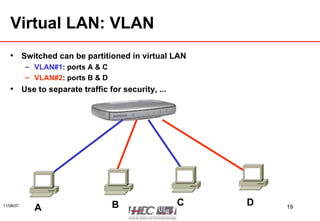
Virtual LAN: VLAN Switched can be partitioned in virtual LAN VLAN#1 : ports A & C VLAN#2 : ports B & D Use to separate traffic for security, ... A B C D
Power over Ethernet The cable can also transmit electrical power! IEEE 802.3af  Only 42V and 15 W but enough to power WiFi Access Point or an IP phone Eliminates power cord and transformer
Wide Area Network:  As Layer 1 or 2 Services WAN: transfer of data over 100’s of km Service is offered by SP (service provider) Nation wide: Belgacom, Voo, Mobistar, Telenet Worldwide: British Telecom, Colt, Verizon, ... Layer 1: leased line = a copper line with modem Like from your ADSL router to Skynet/Belgacom Layer 1: optical fiber Dark fiber  (you need to add laser transmitter): just for you, €€€ Shared fiber (each customer uses a different color for laser): cheaper Layer 2: point to point link (or star network) where SP handles the layer 1 (modulation) and repeats frame (layer 2) Used to be the prevalent solution: X.25, Frame Relay But now reserved for MAN with Ethernet
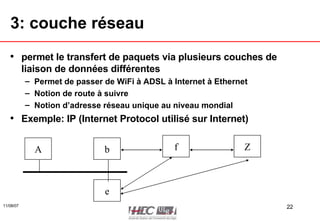
3: couche réseau permet le transfert de paquets via plusieurs couches de liaison de données différentes Permet de passer de WiFi à ADSL à Internet à Ethernet Notion de route à suivre Notion d’adresse réseau unique au niveau mondial Exemple: IP (Internet Protocol utilisé sur Internet) A b Z f e
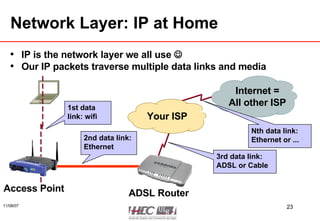
Network Layer: IP at Home IP is the network layer we all use   Our IP packets traverse multiple data links and media Access Point ADSL Router Your ISP Internet = All other ISP 1st data link: wifi 2nd data link: Ethernet 3rd data link: ADSL or Cable Nth data link: Ethernet or ...
What is an IP address? In IPv4, an address is a 32 bit quantity that uniquely identifies a network interface. In IPv4 there are 2 32 =  4,294,967,296 unique addresses possible
Basic Addressing IP addresses are written in  dotted decimal  format. Four sections are separated by dots. Each section contains a number between 0 and 255. 64.100.24.1 Dots separate the sections Each section contains a number between 0 and 255
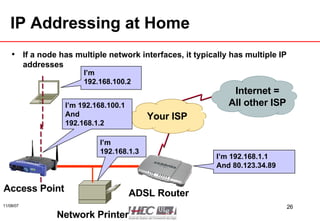
IP Addressing at Home If a node has multiple network interfaces, it typically has multiple IP addresses Access Point ADSL Router Your ISP Internet = All other ISP I’m 192.168.100.2 I’m 192.168.100.1 And  192.168.1.2 I’m 192.168.1.1 And 80.123.34.89 Network Printer I’m 192.168.1.3
IP Address Hierarchy For Mr. Postman IP address is divided into two parts to achieve efficient “packet processing” Network-id: Represents the physical network commonly called a “prefix”  (often first 24 bits) Host-id: Represents a computer on the network  (often last 8 bits) Tasman Dr. 250  Tasman Dr. 102 Main St. 260  Tasman Dr. Main St. 100  Main St. 101  Main St. ? ?
Can we Automate Addressing? Defining static IP addresses on each host Does not scale Error prone (moving a PC to another network), ... Dynamic Host Configuration Protocol (DHCP) DHCP server (Windows or a router) is configured with the list of IP addresses for a network When a host boots, it ask the DHCP for an IP address (and other information like routing, DNS, ...) Most enterprises use DHCP except for servers keeping the log to see who is using which address
Caractéristiques d’IP envoi d’un paquet IP sans garantie de résultat: possibilité de pertes, voire de désordre dans les paquets envoyés et reçus possibilité d’envoi en une fois d’un grand volume (>65.000) bytes en une seule opération programme, IP va couper/recoller ce grand volume en petits paquets vrai couche réseau avec possibilité de routage entre plusieurs LAN et WAN beaucoup d’option de  debugging
What is IPv6? The current IP is version 4 Limited address space (32 bits), exhaustion in 2010 The next IP is version 6 Addresses are 128-bits wide No more exhaustion Else nothing has changed Already in Windows Vista or Mac OS/X or Linux Windows XP: ‘ipv6 install’ IPv6 will rule in 2010 at the latest  ALL NEW NETWORKS/APPLICATION  MUST BE DESIGNED FOR IPV6
TCP/IP le vocable TCP/IP regroupe plusieurs protocoles distincts: couche réseau: IP=  Internet Protocol couche transport: orienté connexion: TCP = Transport Control Protocol orienté datagram: UDP=  User Datagram Protocol anciennes spécifications qui ne rentrent pas bien dans le modèle OSI
Les routes dans un réseau IP chaque hôte doit connaître: son adresse IP adresse de son réseau adresse d’un ou plusieurs  routeurs les  routeurs  connaissent l’ensemble des routes, c-à-d comment aller d’un réseau à un autre
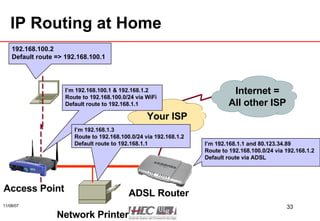
IP Routing at Home Access Point ADSL Router Your ISP Internet = All other ISP 192.168.100.2 Default route => 192.168.100.1 I’m 192.168.100.1 & 192.168.1.2 Route to 192.168.100.0/24 via WiFi Default route to 192.168.1.1 I’m 192.168.1.1 and 80.123.34.89 Route to 192.168.100.0/24 via 192.168.1.2 Default route via ADSL Network Printer I’m 192.168.1.3 Route to 192.168.100.0/24 via 192.168.1.2 Default route to 192.168.1.1
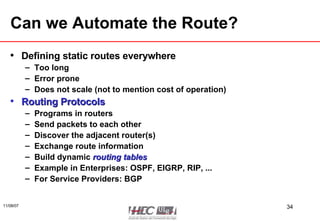
Can we Automate the Route? Defining static routes everywhere Too long Error prone Does not scale (not to mention cost of operation) Routing Protocols Programs in routers  Send packets to each other Discover the adjacent router(s) Exchange route information Build dynamic  routing tables Example in Enterprises: OSPF, EIGRP, RIP, ... For Service Providers: BGP
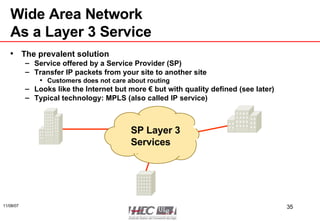
Wide Area Network As a Layer 3 Service The prevalent solution Service offered by a Service Provider (SP) Transfer IP packets from your site to another site Customers does not care about routing Looks like the Internet but more € but with quality defined (see later) Typical technology: MPLS (also called IP service) SP Layer 3 Services
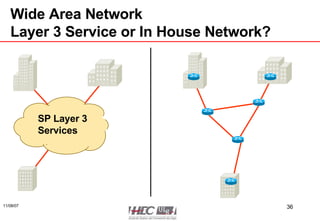
Wide Area Network Layer 3 Service or In House Network? SP Layer 3 Services
Layer 3 Service Pros and Cons Pros Outsource the WAN to SP: no more CAPEX, reduce OPEX Easier to deploy Easier international WAN Specially in  weird  countries Cons Lost of network ownership Could be impossible for some business Need to check quality of delivered service (SLA see later) NB: the cost is not a deal breaker usually
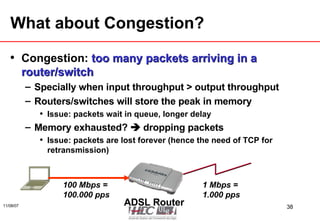
What about Congestion? Congestion:  too many packets arriving in a router/switch Specially when input throughput > output throughput Routers/switches will store the peak in memory Issue: packets wait in queue, longer delay Memory exhausted?    dropping packets Issue: packets are lost forever (hence the need of TCP for retransmission) ADSL Router 100 Mbps = 100.000 pps 1 Mbps = 1.000 pps
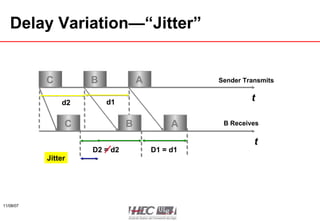
Quality of Service: QoS QoS is a sense of quality for packet transfer Packet loss: due to congestion or frame corruption (rare) Latency (or delay): the time to transfer data from source to destination Jitter: variation of the delay (see next slide)
Delay Variation—“Jitter” t t Sender Transmits B Receives C B A C B A d1 d2 D1 = d1 D2 = d2 Jitter
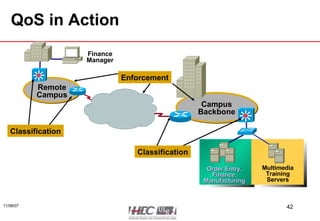
How to Guarantee QoS? Classify & mark Each IP packet is marked with its priority (precedence) The is a byte reserved for it in IP packet By the host By a network device based on TCP/UDP ports Enforce Make different queues: routine, normal, priority, ... In case of congestion Drop packets from routine queue Always process priority packets first Think about fire trucks in traffic jam
QoS in Action Campus Backbone Multimedia Training Servers Order Entry, Finance, Manufacturing Finance Manager Remote Campus Classification Classification Enforcement
Service Level Agreement: SLA This is the contract between A customer A provider About Penalties (discount) when SLA not met Quality of service: Data traffic: packet loss, latency, jitter Availability:  99,999% availability is 5 minutes down per year Maintenance window (scheduled network down) don’t count Change request: time to establish a new circuit Never forget to put SLA  in any service
The Security Impact
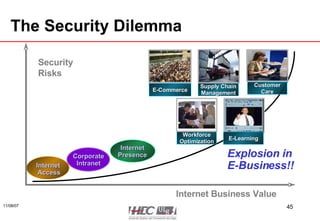
The Security Dilemma Security  Risks Internet Business Value Explosion in  E-Business!! Internet Access Corporate Intranet Internet Presence Customer Care E-Learning Supply Chain Management E-Commerce Workforce Optimization
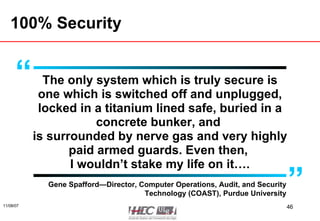
100% Security The only system which is truly secure is one which is switched off and unplugged, locked in a titanium lined safe, buried in a concrete bunker, and  is surrounded by nerve gas and very highly paid armed guards. Even then,  I wouldn’t stake my life on it…. Gene Spafford—Director, Computer Operations, Audit, and Security Technology (COAST), Purdue University “ ”
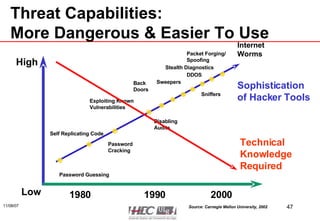
Threat Capabilities: More Dangerous & Easier To Use Sophistication of Hacker Tools Packet Forging/ Spoofing 1990 1980 Password Guessing Self Replicating Code Password Cracking Exploiting Known Vulnerabilities Disabling Audits Back Doors Sweepers Sniffers Stealth Diagnostics High Low 2000 DDOS Internet  Worms Source: Carnegie Mellon University, 2002 Technical Knowledge Required
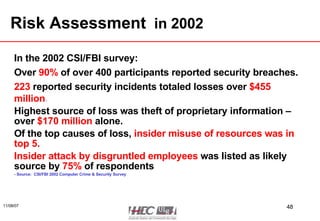
Risk Assessment   in 2002 In the 2002 CSI/FBI survey: Over   90%   of over 400 participants reported security breaches. 223   reported security incidents totaled losses over   $455 million . Highest source of loss was theft of proprietary information – over  $170 million  alone. Of the top causes of loss,  insider misuse of resources was in top 5. Insider attack by disgruntled employees   was listed as likely source by   75%   of respondents - Source:  CSI/FBI 2002 Computer Crime & Security Survey
Risk Assessment  in 2006 In the 2004 CSI/FBI survey (481 US organizations): Over   52%   reported security breaches. Reported security incidents totaled losses over   $52  million .    in decrease   Highest source of loss was virus – over  $15 million  alone followed by unauthorized use  $10 million . Of the top causes of loss,  insider misuse of resources was in top 3. Source:  CSI/FBI 2006 Computer Crime & Security Survey
Insiders… Over 75% of hacking is done by insiders and it’s easy to see why. The person on the inside is on the right side of the firewall—they know the computer systems and they have access to the passwords Neil Barrett, Bull Information Systems, ‘ Computer Crime Fighter’—Personal Computer World, Feb 1999 “ ”
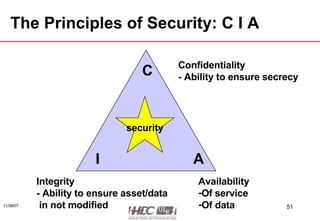
The Principles of Security: C I A Confidentiality - Ability to ensure secrecy Availability Of service Of data Integrity - Ability to ensure asset/data  in not modified security I C A
Attack against Confidentiality telnet foo.bar.org username: dan password: m-y-p-a-s-s-w-o-r-d  d-a-n
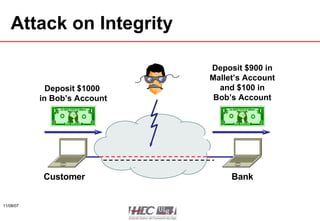
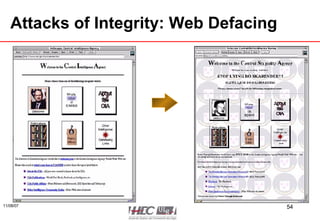
Attack on  Integrity Bank Customer Deposit $1000  in Bob’s Account Deposit $900 in Mallet’s Account and $100 in Bob’s Account
Attacks of Integrity: Web Defacing
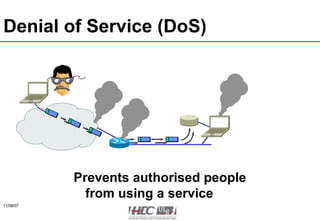
Denial of Service (DoS) Prevents authorised people from using a service
What is Security Management? Risk management Identify assets, discover risk Security policies Reduce the risk Security education Propagate security information to employees
Risk Management This is the process to Identify the risk Assess the risk Reduce the risk Implement countermeasure to reduce risk Do not forget: there is always a risk ! The most tricky… Risk analysis
Purpose of Risk Analysis Need to compare Potential loss due to risk Immediate loss of an asset Recovery of an asset, e.g. data recovery Long term loss Cost of countermeasure Cost of HW & SW Cost of procedure: less flexibility, …
Asset Evaluation Not always easy for data ! Cost of data:  Acquisition,  Data entry,  Storage and maintenance,  R&D Value of data assessed by information owner: Trade secret, … Value of asset Inventory value Cost of replacement, loss of productivity
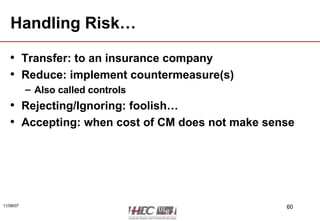
Handling Risk… Transfer: to an insurance company Reduce: implement countermeasure(s) Also called controls Rejecting/Ignoring: foolish… Accepting: when cost of CM does not make sense
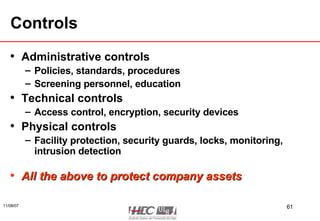
Controls Administrative controls Policies, standards, procedures Screening personnel, education Technical controls Access control, encryption, security devices Physical controls Facility protection, security guards, locks, monitoring, intrusion detection All the above to protect company assets
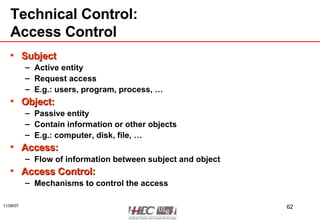
Technical Control: Access Control Subject Active entity Request access  E.g.: users, program, process, … Object: Passive entity Contain information or other objects E.g.: computer, disk, file, … Access: Flow of information between subject and object Access Control: Mechanisms to control the access
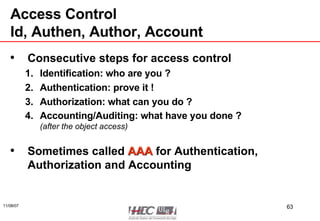
Access Control Id, Authen, Author, Account Consecutive steps for access control Identification: who are you ? Authentication: prove it ! Authorization: what can you do ? Accounting/Auditing: what have you done ? (after the object access) Sometimes called  AAA  for Authentication, Authorization and Accounting
Technical Control: Cryptography The science of hiding a message Plaintext: Hello Plaintext: Hello Encryption Decryption Ciphertext: %z$*@ Encryption  keys
Some Words on Cryptography Encryption/decryption mathematical functions with 2 parameters Message (plain text or cipher text) Key Strength: linked to function and size of key Two classes of crypto systems Symmetric crypto systems: encryption key = decryption key Asymmetric crypto systems: encryption key ≠ decryption key
Technical Controls More Words on Crypto Symmetric cryptosystems Current minimum key size: 128 bits Examples: AES (from Belgium), RC4 Very fast: 1 Gbps Issue: how can we safely share a key?  Asymmetric cryptosystems Current minimum key size: 2048 bits Examples: RSA Very slow: 100 kbps No shared key, easy to deploy Mainly used for  signatures  (non reputable proof of origin) or for  authentication  (who you are)
Crypto on Networks IPsec Used to encrypt all IP packets between two routers/hosts Virtual Private Network (VPN) Linking remote branches over the public Internet Linking a remote user over the public Internet Secure Session Layer (SSL) Used to encrypt a single TCP (like HTTP) connection https://    allows for e-commerce Also used for remote user over the public Internet Cryptography alone is  NEVER ENOUGH  to guarantee security!
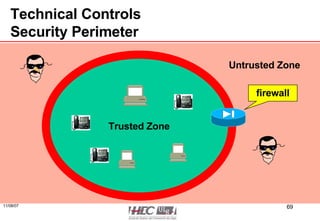
Technical Controls Perimeter Security and Firewalls Security often relies on segregation of security domains Trusted Untrusted: Internet, … Trusted domains are protected by a perimeter Hence the term of security perimeter When a point of passage between domains is required Firewall: security policy enforcement
Technical Controls Security Perimeter Trusted Zone Untrusted Zone firewall
Technical Controls Usual Firewall Locations Internet intranet Partner X Partner Y HR Network Source: Cisco Systems
Technical Controls: Firewalls Deep Packet Inspection More and more protocols run over HTTP SOAP (= XML over HTTP) … Security policy must be enforced for those new protocols   need to also inspect the payload of HTTP This is called  Deep Packet Inspection
Impact of Voice
Why Voice over IP? Before voice had a separated network If voice is over IP then Single network to operate (or to outsource) Toll by-pass:  Data communication is usually cheaper than voice communication More functions in phones Video User directory Data and voice applications can merge Voice mail Web conferencing Customer Relation Management systems
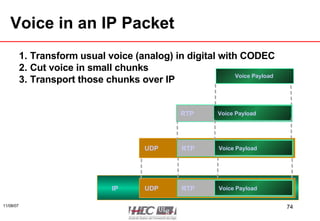
Voice in an IP Packet Transform usual voice (analog) in digital with CODEC Cut voice in small chunks Transport those chunks over IP Voice Payload Voice Payload RTP Voice Payload RTP UDP Voice Payload RTP UDP IP
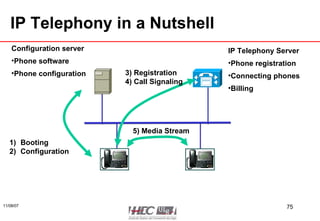
IP Telephony in a Nutshell IP Telephony Server Phone registration Connecting phones Billing Configuration server Phone software Phone configuration Booting Configuration 3) Registration 4) Call Signaling 5) Media Stream
What Is a CODEC? Analog to Digital Conversion Analog Audio Source = 0101 G.711 Pulse Code Modulation (PCM) is the DS0 Everything Is Bits Sample Compand Quantize Encode Frame 4000 Hz Analog Signal = Sample 8,000/sec Nyquist Frequency Quantize 256 Steps Using 8 Bits DS0 64 Kbps
IP Telephony vs. Voice over IP IP telephony is a super-set of services over IP Pure Voice over IP transport Conferencing Voice mail ...
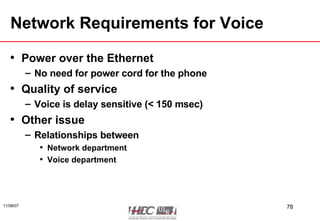
Network Requirements for Voice Power over the Ethernet No need for power cord for the phone Quality of service Voice is delay sensitive (< 150 msec) Other issue Relationships between Network department Voice department
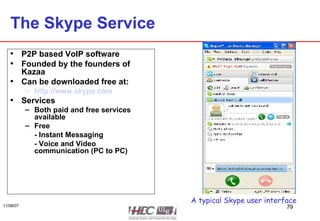
The Skype Service P2P based VoIP software Founded by the founders of Kazaa Can be downloaded free at: http://www.skype.com Services Both paid and free services available Free - Instant Messaging - Voice and Video communication (PC to PC) A typical Skype user interface
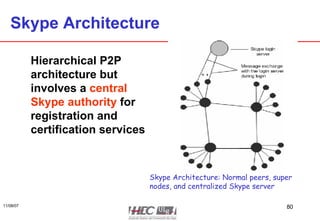
Skype Architecture Hierarchical P2P architecture but involves a  central Skype authority  for registration and certification services Skype Architecture: Normal peers, super nodes, and centralized Skype server
Should You Use Skype? If you can answer yes to four questions: Are you willing to circumvent the perimeter controls of your network? Do you trust the Skype developers to implement security correctly (being closed-source)? Do you trust the ethics of the Skype developers? Can you tolerate the Skype network being unavailable?
Wireless Network
Basics of Radio Electromagnetic waves Energy is linked to Frequency (expressed in Hertz): the higher the better Power (expressed in Watt) Based on frequency: Only line of sight transmission Does not cross metal or concrete Unlicensed use or regulated use Sensitive to weather condition
WiFi IEEE 802.11 (same source as Ethernet) (WLAN Wireless LAN) Unlicensed spectrum: free to be used Limited span: 100 m Bandwidth: 11 Mbps or 54 Mbps Depends on distance, walls, ...
GSM Architecture OMC Home Location Register AuC Equipment ID Network Management Center BTS BTS BTS ME ME ME Subscriber Identity Module Subscriber Identity Module Subscriber Identity Module BSC PSTN Mobile switching center Data communication network BTS = Base Transceiver Station BSC = Base Station Controller AuC = Authentication Center OMC = Operation and Maintenance Center PSTN = Public Switched Telephone Network ME = Mobile Equipment Source: Stallings, 313 Source: Mehrotra, 27 Visitor Location Register BTS
GSM and data Original GSM does not support data Except over normal modem: 9.6 kbps Now GPRS: up to 111 kbps (usually much lower) EDGE: up to 384 kbps Data requires another subscription... Flat fee (not based on volume) is coming Not yet in Belgium
Universal Mobile Telecom Systems UMTS Standardized by 3GPP Also called 3rd generation GSM Same architecture than GSM Faster: up to 2 Mbps, but usually 384 kbps Even faster HSPDA: up to 14.4 Mbps Better quality Native data & video support
WiMax Worldwide Interoperability for Microwave Access Recent technology Coming from IEEE 802.16 (like WiFi) 120 Mbps up to 30 km (Wireless MAN) Licensed spectrum Could be the 4th GSM generation
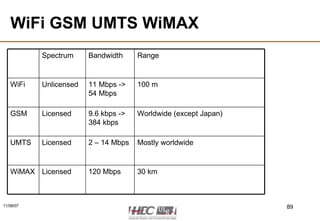
WiFi GSM UMTS WiMAX 120 Mbps 2 – 14 Mbps 9.6 kbps -> 384 kbps 11 Mbps -> 54 Mbps Bandwidth Licensed Licensed Licensed Unlicensed Spectrum 30 km WiMAX Mostly worldwide UMTS Worldwide (except Japan) GSM 100 m WiFi Range
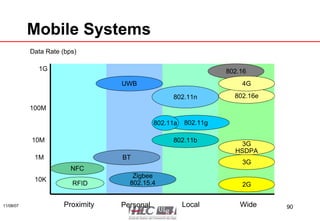
Mobile Systems 802.11n 4G 3G HSDPA Zigbee 802.15.4 BT UWB NFC RFID Proximity Personal Local Wide Data Rate (bps) 1G 1M 10K 10M 100M 2G 3G 802.16 802.16e 802.11g 802.11b 802.11a
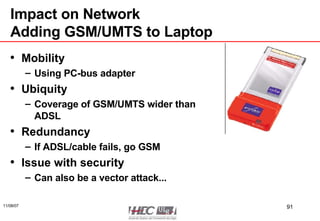
Impact on Network Adding GSM/UMTS to Laptop Mobility Using PC-bus adapter Ubiquity Coverage of GSM/UMTS wider than ADSL Redundancy If ADSL/cable fails, go GSM Issue with security Can also be a vector attack...
Impact on Network Smart Phones Integration of Mobile phone GPRS/UMTS WiFi Bluetooth Computer Windows Mobile/Symbian/Android Browser, Email, ... MOBILITY
How to Deploy a Network? Or the right questions to be asked?
Basic Networking IPv6 Readiness Addressing (mainly technical) Use of DHCP? Important for mobile user Routing (mainly technical)
Levels of Security Does the security policy include network? Risk management: assets, confidentiality requirements Specific requirements for some business: Basel II, PCI Which are my security domains? HR  Sales? Guests What about contractors?
QoS Do you need QoS in your network? Probably for IP telephony What are my critical application? ERP? Emails? Back-up?
High Availability Availability is usually important Redundancy Hot or cold standby? Redundant links? Redundant Service Providers? What are your disaster recovery procedure?
Open Standards Pros Competition means lower price Can switch vendors easily Cons Having multiple vendors cost a lot of € (training the operators and users) Lagging (not leading edge) Be prepared for some compromise But ask your vendor for commitment to support future standards
Future Proof... Find the balance between Proven technologies: but obsolete in a few years Leading edge technos: but unstable and expensive
Operation Cost Cheap to buy ≠ cheap to run
Outsourcing Network Pros Reduces CAPEX Improves balance sheet Cons Your business relies on another party (could go bankrupt or be acquired by competitor) Less flexibility Long process cycle Never forgot about SLA in the contract
End THE END

Aspects Stratégiques des Réseaux

  • 1.
    Veille technologique enTIC Aspects stratégiques des réseaux Eric Vyncke [email_address] Dernière mise à jour: 7 novembre 2007
  • 2.
    References & MiscSlides on http://mastertic.blogspot.com/ Contacts Main job: Cisco Systems as Distinguished Engineer Email: [email_address] Mobile: +32 475 312458
  • 3.
    Agenda Introduction tonetwork The acronym soup The impact of security The impact of wireless The impact of IP telephony Wrap-up: The Questions to be asked
  • 4.
  • 5.
    Why a Sectionon Networks? TIC = Technologie de l’Information et Communication  pas de TIC sans réseaux  Connaître les réseaux = faire des bons choix  les réseaux ont impacté le business depuis la fin de 90’s
  • 6.
    The Acronyms SoupOr a small touch of technology
  • 7.
    Importance de lastandardisation peu de domaines ont autant besoin de standards la communication est un domaine complexe: besoin de spécifications précises communication entre diverses machines communication entre divers constructeurs informatiques plusieurs types de standards: standards propriétaires: parfois non public, réservé à un constructeur: SNA d’IBM, NetWare de Novell, DECnet de Digital, Transdata de Siemens Nixdorf, ... Presque disparus mais encore actifs dans les domaines ‘pre-standard’ Voix sur IP: SCCP de Cisco, wireless security, … standards ouverts de jure : OSI de l’ISO, IEEE 802.*, X.25, ... standards ouverts de facto: TCP/IP, Ethernet, ...
  • 8.
    Généralités les communicationssont un domaine complexe et en évolution constante => besoin d’un modèle: établir des spécifications et les tests comparer des solutions établir des théories le modèle sera en plusieurs couches simples à vocation précise afin de faciliter la compréhension et l’implémentation
  • 9.
    Modèle d’une couchecouche n couche n couche n +1 couche n-1 protocole de couche n services de la couche n services de la couche n-1
  • 10.
    Rôles des 7couches 7: application, interface vers les programmes et/ou utilisateurs 6: présentation, conversion de formats 5: session, synchronisation, établissement 4: transport, fiabilité/qualité de service de bout en bout 3: réseau, échange les données via des noeuds intermédiaire 2: liaison de données, accès entre noeuds voisins 1: physique, modulation d’information élémentaire (souvent 1 bit) sur le médium 0: médium de transmission
  • 11.
    0: medium detransmission Onde hertzienne: distance faible (line of sight), sensibilité au bruit mais pas besoin de câble câble coaxial: bonne résistance au bruit câble torsadé: bon marché, simple à mettre en œuvre => le plus répandu en entreprise fibre optique: chère, complexe à mettre en oeuvre, très résistante au bruit
  • 12.
    1: couche physiquedeux classes de modulation pour un signal informatique bande de base: le signal est directement transmis (comme le télégraphe) exemple: Ethernet bande large broadband : utilisation d’une porteuse modulée (comme la radio) exemples: ADSL, WiFi 1 0 0 1 0 0
  • 13.
    2: couche liaisonde données gestion de l’accès au médium Qui peut transmettre quand? Notion de protocole d’accès Qui est le destinataire pour la trame? Notion d’adresse unique sur le médium (Medium Access Control MAC address) Qui est la source de la trame? Notion d’adresse unique sur le médium Dans quel ordre transmettre les données? La source et la destination sont sur le même media Détection des erreurs liées au media (parasites, …) Pertes possibles exemples: Ethernet, Token Ring
  • 14.
    ...AN Based onthe Span A lot of acronym ending with ...AN Area Network Like LAN Local Area Network: several 100’s of meters MAN Metropolitan Area Network: a city, 10’s of km WAN Wide Area Network: the whole Earth PAN Personal Area Network: one meter or so RAN Radio Area Network: from a single antenna
  • 15.
    Local Area Network:LAN LAN are usually a layer 2 technology Using a single media Most common Ethernet over twisted pair 10 Mbps, 100 Mbps (= Fast Ethernet), 1 Gbps, ... Standard IEEE 802.3 Before over a coax cable now over twisted pair and hub/switch Unique Ethernet address on each Network Interface Card (NIC) 24 bits unique per vendor: 00-02-8A (Cisco) 24 bits assigned by vendor: 09-07-CF  48-bits unique global address: 00-02-8A-09-07-CF
  • 16.
    Ethernet Topologies Howto connect more than 2 hosts? Star network: all hosts connects in a multi-way box Hub: all frames are repeated on all ports Switch: frames are repeated (=switched) only on the destination’s port
  • 17.
    Ethernet Hub Framesare repeated on all ports... 8 x 100 Mbps ports ~ 15 € A  C A B C D A  C A  C A  C
  • 18.
    Ethernet Switch Framesare repeated only on destination port Don’t disturb other machines While A sends to C, B can simultaneously send to D 5 x 100 Mbps ports ~ 20 € High density (8 x 48 ports) => up to 100 € /port A  C A B C D A  C Enterprises always use switches
  • 19.
    Virtual LAN: VLANSwitched can be partitioned in virtual LAN VLAN#1 : ports A & C VLAN#2 : ports B & D Use to separate traffic for security, ... A B C D
  • 20.
    Power over EthernetThe cable can also transmit electrical power! IEEE 802.3af Only 42V and 15 W but enough to power WiFi Access Point or an IP phone Eliminates power cord and transformer
  • 21.
    Wide Area Network: As Layer 1 or 2 Services WAN: transfer of data over 100’s of km Service is offered by SP (service provider) Nation wide: Belgacom, Voo, Mobistar, Telenet Worldwide: British Telecom, Colt, Verizon, ... Layer 1: leased line = a copper line with modem Like from your ADSL router to Skynet/Belgacom Layer 1: optical fiber Dark fiber (you need to add laser transmitter): just for you, €€€ Shared fiber (each customer uses a different color for laser): cheaper Layer 2: point to point link (or star network) where SP handles the layer 1 (modulation) and repeats frame (layer 2) Used to be the prevalent solution: X.25, Frame Relay But now reserved for MAN with Ethernet
  • 22.
    3: couche réseaupermet le transfert de paquets via plusieurs couches de liaison de données différentes Permet de passer de WiFi à ADSL à Internet à Ethernet Notion de route à suivre Notion d’adresse réseau unique au niveau mondial Exemple: IP (Internet Protocol utilisé sur Internet) A b Z f e
  • 23.
    Network Layer: IPat Home IP is the network layer we all use  Our IP packets traverse multiple data links and media Access Point ADSL Router Your ISP Internet = All other ISP 1st data link: wifi 2nd data link: Ethernet 3rd data link: ADSL or Cable Nth data link: Ethernet or ...
  • 24.
    What is anIP address? In IPv4, an address is a 32 bit quantity that uniquely identifies a network interface. In IPv4 there are 2 32 = 4,294,967,296 unique addresses possible
  • 25.
    Basic Addressing IPaddresses are written in dotted decimal format. Four sections are separated by dots. Each section contains a number between 0 and 255. 64.100.24.1 Dots separate the sections Each section contains a number between 0 and 255
  • 26.
    IP Addressing atHome If a node has multiple network interfaces, it typically has multiple IP addresses Access Point ADSL Router Your ISP Internet = All other ISP I’m 192.168.100.2 I’m 192.168.100.1 And 192.168.1.2 I’m 192.168.1.1 And 80.123.34.89 Network Printer I’m 192.168.1.3
  • 27.
    IP Address HierarchyFor Mr. Postman IP address is divided into two parts to achieve efficient “packet processing” Network-id: Represents the physical network commonly called a “prefix” (often first 24 bits) Host-id: Represents a computer on the network (often last 8 bits) Tasman Dr. 250 Tasman Dr. 102 Main St. 260 Tasman Dr. Main St. 100 Main St. 101 Main St. ? ?
  • 28.
    Can we AutomateAddressing? Defining static IP addresses on each host Does not scale Error prone (moving a PC to another network), ... Dynamic Host Configuration Protocol (DHCP) DHCP server (Windows or a router) is configured with the list of IP addresses for a network When a host boots, it ask the DHCP for an IP address (and other information like routing, DNS, ...) Most enterprises use DHCP except for servers keeping the log to see who is using which address
  • 29.
    Caractéristiques d’IP envoid’un paquet IP sans garantie de résultat: possibilité de pertes, voire de désordre dans les paquets envoyés et reçus possibilité d’envoi en une fois d’un grand volume (>65.000) bytes en une seule opération programme, IP va couper/recoller ce grand volume en petits paquets vrai couche réseau avec possibilité de routage entre plusieurs LAN et WAN beaucoup d’option de debugging
  • 30.
    What is IPv6?The current IP is version 4 Limited address space (32 bits), exhaustion in 2010 The next IP is version 6 Addresses are 128-bits wide No more exhaustion Else nothing has changed Already in Windows Vista or Mac OS/X or Linux Windows XP: ‘ipv6 install’ IPv6 will rule in 2010 at the latest  ALL NEW NETWORKS/APPLICATION MUST BE DESIGNED FOR IPV6
  • 31.
    TCP/IP le vocableTCP/IP regroupe plusieurs protocoles distincts: couche réseau: IP= Internet Protocol couche transport: orienté connexion: TCP = Transport Control Protocol orienté datagram: UDP= User Datagram Protocol anciennes spécifications qui ne rentrent pas bien dans le modèle OSI
  • 32.
    Les routes dansun réseau IP chaque hôte doit connaître: son adresse IP adresse de son réseau adresse d’un ou plusieurs routeurs les routeurs connaissent l’ensemble des routes, c-à-d comment aller d’un réseau à un autre
  • 33.
    IP Routing atHome Access Point ADSL Router Your ISP Internet = All other ISP 192.168.100.2 Default route => 192.168.100.1 I’m 192.168.100.1 & 192.168.1.2 Route to 192.168.100.0/24 via WiFi Default route to 192.168.1.1 I’m 192.168.1.1 and 80.123.34.89 Route to 192.168.100.0/24 via 192.168.1.2 Default route via ADSL Network Printer I’m 192.168.1.3 Route to 192.168.100.0/24 via 192.168.1.2 Default route to 192.168.1.1
  • 34.
    Can we Automatethe Route? Defining static routes everywhere Too long Error prone Does not scale (not to mention cost of operation) Routing Protocols Programs in routers Send packets to each other Discover the adjacent router(s) Exchange route information Build dynamic routing tables Example in Enterprises: OSPF, EIGRP, RIP, ... For Service Providers: BGP
  • 35.
    Wide Area NetworkAs a Layer 3 Service The prevalent solution Service offered by a Service Provider (SP) Transfer IP packets from your site to another site Customers does not care about routing Looks like the Internet but more € but with quality defined (see later) Typical technology: MPLS (also called IP service) SP Layer 3 Services
  • 36.
    Wide Area NetworkLayer 3 Service or In House Network? SP Layer 3 Services
  • 37.
    Layer 3 ServicePros and Cons Pros Outsource the WAN to SP: no more CAPEX, reduce OPEX Easier to deploy Easier international WAN Specially in weird countries Cons Lost of network ownership Could be impossible for some business Need to check quality of delivered service (SLA see later) NB: the cost is not a deal breaker usually
  • 38.
    What about Congestion?Congestion: too many packets arriving in a router/switch Specially when input throughput > output throughput Routers/switches will store the peak in memory Issue: packets wait in queue, longer delay Memory exhausted?  dropping packets Issue: packets are lost forever (hence the need of TCP for retransmission) ADSL Router 100 Mbps = 100.000 pps 1 Mbps = 1.000 pps
  • 39.
    Quality of Service:QoS QoS is a sense of quality for packet transfer Packet loss: due to congestion or frame corruption (rare) Latency (or delay): the time to transfer data from source to destination Jitter: variation of the delay (see next slide)
  • 40.
    Delay Variation—“Jitter” tt Sender Transmits B Receives C B A C B A d1 d2 D1 = d1 D2 = d2 Jitter
  • 41.
    How to GuaranteeQoS? Classify & mark Each IP packet is marked with its priority (precedence) The is a byte reserved for it in IP packet By the host By a network device based on TCP/UDP ports Enforce Make different queues: routine, normal, priority, ... In case of congestion Drop packets from routine queue Always process priority packets first Think about fire trucks in traffic jam
  • 42.
    QoS in ActionCampus Backbone Multimedia Training Servers Order Entry, Finance, Manufacturing Finance Manager Remote Campus Classification Classification Enforcement
  • 43.
    Service Level Agreement:SLA This is the contract between A customer A provider About Penalties (discount) when SLA not met Quality of service: Data traffic: packet loss, latency, jitter Availability: 99,999% availability is 5 minutes down per year Maintenance window (scheduled network down) don’t count Change request: time to establish a new circuit Never forget to put SLA in any service
  • 44.
  • 45.
    The Security DilemmaSecurity Risks Internet Business Value Explosion in E-Business!! Internet Access Corporate Intranet Internet Presence Customer Care E-Learning Supply Chain Management E-Commerce Workforce Optimization
  • 46.
    100% Security Theonly system which is truly secure is one which is switched off and unplugged, locked in a titanium lined safe, buried in a concrete bunker, and is surrounded by nerve gas and very highly paid armed guards. Even then, I wouldn’t stake my life on it…. Gene Spafford—Director, Computer Operations, Audit, and Security Technology (COAST), Purdue University “ ”
  • 47.
    Threat Capabilities: MoreDangerous & Easier To Use Sophistication of Hacker Tools Packet Forging/ Spoofing 1990 1980 Password Guessing Self Replicating Code Password Cracking Exploiting Known Vulnerabilities Disabling Audits Back Doors Sweepers Sniffers Stealth Diagnostics High Low 2000 DDOS Internet Worms Source: Carnegie Mellon University, 2002 Technical Knowledge Required
  • 48.
    Risk Assessment in 2002 In the 2002 CSI/FBI survey: Over 90% of over 400 participants reported security breaches. 223 reported security incidents totaled losses over $455 million . Highest source of loss was theft of proprietary information – over $170 million alone. Of the top causes of loss, insider misuse of resources was in top 5. Insider attack by disgruntled employees was listed as likely source by 75% of respondents - Source: CSI/FBI 2002 Computer Crime & Security Survey
  • 49.
    Risk Assessment in 2006 In the 2004 CSI/FBI survey (481 US organizations): Over 52% reported security breaches. Reported security incidents totaled losses over $52 million .  in decrease  Highest source of loss was virus – over $15 million alone followed by unauthorized use $10 million . Of the top causes of loss, insider misuse of resources was in top 3. Source: CSI/FBI 2006 Computer Crime & Security Survey
  • 50.
    Insiders… Over 75%of hacking is done by insiders and it’s easy to see why. The person on the inside is on the right side of the firewall—they know the computer systems and they have access to the passwords Neil Barrett, Bull Information Systems, ‘ Computer Crime Fighter’—Personal Computer World, Feb 1999 “ ”
  • 51.
    The Principles ofSecurity: C I A Confidentiality - Ability to ensure secrecy Availability Of service Of data Integrity - Ability to ensure asset/data in not modified security I C A
  • 52.
    Attack against Confidentialitytelnet foo.bar.org username: dan password: m-y-p-a-s-s-w-o-r-d d-a-n
  • 53.
    Attack on Integrity Bank Customer Deposit $1000 in Bob’s Account Deposit $900 in Mallet’s Account and $100 in Bob’s Account
  • 54.
  • 55.
    Denial of Service(DoS) Prevents authorised people from using a service
  • 56.
    What is SecurityManagement? Risk management Identify assets, discover risk Security policies Reduce the risk Security education Propagate security information to employees
  • 57.
    Risk Management Thisis the process to Identify the risk Assess the risk Reduce the risk Implement countermeasure to reduce risk Do not forget: there is always a risk ! The most tricky… Risk analysis
  • 58.
    Purpose of RiskAnalysis Need to compare Potential loss due to risk Immediate loss of an asset Recovery of an asset, e.g. data recovery Long term loss Cost of countermeasure Cost of HW & SW Cost of procedure: less flexibility, …
  • 59.
    Asset Evaluation Notalways easy for data ! Cost of data: Acquisition, Data entry, Storage and maintenance, R&D Value of data assessed by information owner: Trade secret, … Value of asset Inventory value Cost of replacement, loss of productivity
  • 60.
    Handling Risk… Transfer:to an insurance company Reduce: implement countermeasure(s) Also called controls Rejecting/Ignoring: foolish… Accepting: when cost of CM does not make sense
  • 61.
    Controls Administrative controlsPolicies, standards, procedures Screening personnel, education Technical controls Access control, encryption, security devices Physical controls Facility protection, security guards, locks, monitoring, intrusion detection All the above to protect company assets
  • 62.
    Technical Control: AccessControl Subject Active entity Request access E.g.: users, program, process, … Object: Passive entity Contain information or other objects E.g.: computer, disk, file, … Access: Flow of information between subject and object Access Control: Mechanisms to control the access
  • 63.
    Access Control Id,Authen, Author, Account Consecutive steps for access control Identification: who are you ? Authentication: prove it ! Authorization: what can you do ? Accounting/Auditing: what have you done ? (after the object access) Sometimes called AAA for Authentication, Authorization and Accounting
  • 64.
    Technical Control: CryptographyThe science of hiding a message Plaintext: Hello Plaintext: Hello Encryption Decryption Ciphertext: %z$*@ Encryption keys
  • 65.
    Some Words onCryptography Encryption/decryption mathematical functions with 2 parameters Message (plain text or cipher text) Key Strength: linked to function and size of key Two classes of crypto systems Symmetric crypto systems: encryption key = decryption key Asymmetric crypto systems: encryption key ≠ decryption key
  • 66.
    Technical Controls MoreWords on Crypto Symmetric cryptosystems Current minimum key size: 128 bits Examples: AES (from Belgium), RC4 Very fast: 1 Gbps Issue: how can we safely share a key? Asymmetric cryptosystems Current minimum key size: 2048 bits Examples: RSA Very slow: 100 kbps No shared key, easy to deploy Mainly used for signatures (non reputable proof of origin) or for authentication (who you are)
  • 67.
    Crypto on NetworksIPsec Used to encrypt all IP packets between two routers/hosts Virtual Private Network (VPN) Linking remote branches over the public Internet Linking a remote user over the public Internet Secure Session Layer (SSL) Used to encrypt a single TCP (like HTTP) connection https://  allows for e-commerce Also used for remote user over the public Internet Cryptography alone is NEVER ENOUGH to guarantee security!
  • 68.
    Technical Controls PerimeterSecurity and Firewalls Security often relies on segregation of security domains Trusted Untrusted: Internet, … Trusted domains are protected by a perimeter Hence the term of security perimeter When a point of passage between domains is required Firewall: security policy enforcement
  • 69.
    Technical Controls SecurityPerimeter Trusted Zone Untrusted Zone firewall
  • 70.
    Technical Controls UsualFirewall Locations Internet intranet Partner X Partner Y HR Network Source: Cisco Systems
  • 71.
    Technical Controls: FirewallsDeep Packet Inspection More and more protocols run over HTTP SOAP (= XML over HTTP) … Security policy must be enforced for those new protocols  need to also inspect the payload of HTTP This is called Deep Packet Inspection
  • 72.
  • 73.
    Why Voice overIP? Before voice had a separated network If voice is over IP then Single network to operate (or to outsource) Toll by-pass: Data communication is usually cheaper than voice communication More functions in phones Video User directory Data and voice applications can merge Voice mail Web conferencing Customer Relation Management systems
  • 74.
    Voice in anIP Packet Transform usual voice (analog) in digital with CODEC Cut voice in small chunks Transport those chunks over IP Voice Payload Voice Payload RTP Voice Payload RTP UDP Voice Payload RTP UDP IP
  • 75.
    IP Telephony ina Nutshell IP Telephony Server Phone registration Connecting phones Billing Configuration server Phone software Phone configuration Booting Configuration 3) Registration 4) Call Signaling 5) Media Stream
  • 76.
    What Is aCODEC? Analog to Digital Conversion Analog Audio Source = 0101 G.711 Pulse Code Modulation (PCM) is the DS0 Everything Is Bits Sample Compand Quantize Encode Frame 4000 Hz Analog Signal = Sample 8,000/sec Nyquist Frequency Quantize 256 Steps Using 8 Bits DS0 64 Kbps
  • 77.
    IP Telephony vs.Voice over IP IP telephony is a super-set of services over IP Pure Voice over IP transport Conferencing Voice mail ...
  • 78.
    Network Requirements forVoice Power over the Ethernet No need for power cord for the phone Quality of service Voice is delay sensitive (< 150 msec) Other issue Relationships between Network department Voice department
  • 79.
    The Skype ServiceP2P based VoIP software Founded by the founders of Kazaa Can be downloaded free at: http://www.skype.com Services Both paid and free services available Free - Instant Messaging - Voice and Video communication (PC to PC) A typical Skype user interface
  • 80.
    Skype Architecture HierarchicalP2P architecture but involves a central Skype authority for registration and certification services Skype Architecture: Normal peers, super nodes, and centralized Skype server
  • 81.
    Should You UseSkype? If you can answer yes to four questions: Are you willing to circumvent the perimeter controls of your network? Do you trust the Skype developers to implement security correctly (being closed-source)? Do you trust the ethics of the Skype developers? Can you tolerate the Skype network being unavailable?
  • 82.
  • 83.
    Basics of RadioElectromagnetic waves Energy is linked to Frequency (expressed in Hertz): the higher the better Power (expressed in Watt) Based on frequency: Only line of sight transmission Does not cross metal or concrete Unlicensed use or regulated use Sensitive to weather condition
  • 84.
    WiFi IEEE 802.11(same source as Ethernet) (WLAN Wireless LAN) Unlicensed spectrum: free to be used Limited span: 100 m Bandwidth: 11 Mbps or 54 Mbps Depends on distance, walls, ...
  • 85.
    GSM Architecture OMCHome Location Register AuC Equipment ID Network Management Center BTS BTS BTS ME ME ME Subscriber Identity Module Subscriber Identity Module Subscriber Identity Module BSC PSTN Mobile switching center Data communication network BTS = Base Transceiver Station BSC = Base Station Controller AuC = Authentication Center OMC = Operation and Maintenance Center PSTN = Public Switched Telephone Network ME = Mobile Equipment Source: Stallings, 313 Source: Mehrotra, 27 Visitor Location Register BTS
  • 86.
    GSM and dataOriginal GSM does not support data Except over normal modem: 9.6 kbps Now GPRS: up to 111 kbps (usually much lower) EDGE: up to 384 kbps Data requires another subscription... Flat fee (not based on volume) is coming Not yet in Belgium
  • 87.
    Universal Mobile TelecomSystems UMTS Standardized by 3GPP Also called 3rd generation GSM Same architecture than GSM Faster: up to 2 Mbps, but usually 384 kbps Even faster HSPDA: up to 14.4 Mbps Better quality Native data & video support
  • 88.
    WiMax Worldwide Interoperabilityfor Microwave Access Recent technology Coming from IEEE 802.16 (like WiFi) 120 Mbps up to 30 km (Wireless MAN) Licensed spectrum Could be the 4th GSM generation
  • 89.
    WiFi GSM UMTSWiMAX 120 Mbps 2 – 14 Mbps 9.6 kbps -> 384 kbps 11 Mbps -> 54 Mbps Bandwidth Licensed Licensed Licensed Unlicensed Spectrum 30 km WiMAX Mostly worldwide UMTS Worldwide (except Japan) GSM 100 m WiFi Range
  • 90.
    Mobile Systems 802.11n4G 3G HSDPA Zigbee 802.15.4 BT UWB NFC RFID Proximity Personal Local Wide Data Rate (bps) 1G 1M 10K 10M 100M 2G 3G 802.16 802.16e 802.11g 802.11b 802.11a
  • 91.
    Impact on NetworkAdding GSM/UMTS to Laptop Mobility Using PC-bus adapter Ubiquity Coverage of GSM/UMTS wider than ADSL Redundancy If ADSL/cable fails, go GSM Issue with security Can also be a vector attack...
  • 92.
    Impact on NetworkSmart Phones Integration of Mobile phone GPRS/UMTS WiFi Bluetooth Computer Windows Mobile/Symbian/Android Browser, Email, ... MOBILITY
  • 93.
    How to Deploya Network? Or the right questions to be asked?
  • 94.
    Basic Networking IPv6Readiness Addressing (mainly technical) Use of DHCP? Important for mobile user Routing (mainly technical)
  • 95.
    Levels of SecurityDoes the security policy include network? Risk management: assets, confidentiality requirements Specific requirements for some business: Basel II, PCI Which are my security domains? HR Sales? Guests What about contractors?
  • 96.
    QoS Do youneed QoS in your network? Probably for IP telephony What are my critical application? ERP? Emails? Back-up?
  • 97.
    High Availability Availabilityis usually important Redundancy Hot or cold standby? Redundant links? Redundant Service Providers? What are your disaster recovery procedure?
  • 98.
    Open Standards ProsCompetition means lower price Can switch vendors easily Cons Having multiple vendors cost a lot of € (training the operators and users) Lagging (not leading edge) Be prepared for some compromise But ask your vendor for commitment to support future standards
  • 99.
    Future Proof... Findthe balance between Proven technologies: but obsolete in a few years Leading edge technos: but unstable and expensive
  • 100.
    Operation Cost Cheapto buy ≠ cheap to run
  • 101.
    Outsourcing Network ProsReduces CAPEX Improves balance sheet Cons Your business relies on another party (could go bankrupt or be acquired by competitor) Less flexibility Long process cycle Never forgot about SLA in the contract
  • 102.