
A PRACTICAL TRAINING
PRESENTATION
ON
WINDOWS SERVER 2008
ASISH VERMA
B.Tech VIITH
SEM
Comp. Science & Engg
OBJECTIVES
► Explain the function of a server in a network environment.
► Describe the editions of Windows Server 2008.
► Discuss core technologies.
► Explain the primary roles a Windows Server 2008 computer can
fulfill.
► Describe the new and enhanced features of Windows Server 2008.
THE ROLE OF A SERVER
OPERATING SYSTEM
► Hardware or Software? Server software is ambiguous; can run
on multiple different platforms (i.e. laptop)
► Windows Server 2008 roles short summary:
► File and Printer sharing
► Web server
► Routing and Remote Access Services (RRAS)
► Domain Name System (DNS)
► Dynamic Host Configuration Protocol (DHCP)
► File Transfer Protocol (FTP) Server
► Active Directory
► Distributed File System (DFS)
► Fax Server
WINDOWS SERVER 2008
EDITIONS
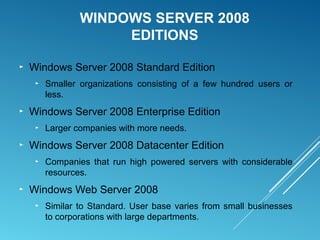
► Windows Server 2008 Standard Edition
► Smaller organizations consisting of a few hundred users or
less.
► Windows Server 2008 Enterprise Edition
► Larger companies with more needs.
► Windows Server 2008 Datacenter Edition
► Companies that run high powered servers with considerable
resources.
► Windows Web Server 2008
► Similar to Standard. User base varies from small businesses
to corporations with large departments.
WINDOWS 2008 STANDARD
EDITION
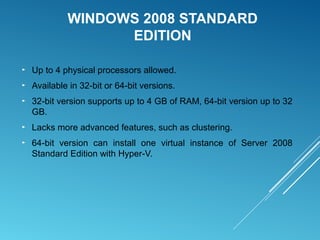
► Up to 4 physical processors allowed.
► Available in 32-bit or 64-bit versions.
► 32-bit version supports up to 4 GB of RAM, 64-bit version up to 32
GB.
► Lacks more advanced features, such as clustering.
► 64-bit version can install one virtual instance of Server 2008
Standard Edition with Hyper-V.
WINDOWS SERVER 2008 ENTERPRISE
EDITION
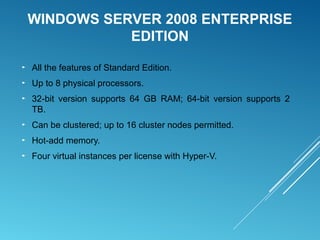
► All the features of Standard Edition.
► Up to 8 physical processors.
► 32-bit version supports 64 GB RAM; 64-bit version supports 2
TB.
► Can be clustered; up to 16 cluster nodes permitted.
► Hot-add memory.
► Four virtual instances per license with Hyper-V.
WINDOWS SERVER 2008 DATACENTER
EDITION
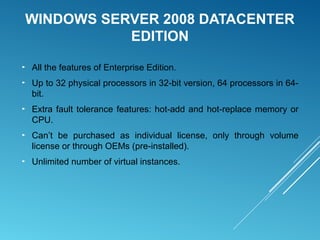
► All the features of Enterprise Edition.
► Up to 32 physical processors in 32-bit version, 64 processors in 64-
bit.
► Extra fault tolerance features: hot-add and hot-replace memory or
CPU.
► Can’t be purchased as individual license, only through volume
license or through OEMs (pre-installed).
► Unlimited number of virtual instances.
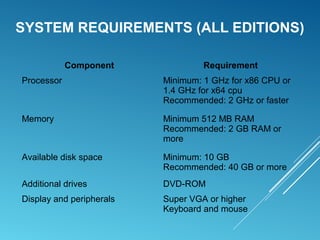
SYSTEM REQUIREMENTS (ALL EDITIONS)
Component Requirement
Processor Minimum: 1 GHz for x86 CPU or
1.4 GHz for x64 cpu
Recommended: 2 GHz or faster
Memory Minimum 512 MB RAM
Recommended: 2 GB RAM or
more
Available disk space Minimum: 10 GB
Recommended: 40 GB or more
Additional drives DVD-ROM
Display and peripherals Super VGA or higher
Keyboard and mouse
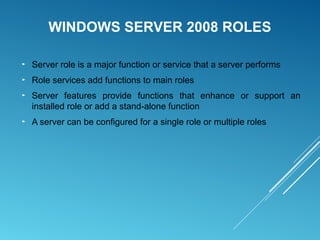
WINDOWS SERVER 2008 ROLES
► Server role is a major function or service that a server performs
► Role services add functions to main roles
► Server features provide functions that enhance or support an
installed role or add a stand-alone function
► A server can be configured for a single role or multiple roles
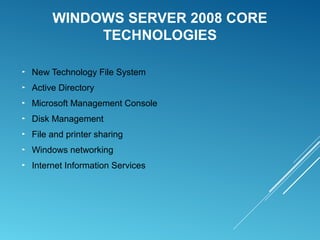
WINDOWS SERVER 2008 CORE
TECHNOLOGIES
► New Technology File System
► Active Directory
► Microsoft Management Console
► Disk Management
► File and printer sharing
► Windows networking
► Internet Information Services
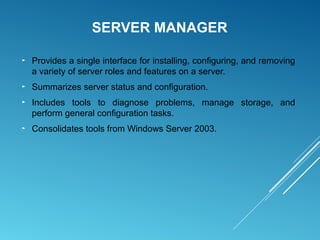
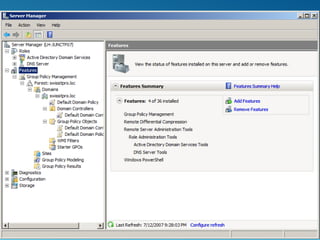
SERVER MANAGER
► Provides a single interface for installing, configuring, and removing
a variety of server roles and features on a server.
► Summarizes server status and configuration.
► Includes tools to diagnose problems, manage storage, and
perform general configuration tasks.
► Consolidates tools from Windows Server 2003.
ACTIVE DIRECTORY
► Provides a single point of administration of resources (Users,
groups, shared printers, etc.)
► Provides centralized authentication and authorization of users to
network resources.
► Along with DNS, provides domain-naming services and
management for a Windows domain.
► Enables administrators to assign system policies, deploy software
to client computers, and assign permissions and rights to users of
network resources.
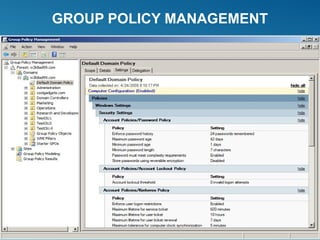
GROUP POLICY MANAGEMENT
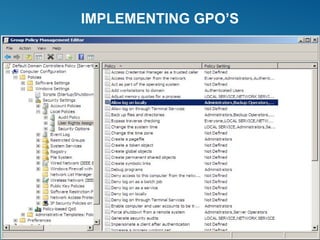
IMPLEMENTING GPO’S
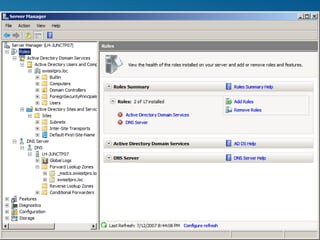
ACTIVE DIRECTORY DOMAIN SERVICES
► Active Directory Domain Services (AD DS) installs Active Directory
and turns Windows Server 2008 into a domain controller.
► Read Only Domain Controller (RODC)
► Provides the same authentication and authorization services as a
standard domain controller.
► Changes cannot be made on an RODC directly.
► Updated periodically by replication from standard domain controllers.
NEW ACTIVE DIRECTORY ROLES
► Active Directory Lightweight Directory Services (AD LDS)
► Provides tighter integration for applications that require large amounts
of data retrieval. Does not require a domain controller or domain.
► Active Directory Federation Services (AD FS)
► Provides Single Sign-On for users of an organization to access internal
resources as well as external resources inside of a partner
organization.
► Active Directory Rights Management Services (AD RMS)
► Helps the author of a document decide how a document can be used
or modified, and deny unauthorized users access.
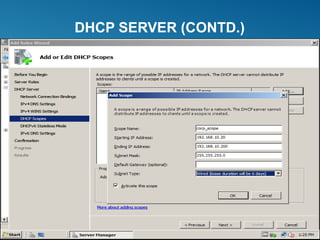
DHCP SERVER
► Dynamic Host Configuration Protocol Server role provides automatic
IP address assignment and configuration for client computers.
► Can provide default gateway address, DNS server addresses, WINS
server addresses, and other options.
► Windows Server 2008’s DHCP server role provides support for IPv6.
DHCP SERVER (CONTD.)
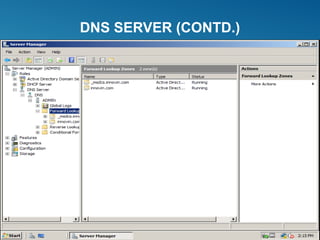
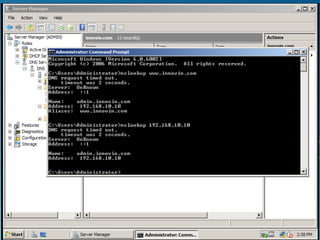
DNS SERVER
► DNS Server resolves the names of Internet computers and
computers that are members of a Windows Domain to their
assigned IP addresses.
► When installing Active Directory, you can specify an existing DNS
server or install DNS on the same server as Active Directory
DNS SERVER (CONTD.)
WINDOWS WEB SERVER 2008
► Designed to run Internet Information Services (IIS) 7.0.
► Hardware support similar to Standard Edition.
► Lacks many of the features present in other editions.
► Typically used when roles such as Active Directory or Terminal
Services are not required.
INTERNET INFORMATION SERVICES
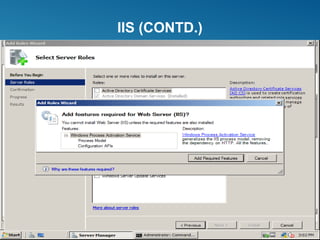
► Windows Server 2008 provides IIS 7.0
► Modular design
► Unused features aren’t available for attackers to exploit
► Extensibility
► Functionality is easily added via modular design
► Manageability
► Delegated administration; can assign control over some aspects of the
website to developers and content owners
► Appcmd.exe provides the ability to manage IIS via scripts and batch
files
IIS (CONTD.)
APPLICATION SERVER
► Provides high-performance integrated environment for managing,
deploying, and running client/server business applications.
► Applications for this role usually built with one or more of the
following technologies: IIS, ASP.NET, Microsoft .NET Framework,
COM+, and Message Queuing.
FAX SERVER
► Provides tools to managed shared fax resources and allow users
to send and receive faxes
► After the role is installed, you can
► Manage users who have access to fax resources
► Configure fax devices
► Create rules for routing incoming and outgoing faxes
► Monitor and log use of fax resources
PRINT SERVICES
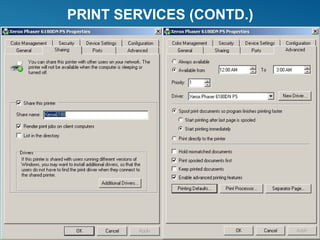
► Enables administrators to manage access to network printers
► Installs Print Server by default
► Internet Printing role service enables Web-based management of
network printers
► Line Printer Daemon (LPD) role service provides compatibility with
Linux/UNIX clients
PRINT SERVICES (CONTD.)
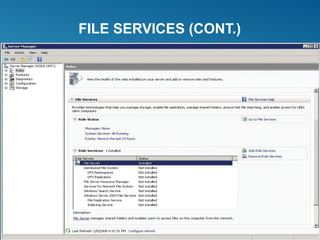
FILE SERVICES
► Provide high availability, reliable, shared storage to Windows and
other client OSs
► Installing File Services role installs the File Server service
automatically
FILE SERVICES (CONT.)
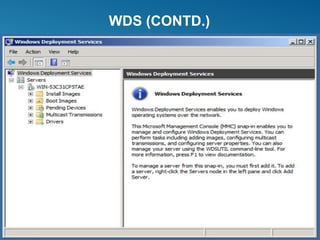
WINDOWS DEPLOYMENT SERVICES
► Simplifies the installation of Windows over a network.
► Can install and remotely configure Windows Vista and Server 2008
systems.
► WDS is an improved version of Remote Installation Services (RIS)
found in Windows Server 2000 and 2003.
► Updates Remote Installation Services.
► Allows unattended installation of Windows Oss.
► WDS can multicast deployment of disk images, reducing network
bandwidth required.
► Includes tools to customize the Windows OS for deployment.
WDS (CONTD.)
NEW FEATURES IN WINDOWS SERVER 2008
► Server Manager
► Server Core
► Hyper-V virtualization
► Storage management enhancements
► Networking enhancements
► Network Access Protection
► Windows Deployment Services
► New Active Directory roles
► Terminal Services enhancements
NETWORK ACCESS PROTECTION
► Ensures computers are equipped with required security features.
► Enables monitoring of anti-virus software and firewall settings.
► If a computer does not meet all requirements defined by an
administrator, it can be restricted automatically from accessing
certain network resources.
► Can force computers to update themselves.
SUMMARY
► A server is defined more by the software installed on
hardware as opposed to the hardware in use. In many
cases, a client OS can behave as a server.
► Windows Server 2008 is available in four editions:
Standard, Enterprise, Datacenter, and Windows Web
Server 2008
► Core technologies in Windows Server 2008 include
NTFS, Active Directory, MMC, disk management, file
and printer sharing, networking components, and IIS
► Windows Server 2008 updates previously available
services with additional functionality, while adding
several new services.
Asish verma

Asish verma

  • 1.
    A PRACTICAL TRAINING PRESENTATION ON WINDOWSSERVER 2008 ASISH VERMA B.Tech VIITH SEM Comp. Science & Engg
  • 2.
    OBJECTIVES ► Explain thefunction of a server in a network environment. ► Describe the editions of Windows Server 2008. ► Discuss core technologies. ► Explain the primary roles a Windows Server 2008 computer can fulfill. ► Describe the new and enhanced features of Windows Server 2008.
  • 3.
    THE ROLE OFA SERVER OPERATING SYSTEM ► Hardware or Software? Server software is ambiguous; can run on multiple different platforms (i.e. laptop) ► Windows Server 2008 roles short summary: ► File and Printer sharing ► Web server ► Routing and Remote Access Services (RRAS) ► Domain Name System (DNS) ► Dynamic Host Configuration Protocol (DHCP) ► File Transfer Protocol (FTP) Server ► Active Directory ► Distributed File System (DFS) ► Fax Server
  • 4.
    WINDOWS SERVER 2008 EDITIONS ►Windows Server 2008 Standard Edition ► Smaller organizations consisting of a few hundred users or less. ► Windows Server 2008 Enterprise Edition ► Larger companies with more needs. ► Windows Server 2008 Datacenter Edition ► Companies that run high powered servers with considerable resources. ► Windows Web Server 2008 ► Similar to Standard. User base varies from small businesses to corporations with large departments.
  • 5.
    WINDOWS 2008 STANDARD EDITION ►Up to 4 physical processors allowed. ► Available in 32-bit or 64-bit versions. ► 32-bit version supports up to 4 GB of RAM, 64-bit version up to 32 GB. ► Lacks more advanced features, such as clustering. ► 64-bit version can install one virtual instance of Server 2008 Standard Edition with Hyper-V.
  • 6.
    WINDOWS SERVER 2008ENTERPRISE EDITION ► All the features of Standard Edition. ► Up to 8 physical processors. ► 32-bit version supports 64 GB RAM; 64-bit version supports 2 TB. ► Can be clustered; up to 16 cluster nodes permitted. ► Hot-add memory. ► Four virtual instances per license with Hyper-V.
  • 7.
    WINDOWS SERVER 2008DATACENTER EDITION ► All the features of Enterprise Edition. ► Up to 32 physical processors in 32-bit version, 64 processors in 64- bit. ► Extra fault tolerance features: hot-add and hot-replace memory or CPU. ► Can’t be purchased as individual license, only through volume license or through OEMs (pre-installed). ► Unlimited number of virtual instances.
  • 8.
    SYSTEM REQUIREMENTS (ALLEDITIONS) Component Requirement Processor Minimum: 1 GHz for x86 CPU or 1.4 GHz for x64 cpu Recommended: 2 GHz or faster Memory Minimum 512 MB RAM Recommended: 2 GB RAM or more Available disk space Minimum: 10 GB Recommended: 40 GB or more Additional drives DVD-ROM Display and peripherals Super VGA or higher Keyboard and mouse
  • 9.
    WINDOWS SERVER 2008ROLES ► Server role is a major function or service that a server performs ► Role services add functions to main roles ► Server features provide functions that enhance or support an installed role or add a stand-alone function ► A server can be configured for a single role or multiple roles
  • 10.
    WINDOWS SERVER 2008CORE TECHNOLOGIES ► New Technology File System ► Active Directory ► Microsoft Management Console ► Disk Management ► File and printer sharing ► Windows networking ► Internet Information Services
  • 11.
    SERVER MANAGER ► Providesa single interface for installing, configuring, and removing a variety of server roles and features on a server. ► Summarizes server status and configuration. ► Includes tools to diagnose problems, manage storage, and perform general configuration tasks. ► Consolidates tools from Windows Server 2003.
  • 13.
    ACTIVE DIRECTORY ► Providesa single point of administration of resources (Users, groups, shared printers, etc.) ► Provides centralized authentication and authorization of users to network resources. ► Along with DNS, provides domain-naming services and management for a Windows domain. ► Enables administrators to assign system policies, deploy software to client computers, and assign permissions and rights to users of network resources.
  • 15.
  • 16.
  • 17.
    ACTIVE DIRECTORY DOMAINSERVICES ► Active Directory Domain Services (AD DS) installs Active Directory and turns Windows Server 2008 into a domain controller. ► Read Only Domain Controller (RODC) ► Provides the same authentication and authorization services as a standard domain controller. ► Changes cannot be made on an RODC directly. ► Updated periodically by replication from standard domain controllers.
  • 18.
    NEW ACTIVE DIRECTORYROLES ► Active Directory Lightweight Directory Services (AD LDS) ► Provides tighter integration for applications that require large amounts of data retrieval. Does not require a domain controller or domain. ► Active Directory Federation Services (AD FS) ► Provides Single Sign-On for users of an organization to access internal resources as well as external resources inside of a partner organization. ► Active Directory Rights Management Services (AD RMS) ► Helps the author of a document decide how a document can be used or modified, and deny unauthorized users access.
  • 19.
    DHCP SERVER ► DynamicHost Configuration Protocol Server role provides automatic IP address assignment and configuration for client computers. ► Can provide default gateway address, DNS server addresses, WINS server addresses, and other options. ► Windows Server 2008’s DHCP server role provides support for IPv6.
  • 20.
  • 21.
    DNS SERVER ► DNSServer resolves the names of Internet computers and computers that are members of a Windows Domain to their assigned IP addresses. ► When installing Active Directory, you can specify an existing DNS server or install DNS on the same server as Active Directory
  • 22.
  • 24.
    WINDOWS WEB SERVER2008 ► Designed to run Internet Information Services (IIS) 7.0. ► Hardware support similar to Standard Edition. ► Lacks many of the features present in other editions. ► Typically used when roles such as Active Directory or Terminal Services are not required.
  • 25.
    INTERNET INFORMATION SERVICES ►Windows Server 2008 provides IIS 7.0 ► Modular design ► Unused features aren’t available for attackers to exploit ► Extensibility ► Functionality is easily added via modular design ► Manageability ► Delegated administration; can assign control over some aspects of the website to developers and content owners ► Appcmd.exe provides the ability to manage IIS via scripts and batch files
  • 26.
  • 27.
    APPLICATION SERVER ► Provideshigh-performance integrated environment for managing, deploying, and running client/server business applications. ► Applications for this role usually built with one or more of the following technologies: IIS, ASP.NET, Microsoft .NET Framework, COM+, and Message Queuing.
  • 28.
    FAX SERVER ► Providestools to managed shared fax resources and allow users to send and receive faxes ► After the role is installed, you can ► Manage users who have access to fax resources ► Configure fax devices ► Create rules for routing incoming and outgoing faxes ► Monitor and log use of fax resources
  • 29.
    PRINT SERVICES ► Enablesadministrators to manage access to network printers ► Installs Print Server by default ► Internet Printing role service enables Web-based management of network printers ► Line Printer Daemon (LPD) role service provides compatibility with Linux/UNIX clients
  • 30.
  • 31.
    FILE SERVICES ► Providehigh availability, reliable, shared storage to Windows and other client OSs ► Installing File Services role installs the File Server service automatically
  • 32.
  • 33.
    WINDOWS DEPLOYMENT SERVICES ►Simplifies the installation of Windows over a network. ► Can install and remotely configure Windows Vista and Server 2008 systems. ► WDS is an improved version of Remote Installation Services (RIS) found in Windows Server 2000 and 2003. ► Updates Remote Installation Services. ► Allows unattended installation of Windows Oss. ► WDS can multicast deployment of disk images, reducing network bandwidth required. ► Includes tools to customize the Windows OS for deployment.
  • 34.
  • 35.
    NEW FEATURES INWINDOWS SERVER 2008 ► Server Manager ► Server Core ► Hyper-V virtualization ► Storage management enhancements ► Networking enhancements ► Network Access Protection ► Windows Deployment Services ► New Active Directory roles ► Terminal Services enhancements
  • 36.
    NETWORK ACCESS PROTECTION ►Ensures computers are equipped with required security features. ► Enables monitoring of anti-virus software and firewall settings. ► If a computer does not meet all requirements defined by an administrator, it can be restricted automatically from accessing certain network resources. ► Can force computers to update themselves.
  • 37.
    SUMMARY ► A serveris defined more by the software installed on hardware as opposed to the hardware in use. In many cases, a client OS can behave as a server. ► Windows Server 2008 is available in four editions: Standard, Enterprise, Datacenter, and Windows Web Server 2008 ► Core technologies in Windows Server 2008 include NTFS, Active Directory, MMC, disk management, file and printer sharing, networking components, and IIS ► Windows Server 2008 updates previously available services with additional functionality, while adding several new services.