Welcome! Community Launch 2008Mark WilsonInfrastructure Architect/Technology lead for Windows Server 2008 and Hyper-V, Fujitsu Servicesmarkw@markwilson.co.ukhttp://www.markwilson.co.uk/blog/{}
A community for everyone who is interested in Microsoft's Windows Server technologies - especially Windows Server 2008Formed in 2007 – just getting startedHave run a few events – more to comeFind out more (join us!) at http://winserverteam.org.uk/
Windows Server 2008: Server CoreWhat? Why? How?
AgendaWhat is server core?  And why do we need it?How does it work (architecture)How is it managed?LocallyRemotelyQuestions? (and hopefully some answers!)
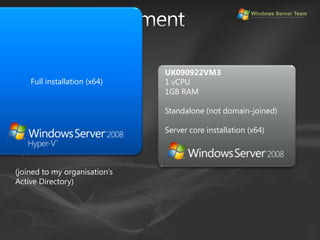
Demo environmentFull installation (x64)UK090922VM31 vCPU1GB RAMStandalone (not domain-joined)Server core installation (x64)UK090922LTFujitsu-Siemens S7210Intel Core 2 Duo T7500 (2.2GHz)4GB RAM(joined to my organisation’s Active Directory)
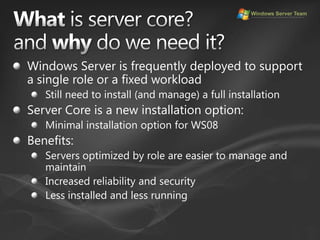
What is server core?and why do we need it?Windows Server is frequently deployed to support a single role or a fixed workloadStill need to install (and manage) a full installationServer Core is a new installation option:Minimal installation option for WS08Benefits:Servers optimized by role are easier to manage and maintainIncreased reliability and securityLess installed and less running
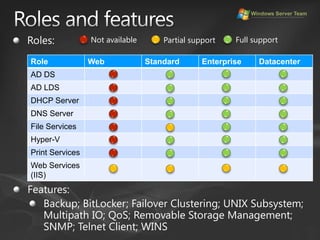
Roles and featuresNot availableFull supportPartial supportRoles:Features:Backup; BitLocker; Failover Clustering; UNIX Subsystem; Multipath IO; QoS; Removable Storage Management; SNMP; Telnet Client; WINS
ArchitectureServer Roles (and Features)NPASTSWDSetc.ServerGUI; .NET Framework; Shell; Internet Explorer; MMC;Media; etc.Server Core Roles (and Features)AD DSAD LDSDHCPDNSFileHyper-VPrintIISServer CoreSecurity; TCP/IP; File systems; RPC and other core sub-systems
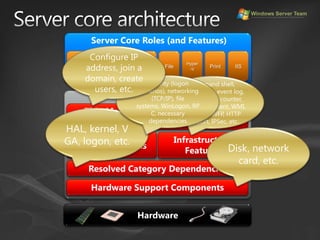
Server core architectureConfigure IP address, join a domain, create users, etc.AD DSAD LDSDHCPDNSFileHyper-VPrintIISSecurity (logon scenarios), networking (TCP/IP), file systems, WinLogon, RPC, necessary dependenciesCommand shell, domain join, event log, performance counter, WS-Management, WMI, licensing, WFP, HTTP support, IPSec, etc.Server CoreThin Management Tools (Local and Remote)HAL, kernel, VGA, logon, etc.Disk, network card, etc.Server Core Roles (and Features)Infrastructure FeaturesCore SubsystemsResolved Category DependenciesHardware Support ComponentsHardware
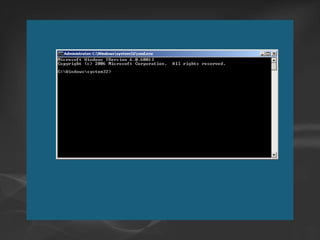
Server CoreGetting startedDemonstration
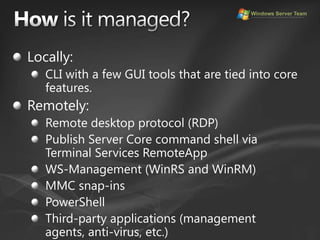
How is it managed?Locally:CLI with a few GUI tools that are tied into core features.Remotely:Remote desktop protocol (RDP)Publish Server Core command shell via Terminal Services RemoteAppWS-Management (WinRS and WinRM)MMC snap-insPowerShellThird-party applications (management agents, anti-virus, etc.)
Automatic updatesServer core does include the automatic updates clientNo notification functionalityManage patch deployment via WSUS (or another method)Same patches as for a full Windows Server 2008 installation – just less of them to apply!
Server CoreLocal managementDemonstration
Getting startedChange the machine name (before joining a domain):netdom renamecomputer %computername% /newname:newcomputernameChange the computer name (after joining a domain):netdom.exe renamecomputer %computername% /NewName:newcomputername /userd:domainname\username /passwordd:*Set the IP address for the primary NIC:netsh interface ipv4 set address "Local Area Connection" static ipaddress subnetmask gatewayipaddressSet the DNS server addresses:netsh interface ipv4 add dns "Local Area Connection" ipaddress [index=indexnumber]Join a domain:netdom join %computername% /domain:domainname /userd:domainname\username /passwordd:* Restart the server:shutdown -r –t 0Add a domain user to a local group:net localgroup groupname /add domainname\username
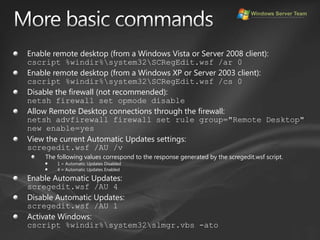
More basic commandsEnable remote desktop (from a Windows Vista or Server 2008 client):cscript %windir%\system32\SCRegEdit.wsf /ar 0Enable remote desktop (from a Windows XP or Server 2003 client):cscript %windir%\system32\SCRegEdit.wsf /cs 0Disable the firewall (not recommended):netsh firewall set opmode disableAllow Remote Desktop connections through the firewall:netsh advfirewall firewall set rule group="Remote Desktop" new enable=yesView the current Automatic Updates settings:scregedit.wsf /AU /vThe following values correspond to the response generated by the scregedit.wsf script.1 = Automatic Updates Disabled4 = Automatic Updates EnabledEnable Automatic Updates:scregedit.wsf /AU 4Disable Automatic Updates:scregedit.wsf /AU 1Activate Windows:cscript %windir%\system32\slmgr.vbs -ato
TweakingSet the screen resolution:Run regedit.exe and navigate to HKEY_LOCAL_MACHINE\SYSTEM\CurrentControlSet\Control\Video\{BBF118A6-4C44-4FE4-A8A3-965A9A577F98}0000 (or whichever GUID key has a subkey named VolatileSettings with a value of 0000), then change DefaultSettings.XResolution and DefaultSettings.YResolution to the desired values (in decimal format).Change the drive letter allocation for an existing disk (e.g. the CD-ROM drive):diskpartselect volume volumenumberassign letter=driveletterFormat additional disks:diskpartselect disk disknumberselect partition partitionnumberformat fs=ntfs label=volumelable quietLabel a disk (e.g. the system disk):label driveletter: volumelable
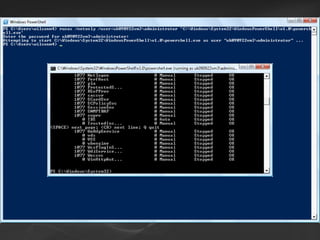
Server CoreRemote management with WS-Management, MMC and Windows PowerShellDemonstration
Is server core anapplication platform?Microsoft do not see server core as an application platform:“Server core is not an application platform [but it] does support development of management tools, utilities and agents”[Andrew Mason, Microsoft]But think about it from a customer perspective:Smaller attack surfaceLess patchingYou can run applications on server core:Cannot have shell or GUI dependenciesCannot use managed code
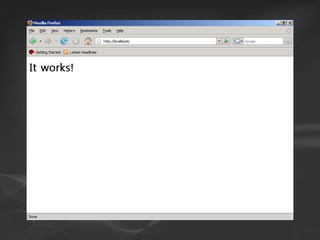
Server CoreInstalling third party applications {optional}Demonstration
The future?MinWin:A minimalistic variation of the Windows kernel, being developed for use in Windows 7 (codenamed MinWin)Publicly demonstrated by Eric Traut (Microsoft Distinguished Engineer) - http://www.youtube.com/watch?v=NNsS_0wSfoUSounds similar to server core but:Server core constrains OS by server roles:Unneeded components removedDependencies still exist in code (must be present to compile) MinWin consolidates dependencies into the kernel. Code compiles even without any extraneous components resulting in a stripped-down self-contained OS kernel image.NET Framework subset, PowerShell support, limited ASP.NET support, Windows Communications FrameworkSome extra roles
Server core takeawaysServer core is a minimal installation option for Windows Server 2008More secure and less to patchLocal management is possible, especially with third party tools such as GNU Wget and CoreConfiguratorRemote management is the preferred approach:RDP, TS RemoteApp, MMC, WS-Management, Windows PowerShellMicrosoft don’t see server core as an application platform – but why not?
Resources (Microsoft)Ask the Core Team: http://blogs.technet.com/askcore/Server Core blog: http://blogs.technet.com/server_core/Windows Server 2008 Technical Library: http://technet2.microsoft.com/windowsserver2008/en/library/bab0f1a1-54aa-4cef-9164-139e8bcc44751033.mspx?mfr=trueA-Z Command Line reference: http://technet2.microsoft.com/windowsserver2008/en/library/f7cedeb1-4996-4d29-8fcb-b44d9de7cd581033.mspx?mfr=true (not all of these are available in server core)Server Core installation option – step-by-step guide: http://technet2.microsoft.com/windowsserver2008/en/library/47a23a74-e13c-46de-8d30-ad0afb1eaffc1033.mspx?mfr=trueAndrew Mason’s TechNet Spotlight video on server core: http://www.microsoft.com/emea/spotlight/sessionh.aspx?videoid=492SDK: http://msdn2.microsoft.com/en-us/library/ms723891.aspx
Resources(non-Microsoft)Windows Server Team UK:  http://winserverteam.org.uk/My blog: http://www.markwilson.co.uk/blog/A few commands to get started with server core: http://www.markwilson.co.uk/blog/2007/08/a-few-commands-to-get-started-with-windows-server-core.htmCustomising server core: http://www.markwilson.co.uk/blog/2008/03/customising-windows-server-2008-server-core.htmAnother blog with lots of server core information:Sander Berkouwer: http://blogs.dirteam.com/blogs/sanderberkouwer/Tools:CoreConfigurator: http://blogs.microsoft.co.il/blogs/guyt/archive/2008/03/22/windows-server-core-coreconfigurator-to-the-rescue.aspxGNU Wget (compiled for Windows): http://users.ugent.be/~bpuype/wget/This slidedeck:http://cid-1453622c71a8a08e.skydrive.live.com/browse.aspx/Public
To find out more about Fujitsu and Microsoft’s industrialisation initiative – Accelerated Microsoft – visit http://uk.fujitsu.com/microsoft/
© 2008, Mark Wilson.Some rights reserved.CThis work is licensed under a Creative Commons Licence.For further details, please visit http://creativecommons.org/licenses/by-nc/2.0/uk/cbn

Windows Server Core

  • 2.
    Welcome! Community Launch2008Mark WilsonInfrastructure Architect/Technology lead for Windows Server 2008 and Hyper-V, Fujitsu Servicesmarkw@markwilson.co.ukhttp://www.markwilson.co.uk/blog/{}
  • 3.
    A community foreveryone who is interested in Microsoft's Windows Server technologies - especially Windows Server 2008Formed in 2007 – just getting startedHave run a few events – more to comeFind out more (join us!) at http://winserverteam.org.uk/
  • 4.
    Windows Server 2008:Server CoreWhat? Why? How?
  • 5.
    AgendaWhat is servercore? And why do we need it?How does it work (architecture)How is it managed?LocallyRemotelyQuestions? (and hopefully some answers!)
  • 6.
    Demo environmentFull installation(x64)UK090922VM31 vCPU1GB RAMStandalone (not domain-joined)Server core installation (x64)UK090922LTFujitsu-Siemens S7210Intel Core 2 Duo T7500 (2.2GHz)4GB RAM(joined to my organisation’s Active Directory)
  • 7.
    What is servercore?and why do we need it?Windows Server is frequently deployed to support a single role or a fixed workloadStill need to install (and manage) a full installationServer Core is a new installation option:Minimal installation option for WS08Benefits:Servers optimized by role are easier to manage and maintainIncreased reliability and securityLess installed and less running
  • 8.
    Roles and featuresNotavailableFull supportPartial supportRoles:Features:Backup; BitLocker; Failover Clustering; UNIX Subsystem; Multipath IO; QoS; Removable Storage Management; SNMP; Telnet Client; WINS
  • 9.
    ArchitectureServer Roles (andFeatures)NPASTSWDSetc.ServerGUI; .NET Framework; Shell; Internet Explorer; MMC;Media; etc.Server Core Roles (and Features)AD DSAD LDSDHCPDNSFileHyper-VPrintIISServer CoreSecurity; TCP/IP; File systems; RPC and other core sub-systems
  • 10.
    Server core architectureConfigureIP address, join a domain, create users, etc.AD DSAD LDSDHCPDNSFileHyper-VPrintIISSecurity (logon scenarios), networking (TCP/IP), file systems, WinLogon, RPC, necessary dependenciesCommand shell, domain join, event log, performance counter, WS-Management, WMI, licensing, WFP, HTTP support, IPSec, etc.Server CoreThin Management Tools (Local and Remote)HAL, kernel, VGA, logon, etc.Disk, network card, etc.Server Core Roles (and Features)Infrastructure FeaturesCore SubsystemsResolved Category DependenciesHardware Support ComponentsHardware
  • 11.
  • 13.
    How is itmanaged?Locally:CLI with a few GUI tools that are tied into core features.Remotely:Remote desktop protocol (RDP)Publish Server Core command shell via Terminal Services RemoteAppWS-Management (WinRS and WinRM)MMC snap-insPowerShellThird-party applications (management agents, anti-virus, etc.)
  • 14.
    Automatic updatesServer coredoes include the automatic updates clientNo notification functionalityManage patch deployment via WSUS (or another method)Same patches as for a full Windows Server 2008 installation – just less of them to apply!
  • 15.
  • 17.
    Getting startedChange themachine name (before joining a domain):netdom renamecomputer %computername% /newname:newcomputernameChange the computer name (after joining a domain):netdom.exe renamecomputer %computername% /NewName:newcomputername /userd:domainname\username /passwordd:*Set the IP address for the primary NIC:netsh interface ipv4 set address "Local Area Connection" static ipaddress subnetmask gatewayipaddressSet the DNS server addresses:netsh interface ipv4 add dns "Local Area Connection" ipaddress [index=indexnumber]Join a domain:netdom join %computername% /domain:domainname /userd:domainname\username /passwordd:* Restart the server:shutdown -r –t 0Add a domain user to a local group:net localgroup groupname /add domainname\username
  • 18.
    More basic commandsEnableremote desktop (from a Windows Vista or Server 2008 client):cscript %windir%\system32\SCRegEdit.wsf /ar 0Enable remote desktop (from a Windows XP or Server 2003 client):cscript %windir%\system32\SCRegEdit.wsf /cs 0Disable the firewall (not recommended):netsh firewall set opmode disableAllow Remote Desktop connections through the firewall:netsh advfirewall firewall set rule group="Remote Desktop" new enable=yesView the current Automatic Updates settings:scregedit.wsf /AU /vThe following values correspond to the response generated by the scregedit.wsf script.1 = Automatic Updates Disabled4 = Automatic Updates EnabledEnable Automatic Updates:scregedit.wsf /AU 4Disable Automatic Updates:scregedit.wsf /AU 1Activate Windows:cscript %windir%\system32\slmgr.vbs -ato
  • 19.
    TweakingSet the screenresolution:Run regedit.exe and navigate to HKEY_LOCAL_MACHINE\SYSTEM\CurrentControlSet\Control\Video\{BBF118A6-4C44-4FE4-A8A3-965A9A577F98}0000 (or whichever GUID key has a subkey named VolatileSettings with a value of 0000), then change DefaultSettings.XResolution and DefaultSettings.YResolution to the desired values (in decimal format).Change the drive letter allocation for an existing disk (e.g. the CD-ROM drive):diskpartselect volume volumenumberassign letter=driveletterFormat additional disks:diskpartselect disk disknumberselect partition partitionnumberformat fs=ntfs label=volumelable quietLabel a disk (e.g. the system disk):label driveletter: volumelable
  • 20.
    Server CoreRemote managementwith WS-Management, MMC and Windows PowerShellDemonstration
  • 22.
    Is server coreanapplication platform?Microsoft do not see server core as an application platform:“Server core is not an application platform [but it] does support development of management tools, utilities and agents”[Andrew Mason, Microsoft]But think about it from a customer perspective:Smaller attack surfaceLess patchingYou can run applications on server core:Cannot have shell or GUI dependenciesCannot use managed code
  • 23.
    Server CoreInstalling thirdparty applications {optional}Demonstration
  • 25.
    The future?MinWin:A minimalisticvariation of the Windows kernel, being developed for use in Windows 7 (codenamed MinWin)Publicly demonstrated by Eric Traut (Microsoft Distinguished Engineer) - http://www.youtube.com/watch?v=NNsS_0wSfoUSounds similar to server core but:Server core constrains OS by server roles:Unneeded components removedDependencies still exist in code (must be present to compile) MinWin consolidates dependencies into the kernel. Code compiles even without any extraneous components resulting in a stripped-down self-contained OS kernel image.NET Framework subset, PowerShell support, limited ASP.NET support, Windows Communications FrameworkSome extra roles
  • 26.
    Server core takeawaysServercore is a minimal installation option for Windows Server 2008More secure and less to patchLocal management is possible, especially with third party tools such as GNU Wget and CoreConfiguratorRemote management is the preferred approach:RDP, TS RemoteApp, MMC, WS-Management, Windows PowerShellMicrosoft don’t see server core as an application platform – but why not?
  • 27.
    Resources (Microsoft)Ask theCore Team: http://blogs.technet.com/askcore/Server Core blog: http://blogs.technet.com/server_core/Windows Server 2008 Technical Library: http://technet2.microsoft.com/windowsserver2008/en/library/bab0f1a1-54aa-4cef-9164-139e8bcc44751033.mspx?mfr=trueA-Z Command Line reference: http://technet2.microsoft.com/windowsserver2008/en/library/f7cedeb1-4996-4d29-8fcb-b44d9de7cd581033.mspx?mfr=true (not all of these are available in server core)Server Core installation option – step-by-step guide: http://technet2.microsoft.com/windowsserver2008/en/library/47a23a74-e13c-46de-8d30-ad0afb1eaffc1033.mspx?mfr=trueAndrew Mason’s TechNet Spotlight video on server core: http://www.microsoft.com/emea/spotlight/sessionh.aspx?videoid=492SDK: http://msdn2.microsoft.com/en-us/library/ms723891.aspx
  • 28.
    Resources(non-Microsoft)Windows Server TeamUK: http://winserverteam.org.uk/My blog: http://www.markwilson.co.uk/blog/A few commands to get started with server core: http://www.markwilson.co.uk/blog/2007/08/a-few-commands-to-get-started-with-windows-server-core.htmCustomising server core: http://www.markwilson.co.uk/blog/2008/03/customising-windows-server-2008-server-core.htmAnother blog with lots of server core information:Sander Berkouwer: http://blogs.dirteam.com/blogs/sanderberkouwer/Tools:CoreConfigurator: http://blogs.microsoft.co.il/blogs/guyt/archive/2008/03/22/windows-server-core-coreconfigurator-to-the-rescue.aspxGNU Wget (compiled for Windows): http://users.ugent.be/~bpuype/wget/This slidedeck:http://cid-1453622c71a8a08e.skydrive.live.com/browse.aspx/Public
  • 29.
    To find outmore about Fujitsu and Microsoft’s industrialisation initiative – Accelerated Microsoft – visit http://uk.fujitsu.com/microsoft/
  • 32.
    © 2008, MarkWilson.Some rights reserved.CThis work is licensed under a Creative Commons Licence.For further details, please visit http://creativecommons.org/licenses/by-nc/2.0/uk/cbn