FreeBSD System
Administration Using SysAdm
Dru Lavigne
Director of Technical Documentation, iXsystems
AsiaBSDCon March 11, 2017
What is SysAdm?
BSD-licensed framework for administering local or
remote FreeBSD/TrueOS systems.
Built into TrueOS, available as a FreeBSD package,
src is available on GitHub.
Features
Complements FreeBSD's built-in configuration files.
Provides graphical and scriptable methods for
performing routine system administration tasks.
Includes a notification system to alert of events that
require attention.
Components
Server: daemon to listen for connection requests.
Client: graphical front-end for connecting to and
interacting with the server.
Bridge: experimental connection relay.
SysAdm Server
Install and run on the system to be managed.
Provides middleware to facilitate interactions between
the user and the managed system.
SysAdm Server
Supports JSON text format over two connection types:
REST: single-request connection that requires user and
password authentication with every request.
WebSockets: long-lived connection for pure JSON
input/output. Uses one-time authentication with
a configurable inactivity timeout/disconnect.
SysAdm Server
Requires TLS encryption over HTTPS or WSS.
Requires username/password authentication or an
SSL public/private key pair.
Enforces configurable connection timeouts and
blacklisting.
Server API
Provides a set of classes for managing the system.
All configuration changes are performed directly
to the built-in configuration files (i.e. not to a
configuration database).
Server API
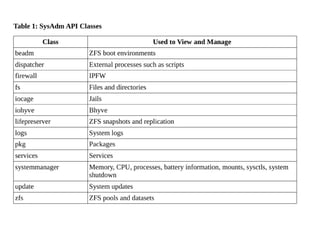
Each API class provides a list of actions to view or
change the current state of a configurable element.
API requests can use either a one-time (REST) or
long-lived (WebSockets) connection.
The SysAdm API Reference Guide describes each class,
its actions, and usage examples.
SysAdm Client
Suite of graphical utilities to provide a front-end to
the SysAdm API's classes and actions.
Written in Qt5 to maximize cross-platform support.
Currently available for FreeBSD, Windows, and OS X.
SysAdm Client
Integrates into the system tray in order to provide
event notifications.
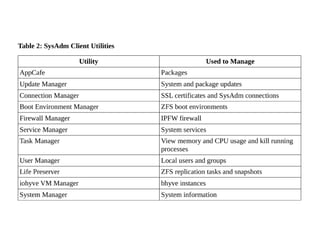
Client utilities are listed in a graphical Control Panel.
List of available utilities may vary, depending upon
what is installed on the system.
SysAdm Client
Access to remote system disabled until admin
configures secure Websockets connection.
Valid username/password required for first connection
at which time a unique SSL key pair is created,
registered, and required for subsequent connections.
SysAdm Client
Registered certificates/keys stored on client in an
encrypted file protected by a password.
Encrypted client settings can be imported/exported.
Graphical Connection Manager provided for generating
keys and managing connections.
SysAdm Bridge
Experimental component to manage connections to
systems with dynamic addresses or which reside
behind a firewall.
Bridge requires a static, public IP address but can be
hosted elsewhere, such as on a cloud-based virtual
machine.
SysAdm Bridge
Designed to be a completely untrusted relay.
Servers and clients use a separate SSL certificate
when talking to the bridge to ensure that their real
certificate isn’t used to connect to an unknown system.
SysAdm Bridge
Once connected to the bridge, the server/client
sends MD5 of real SSL certificate.
The bridge responds with the ID and location of any
systems which list that MD5 in their configured
certificate list.
Resources
https://sysadm.us
https://github.com/trueos/sysadm/
https://github.com/trueos/sysadm-ui-qt
http://api.sysadm.us/
Questions?
Contact
dru@freebsd.org
URL to slides
http://slideshare.net/dlavigne/asiabsdcon2017

Asiabsdcon2017

  • 1.
    FreeBSD System Administration UsingSysAdm Dru Lavigne Director of Technical Documentation, iXsystems AsiaBSDCon March 11, 2017
  • 2.
    What is SysAdm? BSD-licensedframework for administering local or remote FreeBSD/TrueOS systems. Built into TrueOS, available as a FreeBSD package, src is available on GitHub.
  • 3.
    Features Complements FreeBSD's built-inconfiguration files. Provides graphical and scriptable methods for performing routine system administration tasks. Includes a notification system to alert of events that require attention.
  • 4.
    Components Server: daemon tolisten for connection requests. Client: graphical front-end for connecting to and interacting with the server. Bridge: experimental connection relay.
  • 5.
    SysAdm Server Install andrun on the system to be managed. Provides middleware to facilitate interactions between the user and the managed system.
  • 6.
    SysAdm Server Supports JSONtext format over two connection types: REST: single-request connection that requires user and password authentication with every request. WebSockets: long-lived connection for pure JSON input/output. Uses one-time authentication with a configurable inactivity timeout/disconnect.
  • 7.
    SysAdm Server Requires TLSencryption over HTTPS or WSS. Requires username/password authentication or an SSL public/private key pair. Enforces configurable connection timeouts and blacklisting.
  • 8.
    Server API Provides aset of classes for managing the system. All configuration changes are performed directly to the built-in configuration files (i.e. not to a configuration database).
  • 10.
    Server API Each APIclass provides a list of actions to view or change the current state of a configurable element. API requests can use either a one-time (REST) or long-lived (WebSockets) connection. The SysAdm API Reference Guide describes each class, its actions, and usage examples.
  • 11.
    SysAdm Client Suite ofgraphical utilities to provide a front-end to the SysAdm API's classes and actions. Written in Qt5 to maximize cross-platform support. Currently available for FreeBSD, Windows, and OS X.
  • 12.
    SysAdm Client Integrates intothe system tray in order to provide event notifications. Client utilities are listed in a graphical Control Panel. List of available utilities may vary, depending upon what is installed on the system.
  • 13.
    SysAdm Client Access toremote system disabled until admin configures secure Websockets connection. Valid username/password required for first connection at which time a unique SSL key pair is created, registered, and required for subsequent connections.
  • 14.
    SysAdm Client Registered certificates/keysstored on client in an encrypted file protected by a password. Encrypted client settings can be imported/exported. Graphical Connection Manager provided for generating keys and managing connections.
  • 16.
    SysAdm Bridge Experimental componentto manage connections to systems with dynamic addresses or which reside behind a firewall. Bridge requires a static, public IP address but can be hosted elsewhere, such as on a cloud-based virtual machine.
  • 17.
    SysAdm Bridge Designed tobe a completely untrusted relay. Servers and clients use a separate SSL certificate when talking to the bridge to ensure that their real certificate isn’t used to connect to an unknown system.
  • 18.
    SysAdm Bridge Once connectedto the bridge, the server/client sends MD5 of real SSL certificate. The bridge responds with the ID and location of any systems which list that MD5 in their configured certificate list.
  • 19.
  • 20.