Introduction to
Computer Applications
Lecture # 13
Objective of Lecture
 Software
 Types of Software
 System software
 Description
 Examples
What is Software
Def#1
 Software is a set of instruction that use to operates
various kind of program.
Def#2
 Software is a generic term for organized collections of
computer data and instructions.
Software
 Software, is a collection of computer programs that
provide the instructions for telling a computer what to do
and how to do it.
 In contrast to hardware, software is intangible,
meaning it “cannot be touched”having no physical
existence.
Types of software
It is divided in to two major categories
 System software that provides the basic non-task-
specific functions of the computer.
 Application software which is used by users to
accomplish specific tasks.
Types of Software
 Application softwares
 System softwares
1. Operating System
2. Utility Program
3. Device Drivers
System Software
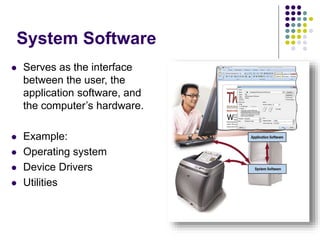
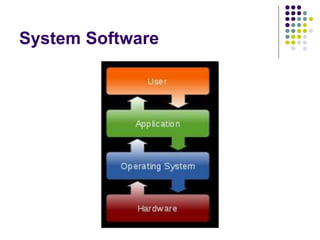
 Serves as the interface
between the user, the
application software, and
the computer’s hardware.
 Example:
 Operating system
 Device Drivers
 Utilities
System software
 System software is responsible for controlling,
integrating, and managing the individual hardware
components of a computer system.
 Generally, system software consists of an operating
system and some fundamental utilities such as
 disk formatters
 file managers
 display managers
 user authentication (login)
 and management tools
 networking software
 device control software
System Software
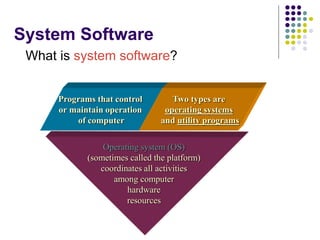
What is system software?
Operating system (OS)
(sometimes called the platform)
coordinates all activities
among computer
hardware
resources
Programs that control
or maintain operation
of computer
Two types are
operating systems
and utility programs
System Software
Operating System
 Operating system is a set of programs including
instructions that coordinate all the activities among
hardware resources.
 Examples:
Windows,Macintosh,Linux,Unix
Operating System
 A program that acts as an intermediary between a user
of a computer and the computer hardware.
Operating system goals:
 Execute user programs and make solving user
problems easier.
 Make the computer system convenient to use.
Operating system Examples:
Linux, Unix, XP ,Windows 7 ,Windows 8.
Operating System Functions
 starting a computer,
 providing a user interface,
 managing programs, memory,
 coordinating tasks,
 configuring devices,
 establishing an internet connection,
 monitoring performance,
 providing file management utilities.
Operating System Functions
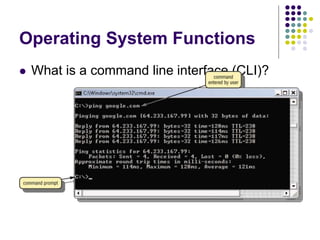
 What is a command line interface (CLI)?
Operating System Functions
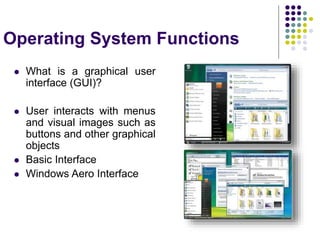
 What is a graphical user
interface (GUI)?
 User interacts with menus
and visual images such as
buttons and other graphical
objects
 Basic Interface
 Windows Aero Interface
Device Drivers
 In computing, a device driver or software driver is a
computer programs to interact with a hardware device.
 Drivers are hardware-dependent and operating-system-
specific.
Device drivers
 Device Driver or Software Driver is a computer
program allowing an external extended mother board
components to interact with computer system.
Because of the diversity of modern update hardware
and operating systems, drivers operate in many
different environments. Drivers may interface with;
 Printer
 Scanner
 Sound card
 VGA card
 Network card. etc….
Operating System Utility Programs
 What is a Utility Program?
 System software that performs maintenance-type
tasks related to managing computers devices or
programs
 Also called utility
 Example:
 antivirus software
 Defragmenters
 Internet and network connection is managed by
variety of small software utilities, including firewall
programs, while program installation and removal
is achieved by package managers and installation
clients.
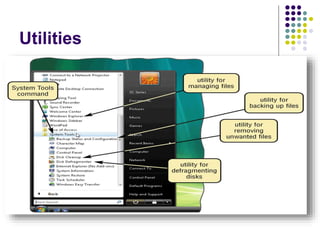
Utilities
Utilities
 Utility software is a kind of system software designed to
help analyze, configure, optimize and maintain the computer.
A single piece of utility software is usually called a utility or
tool. Utility software should be contrasted with application
software, which allows users to do things like creating text
documents, playing games.
Utility software :
 Antivirus(MC cafee)
 Data compression software (win RAR)
 Disk partitioning
 Backup
 Memory testers
 Network utilities etc…
Operating System Utility
Programs
What is a File Manager?
 Performs functions related to file management
 A file manager displays list of files on storage
medium
 Organizes file into folder
 Used for Copy, Delete, Rename, Move and shortcut
of files
Operating System Utility Programs
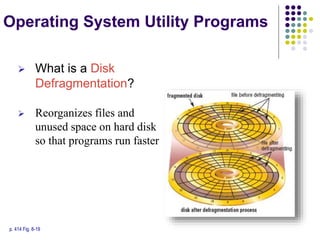
p. 414 Fig. 8-19
 What is a Disk
Defragmentation?
 Reorganizes files and
unused space on hard disk
so that programs run faster
Utility Programs
 What is File compression?
 Shrinks size of files to free up room and improve
performance
 Compressed files are sometimes called zipped files
 Two popular utilities:
Win RAR and WinZip
Operating System Utility Programs
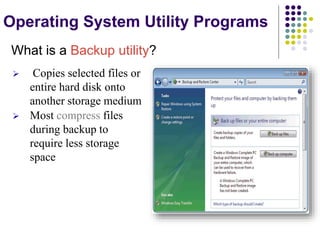
What is a Backup utility?
 Copies selected files or
entire hard disk onto
another storage medium
 Most compress files
during backup to
require less storage
space
Questions??

ITC_lec_13.ppt

  • 1.
  • 2.
    Objective of Lecture Software  Types of Software  System software  Description  Examples
  • 3.
    What is Software Def#1 Software is a set of instruction that use to operates various kind of program. Def#2  Software is a generic term for organized collections of computer data and instructions.
  • 4.
    Software  Software, isa collection of computer programs that provide the instructions for telling a computer what to do and how to do it.  In contrast to hardware, software is intangible, meaning it “cannot be touched”having no physical existence.
  • 5.
    Types of software Itis divided in to two major categories  System software that provides the basic non-task- specific functions of the computer.  Application software which is used by users to accomplish specific tasks.
  • 6.
    Types of Software Application softwares  System softwares 1. Operating System 2. Utility Program 3. Device Drivers
  • 7.
    System Software  Servesas the interface between the user, the application software, and the computer’s hardware.  Example:  Operating system  Device Drivers  Utilities
  • 8.
    System software  Systemsoftware is responsible for controlling, integrating, and managing the individual hardware components of a computer system.  Generally, system software consists of an operating system and some fundamental utilities such as  disk formatters  file managers  display managers  user authentication (login)  and management tools  networking software  device control software
  • 9.
    System Software What issystem software? Operating system (OS) (sometimes called the platform) coordinates all activities among computer hardware resources Programs that control or maintain operation of computer Two types are operating systems and utility programs
  • 10.
  • 11.
    Operating System  Operatingsystem is a set of programs including instructions that coordinate all the activities among hardware resources.  Examples: Windows,Macintosh,Linux,Unix
  • 12.
    Operating System  Aprogram that acts as an intermediary between a user of a computer and the computer hardware. Operating system goals:  Execute user programs and make solving user problems easier.  Make the computer system convenient to use. Operating system Examples: Linux, Unix, XP ,Windows 7 ,Windows 8.
  • 13.
    Operating System Functions starting a computer,  providing a user interface,  managing programs, memory,  coordinating tasks,  configuring devices,  establishing an internet connection,  monitoring performance,  providing file management utilities.
  • 14.
    Operating System Functions What is a command line interface (CLI)?
  • 15.
    Operating System Functions What is a graphical user interface (GUI)?  User interacts with menus and visual images such as buttons and other graphical objects  Basic Interface  Windows Aero Interface
  • 16.
    Device Drivers  Incomputing, a device driver or software driver is a computer programs to interact with a hardware device.  Drivers are hardware-dependent and operating-system- specific.
  • 17.
    Device drivers  DeviceDriver or Software Driver is a computer program allowing an external extended mother board components to interact with computer system. Because of the diversity of modern update hardware and operating systems, drivers operate in many different environments. Drivers may interface with;  Printer  Scanner  Sound card  VGA card  Network card. etc….
  • 18.
    Operating System UtilityPrograms  What is a Utility Program?  System software that performs maintenance-type tasks related to managing computers devices or programs  Also called utility  Example:  antivirus software  Defragmenters  Internet and network connection is managed by variety of small software utilities, including firewall programs, while program installation and removal is achieved by package managers and installation clients.
  • 19.
  • 20.
    Utilities  Utility softwareis a kind of system software designed to help analyze, configure, optimize and maintain the computer. A single piece of utility software is usually called a utility or tool. Utility software should be contrasted with application software, which allows users to do things like creating text documents, playing games. Utility software :  Antivirus(MC cafee)  Data compression software (win RAR)  Disk partitioning  Backup  Memory testers  Network utilities etc…
  • 21.
    Operating System Utility Programs Whatis a File Manager?  Performs functions related to file management  A file manager displays list of files on storage medium  Organizes file into folder  Used for Copy, Delete, Rename, Move and shortcut of files
  • 22.
    Operating System UtilityPrograms p. 414 Fig. 8-19  What is a Disk Defragmentation?  Reorganizes files and unused space on hard disk so that programs run faster
  • 23.
    Utility Programs  Whatis File compression?  Shrinks size of files to free up room and improve performance  Compressed files are sometimes called zipped files  Two popular utilities: Win RAR and WinZip
  • 24.
    Operating System UtilityPrograms What is a Backup utility?  Copies selected files or entire hard disk onto another storage medium  Most compress files during backup to require less storage space
  • 25.