Presented BY: M.Shammaas
Submitted to: M.Sajid Farooq
Computer Software
 A set of instructions given to the computer
to solve any problem is program or
software.
 These instructions tell the computer what to
do. Software cannot be executed without
hardware.
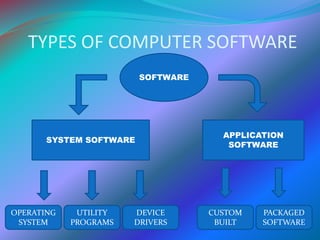
 There are two types of software.
1. System Software
2. Application software
PACKAGED
SOFTWARE
CUSTOM
BUILT
DEVICE
DRIVERS
UTILITY
PROGRAMS
OPERATING
SYSTEM
SYSTEM SOFTWARE
APPLICATION
SOFTWARE
SOFTWARE
TYPES OF COMPUTER SOFTWARE
APPLICATION SOFTWARE
 Application software are developed to perform some
specific task. These are specially designed to solve the
problems of the users.
 This software is also used to provide audio, video or
multimedia entertainment to the users.
 Microsoft world, Microsoft excel and Adobe
Photoshop are examples of application software.
 Custom-built Software
 Packaged Software
CUSTOM-BUILT SOFTWARE
 The software are designed according to the
requirement of the particular customer.
 The professional teams of programmers depending on
the requirements develops these programs.
 Cost of customized software is more than the
packaged software.
 Patient information system, inventory system, college
information system and examination system are the
examples.
PACKAGED SOFTWARE
 There are also know as off-the-shelf (Ready Made)
programs. These are designed for sale to the general
public.
 Software developers also acquire packaged software foe
their ease.
 These facilitate the users in all field of life.
 Microsoft office package (Micr0soft World, Ms-excel,
etc), Graphics software, Communication program are
the examples.
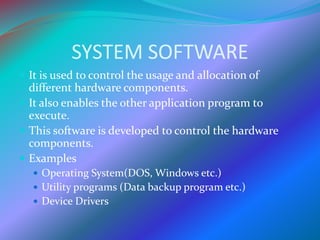
SYSTEM SOFTWARE
 It is used to control the usage and allocation of
different hardware components.
 It also enables the other application program to
execute.
 This software is developed to control the hardware
components.
 Examples
 Operating System(DOS, Windows etc.)
 Utility programs (Data backup program etc.)
 Device Drivers
OPERATING SYSTEM
 An operating system is the set of programs that
manages the all computer components and operations.
 A computer cannot do anything without operating
system. Operating system must be installed on every
type of computer.
 User interact with the computer through operating
system.
UTILITY PROGRAMS
 A utility program is the type of system program that is
used or effective management of computer system.
 The user can use the utility programs to perform
maintenance task related to different devices and
programs.
 The utility program keep the computer system running
smoothly.
 Most operating system include different utility
programs. The user can also buy stand alone utility
program.
DEVICE DRIVERS
 A device driver is a program that is used to operate and
control a device attached to computer.
 Device drivers are provider by the manufacturers of
the device. The devices cannot function properly
without device drivers.
REVIEW
 Computer Software
 System Software
 Operating System
 Utility Programs
 Device Drivers
 Application Software
 Custom-built software
 Packaged software
THANK YOU

Software Presentation

  • 2.
  • 3.
    Computer Software  Aset of instructions given to the computer to solve any problem is program or software.  These instructions tell the computer what to do. Software cannot be executed without hardware.  There are two types of software. 1. System Software 2. Application software
  • 4.
  • 5.
    APPLICATION SOFTWARE  Applicationsoftware are developed to perform some specific task. These are specially designed to solve the problems of the users.  This software is also used to provide audio, video or multimedia entertainment to the users.  Microsoft world, Microsoft excel and Adobe Photoshop are examples of application software.  Custom-built Software  Packaged Software
  • 6.
    CUSTOM-BUILT SOFTWARE  Thesoftware are designed according to the requirement of the particular customer.  The professional teams of programmers depending on the requirements develops these programs.  Cost of customized software is more than the packaged software.  Patient information system, inventory system, college information system and examination system are the examples.
  • 7.
    PACKAGED SOFTWARE  Thereare also know as off-the-shelf (Ready Made) programs. These are designed for sale to the general public.  Software developers also acquire packaged software foe their ease.  These facilitate the users in all field of life.  Microsoft office package (Micr0soft World, Ms-excel, etc), Graphics software, Communication program are the examples.
  • 8.
    SYSTEM SOFTWARE  Itis used to control the usage and allocation of different hardware components.  It also enables the other application program to execute.  This software is developed to control the hardware components.  Examples  Operating System(DOS, Windows etc.)  Utility programs (Data backup program etc.)  Device Drivers
  • 9.
    OPERATING SYSTEM  Anoperating system is the set of programs that manages the all computer components and operations.  A computer cannot do anything without operating system. Operating system must be installed on every type of computer.  User interact with the computer through operating system.
  • 10.
    UTILITY PROGRAMS  Autility program is the type of system program that is used or effective management of computer system.  The user can use the utility programs to perform maintenance task related to different devices and programs.  The utility program keep the computer system running smoothly.  Most operating system include different utility programs. The user can also buy stand alone utility program.
  • 11.
    DEVICE DRIVERS  Adevice driver is a program that is used to operate and control a device attached to computer.  Device drivers are provider by the manufacturers of the device. The devices cannot function properly without device drivers.
  • 12.
    REVIEW  Computer Software System Software  Operating System  Utility Programs  Device Drivers  Application Software  Custom-built software  Packaged software
  • 13.