ARTDM 170, Week 16:  Publishing Flash Gilbert Guerrero  [email_address] gilbertguerrero.com/blog/artdm-170/
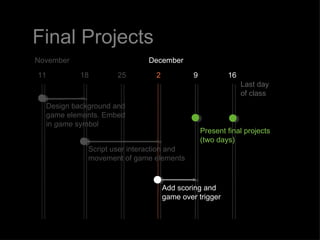
Final Projects December 2 9 16 25 11 November Last day  of class Present final projects (two days) Script user interaction and movement of game elements Add scoring and game over trigger 18 Design background and game elements. Embed in  game  symbol
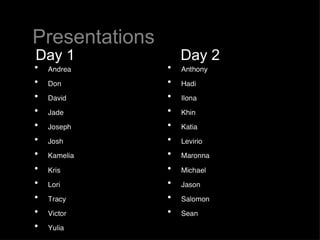
Presentations Day 1 Day 2
Flash on the Web
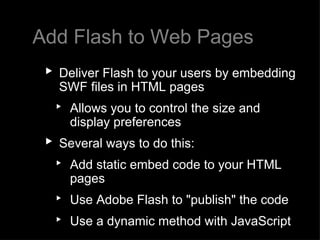
Add Flash to Web Pages Deliver Flash to your users by embedding SWF files in HTML pages Allows you to control the size and display preferences Several ways to do this: Add static embed code to your HTML pages  Use Adobe Flash to "publish" the code  Use a dynamic method with JavaScript
Two Ways to Add Static Embed Code
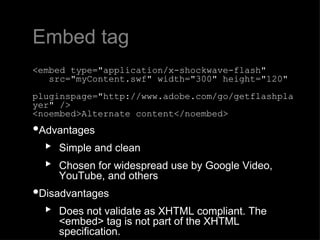
Embed tag <embed type=&quot;application/x-shockwave-flash&quot;     src=&quot;myContent.swf&quot; width=&quot;300&quot; height=&quot;120&quot;     pluginspage=&quot;http://www.adobe.com/go/getflashplayer&quot; /> <noembed>Alternate content</noembed> Advantages  Simple and clean Chosen for widespread use by Google Video, YouTube, and others Disadvantages  Does not validate as XHTML compliant. The <embed> tag is not part of the XHTML specification.
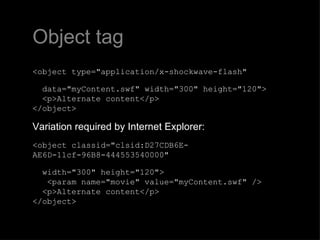
Object tag <object type=&quot;application/x-shockwave-flash&quot;     data=&quot;myContent.swf&quot; width=&quot;300&quot; height=&quot;120&quot;>   <p>Alternate content</p> </object> Variation required by Internet Explorer: <object classid=&quot;clsid:D27CDB6E-AE6D-11cf-96B8-444553540000&quot;     width=&quot;300&quot; height=&quot;120&quot;>    <param name=&quot;movie&quot; value=&quot;myContent.swf&quot; />    <p>Alternate content</p> </object>
Object tag: Nested To get the object tag to work as one block of code in the two ways it can written, nest them with IE conditional tags: <object classid=&quot;clsid:D27CDB6E-AE6D-11cf-96B8-444553540000&quot;  width=&quot;300&quot; height=&quot;120&quot;>    <param name=&quot;movie&quot; value=&quot;myContent.swf&quot; />    <!--[if !IE]>-->       <object type=&quot;application/x-shockwave-flash&quot;      data=&quot;myContent.sw&quot; width=&quot;300&quot; height=&quot;120&quot;>    <!--<![endif]-->        <p>Alternate content</p>    <!--[if !IE]>-->       </object>    <!--<![endif]--> </object>
&quot;Flash Embedding Cage Match&quot; by Bobby van der Sluis,  A List Apart,  http://www.alistapart.com/articles/flashembedcagematch
Publishing with Adobe Flash
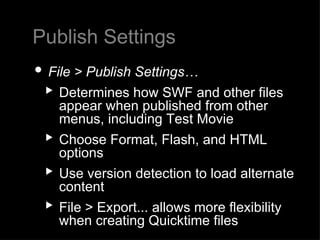
Publish Settings File > Publish Settings… Determines how SWF and other files appear when published from other menus, including Test Movie Choose Format, Flash, and HTML options Use version detection to load alternate content  File > Export... allows more flexibility when creating Quicktime files
SWF Object  
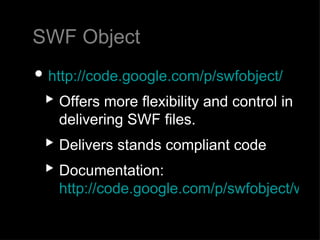
SWF Object http://code.google.com/p/swfobject/ Offers more flexibility and control in delivering SWF files. Delivers stands compliant code  Documentation:  http://code.google.com/p/swfobject/wiki/documentation
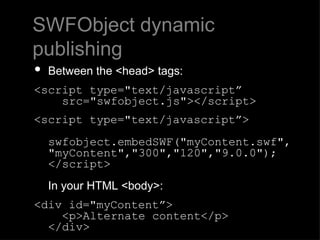
SWFObject dynamic publishing Between the <head> tags: <script type=&quot;text/javascript”     src=&quot;swfobject.js&quot;></script> <script type=&quot;text/javascript”>   swfobject.embedSWF(&quot;myContent.swf&quot;,  &quot;myContent&quot;,&quot;300&quot;,&quot;120&quot;,&quot;9.0.0&quot;); </script> In your HTML <body>:  <div id=&quot;myContent”>   <p>Alternate content</p>  </div>
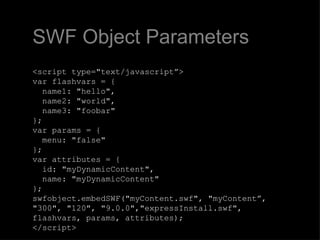
SWF Object Parameters <script type=&quot;text/javascript”> var flashvars = {   name1: &quot;hello&quot;,   name2: &quot;world&quot;,   name3: &quot;foobar&quot; }; var params = {   menu: &quot;false&quot; }; var attributes = {   id: &quot;myDynamicContent&quot;,   name: &quot;myDynamicContent&quot; }; swfobject.embedSWF(&quot;myContent.swf&quot;, &quot;myContent”, &quot;300&quot;, &quot;120&quot;, &quot;9.0.0&quot;,&quot;expressInstall.swf&quot;,  flashvars, params, attributes); </script>
Preloaders
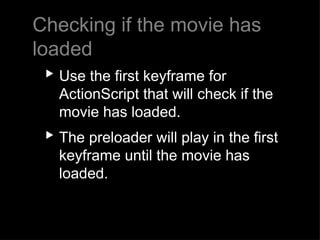
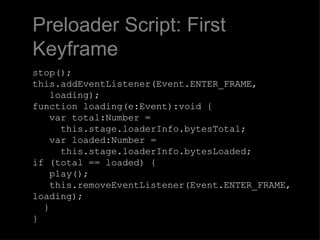
Checking if the movie has loaded Use the first keyframe for ActionScript that will check if the movie has loaded.   The preloader will play in the first keyframe until the movie has loaded.
Preloader Script: First Keyframe stop(); this.addEventListener(Event.ENTER_FRAME,   loading); function loading(e:Event):void {     var total:Number =   this.stage.loaderInfo.bytesTotal;    var loaded:Number =   this.stage.loaderInfo.bytesLoaded;  if (total == loaded) {    play();   this.removeEventListener(Event.ENTER_FRAME, loading);   } }
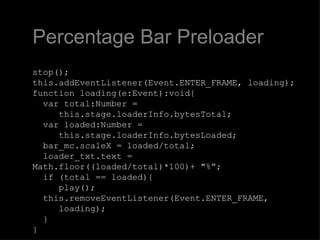
Percentage Bar Preloader stop(); this.addEventListener(Event.ENTER_FRAME, loading); function loading(e:Event):void{   var total:Number =    this.stage.loaderInfo.bytesTotal;   var loaded:Number =    this.stage.loaderInfo.bytesLoaded;   bar_mc.scaleX = loaded/total;   loader_txt.text = Math.floor((loaded/total)*100)+ &quot;%”;   if (total == loaded){    play();   this.removeEventListener(Event.ENTER_FRAME,   loading);   } }
AS3 Preloader Tutorial http://www.oman3d.com/tutorials/flash/as3preloader/
Homework Work on your final projects Add scoring and game over trigger
Thank You

ARTDM 170, Week 16: Publishing

  • 1.
    ARTDM 170, Week16: Publishing Flash Gilbert Guerrero [email_address] gilbertguerrero.com/blog/artdm-170/
  • 2.
    Final Projects December2 9 16 25 11 November Last day of class Present final projects (two days) Script user interaction and movement of game elements Add scoring and game over trigger 18 Design background and game elements. Embed in game symbol
  • 3.
  • 4.
  • 5.
    Add Flash toWeb Pages Deliver Flash to your users by embedding SWF files in HTML pages Allows you to control the size and display preferences Several ways to do this: Add static embed code to your HTML pages Use Adobe Flash to &quot;publish&quot; the code Use a dynamic method with JavaScript
  • 6.
    Two Ways toAdd Static Embed Code
  • 7.
    Embed tag <embedtype=&quot;application/x-shockwave-flash&quot;    src=&quot;myContent.swf&quot; width=&quot;300&quot; height=&quot;120&quot;    pluginspage=&quot;http://www.adobe.com/go/getflashplayer&quot; /> <noembed>Alternate content</noembed> Advantages Simple and clean Chosen for widespread use by Google Video, YouTube, and others Disadvantages Does not validate as XHTML compliant. The <embed> tag is not part of the XHTML specification.
  • 8.
    Object tag <objecttype=&quot;application/x-shockwave-flash&quot;    data=&quot;myContent.swf&quot; width=&quot;300&quot; height=&quot;120&quot;>   <p>Alternate content</p> </object> Variation required by Internet Explorer: <object classid=&quot;clsid:D27CDB6E-AE6D-11cf-96B8-444553540000&quot;    width=&quot;300&quot; height=&quot;120&quot;>    <param name=&quot;movie&quot; value=&quot;myContent.swf&quot; />   <p>Alternate content</p> </object>
  • 9.
    Object tag: NestedTo get the object tag to work as one block of code in the two ways it can written, nest them with IE conditional tags: <object classid=&quot;clsid:D27CDB6E-AE6D-11cf-96B8-444553540000&quot; width=&quot;300&quot; height=&quot;120&quot;>    <param name=&quot;movie&quot; value=&quot;myContent.swf&quot; />    <!--[if !IE]>-->      <object type=&quot;application/x-shockwave-flash&quot;      data=&quot;myContent.sw&quot; width=&quot;300&quot; height=&quot;120&quot;>    <!--<![endif]-->        <p>Alternate content</p>    <!--[if !IE]>-->      </object>    <!--<![endif]--> </object>
  • 10.
    &quot;Flash Embedding CageMatch&quot; by Bobby van der Sluis, A List Apart, http://www.alistapart.com/articles/flashembedcagematch
  • 11.
  • 12.
    Publish Settings File> Publish Settings… Determines how SWF and other files appear when published from other menus, including Test Movie Choose Format, Flash, and HTML options Use version detection to load alternate content File > Export... allows more flexibility when creating Quicktime files
  • 13.
  • 14.
    SWF Object http://code.google.com/p/swfobject/Offers more flexibility and control in delivering SWF files. Delivers stands compliant code Documentation: http://code.google.com/p/swfobject/wiki/documentation
  • 15.
    SWFObject dynamic publishingBetween the <head> tags: <script type=&quot;text/javascript”  src=&quot;swfobject.js&quot;></script> <script type=&quot;text/javascript”> swfobject.embedSWF(&quot;myContent.swf&quot;,  &quot;myContent&quot;,&quot;300&quot;,&quot;120&quot;,&quot;9.0.0&quot;); </script> In your HTML <body>:  <div id=&quot;myContent”>   <p>Alternate content</p>  </div>
  • 16.
    SWF Object Parameters<script type=&quot;text/javascript”> var flashvars = {   name1: &quot;hello&quot;,   name2: &quot;world&quot;,   name3: &quot;foobar&quot; }; var params = {   menu: &quot;false&quot; }; var attributes = {   id: &quot;myDynamicContent&quot;,   name: &quot;myDynamicContent&quot; }; swfobject.embedSWF(&quot;myContent.swf&quot;, &quot;myContent”, &quot;300&quot;, &quot;120&quot;, &quot;9.0.0&quot;,&quot;expressInstall.swf&quot;, flashvars, params, attributes); </script>
  • 17.
  • 18.
    Checking if themovie has loaded Use the first keyframe for ActionScript that will check if the movie has loaded.   The preloader will play in the first keyframe until the movie has loaded.
  • 19.
    Preloader Script: FirstKeyframe stop(); this.addEventListener(Event.ENTER_FRAME, loading); function loading(e:Event):void {    var total:Number = this.stage.loaderInfo.bytesTotal;    var loaded:Number = this.stage.loaderInfo.bytesLoaded; if (total == loaded) {    play(); this.removeEventListener(Event.ENTER_FRAME, loading);   } }
  • 20.
    Percentage Bar Preloaderstop(); this.addEventListener(Event.ENTER_FRAME, loading); function loading(e:Event):void{   var total:Number = this.stage.loaderInfo.bytesTotal;   var loaded:Number = this.stage.loaderInfo.bytesLoaded;   bar_mc.scaleX = loaded/total;   loader_txt.text = Math.floor((loaded/total)*100)+ &quot;%”;   if (total == loaded){   play();   this.removeEventListener(Event.ENTER_FRAME, loading); } }
  • 21.
    AS3 Preloader Tutorialhttp://www.oman3d.com/tutorials/flash/as3preloader/
  • 22.
    Homework Work onyour final projects Add scoring and game over trigger
  • 23.