Flex for Flash Developers Sho Kuwamoto Sr. Director, Engineering Adobe Systems, Inc.
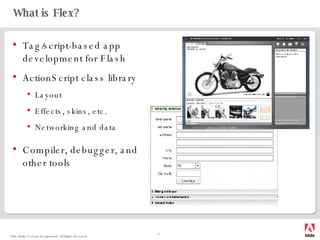
What is Flex? Tag/script-based app development for Flash ActionScript class library Layout Effects, skins, etc. Networking and data Compiler, debugger, and other tools
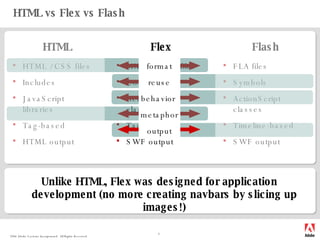
HTML vs Flex vs Flash Unlike HTML, Flex was designed for application development (no more creating navbars by slicing up images!) HTML / CSS files Includes JavaScript libraries Tag-based HTML output HTML Flex Flash MXML / CSS files Components ActionScript classes Tag-based SWF output FLA files Symbols ActionScript classes  Timeline-based SWF output format reuse behavior  metaphor output
Let’s see some code
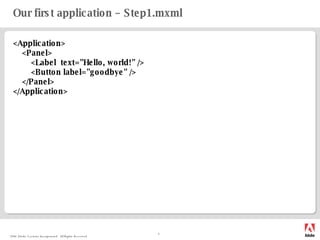
Our first application – Step1.mxml <Application> <Panel> <Label  text=&quot;Hello, world!&quot; /> <Button label=&quot;goodbye&quot; /> </Panel> </Application>
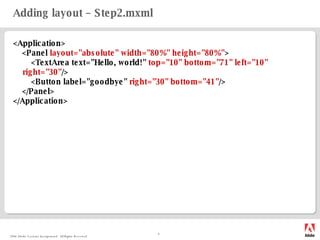
Adding layout – Step2.mxml <Application> <Panel  layout=&quot;absolute&quot;   width=&quot;80%&quot; height=&quot;80%&quot; > <TextArea text=&quot;Hello, world!&quot;  top=&quot;10&quot; bottom=&quot;71&quot; left=&quot;10&quot; right=&quot;30&quot; /> <Button label=&quot;goodbye&quot;  right=&quot;30&quot; bottom=&quot;41&quot; /> </Panel> </Application>
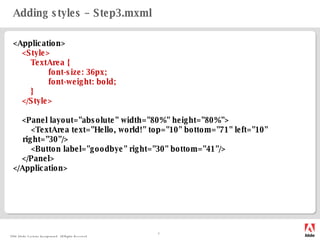
Adding styles – Step3.mxml <Application> <Style> TextArea { font-size: 36px; font-weight: bold; } </Style> <Panel  layout=&quot;absolute&quot; width=&quot;80%&quot; height=&quot;80%&quot;> <TextArea text=&quot;Hello, world!&quot; top=&quot;10&quot; bottom=&quot;71&quot; left=&quot;10&quot; right=&quot;30&quot;/> <Button label=&quot;goodbye&quot; right=&quot;30&quot; bottom=&quot;41&quot;/> </Panel> </Application>
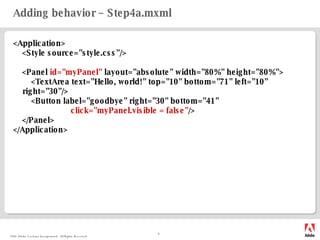
Adding behavior – Step4a.mxml <Application> <Style source=&quot;style.css&quot;/> <Panel  id=&quot;myPanel&quot;   layout=&quot;absolute&quot; width=&quot;80%&quot; height=&quot;80%&quot;> <TextArea text=&quot;Hello, world!&quot; top=&quot;10&quot; bottom=&quot;71&quot; left=&quot;10&quot; right=&quot;30&quot;/> <Button label=&quot;goodbye&quot; right=&quot;30&quot; bottom=&quot;41&quot;  click=&quot;myPanel.visible = false&quot; /> </Panel> </Application>
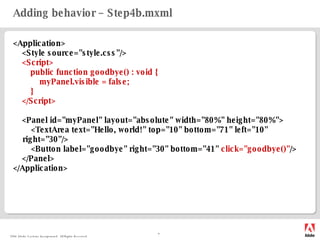
Adding behavior – Step4b.mxml <Application> <Style source=&quot;style.css&quot;/> <Script> public function goodbye() : void { myPanel.visible = false; } </Script> <Panel  id=&quot;myPanel&quot;   layout=&quot;absolute&quot; width=&quot;80%&quot; height=&quot;80%&quot;> <TextArea text=&quot;Hello, world!&quot; top=&quot;10&quot; bottom=&quot;71&quot; left=&quot;10&quot; right=&quot;30&quot;/> <Button label=&quot;goodbye&quot; right=&quot;30&quot; bottom=&quot;41&quot;  click=&quot;goodbye()&quot; /> </Panel> </Application>
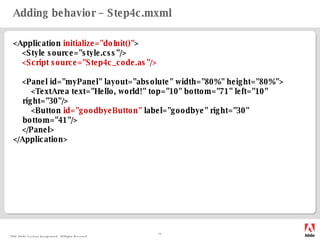
Adding behavior – Step4c.mxml <Application  initialize=&quot;doInit()&quot; > <Style source=&quot;style.css&quot;/> <Script source=&quot;Step4c_code.as&quot;/> <Panel  id=&quot;myPanel&quot;   layout=&quot;absolute&quot; width=&quot;80%&quot; height=&quot;80%&quot;> <TextArea text=&quot;Hello, world!&quot; top=&quot;10&quot; bottom=&quot;71&quot; left=&quot;10&quot; right=&quot;30&quot;/> <Button  id=&quot;goodbyeButton&quot;  label=&quot;goodbye&quot; right=&quot;30&quot; bottom=&quot;41&quot;/> </Panel> </Application>
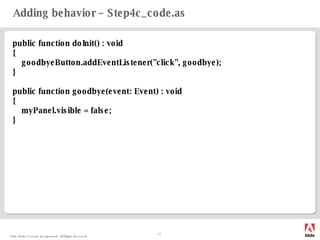
Adding behavior – Step4c_code.as public function doInit() : void { goodbyeButton.addEventListener(&quot;click&quot;, goodbye); } public function goodbye(event: Event) : void { myPanel.visible = false; }
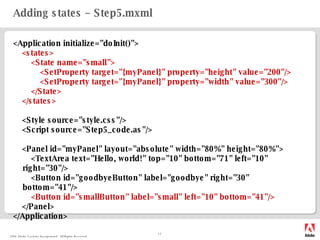
Adding states – Step5.mxml <Application initialize=&quot;doInit()&quot;> <states> <State name=&quot;small&quot;> <SetProperty target=&quot;{myPanel}&quot; property=&quot;height&quot; value=&quot;200&quot;/> <SetProperty target=&quot;{myPanel}&quot; property=&quot;width&quot; value=&quot;300&quot;/> </State> </states> <Style source=&quot;style.css&quot;/> <Script source=&quot;Step5_code.as&quot;/> < Panel id=&quot;myPanel&quot; layout=&quot;absolute&quot; width=&quot;80%&quot; height=&quot;80%&quot;> <TextArea text=&quot;Hello, world!&quot; top=&quot;10&quot; bottom=&quot;71&quot; left=&quot;10&quot; right=&quot;30&quot;/> <Button id=&quot;goodbyeButton&quot; label=&quot;goodbye&quot; right=&quot;30&quot; bottom=&quot;41&quot;/> <Button id=&quot;smallButton&quot; label=&quot;small&quot; left=&quot;10&quot; bottom=&quot;41&quot;/> </Panel> </Application>
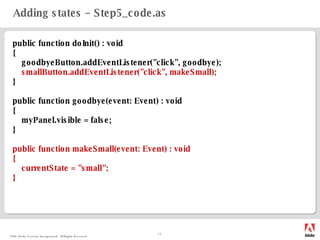
Adding states – Step5_code.as public function doInit() : void { goodbyeButton.addEventListener(&quot;click&quot;, goodbye); smallButton.addEventListener(&quot;click&quot;, makeSmall); } public function goodbye(event: Event) : void { myPanel.visible = false; } public function makeSmall(event: Event) : void { currentState = &quot;small&quot;; }
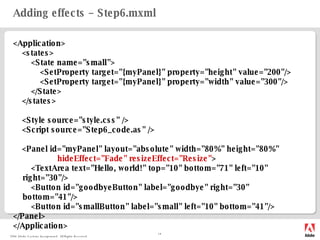
Adding effects – Step6.mxml <Application> <states> <State name=&quot;small&quot;> <SetProperty target=&quot;{myPanel}&quot; property=&quot;height&quot; value=&quot;200&quot;/> <SetProperty target=&quot;{myPanel}&quot; property=&quot;width&quot; value=&quot;300&quot;/> </State> </states> <Style source=&quot;style.css&quot; /> <Script source=&quot;Step6_code.as&quot; /> < Panel id=&quot;myPanel&quot; layout=&quot;absolute&quot; width=&quot;80%&quot; height=&quot;80%&quot; hideEffect=&quot;Fade&quot; resizeEffect=&quot;Resize&quot; > <TextArea text=&quot;Hello, world!&quot; top=&quot;10&quot; bottom=&quot;71&quot; left=&quot;10&quot; right=&quot;30&quot;/> <Button id=&quot;goodbyeButton&quot; label=&quot;goodbye&quot; right=&quot;30&quot; bottom=&quot;41&quot;/> <Button id=&quot;smallButton&quot; label=&quot;small&quot; left=&quot;10&quot; bottom=&quot;41&quot;/> </Panel> </Application>
Deeper dives
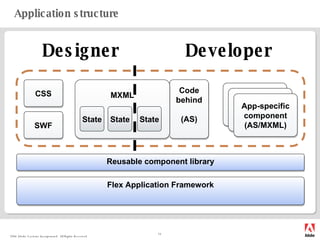
Application structure Flex Application Framework Code behind (AS) CSS Component MXML Component App-specific component (AS/MXML) Reusable component library State State State SWF Skins & Styles Layout & Effects Behavior & Data Components Designer Developer
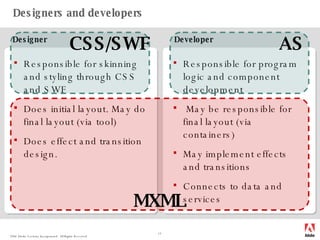
Designers and developers Responsible for skinning and styling through CSS and SWF Does initial layout. May do final layout (via tool) Does effect and transition design. Responsible for program logic and component development May be responsible for final layout (via containers) May implement effects and transitions Connects to data and services Designer Developer MXML AS CSS/SWF
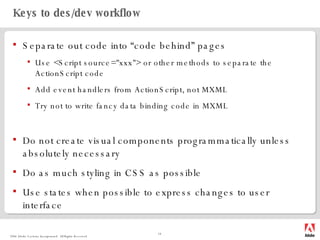
Keys to des/dev workflow Separate out code into “code behind” pages Use <Script source=&quot;xxx&quot;> or other methods to separate the ActionScript code Add event handlers from ActionScript, not MXML Try not to write fancy data binding code in MXML Do not create visual components programmatically unless absolutely necessary Do as much styling in CSS as possible Use states when possible to express changes to user interface
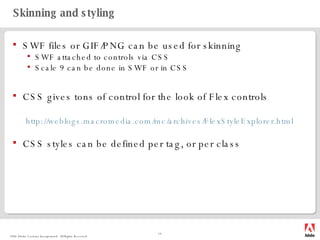
Skinning and styling SWF files or GIF/PNG can be used for skinning SWF attached to controls via CSS Scale 9 can be done in SWF or in CSS CSS gives tons of control for the look of Flex controls http:// weblogs.macromedia.com/mc/archives/FlexStyleExplorer.html CSS styles can be defined per tag, or per class
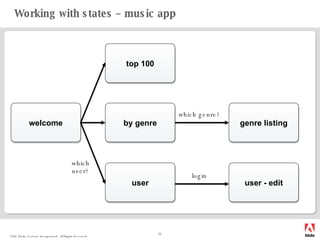
Working with states – music app welcome top 100 by genre user user - edit login genre listing which genre? which user?
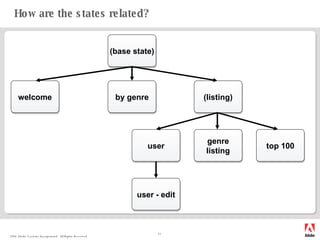
How are the states related? welcome top 100 by genre user - edit genre listing (base state) (listing) user
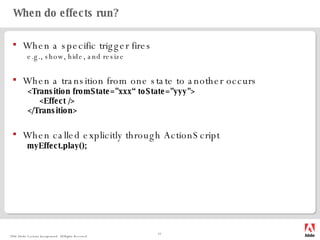
When do effects run? When a specific trigger fires e.g., show, hide, and resize When a transition from one state to another occurs <Transition fromState=&quot;xxx“ toState=&quot;yyy&quot;> <Effect /> </Transition> When called explicitly through ActionScript myEffect.play();
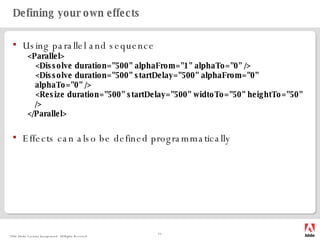
Defining your own effects Using parallel and sequence <Parallel> <Dissolve duration=&quot;500&quot; alphaFrom=&quot;1&quot; alphaTo=&quot;0&quot; /> <Dissolve duration=&quot;500&quot; startDelay=&quot;500&quot; alphaFrom=&quot;0&quot; alphaTo=&quot;0&quot; /> <Resize duration=&quot;500&quot; startDelay=&quot;500&quot; widtoTo=&quot;50&quot; heightTo=&quot;50&quot; /> </Parallel> Effects can also be defined programmatically
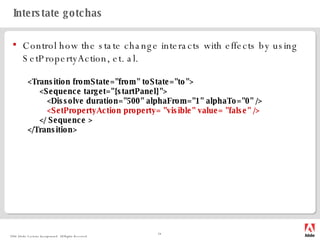
Interstate gotchas Control how the state change interacts with effects by using SetPropertyAction, et. al. <Transition fromState=&quot;from&quot; toState=&quot;to&quot;> <Sequence target=&quot;{startPanel}&quot;> <Dissolve duration=&quot;500&quot; alphaFrom=&quot;1&quot; alphaTo=&quot;0&quot; /> <SetPropertyAction property= &quot;visible&quot; value= &quot;false&quot; /> </ Sequence > </Transition>
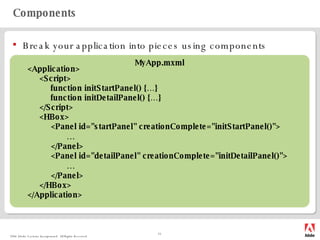
Components Break your application into pieces using components <Application> <Script> function initStartPanel() {…} function initDetailPanel() {…} </Script> <HBox> <Panel id=&quot;startPanel&quot; creationComplete=&quot;initStartPanel()&quot;> … </Panel> <Panel id=&quot;detailPanel&quot; creationComplete=&quot;initDetailPanel()&quot;> … </Panel> </HBox> </Application> MyApp.mxml
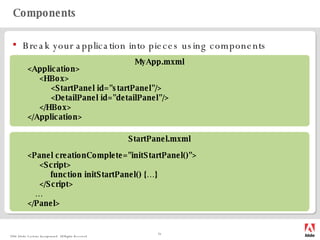
Components Break your application into pieces using components <Application> <HBox> <StartPanel id=&quot;startPanel&quot;/> <DetailPanel id=&quot;detailPanel&quot;/> </HBox> </Application> <Panel creationComplete=&quot;initStartPanel()&quot;> <Script> function initStartPanel() {…} </Script> … </Panel> MyApp.mxml StartPanel.mxml
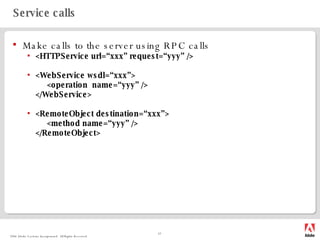
Service calls Make calls to the server using RPC calls <HTTPService url=“xxx” request=“yyy” /> <WebService wsdl=“xxx”> <operation  name=“yyy” /> </WebService> <RemoteObject destination=“xxx”> <method name=“yyy” /> </RemoteObject>
Service calls Results come asynchronously; listen for the “result” event. Alternatively, use data binding. Results can be retrieved off of the “result” property of the service itself. Always add fault handlers; you never know whether the connection will work.
Data binding Use curly braces to bind ActionScript expressions to MXML attribute values. Not all attributes can be bound – use the [Bindable] metadata in order to make a member variable bindable. In beta 2, properties with getters and setters can also be made bindable through the same metadata.
 

Flex For Flash Developers Ff 2006 Final

  • 1.
    Flex for FlashDevelopers Sho Kuwamoto Sr. Director, Engineering Adobe Systems, Inc.
  • 2.
    What is Flex?Tag/script-based app development for Flash ActionScript class library Layout Effects, skins, etc. Networking and data Compiler, debugger, and other tools
  • 3.
    HTML vs Flexvs Flash Unlike HTML, Flex was designed for application development (no more creating navbars by slicing up images!) HTML / CSS files Includes JavaScript libraries Tag-based HTML output HTML Flex Flash MXML / CSS files Components ActionScript classes Tag-based SWF output FLA files Symbols ActionScript classes Timeline-based SWF output format reuse behavior metaphor output
  • 4.
  • 5.
    Our first application– Step1.mxml <Application> <Panel> <Label text=&quot;Hello, world!&quot; /> <Button label=&quot;goodbye&quot; /> </Panel> </Application>
  • 6.
    Adding layout –Step2.mxml <Application> <Panel layout=&quot;absolute&quot; width=&quot;80%&quot; height=&quot;80%&quot; > <TextArea text=&quot;Hello, world!&quot; top=&quot;10&quot; bottom=&quot;71&quot; left=&quot;10&quot; right=&quot;30&quot; /> <Button label=&quot;goodbye&quot; right=&quot;30&quot; bottom=&quot;41&quot; /> </Panel> </Application>
  • 7.
    Adding styles –Step3.mxml <Application> <Style> TextArea { font-size: 36px; font-weight: bold; } </Style> <Panel layout=&quot;absolute&quot; width=&quot;80%&quot; height=&quot;80%&quot;> <TextArea text=&quot;Hello, world!&quot; top=&quot;10&quot; bottom=&quot;71&quot; left=&quot;10&quot; right=&quot;30&quot;/> <Button label=&quot;goodbye&quot; right=&quot;30&quot; bottom=&quot;41&quot;/> </Panel> </Application>
  • 8.
    Adding behavior –Step4a.mxml <Application> <Style source=&quot;style.css&quot;/> <Panel id=&quot;myPanel&quot; layout=&quot;absolute&quot; width=&quot;80%&quot; height=&quot;80%&quot;> <TextArea text=&quot;Hello, world!&quot; top=&quot;10&quot; bottom=&quot;71&quot; left=&quot;10&quot; right=&quot;30&quot;/> <Button label=&quot;goodbye&quot; right=&quot;30&quot; bottom=&quot;41&quot; click=&quot;myPanel.visible = false&quot; /> </Panel> </Application>
  • 9.
    Adding behavior –Step4b.mxml <Application> <Style source=&quot;style.css&quot;/> <Script> public function goodbye() : void { myPanel.visible = false; } </Script> <Panel id=&quot;myPanel&quot; layout=&quot;absolute&quot; width=&quot;80%&quot; height=&quot;80%&quot;> <TextArea text=&quot;Hello, world!&quot; top=&quot;10&quot; bottom=&quot;71&quot; left=&quot;10&quot; right=&quot;30&quot;/> <Button label=&quot;goodbye&quot; right=&quot;30&quot; bottom=&quot;41&quot; click=&quot;goodbye()&quot; /> </Panel> </Application>
  • 10.
    Adding behavior –Step4c.mxml <Application initialize=&quot;doInit()&quot; > <Style source=&quot;style.css&quot;/> <Script source=&quot;Step4c_code.as&quot;/> <Panel id=&quot;myPanel&quot; layout=&quot;absolute&quot; width=&quot;80%&quot; height=&quot;80%&quot;> <TextArea text=&quot;Hello, world!&quot; top=&quot;10&quot; bottom=&quot;71&quot; left=&quot;10&quot; right=&quot;30&quot;/> <Button id=&quot;goodbyeButton&quot; label=&quot;goodbye&quot; right=&quot;30&quot; bottom=&quot;41&quot;/> </Panel> </Application>
  • 11.
    Adding behavior –Step4c_code.as public function doInit() : void { goodbyeButton.addEventListener(&quot;click&quot;, goodbye); } public function goodbye(event: Event) : void { myPanel.visible = false; }
  • 12.
    Adding states –Step5.mxml <Application initialize=&quot;doInit()&quot;> <states> <State name=&quot;small&quot;> <SetProperty target=&quot;{myPanel}&quot; property=&quot;height&quot; value=&quot;200&quot;/> <SetProperty target=&quot;{myPanel}&quot; property=&quot;width&quot; value=&quot;300&quot;/> </State> </states> <Style source=&quot;style.css&quot;/> <Script source=&quot;Step5_code.as&quot;/> < Panel id=&quot;myPanel&quot; layout=&quot;absolute&quot; width=&quot;80%&quot; height=&quot;80%&quot;> <TextArea text=&quot;Hello, world!&quot; top=&quot;10&quot; bottom=&quot;71&quot; left=&quot;10&quot; right=&quot;30&quot;/> <Button id=&quot;goodbyeButton&quot; label=&quot;goodbye&quot; right=&quot;30&quot; bottom=&quot;41&quot;/> <Button id=&quot;smallButton&quot; label=&quot;small&quot; left=&quot;10&quot; bottom=&quot;41&quot;/> </Panel> </Application>
  • 13.
    Adding states –Step5_code.as public function doInit() : void { goodbyeButton.addEventListener(&quot;click&quot;, goodbye); smallButton.addEventListener(&quot;click&quot;, makeSmall); } public function goodbye(event: Event) : void { myPanel.visible = false; } public function makeSmall(event: Event) : void { currentState = &quot;small&quot;; }
  • 14.
    Adding effects –Step6.mxml <Application> <states> <State name=&quot;small&quot;> <SetProperty target=&quot;{myPanel}&quot; property=&quot;height&quot; value=&quot;200&quot;/> <SetProperty target=&quot;{myPanel}&quot; property=&quot;width&quot; value=&quot;300&quot;/> </State> </states> <Style source=&quot;style.css&quot; /> <Script source=&quot;Step6_code.as&quot; /> < Panel id=&quot;myPanel&quot; layout=&quot;absolute&quot; width=&quot;80%&quot; height=&quot;80%&quot; hideEffect=&quot;Fade&quot; resizeEffect=&quot;Resize&quot; > <TextArea text=&quot;Hello, world!&quot; top=&quot;10&quot; bottom=&quot;71&quot; left=&quot;10&quot; right=&quot;30&quot;/> <Button id=&quot;goodbyeButton&quot; label=&quot;goodbye&quot; right=&quot;30&quot; bottom=&quot;41&quot;/> <Button id=&quot;smallButton&quot; label=&quot;small&quot; left=&quot;10&quot; bottom=&quot;41&quot;/> </Panel> </Application>
  • 15.
  • 16.
    Application structure FlexApplication Framework Code behind (AS) CSS Component MXML Component App-specific component (AS/MXML) Reusable component library State State State SWF Skins & Styles Layout & Effects Behavior & Data Components Designer Developer
  • 17.
    Designers and developersResponsible for skinning and styling through CSS and SWF Does initial layout. May do final layout (via tool) Does effect and transition design. Responsible for program logic and component development May be responsible for final layout (via containers) May implement effects and transitions Connects to data and services Designer Developer MXML AS CSS/SWF
  • 18.
    Keys to des/devworkflow Separate out code into “code behind” pages Use <Script source=&quot;xxx&quot;> or other methods to separate the ActionScript code Add event handlers from ActionScript, not MXML Try not to write fancy data binding code in MXML Do not create visual components programmatically unless absolutely necessary Do as much styling in CSS as possible Use states when possible to express changes to user interface
  • 19.
    Skinning and stylingSWF files or GIF/PNG can be used for skinning SWF attached to controls via CSS Scale 9 can be done in SWF or in CSS CSS gives tons of control for the look of Flex controls http:// weblogs.macromedia.com/mc/archives/FlexStyleExplorer.html CSS styles can be defined per tag, or per class
  • 20.
    Working with states– music app welcome top 100 by genre user user - edit login genre listing which genre? which user?
  • 21.
    How are thestates related? welcome top 100 by genre user - edit genre listing (base state) (listing) user
  • 22.
    When do effectsrun? When a specific trigger fires e.g., show, hide, and resize When a transition from one state to another occurs <Transition fromState=&quot;xxx“ toState=&quot;yyy&quot;> <Effect /> </Transition> When called explicitly through ActionScript myEffect.play();
  • 23.
    Defining your owneffects Using parallel and sequence <Parallel> <Dissolve duration=&quot;500&quot; alphaFrom=&quot;1&quot; alphaTo=&quot;0&quot; /> <Dissolve duration=&quot;500&quot; startDelay=&quot;500&quot; alphaFrom=&quot;0&quot; alphaTo=&quot;0&quot; /> <Resize duration=&quot;500&quot; startDelay=&quot;500&quot; widtoTo=&quot;50&quot; heightTo=&quot;50&quot; /> </Parallel> Effects can also be defined programmatically
  • 24.
    Interstate gotchas Controlhow the state change interacts with effects by using SetPropertyAction, et. al. <Transition fromState=&quot;from&quot; toState=&quot;to&quot;> <Sequence target=&quot;{startPanel}&quot;> <Dissolve duration=&quot;500&quot; alphaFrom=&quot;1&quot; alphaTo=&quot;0&quot; /> <SetPropertyAction property= &quot;visible&quot; value= &quot;false&quot; /> </ Sequence > </Transition>
  • 25.
    Components Break yourapplication into pieces using components <Application> <Script> function initStartPanel() {…} function initDetailPanel() {…} </Script> <HBox> <Panel id=&quot;startPanel&quot; creationComplete=&quot;initStartPanel()&quot;> … </Panel> <Panel id=&quot;detailPanel&quot; creationComplete=&quot;initDetailPanel()&quot;> … </Panel> </HBox> </Application> MyApp.mxml
  • 26.
    Components Break yourapplication into pieces using components <Application> <HBox> <StartPanel id=&quot;startPanel&quot;/> <DetailPanel id=&quot;detailPanel&quot;/> </HBox> </Application> <Panel creationComplete=&quot;initStartPanel()&quot;> <Script> function initStartPanel() {…} </Script> … </Panel> MyApp.mxml StartPanel.mxml
  • 27.
    Service calls Makecalls to the server using RPC calls <HTTPService url=“xxx” request=“yyy” /> <WebService wsdl=“xxx”> <operation name=“yyy” /> </WebService> <RemoteObject destination=“xxx”> <method name=“yyy” /> </RemoteObject>
  • 28.
    Service calls Resultscome asynchronously; listen for the “result” event. Alternatively, use data binding. Results can be retrieved off of the “result” property of the service itself. Always add fault handlers; you never know whether the connection will work.
  • 29.
    Data binding Usecurly braces to bind ActionScript expressions to MXML attribute values. Not all attributes can be bound – use the [Bindable] metadata in order to make a member variable bindable. In beta 2, properties with getters and setters can also be made bindable through the same metadata.
  • 30.