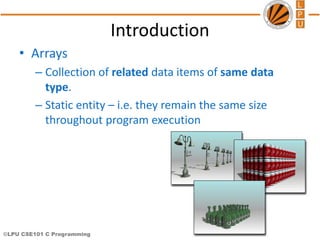
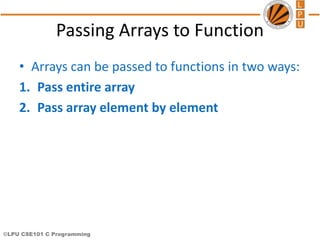
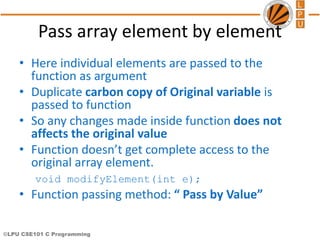
This document discusses arrays in C programming. It defines arrays as collections of related data items of the same data type. Arrays allow grouping of multiple values under a single name. Elements in an array are accessed using indexes enclosed in square brackets after the array name. The document covers declaring, initializing, and accessing array elements. It also discusses passing entire arrays and individual array elements to functions. The key points are: arrays have static size, elements are accessed via indexes, arrays can be initialized using values or calculations in loops, and arrays can be passed to functions by reference (entire array) or by value (individual elements).
![©LPU CSE101 C Programming
Arrays
• Array
– Group of consecutive memory locations
– Same name and data type
• To refer to an element, specify:
– Array name
– Position number in square brackets([])
• Format:
arrayname[position_number]
– First element is always at position 0
– Eg. n element array named c:
• c[0], c[1]...c[n – 1]
Name of array (Note
that all elements of
this array have the
same name, c)
Position number of
the element within
array c
3
c[6]
-45
6
0
72
-89
0
62
-3
1
6453
78
c[0]
c[1]
c[2]
c[3]
c[11]
c[10]
c[9]
c[8]
c[7]
c[5]
c[4]](https://image.slidesharecdn.com/cse101-lec17-181003140244/85/Array-and-functions-4-320.jpg)
![©LPU CSE101 C Programming
Arrays
• An array is an ordered list of values
c[0] c[1] c[2] c[3] c[4] c[5] c[6] c[7] c[8] c[9]
79 87 94 82 67 98 87 81 74 91
An array of size N is indexed from zero to N-1
c
The entire array
has a single name
Each value has a numeric index
This array holds 10 values that are indexed from 0 to 9](https://image.slidesharecdn.com/cse101-lec17-181003140244/85/Array-and-functions-5-320.jpg)
![©LPU CSE101 C Programming
Arrays
• Array elements are like normal variables
c[0] = 3;/*stores 3 to c[0] element*/
scanf (“%d”, &c[1]);/*reads c[1] element*/
printf (“%d, %d”, c[0], c[1]); /*displays
c[0] & c[1] element*/
• The position number inside square brackets is called
subscript/index.
• Subscript must be integer or an integer expression
c[5 - 2] = 7; (i.e. c[3] = 7)](https://image.slidesharecdn.com/cse101-lec17-181003140244/85/Array-and-functions-6-320.jpg)
![©LPU CSE101 C Programming
Defining Arrays
• When defining arrays, specify:
– Name
– Data Type of array
– Number of elements
datatype arrayName[numberOfElements];
– Examples:
int students[10];
float myArray[3284];
• Defining multiple arrays of same data type
– Format is similar to regular variables
– Example:
int b[100], x[27];](https://image.slidesharecdn.com/cse101-lec17-181003140244/85/Array-and-functions-7-320.jpg)
![©LPU CSE101 C Programming
Initializing Arrays
• Initializers
int n[5] = { 1, 2, 3, 4, 5 };
– If not enough initializers given, then rightmost
elements become 0
– int n[5] = { 0 }; // initialize all elements to 0
– C arrays have no bounds checking.
• If size is omitted, initializers determine it
int n[] = { 1, 2, 3, 4, 5 };
– 5 initializers, therefore 5 element array.](https://image.slidesharecdn.com/cse101-lec17-181003140244/85/Array-and-functions-8-320.jpg)
![©LPU CSE101 C Programming
Initializing Arrays
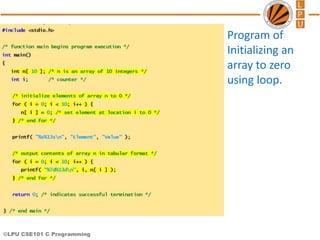
• Array is same as the variable can prompt for
value from the user at run time.
• Array is a group of elements so we use for
loop to get the values of every element
instead of getting single value at a time.
• Example: int array[5], i; // array of size 5
for(i=0;i<5;i++){// loop begins from 0 to 4
scanf(“%d”, &array[i]);
}](https://image.slidesharecdn.com/cse101-lec17-181003140244/85/Array-and-functions-9-320.jpg)
![©LPU CSE101 C Programming
Element Value
0 0
1 0
2 0
3 0
4 0
5 0
6 0
7 0
8 0
9 0
0
n[6]
0
0
0
0
0
0
0
0
n[0]
n[1]
n[2]
n[3]
n[9]
n[8]
n[7]
n[5]
n[4]
0](https://image.slidesharecdn.com/cse101-lec17-181003140244/85/Array-and-functions-11-320.jpg)
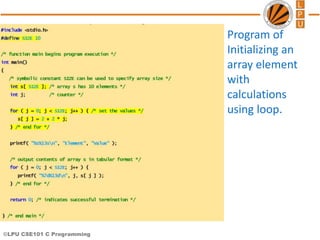
![©LPU CSE101 C Programming
Element Value
0 2
1 4
2 6
3 8
4 10
5 12
6 14
7 16
8 18
9 20
10
n[6]
4
6
8
12
14
16
18
20
n[0]
n[1]
n[2]
n[3]
n[9]
n[8]
n[7]
n[5]
n[4]
2](https://image.slidesharecdn.com/cse101-lec17-181003140244/85/Array-and-functions-13-320.jpg)
![©LPU CSE101 C Programming
array = 0012FF78
&array[0] = 0012FF78
&array = 0012FF78
#include <stdio.h>
/* function main begins program execution */
int main()
{
char array[ 5 ]; /* define an array of size 5 */
printf( " array = %pn&array[0] = %pn"
" &array = %pn",
array, &array[ 0 ], &array );
return 0; /* indicates successful termination */
} /* end main */
Program to
explain the
address of
array](https://image.slidesharecdn.com/cse101-lec17-181003140244/85/Array-and-functions-15-320.jpg)
![©LPU CSE101 C Programming
Character Arrays
• Character arrays
– Character arrays can be initialized using string literals
char string1[] = "first";
– It is equivalent to
char string1[] = { 'f', 'i', 'r', 's', 't', '0' };
• Null character '0' terminates strings
• string1 actually has 6 elements
– Can access individual characters
string1[ 3 ] is character ‘s’
– Array name is address of array, so & not needed for scanf
scanf( "%s", string2 );
• Reads characters until whitespace encountered](https://image.slidesharecdn.com/cse101-lec17-181003140244/85/Array-and-functions-16-320.jpg)
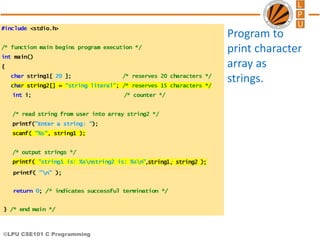
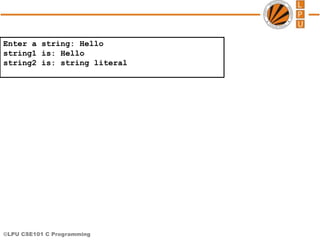
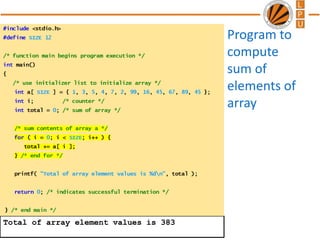
![©LPU CSE101 C Programming
Pass entire array
• Here entire array can be passed as an argument
to the function
• Function gets complete access to the original
array
• While passing entire array Address of first
element is passed to function, any changes made
inside function, directly affects the Original
value.
void modifyArray(int b[], int arraySize);
• Function passing method: “ Pass by Address”](https://image.slidesharecdn.com/cse101-lec17-181003140244/85/Array-and-functions-20-320.jpg)
![©LPU CSE101 C Programming
Passing Arrays to Functions
• Function prototype
void modifyArray(int b[], int arraySize);
– Parameter names optional in prototype
• int b[] could be written int []
• int arraySize could be simply int
void modifyArray(int [], int);
• Function call
int a[SIZE];
modifyArray(a, SIZE);](https://image.slidesharecdn.com/cse101-lec17-181003140244/85/Array-and-functions-22-320.jpg)
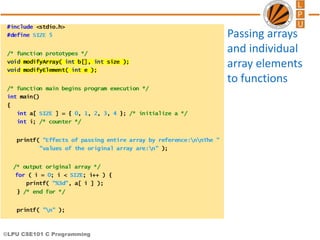
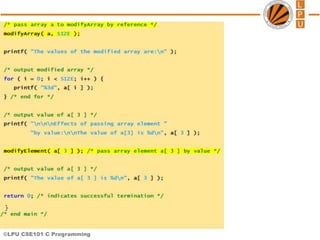

![©LPU CSE101 C Programming
Effects of passing entire array by reference:
The values of the original array are:
0 1 2 3 4
The values of the modified array are:
0 2 4 6 8
Effects of passing array element by value:
The value of a[3] is 6
Value in modifyElement is 12
The value of a[3] is 6](https://image.slidesharecdn.com/cse101-lec17-181003140244/85/Array-and-functions-26-320.jpg)


![Data Structures - Lecture 3 [Arrays]](https://cdn.slidesharecdn.com/ss_thumbnails/lecture-3arrays-141224100714-conversion-gate01-thumbnail.jpg?width=640&height=640&fit=bounds)


