Arrays
@LPU CSE202 C++ Programming
Outline
• To declare an array
• To initialize an array
• Operations on array
@LPU CSE202 C++ Programming
Introduction
• Arrays
– Collection of related data items of same data
type.
– Static entity – i.e. they remain the same size
throughout program execution
Quick yak:
Ask students
where they
encounter array
in routine ex:
•Buttons on
mobile…(huh
now it is touch
screen!!!)
@LPU CSE202 C++ Programming
Arrays
• Array
– Group of consecutive memory locations
– Same name and data type
• To refer to an element, specify:
– Array name
– Position number in square brackets([])
• Format:
arrayname[position_number]
– First element is always at position 0
– Eg. n element array named c:
• c[0], c[1]...c[n – 1]
Name of array (Note that all elements
of this array have the same name, c)
Position number of the
element within array c
3
c[6]
-45
6
0
72
-89
0
62
-3
1
6453
78
c[0]
c[1]
c[2]
c[3]
c[11]
c[10]
c[9]
c[8]
c[7]
c[5]
c[4]
@LPU CSE202 C++ Programming
Arrays
• An array is an ordered list of values
c
The entire array
has a single name
Each value has a numeric index
c[0] c[1] c[2] c[3] c[4] c[5] c[6] c[7] c[8] c[9]
79 87 94 82 67 98 87 81 74 91
An array of size N is indexed from zero to N-1
This array holds 10 values that are indexed from 0 to 9
@LPU CSE202 C++ Programming
Arrays
• Array elements are like normal variables
c[0] = 3;/*stores 3 to c[0] element*/
scanf (“%d”, &c[1]);/*reads c[1] element*/
printf (“%d, %d”, c[0], c[1]); /*displays
c[0] & c[1] element*/
• The position number inside square brackets is called
subscript/index.
• Subscript must be integer or an integer expression
c[5 - 2] = 7; (i.e. c[3] = 7)
@LPU CSE202 C++ Programming
Defining Arrays
• When defining arrays, specify:
– Name
– Data Type of array
– Number of elements
datatype arrayName[numberOfElements];
– Examples:
int students[10];
float myArray[3284];
• Defining multiple arrays of same data type
– Format is similar to regular variables
– Example:
int b[100], x[27];
@LPU CSE202 C++ Programming
Initializing Arrays
• Initializers
int n[5] = { 1, 2, 3, 4, 5 };
– If not enough initializers given, then rightmost
elements become 0
– int n[5] = { 0 }; // initialize all elements to 0
– C arrays have no bounds checking.
• If size is omitted, initializers determine it
int n[] = { 1, 2, 3, 4, 5 };
– 5 initializers, therefore 5 element array.
Quick yak:
Probe on the example
below ask what
happens:
•for (i=1;i<5;i++)
•for
(i=0;i<5;i+=2)
@LPU CSE202 C++ Programming
Initializing Arrays
• Array is same as the variable can prompt for
value from the user at run time.
• Array is a group of elements so we use for
loop to get the values of every element
instead of getting single value at a time.
• Example: int array[5]; // array of size 5
for(int i=0;i<5;i++){// loop begins from 0 to 4
cin>>&array[i];
}
@LPU CSE202 C++ Programming
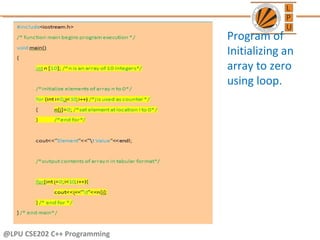
Program of
Initializing an
array to zero
using loop.
@LPU CSE202 C++ Programming
Element Value
0 0
1 0
2 0
3 0
4 0
5 0
6 0
7 0
8 0
9 0
0
n[6]
0
0
0
0
0
0
0
0
n[0]
n[1]
n[2]
n[3]
n[9]
n[8]
n[7]
n[5]
n[4]
Quick yak:
Discussion can
be quickly done
on
•t
•endl
Used in the
program
@LPU CSE202 C++ Programming
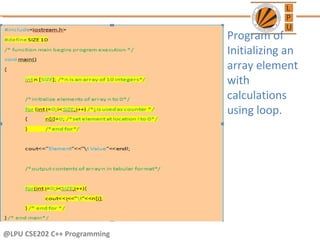
Program of
Initializing an
array element
with
calculations
using loop.
@LPU CSE202 C++ Programming
Element Value
0 2
1 4
2 6
3 8
4 10
5 12
6 14
7 16
8 18
9 20
10
n[6]
4
6
8
12
14
16
18
20
n[0]
n[1]
n[2]
n[3]
n[9]
n[8]
n[7]
n[5]
n[4]
@LPU CSE202 C++ Programming
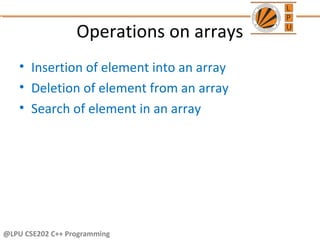
Operations on arrays
• Insertion of element into an array
• Deletion of element from an array
• Search of element in an array
@LPU CSE202 C++ Programming
• Program to
insert an
element
into an
array
#include<iostream.h>
#include<conio.h>
int main()
{
int a[100],i,n,k, item;
cout<<"how many no to store in array";
cin>>n;
cout<<"Enter the number";
for(i=0;i<=n-1;i++)
cin>>a[i];
cout<<"Enter the no. and its position";
cin>>tem>>k;
k=k-1;
for(i=n-1;i>=k;i--)
{
a[i+1]=a[i];
}
a[k]=item;
cout<<"Contents of the arrayn";
for(i=0;i<=n;i++)
{
cout<<a[i];
}
getch();
}
@LPU CSE202 C++ Programming
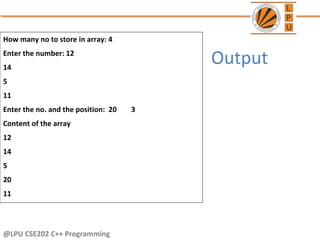
How many no to store in array: 4
Enter the number: 12
14
5
11
Enter the no. and the position: 20 3
Content of the array
12
14
5
20
11
Output
@LPU CSE202 C++ Programming
• Program to
delete an
element
from an
array
#include<iostream.h>
#include<conio.h>
int main()
{
int a[100],i,n,k;
cout<<"how many no to store in array"<<endl;
cin>>n;
cout<<"enter the number"<<endl;
for(i=0;i<n;i++)
cin>>a[i];
cout<<"enter the position";
cin>>k;
k=k-1;
for(i=k;i<n;i++)
{
a[i]=a[i+1];
}
cout<<"contents of the array"<<endl;
for(i=0;i<n-1;i++)
{
cout<<a[i];
}
getch();
}
@LPU CSE202 C++ Programming
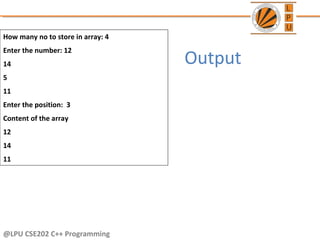
How many no to store in array: 4
Enter the number: 12
14
5
11
Enter the position: 3
Content of the array
12
14
11
Output
@LPU CSE202 C++ Programming
• The process of finding a particular element of
an array is called searching.
• Search an array for a key value.
• Two searching techniques:
– Linear search
– Binary search
Searching in Arrays
@LPU CSE202 C++ Programming
• Linear search
– Simple
– Compare each element of array with key value
– Useful for small and unsorted arrays
• It simply examines each element sequentially,
starting with the first element, until it finds the
key element or it reaches the end of the array.
Example: If you were looking for someone on a
moving passenger train, you would use a
sequential search.
Linear search
@LPU CSE202 C++ Programming
#include<iostream.h>
#include<conio.h>
int main()
{
int a[20],key,i,n, c=0;
cout<<“Enter the number of elements:t";
cin>>n;
cout<<"Enter the elements:t";
for(i=0;i<n;i++)
cin>>a[i];
cout<<"Enter the element to be found t";
cin>>key;
for(i=0;i<n;i++)
if(a[i]==key) //comparison
{
cout<<“Key found at location t"<<i;
c++;
break;
}
if (c==0)
cout<<"element not found in the list";
getch();
return 0;
}
• Program of
linear
search in an
array.
@LPU CSE202 C++ Programming
Output
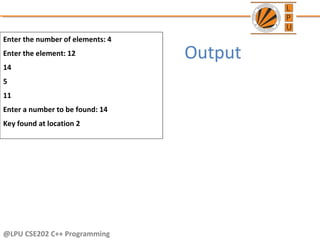
Enter the number of elements: 4
Enter the element: 12
14
5
11
Enter a number to be found: 14
Key found at location 2
@LPU CSE202 C++ Programming
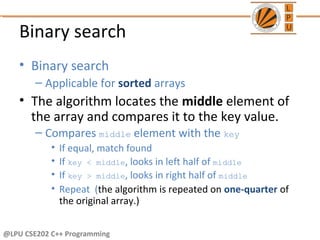
• Binary search
– Applicable for sorted arrays
• The algorithm locates the middle element of
the array and compares it to the key value.
– Compares middle element with the key
• If equal, match found
• If key < middle, looks in left half of middle
• If key > middle, looks in right half of middle
• Repeat (the algorithm is repeated on one-quarter of
the original array.)
Binary search
@LPU CSE202 C++ Programming
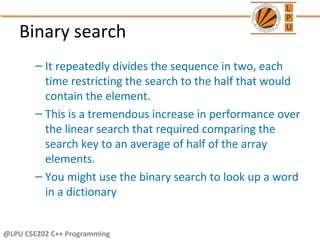
Binary search
– It repeatedly divides the sequence in two, each
time restricting the search to the half that would
contain the element.
– This is a tremendous increase in performance over
the linear search that required comparing the
search key to an average of half of the array
elements.
– You might use the binary search to look up a word
in a dictionary
@LPU CSE202 C++ Programming
#include<iostream.h>
#include<conio.h>
int main()
{
int ar[100],beg,mid,end,i,n,search;
cout<<"How many numbers in the array: ";
cin>>n;
cout<<"Enter "<<n<<" numbers in ascending order --> ";
for(i=0;i<n;i++)
cin>>ar[i];
beg=0;end=n-1;
cout<<"Enter a number to search: ";
cin>>search;
while(beg<=end)
{
mid=(beg+end)/2;
if(ar[mid]==search)
cout<<"nItem found at position"<<(mid+1);
if(search>ar[mid])
beg=mid+1;
else
end=mid-1;
}
cout<<"nSorry! "<<search<<" doesnot found.";
getch();
}
• Program of
binary
search in an
array.
@LPU CSE202 C++ Programming
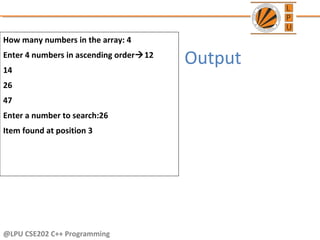
How many numbers in the array: 4
Enter 4 numbers in ascending order12
14
26
47
Enter a number to search:26
Item found at position 3
Output
@LPU CSE202 C++ Programming
Next Class: Pointers

Arrays in C++

  • 1.
  • 2.
    Outline • To declarean array • To initialize an array • Operations on array @LPU CSE202 C++ Programming
  • 3.
    Introduction • Arrays – Collectionof related data items of same data type. – Static entity – i.e. they remain the same size throughout program execution Quick yak: Ask students where they encounter array in routine ex: •Buttons on mobile…(huh now it is touch screen!!!) @LPU CSE202 C++ Programming
  • 4.
    Arrays • Array – Groupof consecutive memory locations – Same name and data type • To refer to an element, specify: – Array name – Position number in square brackets([]) • Format: arrayname[position_number] – First element is always at position 0 – Eg. n element array named c: • c[0], c[1]...c[n – 1] Name of array (Note that all elements of this array have the same name, c) Position number of the element within array c 3 c[6] -45 6 0 72 -89 0 62 -3 1 6453 78 c[0] c[1] c[2] c[3] c[11] c[10] c[9] c[8] c[7] c[5] c[4] @LPU CSE202 C++ Programming
  • 5.
    Arrays • An arrayis an ordered list of values c The entire array has a single name Each value has a numeric index c[0] c[1] c[2] c[3] c[4] c[5] c[6] c[7] c[8] c[9] 79 87 94 82 67 98 87 81 74 91 An array of size N is indexed from zero to N-1 This array holds 10 values that are indexed from 0 to 9 @LPU CSE202 C++ Programming
  • 6.
    Arrays • Array elementsare like normal variables c[0] = 3;/*stores 3 to c[0] element*/ scanf (“%d”, &c[1]);/*reads c[1] element*/ printf (“%d, %d”, c[0], c[1]); /*displays c[0] & c[1] element*/ • The position number inside square brackets is called subscript/index. • Subscript must be integer or an integer expression c[5 - 2] = 7; (i.e. c[3] = 7) @LPU CSE202 C++ Programming
  • 7.
    Defining Arrays • Whendefining arrays, specify: – Name – Data Type of array – Number of elements datatype arrayName[numberOfElements]; – Examples: int students[10]; float myArray[3284]; • Defining multiple arrays of same data type – Format is similar to regular variables – Example: int b[100], x[27]; @LPU CSE202 C++ Programming
  • 8.
    Initializing Arrays • Initializers intn[5] = { 1, 2, 3, 4, 5 }; – If not enough initializers given, then rightmost elements become 0 – int n[5] = { 0 }; // initialize all elements to 0 – C arrays have no bounds checking. • If size is omitted, initializers determine it int n[] = { 1, 2, 3, 4, 5 }; – 5 initializers, therefore 5 element array. Quick yak: Probe on the example below ask what happens: •for (i=1;i<5;i++) •for (i=0;i<5;i+=2) @LPU CSE202 C++ Programming
  • 9.
    Initializing Arrays • Arrayis same as the variable can prompt for value from the user at run time. • Array is a group of elements so we use for loop to get the values of every element instead of getting single value at a time. • Example: int array[5]; // array of size 5 for(int i=0;i<5;i++){// loop begins from 0 to 4 cin>>&array[i]; } @LPU CSE202 C++ Programming
  • 10.
    @LPU CSE202 C++Programming Program of Initializing an array to zero using loop.
  • 11.
    @LPU CSE202 C++Programming Element Value 0 0 1 0 2 0 3 0 4 0 5 0 6 0 7 0 8 0 9 0 0 n[6] 0 0 0 0 0 0 0 0 n[0] n[1] n[2] n[3] n[9] n[8] n[7] n[5] n[4] Quick yak: Discussion can be quickly done on •t •endl Used in the program
  • 12.
    @LPU CSE202 C++Programming Program of Initializing an array element with calculations using loop.
  • 13.
    @LPU CSE202 C++Programming Element Value 0 2 1 4 2 6 3 8 4 10 5 12 6 14 7 16 8 18 9 20 10 n[6] 4 6 8 12 14 16 18 20 n[0] n[1] n[2] n[3] n[9] n[8] n[7] n[5] n[4]
  • 14.
    @LPU CSE202 C++Programming Operations on arrays • Insertion of element into an array • Deletion of element from an array • Search of element in an array
  • 15.
    @LPU CSE202 C++Programming • Program to insert an element into an array #include<iostream.h> #include<conio.h> int main() { int a[100],i,n,k, item; cout<<"how many no to store in array"; cin>>n; cout<<"Enter the number"; for(i=0;i<=n-1;i++) cin>>a[i]; cout<<"Enter the no. and its position"; cin>>tem>>k; k=k-1; for(i=n-1;i>=k;i--) { a[i+1]=a[i]; } a[k]=item; cout<<"Contents of the arrayn"; for(i=0;i<=n;i++) { cout<<a[i]; } getch(); }
  • 16.
    @LPU CSE202 C++Programming How many no to store in array: 4 Enter the number: 12 14 5 11 Enter the no. and the position: 20 3 Content of the array 12 14 5 20 11 Output
  • 17.
    @LPU CSE202 C++Programming • Program to delete an element from an array #include<iostream.h> #include<conio.h> int main() { int a[100],i,n,k; cout<<"how many no to store in array"<<endl; cin>>n; cout<<"enter the number"<<endl; for(i=0;i<n;i++) cin>>a[i]; cout<<"enter the position"; cin>>k; k=k-1; for(i=k;i<n;i++) { a[i]=a[i+1]; } cout<<"contents of the array"<<endl; for(i=0;i<n-1;i++) { cout<<a[i]; } getch(); }
  • 18.
    @LPU CSE202 C++Programming How many no to store in array: 4 Enter the number: 12 14 5 11 Enter the position: 3 Content of the array 12 14 11 Output
  • 19.
    @LPU CSE202 C++Programming • The process of finding a particular element of an array is called searching. • Search an array for a key value. • Two searching techniques: – Linear search – Binary search Searching in Arrays
  • 20.
    @LPU CSE202 C++Programming • Linear search – Simple – Compare each element of array with key value – Useful for small and unsorted arrays • It simply examines each element sequentially, starting with the first element, until it finds the key element or it reaches the end of the array. Example: If you were looking for someone on a moving passenger train, you would use a sequential search. Linear search
  • 21.
    @LPU CSE202 C++Programming #include<iostream.h> #include<conio.h> int main() { int a[20],key,i,n, c=0; cout<<“Enter the number of elements:t"; cin>>n; cout<<"Enter the elements:t"; for(i=0;i<n;i++) cin>>a[i]; cout<<"Enter the element to be found t"; cin>>key; for(i=0;i<n;i++) if(a[i]==key) //comparison { cout<<“Key found at location t"<<i; c++; break; } if (c==0) cout<<"element not found in the list"; getch(); return 0; } • Program of linear search in an array.
  • 22.
    @LPU CSE202 C++Programming Output Enter the number of elements: 4 Enter the element: 12 14 5 11 Enter a number to be found: 14 Key found at location 2
  • 23.
    @LPU CSE202 C++Programming • Binary search – Applicable for sorted arrays • The algorithm locates the middle element of the array and compares it to the key value. – Compares middle element with the key • If equal, match found • If key < middle, looks in left half of middle • If key > middle, looks in right half of middle • Repeat (the algorithm is repeated on one-quarter of the original array.) Binary search
  • 24.
    @LPU CSE202 C++Programming Binary search – It repeatedly divides the sequence in two, each time restricting the search to the half that would contain the element. – This is a tremendous increase in performance over the linear search that required comparing the search key to an average of half of the array elements. – You might use the binary search to look up a word in a dictionary
  • 25.
    @LPU CSE202 C++Programming #include<iostream.h> #include<conio.h> int main() { int ar[100],beg,mid,end,i,n,search; cout<<"How many numbers in the array: "; cin>>n; cout<<"Enter "<<n<<" numbers in ascending order --> "; for(i=0;i<n;i++) cin>>ar[i]; beg=0;end=n-1; cout<<"Enter a number to search: "; cin>>search; while(beg<=end) { mid=(beg+end)/2; if(ar[mid]==search) cout<<"nItem found at position"<<(mid+1); if(search>ar[mid]) beg=mid+1; else end=mid-1; } cout<<"nSorry! "<<search<<" doesnot found."; getch(); } • Program of binary search in an array.
  • 26.
    @LPU CSE202 C++Programming How many numbers in the array: 4 Enter 4 numbers in ascending order12 14 26 47 Enter a number to search:26 Item found at position 3 Output
  • 27.
    @LPU CSE202 C++Programming Next Class: Pointers