
AppDynamics Universal Agent
Val Chibisov
Sr. Product Manager | AppDynamics Inc
APPDYNAMICS CONFIDENTIAL AND PROPRIETARY 2
Notice
The information and materials included in this presentation (collectively, the
“Materials”) are the proprietary information of AppDynamics, Inc. (“AppDynamics” or
the “Company”). No part of the Materials may be reproduced, distributed,
communicated or displayed in any form or by any means, or used to make any
derivative work, without prior written permission from AppDynamics.
The Materials may contain product roadmap information of AppDynamics.
AppDynamics reserves the right to change any product roadmap information at any
time, for any reason and without notice. This information is intended to outline
AppDynamics' general product direction, it is not a guarantee of future product
features, and it should not be relied on in making a purchasing decision. The
development, release, and timing of any features or functionality described for
AppDynamics' products remains at AppDynamics' sole discretion. AppDynamics
reserves the right to change any planned features at any time before making them
generally available as well as never making them generally available.
All third-party trademarks, including names, logos and brands, referenced by
AppDynamics in this presentation are property of their respective owners. All
references to third-party trademarks are for identification purposes only and shall be
considered nominative fair use under trademark law. © 2016 AppDynamics, Inc. All
rights reserved.
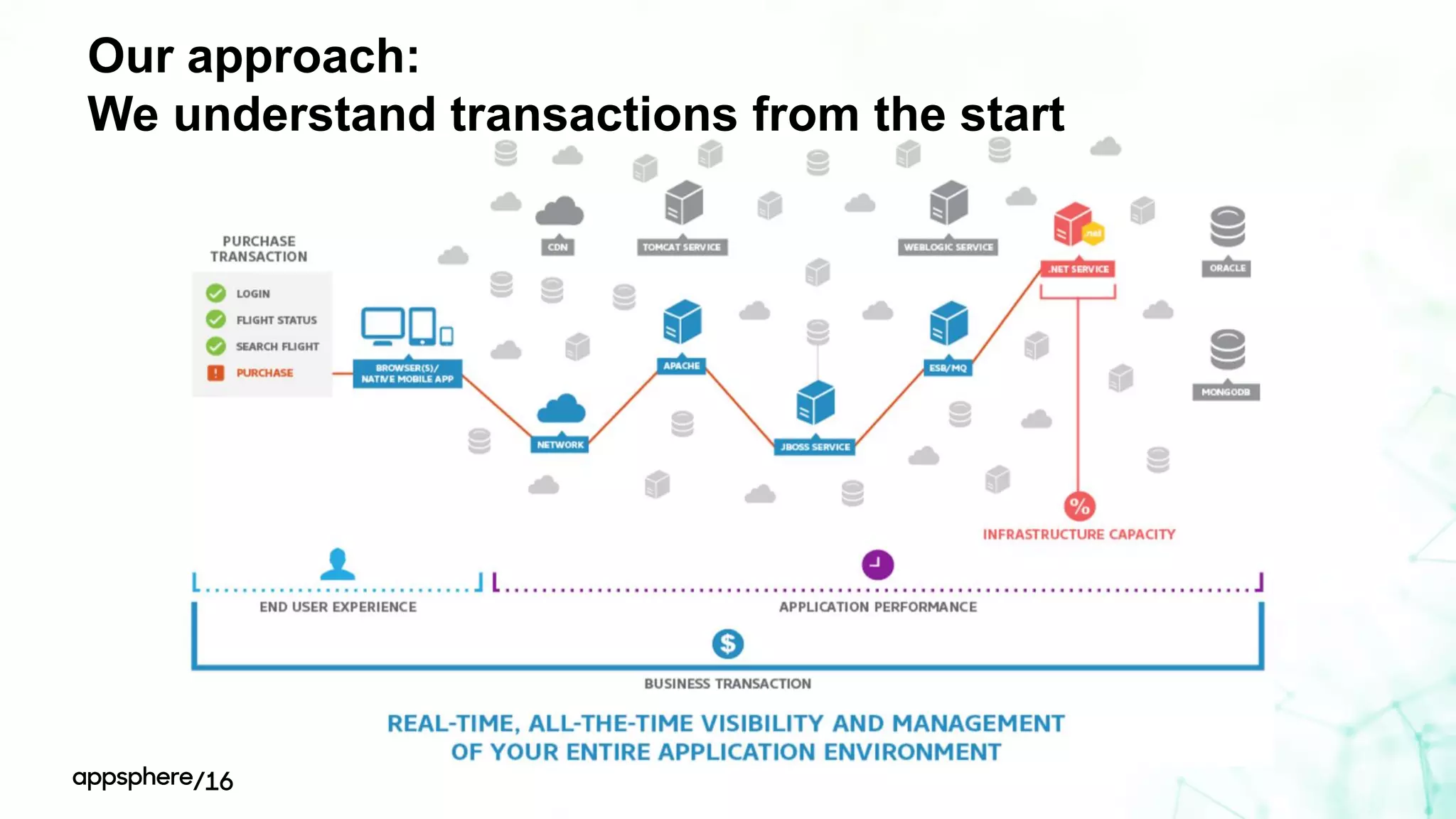
Our approach:
We understand transactions
from the start
Real-time, all-the-time visibility and management
Of your entire application environment
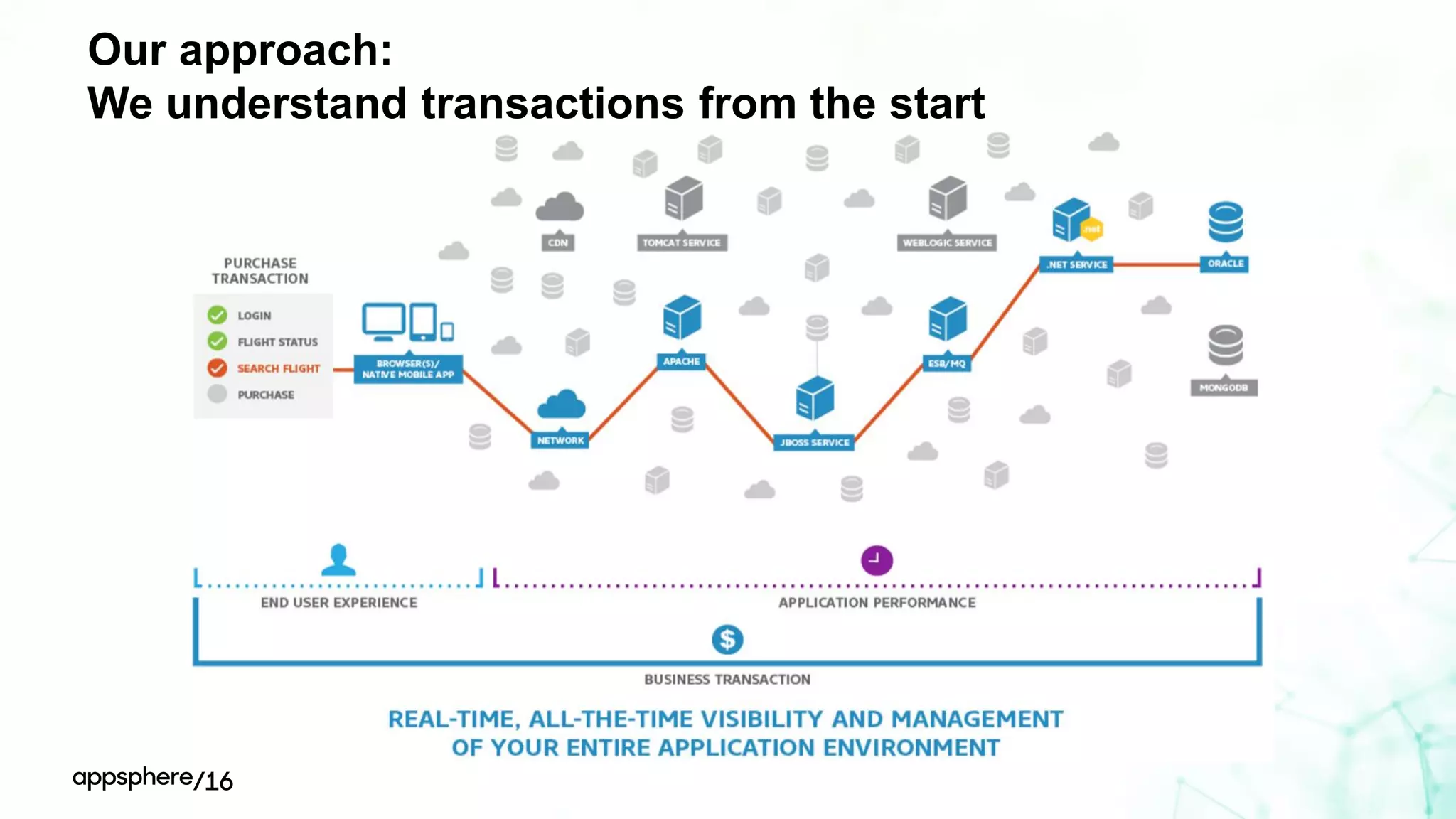
Our approach:
We understand transactions from the start
Our approach:
We understand transactions from the start
Deploying agents
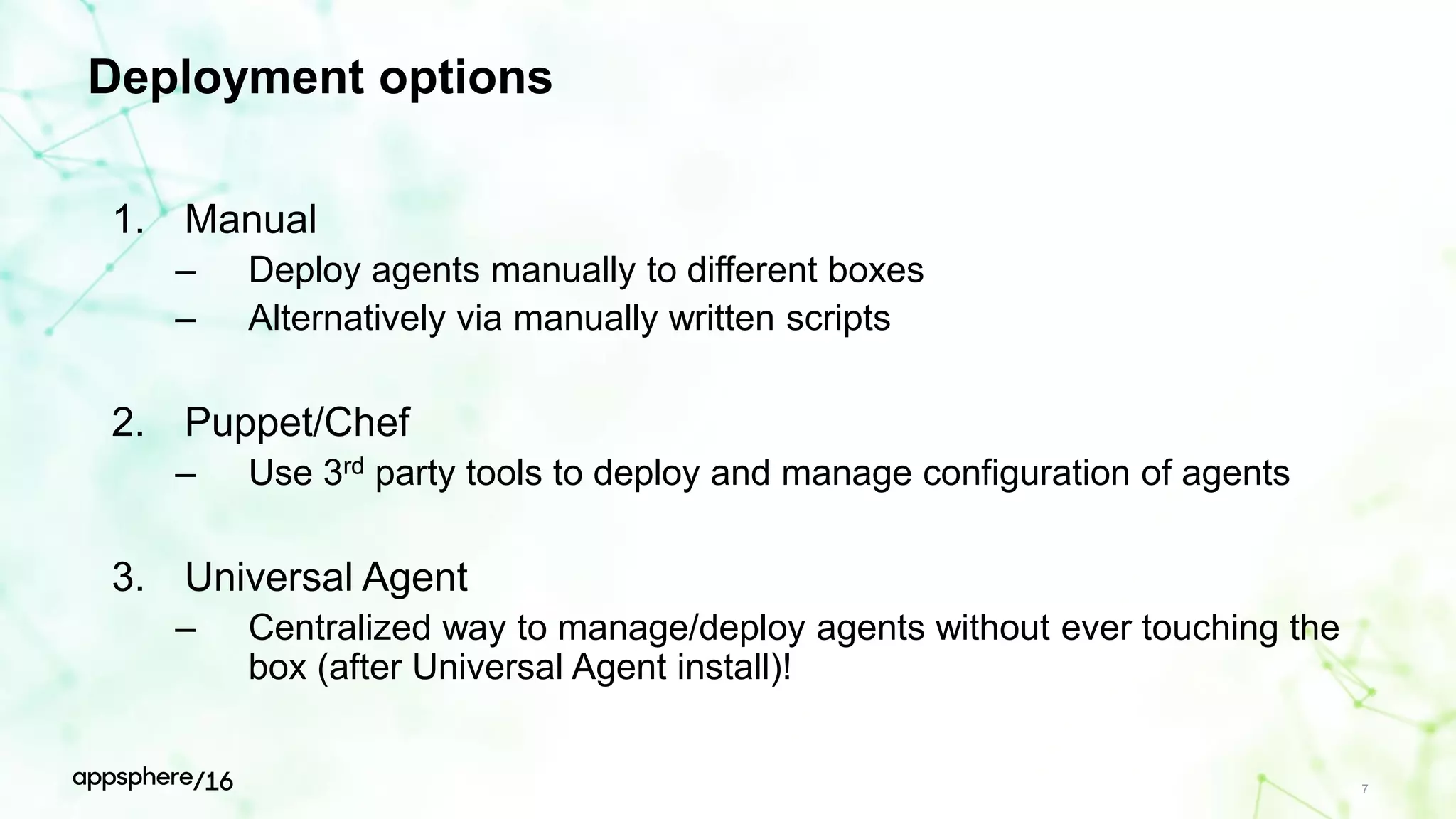
Deployment options
1. Manual
– Deploy agents manually to different boxes
– Alternatively via manually written scripts
2. Puppet/Chef
– Use 3rd party tools to deploy and manage configuration of agents
3. Universal Agent
– Centralized way to manage/deploy agents without ever touching the
box (after Universal Agent install)!
7
Universal Agent overview
Copyright © 2015 AppDynamics. All rights reserved. 9
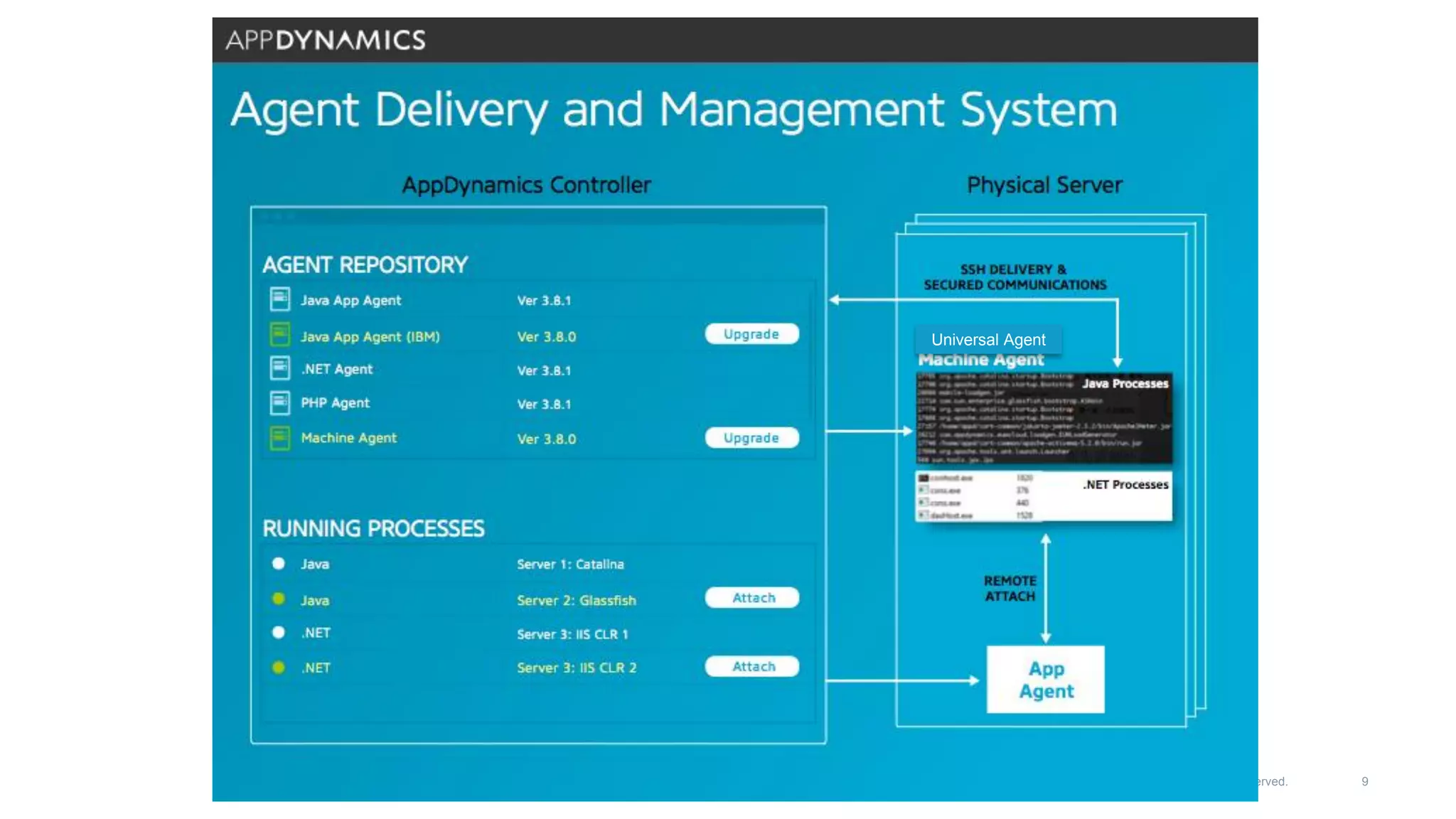
Universal Agent
Universal Agent
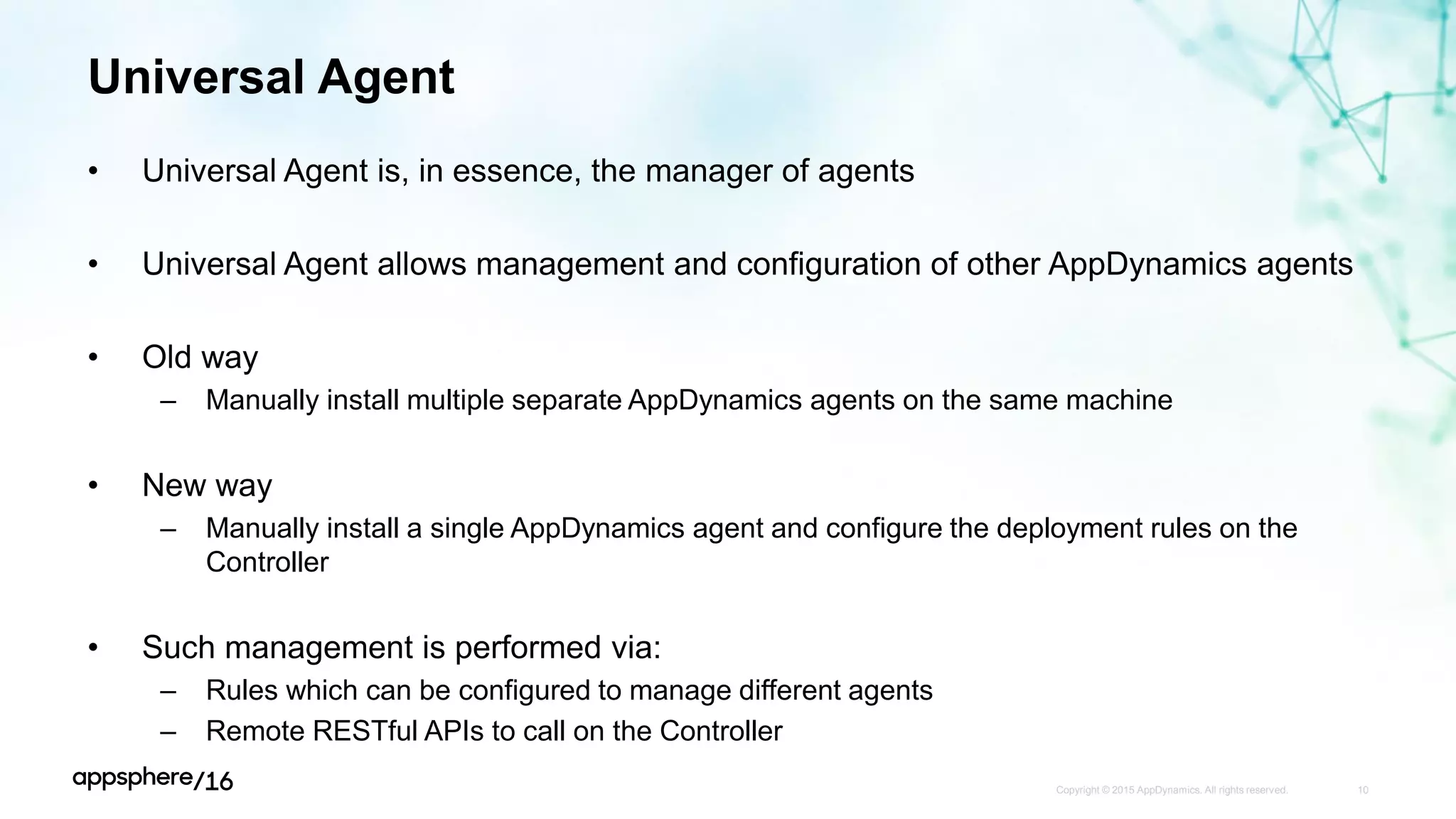
• Universal Agent is, in essence, the manager of agents
• Universal Agent allows management and configuration of other AppDynamics agents
• Old way
– Manually install multiple separate AppDynamics agents on the same machine
• New way
– Manually install a single AppDynamics agent and configure the deployment rules on the
Controller
• Such management is performed via:
– Rules which can be configured to manage different agents
– Remote RESTful APIs to call on the Controller
Copyright © 2015 AppDynamics. All rights reserved. 10
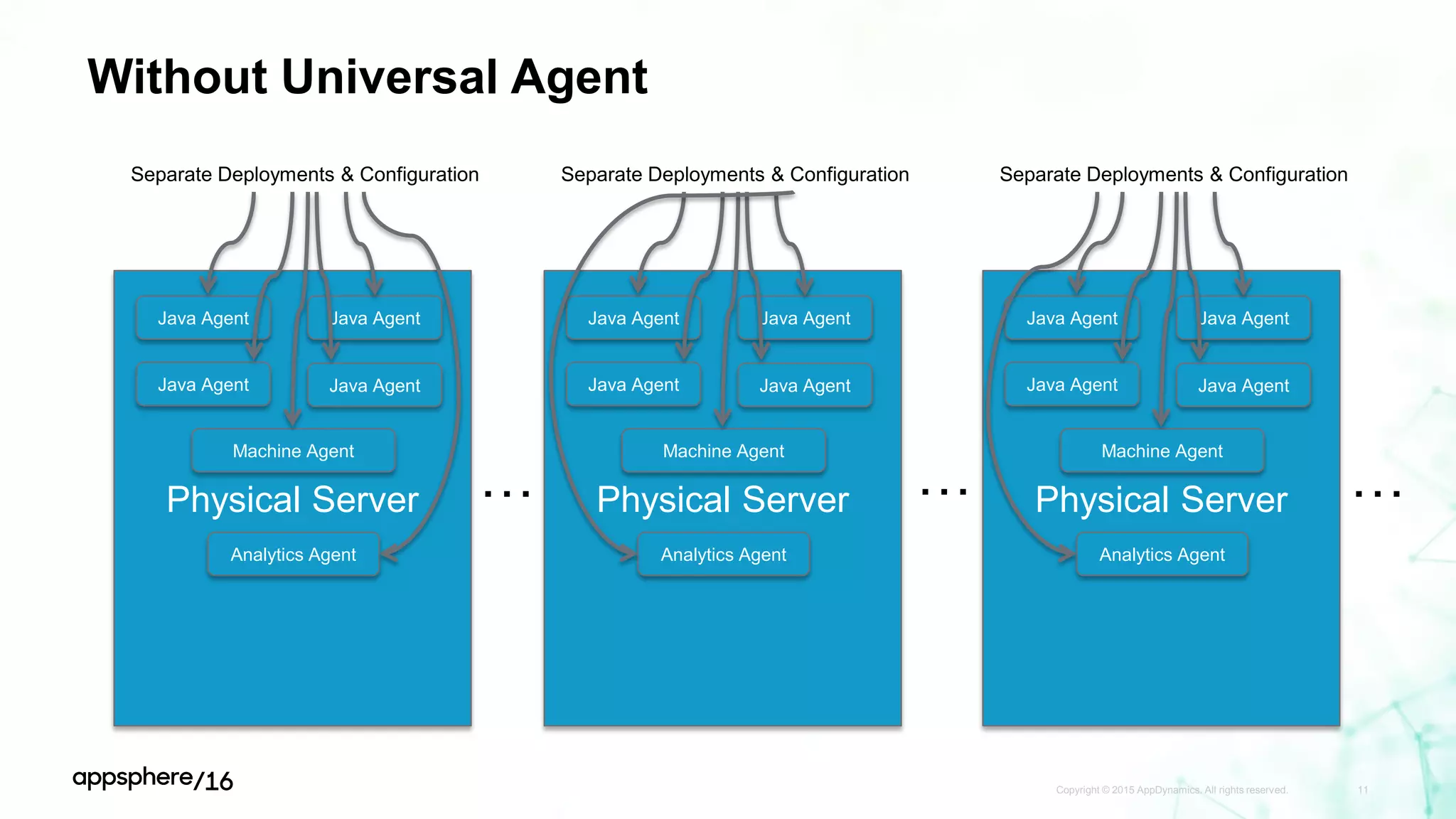
Without Universal Agent
Copyright © 2015 AppDynamics. All rights reserved. 11
Physical Server
Java Agent Java Agent
Machine Agent
Analytics Agent
Separate Deployments & Configuration
Physical Server
Java Agent Java Agent
Machine Agent
Analytics Agent
Separate Deployments & Configuration
Physical Server
Java Agent Java Agent
Machine Agent
Analytics Agent
Separate Deployments & Configuration
… … …
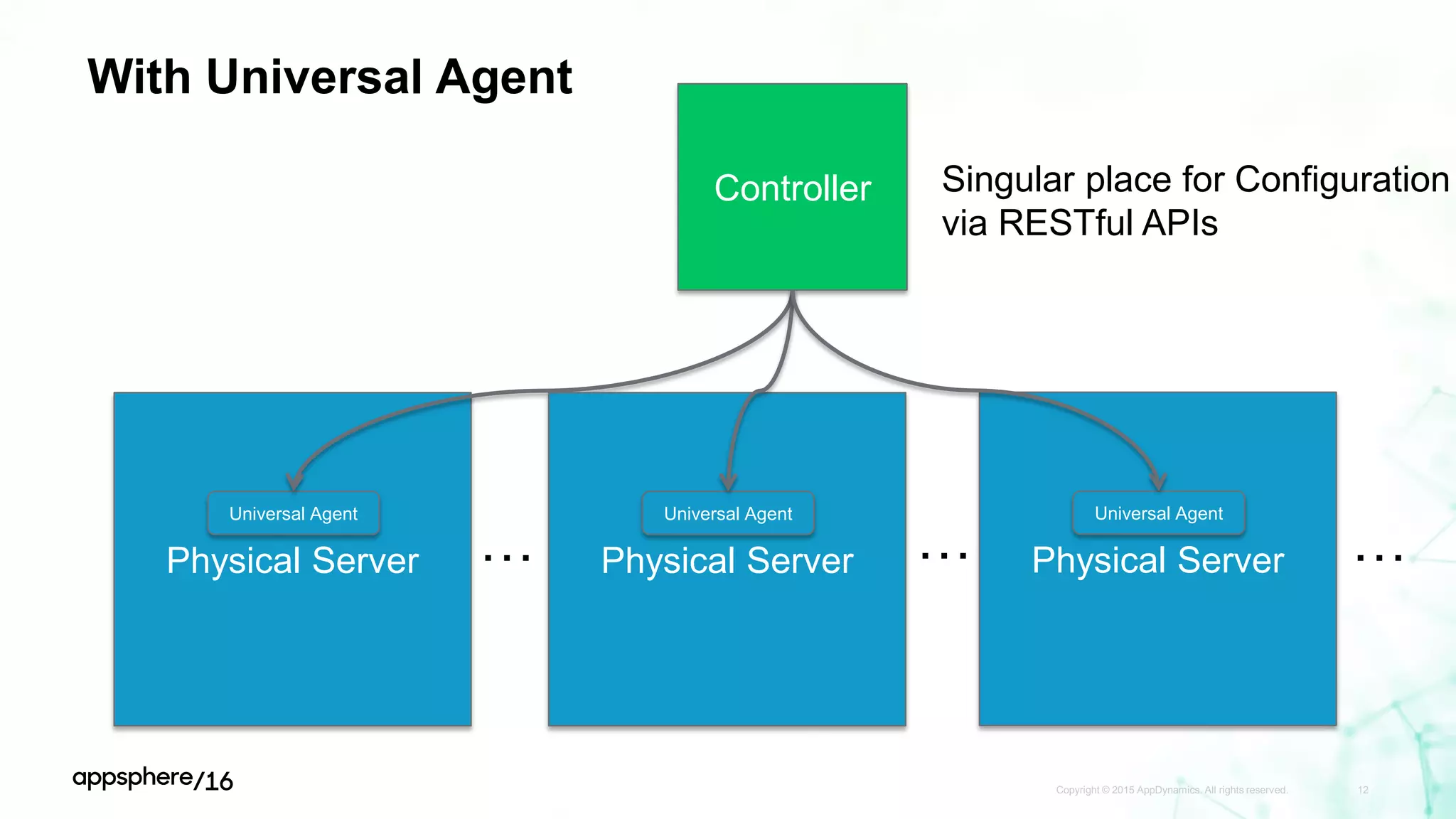
With Universal Agent
Copyright © 2015 AppDynamics. All rights reserved. 12
Physical Server
Universal Agent
Controller
Physical Server
Universal Agent
Physical Server
Universal Agent
Singular place for Configuration
via RESTful APIs
… … …
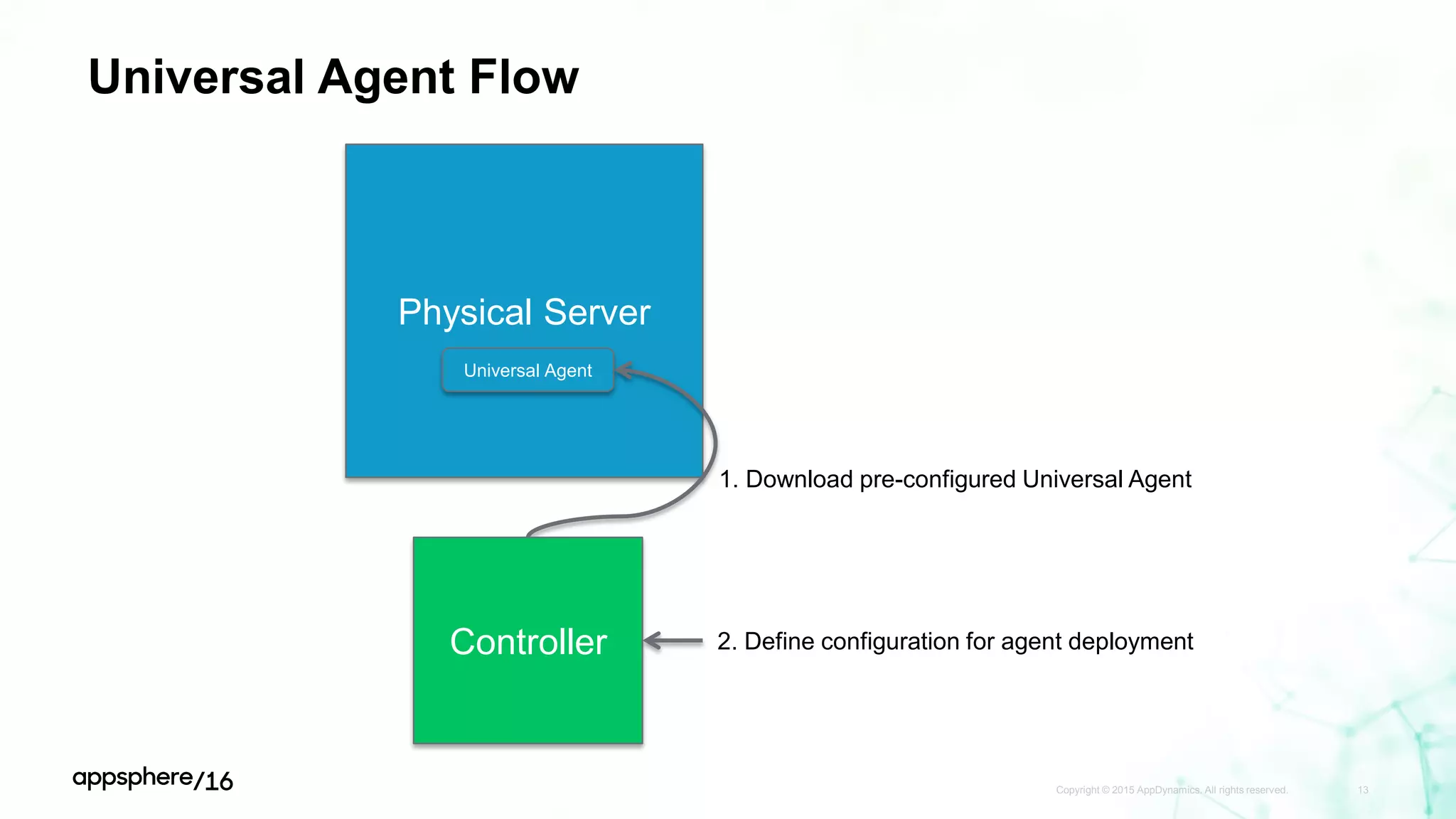
Universal Agent Flow
Copyright © 2015 AppDynamics. All rights reserved. 13
Physical Server
Universal Agent
Controller
1. Download pre-configured Universal Agent
2. Define configuration for agent deployment
Universal Agent Flow: UA Install
Copyright © 2015 AppDynamics. All rights reserved. 14
Physical Server
Universal AgentController
curl/wget pre-configured Universal Agent
• Flexible installation options:
1. Direct download from the Controller – little to no configuration modification necessary
2. Download from Portal and configure manually
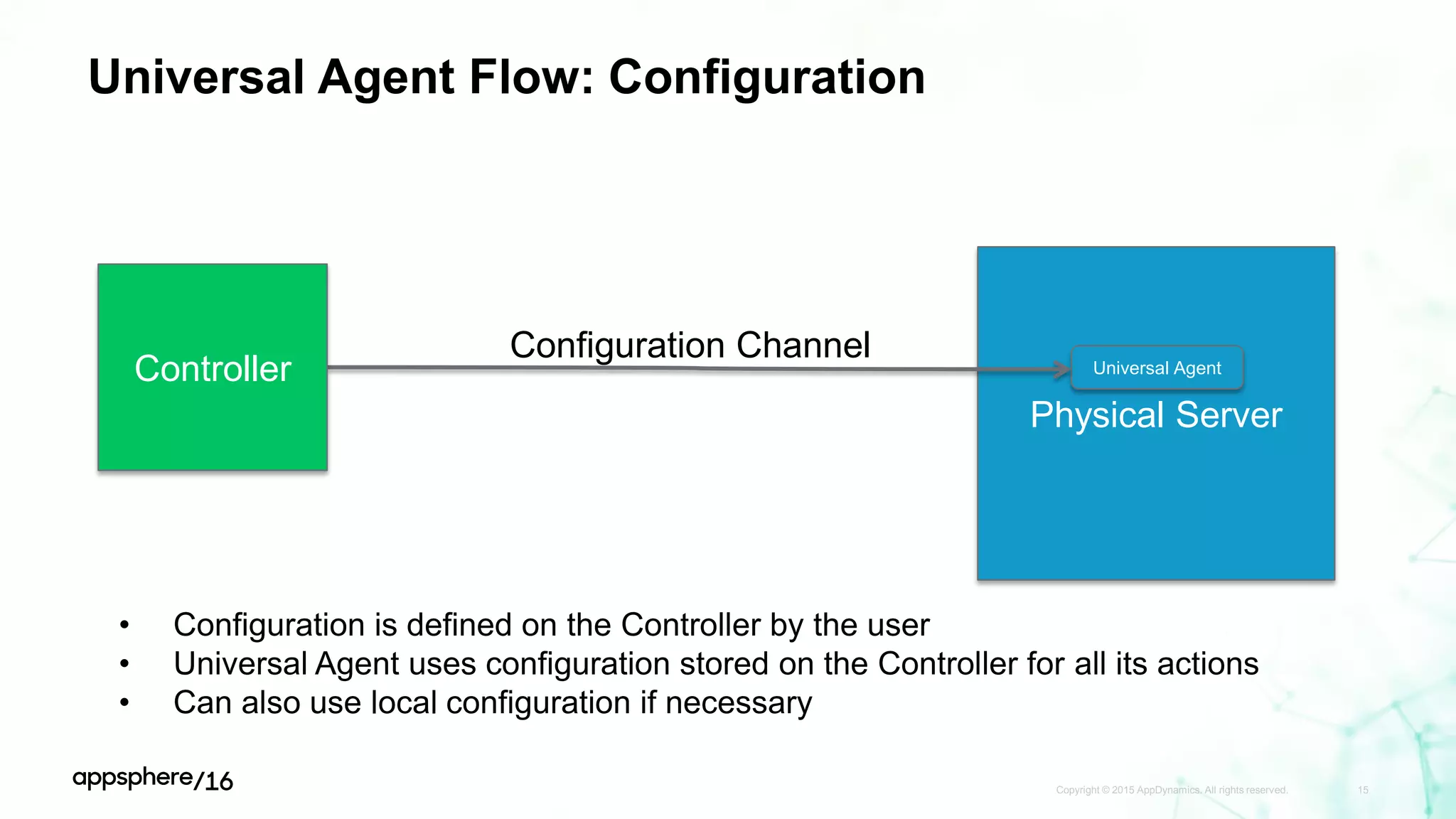
Universal Agent Flow: Configuration
Copyright © 2015 AppDynamics. All rights reserved. 15
Physical Server
Universal AgentController
Configuration Channel
• Configuration is defined on the Controller by the user
• Universal Agent uses configuration stored on the Controller for all its actions
• Can also use local configuration if necessary
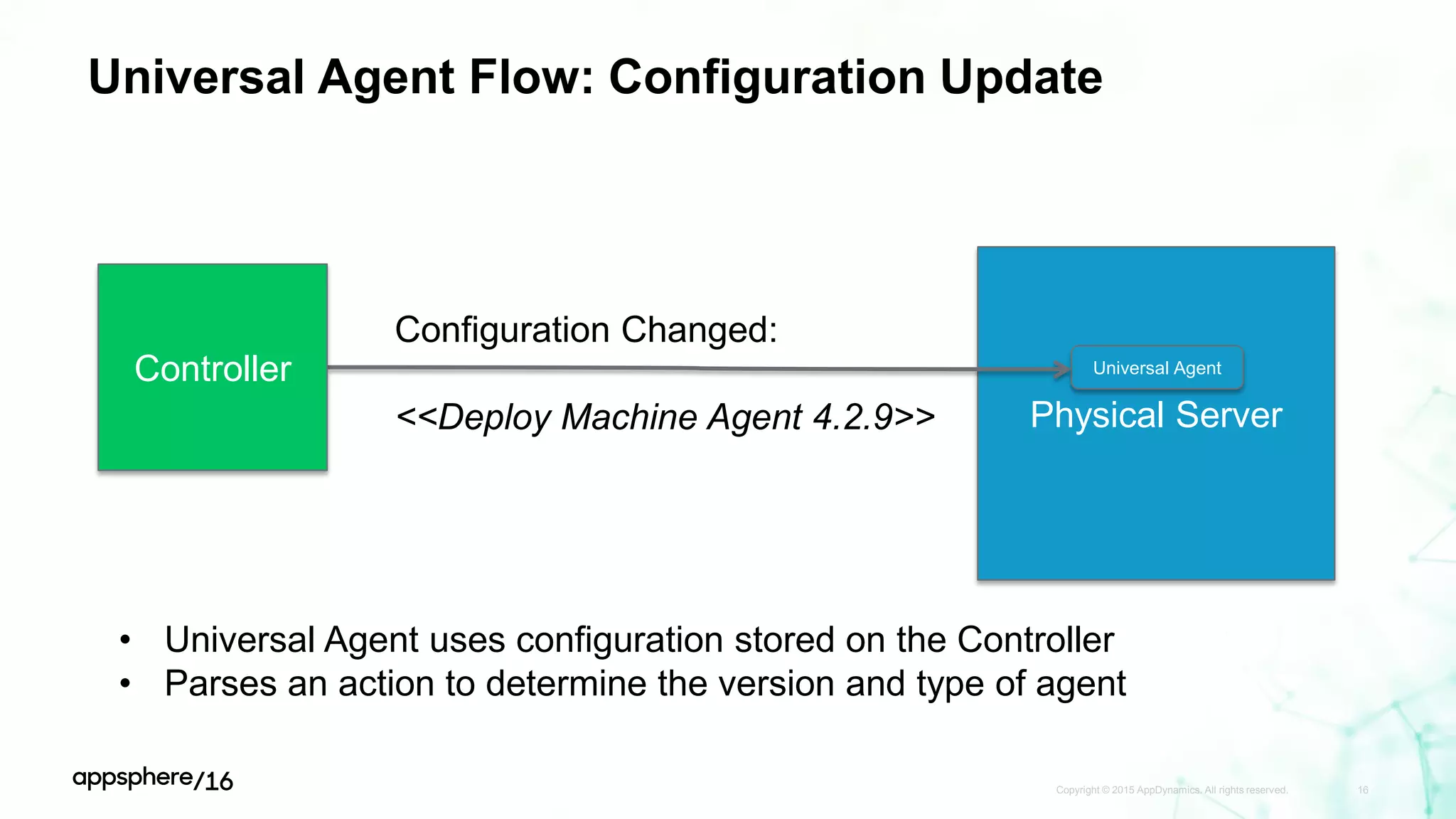
Universal Agent Flow: Configuration Update
Copyright © 2015 AppDynamics. All rights reserved. 16
Physical Server
Universal AgentController
Configuration Changed:
<<Deploy Machine Agent 4.2.9>>
• Universal Agent uses configuration stored on the Controller
• Parses an action to determine the version and type of agent
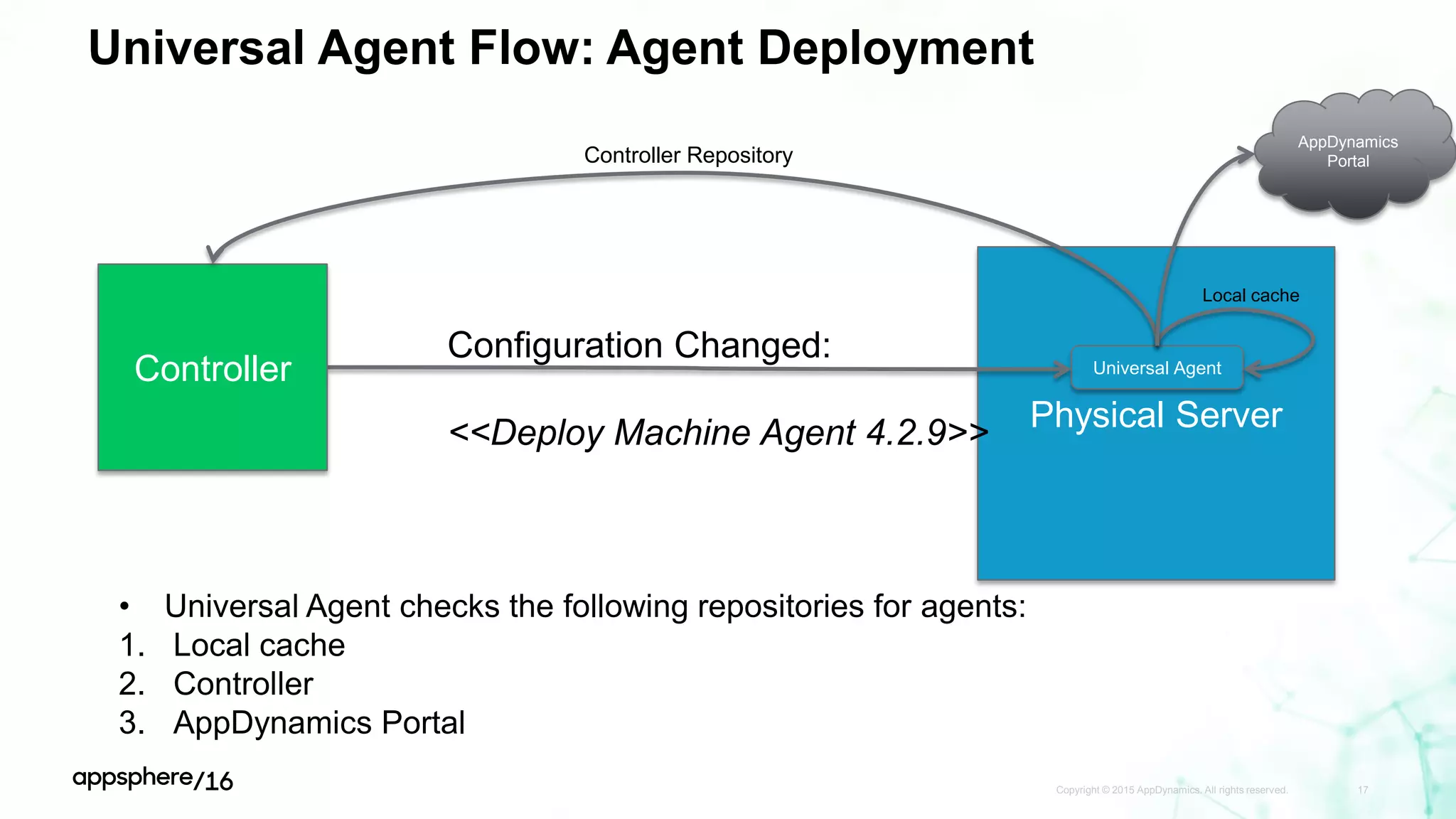
Universal Agent Flow: Agent Deployment
Copyright © 2015 AppDynamics. All rights reserved. 17
Physical Server
Universal AgentController
Configuration Changed:
<<Deploy Machine Agent 4.2.9>>
• Universal Agent checks the following repositories for agents:
1. Local cache
2. Controller
3. AppDynamics Portal
Local cache
Controller Repository
AppDynamics
Portal
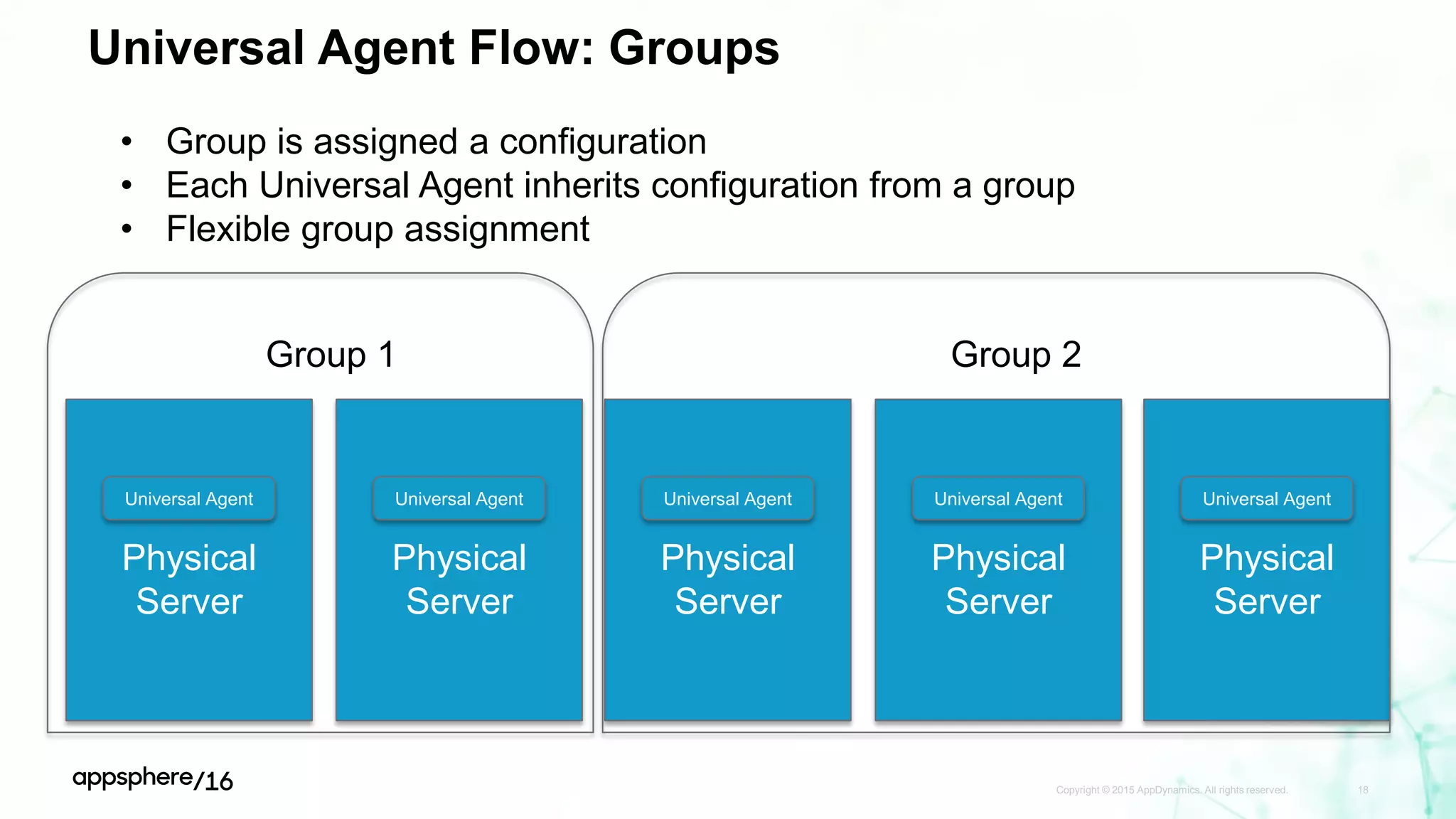
Universal Agent Flow: Groups
Copyright © 2015 AppDynamics. All rights reserved. 18
Physical
Server
Universal Agent
Physical
Server
Universal Agent
Physical
Server
Universal Agent
Physical
Server
Universal Agent
Physical
Server
Universal Agent
Group 1 Group 2
• Group is assigned a configuration
• Each Universal Agent inherits configuration from a group
• Flexible group assignment
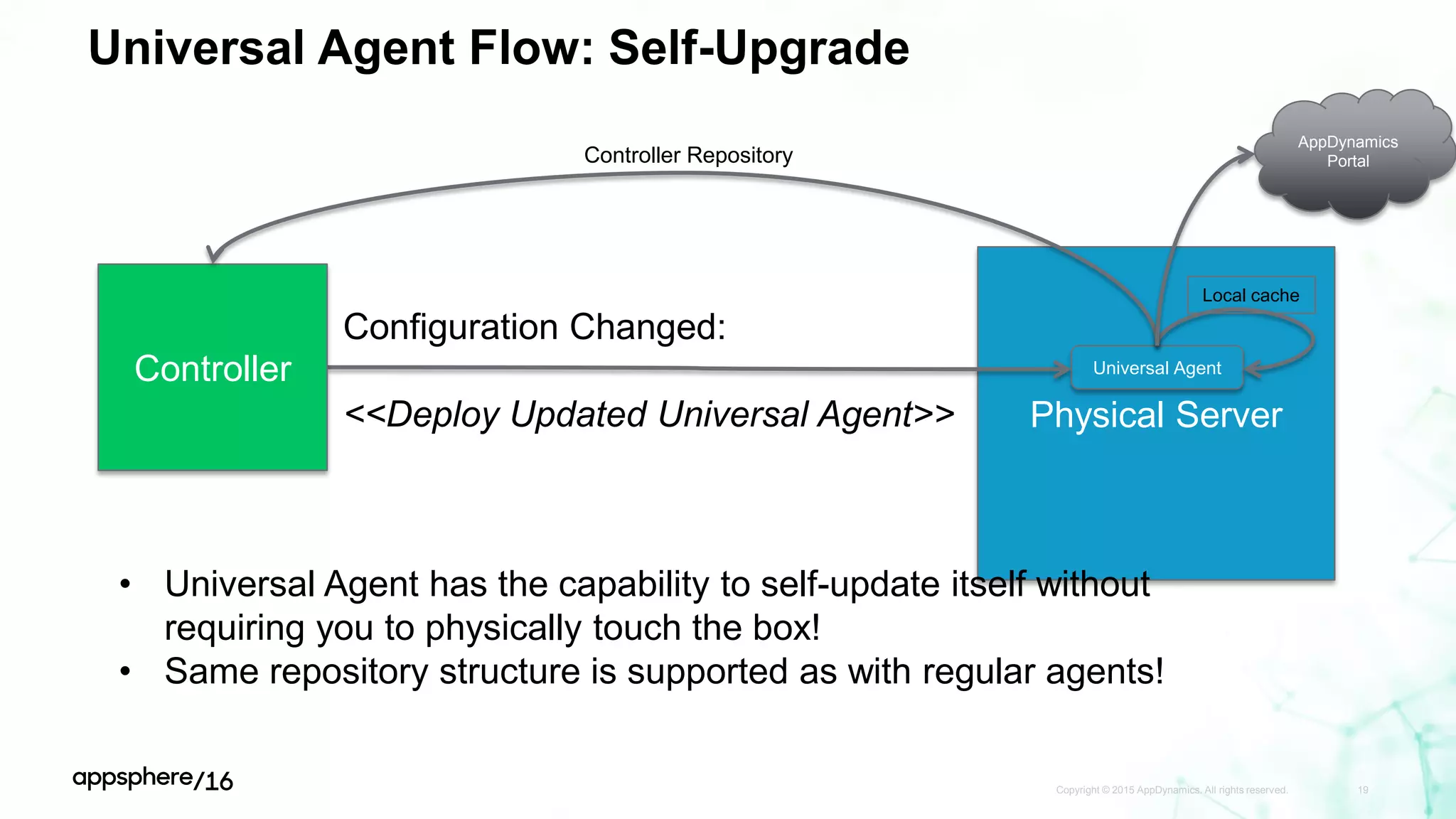
Universal Agent Flow: Self-Upgrade
Copyright © 2015 AppDynamics. All rights reserved. 19
Physical Server
Universal AgentController
Configuration Changed:
<<Deploy Updated Universal Agent>>
• Universal Agent has the capability to self-update itself without
requiring you to physically touch the box!
• Same repository structure is supported as with regular agents!
Local cache
Controller Repository
AppDynamics
Portal
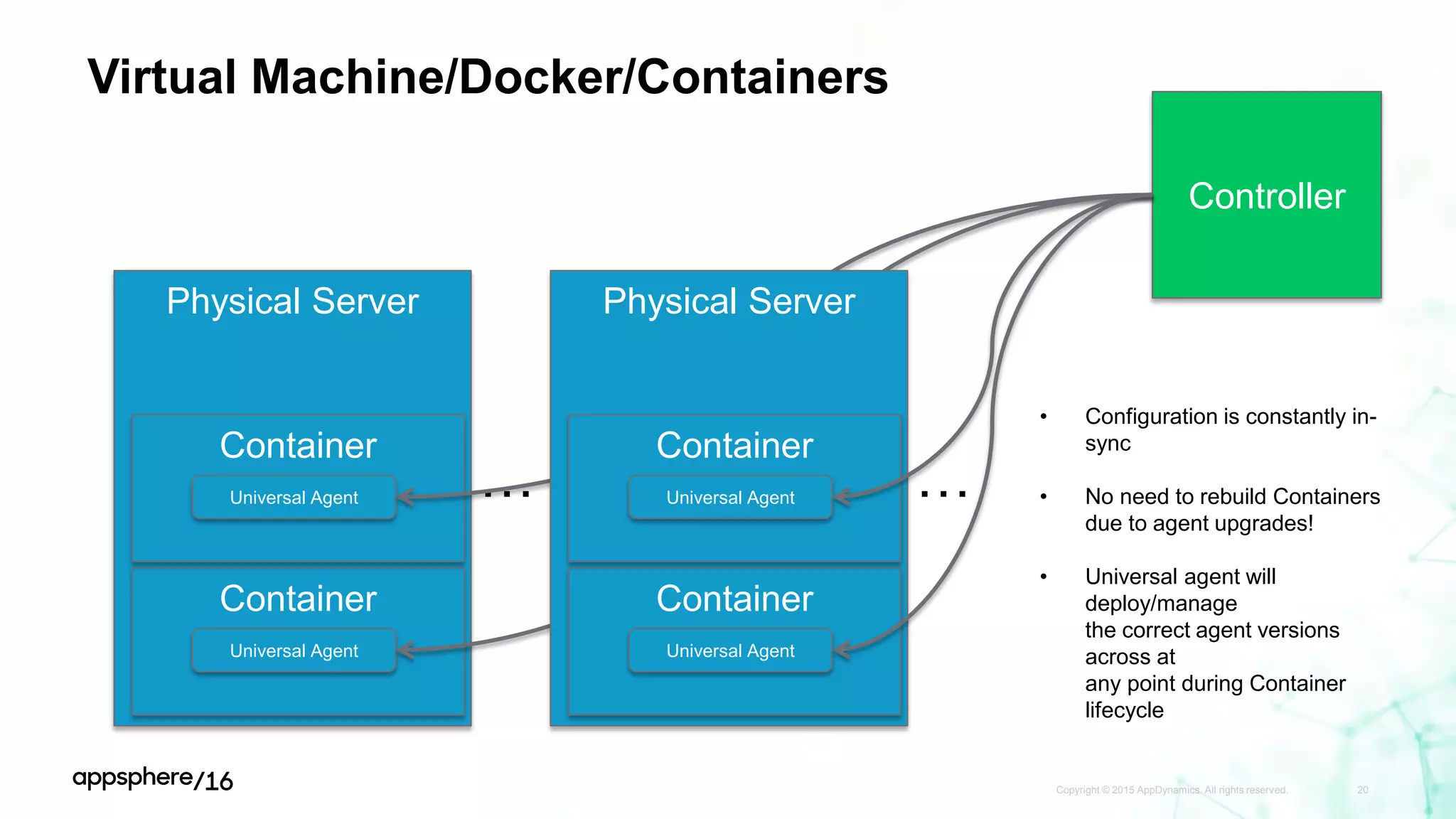
Virtual Machine/Docker/Containers
Copyright © 2015 AppDynamics. All rights reserved. 20
Physical Server
Container
…
Universal Agent
Container
Universal Agent
Controller
Physical Server
Container
…
Universal Agent
Container
Universal Agent
• Configuration is constantly in-
sync
• No need to rebuild Containers
due to agent upgrades!
• Universal agent will
deploy/manage
the correct agent versions
across at
any point during Container
lifecycle
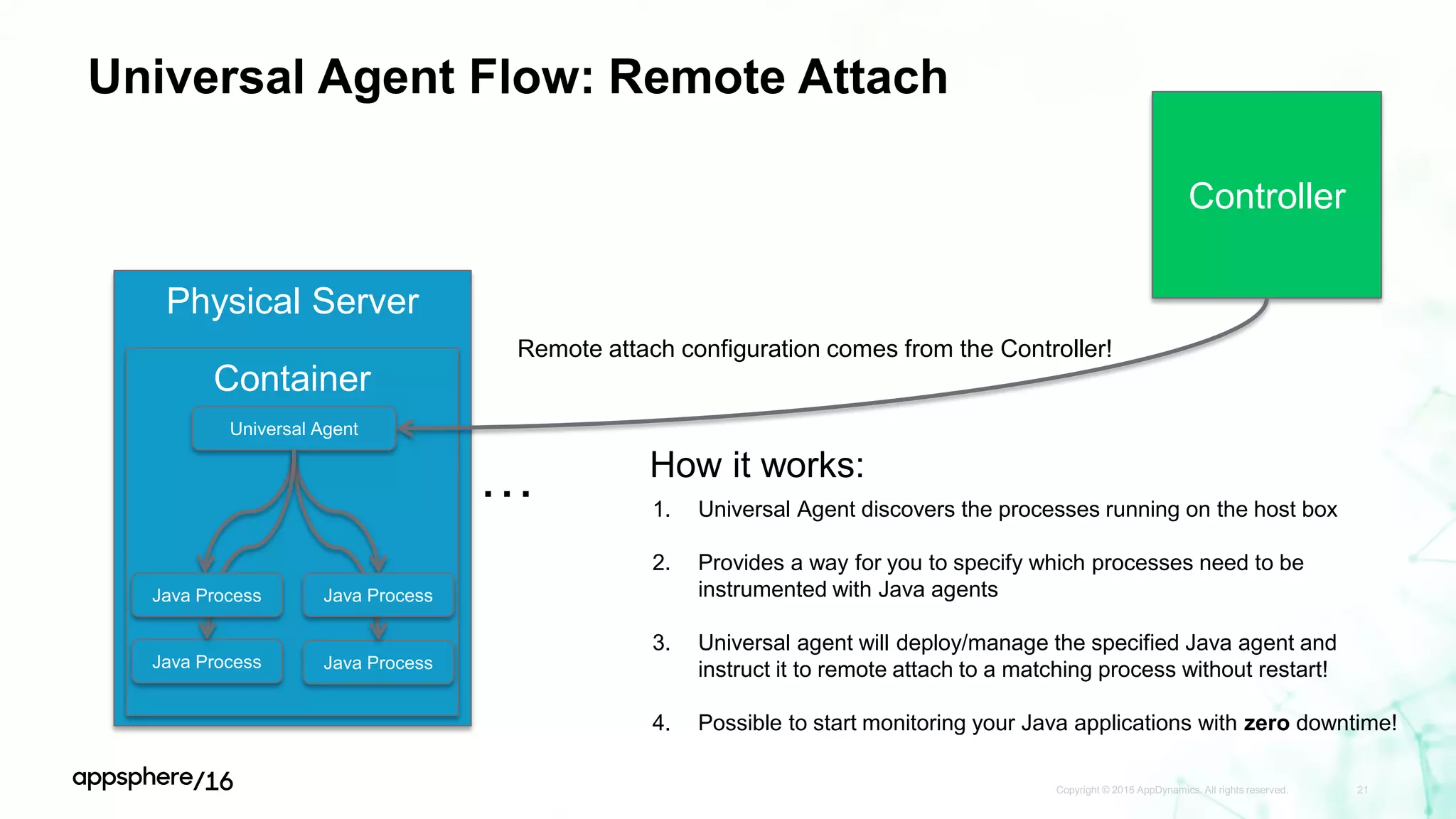
Universal Agent Flow: Remote Attach
Copyright © 2015 AppDynamics. All rights reserved. 21
Physical Server
…
Container
Universal Agent
Controller
1. Universal Agent discovers the processes running on the host box
2. Provides a way for you to specify which processes need to be
instrumented with Java agents
3. Universal agent will deploy/manage the specified Java agent and
instruct it to remote attach to a matching process without restart!
4. Possible to start monitoring your Java applications with zero downtime!
Java Process Java Process
Java ProcessJava Process
How it works:
Remote attach configuration comes from the Controller!
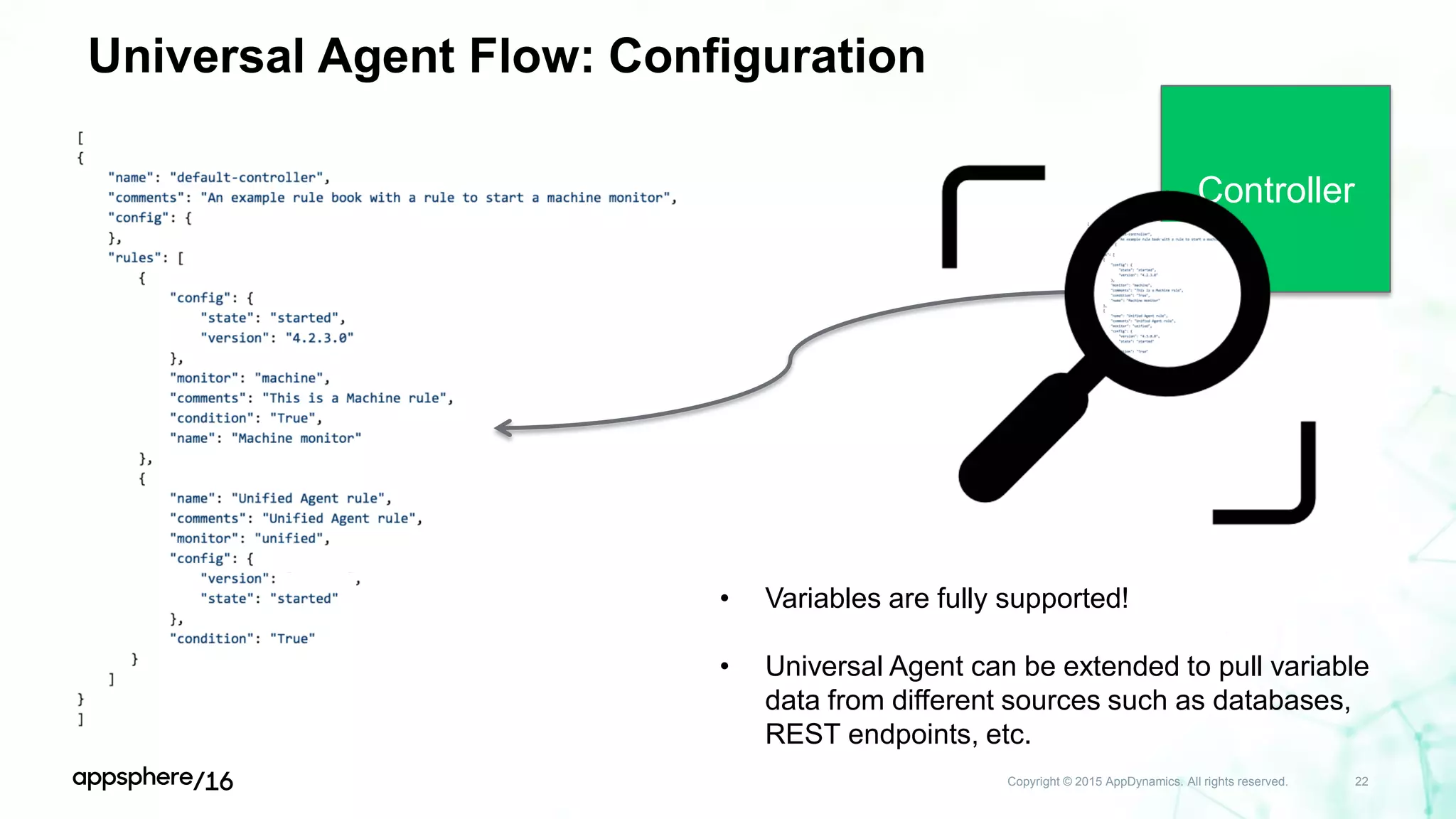
Universal Agent Flow: Configuration
Copyright © 2015 AppDynamics. All rights reserved. 22
Controller
• Variables are fully supported!
• Universal Agent can be extended to pull variable
data from different sources such as databases,
REST endpoints, etc.
Demo & discussion
Please give us your feedback—Session T13328
• Complete the online survey you'll receive via
email later today or via text at:
Text this number: 878787
Text this word: APPSPHERE
• Every time you submit a session survey, your
name will be entered in a random drawing.
We're giving away Amazon Echos
to 5 lucky winners!
• Thank you for your input
APPDYNAMICS CONFIDENTIAL AND PROPRIETARY 24
Win!
Thank you

Advanced Agent Deployment Strategies in Large Scale, Complex Environments - AppSphere16

  • 1.
    AppDynamics Universal Agent ValChibisov Sr. Product Manager | AppDynamics Inc
  • 2.
    APPDYNAMICS CONFIDENTIAL ANDPROPRIETARY 2 Notice The information and materials included in this presentation (collectively, the “Materials”) are the proprietary information of AppDynamics, Inc. (“AppDynamics” or the “Company”). No part of the Materials may be reproduced, distributed, communicated or displayed in any form or by any means, or used to make any derivative work, without prior written permission from AppDynamics. The Materials may contain product roadmap information of AppDynamics. AppDynamics reserves the right to change any product roadmap information at any time, for any reason and without notice. This information is intended to outline AppDynamics' general product direction, it is not a guarantee of future product features, and it should not be relied on in making a purchasing decision. The development, release, and timing of any features or functionality described for AppDynamics' products remains at AppDynamics' sole discretion. AppDynamics reserves the right to change any planned features at any time before making them generally available as well as never making them generally available. All third-party trademarks, including names, logos and brands, referenced by AppDynamics in this presentation are property of their respective owners. All references to third-party trademarks are for identification purposes only and shall be considered nominative fair use under trademark law. © 2016 AppDynamics, Inc. All rights reserved.
  • 3.
    Our approach: We understandtransactions from the start Real-time, all-the-time visibility and management Of your entire application environment
  • 4.
    Our approach: We understandtransactions from the start
  • 5.
    Our approach: We understandtransactions from the start
  • 6.
  • 7.
    Deployment options 1. Manual –Deploy agents manually to different boxes – Alternatively via manually written scripts 2. Puppet/Chef – Use 3rd party tools to deploy and manage configuration of agents 3. Universal Agent – Centralized way to manage/deploy agents without ever touching the box (after Universal Agent install)! 7
  • 8.
  • 9.
    Copyright © 2015AppDynamics. All rights reserved. 9 Universal Agent
  • 10.
    Universal Agent • UniversalAgent is, in essence, the manager of agents • Universal Agent allows management and configuration of other AppDynamics agents • Old way – Manually install multiple separate AppDynamics agents on the same machine • New way – Manually install a single AppDynamics agent and configure the deployment rules on the Controller • Such management is performed via: – Rules which can be configured to manage different agents – Remote RESTful APIs to call on the Controller Copyright © 2015 AppDynamics. All rights reserved. 10
  • 11.
    Without Universal Agent Copyright© 2015 AppDynamics. All rights reserved. 11 Physical Server Java Agent Java Agent Java Agent Java Agent Machine Agent Analytics Agent Separate Deployments & Configuration Physical Server Java Agent Java Agent Java Agent Java Agent Machine Agent Analytics Agent Separate Deployments & Configuration Physical Server Java Agent Java Agent Java Agent Java Agent Machine Agent Analytics Agent Separate Deployments & Configuration … … …
  • 12.
    With Universal Agent Copyright© 2015 AppDynamics. All rights reserved. 12 Physical Server Universal Agent Controller Physical Server Universal Agent Physical Server Universal Agent Singular place for Configuration via RESTful APIs … … …
  • 13.
    Universal Agent Flow Copyright© 2015 AppDynamics. All rights reserved. 13 Physical Server Universal Agent Controller 1. Download pre-configured Universal Agent 2. Define configuration for agent deployment
  • 14.
    Universal Agent Flow:UA Install Copyright © 2015 AppDynamics. All rights reserved. 14 Physical Server Universal AgentController curl/wget pre-configured Universal Agent • Flexible installation options: 1. Direct download from the Controller – little to no configuration modification necessary 2. Download from Portal and configure manually
  • 15.
    Universal Agent Flow:Configuration Copyright © 2015 AppDynamics. All rights reserved. 15 Physical Server Universal AgentController Configuration Channel • Configuration is defined on the Controller by the user • Universal Agent uses configuration stored on the Controller for all its actions • Can also use local configuration if necessary
  • 16.
    Universal Agent Flow:Configuration Update Copyright © 2015 AppDynamics. All rights reserved. 16 Physical Server Universal AgentController Configuration Changed: <<Deploy Machine Agent 4.2.9>> • Universal Agent uses configuration stored on the Controller • Parses an action to determine the version and type of agent
  • 17.
    Universal Agent Flow:Agent Deployment Copyright © 2015 AppDynamics. All rights reserved. 17 Physical Server Universal AgentController Configuration Changed: <<Deploy Machine Agent 4.2.9>> • Universal Agent checks the following repositories for agents: 1. Local cache 2. Controller 3. AppDynamics Portal Local cache Controller Repository AppDynamics Portal
  • 18.
    Universal Agent Flow:Groups Copyright © 2015 AppDynamics. All rights reserved. 18 Physical Server Universal Agent Physical Server Universal Agent Physical Server Universal Agent Physical Server Universal Agent Physical Server Universal Agent Group 1 Group 2 • Group is assigned a configuration • Each Universal Agent inherits configuration from a group • Flexible group assignment
  • 19.
    Universal Agent Flow:Self-Upgrade Copyright © 2015 AppDynamics. All rights reserved. 19 Physical Server Universal AgentController Configuration Changed: <<Deploy Updated Universal Agent>> • Universal Agent has the capability to self-update itself without requiring you to physically touch the box! • Same repository structure is supported as with regular agents! Local cache Controller Repository AppDynamics Portal
  • 20.
    Virtual Machine/Docker/Containers Copyright ©2015 AppDynamics. All rights reserved. 20 Physical Server Container … Universal Agent Container Universal Agent Controller Physical Server Container … Universal Agent Container Universal Agent • Configuration is constantly in- sync • No need to rebuild Containers due to agent upgrades! • Universal agent will deploy/manage the correct agent versions across at any point during Container lifecycle
  • 21.
    Universal Agent Flow:Remote Attach Copyright © 2015 AppDynamics. All rights reserved. 21 Physical Server … Container Universal Agent Controller 1. Universal Agent discovers the processes running on the host box 2. Provides a way for you to specify which processes need to be instrumented with Java agents 3. Universal agent will deploy/manage the specified Java agent and instruct it to remote attach to a matching process without restart! 4. Possible to start monitoring your Java applications with zero downtime! Java Process Java Process Java ProcessJava Process How it works: Remote attach configuration comes from the Controller!
  • 22.
    Universal Agent Flow:Configuration Copyright © 2015 AppDynamics. All rights reserved. 22 Controller • Variables are fully supported! • Universal Agent can be extended to pull variable data from different sources such as databases, REST endpoints, etc.
  • 23.
  • 24.
    Please give usyour feedback—Session T13328 • Complete the online survey you'll receive via email later today or via text at: Text this number: 878787 Text this word: APPSPHERE • Every time you submit a session survey, your name will be entered in a random drawing. We're giving away Amazon Echos to 5 lucky winners! • Thank you for your input APPDYNAMICS CONFIDENTIAL AND PROPRIETARY 24 Win!
  • 25.