
From APM to Business Monitoring
with AppDynamics Analytics
AppDynamics Version 4.2
APPDYNAMICS CONFIDENTIAL AND PROPRIETARY 2
Notice
The information and materials included in this presentation (collectively,
the “Materials”) are the confidential and proprietary information of
AppDynamics, Inc. (the “Company”). No part of the Materials may be
reproduced, distributed, communicated or displayed in any form or by any
means, or used to make any derivative work, without prior written
permission from the Company. © 2016 AppDynamics, Inc. All rights
reserved.
All third party trademarks, including names, logos and brands, referenced
by the Company in this presentation are property of their respective
owners. All references to third party trademarks are for identification
purposes only and shall be considered nominative fair use under
trademark law.
Objectives
How easily business impact, usage,
and advanced analytics can be obtained
and visualized
Where the Analytics plugin fits in to the
overall AppDynamics Intelligence Platform
architecture
How to use event data as well as custom
method and HTTP requestdata collectors
to search and analyze business transactions
The simple steps to visualize search results
with the custom widgetbuilder
APPDYNAMICS CONFIDENTIAL AND PROPRIETARY 3
Course
Use business impactanalytics to compile
a list of users affected by a system outage to
facilitate marketing with a win-back campaign
Learn how to visualize application,server,
and network performance data as it relates
to business transactions
Understand fine-grained customer usage
and make data driven decisions
Perform infrastructure troubleshooting
by searching logs and analyzing with
aggregated error dashboards
Labs
APPDYNAMICS CONFIDENTIAL AND PROPRIETARY 4
Topic 1 AppDynamicsAPM Review
Topic 2 What Is AppDynamicsAnalytics?
Topic 3 Collect Transaction Analytics Data
Topic 4 Search & Visualize
Topic 5 Log Analytics
Topic 6 Metrics & Alerts
Topic 7 Analytics & Data Security
Agenda
From APM to Business Monitoring with AppDynamicsAnalytics
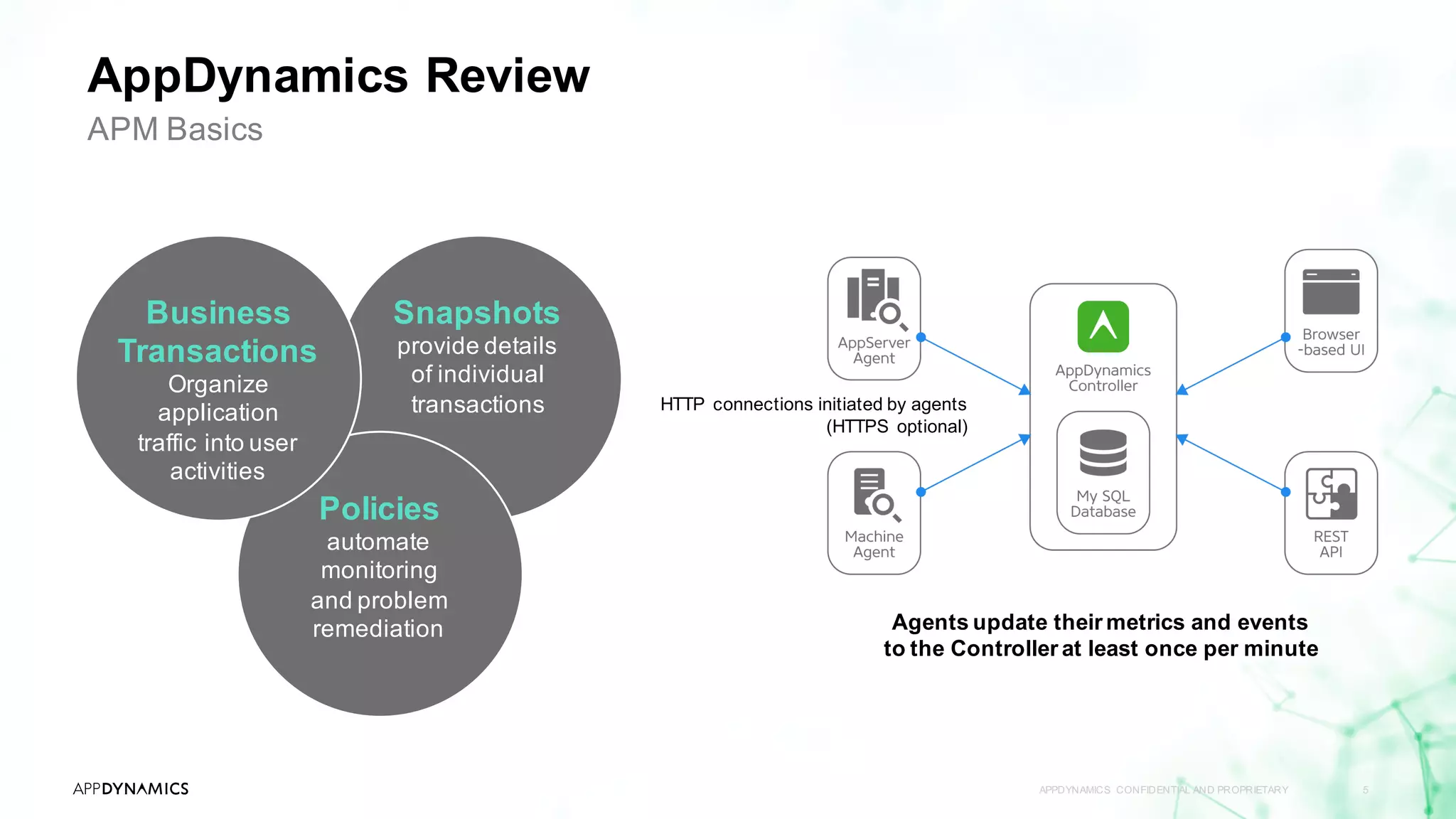
AppDynamics Review
APPDYNAMICS CONFIDENTIAL AND PROPRIETARY 5
APM Basics
HTTP connections initiated by agents
(HTTPS optional)
Agents update their metrics and events
to the Controller at least once per minute
Snapshots
provide details
of individual
transactions
Policies
automate
monitoring
and problem
remediation
Business
Transactions
Organize
application
traffic into user
activities
APPDYNAMICS CONFIDENTIAL AND PROPRIETARY 6
Topic 1 AppDynamicsAPM Review
Topic 2 What Is AppDynamics Analytics?
Topic 3 Collect Transaction Analytics Data
Topic 4 Search & Visualize
Topic 5 Log Analytics
Topic 6 Metrics & Alerts
Topic 7 Analytics & Data Security
Agenda
From APM to Business Monitoring with AppDynamicsAnalytics
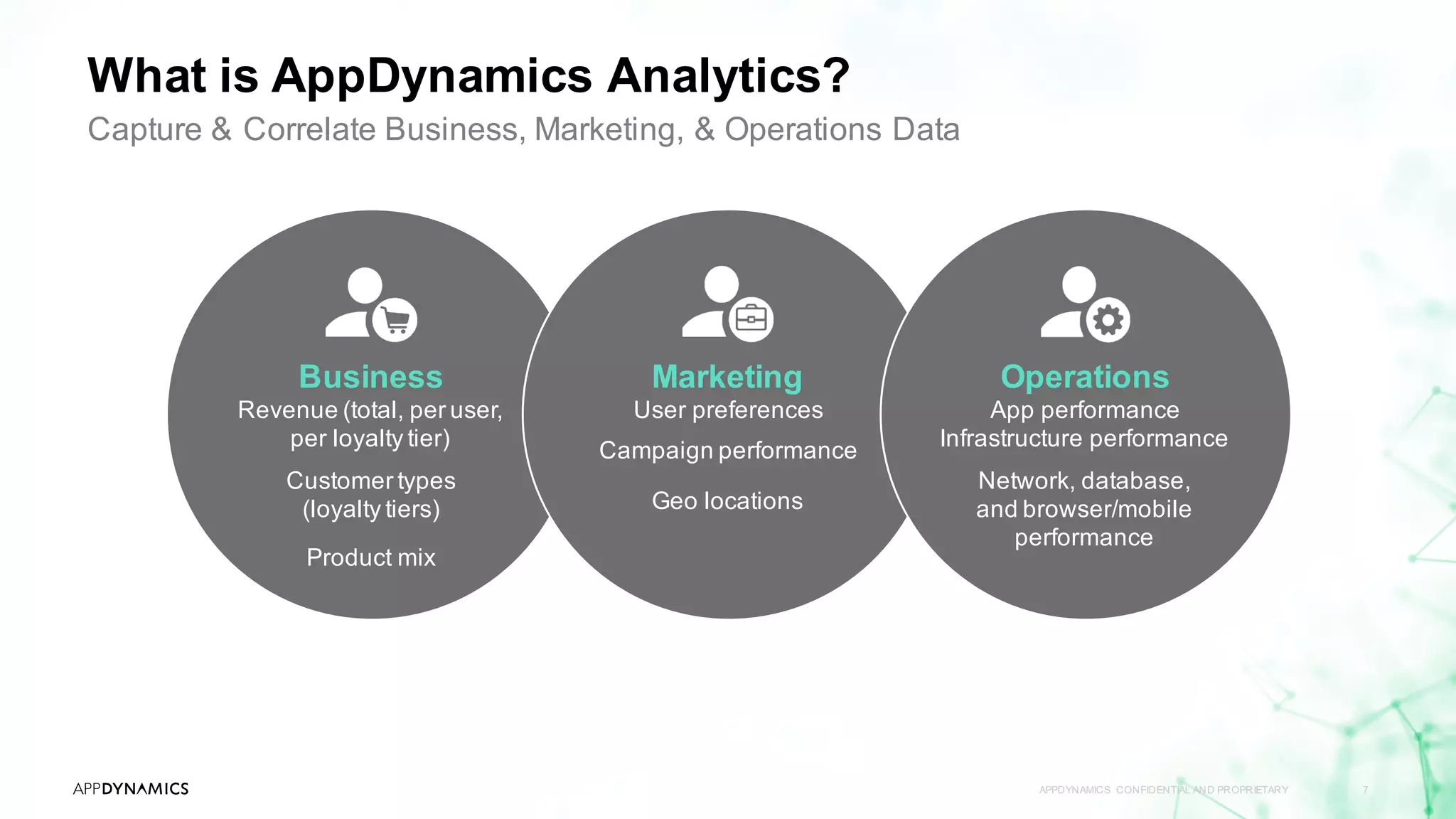
What is AppDynamics Analytics?
APPDYNAMICS CONFIDENTIAL AND PROPRIETARY 7
Capture & Correlate Business, Marketing, & Operations Data
Business
Revenue (total, per user,
per loyalty tier)
Customer types
(loyalty tiers)
Product mix
Marketing
User preferences
Campaign performance
Geo locations
Operations
App performance
Infrastructure performance
Network, database,
and browser/mobile
performance
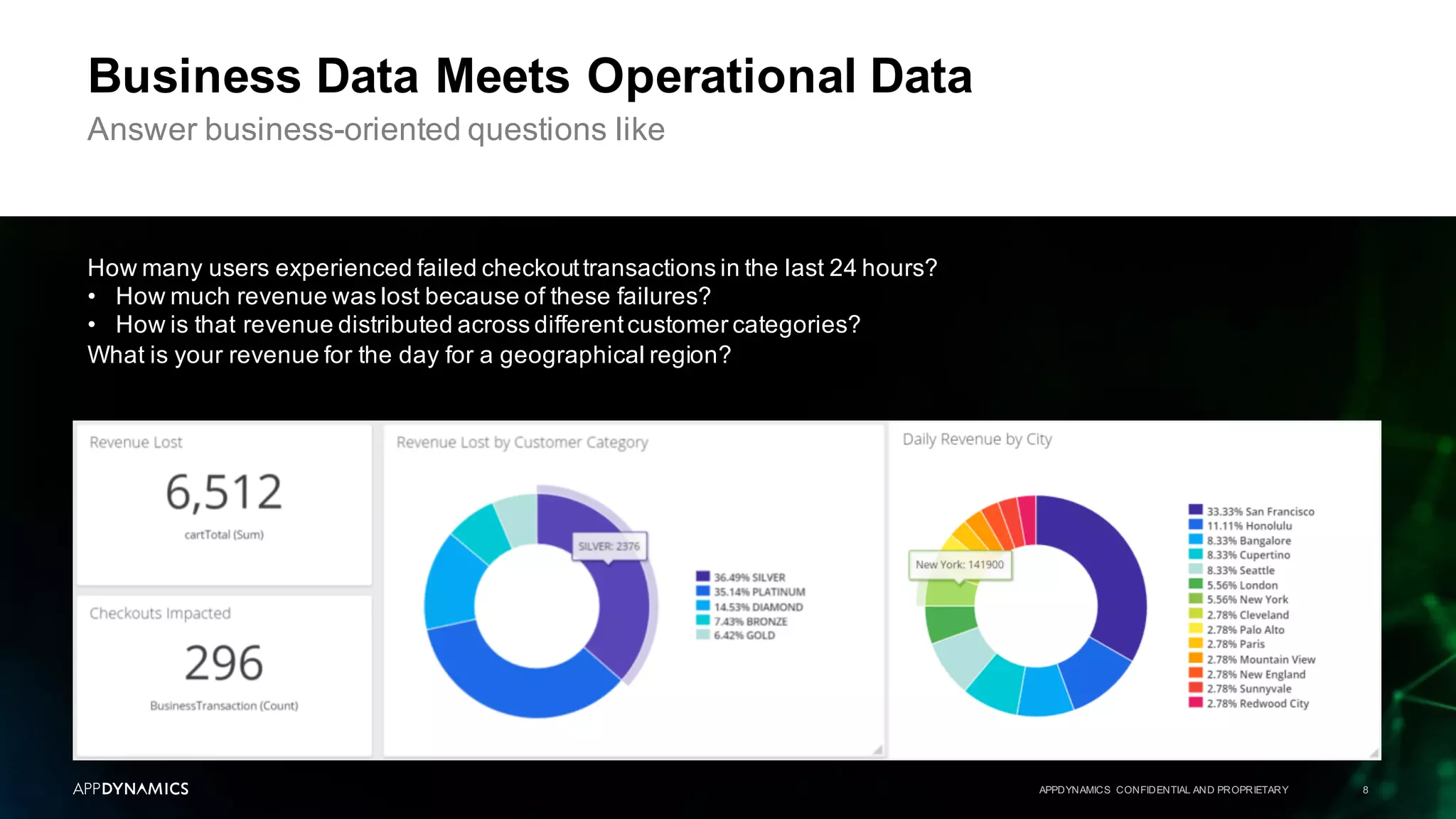
Business Data Meets Operational Data
APPDYNAMICS CONFIDENTIAL AND PROPRIETARY 8
Answer business-oriented questions like
How many users experienced failed checkouttransactions in the last 24 hours?
• How much revenue was lost because of these failures?
• How is that revenue distributed across differentcustomer categories?
What is your revenue for the day for a geographical region?
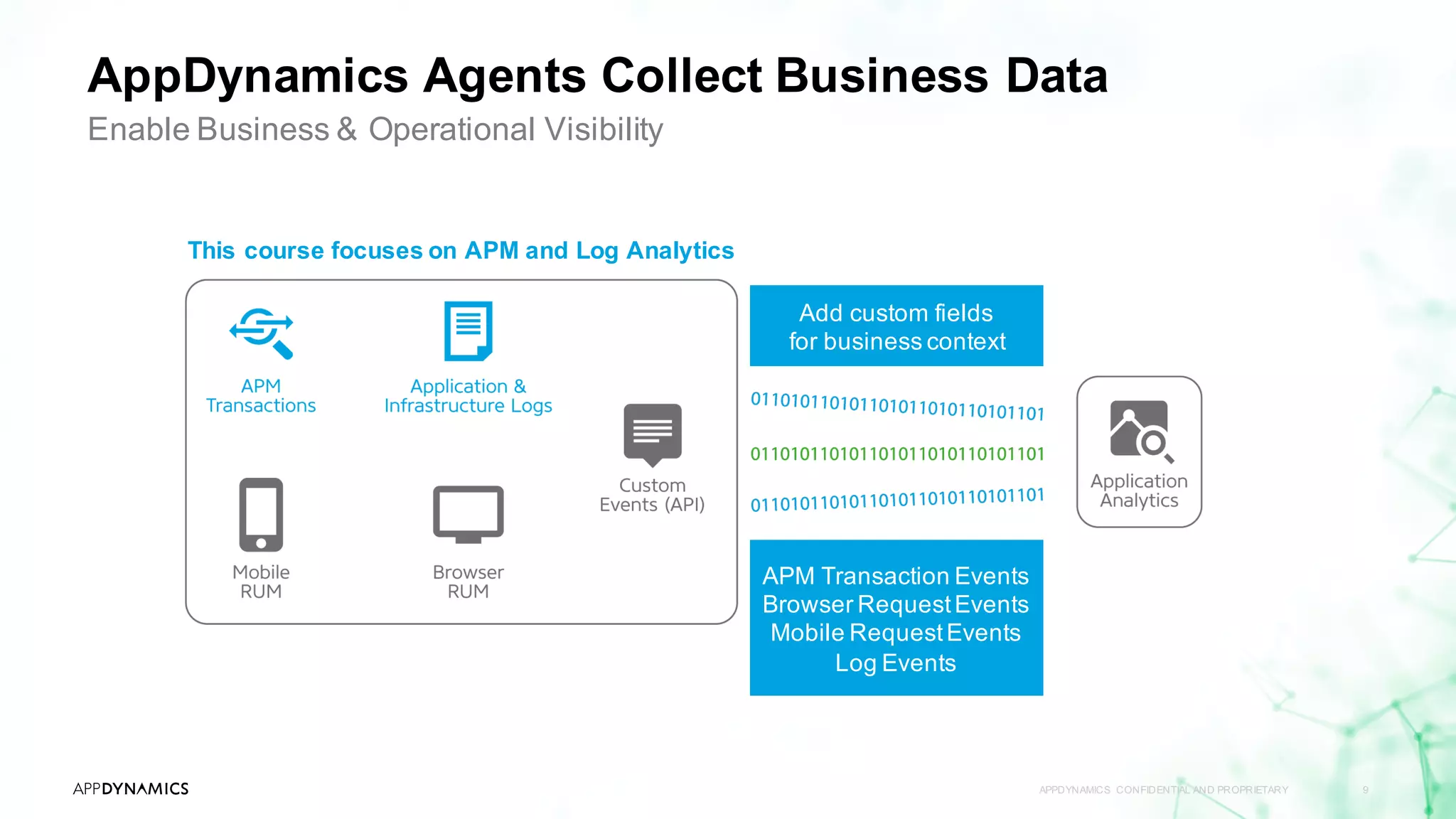
AppDynamics Agents Collect Business Data
APPDYNAMICS CONFIDENTIAL AND PROPRIETARY 9
Enable Business & Operational Visibility
APM Transaction Events
Browser RequestEvents
Mobile RequestEvents
Log Events
Add custom fields
for business context
This course focuses on APM and Log Analytics
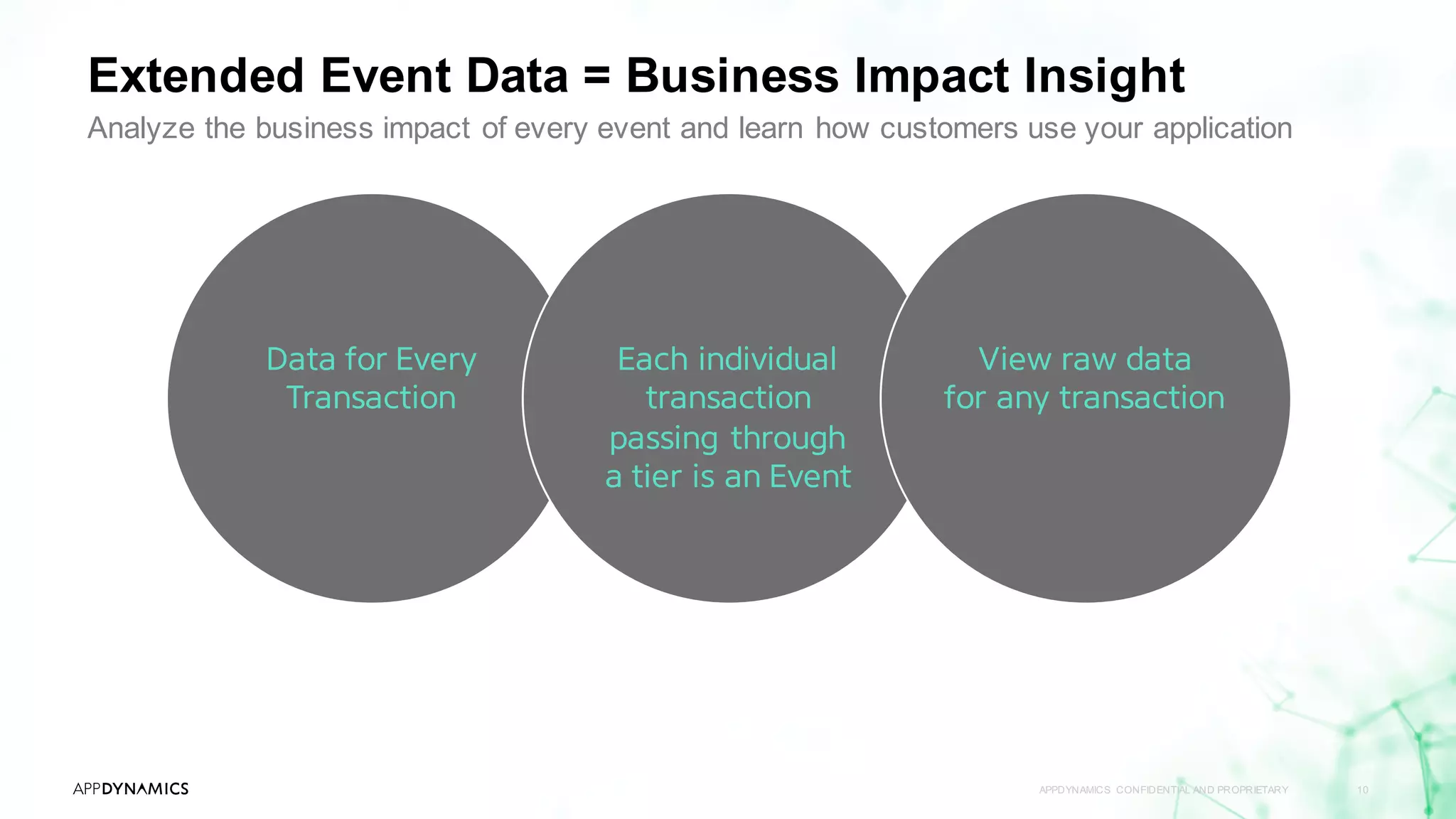
Extended Event Data = Business Impact Insight
APPDYNAMICS CONFIDENTIAL AND PROPRIETARY 10
Analyze the business impact of every event and learn how customers use your application
Data for Every
Transaction
Each individual
transaction
passing through
a tier is an Event
View raw data
for any transaction
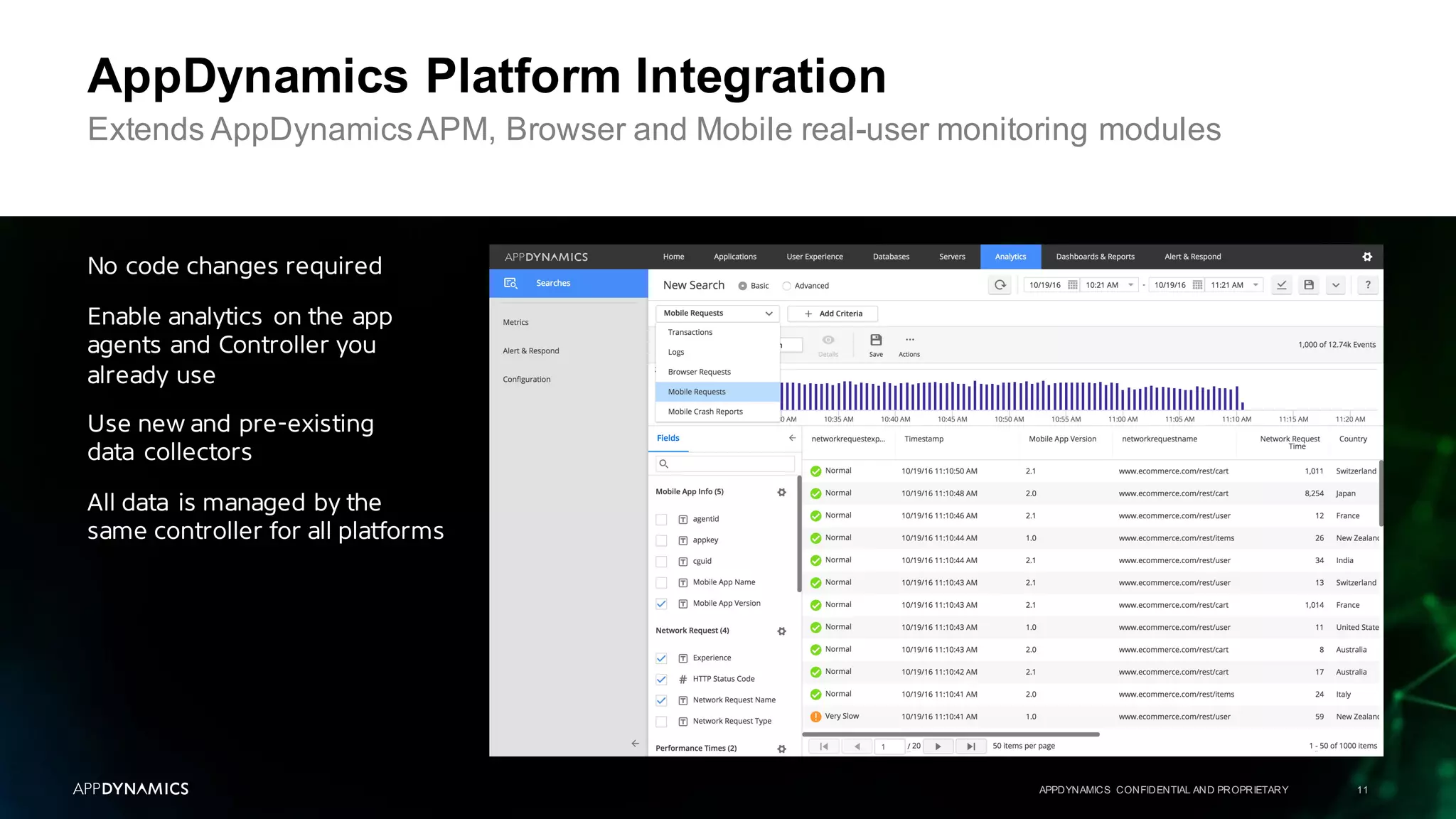
AppDynamics Platform Integration
APPDYNAMICS CONFIDENTIAL AND PROPRIETARY 11
No code changes required
Enable analytics on the app
agents and Controller you
already use
Use new and pre-existing
data collectors
All data is managed by the
same controller for all platforms
Extends AppDynamicsAPM, Browser and Mobile real-user monitoring modules
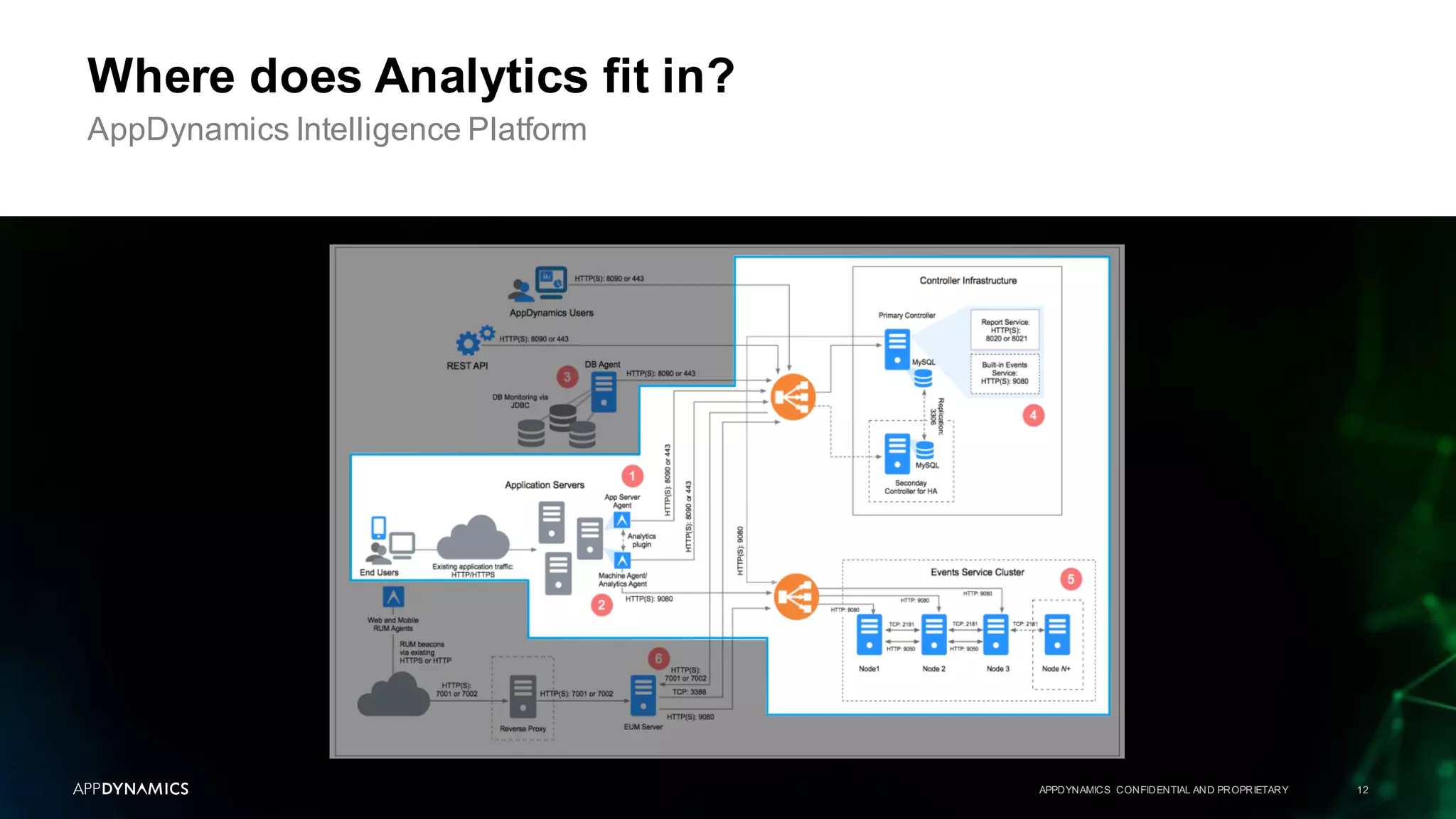
Where does Analytics fit in?
APPDYNAMICS CONFIDENTIAL AND PROPRIETARY 12
AppDynamics Intelligence Platform
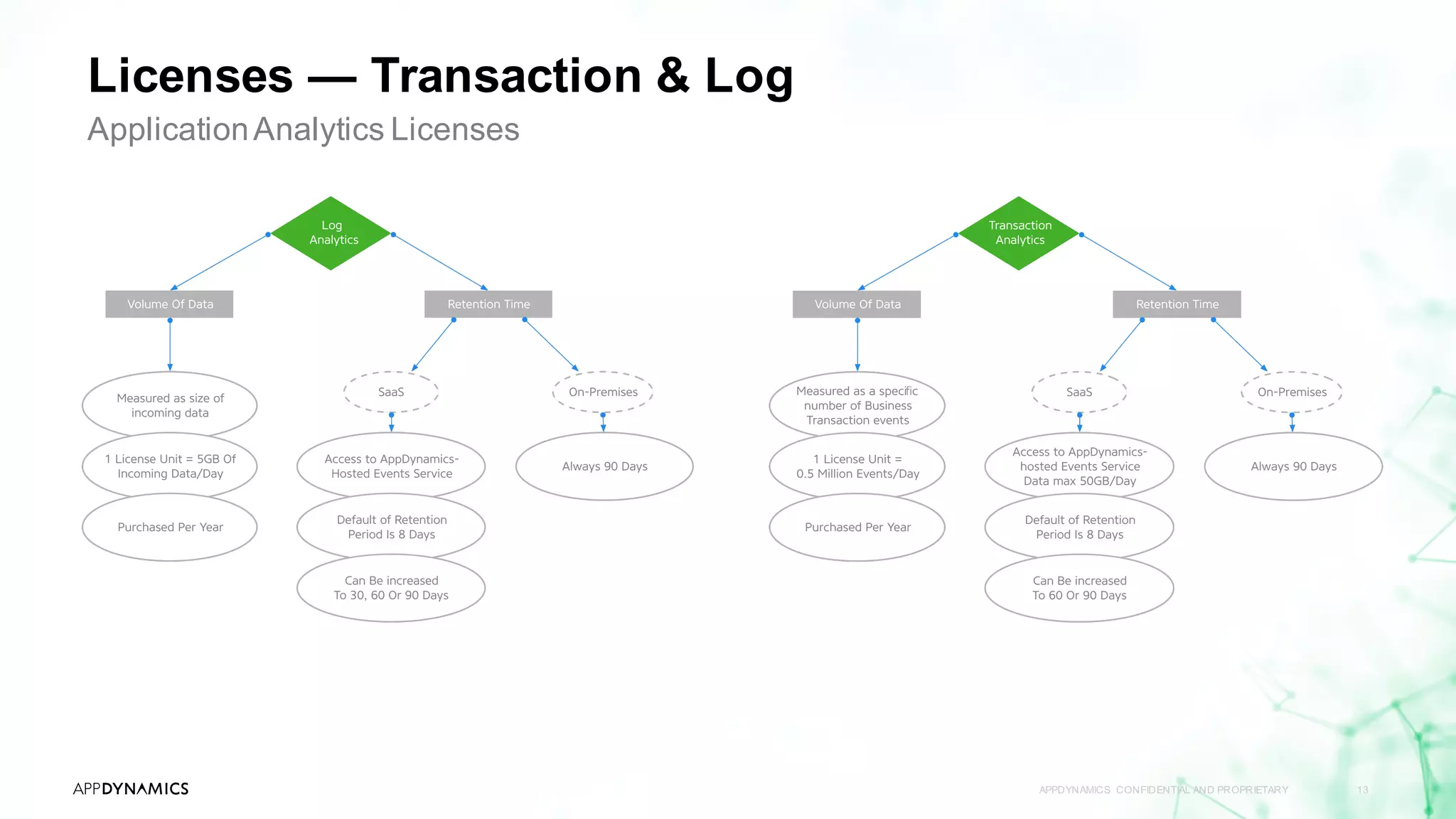
Licenses — Transaction & Log
APPDYNAMICS CONFIDENTIAL AND PROPRIETARY 13
ApplicationAnalytics Licenses
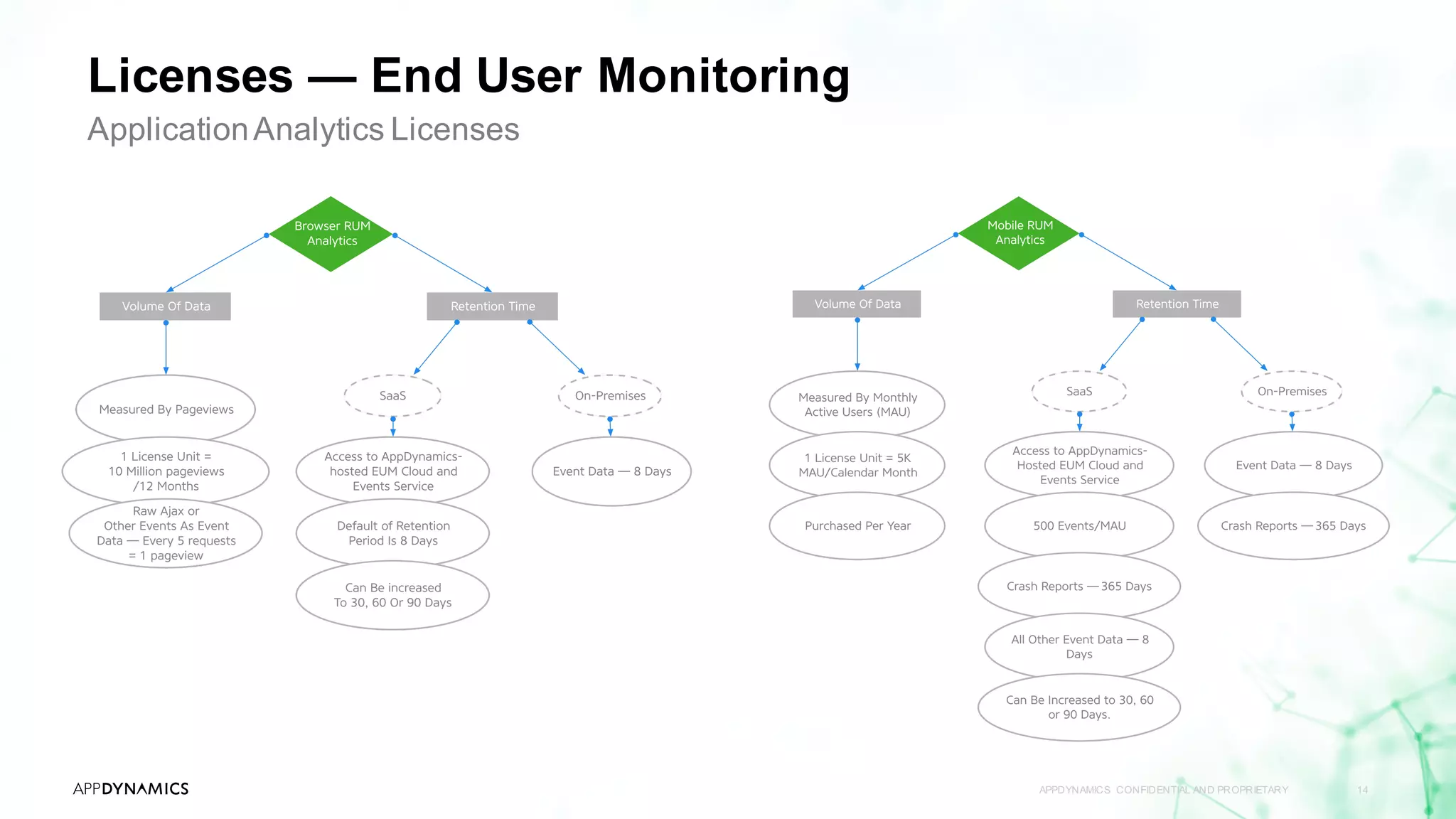
Licenses — End User Monitoring
APPDYNAMICS CONFIDENTIAL AND PROPRIETARY 14
ApplicationAnalytics Licenses
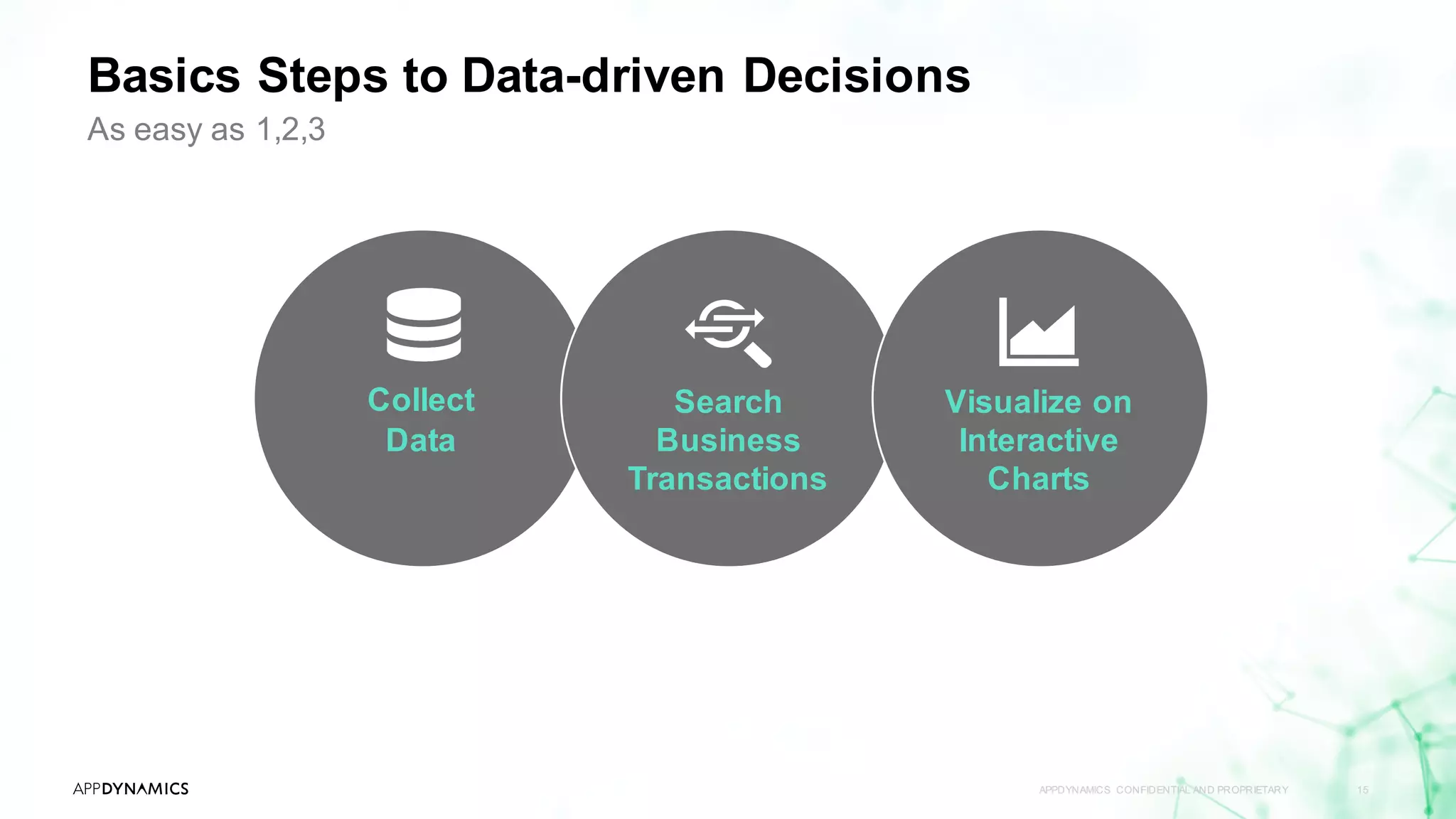
Basics Steps to Data-driven Decisions
APPDYNAMICS CONFIDENTIAL AND PROPRIETARY 15
As easy as 1,2,3
Collect
Data
Search
Business
Transactions
Visualize on
Interactive
Charts
APPDYNAMICS CONFIDENTIAL AND PROPRIETARY 16
Topic 1 AppDynamicsAPM Review
Topic 2 What Is AppDynamicsAnalytics?
Topic 3 Collect Transaction Analytics Data
Topic 4 Search & Visualize
Topic 5 Log Analytics
Topic 6 Metrics & Alerts
Topic 7 Analytics & Data Security
Agenda
From APM to Business Monitoring with AppDynamicsAnalytics
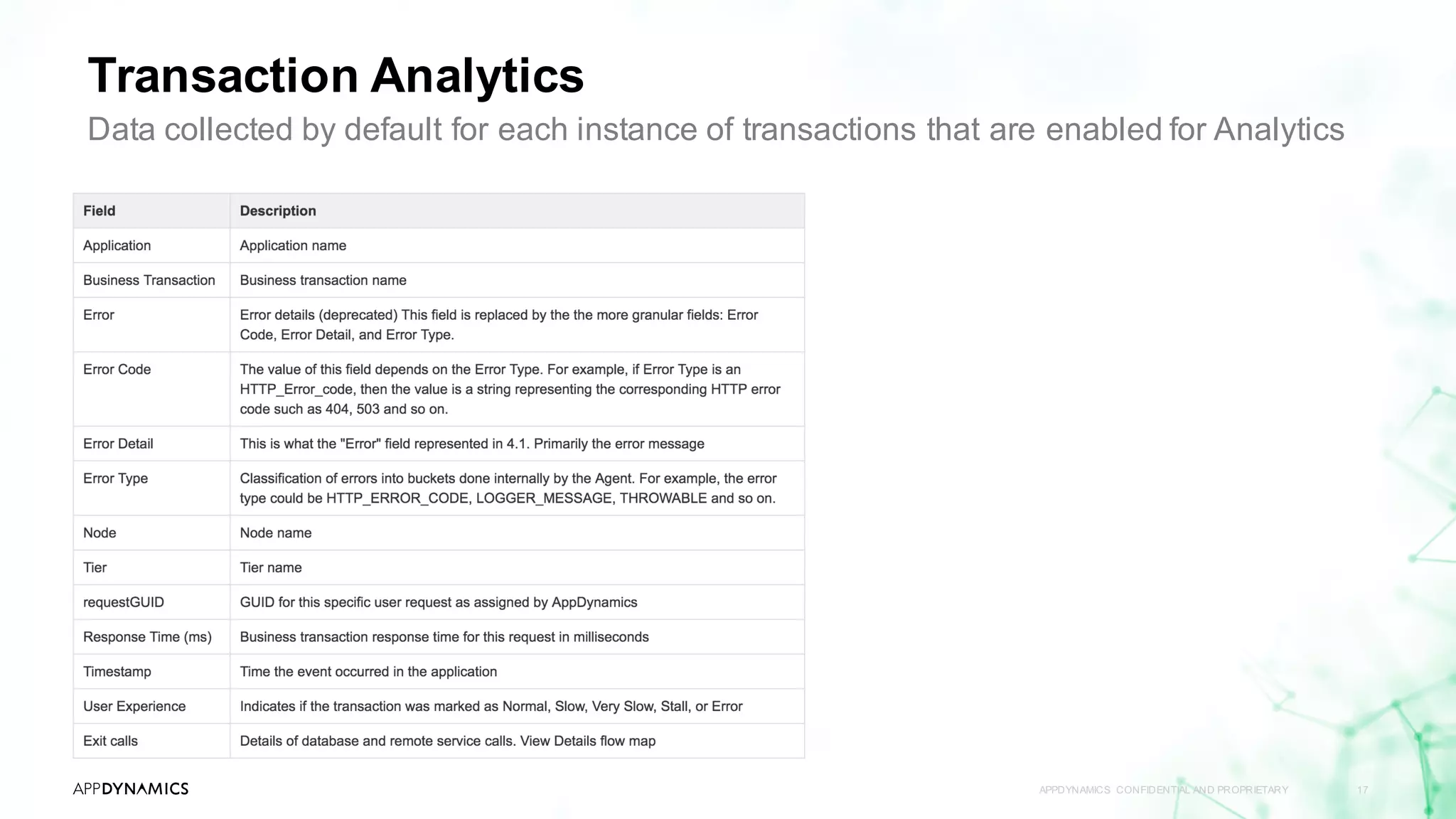
Transaction Analytics
APPDYNAMICS CONFIDENTIAL AND PROPRIETARY 17
Data collected by default for each instance of transactions that are enabled for Analytics
APPDYNAMICS CONFIDENTIAL AND PROPRIETARY 18
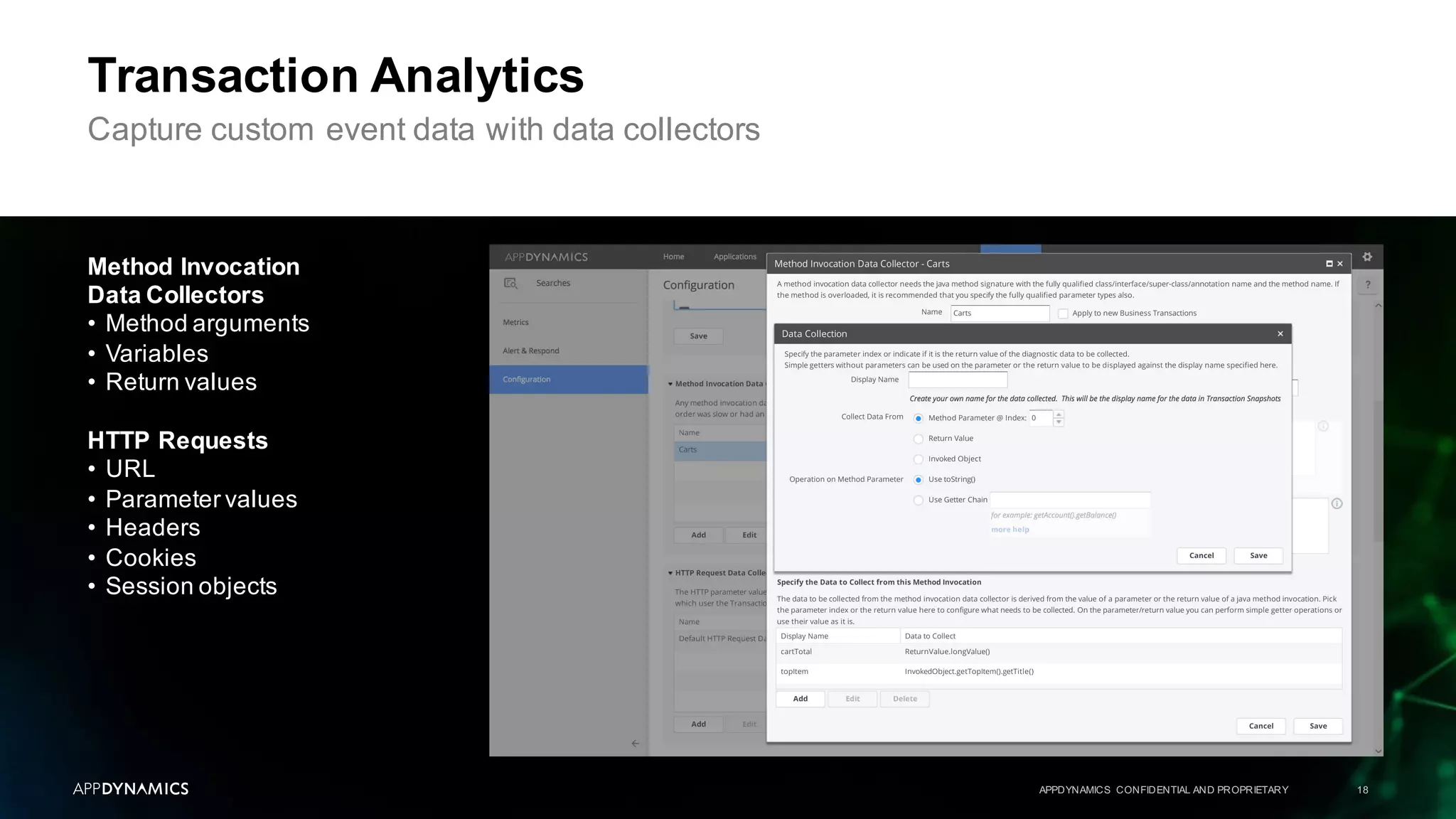
Transaction Analytics
Capture custom event data with data collectors
Method Invocation
Data Collectors
• Method arguments
• Variables
• Return values
HTTP Requests
• URL
• Parameter values
• Headers
• Cookies
• Session objects
Lab 1
APPDYNAMICS CONFIDENTIAL AND PROPRIETARY 19
Configuration
Lab 2
Custom Data Collectors
APPDYNAMICS CONFIDENTIAL AND PROPRIETARY 20
Topic 1 AppDynamicsAPM Review
Topic 2 What Is AppDynamicsAnalytics?
Topic 3 Collect Transaction Analytics Data
Topic 4 Search & Visualize
Topic 5 Log Analytics
Topic 6 Metrics & Alerts
Topic 7 Analytics & Data Security
Agenda
From APM to Business Monitoring with AppDynamicsAnalytics
APPDYNAMICS CONFIDENTIAL AND PROPRIETARY 21
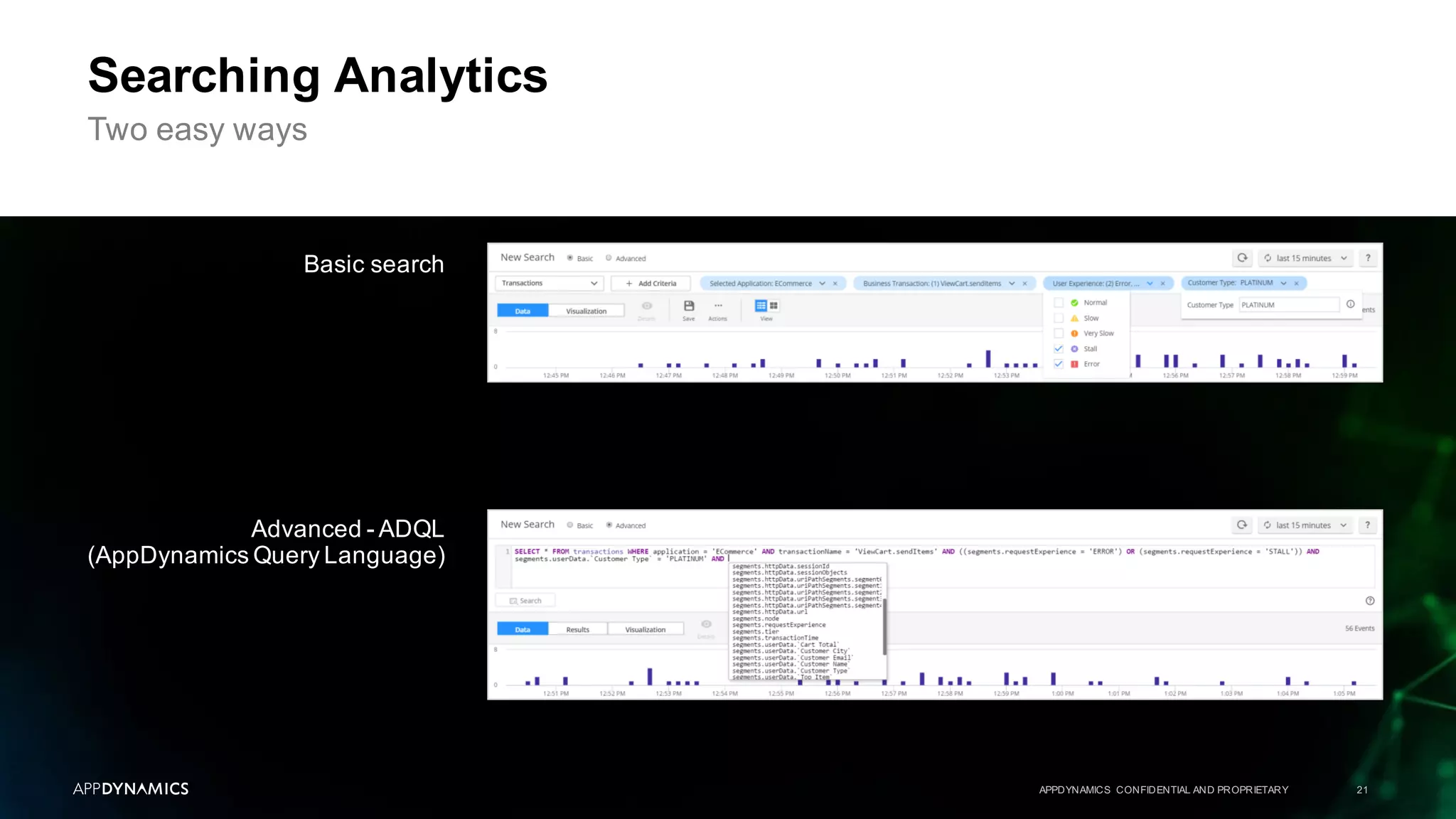
Searching Analytics
Two easy ways
Basic search
Advanced - ADQL
(AppDynamics Query Language)
APPDYNAMICS CONFIDENTIAL AND PROPRIETARY 22
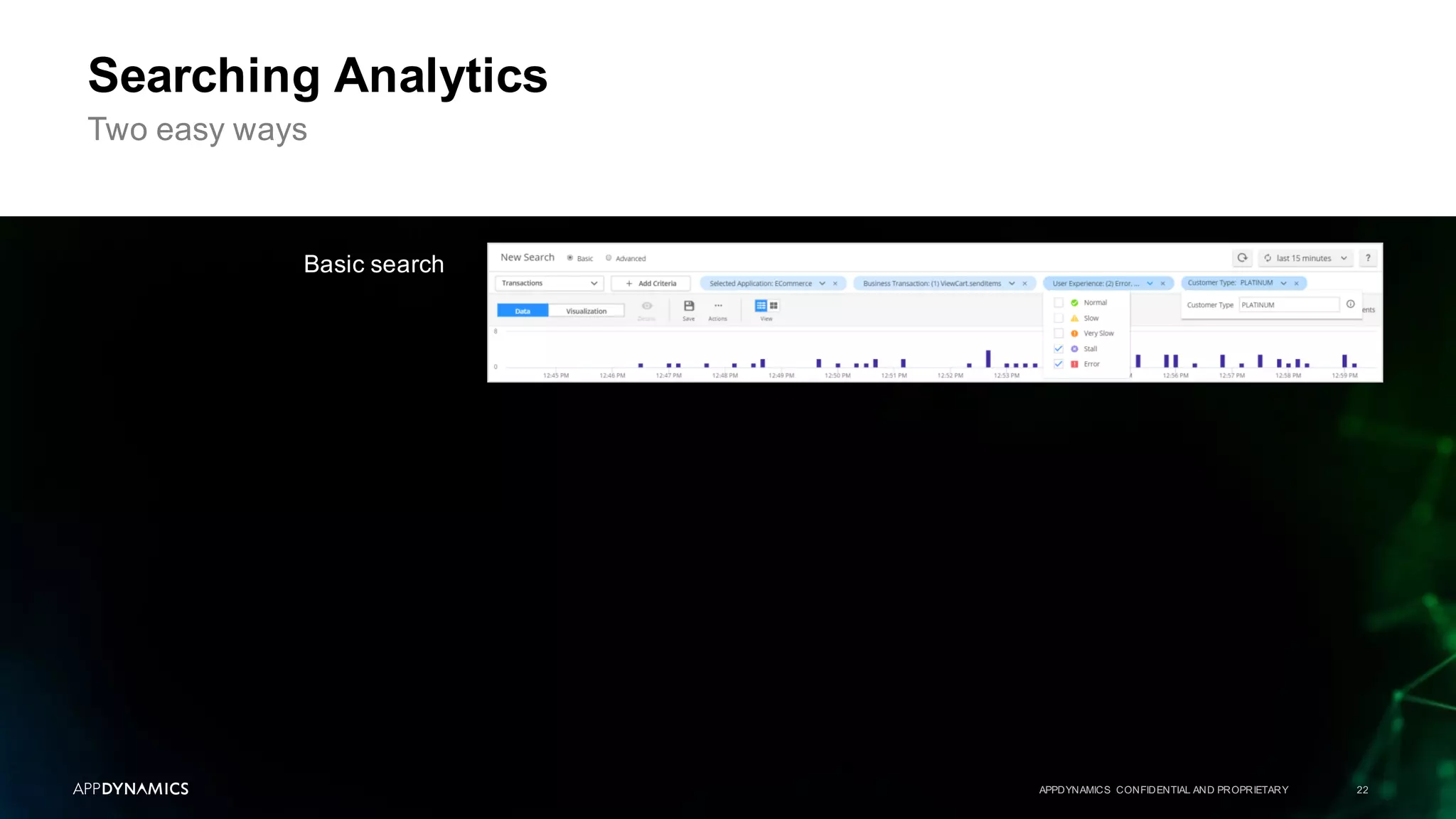
Searching Analytics
Two easy ways
Basic search
APPDYNAMICS CONFIDENTIAL AND PROPRIETARY 23
Searching Analytics
Two easy ways
Advanced - ADQL
(AppDynamics Query Language)
SELECT * | (DISTINCT)? [field_name | function(field_name, arguments, ...) AS label, ...]
FROM [event_type]
WHERE [(NOT)? field_name OPERATOR value][AND | OR] ...
[ORDER BY [field_name (ASC | DESC)?], ...]
[LIMIT number, ...]
ADQL statements are referred to as event queries.
The query syntax is as follows:
The SELECT clause and FROM clause are required. All other clauses are optional
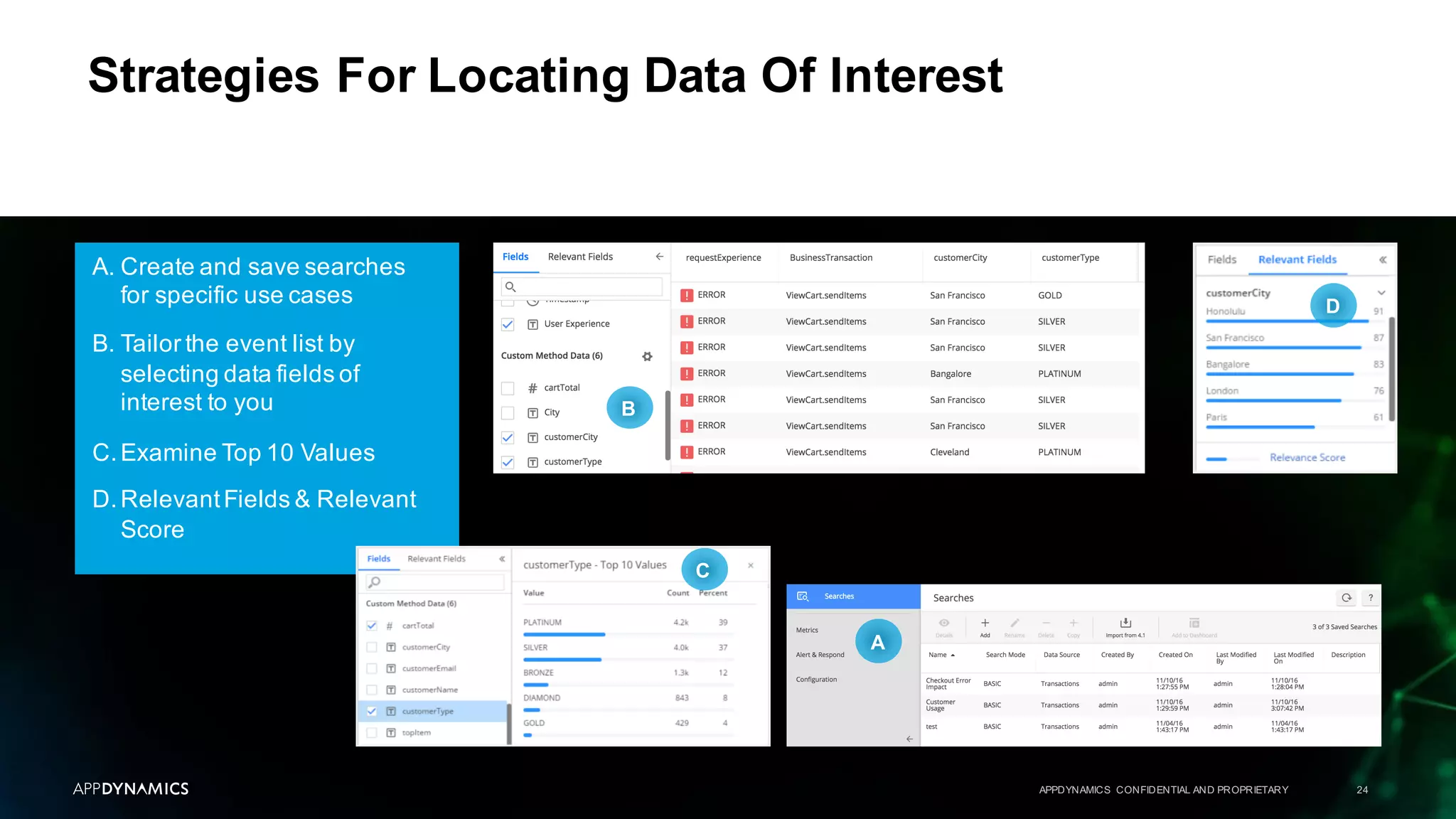
A. Create and save searches
for specific use cases
B. Tailor the event list by
selecting data fields of
interest to you
C.Examine Top 10 Values
D.RelevantFields & Relevant
Score
APPDYNAMICS CONFIDENTIAL AND PROPRIETARY 24
Strategies For Locating Data Of Interest
A
C
B
D
APPDYNAMICS CONFIDENTIAL AND PROPRIETARY 25
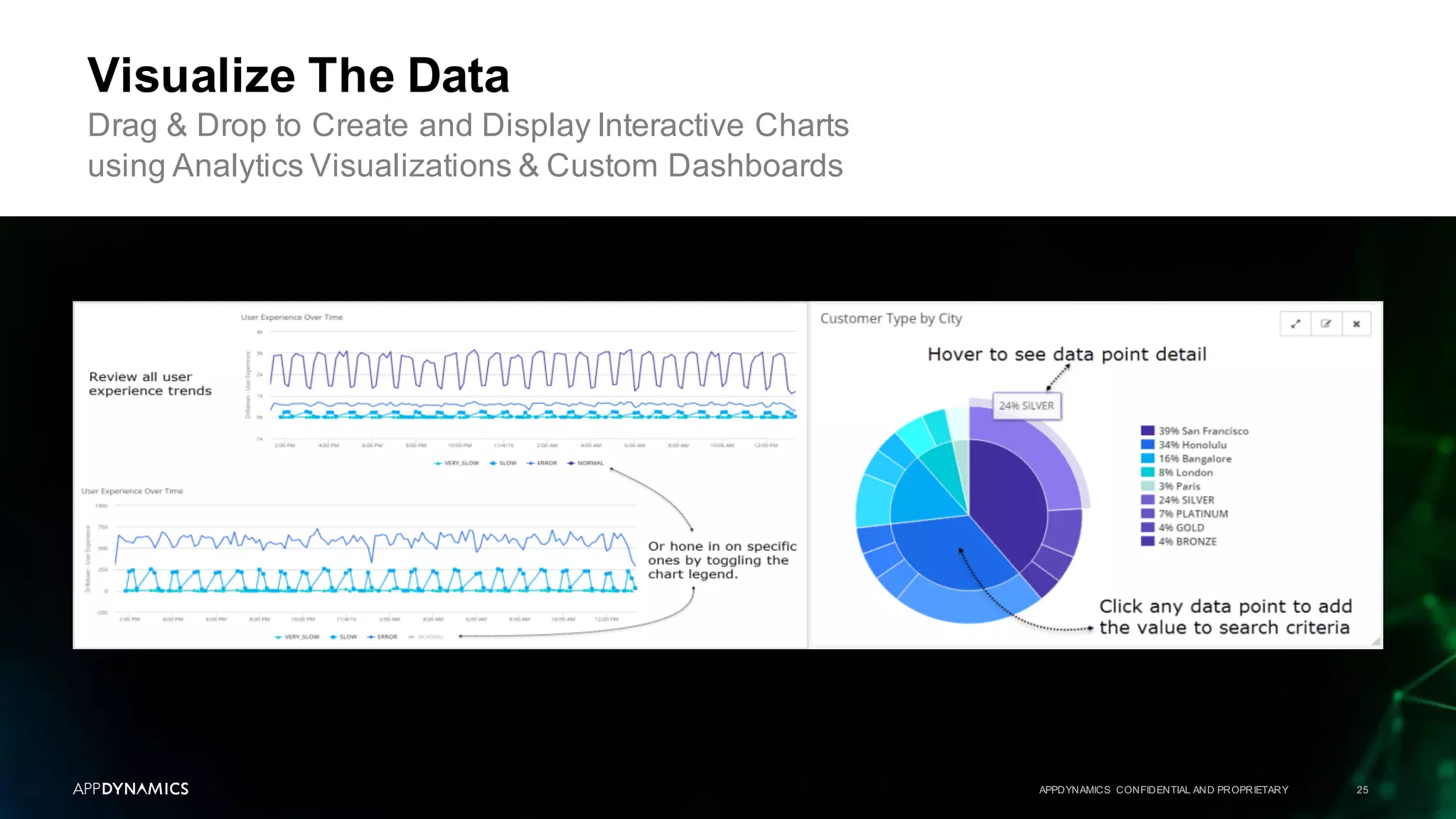
Visualize The Data
Drag & Drop to Create and Display Interactive Charts
using Analytics Visualizations & Custom Dashboards
APPDYNAMICS CONFIDENTIAL AND PROPRIETARY 26
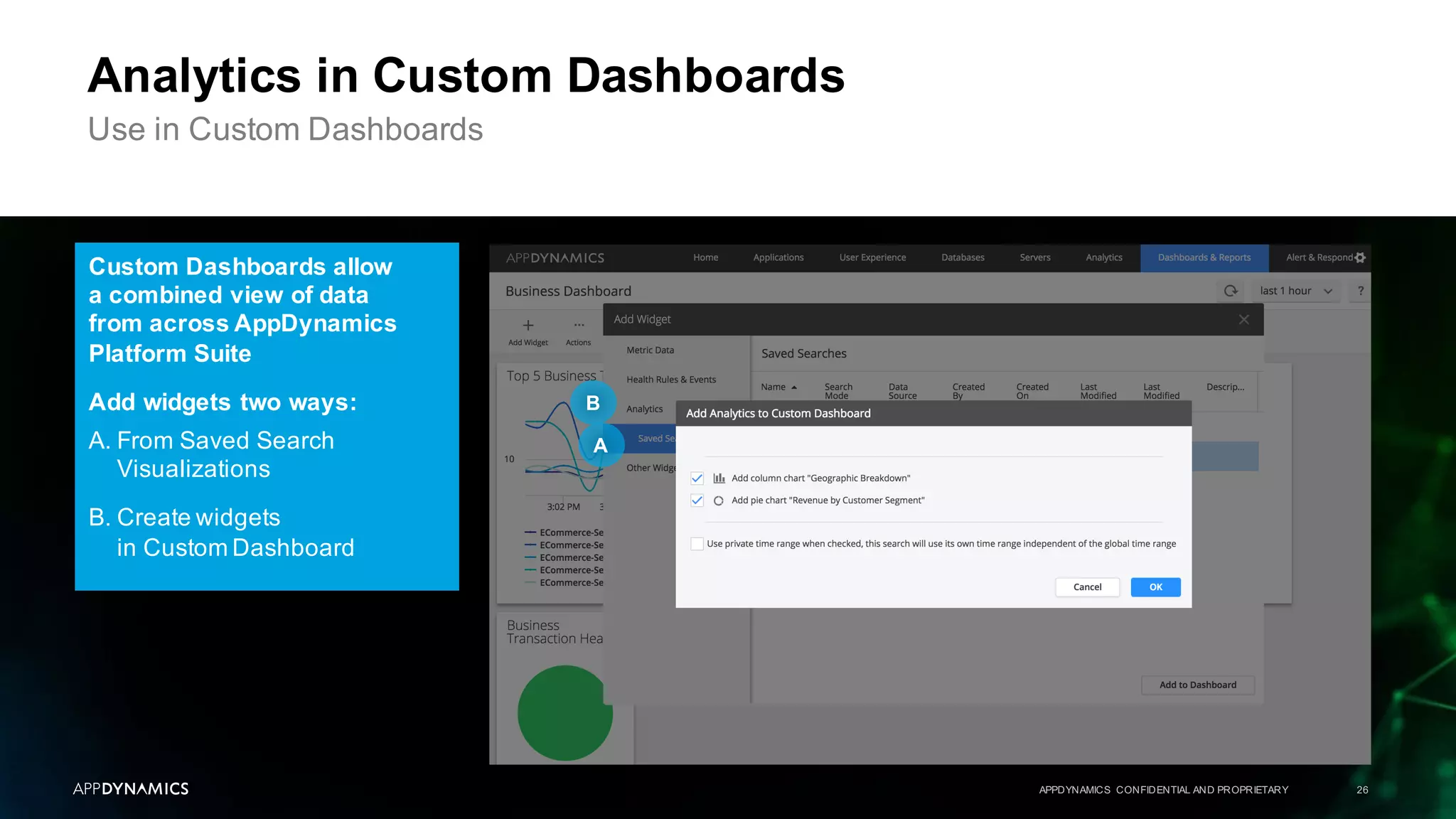
Analytics in Custom Dashboards
Use in Custom Dashboards
Custom Dashboards allow
a combined view of data
from across AppDynamics
Platform Suite
Add widgets two ways:
A. From Saved Search
Visualizations
B. Create widgets
in Custom Dashboard
A
B
APPDYNAMICS CONFIDENTIAL AND PROPRIETARY 27
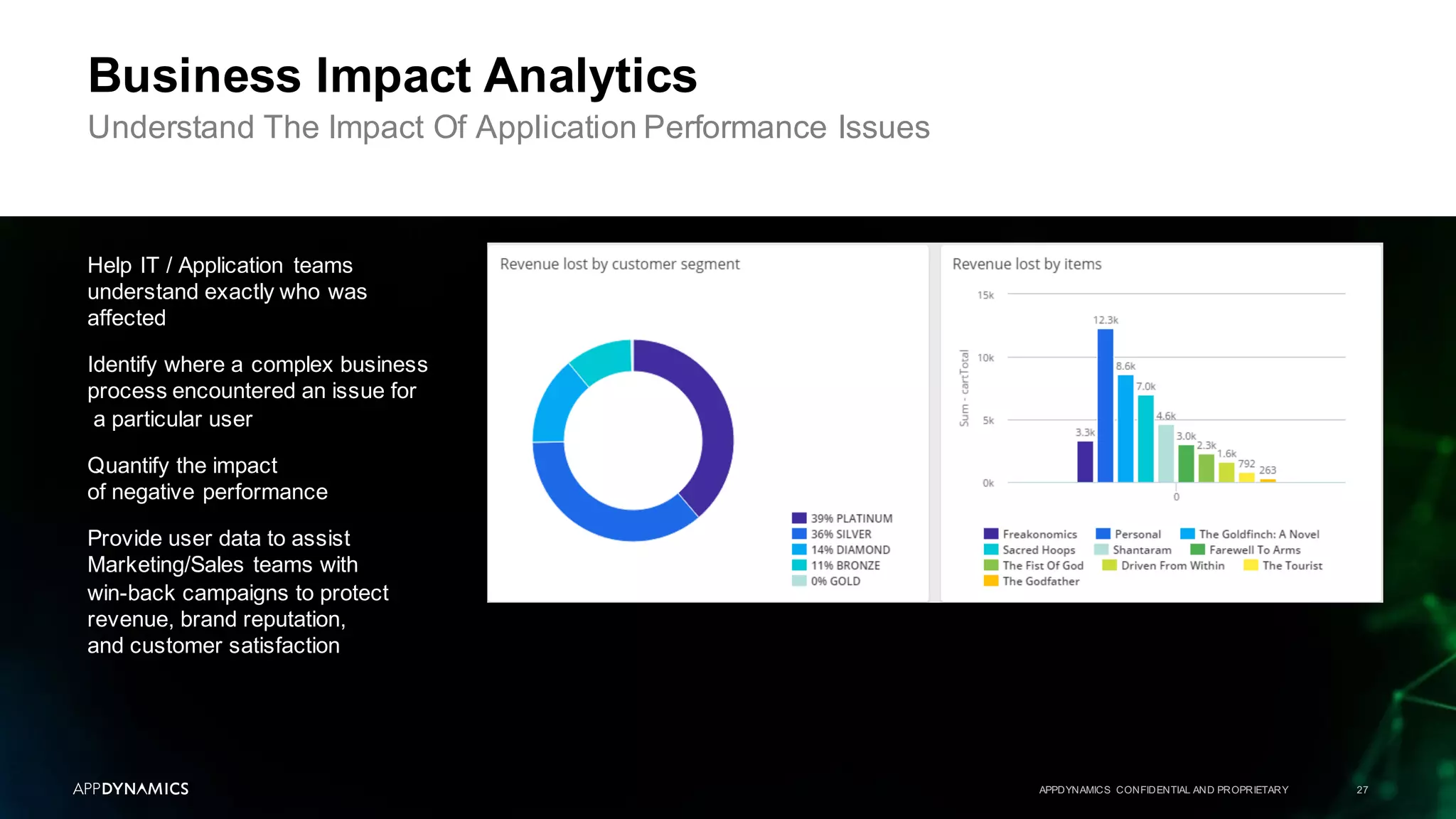
Business Impact Analytics
Understand The Impact Of Application Performance Issues
Help IT / Application teams
understand exactly who was
affected
Identify where a complex business
process encountered an issue for
a particular user
Quantify the impact
of negative performance
Provide user data to assist
Marketing/Sales teams with
win-back campaigns to protect
revenue, brand reputation,
and customer satisfaction
APPDYNAMICS CONFIDENTIAL AND PROPRIETARY 28
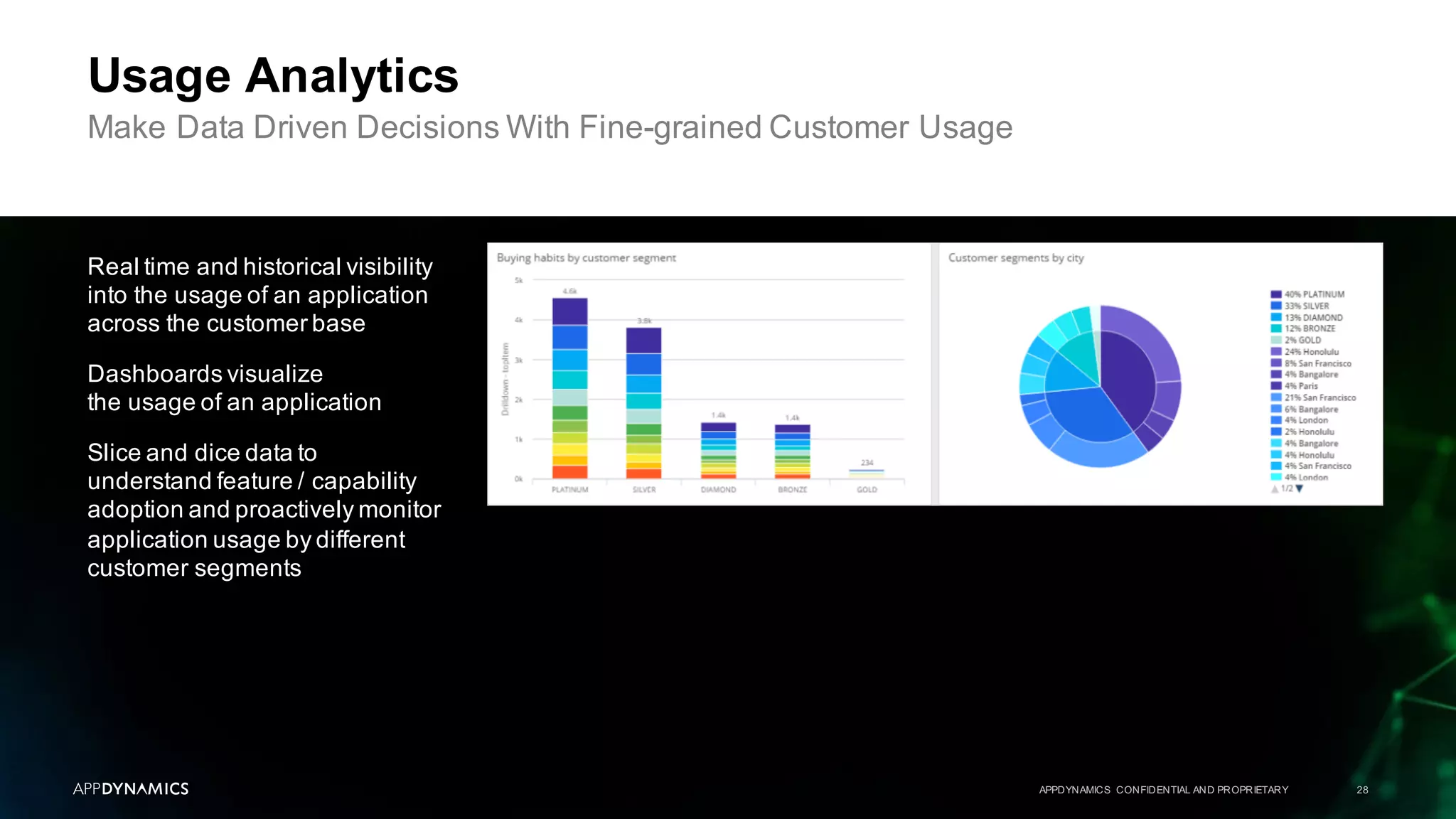
Usage Analytics
Make Data Driven Decisions With Fine-grained Customer Usage
Real time and historical visibility
into the usage of an application
across the customer base
Dashboards visualize
the usage of an application
Slice and dice data to
understand feature / capability
adoption and proactively monitor
application usage by different
customer segments
APPDYNAMICS CONFIDENTIAL AND PROPRIETARY 29
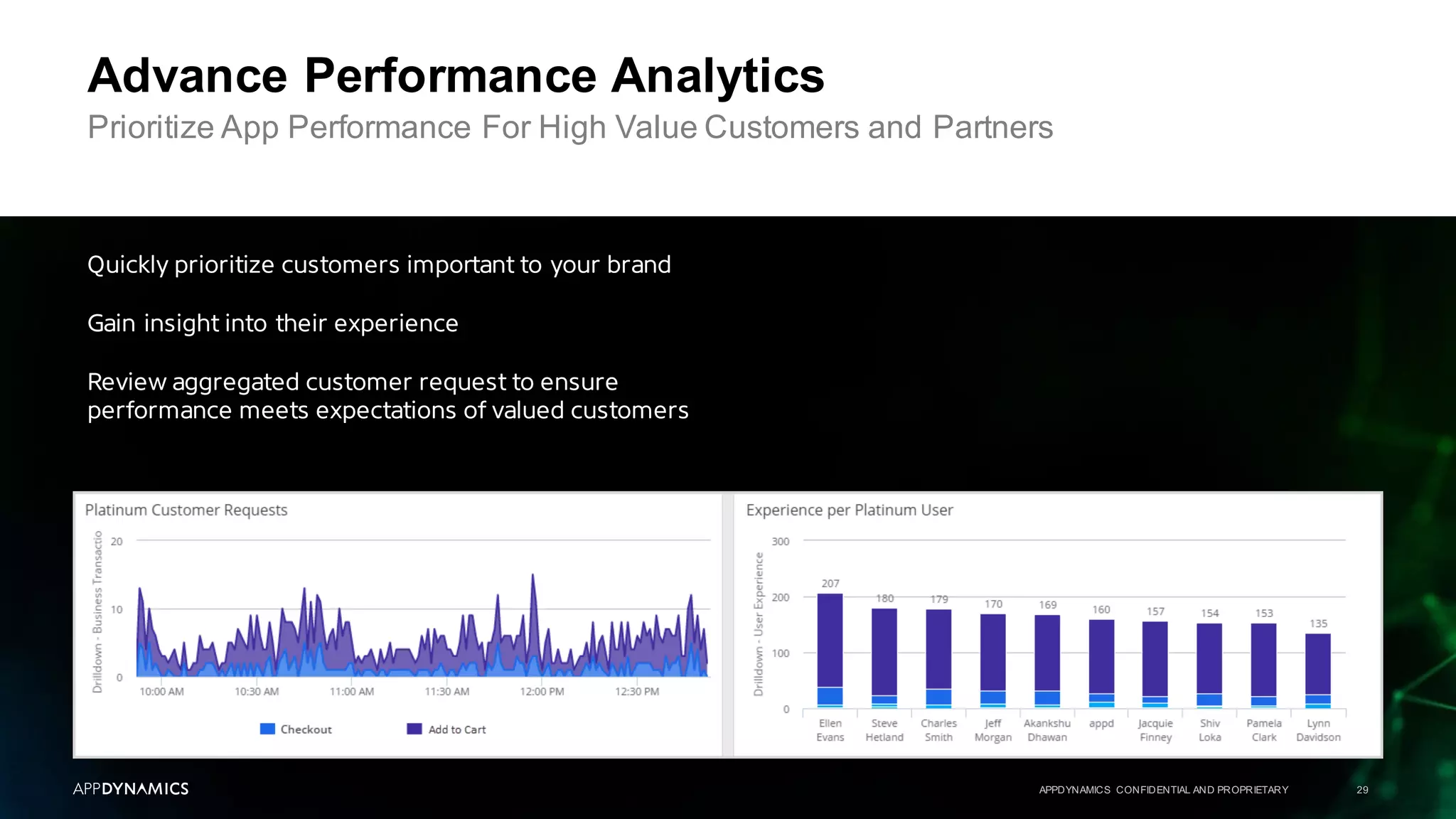
Advance Performance Analytics
Prioritize App Performance For High Value Customers and Partners
Quickly prioritize customers important to your brand
Gain insight into their experience
Review aggregated customer request to ensure
performance meets expectations of valued customers
APPDYNAMICS CONFIDENTIAL AND PROPRIETARY 30
Advance Performance Analytics
Real-time Streaming
AppDynamics provides real time
visibility into the performance
of transactions that are being
processed by an application
"Live Stream" allows IT /
Application teams to monitor
the overall health of the
application and quickly identify
performance problem outliers
Teams can easily manage
"to the yellow"and catch
problems before they
become critical issues
Instructor Demo 1
APPDYNAMICS CONFIDENTIAL AND PROPRIETARY 31
Discover
The User Interface
Lab 3
APPDYNAMICS CONFIDENTIAL AND PROPRIETARY 32
Win-back Campaign
Lab 4
Visualize Customer Usage
Lab 5
Advanced Performance Analytics
APPDYNAMICS CONFIDENTIAL AND PROPRIETARY 33
Topic 1 AppDynamicsAPM Review
Topic 2 What Is AppDynamicsAnalytics?
Topic 3 Collect Transaction Analytics Data
Topic 4 Search & Visualize
Topic 5 Log Analytics
Topic 6 Metrics & Alerts
Topic 7 Analytics & Data Security
Agenda
From APM to Business Monitoring with AppDynamicsAnalytics
Log Analytics
APPDYNAMICS CONFIDENTIAL AND PROPRIETARY 34
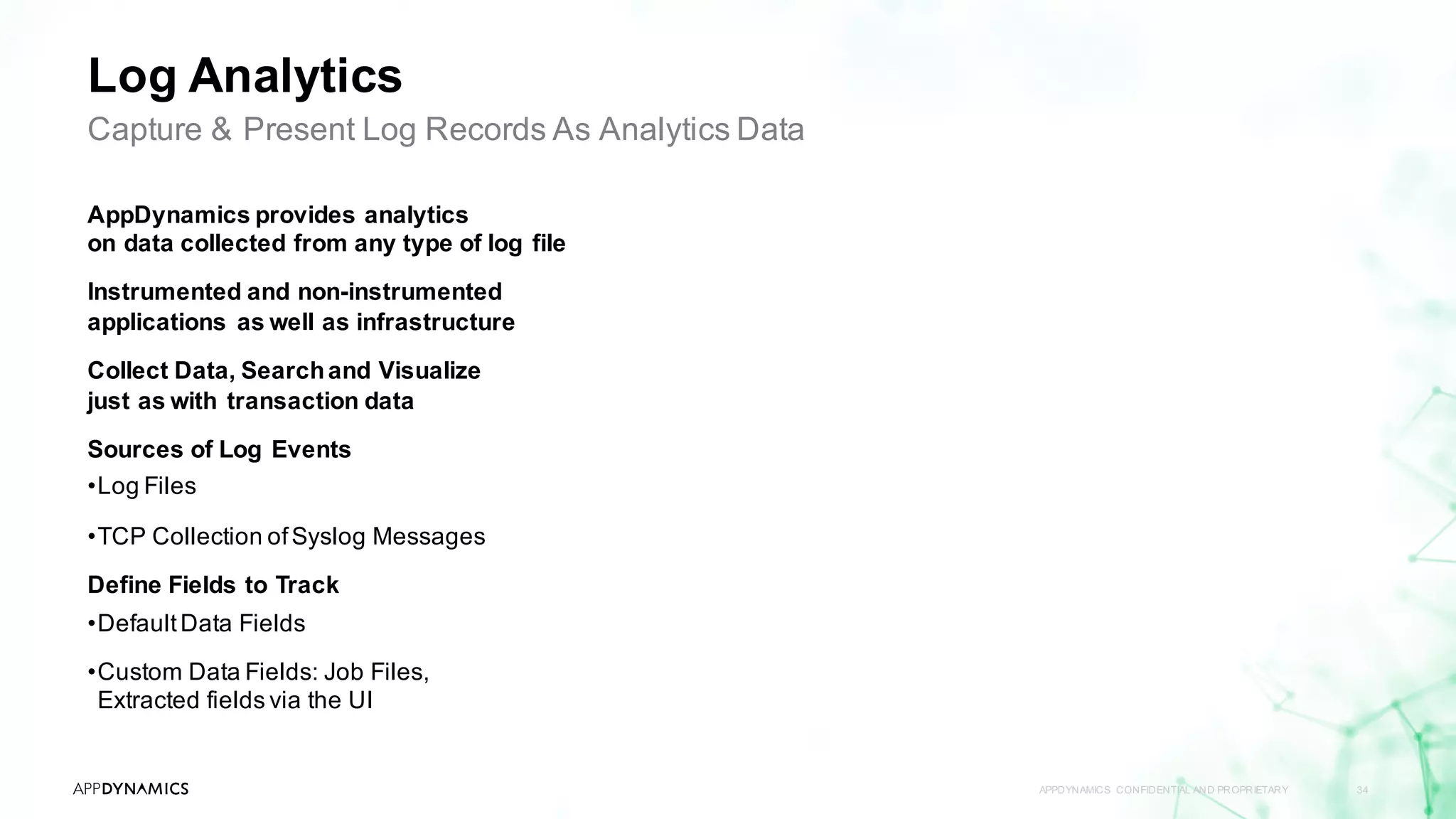
Capture & Present Log Records As Analytics Data
AppDynamics provides analytics
on data collected from any type of log file
Instrumented and non-instrumented
applications as well as infrastructure
Collect Data, Searchand Visualize
just as with transaction data
Sources of Log Events
•Log Files
•TCP Collection ofSyslog Messages
Define Fields to Track
•DefaultData Fields
•Custom Data Fields: Job Files,
Extracted fields via the UI
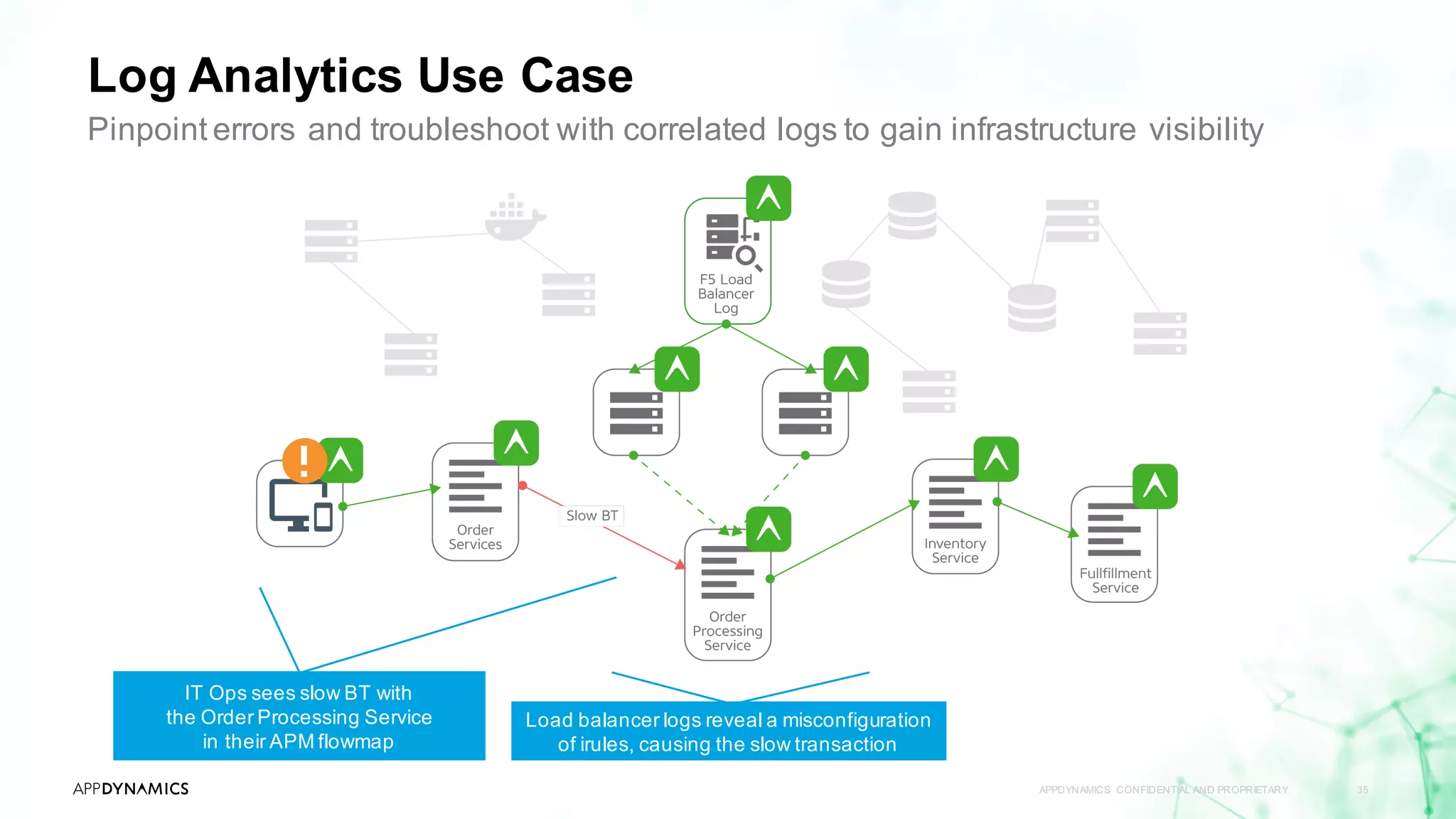
Log Analytics Use Case
APPDYNAMICS CONFIDENTIAL AND PROPRIETARY 35
Pinpoint errors and troubleshoot with correlated logs to gain infrastructure visibility
IT Ops sees slow BT with
the Order Processing Service
in their APM flowmap
Load balancer logs reveal a misconfiguration
of irules, causing the slow transaction
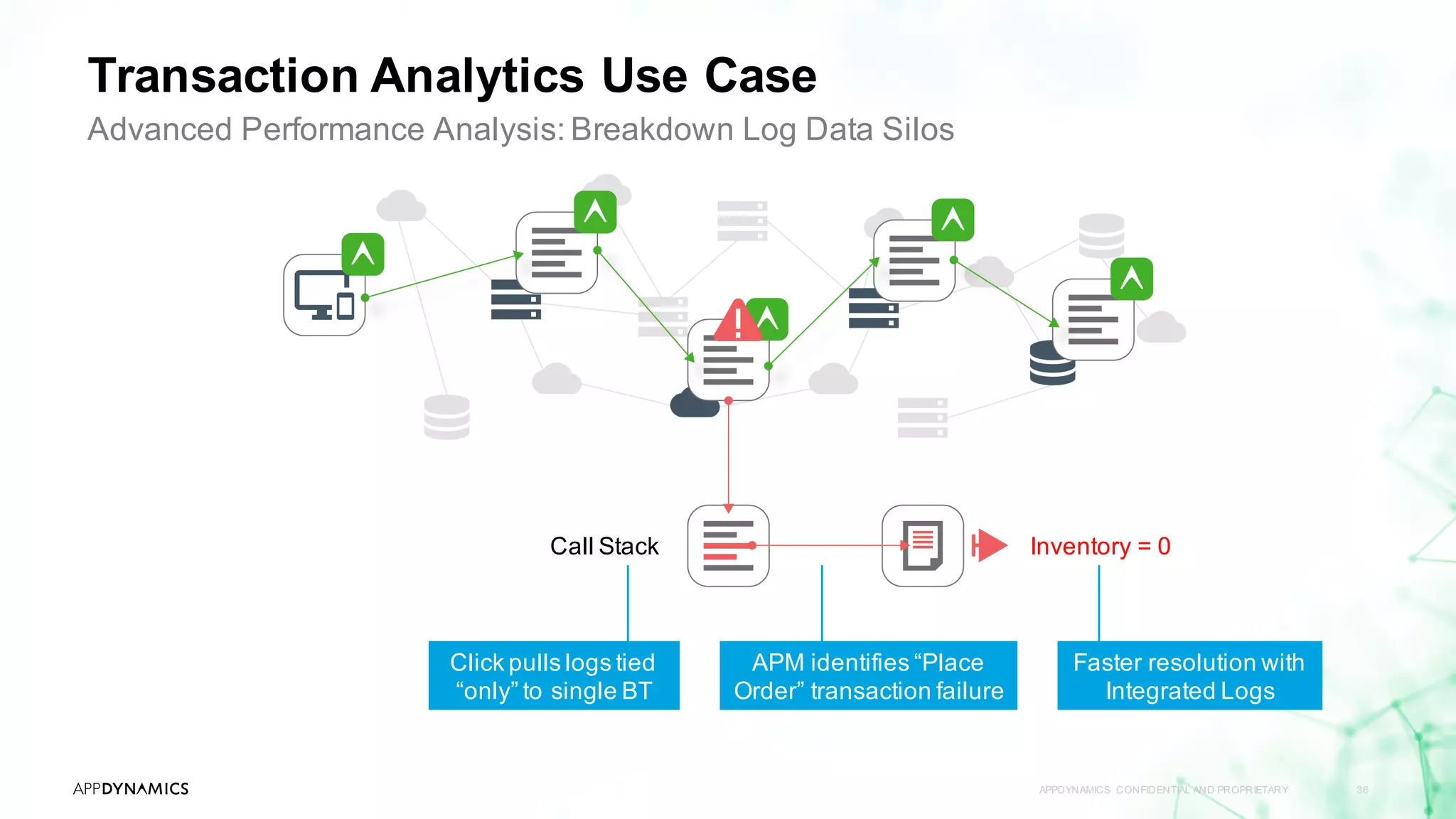
Transaction Analytics Use Case
APPDYNAMICS CONFIDENTIAL AND PROPRIETARY 36
Advanced Performance Analysis: Breakdown Log Data Silos
Click pulls logs tied
“only” to single BT
Call Stack
APM identifies “Place
Order” transaction failure
Faster resolution with
Integrated Logs
Inventory = 0
APPDYNAMICS CONFIDENTIAL AND PROPRIETARY 37
Configuring Log Analytics
Capture And Present Log Records As Analytics Data With Job Files
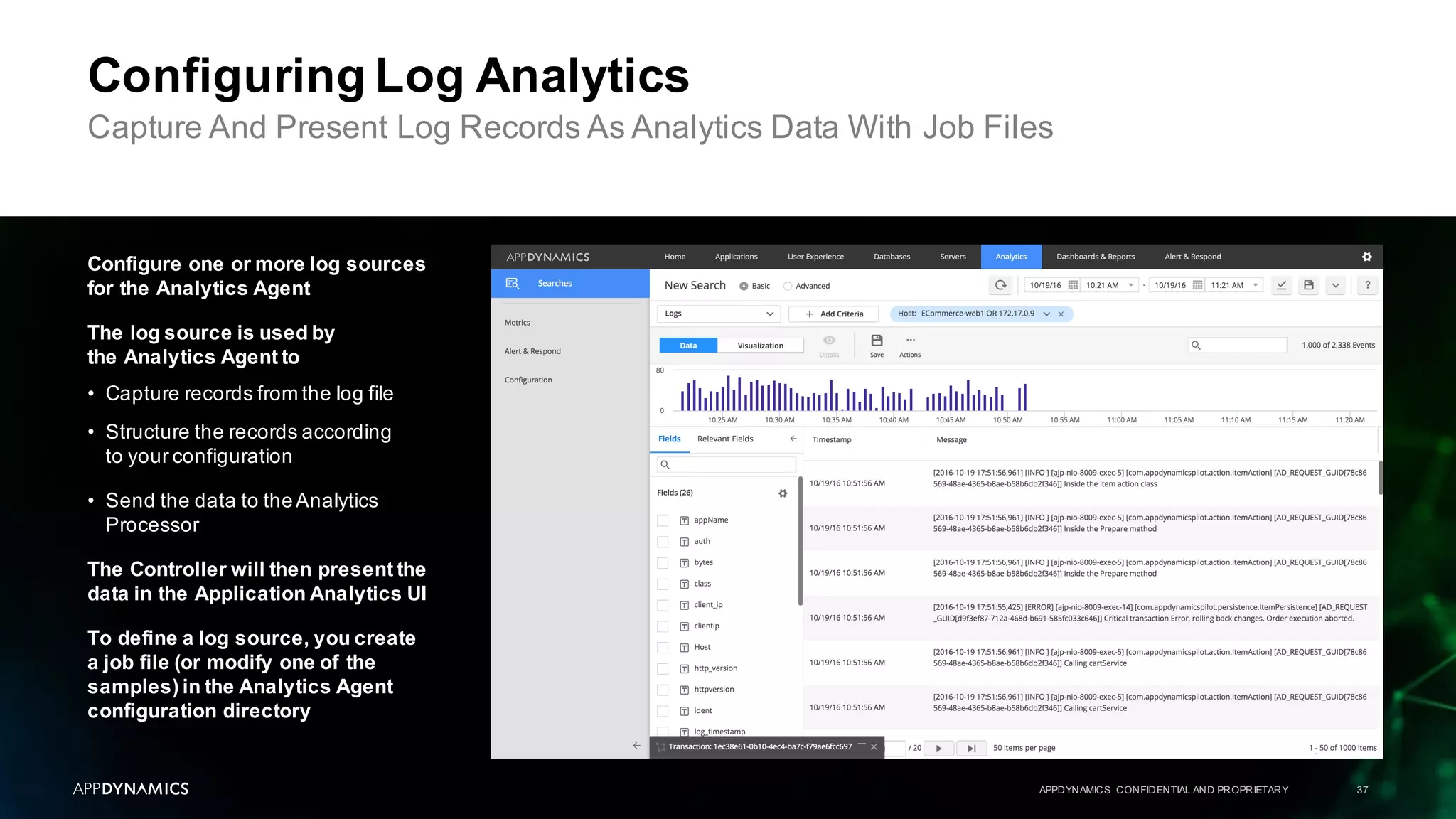
Configure one or more log sources
for the Analytics Agent
The log source is used by
the Analytics Agent to
• Capture records from the log file
• Structure the records according
to your configuration
• Send the data to theAnalytics
Processor
The Controller will then present the
data in the Application Analytics UI
To define a log source, you create
a job file (or modify one of the
samples) in the Analytics Agent
configuration directory
Job Files
APPDYNAMICS CONFIDENTIAL AND PROPRIETARY 38
Describe the log source in the job files
Each log source is represented
by a job file. A job file is a
configuration file that specifies
The location of the source log file
The pattern for structuring
the records in the log
Other options for capturing
records from the log source
Job files are located
in the following directory
<Analytics_Agent_Home>
/conf/job/
You can add job files
to the directory without
restarting the agent
# Source can be of two types:
# 1) file: This allows tailing a log file.
# 2) syslog: Listens to Syslog messages on a network port.
source:
type: file
path: ${CODEBASE_HOME}/analytics/analytics-dev-app-home/processor/logs
nameGlob: analytics-api-store.log
startAtEnd: false
# These fields are in addition to the data that is already present in
# the files being tailed. Each record read from the file will be
# enriched with these fields.
fields:
sourceType: analytics-demo-log
nodeName: All-In-One
tierName: AppTier
appName: Analytics
# Grok is a way to define and use complex, nested regular expressions
# in an easy to read and use format. The Grok patterns here are meant
# to match a part of the log "message" string.
grok:
patterns:
- "[%{LOGLEVEL:logLevel}%{SPACE}] [%{DATA:threadName}]
[%{JAVACLASS:class}] %{GREEDYDATA}"
Log Analytics
APPDYNAMICS CONFIDENTIAL AND PROPRIETARY 39
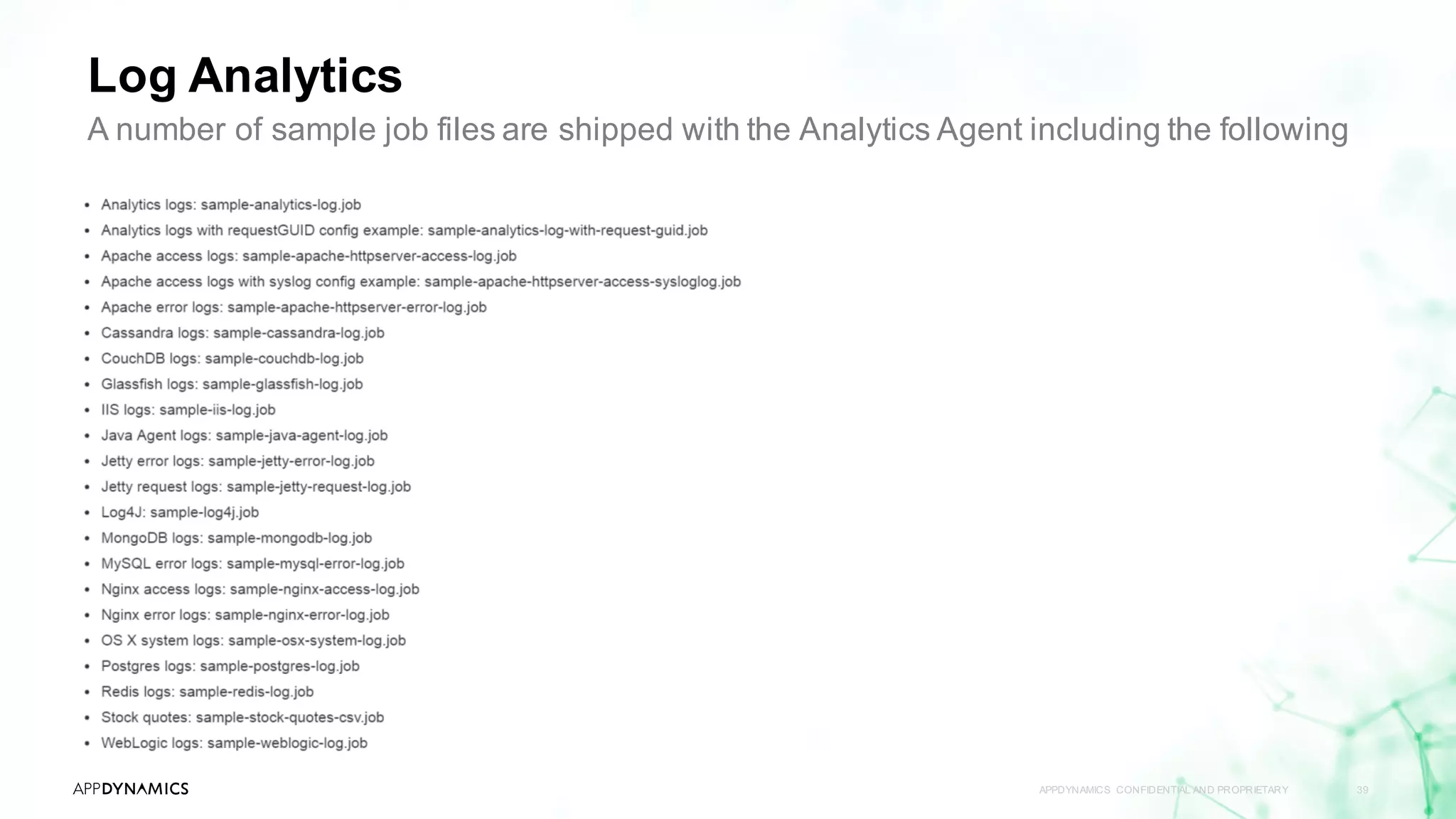
A number of sample job files are shipped with the Analytics Agent including the following
TCP Collection Of Syslog Messages
APPDYNAMICS CONFIDENTIAL AND PROPRIETARY 40
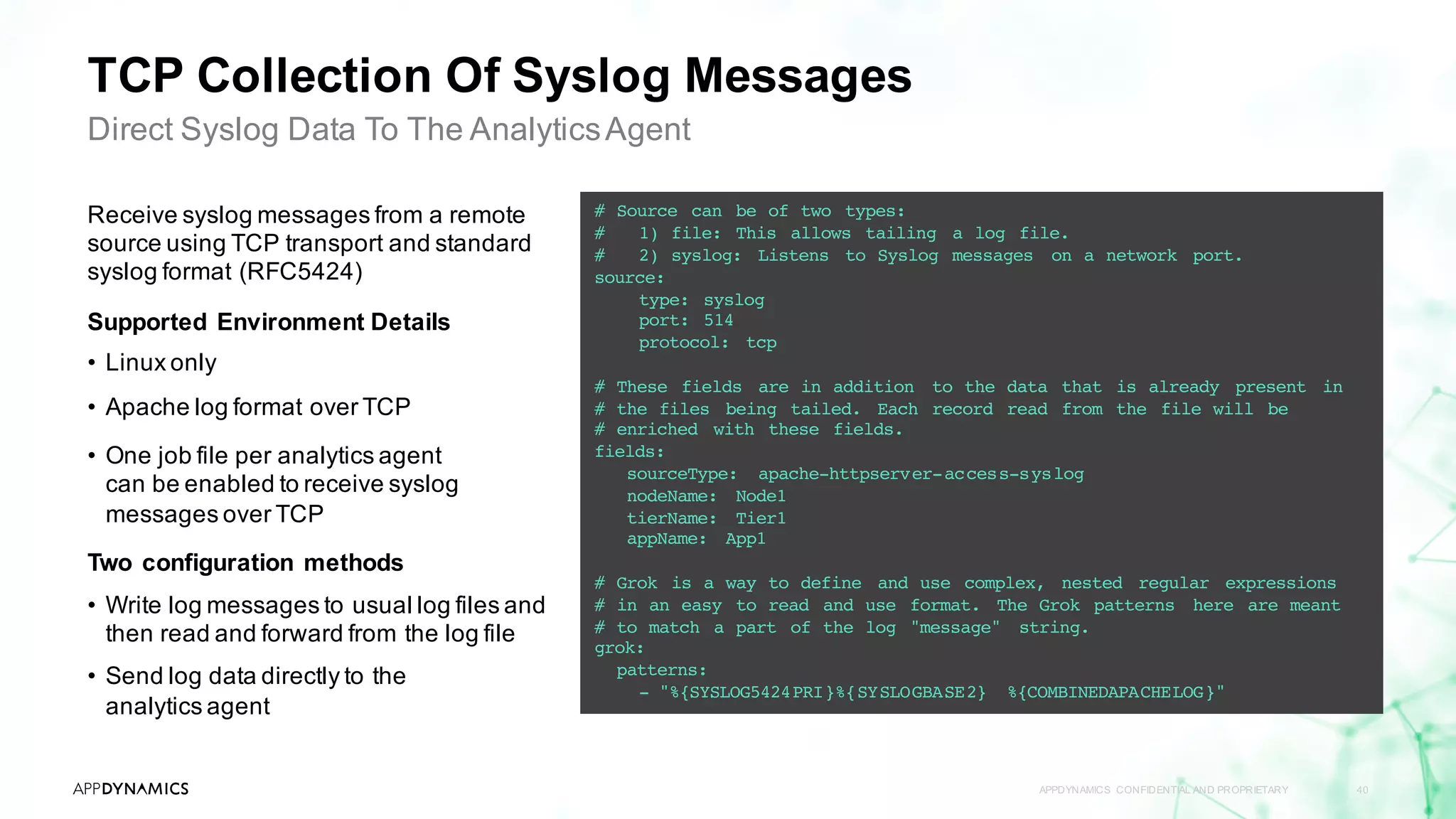
Direct Syslog Data To The AnalyticsAgent
Receive syslog messages from a remote
source using TCP transport and standard
syslog format (RFC5424)
Supported Environment Details
• Linux only
• Apache log format over TCP
• One job file per analytics agent
can be enabled to receive syslog
messages over TCP
Two configuration methods
• Write log messages to usual log files and
then read and forward from the log file
• Send log data directly to the
analytics agent
# Source can be of two types:
# 1) file: This allows tailing a log file.
# 2) syslog: Listens to Syslog messages on a network port.
source:
type: syslog
port: 514
protocol: tcp
# These fields are in addition to the data that is already present in
# the files being tailed. Each record read from the file will be
# enriched with these fields.
fields:
sourceType: apache-httpserver-access-syslog
nodeName: Node1
tierName: Tier1
appName: App1
# Grok is a way to define and use complex, nested regular expressions
# in an easy to read and use format. The Grok patterns here are meant
# to match a part of the log "message" string.
grok:
patterns:
- "%{SYSLOG5424PRI}%{SYSLOGBASE2} %{COMBINEDAPACHELOG}"
Default Event Data
APPDYNAMICS CONFIDENTIAL AND PROPRIETARY 41
Fields to track
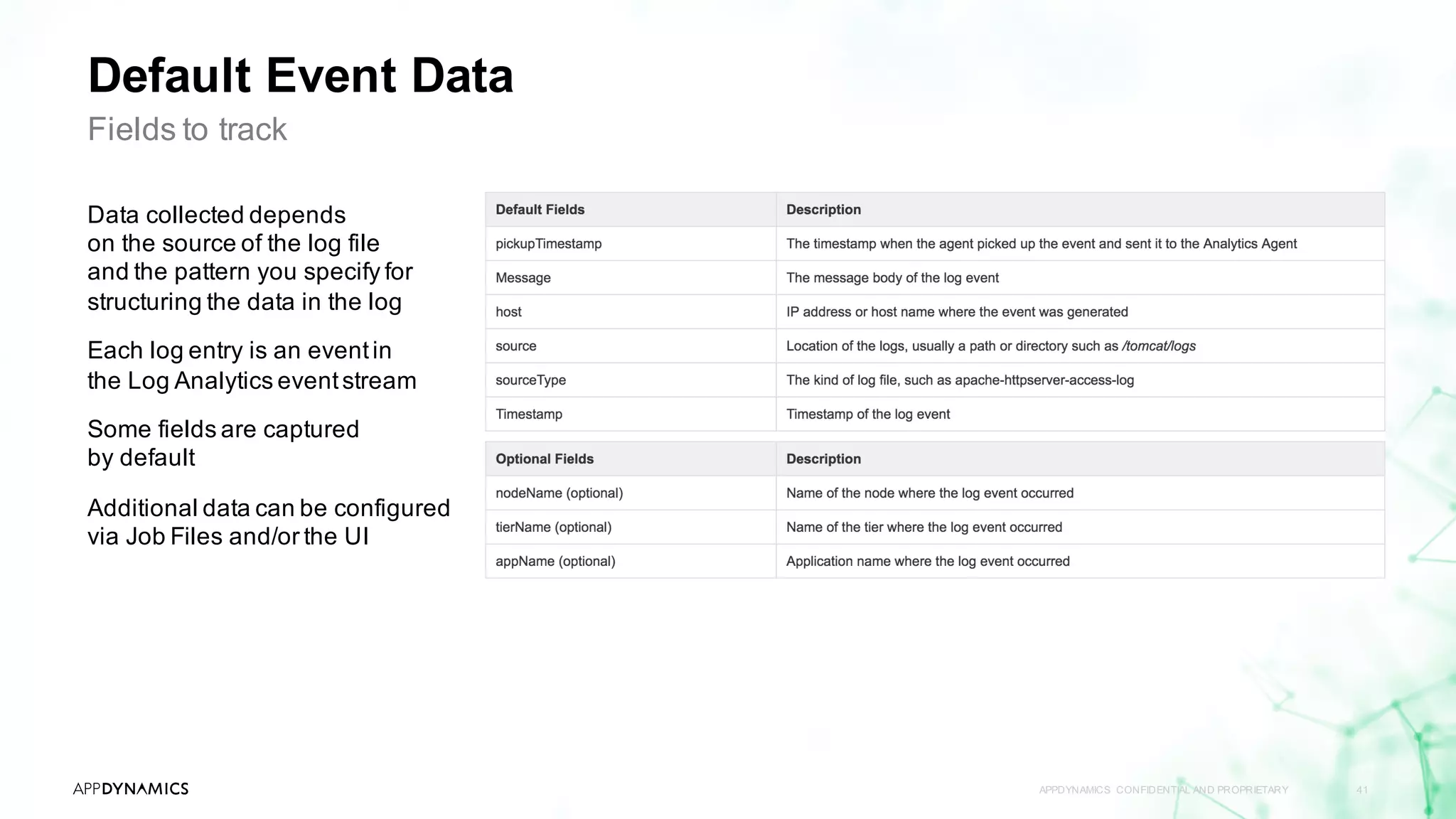
Data collected depends
on the source of the log file
and the pattern you specify for
structuring the data in the log
Each log entry is an eventin
the Log Analytics eventstream
Some fields are captured
by default
Additional data can be configured
via Job Files and/or the UI
APPDYNAMICS CONFIDENTIAL AND PROPRIETARY 42
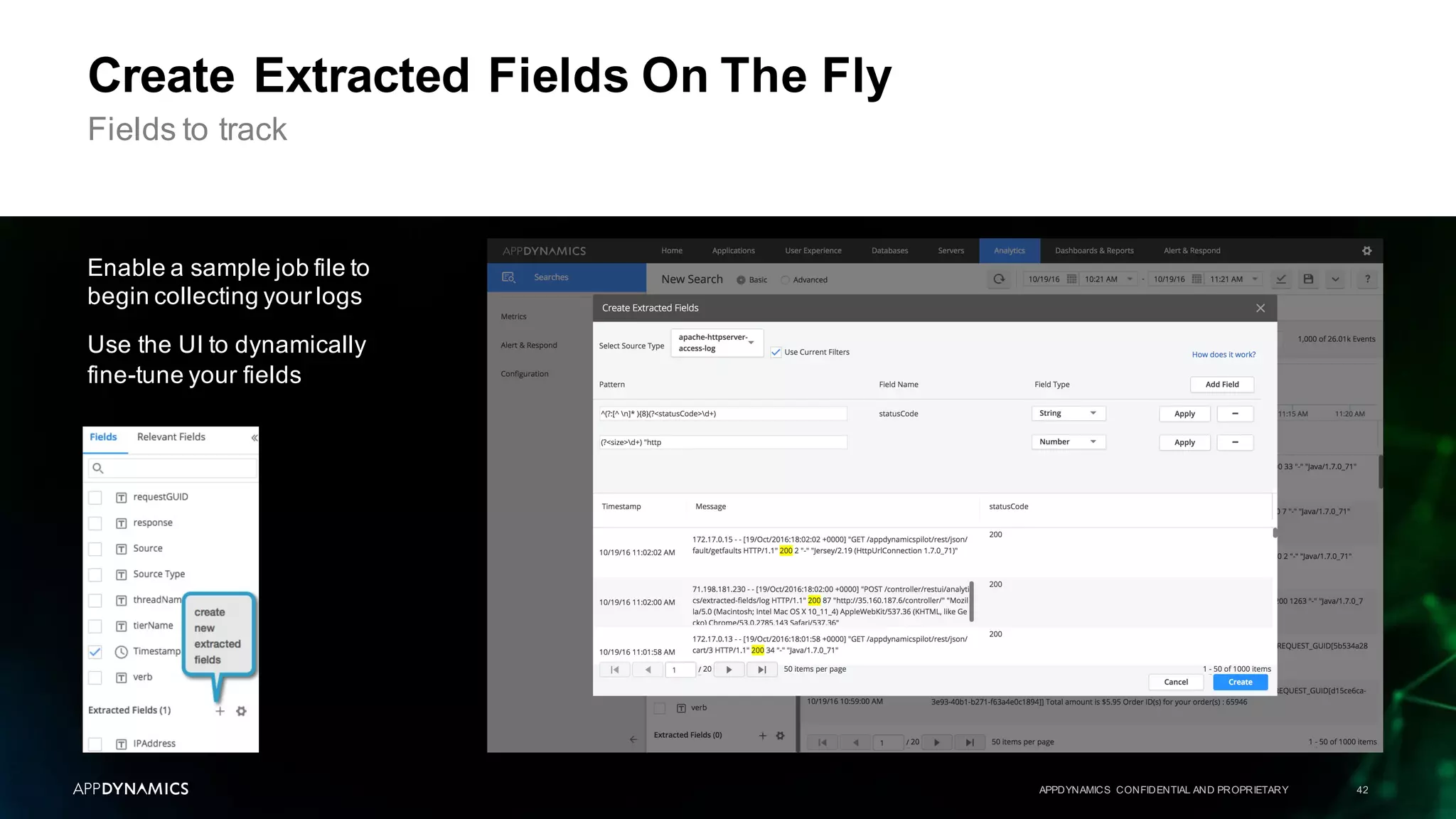
Create Extracted Fields On The Fly
Enable a sample job file to
begin collecting your logs
Use the UI to dynamically
fine-tune your fields
Fields to track
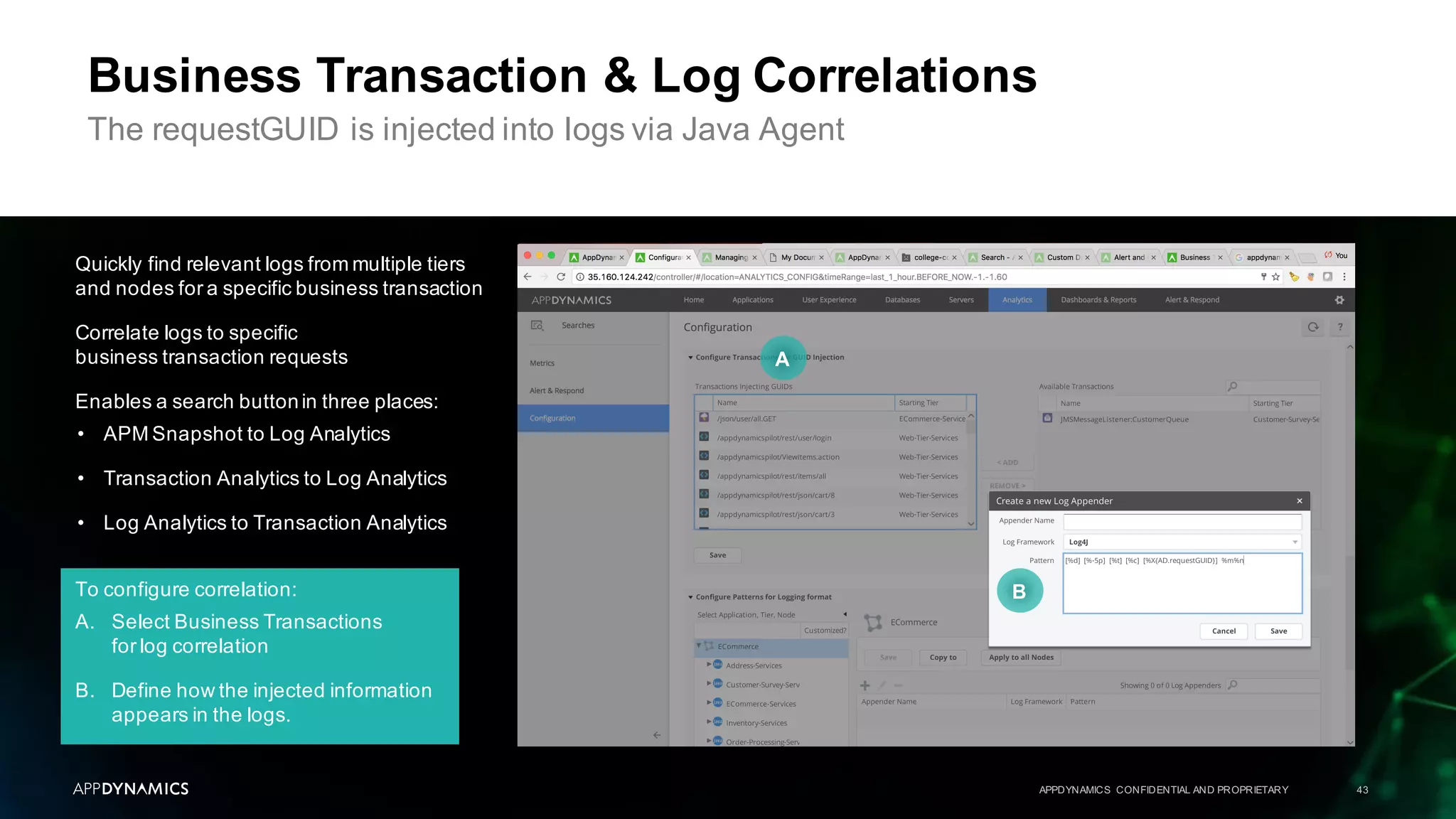
To configure correlation:
A. Select Business Transactions
for log correlation
B. Define how the injected information
appears in the logs.
Quickly find relevant logs from multiple tiers
and nodes for a specific business transaction
Correlate logs to specific
business transaction requests
Enables a search buttonin three places:
• APM Snapshot to Log Analytics
• Transaction Analytics to Log Analytics
• Log Analytics to Transaction Analytics
APPDYNAMICS CONFIDENTIAL AND PROPRIETARY 43
Business Transaction & Log Correlations
The requestGUID is injected into logs via Java Agent
A
B
Instructor Demo 2
APPDYNAMICS CONFIDENTIAL AND PROPRIETARY 44
Log Analytics
Lab 6
APPDYNAMICS CONFIDENTIAL AND PROPRIETARY 45
Infrastructure Troubleshooting
Lab 7
Extract Fields From Log Analytics
Lab 8
Business Transaction GUID Injection
APPDYNAMICS CONFIDENTIAL AND PROPRIETARY 46
Topic 1 AppDynamicsAPM Review
Topic 2 What Is AppDynamicsAnalytics?
Topic 3 Collect Transaction Analytics Data
Topic 4 Search & Visualize
Topic 5 Log Analytics
Topic 6 Metrics & Alerts
Topic 7 Analytics & Data Security
Agenda
From APM to Business Monitoring with AppDynamicsAnalytics
APPDYNAMICS CONFIDENTIAL AND PROPRIETARY 47
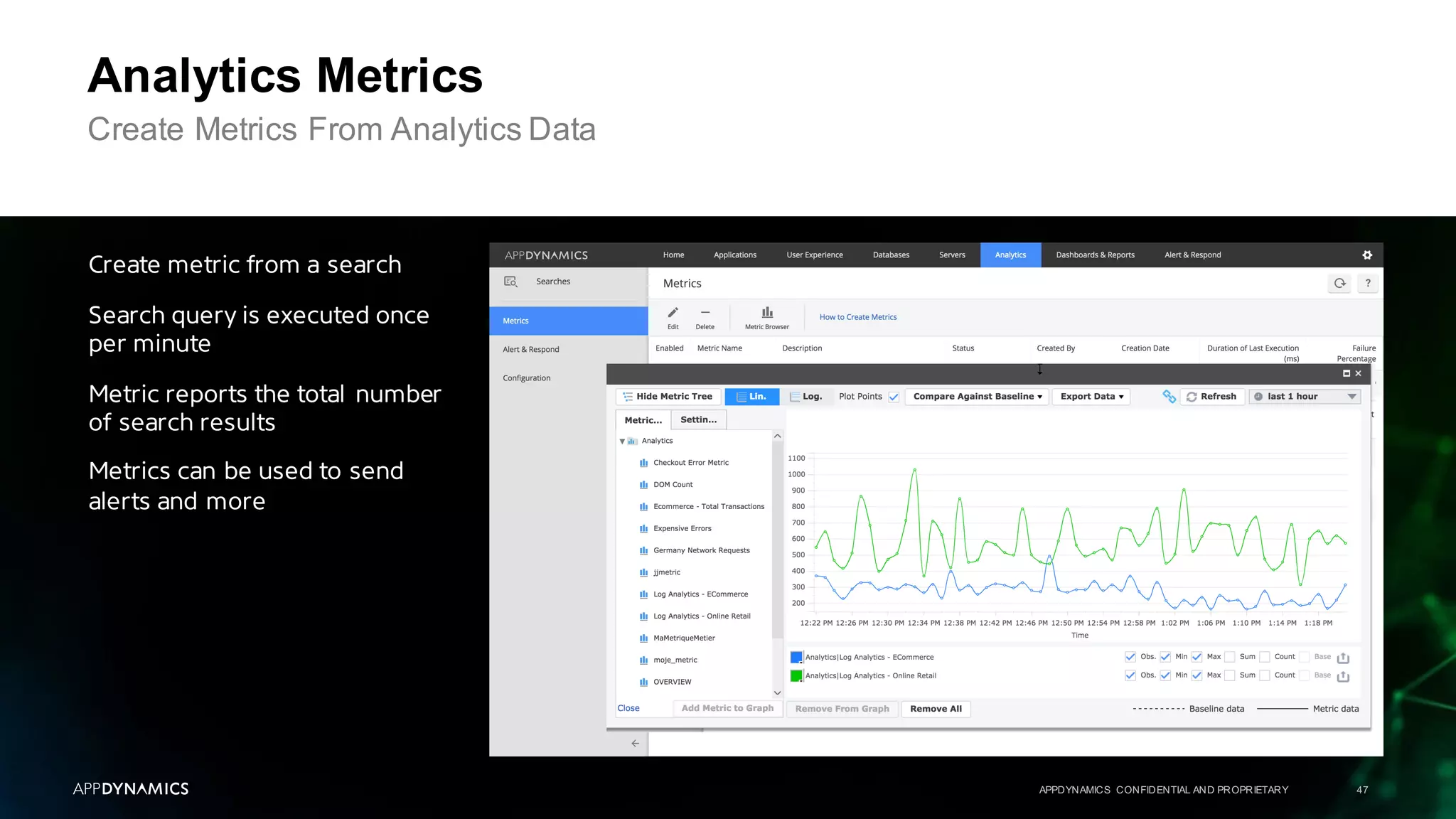
Analytics Metrics
Create Metrics From Analytics Data
Create metric from a search
Search query is executed once
per minute
Metric reports the total number
of search results
Metrics can be used to send
alerts and more
APPDYNAMICS CONFIDENTIAL AND PROPRIETARY 48
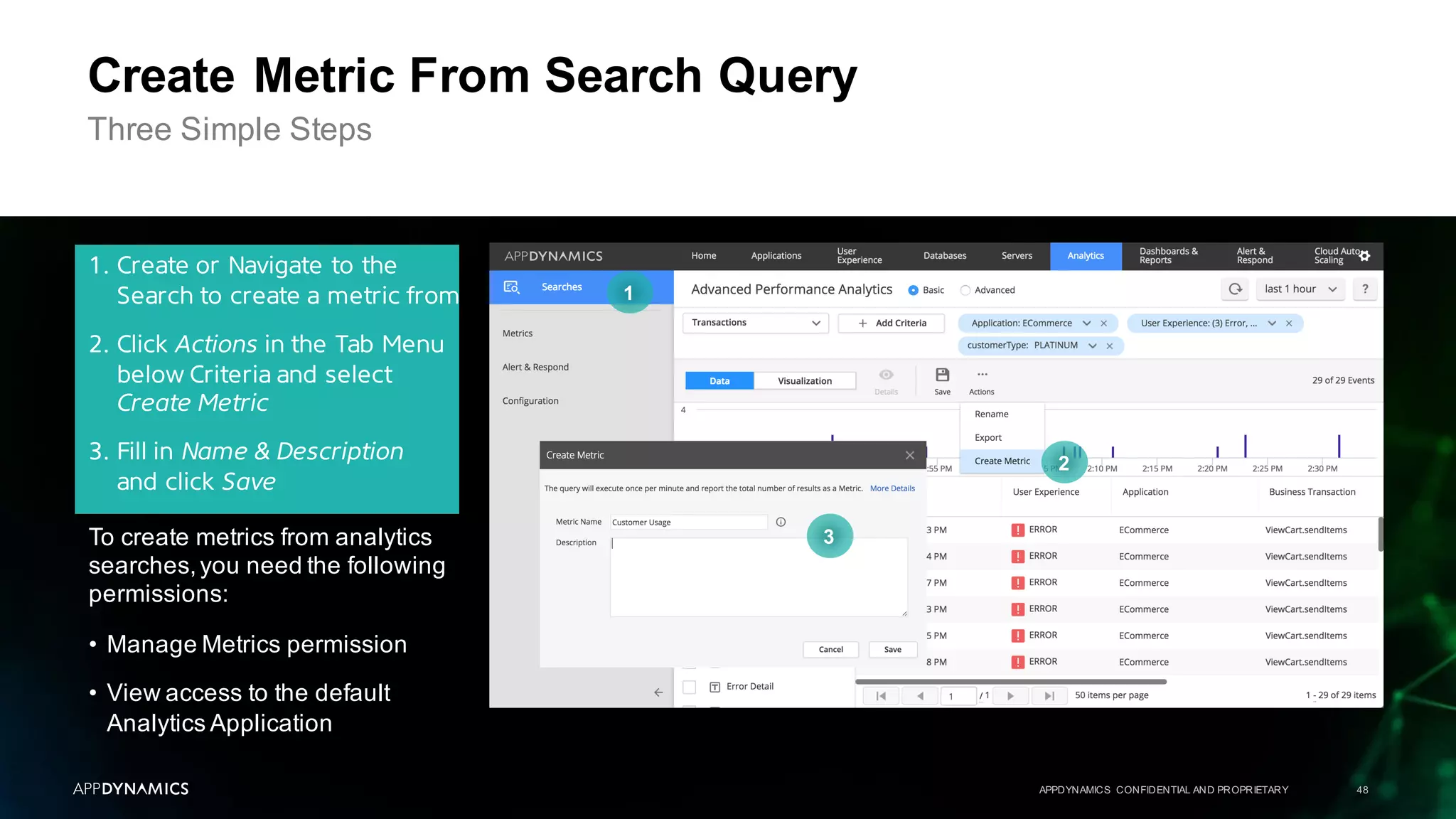
Create Metric From Search Query
Three Simple Steps
1. Create or Navigate to the
Search to create a metric from
2. Click Actions in the Tab Menu
below Criteria and select
Create Metric
3. Fill in Name & Description
and click Save
1
2
3To create metrics from analytics
searches,you need the following
permissions:
• Manage Metrics permission
• View access to the default
Analytics Application
APPDYNAMICS CONFIDENTIAL AND PROPRIETARY 49
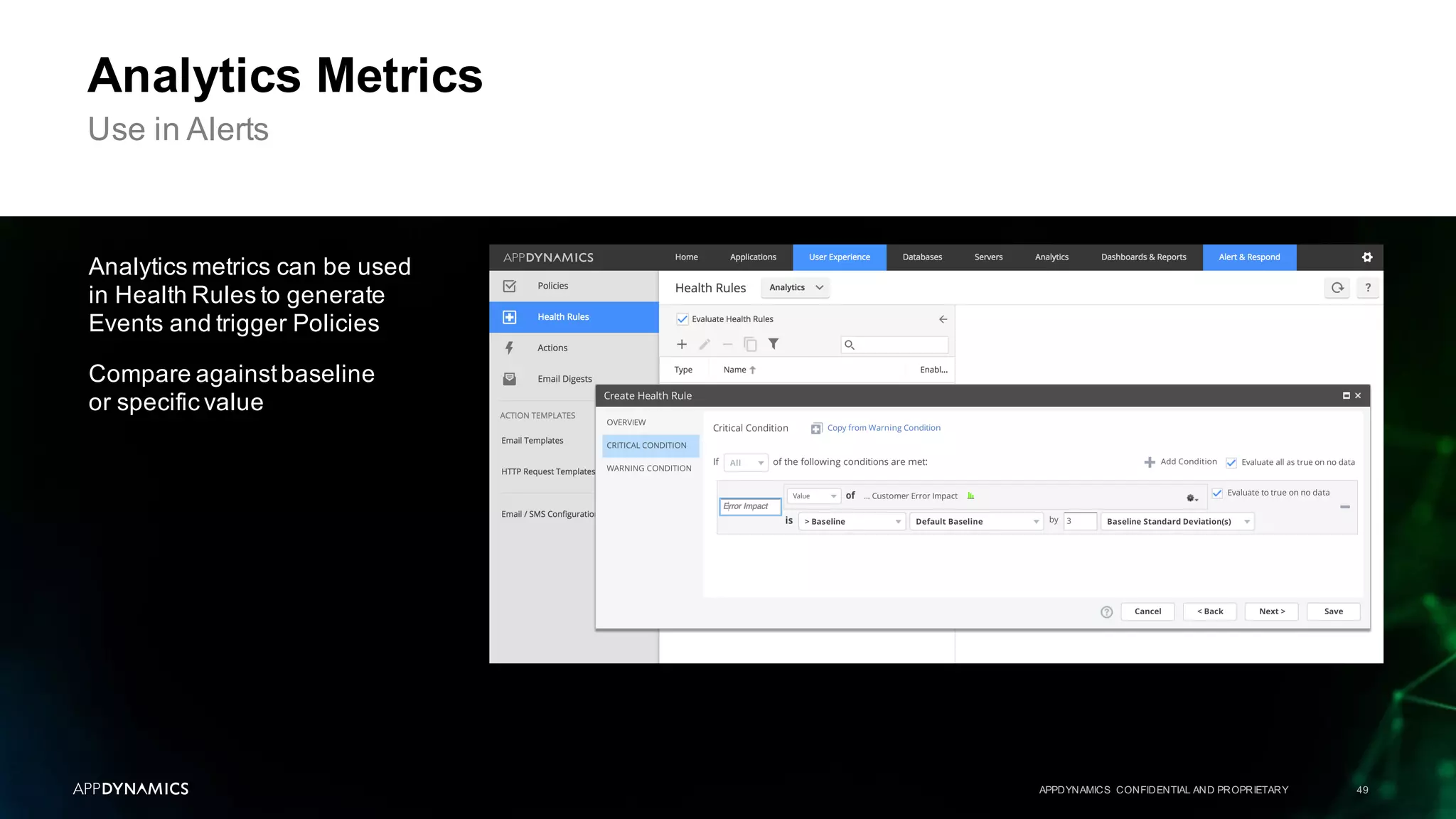
Analytics Metrics
Use in Alerts
Analytics metrics can be used
in Health Rules to generate
Events and trigger Policies
Compare againstbaseline
or specific value
APPDYNAMICS CONFIDENTIAL AND PROPRIETARY 50
Topic 1 AppDynamicsAPM Review
Topic 2 What Is AppDynamicsAnalytics?
Topic 3 Collect Transaction Analytics Data
Topic 4 Search & Visualize
Topic 5 Log Analytics
Topic 6 Metrics & Alerts
Topic 7 Analytics & Data Security
Agenda
From APM to Business Monitoring with AppDynamicsAnalytics
APPDYNAMICS CONFIDENTIAL AND PROPRIETARY 51
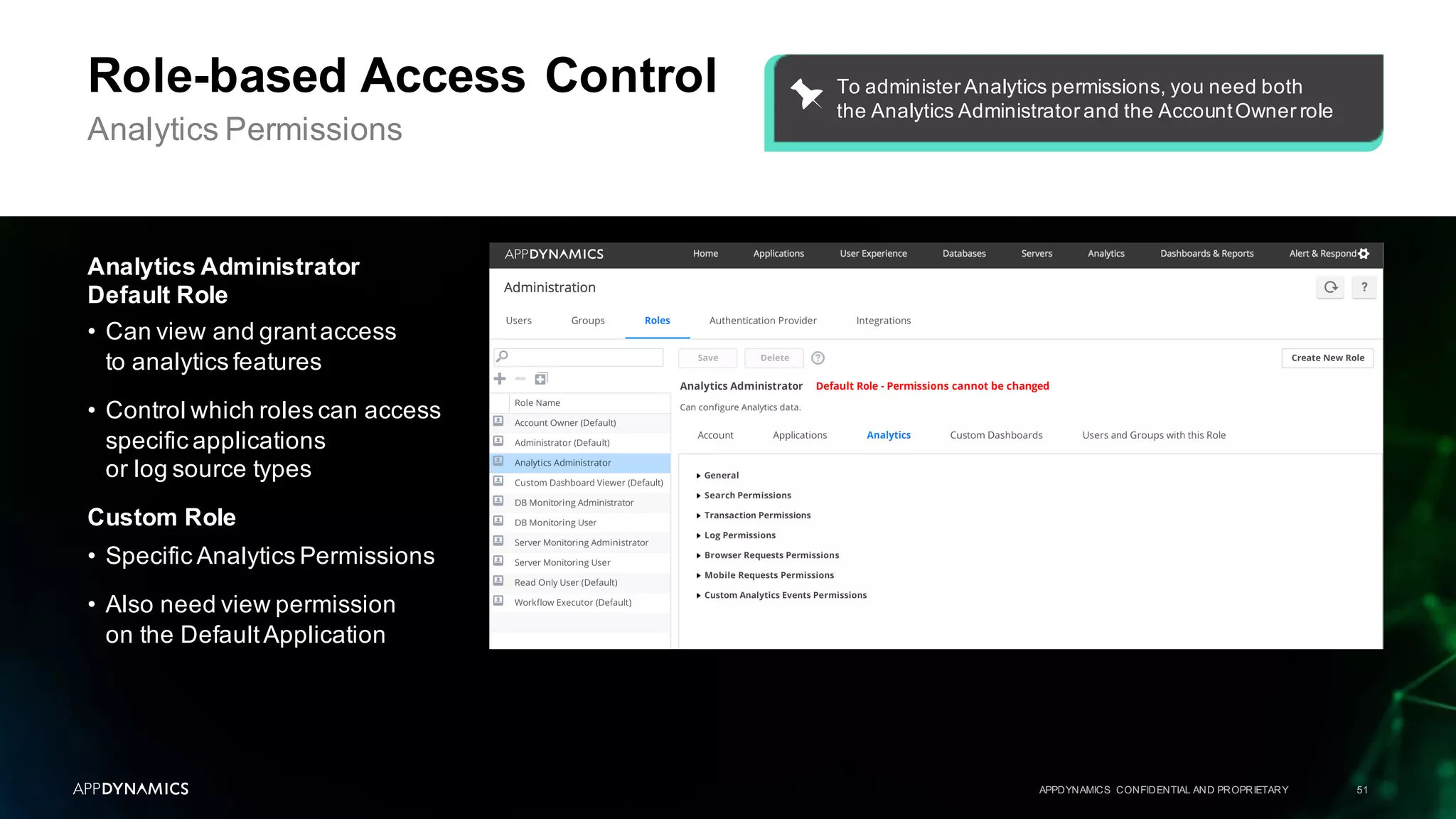
Role-based Access Control
Analytics Permissions
Analytics Administrator
Default Role
• Can view and grantaccess
to analytics features
• Control which roles can access
specific applications
or log source types
Custom Role
• Specific Analytics Permissions
• Also need view permission
on the DefaultApplication
To administer Analytics permissions, you need both
the Analytics Administrator and the AccountOwner role
APPDYNAMICS CONFIDENTIAL AND PROPRIETARY 52
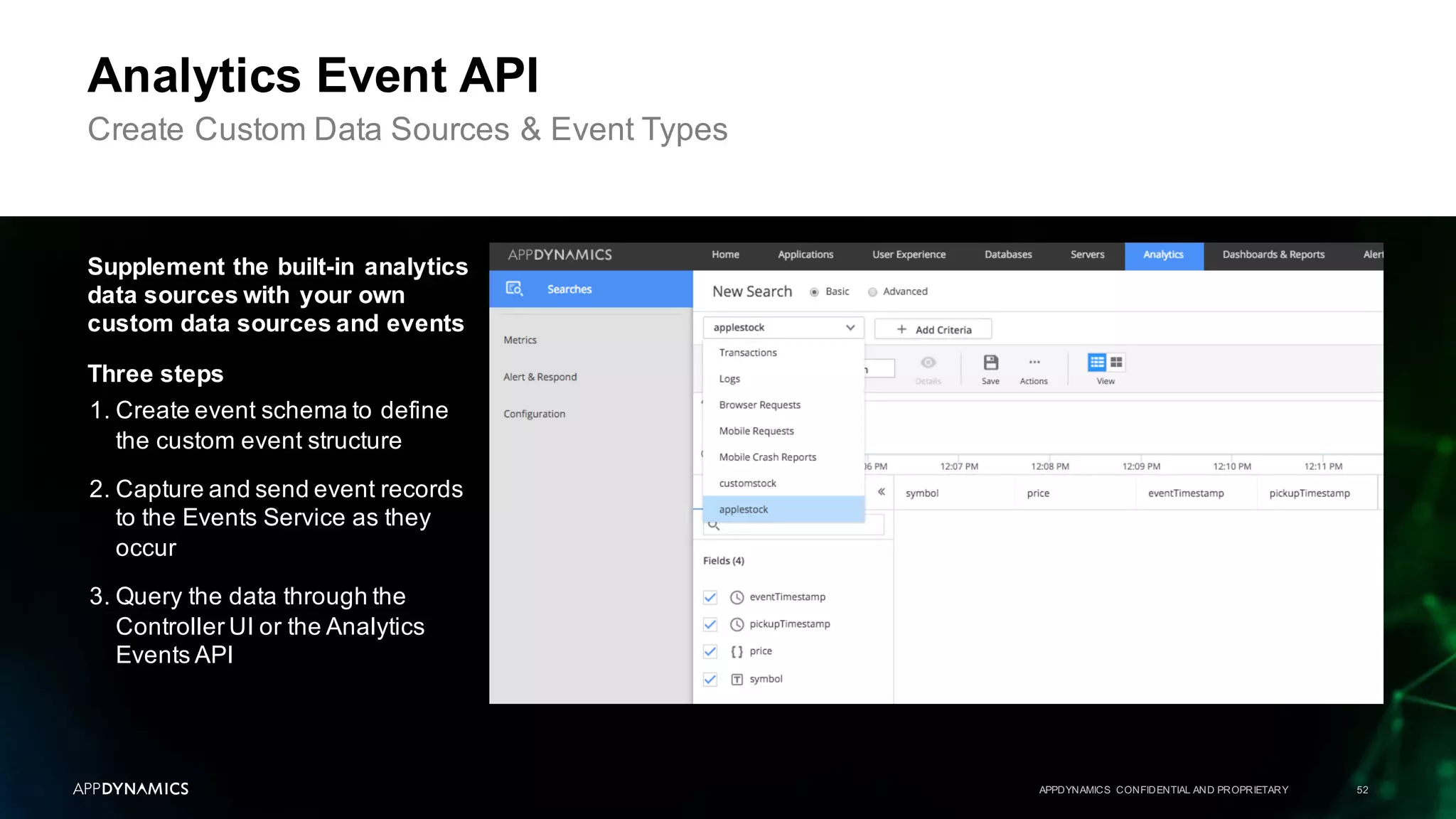
Analytics Event API
Create Custom Data Sources & Event Types
Supplement the built-in analytics
data sources with your own
custom data sources and events
Three steps
1. Create event schema to define
the custom event structure
2. Capture and send event records
to the Events Service as they
occur
3. Query the data through the
Controller UI or the Analytics
Events API
APPDYNAMICS CONFIDENTIAL AND PROPRIETARY 53
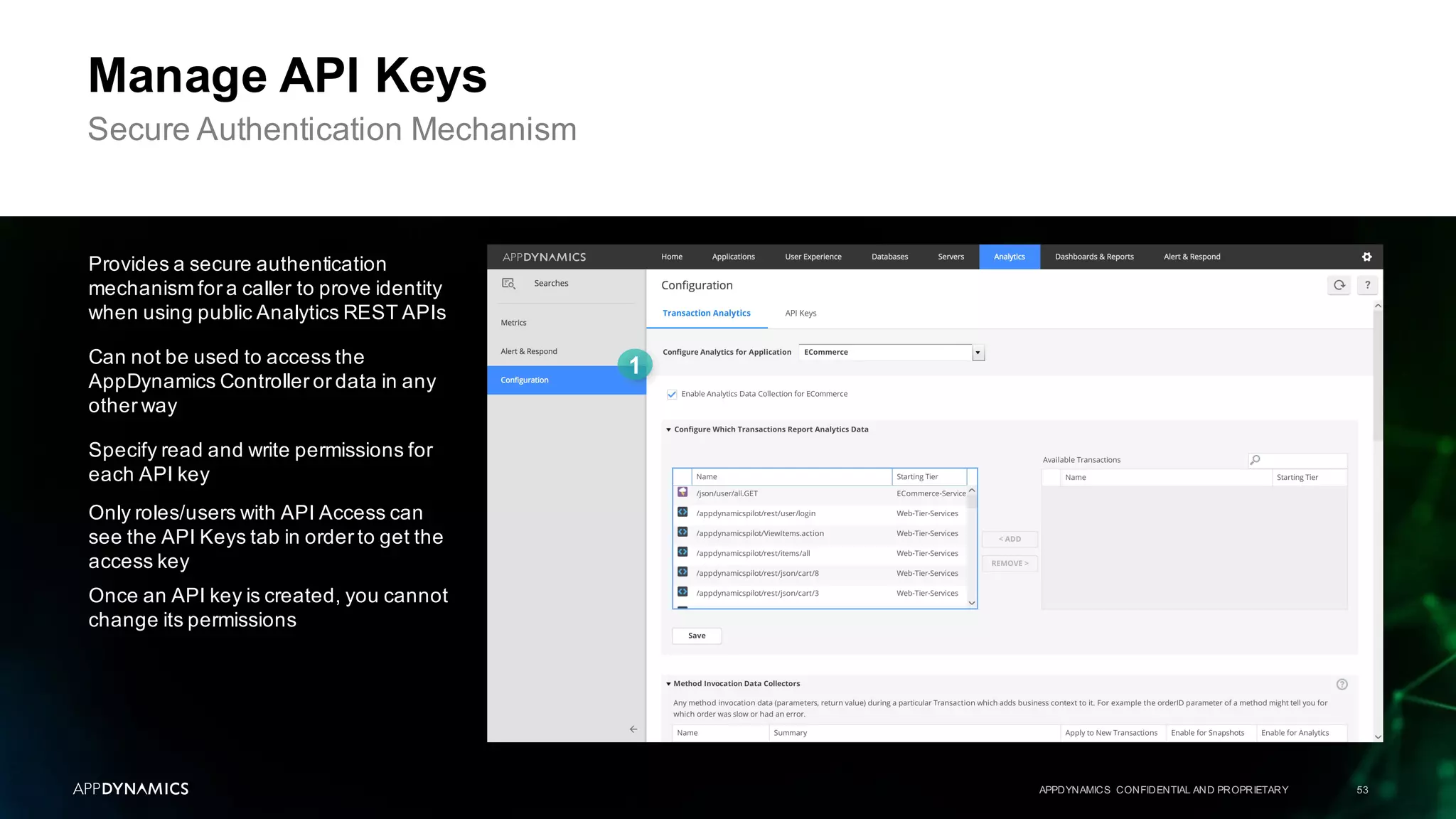
Manage API Keys
Secure Authentication Mechanism
Provides a secure authentication
mechanism for a caller to prove identity
when using public Analytics REST APIs
Can not be used to access the
AppDynamics Controller or data in any
other way
Specify read and write permissions for
each API key
Only roles/users with API Access can
see the API Keys tab in order to get the
access key
Once an API key is created, you cannot
change its permissions
Lab 9
APPDYNAMICS CONFIDENTIAL AND PROPRIETARY 54
Create Metric From Search Query
Lab 10
Create Health Rule, Action, And Policy
What We Learned Today
APPDYNAMICS CONFIDENTIAL AND PROPRIETARY 55
Understand whatAnalytics is and it can be used
to query and visualize business data
Use eventdata as well as custom method and HTTP
requestdata collectors to search and analyze
business transactions
Visualize search results with the custom widgetbuilder
You should now be able to complete a few tasks
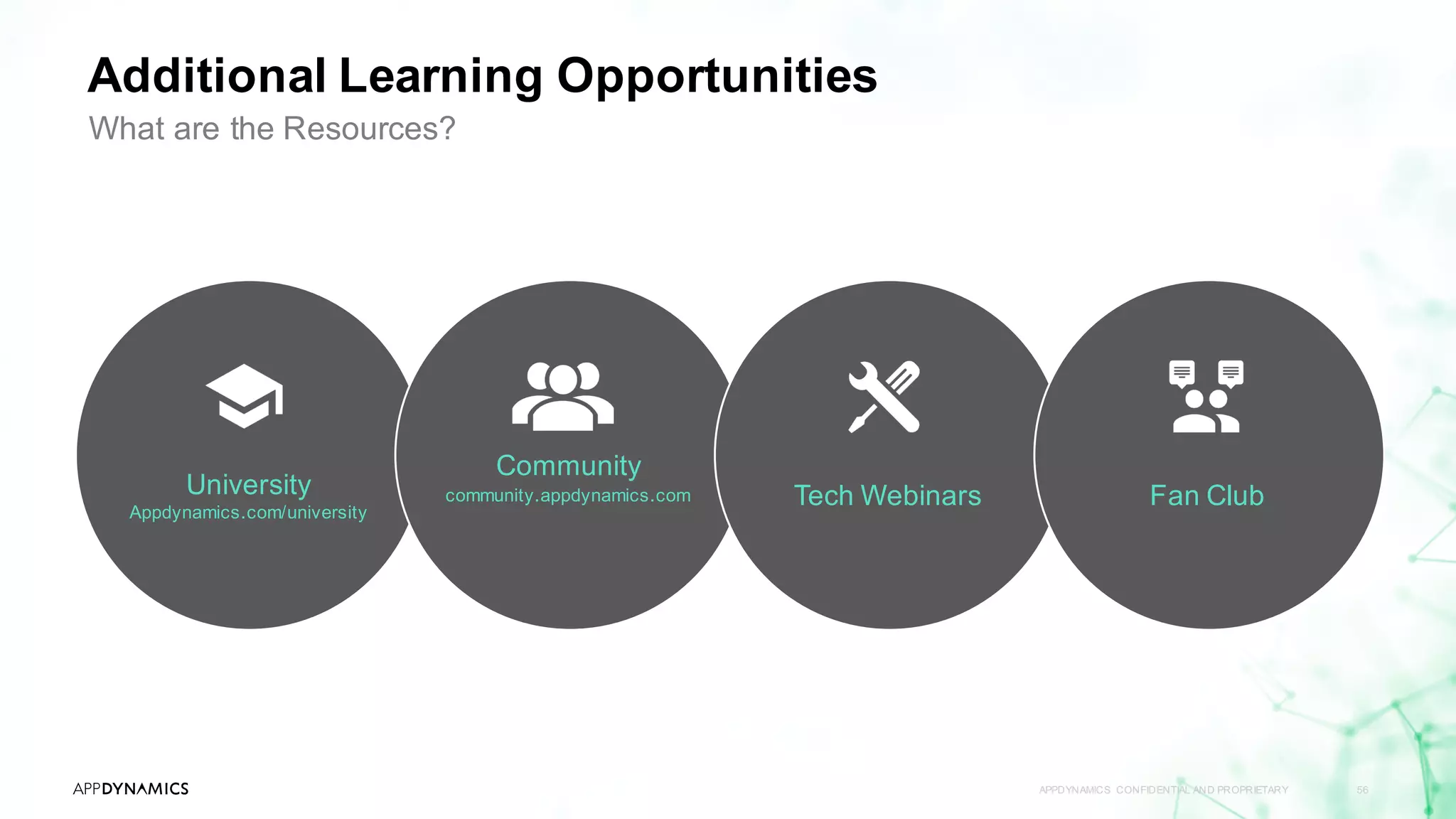
University
Appdynamics.com/university
Community
community.appdynamics.com Tech Webinars
Additional Learning Opportunities
APPDYNAMICS CONFIDENTIAL AND PROPRIETARY 56
What are the Resources?
Fan Club
University
APPDYNAMICS CONFIDENTIAL AND PROPRIETARY 57
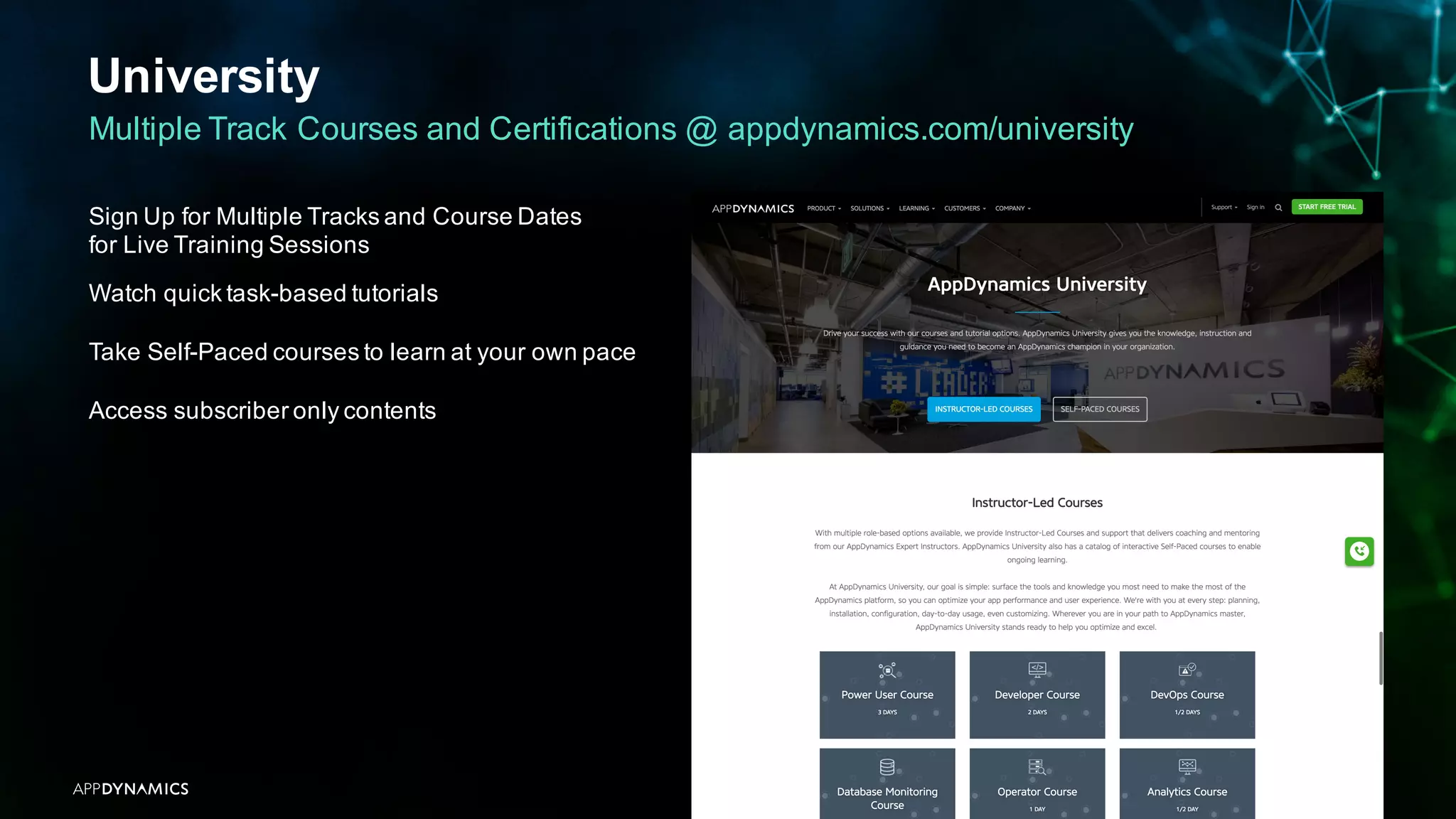
Multiple Track Courses and Certifications @ appdynamics.com/university
Sign Up for Multiple Tracks and Course Dates
for Live Training Sessions
Watch quick task-based tutorials
Take Self-Paced courses to learn at your own pace
Access subscriber only contents
Community
APPDYNAMICS CONFIDENTIAL AND PROPRIETARY 58
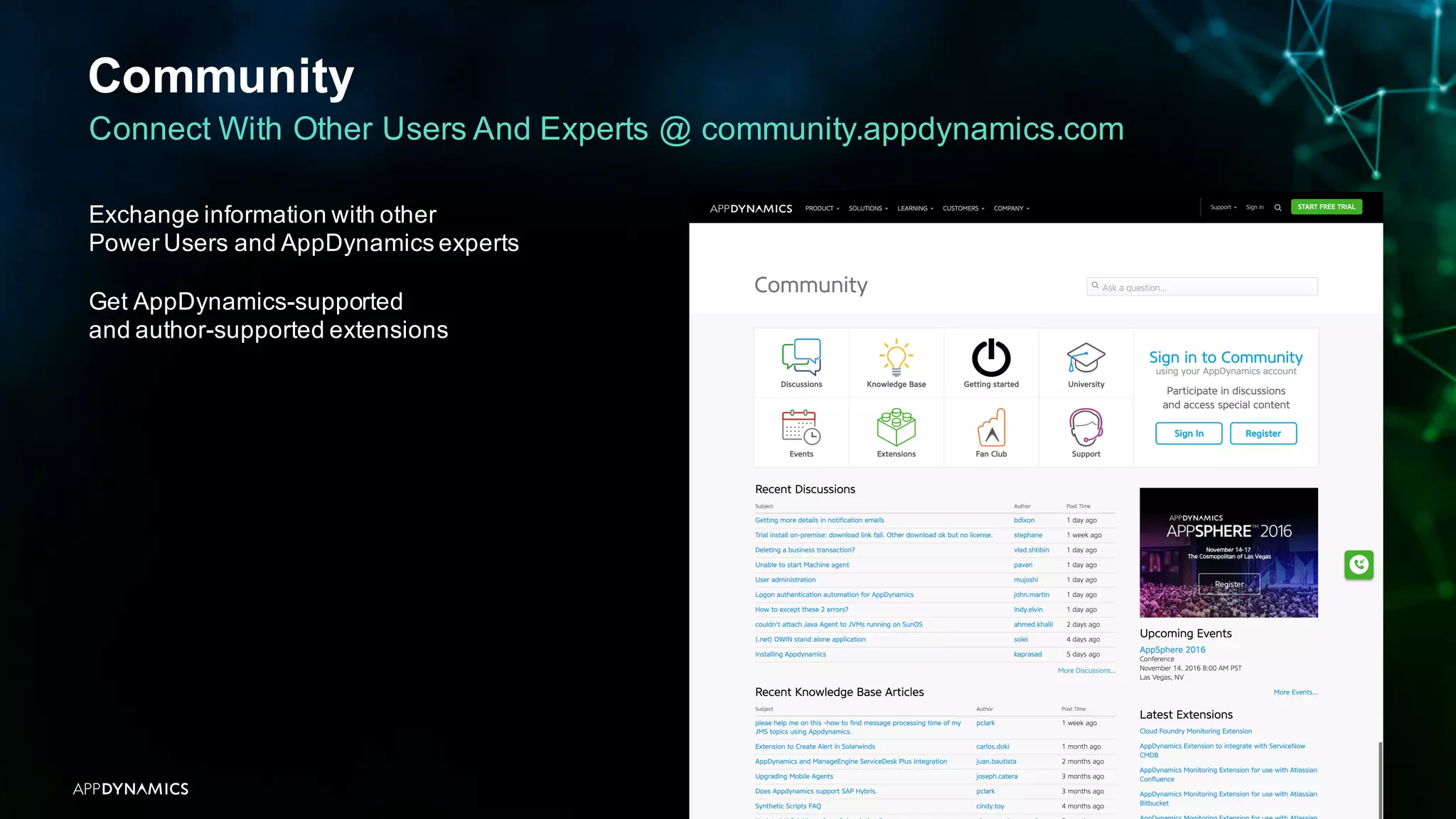
Connect With Other Users And Experts @ community.appdynamics.com
Exchange information with other
Power Users and AppDynamics experts
Get AppDynamics-supported
and author-supported extensions
Tech Webinars
APPDYNAMICS CONFIDENTIAL AND PROPRIETARY 59
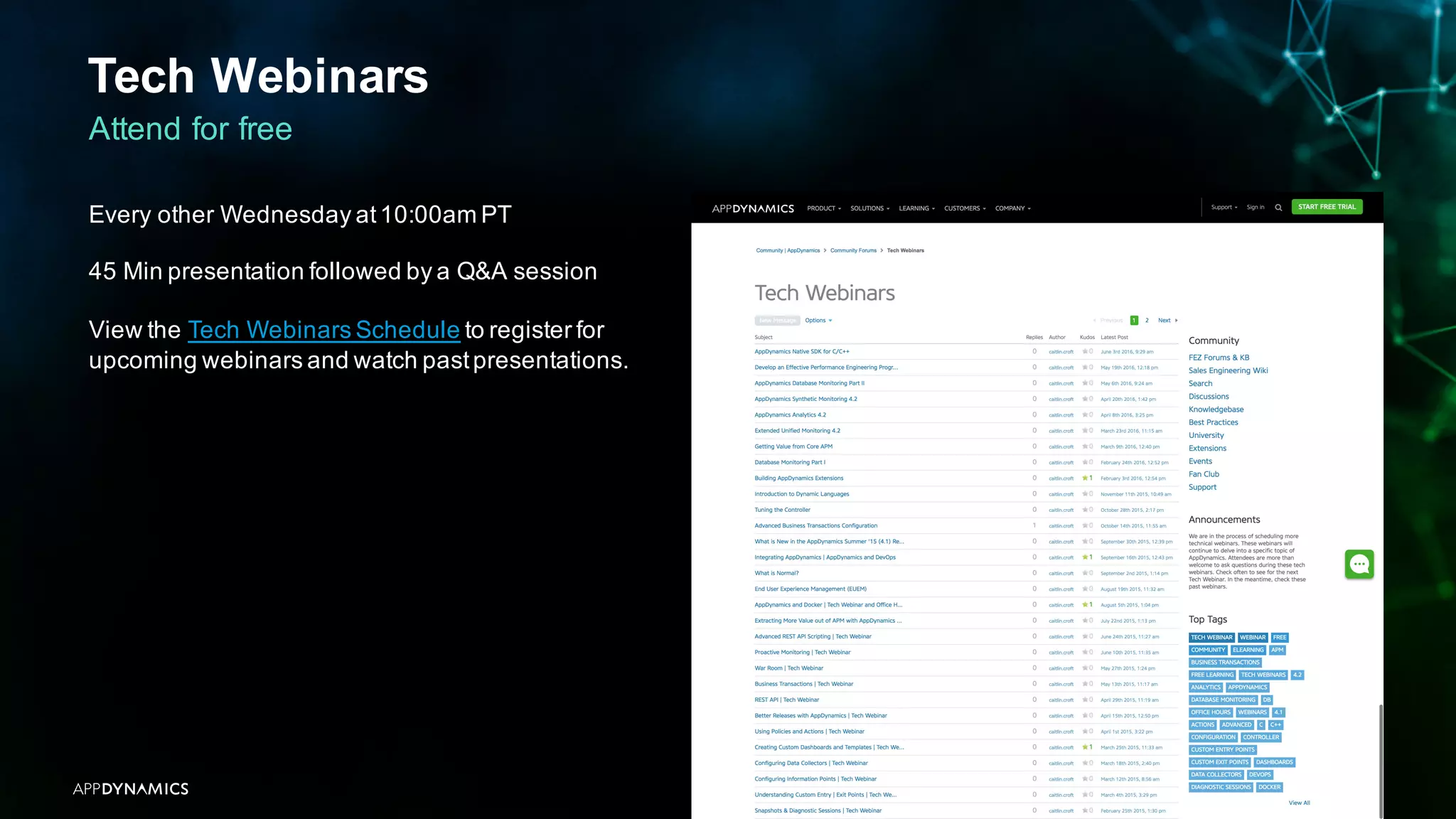
Attend for free
Every other Wednesday at10:00am PT
45 Min presentation followed by a Q&A session
View the Tech Webinars Schedule to register for
upcoming webinars and watch pastpresentations.
Join The FanClub
APPDYNAMICS CONFIDENTIAL AND PROPRIETARY 60
We love our customers and partners. Let us thank you for your ongoing support.
See new features and roadmaps
Try new products and beta programs
Access custom extensions and training
MeetAppDynamics Executives
Get premium swag and invitations to events
Sign up and claim your benefits
by clicking here to submit the request!
Thank You
Please fill out the survey:
https://www.surveymonkey.com/r/AppDynamicsUniversity
Your feedback is very important to us. We use it to help us improve our content
and incorporate new features to keep our courses relevantfor our audience.
Angela Lang
angela.lang@appdynamics.com

From APM to Business Monitoring with AppDynamics Analytics

  • 1.
    From APM toBusiness Monitoring with AppDynamics Analytics AppDynamics Version 4.2
  • 2.
    APPDYNAMICS CONFIDENTIAL ANDPROPRIETARY 2 Notice The information and materials included in this presentation (collectively, the “Materials”) are the confidential and proprietary information of AppDynamics, Inc. (the “Company”). No part of the Materials may be reproduced, distributed, communicated or displayed in any form or by any means, or used to make any derivative work, without prior written permission from the Company. © 2016 AppDynamics, Inc. All rights reserved. All third party trademarks, including names, logos and brands, referenced by the Company in this presentation are property of their respective owners. All references to third party trademarks are for identification purposes only and shall be considered nominative fair use under trademark law.
  • 3.
    Objectives How easily businessimpact, usage, and advanced analytics can be obtained and visualized Where the Analytics plugin fits in to the overall AppDynamics Intelligence Platform architecture How to use event data as well as custom method and HTTP requestdata collectors to search and analyze business transactions The simple steps to visualize search results with the custom widgetbuilder APPDYNAMICS CONFIDENTIAL AND PROPRIETARY 3 Course Use business impactanalytics to compile a list of users affected by a system outage to facilitate marketing with a win-back campaign Learn how to visualize application,server, and network performance data as it relates to business transactions Understand fine-grained customer usage and make data driven decisions Perform infrastructure troubleshooting by searching logs and analyzing with aggregated error dashboards Labs
  • 4.
    APPDYNAMICS CONFIDENTIAL ANDPROPRIETARY 4 Topic 1 AppDynamicsAPM Review Topic 2 What Is AppDynamicsAnalytics? Topic 3 Collect Transaction Analytics Data Topic 4 Search & Visualize Topic 5 Log Analytics Topic 6 Metrics & Alerts Topic 7 Analytics & Data Security Agenda From APM to Business Monitoring with AppDynamicsAnalytics
  • 5.
    AppDynamics Review APPDYNAMICS CONFIDENTIALAND PROPRIETARY 5 APM Basics HTTP connections initiated by agents (HTTPS optional) Agents update their metrics and events to the Controller at least once per minute Snapshots provide details of individual transactions Policies automate monitoring and problem remediation Business Transactions Organize application traffic into user activities
  • 6.
    APPDYNAMICS CONFIDENTIAL ANDPROPRIETARY 6 Topic 1 AppDynamicsAPM Review Topic 2 What Is AppDynamics Analytics? Topic 3 Collect Transaction Analytics Data Topic 4 Search & Visualize Topic 5 Log Analytics Topic 6 Metrics & Alerts Topic 7 Analytics & Data Security Agenda From APM to Business Monitoring with AppDynamicsAnalytics
  • 7.
    What is AppDynamicsAnalytics? APPDYNAMICS CONFIDENTIAL AND PROPRIETARY 7 Capture & Correlate Business, Marketing, & Operations Data Business Revenue (total, per user, per loyalty tier) Customer types (loyalty tiers) Product mix Marketing User preferences Campaign performance Geo locations Operations App performance Infrastructure performance Network, database, and browser/mobile performance
  • 8.
    Business Data MeetsOperational Data APPDYNAMICS CONFIDENTIAL AND PROPRIETARY 8 Answer business-oriented questions like How many users experienced failed checkouttransactions in the last 24 hours? • How much revenue was lost because of these failures? • How is that revenue distributed across differentcustomer categories? What is your revenue for the day for a geographical region?
  • 9.
    AppDynamics Agents CollectBusiness Data APPDYNAMICS CONFIDENTIAL AND PROPRIETARY 9 Enable Business & Operational Visibility APM Transaction Events Browser RequestEvents Mobile RequestEvents Log Events Add custom fields for business context This course focuses on APM and Log Analytics
  • 10.
    Extended Event Data= Business Impact Insight APPDYNAMICS CONFIDENTIAL AND PROPRIETARY 10 Analyze the business impact of every event and learn how customers use your application Data for Every Transaction Each individual transaction passing through a tier is an Event View raw data for any transaction
  • 11.
    AppDynamics Platform Integration APPDYNAMICSCONFIDENTIAL AND PROPRIETARY 11 No code changes required Enable analytics on the app agents and Controller you already use Use new and pre-existing data collectors All data is managed by the same controller for all platforms Extends AppDynamicsAPM, Browser and Mobile real-user monitoring modules
  • 12.
    Where does Analyticsfit in? APPDYNAMICS CONFIDENTIAL AND PROPRIETARY 12 AppDynamics Intelligence Platform
  • 13.
    Licenses — Transaction& Log APPDYNAMICS CONFIDENTIAL AND PROPRIETARY 13 ApplicationAnalytics Licenses
  • 14.
    Licenses — EndUser Monitoring APPDYNAMICS CONFIDENTIAL AND PROPRIETARY 14 ApplicationAnalytics Licenses
  • 15.
    Basics Steps toData-driven Decisions APPDYNAMICS CONFIDENTIAL AND PROPRIETARY 15 As easy as 1,2,3 Collect Data Search Business Transactions Visualize on Interactive Charts
  • 16.
    APPDYNAMICS CONFIDENTIAL ANDPROPRIETARY 16 Topic 1 AppDynamicsAPM Review Topic 2 What Is AppDynamicsAnalytics? Topic 3 Collect Transaction Analytics Data Topic 4 Search & Visualize Topic 5 Log Analytics Topic 6 Metrics & Alerts Topic 7 Analytics & Data Security Agenda From APM to Business Monitoring with AppDynamicsAnalytics
  • 17.
    Transaction Analytics APPDYNAMICS CONFIDENTIALAND PROPRIETARY 17 Data collected by default for each instance of transactions that are enabled for Analytics
  • 18.
    APPDYNAMICS CONFIDENTIAL ANDPROPRIETARY 18 Transaction Analytics Capture custom event data with data collectors Method Invocation Data Collectors • Method arguments • Variables • Return values HTTP Requests • URL • Parameter values • Headers • Cookies • Session objects
  • 19.
    Lab 1 APPDYNAMICS CONFIDENTIALAND PROPRIETARY 19 Configuration Lab 2 Custom Data Collectors
  • 20.
    APPDYNAMICS CONFIDENTIAL ANDPROPRIETARY 20 Topic 1 AppDynamicsAPM Review Topic 2 What Is AppDynamicsAnalytics? Topic 3 Collect Transaction Analytics Data Topic 4 Search & Visualize Topic 5 Log Analytics Topic 6 Metrics & Alerts Topic 7 Analytics & Data Security Agenda From APM to Business Monitoring with AppDynamicsAnalytics
  • 21.
    APPDYNAMICS CONFIDENTIAL ANDPROPRIETARY 21 Searching Analytics Two easy ways Basic search Advanced - ADQL (AppDynamics Query Language)
  • 22.
    APPDYNAMICS CONFIDENTIAL ANDPROPRIETARY 22 Searching Analytics Two easy ways Basic search
  • 23.
    APPDYNAMICS CONFIDENTIAL ANDPROPRIETARY 23 Searching Analytics Two easy ways Advanced - ADQL (AppDynamics Query Language) SELECT * | (DISTINCT)? [field_name | function(field_name, arguments, ...) AS label, ...] FROM [event_type] WHERE [(NOT)? field_name OPERATOR value][AND | OR] ... [ORDER BY [field_name (ASC | DESC)?], ...] [LIMIT number, ...] ADQL statements are referred to as event queries. The query syntax is as follows: The SELECT clause and FROM clause are required. All other clauses are optional
  • 24.
    A. Create andsave searches for specific use cases B. Tailor the event list by selecting data fields of interest to you C.Examine Top 10 Values D.RelevantFields & Relevant Score APPDYNAMICS CONFIDENTIAL AND PROPRIETARY 24 Strategies For Locating Data Of Interest A C B D
  • 25.
    APPDYNAMICS CONFIDENTIAL ANDPROPRIETARY 25 Visualize The Data Drag & Drop to Create and Display Interactive Charts using Analytics Visualizations & Custom Dashboards
  • 26.
    APPDYNAMICS CONFIDENTIAL ANDPROPRIETARY 26 Analytics in Custom Dashboards Use in Custom Dashboards Custom Dashboards allow a combined view of data from across AppDynamics Platform Suite Add widgets two ways: A. From Saved Search Visualizations B. Create widgets in Custom Dashboard A B
  • 27.
    APPDYNAMICS CONFIDENTIAL ANDPROPRIETARY 27 Business Impact Analytics Understand The Impact Of Application Performance Issues Help IT / Application teams understand exactly who was affected Identify where a complex business process encountered an issue for a particular user Quantify the impact of negative performance Provide user data to assist Marketing/Sales teams with win-back campaigns to protect revenue, brand reputation, and customer satisfaction
  • 28.
    APPDYNAMICS CONFIDENTIAL ANDPROPRIETARY 28 Usage Analytics Make Data Driven Decisions With Fine-grained Customer Usage Real time and historical visibility into the usage of an application across the customer base Dashboards visualize the usage of an application Slice and dice data to understand feature / capability adoption and proactively monitor application usage by different customer segments
  • 29.
    APPDYNAMICS CONFIDENTIAL ANDPROPRIETARY 29 Advance Performance Analytics Prioritize App Performance For High Value Customers and Partners Quickly prioritize customers important to your brand Gain insight into their experience Review aggregated customer request to ensure performance meets expectations of valued customers
  • 30.
    APPDYNAMICS CONFIDENTIAL ANDPROPRIETARY 30 Advance Performance Analytics Real-time Streaming AppDynamics provides real time visibility into the performance of transactions that are being processed by an application "Live Stream" allows IT / Application teams to monitor the overall health of the application and quickly identify performance problem outliers Teams can easily manage "to the yellow"and catch problems before they become critical issues
  • 31.
    Instructor Demo 1 APPDYNAMICSCONFIDENTIAL AND PROPRIETARY 31 Discover The User Interface
  • 32.
    Lab 3 APPDYNAMICS CONFIDENTIALAND PROPRIETARY 32 Win-back Campaign Lab 4 Visualize Customer Usage Lab 5 Advanced Performance Analytics
  • 33.
    APPDYNAMICS CONFIDENTIAL ANDPROPRIETARY 33 Topic 1 AppDynamicsAPM Review Topic 2 What Is AppDynamicsAnalytics? Topic 3 Collect Transaction Analytics Data Topic 4 Search & Visualize Topic 5 Log Analytics Topic 6 Metrics & Alerts Topic 7 Analytics & Data Security Agenda From APM to Business Monitoring with AppDynamicsAnalytics
  • 34.
    Log Analytics APPDYNAMICS CONFIDENTIALAND PROPRIETARY 34 Capture & Present Log Records As Analytics Data AppDynamics provides analytics on data collected from any type of log file Instrumented and non-instrumented applications as well as infrastructure Collect Data, Searchand Visualize just as with transaction data Sources of Log Events •Log Files •TCP Collection ofSyslog Messages Define Fields to Track •DefaultData Fields •Custom Data Fields: Job Files, Extracted fields via the UI
  • 35.
    Log Analytics UseCase APPDYNAMICS CONFIDENTIAL AND PROPRIETARY 35 Pinpoint errors and troubleshoot with correlated logs to gain infrastructure visibility IT Ops sees slow BT with the Order Processing Service in their APM flowmap Load balancer logs reveal a misconfiguration of irules, causing the slow transaction
  • 36.
    Transaction Analytics UseCase APPDYNAMICS CONFIDENTIAL AND PROPRIETARY 36 Advanced Performance Analysis: Breakdown Log Data Silos Click pulls logs tied “only” to single BT Call Stack APM identifies “Place Order” transaction failure Faster resolution with Integrated Logs Inventory = 0
  • 37.
    APPDYNAMICS CONFIDENTIAL ANDPROPRIETARY 37 Configuring Log Analytics Capture And Present Log Records As Analytics Data With Job Files Configure one or more log sources for the Analytics Agent The log source is used by the Analytics Agent to • Capture records from the log file • Structure the records according to your configuration • Send the data to theAnalytics Processor The Controller will then present the data in the Application Analytics UI To define a log source, you create a job file (or modify one of the samples) in the Analytics Agent configuration directory
  • 38.
    Job Files APPDYNAMICS CONFIDENTIALAND PROPRIETARY 38 Describe the log source in the job files Each log source is represented by a job file. A job file is a configuration file that specifies The location of the source log file The pattern for structuring the records in the log Other options for capturing records from the log source Job files are located in the following directory <Analytics_Agent_Home> /conf/job/ You can add job files to the directory without restarting the agent # Source can be of two types: # 1) file: This allows tailing a log file. # 2) syslog: Listens to Syslog messages on a network port. source: type: file path: ${CODEBASE_HOME}/analytics/analytics-dev-app-home/processor/logs nameGlob: analytics-api-store.log startAtEnd: false # These fields are in addition to the data that is already present in # the files being tailed. Each record read from the file will be # enriched with these fields. fields: sourceType: analytics-demo-log nodeName: All-In-One tierName: AppTier appName: Analytics # Grok is a way to define and use complex, nested regular expressions # in an easy to read and use format. The Grok patterns here are meant # to match a part of the log "message" string. grok: patterns: - "[%{LOGLEVEL:logLevel}%{SPACE}] [%{DATA:threadName}] [%{JAVACLASS:class}] %{GREEDYDATA}"
  • 39.
    Log Analytics APPDYNAMICS CONFIDENTIALAND PROPRIETARY 39 A number of sample job files are shipped with the Analytics Agent including the following
  • 40.
    TCP Collection OfSyslog Messages APPDYNAMICS CONFIDENTIAL AND PROPRIETARY 40 Direct Syslog Data To The AnalyticsAgent Receive syslog messages from a remote source using TCP transport and standard syslog format (RFC5424) Supported Environment Details • Linux only • Apache log format over TCP • One job file per analytics agent can be enabled to receive syslog messages over TCP Two configuration methods • Write log messages to usual log files and then read and forward from the log file • Send log data directly to the analytics agent # Source can be of two types: # 1) file: This allows tailing a log file. # 2) syslog: Listens to Syslog messages on a network port. source: type: syslog port: 514 protocol: tcp # These fields are in addition to the data that is already present in # the files being tailed. Each record read from the file will be # enriched with these fields. fields: sourceType: apache-httpserver-access-syslog nodeName: Node1 tierName: Tier1 appName: App1 # Grok is a way to define and use complex, nested regular expressions # in an easy to read and use format. The Grok patterns here are meant # to match a part of the log "message" string. grok: patterns: - "%{SYSLOG5424PRI}%{SYSLOGBASE2} %{COMBINEDAPACHELOG}"
  • 41.
    Default Event Data APPDYNAMICSCONFIDENTIAL AND PROPRIETARY 41 Fields to track Data collected depends on the source of the log file and the pattern you specify for structuring the data in the log Each log entry is an eventin the Log Analytics eventstream Some fields are captured by default Additional data can be configured via Job Files and/or the UI
  • 42.
    APPDYNAMICS CONFIDENTIAL ANDPROPRIETARY 42 Create Extracted Fields On The Fly Enable a sample job file to begin collecting your logs Use the UI to dynamically fine-tune your fields Fields to track
  • 43.
    To configure correlation: A.Select Business Transactions for log correlation B. Define how the injected information appears in the logs. Quickly find relevant logs from multiple tiers and nodes for a specific business transaction Correlate logs to specific business transaction requests Enables a search buttonin three places: • APM Snapshot to Log Analytics • Transaction Analytics to Log Analytics • Log Analytics to Transaction Analytics APPDYNAMICS CONFIDENTIAL AND PROPRIETARY 43 Business Transaction & Log Correlations The requestGUID is injected into logs via Java Agent A B
  • 44.
    Instructor Demo 2 APPDYNAMICSCONFIDENTIAL AND PROPRIETARY 44 Log Analytics
  • 45.
    Lab 6 APPDYNAMICS CONFIDENTIALAND PROPRIETARY 45 Infrastructure Troubleshooting Lab 7 Extract Fields From Log Analytics Lab 8 Business Transaction GUID Injection
  • 46.
    APPDYNAMICS CONFIDENTIAL ANDPROPRIETARY 46 Topic 1 AppDynamicsAPM Review Topic 2 What Is AppDynamicsAnalytics? Topic 3 Collect Transaction Analytics Data Topic 4 Search & Visualize Topic 5 Log Analytics Topic 6 Metrics & Alerts Topic 7 Analytics & Data Security Agenda From APM to Business Monitoring with AppDynamicsAnalytics
  • 47.
    APPDYNAMICS CONFIDENTIAL ANDPROPRIETARY 47 Analytics Metrics Create Metrics From Analytics Data Create metric from a search Search query is executed once per minute Metric reports the total number of search results Metrics can be used to send alerts and more
  • 48.
    APPDYNAMICS CONFIDENTIAL ANDPROPRIETARY 48 Create Metric From Search Query Three Simple Steps 1. Create or Navigate to the Search to create a metric from 2. Click Actions in the Tab Menu below Criteria and select Create Metric 3. Fill in Name & Description and click Save 1 2 3To create metrics from analytics searches,you need the following permissions: • Manage Metrics permission • View access to the default Analytics Application
  • 49.
    APPDYNAMICS CONFIDENTIAL ANDPROPRIETARY 49 Analytics Metrics Use in Alerts Analytics metrics can be used in Health Rules to generate Events and trigger Policies Compare againstbaseline or specific value
  • 50.
    APPDYNAMICS CONFIDENTIAL ANDPROPRIETARY 50 Topic 1 AppDynamicsAPM Review Topic 2 What Is AppDynamicsAnalytics? Topic 3 Collect Transaction Analytics Data Topic 4 Search & Visualize Topic 5 Log Analytics Topic 6 Metrics & Alerts Topic 7 Analytics & Data Security Agenda From APM to Business Monitoring with AppDynamicsAnalytics
  • 51.
    APPDYNAMICS CONFIDENTIAL ANDPROPRIETARY 51 Role-based Access Control Analytics Permissions Analytics Administrator Default Role • Can view and grantaccess to analytics features • Control which roles can access specific applications or log source types Custom Role • Specific Analytics Permissions • Also need view permission on the DefaultApplication To administer Analytics permissions, you need both the Analytics Administrator and the AccountOwner role
  • 52.
    APPDYNAMICS CONFIDENTIAL ANDPROPRIETARY 52 Analytics Event API Create Custom Data Sources & Event Types Supplement the built-in analytics data sources with your own custom data sources and events Three steps 1. Create event schema to define the custom event structure 2. Capture and send event records to the Events Service as they occur 3. Query the data through the Controller UI or the Analytics Events API
  • 53.
    APPDYNAMICS CONFIDENTIAL ANDPROPRIETARY 53 Manage API Keys Secure Authentication Mechanism Provides a secure authentication mechanism for a caller to prove identity when using public Analytics REST APIs Can not be used to access the AppDynamics Controller or data in any other way Specify read and write permissions for each API key Only roles/users with API Access can see the API Keys tab in order to get the access key Once an API key is created, you cannot change its permissions
  • 54.
    Lab 9 APPDYNAMICS CONFIDENTIALAND PROPRIETARY 54 Create Metric From Search Query Lab 10 Create Health Rule, Action, And Policy
  • 55.
    What We LearnedToday APPDYNAMICS CONFIDENTIAL AND PROPRIETARY 55 Understand whatAnalytics is and it can be used to query and visualize business data Use eventdata as well as custom method and HTTP requestdata collectors to search and analyze business transactions Visualize search results with the custom widgetbuilder You should now be able to complete a few tasks
  • 56.
    University Appdynamics.com/university Community community.appdynamics.com Tech Webinars AdditionalLearning Opportunities APPDYNAMICS CONFIDENTIAL AND PROPRIETARY 56 What are the Resources? Fan Club
  • 57.
    University APPDYNAMICS CONFIDENTIAL ANDPROPRIETARY 57 Multiple Track Courses and Certifications @ appdynamics.com/university Sign Up for Multiple Tracks and Course Dates for Live Training Sessions Watch quick task-based tutorials Take Self-Paced courses to learn at your own pace Access subscriber only contents
  • 58.
    Community APPDYNAMICS CONFIDENTIAL ANDPROPRIETARY 58 Connect With Other Users And Experts @ community.appdynamics.com Exchange information with other Power Users and AppDynamics experts Get AppDynamics-supported and author-supported extensions
  • 59.
    Tech Webinars APPDYNAMICS CONFIDENTIALAND PROPRIETARY 59 Attend for free Every other Wednesday at10:00am PT 45 Min presentation followed by a Q&A session View the Tech Webinars Schedule to register for upcoming webinars and watch pastpresentations.
  • 60.
    Join The FanClub APPDYNAMICSCONFIDENTIAL AND PROPRIETARY 60 We love our customers and partners. Let us thank you for your ongoing support. See new features and roadmaps Try new products and beta programs Access custom extensions and training MeetAppDynamics Executives Get premium swag and invitations to events Sign up and claim your benefits by clicking here to submit the request!
  • 61.
    Thank You Please fillout the survey: https://www.surveymonkey.com/r/AppDynamicsUniversity Your feedback is very important to us. We use it to help us improve our content and incorporate new features to keep our courses relevantfor our audience. Angela Lang angela.lang@appdynamics.com