Application Security                                                                    Security Verified


                                             Chapter 02
                                           SQL INJECTION


Mohamed Ridha Chebbi, CISSP
Ridha.chebbi@icodesecurity.com

                                 © 2012 iCode information security All rights reserved
Introduction                                                               Security Verified


   Almost every web application employs a database to store the
   various kinds of information that it needs in order to operate.
   For example, a web application deployed by an online retailer
   might use a database to store the following information:
■ User accounts, credentials, and personal information
■ Descriptions and prices of goods for sale
■ Orders, account statements, and payment details
■ The privileges of each user within the application

   The means of accessing information within the database is
   Structured Query Language, or SQL. SQL can be used to read,
   update, add, and delete information held within the database.


                   © 2012 iCode information security All rights reserved
Exploiting a Basic Vulnerability                                               Security Verified


   Consider a web application deployed by a book Store.
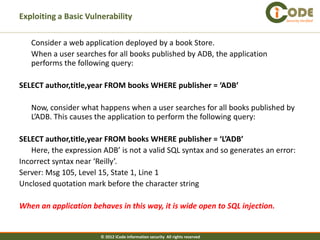
   When a user searches for all books published by ADB, the application
   performs the following query:

SELECT author,title,year FROM books WHERE publisher = ‘ADB’

   Now, consider what happens when a user searches for all books published by
   L’ADB. This causes the application to perform the following query:

SELECT author,title,year FROM books WHERE publisher = ‘L’ADB’
   Here, the expression ADB’ is not a valid SQL syntax and so generates an error:
Incorrect syntax near ‘Reilly’.
Server: Msg 105, Level 15, State 1, Line 1
Unclosed quotation mark before the character string

When an application behaves in this way, it is wide open to SQL injection.


                       © 2012 iCode information security All rights reserved
Exploiting a Basic Vulnerability                                                Security Verified


   The attacker can modify again the query to return every single book in the
   retailer’s catalog, by entering the search term:

ADB’ OR 1=1--

   This causes the application to perform the following query:

SELECT author,title,year FROM books WHERE publisher = ‘ADB’ OR 1=1--‘

   Because 1 is always equal to 1, the database will return every record within
   the books table.

    NOTE : The double hyphen “--” in SQL means that tells the rest of the line is
   a comment and should be ignored. In MySQL, you will need to include a
   space after the double hyphen “-- “, or use a hash “#” character to specify a
   comment.


                       © 2012 iCode information security All rights reserved
Bypassing a Login                                                                 Security Verified


   In some situations, a simple SQL injection vulnerability may have an immediately
   critical impact. Many applications that implement a forms-based login function use
   a database to store user credentials and perform a simple SQL query to validate
   each login attempt. A typical example of this query is:
SELECT * FROM users WHERE username = ‘marcus’ and password = ‘secret’

   An attacker can inject into either the username or the password field to modify the
   query. For example, if an attacker knows that the username of the application
   administrator is admin, he can log in as that user by supplying any password and
   the following username:
         admin’—

   This causes the application to perform the following query:
SELECT * FROM users WHERE username = ‘admin’--‘ AND password = ‘blablabla’
   which because of the comment symbol is equivalent to
SELECT * FROM users WHERE username = ‘admin’
   So the password check has been bypassed.

                         © 2012 iCode information security All rights reserved
Bypassing a Login                                                             Security Verified


Suppose that the attacker does not know the username of the administrator.
   - In most applications, the first account in the database is an administrative
   user, because this account is normally created manually and then used to
   generate all other accounts via the application.
   - Further, if the query returns the details for more than one user, most
   applications will simply process the first user whose details are returned.

   An attacker can often exploit this behavior to log in as the first user in the
   database by supplying the username:
         ‘ OR 1=1--
   This causes the application to perform the query
SELECT * FROM users WHERE username = ‘’ OR 1=1--‘ AND password = ‘blabla’
   which because of the comment symbol is equivalent to
SELECT * FROM users WHERE username = ‘’ OR 1=1


                        © 2012 iCode information security All rights reserved
Finding SQL Injection Bugs                                                     Security Verified


-   In the most obvious cases, a SQL injection flaw may be discovered and
    conclusively verified by supplying a single item of unexpected input to the
    application.

-   In other cases, bugs may be extremely subtle and may be difficult to
    distinguish from other categories of vulnerability or from benign
    anomalies that do not present any security threat.

    NOTE : In your application mapping exercises (see Chapter 4), you should
    have identified instances where the application appears to be accessing a
    back-end database, and all of these need to be probed for SQL injection
    flaws.
    This includes all URL parameters, cookies, items of POST data, and HTTP
    headers.


                       © 2012 iCode information security All rights reserved
Finding SQL Injection Bugs - String Data                                        Security Verified


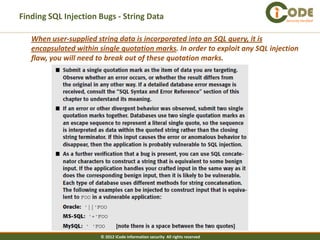
   When user-supplied string data is incorporated into an SQL query, it is
   encapsulated within single quotation marks. In order to exploit any SQL injection
   flaw, you will need to break out of these quotation marks.


                        © 2012 iCode information security All rights reserved
Finding SQL Injection Bugs - String Data                                                                Security Verified


   NOTE :
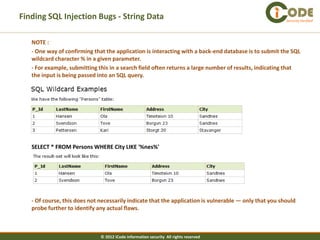
   - One way of confirming that the application is interacting with a back-end database is to submit the SQL
   wildcard character % in a given parameter.
   - For example, submitting this in a search field often returns a large number of results, indicating that
   the input is being passed into an SQL query.


   SELECT * FROM Persons WHERE City LIKE '%nes%'


   - Of course, this does not necessarily indicate that the application is vulnerable — only that you should
   probe further to identify any actual flaws.


                              © 2012 iCode information security All rights reserved
Finding SQL Injection Bugs – Numeric Data                                                              Security Verified


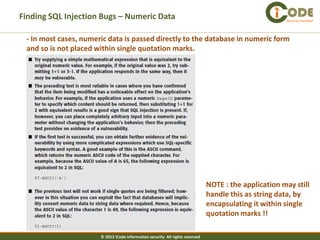
 - In most cases, numeric data is passed directly to the database in numeric form
 and so is not placed within single quotation marks.


                                                                               NOTE : the application may still
                                                                               handle this as string data, by
                                                                               encapsulating it within single
                                                                               quotation marks !!

                       © 2012 iCode information security All rights reserved
Finding SQL Injection Bugs – Numeric Data                                        Security Verified


These encodings are necessary whether you are editing the parameter’s value directly from
your browser, with an intercepting proxy, or through any other means. If you fail to encode
problem characters correctly, then you may invalidate the entire request, or submit data
that you did not intend to.
                           © 2012 iCode information security All rights reserved
Injecting into Different Statement Types - INSERT Statements                             Security Verified


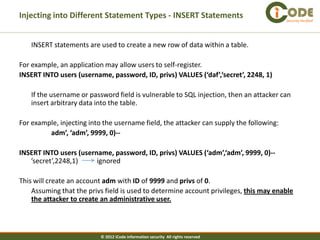
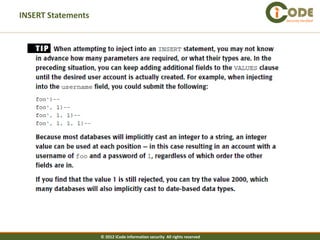
   INSERT statements are used to create a new row of data within a table.

For example, an application may allow users to self-register.
INSERT INTO users (username, password, ID, privs) VALUES (‘daf’,‘secret’, 2248, 1)

   If the username or password field is vulnerable to SQL injection, then an attacker can
   insert arbitrary data into the table.

For example, injecting into the username field, the attacker can supply the following:
         adm’, ‘adm’, 9999, 0)--

INSERT INTO users (username, password, ID, privs) VALUES (‘adm’,‘adm’, 9999, 0)--
   ’secret’,2248,1)     ignored

This will create an account adm with ID of 9999 and privs of 0.
    Assuming that the privs field is used to determine account privileges, this may enable
    the attacker to create an administrative user.


                           © 2012 iCode information security All rights reserved
INSERT Statements                                                           Security Verified


                    © 2012 iCode information security All rights reserved
UPDATE Statements                                                                 Security Verified


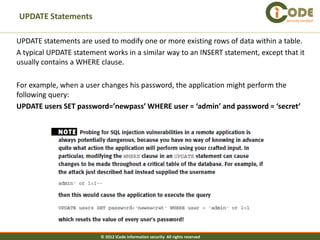
UPDATE statements are used to modify one or more existing rows of data within a table.
A typical UPDATE statement works in a similar way to an INSERT statement, except that it
usually contains a WHERE clause.

For example, when a user changes his password, the application might perform the
following query:
UPDATE users SET password=’newpass’ WHERE user = ‘admin’ and password = ‘secret’


                         © 2012 iCode information security All rights reserved
DELETE Statements                                                           Security Verified


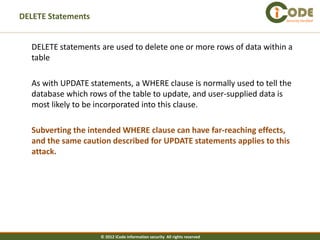
  DELETE statements are used to delete one or more rows of data within a
  table

  As with UPDATE statements, a WHERE clause is normally used to tell the
  database which rows of the table to update, and user-supplied data is
  most likely to be incorporated into this clause.

  Subverting the intended WHERE clause can have far-reaching effects,
  and the same caution described for UPDATE statements applies to this
  attack.


                    © 2012 iCode information security All rights reserved
The UNION Operator                                                                              Security Verified


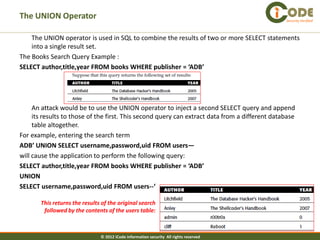
    The UNION operator is used in SQL to combine the results of two or more SELECT statements
    into a single result set.
The Books Search Query Example :
SELECT author,title,year FROM books WHERE publisher = ‘ADB’


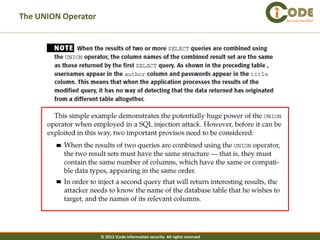
     An attack would be to use the UNION operator to inject a second SELECT query and append
     its results to those of the first. This second query can extract data from a different database
     table altogether.
For example, entering the search term
ADB’ UNION SELECT username,password,uid FROM users—
will cause the application to perform the following query:
SELECT author,title,year FROM books WHERE publisher = ‘ADB’
UNION
SELECT username,password,uid FROM users--‘

       This returns the results of the original search
        followed by the contents of the users table:


                               © 2012 iCode information security All rights reserved
The UNION Operator                                                           Security Verified


                     © 2012 iCode information security All rights reserved
The UNION Operator                                                                         Security Verified


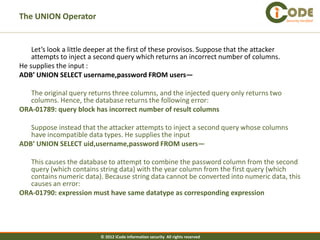
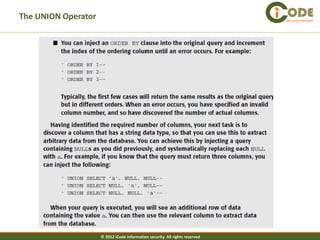
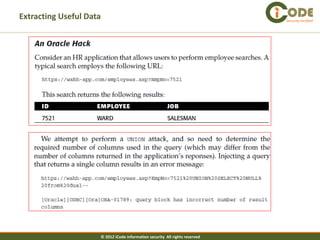
    Let’s look a little deeper at the first of these provisos. Suppose that the attacker
    attempts to inject a second query which returns an incorrect number of columns.
He supplies the input :
ADB’ UNION SELECT username,password FROM users—

   The original query returns three columns, and the injected query only returns two
   columns. Hence, the database returns the following error:
ORA-01789: query block has incorrect number of result columns

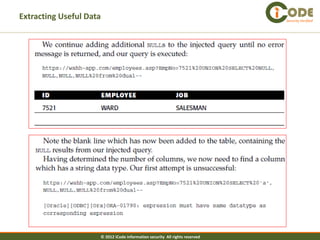
   Suppose instead that the attacker attempts to inject a second query whose columns
   have incompatible data types. He supplies the input
ADB’ UNION SELECT uid,username,password FROM users—

   This causes the database to attempt to combine the password column from the second
   query (which contains string data) with the year column from the first query (which
   contains numeric data). Because string data cannot be converted into numeric data, this
   causes an error:
ORA-01790: expression must have same datatype as corresponding expression


                           © 2012 iCode information security All rights reserved
The UNION Operator                                                           Security Verified


                     © 2012 iCode information security All rights reserved
The UNION Operator                                                           Security Verified


                     © 2012 iCode information security All rights reserved
The UNION Operator                                                           Security Verified


                     © 2012 iCode information security All rights reserved
The UNION Operator                                                            Security Verified


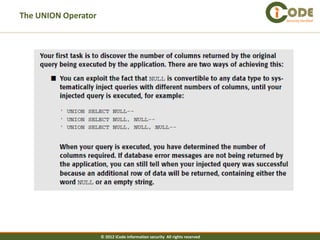
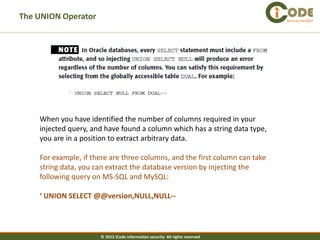
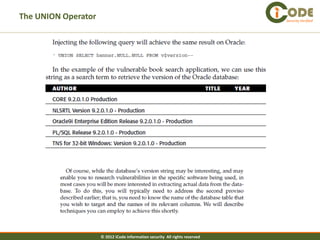
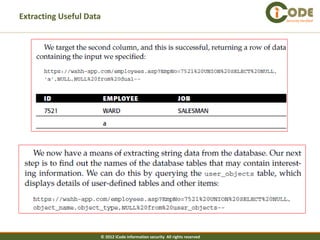
    When you have identified the number of columns required in your
    injected query, and have found a column which has a string data type,
    you are in a position to extract arbitrary data.

    For example, if there are three columns, and the first column can take
    string data, you can extract the database version by injecting the
    following query on MS-SQL and MySQL:

    ‘ UNION SELECT @@version,NULL,NULL--


                      © 2012 iCode information security All rights reserved
The UNION Operator                                                           Security Verified


                     © 2012 iCode information security All rights reserved
Fingerprinting the Database                                                         Security Verified


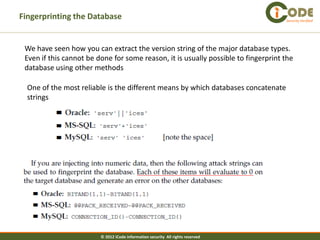
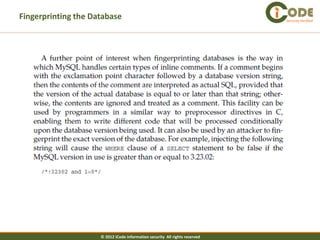
 We have seen how you can extract the version string of the major database types.
 Even if this cannot be done for some reason, it is usually possible to fingerprint the
 database using other methods

  One of the most reliable is the different means by which databases concatenate
  strings


                         © 2012 iCode information security All rights reserved
Fingerprinting the Database                                                  Security Verified


                     © 2012 iCode information security All rights reserved
Extracting Useful Data                                                       Security Verified


                     © 2012 iCode information security All rights reserved
Extracting Useful Data                                                       Security Verified


                     © 2012 iCode information security All rights reserved
Extracting Useful Data                                                       Security Verified


                     © 2012 iCode information security All rights reserved
Extracting Useful Data                                                       Security Verified


                     © 2012 iCode information security All rights reserved
Extracting Useful Data                                                       Security Verified


                     © 2012 iCode information security All rights reserved
Extracting Useful Data                                                       Security Verified


                     © 2012 iCode information security All rights reserved

Appsec SQL injection case study

  • 1.
    Application Security Security Verified Chapter 02 SQL INJECTION Mohamed Ridha Chebbi, CISSP Ridha.chebbi@icodesecurity.com © 2012 iCode information security All rights reserved
  • 2.
    Introduction Security Verified Almost every web application employs a database to store the various kinds of information that it needs in order to operate. For example, a web application deployed by an online retailer might use a database to store the following information: ■ User accounts, credentials, and personal information ■ Descriptions and prices of goods for sale ■ Orders, account statements, and payment details ■ The privileges of each user within the application The means of accessing information within the database is Structured Query Language, or SQL. SQL can be used to read, update, add, and delete information held within the database. © 2012 iCode information security All rights reserved
  • 3.
    Exploiting a BasicVulnerability Security Verified Consider a web application deployed by a book Store. When a user searches for all books published by ADB, the application performs the following query: SELECT author,title,year FROM books WHERE publisher = ‘ADB’ Now, consider what happens when a user searches for all books published by L’ADB. This causes the application to perform the following query: SELECT author,title,year FROM books WHERE publisher = ‘L’ADB’ Here, the expression ADB’ is not a valid SQL syntax and so generates an error: Incorrect syntax near ‘Reilly’. Server: Msg 105, Level 15, State 1, Line 1 Unclosed quotation mark before the character string When an application behaves in this way, it is wide open to SQL injection. © 2012 iCode information security All rights reserved
  • 4.
    Exploiting a BasicVulnerability Security Verified The attacker can modify again the query to return every single book in the retailer’s catalog, by entering the search term: ADB’ OR 1=1-- This causes the application to perform the following query: SELECT author,title,year FROM books WHERE publisher = ‘ADB’ OR 1=1--‘ Because 1 is always equal to 1, the database will return every record within the books table. NOTE : The double hyphen “--” in SQL means that tells the rest of the line is a comment and should be ignored. In MySQL, you will need to include a space after the double hyphen “-- “, or use a hash “#” character to specify a comment. © 2012 iCode information security All rights reserved
  • 5.
    Bypassing a Login Security Verified In some situations, a simple SQL injection vulnerability may have an immediately critical impact. Many applications that implement a forms-based login function use a database to store user credentials and perform a simple SQL query to validate each login attempt. A typical example of this query is: SELECT * FROM users WHERE username = ‘marcus’ and password = ‘secret’ An attacker can inject into either the username or the password field to modify the query. For example, if an attacker knows that the username of the application administrator is admin, he can log in as that user by supplying any password and the following username: admin’— This causes the application to perform the following query: SELECT * FROM users WHERE username = ‘admin’--‘ AND password = ‘blablabla’ which because of the comment symbol is equivalent to SELECT * FROM users WHERE username = ‘admin’ So the password check has been bypassed. © 2012 iCode information security All rights reserved
  • 6.
    Bypassing a Login Security Verified Suppose that the attacker does not know the username of the administrator. - In most applications, the first account in the database is an administrative user, because this account is normally created manually and then used to generate all other accounts via the application. - Further, if the query returns the details for more than one user, most applications will simply process the first user whose details are returned. An attacker can often exploit this behavior to log in as the first user in the database by supplying the username: ‘ OR 1=1-- This causes the application to perform the query SELECT * FROM users WHERE username = ‘’ OR 1=1--‘ AND password = ‘blabla’ which because of the comment symbol is equivalent to SELECT * FROM users WHERE username = ‘’ OR 1=1 © 2012 iCode information security All rights reserved
  • 7.
    Finding SQL InjectionBugs Security Verified - In the most obvious cases, a SQL injection flaw may be discovered and conclusively verified by supplying a single item of unexpected input to the application. - In other cases, bugs may be extremely subtle and may be difficult to distinguish from other categories of vulnerability or from benign anomalies that do not present any security threat. NOTE : In your application mapping exercises (see Chapter 4), you should have identified instances where the application appears to be accessing a back-end database, and all of these need to be probed for SQL injection flaws. This includes all URL parameters, cookies, items of POST data, and HTTP headers. © 2012 iCode information security All rights reserved
  • 8.
    Finding SQL InjectionBugs - String Data Security Verified When user-supplied string data is incorporated into an SQL query, it is encapsulated within single quotation marks. In order to exploit any SQL injection flaw, you will need to break out of these quotation marks. © 2012 iCode information security All rights reserved
  • 9.
    Finding SQL InjectionBugs - String Data Security Verified NOTE : - One way of confirming that the application is interacting with a back-end database is to submit the SQL wildcard character % in a given parameter. - For example, submitting this in a search field often returns a large number of results, indicating that the input is being passed into an SQL query. SELECT * FROM Persons WHERE City LIKE '%nes%' - Of course, this does not necessarily indicate that the application is vulnerable — only that you should probe further to identify any actual flaws. © 2012 iCode information security All rights reserved
  • 10.
    Finding SQL InjectionBugs – Numeric Data Security Verified - In most cases, numeric data is passed directly to the database in numeric form and so is not placed within single quotation marks. NOTE : the application may still handle this as string data, by encapsulating it within single quotation marks !! © 2012 iCode information security All rights reserved
  • 11.
    Finding SQL InjectionBugs – Numeric Data Security Verified These encodings are necessary whether you are editing the parameter’s value directly from your browser, with an intercepting proxy, or through any other means. If you fail to encode problem characters correctly, then you may invalidate the entire request, or submit data that you did not intend to. © 2012 iCode information security All rights reserved
  • 12.
    Injecting into DifferentStatement Types - INSERT Statements Security Verified INSERT statements are used to create a new row of data within a table. For example, an application may allow users to self-register. INSERT INTO users (username, password, ID, privs) VALUES (‘daf’,‘secret’, 2248, 1) If the username or password field is vulnerable to SQL injection, then an attacker can insert arbitrary data into the table. For example, injecting into the username field, the attacker can supply the following: adm’, ‘adm’, 9999, 0)-- INSERT INTO users (username, password, ID, privs) VALUES (‘adm’,‘adm’, 9999, 0)-- ’secret’,2248,1) ignored This will create an account adm with ID of 9999 and privs of 0. Assuming that the privs field is used to determine account privileges, this may enable the attacker to create an administrative user. © 2012 iCode information security All rights reserved
  • 13.
    INSERT Statements Security Verified © 2012 iCode information security All rights reserved
  • 14.
    UPDATE Statements Security Verified UPDATE statements are used to modify one or more existing rows of data within a table. A typical UPDATE statement works in a similar way to an INSERT statement, except that it usually contains a WHERE clause. For example, when a user changes his password, the application might perform the following query: UPDATE users SET password=’newpass’ WHERE user = ‘admin’ and password = ‘secret’ © 2012 iCode information security All rights reserved
  • 15.
    DELETE Statements Security Verified DELETE statements are used to delete one or more rows of data within a table As with UPDATE statements, a WHERE clause is normally used to tell the database which rows of the table to update, and user-supplied data is most likely to be incorporated into this clause. Subverting the intended WHERE clause can have far-reaching effects, and the same caution described for UPDATE statements applies to this attack. © 2012 iCode information security All rights reserved
  • 16.
    The UNION Operator Security Verified The UNION operator is used in SQL to combine the results of two or more SELECT statements into a single result set. The Books Search Query Example : SELECT author,title,year FROM books WHERE publisher = ‘ADB’ An attack would be to use the UNION operator to inject a second SELECT query and append its results to those of the first. This second query can extract data from a different database table altogether. For example, entering the search term ADB’ UNION SELECT username,password,uid FROM users— will cause the application to perform the following query: SELECT author,title,year FROM books WHERE publisher = ‘ADB’ UNION SELECT username,password,uid FROM users--‘ This returns the results of the original search followed by the contents of the users table: © 2012 iCode information security All rights reserved
  • 17.
    The UNION Operator Security Verified © 2012 iCode information security All rights reserved
  • 18.
    The UNION Operator Security Verified Let’s look a little deeper at the first of these provisos. Suppose that the attacker attempts to inject a second query which returns an incorrect number of columns. He supplies the input : ADB’ UNION SELECT username,password FROM users— The original query returns three columns, and the injected query only returns two columns. Hence, the database returns the following error: ORA-01789: query block has incorrect number of result columns Suppose instead that the attacker attempts to inject a second query whose columns have incompatible data types. He supplies the input ADB’ UNION SELECT uid,username,password FROM users— This causes the database to attempt to combine the password column from the second query (which contains string data) with the year column from the first query (which contains numeric data). Because string data cannot be converted into numeric data, this causes an error: ORA-01790: expression must have same datatype as corresponding expression © 2012 iCode information security All rights reserved
  • 19.
    The UNION Operator Security Verified © 2012 iCode information security All rights reserved
  • 20.
    The UNION Operator Security Verified © 2012 iCode information security All rights reserved
  • 21.
    The UNION Operator Security Verified © 2012 iCode information security All rights reserved
  • 22.
    The UNION Operator Security Verified When you have identified the number of columns required in your injected query, and have found a column which has a string data type, you are in a position to extract arbitrary data. For example, if there are three columns, and the first column can take string data, you can extract the database version by injecting the following query on MS-SQL and MySQL: ‘ UNION SELECT @@version,NULL,NULL-- © 2012 iCode information security All rights reserved
  • 23.
    The UNION Operator Security Verified © 2012 iCode information security All rights reserved
  • 24.
    Fingerprinting the Database Security Verified We have seen how you can extract the version string of the major database types. Even if this cannot be done for some reason, it is usually possible to fingerprint the database using other methods One of the most reliable is the different means by which databases concatenate strings © 2012 iCode information security All rights reserved
  • 25.
    Fingerprinting the Database Security Verified © 2012 iCode information security All rights reserved
  • 26.
    Extracting Useful Data Security Verified © 2012 iCode information security All rights reserved
  • 27.
    Extracting Useful Data Security Verified © 2012 iCode information security All rights reserved
  • 28.
    Extracting Useful Data Security Verified © 2012 iCode information security All rights reserved
  • 29.
    Extracting Useful Data Security Verified © 2012 iCode information security All rights reserved
  • 30.
    Extracting Useful Data Security Verified © 2012 iCode information security All rights reserved
  • 31.
    Extracting Useful Data Security Verified © 2012 iCode information security All rights reserved