Application
packaging
The factory
model approach.
Application packaging has numerous benefits in terms of the
management of applications for desktops, laptops and servers:
 Improved desktops, laptops and servers help minimize
cost / effort
 Lowered cost and increased Return On Investment (ROI)
on application management
 Reduced end user support cost – the same application can
be administered and deployed to multiple users
 Application and license management
 Effective tracking of application licenses and the number of
licenses being used in the organization
 Retirement of old versions, request for updates / upgrades
 Application inventory records – provides collective
information on applications deployed in different
business groups
 Application version control – ensures that the same version
of an application is distributed throughout the organization,
which reduces compatibility issues
 On demand installation – users can trigger installation
after the application is published, to users in a locked
down environment
 Minimize user / business disruption – automated
installation helps installing applications in the background
without interrupting or prompting the user
 Streamlines the deployment process to incorporate robust
self-repair and rollback capabilities
 Multi-platform support _ eg., Windows 7, Vista, XP, Windows
server and Windows terminal servers
Application virtualization on the other hand, is a new
packaging technology which, unlike the traditional MSI-based
packaging mechanism, decouples application from the
underlying Operating System (OS). Application virtualization
does not actually install the application to a local machine. It
executes applications in their own dedicated virtual environment
popularly known as the “bubble.” Since applications reside
in their dedicated bubbles, no two virtualized applications see
each other and conflicts between them are reduced.
Why does your enterprise need application packaging and virtualization?
Application management for desktops and servers is expensive and challenging for corporates.
This creates the need for revolutionary application management techniques such as application
packaging / re-packaging. More robust than the earlier ones, this technique enables enterprises
administer the environment more efficiently, with reduced end user support and minimal
business disruptions.
Minimize deployment cost with application
packaging strategy
Application packaging strategy helps enterprises reduce their
administrative / support cost and standardize the environment
by maintaining corporate standards / processes. This enables
easy installation / configuration / upgrade / patches with less
administrative support.
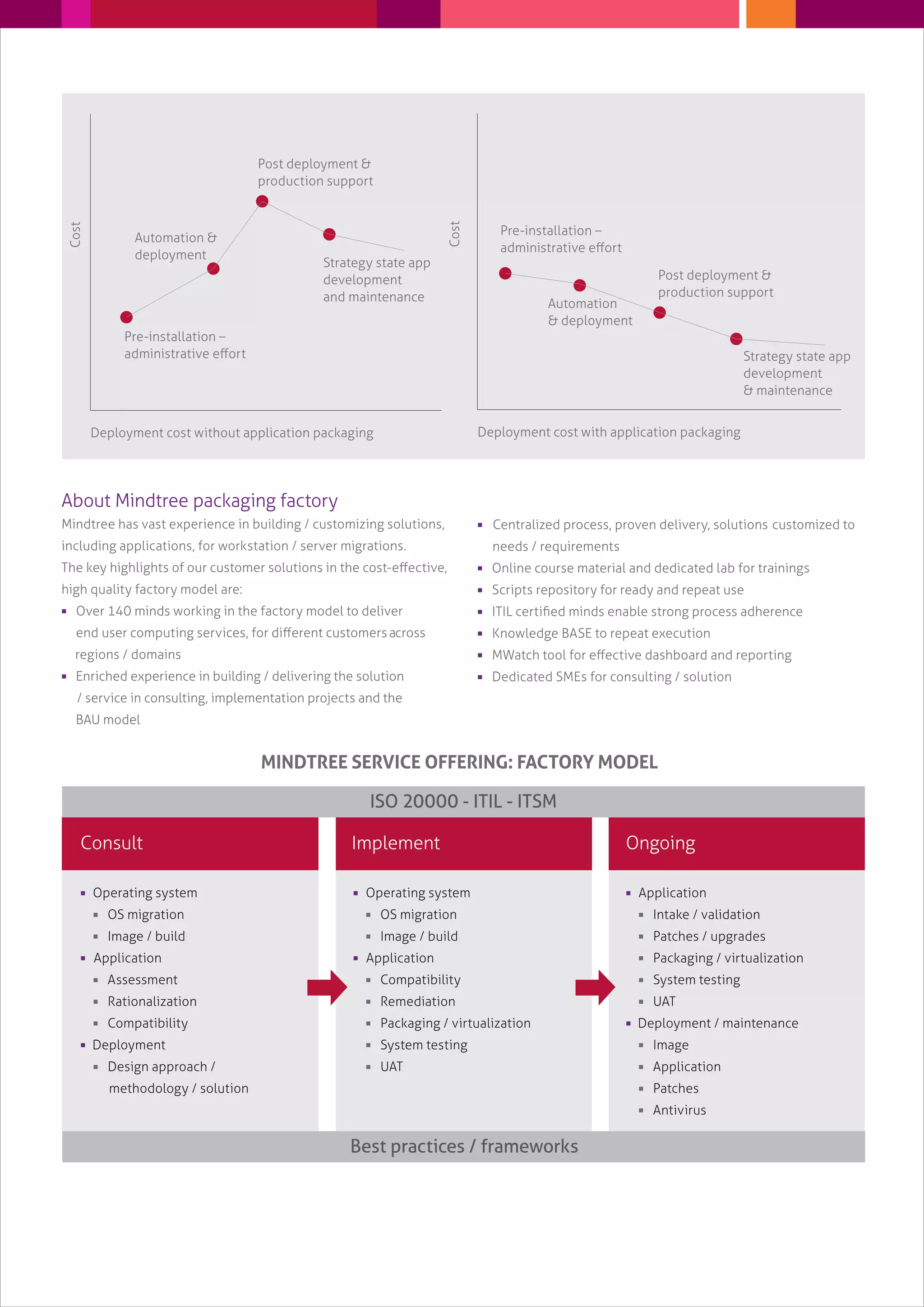
The figures show the cost benefits and administrative support
effort between the implementation of pre-packaging and
post-packaging. The figures might change based on their
environment / process / standards / implementation on software
life cycle management.
Advantages of application virtualization
over traditional application packaging:
 No installation required, thus no more conflict between
the application and the OS
 Supports multiple runtime environments based on
application requirement
 Supports multiple versions of the same
application concurrently
 Improved security – virtualized apps are isolated
from the OS and from each other to prevent
malware from easily infecting other parts of the system
 Lower cost for migrations and upgrades
 Accelerates application deployment, through on demand
application streaming
Pre-installation _
administrative effort
Pre-installation _
administrative effort
Deployment cost without application packaging
Cost
Automation &
deployment
Automation
& deployment
Post deployment &
production support
Post deployment &
production support
Strategy state app
development
and maintenance
Strategy state app
development
& maintenance
Deployment cost with application packaging
Cost
About Mindtree packaging factory
Mindtree has vast experience in building / customizing solutions,
including applications, for workstation / server migrations.
The key highlights of our customer solutions in the cost-effective,
high quality factory model are:
 Over 140 minds working in the factory model to deliver
end user computing services, for different customersacross
regions / domains
 Enriched experience in building / delivering the solution
/ service in consulting, implementation projects and the
BAU model
 Centralized process, proven delivery, solutions customized to
needs / requirements
 Online course material and dedicated lab for trainings
 Scripts repository for ready and repeat use
 ITIL certified minds enable strong process adherence
 Knowledge BASE to repeat execution
 MWatch tool for effective dashboard and reporting
 Dedicated SMEs for consulting / solution
 Operating system
 OS migration
 Image / build
 Application
 Assessment
 Rationalization
 Compatibility
 Deployment
 Design approach /
methodology / solution
Implement
 Operating system
 OS migration
 Image / build
 Application
 Compatibility
 Remediation
 Packaging / virtualization
 System testing
 UAT
Ongoing
 Application
 Intake / validation
 Patches / upgrades
 Packaging / virtualization
 System testing
 UAT
 Deployment / maintenance
 Image
 Application
 Patches
 Antivirus
Consult
MINDTREE SERVICE OFFERING: FACTORY MODEL
ISO 20000 - ITIL - ITSM
Best practices / frameworks
www.mindtree.com
Why Mindtree
 Breadth of service – Mindtree addresses infrastructure,
operating system, applications, packaged and custom
applications, consulting and ongoing management services
 Expertise and experience in handling project and SLA-based
migration projects
 Flexibility – cited by existing customers as one of the main
reasons they choose to work with Mindtree
Capabilities
 Best industry practices and framework
 Over 100 engineers with ITIL certification
 Strong technical SMEs
 Change BASE certified engineers
 Ability to meet stringent customer migration schedules
 Proven high CSATs
 Reusable scripts / central knowledge BASE
 Project managers / program managers with vast
domain expertise
 Readymade standards / process documents for quick adoption
by customers
 ITIL / ISO20K process adherence / compliance
 Factory model approach
 In-house MWatch tool for tracking / dashboard
Partners
 Gold certified partnership with Microsoft
 Strategic partnership with ChangeBASE
Cost drivers
 Tools
 Complexity / priority
 Volume
 Link and bandwidth
 Service window (multi-geo)
 DR site
 ODC setup (customer specific if needed)
Consulting team
Centre of excellence Governance framework Project execution methodology
Assesment OS migration Application
migration
Intake
validation
Customer A
Virtualization
/ packaging
Customer B Customer C
System testing
/ UAT
Deployment
Client A, B, C
FACTORY AS A SERVICE MODEL
Intake / validation / compatibility
Remediation / packaging / virtualization
System test / UAT
Workflowtool
OnshoreOffshore
Migration team
operation system
Migration team
applications
Deployment
Team member Technical
co-ordinator

Application packaging - The factory model approach.

  • 1.
  • 2.
    Application packaging hasnumerous benefits in terms of the management of applications for desktops, laptops and servers:  Improved desktops, laptops and servers help minimize cost / effort  Lowered cost and increased Return On Investment (ROI) on application management  Reduced end user support cost – the same application can be administered and deployed to multiple users  Application and license management  Effective tracking of application licenses and the number of licenses being used in the organization  Retirement of old versions, request for updates / upgrades  Application inventory records – provides collective information on applications deployed in different business groups  Application version control – ensures that the same version of an application is distributed throughout the organization, which reduces compatibility issues  On demand installation – users can trigger installation after the application is published, to users in a locked down environment  Minimize user / business disruption – automated installation helps installing applications in the background without interrupting or prompting the user  Streamlines the deployment process to incorporate robust self-repair and rollback capabilities  Multi-platform support _ eg., Windows 7, Vista, XP, Windows server and Windows terminal servers Application virtualization on the other hand, is a new packaging technology which, unlike the traditional MSI-based packaging mechanism, decouples application from the underlying Operating System (OS). Application virtualization does not actually install the application to a local machine. It executes applications in their own dedicated virtual environment popularly known as the “bubble.” Since applications reside in their dedicated bubbles, no two virtualized applications see each other and conflicts between them are reduced. Why does your enterprise need application packaging and virtualization? Application management for desktops and servers is expensive and challenging for corporates. This creates the need for revolutionary application management techniques such as application packaging / re-packaging. More robust than the earlier ones, this technique enables enterprises administer the environment more efficiently, with reduced end user support and minimal business disruptions. Minimize deployment cost with application packaging strategy Application packaging strategy helps enterprises reduce their administrative / support cost and standardize the environment by maintaining corporate standards / processes. This enables easy installation / configuration / upgrade / patches with less administrative support. The figures show the cost benefits and administrative support effort between the implementation of pre-packaging and post-packaging. The figures might change based on their environment / process / standards / implementation on software life cycle management. Advantages of application virtualization over traditional application packaging:  No installation required, thus no more conflict between the application and the OS  Supports multiple runtime environments based on application requirement  Supports multiple versions of the same application concurrently  Improved security – virtualized apps are isolated from the OS and from each other to prevent malware from easily infecting other parts of the system  Lower cost for migrations and upgrades  Accelerates application deployment, through on demand application streaming
  • 3.
    Pre-installation _ administrative effort Pre-installation_ administrative effort Deployment cost without application packaging Cost Automation & deployment Automation & deployment Post deployment & production support Post deployment & production support Strategy state app development and maintenance Strategy state app development & maintenance Deployment cost with application packaging Cost About Mindtree packaging factory Mindtree has vast experience in building / customizing solutions, including applications, for workstation / server migrations. The key highlights of our customer solutions in the cost-effective, high quality factory model are:  Over 140 minds working in the factory model to deliver end user computing services, for different customersacross regions / domains  Enriched experience in building / delivering the solution / service in consulting, implementation projects and the BAU model  Centralized process, proven delivery, solutions customized to needs / requirements  Online course material and dedicated lab for trainings  Scripts repository for ready and repeat use  ITIL certified minds enable strong process adherence  Knowledge BASE to repeat execution  MWatch tool for effective dashboard and reporting  Dedicated SMEs for consulting / solution  Operating system  OS migration  Image / build  Application  Assessment  Rationalization  Compatibility  Deployment  Design approach / methodology / solution Implement  Operating system  OS migration  Image / build  Application  Compatibility  Remediation  Packaging / virtualization  System testing  UAT Ongoing  Application  Intake / validation  Patches / upgrades  Packaging / virtualization  System testing  UAT  Deployment / maintenance  Image  Application  Patches  Antivirus Consult MINDTREE SERVICE OFFERING: FACTORY MODEL ISO 20000 - ITIL - ITSM Best practices / frameworks
  • 4.
    www.mindtree.com Why Mindtree  Breadthof service – Mindtree addresses infrastructure, operating system, applications, packaged and custom applications, consulting and ongoing management services  Expertise and experience in handling project and SLA-based migration projects  Flexibility – cited by existing customers as one of the main reasons they choose to work with Mindtree Capabilities  Best industry practices and framework  Over 100 engineers with ITIL certification  Strong technical SMEs  Change BASE certified engineers  Ability to meet stringent customer migration schedules  Proven high CSATs  Reusable scripts / central knowledge BASE  Project managers / program managers with vast domain expertise  Readymade standards / process documents for quick adoption by customers  ITIL / ISO20K process adherence / compliance  Factory model approach  In-house MWatch tool for tracking / dashboard Partners  Gold certified partnership with Microsoft  Strategic partnership with ChangeBASE Cost drivers  Tools  Complexity / priority  Volume  Link and bandwidth  Service window (multi-geo)  DR site  ODC setup (customer specific if needed) Consulting team Centre of excellence Governance framework Project execution methodology Assesment OS migration Application migration Intake validation Customer A Virtualization / packaging Customer B Customer C System testing / UAT Deployment Client A, B, C FACTORY AS A SERVICE MODEL Intake / validation / compatibility Remediation / packaging / virtualization System test / UAT Workflowtool OnshoreOffshore Migration team operation system Migration team applications Deployment Team member Technical co-ordinator