App Extension
2014/6/20

@TachibanaKaoru
この書類は、Apple社が公開している情報を
もとに作成しています。
Agenda
• About
• What is App Extension
• How to make App Extension
• How to share data Container and Extension
• App Group and Shared Container
• How to share codes between Container and Extension
• Information
About
• @TachibanaKaoru
• 渋谷のgenesix(VOYAGE GROUP)という会社で iOS
エンジニアをしています。
• Blog : http://www.toyship.org/
• WWDCの参加は2010が最後でした。
• それ以来行けていません……。
What is App Extension
• iOS8から導入された、アプリ間の連携の仕組み。
• それに加え、Notification Centerに表示するWidget機
能やサードパーティ製キーボードも含まれています
• 今日はそれぞれのApp Extensionの詳細には踏み込ま
ず、App Extension全体に関連する項目を中心にすすめ
ます
What is App Extension
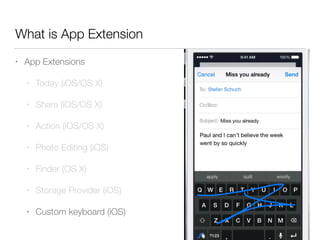
• App Extensions
• Today (iOS/OS X)
• Share (iOS/OS X)
• Action (iOS/OS X)
• Photo Editing (iOS)
• Finder (OS X)
• Storage Provider (iOS)
• Custom keyboard (iOS)
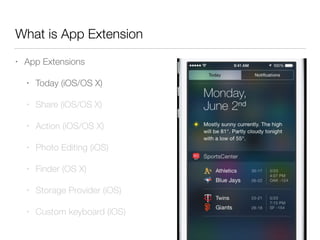
What is App Extension
• App Extensions
• Today (iOS/OS X)
• Share (iOS/OS X)
• Action (iOS/OS X)
• Photo Editing (iOS)
• Finder (OS X)
• Storage Provider (iOS)
• Custom keyboard (iOS)
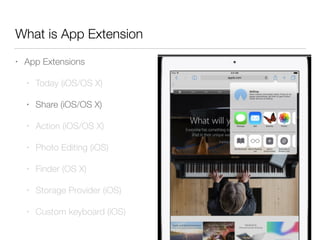
What is App Extension
• App Extensions
• Today (iOS/OS X)
• Share (iOS/OS X)
• Action (iOS/OS X)
• Photo Editing (iOS)
• Finder (OS X)
• Storage Provider (iOS)
• Custom keyboard (iOS)
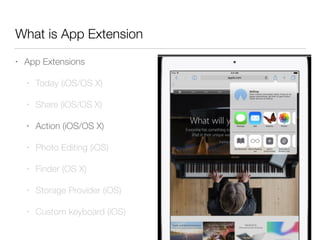
What is App Extension
• App Extensions
• Today (iOS/OS X)
• Share (iOS/OS X)
• Action (iOS/OS X)
• Photo Editing (iOS)
• Finder (OS X)
• Storage Provider (iOS)
• Custom keyboard (iOS)
What is App Extension
• App Extensions
• Today (iOS/OS X)
• Share (iOS/OS X)
• Action (iOS/OS X)
• Photo Editing (iOS)
• Finder (OS X)
• Storage Provider (iOS)
• Custom keyboard (iOS)
How to make App Extension
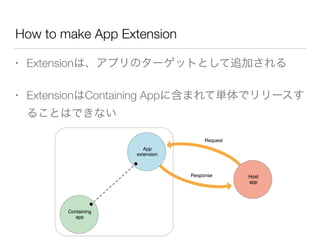
• Extensionは、アプリのターゲットとして追加される
• ExtensionはContaining Appに含まれて単体でリリースす
ることはできない
How to make App Extension
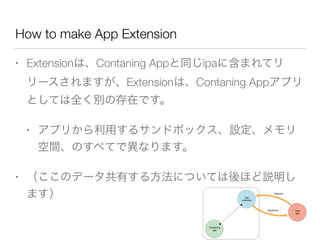
• Extensionは、Contaning Appと同じipaに含まれてリ
リースされますが、Extensionは、Contaning Appアプリ
としては全く別の存在です。
• アプリから利用するサンドボックス、設定、メモリ
空間、のすべてで異なります。
• (ここのデータ共有する方法については後ほど説明し
ます)
How to make App Extension
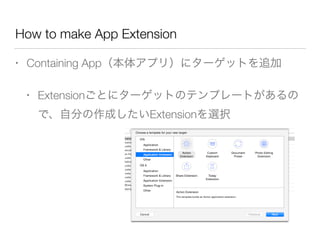
• Containing App(本体アプリ)にターゲットを追加
• Extensionごとにターゲットのテンプレートがあるの
で、自分の作成したいExtensionを選択
How to make App Extension
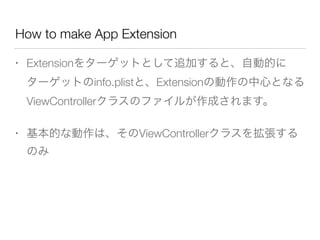
• Extensionをターゲットとして追加すると、自動的に
ターゲットのinfo.plistと、Extensionの動作の中心となる
ViewControllerクラスのファイルが作成されます。
• 基本的な動作は、そのViewControllerクラスを拡張する
のみ
How to make App Extension
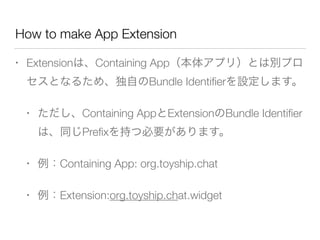
• Extensionは、Containing App(本体アプリ)とは別プロ
セスとなるため、独自のBundle Identifierを設定します。
• ただし、Containing AppとExtensionのBundle Identifier
は、同じPrefixを持つ必要があります。
• 例:Containing App: org.toyship.chat
• 例:Extension:org.toyship.chat.widget
How to make App Extension
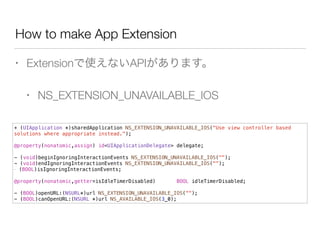
• Extensionで使えないAPIがあります。
• NS_EXTENSION_UNAVAILABLE_IOS
+ (UIApplication *)sharedApplication NS_EXTENSION_UNAVAILABLE_IOS("Use view controller based
solutions where appropriate instead.");
!
@property(nonatomic,assign) id<UIApplicationDelegate> delegate;
!
- (void)beginIgnoringInteractionEvents NS_EXTENSION_UNAVAILABLE_IOS("");
- (void)endIgnoringInteractionEvents NS_EXTENSION_UNAVAILABLE_IOS("");
- (BOOL)isIgnoringInteractionEvents;
!
@property(nonatomic,getter=isIdleTimerDisabled) BOOL idleTimerDisabled;
!
- (BOOL)openURL:(NSURL*)url NS_EXTENSION_UNAVAILABLE_IOS("");
- (BOOL)canOpenURL:(NSURL *)url NS_AVAILABLE_IOS(3_0);
How to make App Extension
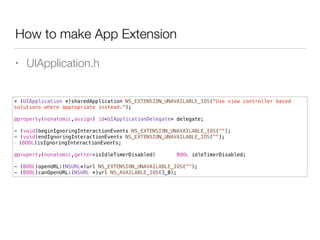
• UIApplication.h
+ (UIApplication *)sharedApplication NS_EXTENSION_UNAVAILABLE_IOS("Use view controller based
solutions where appropriate instead.");
!
@property(nonatomic,assign) id<UIApplicationDelegate> delegate;
!
- (void)beginIgnoringInteractionEvents NS_EXTENSION_UNAVAILABLE_IOS("");
- (void)endIgnoringInteractionEvents NS_EXTENSION_UNAVAILABLE_IOS("");
- (BOOL)isIgnoringInteractionEvents;
!
@property(nonatomic,getter=isIdleTimerDisabled) BOOL idleTimerDisabled;
!
- (BOOL)openURL:(NSURL*)url NS_EXTENSION_UNAVAILABLE_IOS("");
- (BOOL)canOpenURL:(NSURL *)url NS_AVAILABLE_IOS(3_0);
How to make App Extension
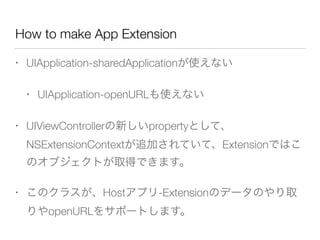
• UIApplication-sharedApplicationが使えない
• UIApplication-openURLも使えない
• UIViewControllerの新しいpropertyとして、
NSExtensionContextが追加されていて、Extensionではこ
のオブジェクトが取得できます。
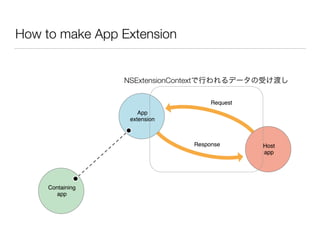
• このクラスが、Hostアプリ-Extensionのデータのやり取
りやopenURLをサポートします。
How to make App Extension
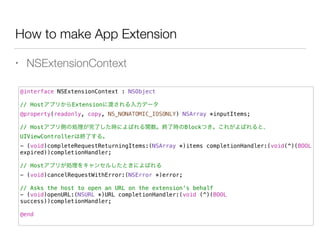
• NSExtensionContext
@interface NSExtensionContext : NSObject
!
// HostアプリからExtensionに渡される入力データ
@property(readonly, copy, NS_NONATOMIC_IOSONLY) NSArray *inputItems;
!
// Hostアプリ側の処理が完了した時によばれる関数。終了時のBlockつき。これがよばれると、
UIViewControllerは終了する。
- (void)completeRequestReturningItems:(NSArray *)items completionHandler:(void(^)(BOOL
expired))completionHandler;
!
// Hostアプリが処理をキャンセルしたときによばれる
- (void)cancelRequestWithError:(NSError *)error;
!
// Asks the host to open an URL on the extension's behalf
- (void)openURL:(NSURL *)URL completionHandler:(void (^)(BOOL
success))completionHandler;
!
@end
How to make App Extension
NSExtensionContextで行われるデータの受け渡し
How to make App Extension
• Extension内でNSExtensionContext経由でopenURLを実
行
- (IBAction)openSomething:(id)sender {
[self.extensionContext
openURL:[NSURL URLWithString:@"http://www.apple.com/"]
completionHandler:nil];
!
}
How to make App Extension - Today
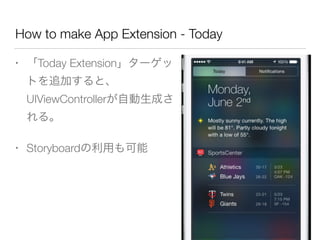
• 「Today Extension」ターゲッ
トを追加すると、
UIViewControllerが自動生成さ
れる。
• Storyboardの利用も可能
How to make App Extension - Today
• Today Extensionでは、表示領域が制限される
• Widgetの縦サイズを変更することは可能だが、デバイ
スの縦サイズが上限となっている
• UIScrollViewはおくべきでない
• Today Extensionではキーボード入力が不可となっている
ため、touch/gestureイベントのみで操作できるように実
装する
How to make App Extension - Share
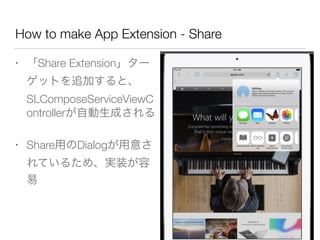
• 「Share Extension」ター
ゲットを追加すると、
SLComposeServiceViewC
ontrollerが自動生成される
• Share用のDialogが用意さ
れているため、実装が容
易
How to make App Extension - Keyboard
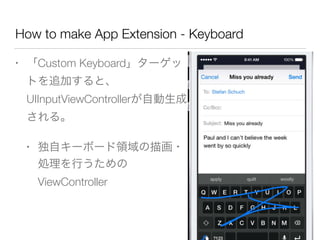
• 「Custom Keyboard」ターゲッ
トを追加すると、
UIInputViewControllerが自動生成
される。
• 独自キーボード領域の描画・
処理を行うための
ViewController
How to make App Extension - Keyboard
• UIInputViewControllerで、独自キーを設定
- (void)viewDidLoad {
[super viewDidLoad];
// 独自キーボードボタンを設定する。
UIButton* button = [UIButton buttonWithType:UIButtonTypeCustom];
button.frame = CGRectMake(0, 0, 100, 100);
[button addTarget:self action:@selector(inputSomething:)
forControlEvents:UIControlEventTouchUpInside];
[self.view addSubview:button];
// 「次のキーボードへ」ボタンを設定する。
self.nextKeyboardButton = [UIButton buttonWithType:UIButtonTypeSystem];
[self.nextKeyboardButton setTitle:NSLocalizedString(@"Next Keyboard", @"Title for
'Next Keyboard' button") forState:UIControlStateNormal];
[self.nextKeyboardButton sizeToFit];
self.nextKeyboardButton.translatesAutoresizingMaskIntoConstraints = NO;
[self.nextKeyboardButton addTarget:self action:@selector(advanceToNextInputMode)
forControlEvents:UIControlEventTouchUpInside];
[self.view addSubview:self.nextKeyboardButton];
}
How to make App Extension - Keyboard
• 文字入力はUIInputViewControllerのtextDocumentProxy
メンバー経由で実行する
-(void)inputSomething:(id)sender{
// 好きな文字を入力する
[self.textDocumentProxy insertText:@"🍎 "];
}
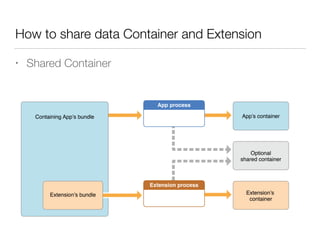
How to share data Container and Extension
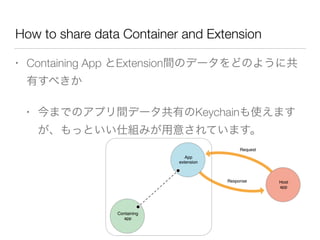
• Containing App とExtension間のデータをどのように共
有すべきか
• 今までのアプリ間データ共有のKeychainも使えます
が、もっといい仕組みが用意されています。
How to share data Container and Extension
• Shared Container
App Group and Shared Container
• App Groupとは
• iOS8から導入された、アプリ間のデータ共有システ
ム
• App Groupを設定することによって、Shared
Containerが利用可能となる
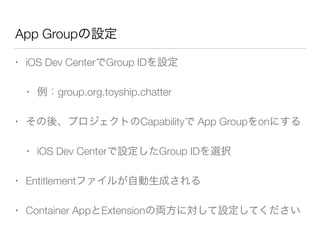
App Groupの設定
• iOS Dev CenterでGroup IDを設定
• 例:group.org.toyship.chatter
• その後、プロジェクトのCapabilityで App Groupをonにする
• iOS Dev Centerで設定したGroup IDを選択
• Entitlementファイルが自動生成される
• Container AppとExtensionの両方に対して設定してください
App Group and NSUserDefaults
• App Group設定後、NSUserDafaultsでsharedDefaultsが
利用可能となる
NSUserDefaults *sharedDefaults = [[NSUserDefaults alloc]
initWithSuiteName:@"group.org.toyship.kaomoji"];
NSString* strValue = [sharedDefaults valueForKey:@"Neko"];
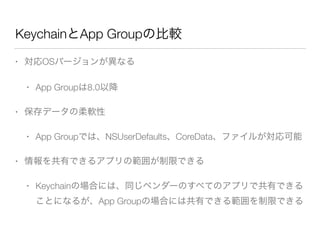
KeychainとApp Groupの比較
• 対応OSバージョンが異なる
• App Groupは8.0以降
• 保存データの柔軟性
• App Groupでは、NSUserDefaults、CoreData、ファイルが対応可能
• 情報を共有できるアプリの範囲が制限できる
• Keychainの場合には、同じベンダーのすべてのアプリで共有できる
ことになるが、App Groupの場合には共有できる範囲を制限できる
How to share codes between Container and
Extension
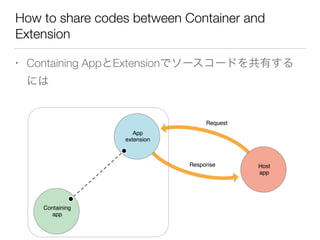
• Containing AppとExtensionでソースコードを共有する
には
How to share codes between Container and
Extension
• 共用のフレームワークとして、Embedded Frameworks
を作ることができる。
• ただし、このフレームワークはContainer Appと
Extensionの間の共有しかできず、他のアプリなどで
は使えない。
• Extensionで使えないコードはEmbedded Frameworks
の中でも使えない。
Information
• Extensionは、現時点ではまだ不安定な点もあり、実装
をすすめる際にはそれに留意する必要があります
Information - NSLog
• Extensionは別プロセスになっており、DebuggerがAttach
Processできていないため、NSLogが出力されない
• 下記の情報では成功した人もいるようです
• http://stackoverflow.com/questions/24031612/how-to-
debug-ios-8-extensions-with-nslog?rq=1
!
Information - Notify to users
• 実際にExtension実装をしても、ユーザー環境でonにさ
れないとExtensionが使われない。
• on/offの設定がわかりにくく、せっかくExtensionを実
装してもユーザーに気がついてもらえない可能性が
ある。
Fin

App extension for iOS

  • 1.
  • 2.
  • 3.
    Agenda • About • Whatis App Extension • How to make App Extension • How to share data Container and Extension • App Group and Shared Container • How to share codes between Container and Extension • Information
  • 4.
    About • @TachibanaKaoru • 渋谷のgenesix(VOYAGEGROUP)という会社で iOS エンジニアをしています。 • Blog : http://www.toyship.org/ • WWDCの参加は2010が最後でした。 • それ以来行けていません……。
  • 5.
    What is AppExtension • iOS8から導入された、アプリ間の連携の仕組み。 • それに加え、Notification Centerに表示するWidget機 能やサードパーティ製キーボードも含まれています • 今日はそれぞれのApp Extensionの詳細には踏み込ま ず、App Extension全体に関連する項目を中心にすすめ ます
  • 6.
    What is AppExtension • App Extensions • Today (iOS/OS X) • Share (iOS/OS X) • Action (iOS/OS X) • Photo Editing (iOS) • Finder (OS X) • Storage Provider (iOS) • Custom keyboard (iOS)
  • 7.
    What is AppExtension • App Extensions • Today (iOS/OS X) • Share (iOS/OS X) • Action (iOS/OS X) • Photo Editing (iOS) • Finder (OS X) • Storage Provider (iOS) • Custom keyboard (iOS)
  • 8.
    What is AppExtension • App Extensions • Today (iOS/OS X) • Share (iOS/OS X) • Action (iOS/OS X) • Photo Editing (iOS) • Finder (OS X) • Storage Provider (iOS) • Custom keyboard (iOS)
  • 9.
    What is AppExtension • App Extensions • Today (iOS/OS X) • Share (iOS/OS X) • Action (iOS/OS X) • Photo Editing (iOS) • Finder (OS X) • Storage Provider (iOS) • Custom keyboard (iOS)
  • 10.
    What is AppExtension • App Extensions • Today (iOS/OS X) • Share (iOS/OS X) • Action (iOS/OS X) • Photo Editing (iOS) • Finder (OS X) • Storage Provider (iOS) • Custom keyboard (iOS)
  • 11.
    How to makeApp Extension • Extensionは、アプリのターゲットとして追加される • ExtensionはContaining Appに含まれて単体でリリースす ることはできない
  • 12.
    How to makeApp Extension • Extensionは、Contaning Appと同じipaに含まれてリ リースされますが、Extensionは、Contaning Appアプリ としては全く別の存在です。 • アプリから利用するサンドボックス、設定、メモリ 空間、のすべてで異なります。 • (ここのデータ共有する方法については後ほど説明し ます)
  • 13.
    How to makeApp Extension • Containing App(本体アプリ)にターゲットを追加 • Extensionごとにターゲットのテンプレートがあるの で、自分の作成したいExtensionを選択
  • 14.
    How to makeApp Extension • Extensionをターゲットとして追加すると、自動的に ターゲットのinfo.plistと、Extensionの動作の中心となる ViewControllerクラスのファイルが作成されます。 • 基本的な動作は、そのViewControllerクラスを拡張する のみ
  • 15.
    How to makeApp Extension • Extensionは、Containing App(本体アプリ)とは別プロ セスとなるため、独自のBundle Identifierを設定します。 • ただし、Containing AppとExtensionのBundle Identifier は、同じPrefixを持つ必要があります。 • 例:Containing App: org.toyship.chat • 例:Extension:org.toyship.chat.widget
  • 16.
    How to makeApp Extension • Extensionで使えないAPIがあります。 • NS_EXTENSION_UNAVAILABLE_IOS + (UIApplication *)sharedApplication NS_EXTENSION_UNAVAILABLE_IOS("Use view controller based solutions where appropriate instead."); ! @property(nonatomic,assign) id<UIApplicationDelegate> delegate; ! - (void)beginIgnoringInteractionEvents NS_EXTENSION_UNAVAILABLE_IOS(""); - (void)endIgnoringInteractionEvents NS_EXTENSION_UNAVAILABLE_IOS(""); - (BOOL)isIgnoringInteractionEvents; ! @property(nonatomic,getter=isIdleTimerDisabled) BOOL idleTimerDisabled; ! - (BOOL)openURL:(NSURL*)url NS_EXTENSION_UNAVAILABLE_IOS(""); - (BOOL)canOpenURL:(NSURL *)url NS_AVAILABLE_IOS(3_0);
  • 17.
    How to makeApp Extension • UIApplication.h + (UIApplication *)sharedApplication NS_EXTENSION_UNAVAILABLE_IOS("Use view controller based solutions where appropriate instead."); ! @property(nonatomic,assign) id<UIApplicationDelegate> delegate; ! - (void)beginIgnoringInteractionEvents NS_EXTENSION_UNAVAILABLE_IOS(""); - (void)endIgnoringInteractionEvents NS_EXTENSION_UNAVAILABLE_IOS(""); - (BOOL)isIgnoringInteractionEvents; ! @property(nonatomic,getter=isIdleTimerDisabled) BOOL idleTimerDisabled; ! - (BOOL)openURL:(NSURL*)url NS_EXTENSION_UNAVAILABLE_IOS(""); - (BOOL)canOpenURL:(NSURL *)url NS_AVAILABLE_IOS(3_0);
  • 18.
    How to makeApp Extension • UIApplication-sharedApplicationが使えない • UIApplication-openURLも使えない • UIViewControllerの新しいpropertyとして、 NSExtensionContextが追加されていて、Extensionではこ のオブジェクトが取得できます。 • このクラスが、Hostアプリ-Extensionのデータのやり取 りやopenURLをサポートします。
  • 19.
    How to makeApp Extension • NSExtensionContext @interface NSExtensionContext : NSObject ! // HostアプリからExtensionに渡される入力データ @property(readonly, copy, NS_NONATOMIC_IOSONLY) NSArray *inputItems; ! // Hostアプリ側の処理が完了した時によばれる関数。終了時のBlockつき。これがよばれると、 UIViewControllerは終了する。 - (void)completeRequestReturningItems:(NSArray *)items completionHandler:(void(^)(BOOL expired))completionHandler; ! // Hostアプリが処理をキャンセルしたときによばれる - (void)cancelRequestWithError:(NSError *)error; ! // Asks the host to open an URL on the extension's behalf - (void)openURL:(NSURL *)URL completionHandler:(void (^)(BOOL success))completionHandler; ! @end
  • 20.
    How to makeApp Extension NSExtensionContextで行われるデータの受け渡し
  • 21.
    How to makeApp Extension • Extension内でNSExtensionContext経由でopenURLを実 行 - (IBAction)openSomething:(id)sender { [self.extensionContext openURL:[NSURL URLWithString:@"http://www.apple.com/"] completionHandler:nil]; ! }
  • 22.
    How to makeApp Extension - Today • 「Today Extension」ターゲッ トを追加すると、 UIViewControllerが自動生成さ れる。 • Storyboardの利用も可能
  • 23.
    How to makeApp Extension - Today • Today Extensionでは、表示領域が制限される • Widgetの縦サイズを変更することは可能だが、デバイ スの縦サイズが上限となっている • UIScrollViewはおくべきでない • Today Extensionではキーボード入力が不可となっている ため、touch/gestureイベントのみで操作できるように実 装する
  • 24.
    How to makeApp Extension - Share • 「Share Extension」ター ゲットを追加すると、 SLComposeServiceViewC ontrollerが自動生成される • Share用のDialogが用意さ れているため、実装が容 易
  • 25.
    How to makeApp Extension - Keyboard • 「Custom Keyboard」ターゲッ トを追加すると、 UIInputViewControllerが自動生成 される。 • 独自キーボード領域の描画・ 処理を行うための ViewController
  • 26.
    How to makeApp Extension - Keyboard • UIInputViewControllerで、独自キーを設定 - (void)viewDidLoad { [super viewDidLoad]; // 独自キーボードボタンを設定する。 UIButton* button = [UIButton buttonWithType:UIButtonTypeCustom]; button.frame = CGRectMake(0, 0, 100, 100); [button addTarget:self action:@selector(inputSomething:) forControlEvents:UIControlEventTouchUpInside]; [self.view addSubview:button]; // 「次のキーボードへ」ボタンを設定する。 self.nextKeyboardButton = [UIButton buttonWithType:UIButtonTypeSystem]; [self.nextKeyboardButton setTitle:NSLocalizedString(@"Next Keyboard", @"Title for 'Next Keyboard' button") forState:UIControlStateNormal]; [self.nextKeyboardButton sizeToFit]; self.nextKeyboardButton.translatesAutoresizingMaskIntoConstraints = NO; [self.nextKeyboardButton addTarget:self action:@selector(advanceToNextInputMode) forControlEvents:UIControlEventTouchUpInside]; [self.view addSubview:self.nextKeyboardButton]; }
  • 27.
    How to makeApp Extension - Keyboard • 文字入力はUIInputViewControllerのtextDocumentProxy メンバー経由で実行する -(void)inputSomething:(id)sender{ // 好きな文字を入力する [self.textDocumentProxy insertText:@"🍎 "]; }
  • 28.
    How to sharedata Container and Extension • Containing App とExtension間のデータをどのように共 有すべきか • 今までのアプリ間データ共有のKeychainも使えます が、もっといい仕組みが用意されています。
  • 29.
    How to sharedata Container and Extension • Shared Container
  • 30.
    App Group andShared Container • App Groupとは • iOS8から導入された、アプリ間のデータ共有システ ム • App Groupを設定することによって、Shared Containerが利用可能となる
  • 31.
    App Groupの設定 • iOSDev CenterでGroup IDを設定 • 例:group.org.toyship.chatter • その後、プロジェクトのCapabilityで App Groupをonにする • iOS Dev Centerで設定したGroup IDを選択 • Entitlementファイルが自動生成される • Container AppとExtensionの両方に対して設定してください
  • 32.
    App Group andNSUserDefaults • App Group設定後、NSUserDafaultsでsharedDefaultsが 利用可能となる NSUserDefaults *sharedDefaults = [[NSUserDefaults alloc] initWithSuiteName:@"group.org.toyship.kaomoji"]; NSString* strValue = [sharedDefaults valueForKey:@"Neko"];
  • 33.
    KeychainとApp Groupの比較 • 対応OSバージョンが異なる •App Groupは8.0以降 • 保存データの柔軟性 • App Groupでは、NSUserDefaults、CoreData、ファイルが対応可能 • 情報を共有できるアプリの範囲が制限できる • Keychainの場合には、同じベンダーのすべてのアプリで共有できる ことになるが、App Groupの場合には共有できる範囲を制限できる
  • 34.
    How to sharecodes between Container and Extension • Containing AppとExtensionでソースコードを共有する には
  • 35.
    How to sharecodes between Container and Extension • 共用のフレームワークとして、Embedded Frameworks を作ることができる。 • ただし、このフレームワークはContainer Appと Extensionの間の共有しかできず、他のアプリなどで は使えない。 • Extensionで使えないコードはEmbedded Frameworks の中でも使えない。
  • 36.
  • 37.
    Information - NSLog •Extensionは別プロセスになっており、DebuggerがAttach Processできていないため、NSLogが出力されない • 下記の情報では成功した人もいるようです • http://stackoverflow.com/questions/24031612/how-to- debug-ios-8-extensions-with-nslog?rq=1 !
  • 38.
    Information - Notifyto users • 実際にExtension実装をしても、ユーザー環境でonにさ れないとExtensionが使われない。 • on/offの設定がわかりにくく、せっかくExtensionを実 装してもユーザーに気がついてもらえない可能性が ある。
  • 39.