はじめての
Fragments
2012 – 04 - 24
株式会社グルーヴシステムズ    木下照章
自己紹介
- 株式会社グルーヴシステムズ                   代表取締役社長


- 制御系 → 業務系 → アプリ系(いまここ)


- iOS / Androidアプリを多数制作


- Twitter ID : @metal_president


                                            1
AGENDA
1. Fragments とは


2. Fragments の使い方


3. Fragments を使ってみる


                      2
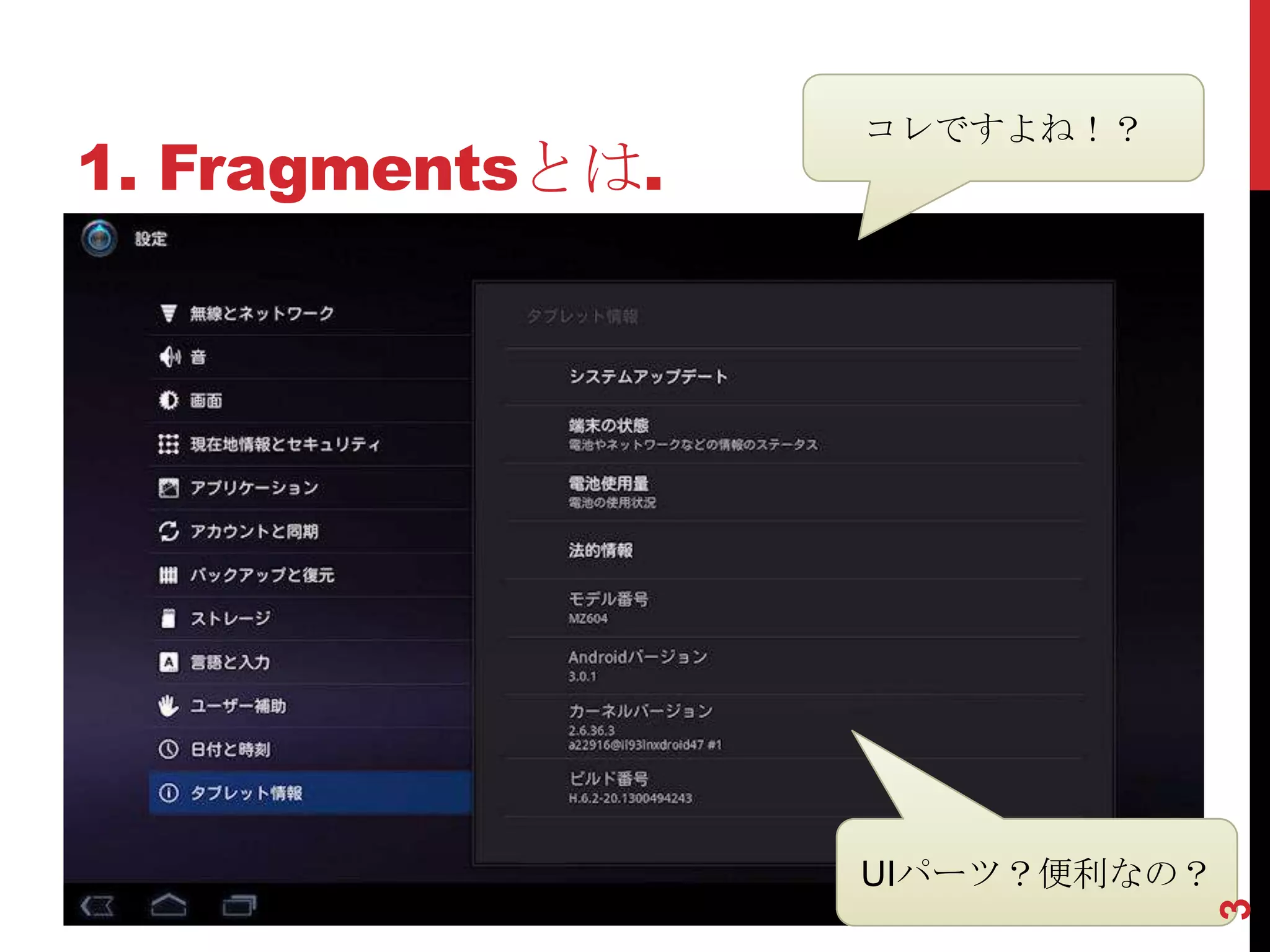
コレですよね!?
1. Fragmentsとは.


                  UIパーツ?便利なの?


                                3
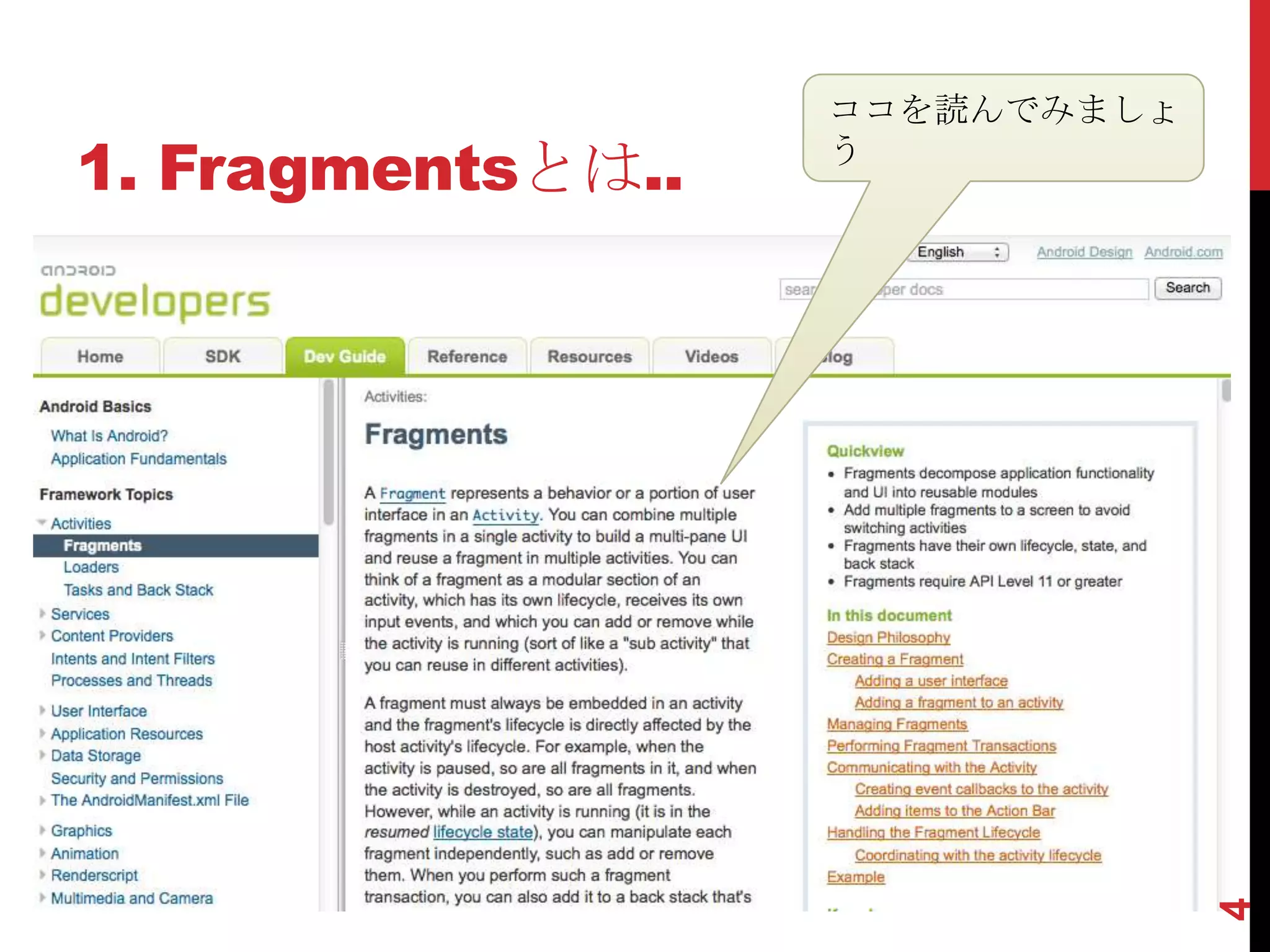
ココを読んでみましょ
1. Fragmentsとは..   う


                                4
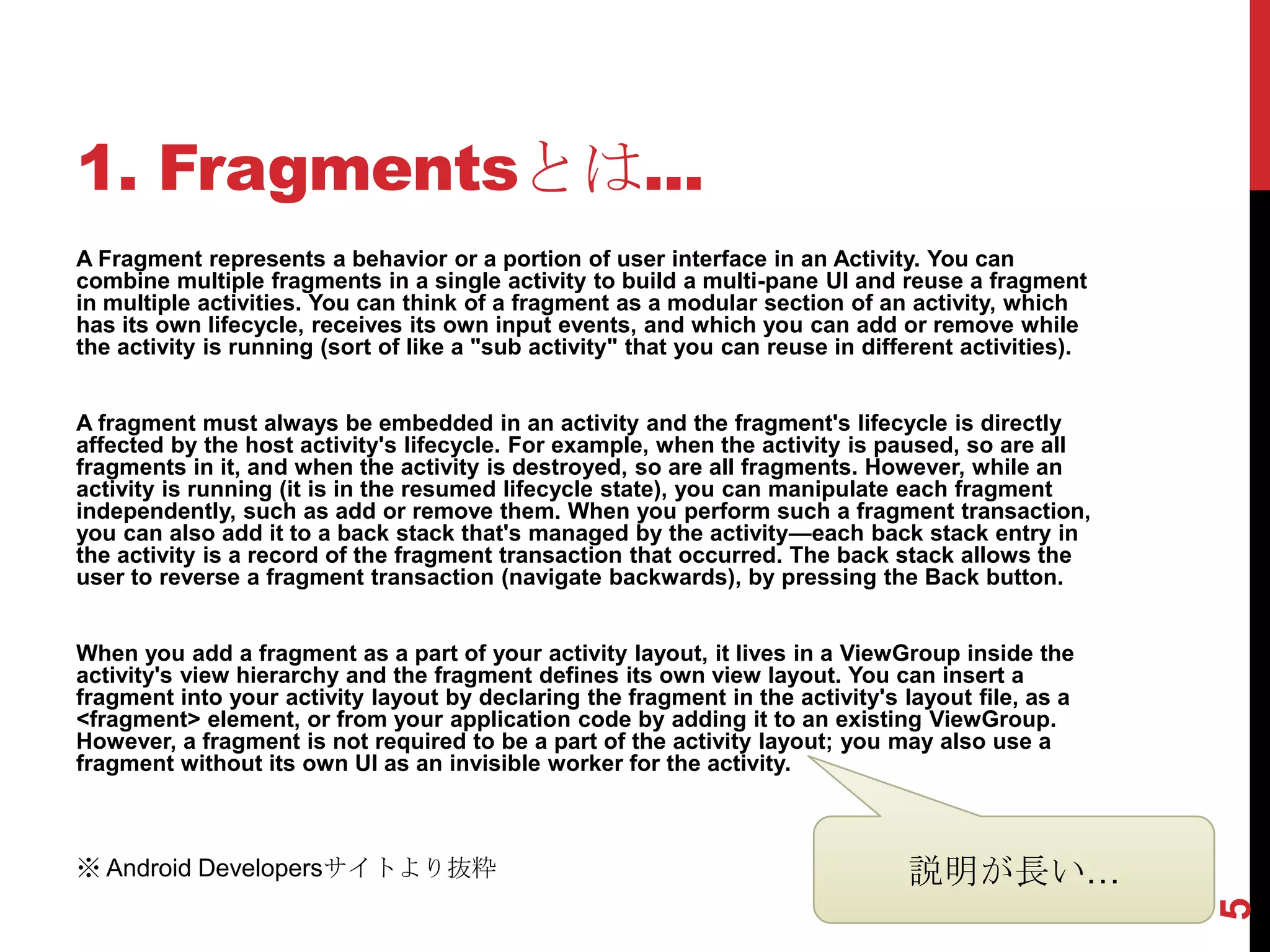
1. Fragmentsとは...
A Fragment represents a behavior or a portion of user interface in an Activity. You can
combine multiple fragments in a single activity to build a multi-pane UI and reuse a fragment
in multiple activities. You can think of a fragment as a modular section of an activity, which
has its own lifecycle, receives its own input events, and which you can add or remove while
the activity is running (sort of like a "sub activity" that you can reuse in different activities).


A fragment must always be embedded in an activity and the fragment's lifecycle is directly
affected by the host activity's lifecycle. For example, when the activity is paused, so are all
fragments in it, and when the activity is destroyed, so are all fragments. However, while an
activity is running (it is in the resumed lifecycle state), you can manipulate each fragment
independently, such as add or remove them. When you perform such a fragment transaction,
you can also add it to a back stack that's managed by the activity—each back stack entry in
the activity is a record of the fragment transaction that occurred. The back stack allows the
user to reverse a fragment transaction (navigate backwards), by pressing the Back button.


When you add a fragment as a part of your activity layout, it lives in a ViewGroup inside the
activity's view hierarchy and the fragment defines its own view layout. You can insert a
fragment into your activity layout by declaring the fragment in the activity's layout file, as a
<fragment> element, or from your application code by adding it to an existing ViewGroup.
However, a fragment is not required to be a part of the activity layout; you may also use a
fragment without its own UI as an invisible worker for the activity.


※ Android Developersサイトより抜粋                                                      説明が長い…


                                                                                                      5

1. Fragmentsとは....        翻訳を抜粋


 フラグメントは、アクティビティにおける動作やユーザーイン
ターフェイスの部分を表す 〜 マルチペインのUIを構築し、複数
のアクティビティでフラグメントを再利用するために単一のアク
ティビティに複数のフラグメントを組み合わせることができます
〜 アクティビティの実行中に追加または削除することができま
す。
  フラグメントは常にアクティビティに埋め込まなければならず、
フラグメントのライフサイクルは直接ホスト·アクティビティの
ライフサイクルに影響されます 〜 追加または削除するように、
独立して各フラグメントを操作することができます 〜 フラグメ
ントのトランザクションを実行するときには、バックスタックに
追加することができ、ユーザーが[戻る]ボタンを押すことによっ
て、フラグメントのトランザクションを逆にすることができます。
〜
 〜アクティビティのレイアウト ファイル内に<fragment>要素
として宣言することによって、またはアプリケーションコードか
らフラグメントを挿入することができます。 〜


                                     6
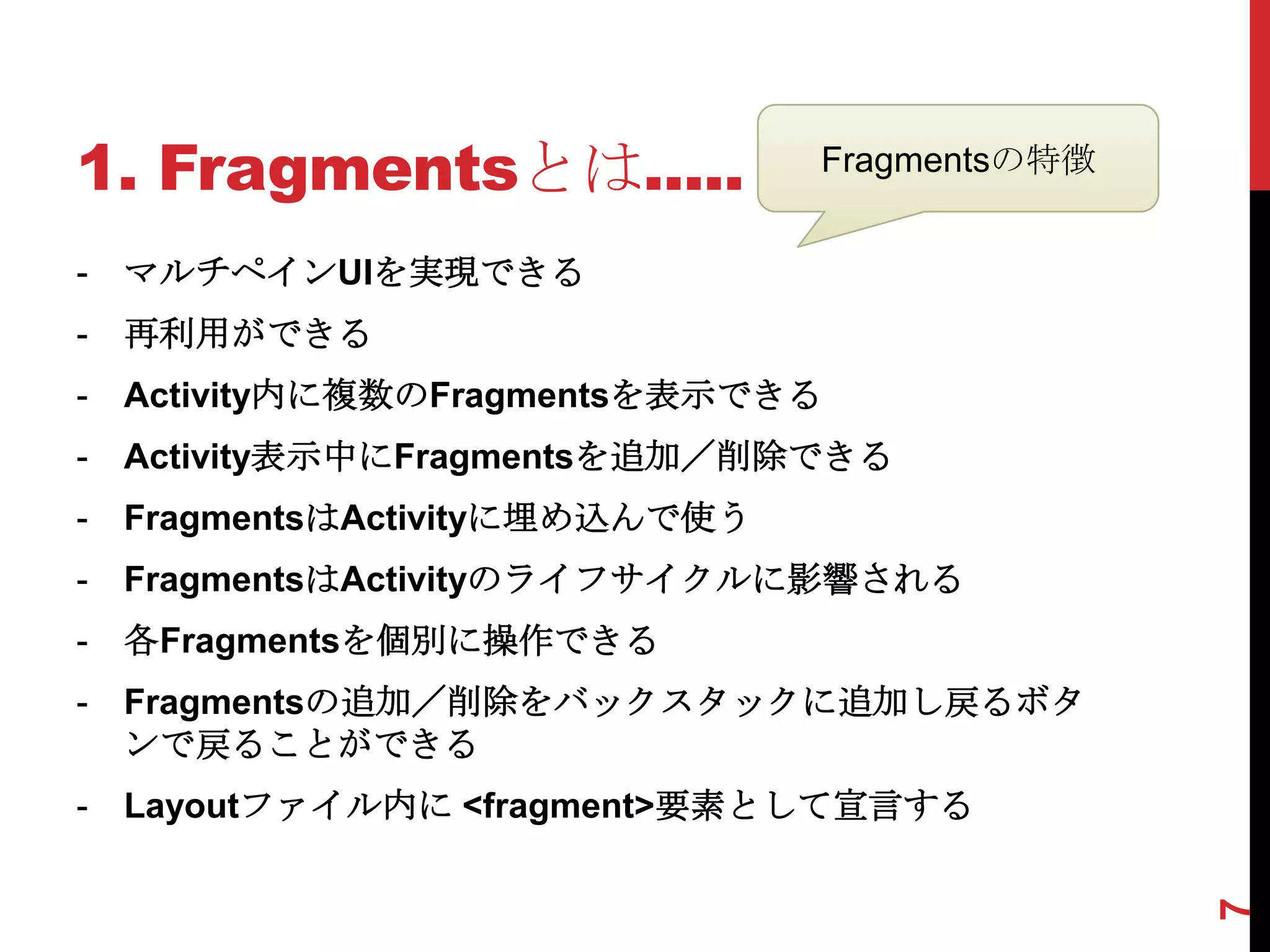
1. Fragmentsとは.....              Fragmentsの特徴


-   マルチペインUIを実現できる
-   再利用ができる
-   Activity内に複数のFragmentsを表示できる
-   Activity表示中にFragmentsを追加/削除できる
-   FragmentsはActivityに埋め込んで使う
-   FragmentsはActivityのライフサイクルに影響される
-   各Fragmentsを個別に操作できる
-   Fragmentsの追加/削除をバックスタックに追加し戻るボタ
    ンで戻ることができる
-   Layoutファイル内に <fragment>要素として宣言する


                                                7
1. Fragmentsとは......


   Fragmentsスゴイ!!
                    Fragments新しい!


         Fragmentsカッコいい


                                    8
1. Fragmentsとは.......
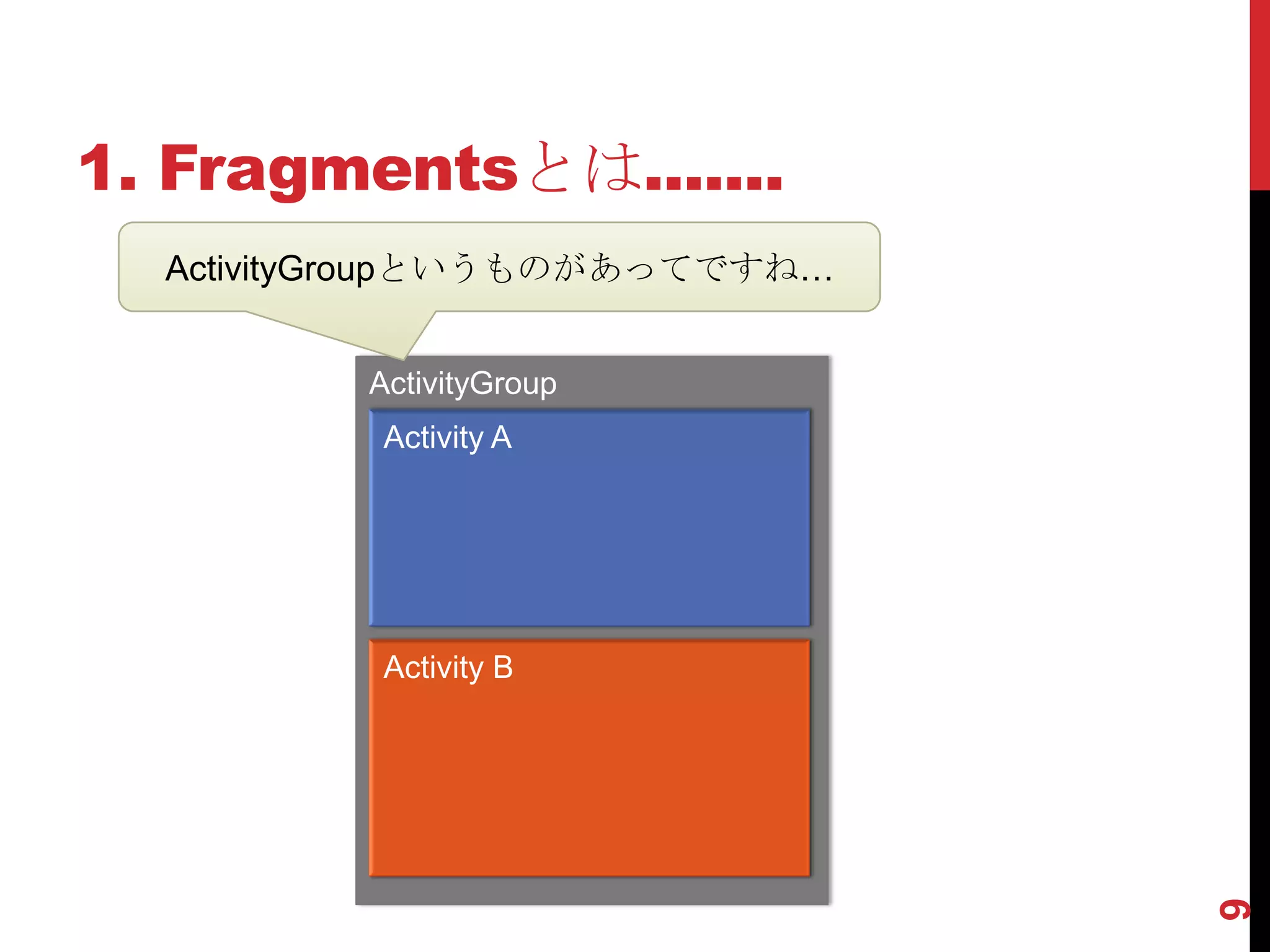
  ActivityGroupというものがあってですね…


         ActivityGroup
          Activity A


          Activity B


                               9
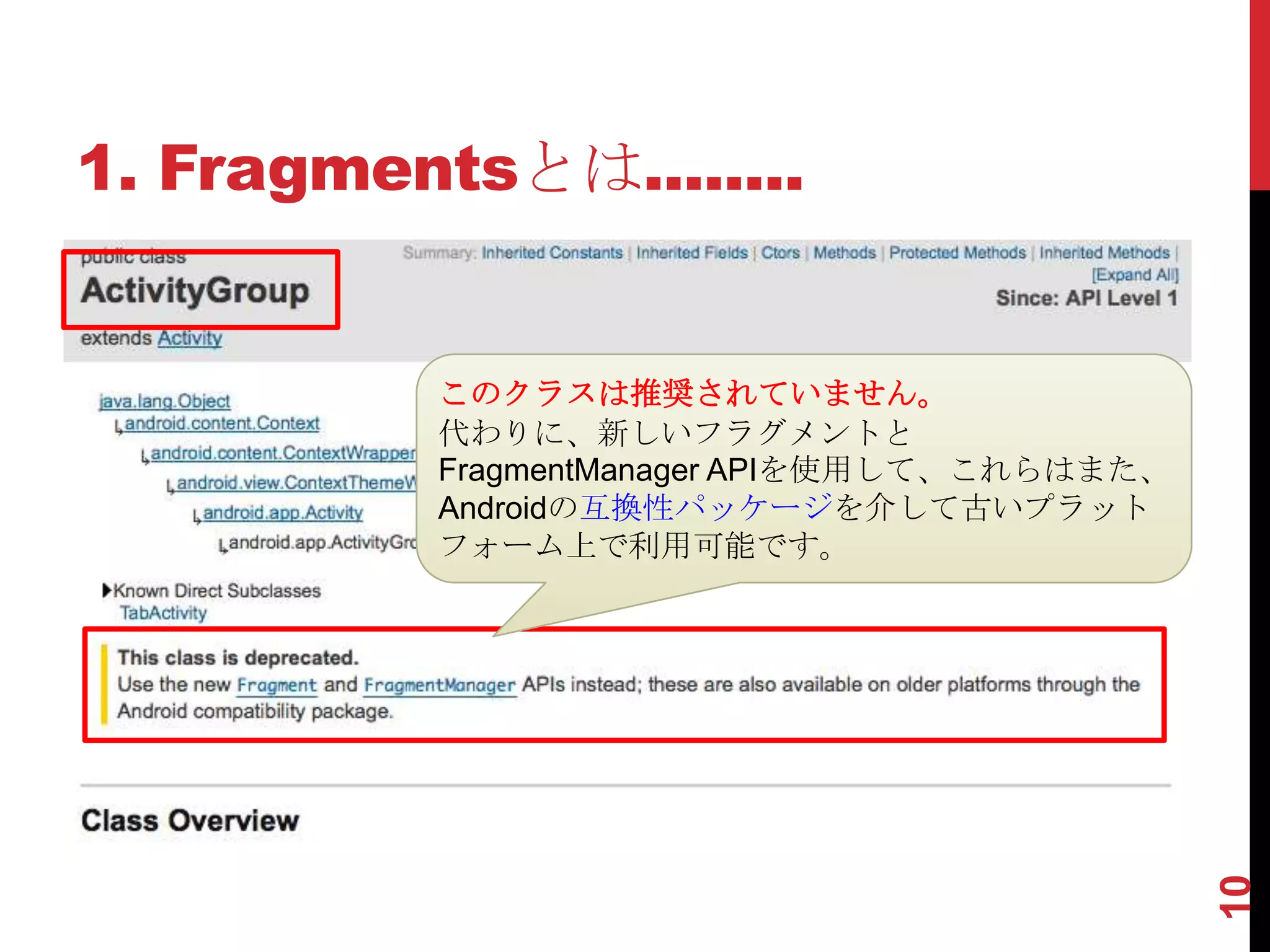
1. Fragmentsとは........


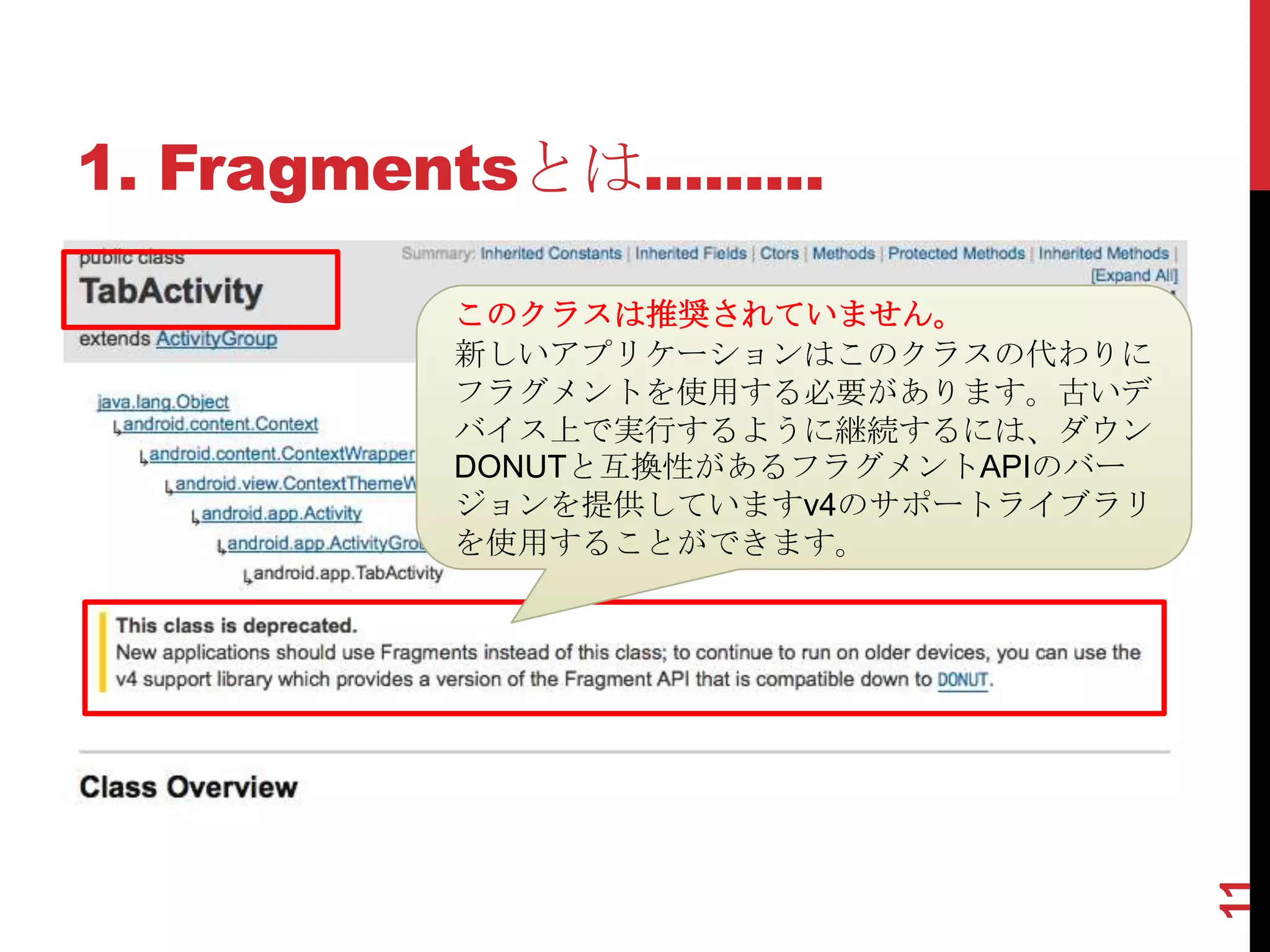
          このクラスは推奨されていません。
          代わりに、新しいフラグメントと
          FragmentManager APIを使用して、これらはまた、
          Androidの互換性パッケージを介して古いプラット
          フォーム上で利用可能です。


                                             10
1. Fragmentsとは.........

           このクラスは推奨されていません。
           新しいアプリケーションはこのクラスの代わりに
           フラグメントを使用する必要があります。古いデ
           バイス上で実行するように継続するには、ダウン
           DONUTと互換性があるフラグメントAPIのバー
           ジョンを提供していますv4のサポートライブラリ
           を使用することができます。


                                      11
1. Fragmentsとは..........
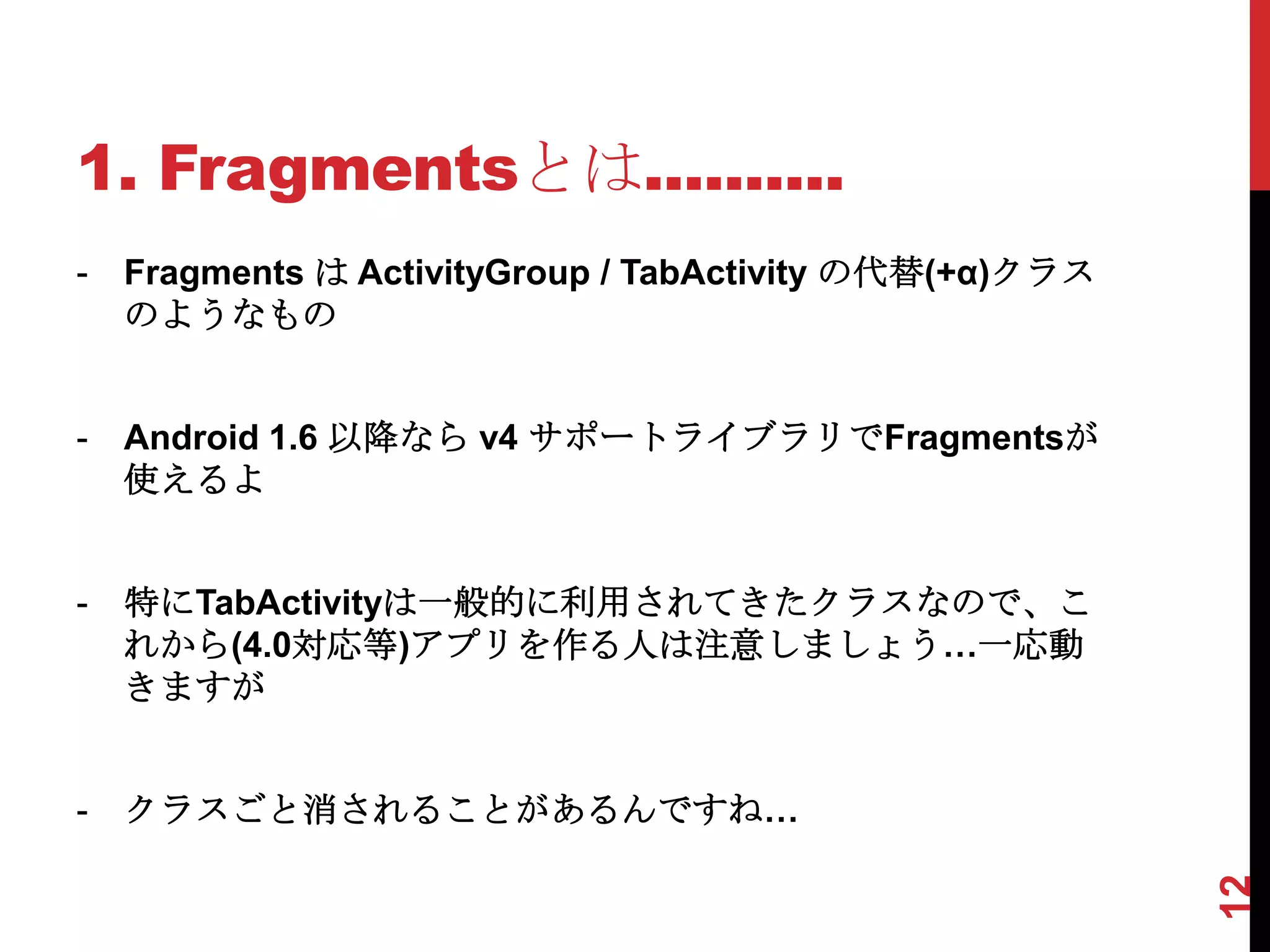
-   Fragments は ActivityGroup / TabActivity の代替(+α)クラス
    のようなもの


-   Android 1.6 以降なら v4 サポートライブラリでFragmentsが
    使えるよ


-   特にTabActivityは一般的に利用されてきたクラスなので、こ
    れから(4.0対応等)アプリを作る人は注意しましょう…一応動
    きますが


-   クラスごと消されることがあるんですね…


                                                         12
2. Fragmentsの使い方.
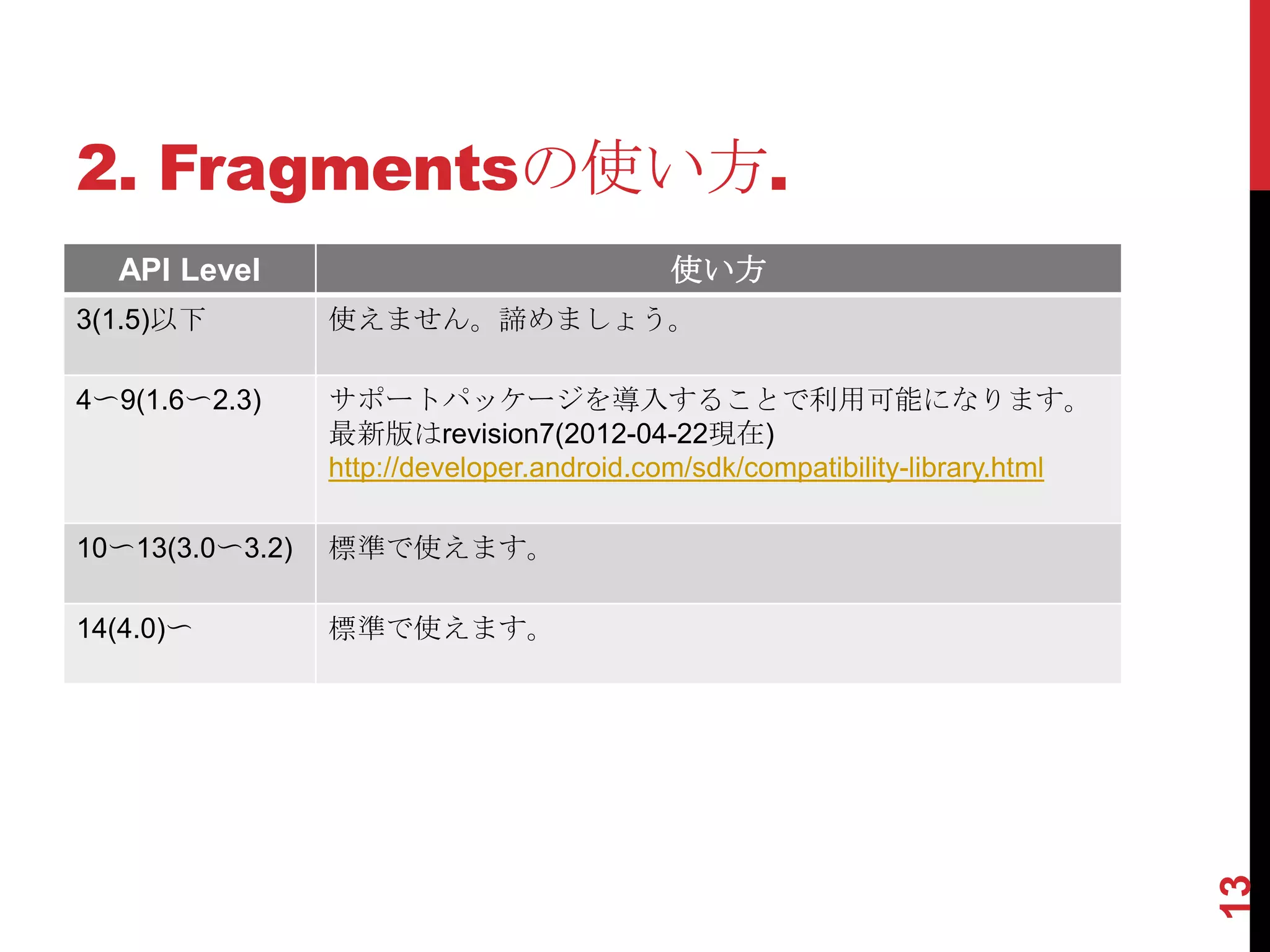
  API Level                                使い方
3(1.5)以下         使えません。諦めましょう。

4〜9(1.6〜2.3)     サポートパッケージを導入することで利用可能になります。
                 最新版はrevision7(2012-04-22現在)
                 http://developer.android.com/sdk/compatibility-library.html

10〜13(3.0〜3.2)   標準で使えます。

14(4.0)〜         標準で使えます。


                                                                               13
2. Fragmentsの使い方..
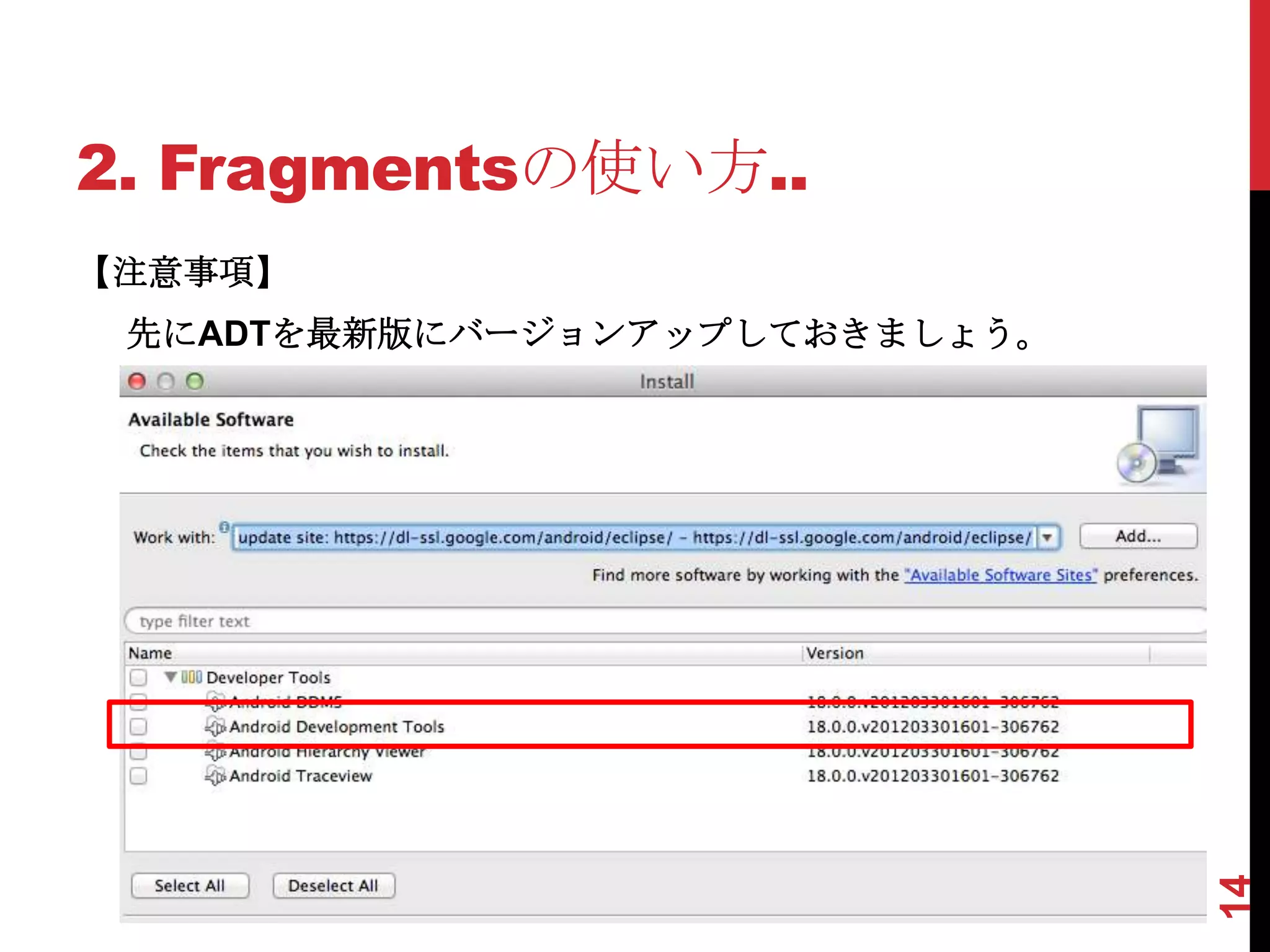
【注意事項】
 先にADTを最新版にバージョンアップしておきましょう。


                               14
2. Fragmentsの使い方...
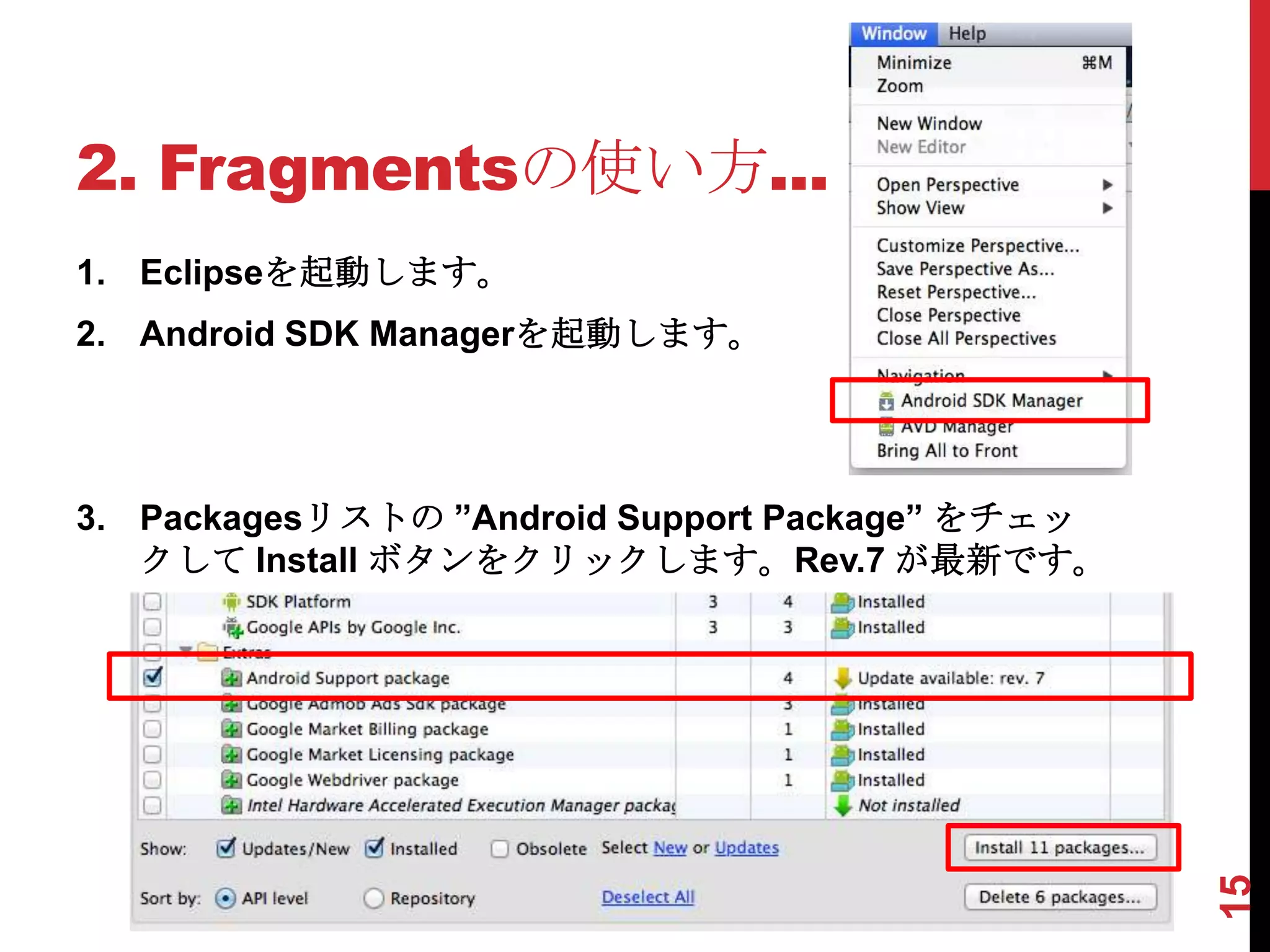
1. Eclipseを起動します。
2. Android SDK Managerを起動します。


3. Packagesリストの ”Android Support Package” をチェッ
   クして Install ボタンをクリックします。Rev.7 が最新です。


                                                 15
2. Fragmentsの使い方.…
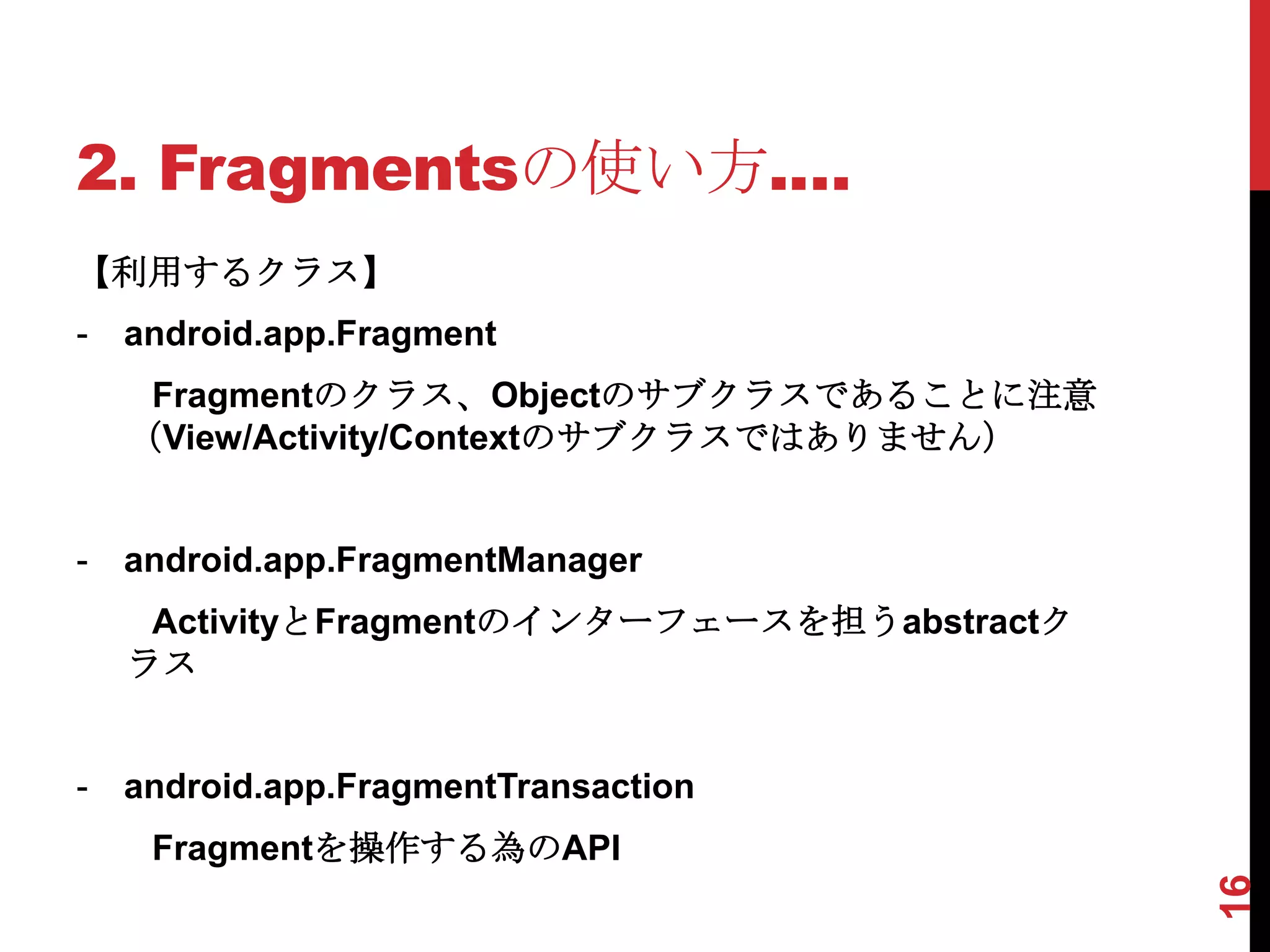
【利用するクラス】
-   android.app.Fragment
     Fragmentのクラス、Objectのサブクラスであることに注意
    (View/Activity/Contextのサブクラスではありません)


-   android.app.FragmentManager
     ActivityとFragmentのインターフェースを担うabstractク
    ラス


-   android.app.FragmentTransaction
     Fragmentを操作する為のAPI


                                              16
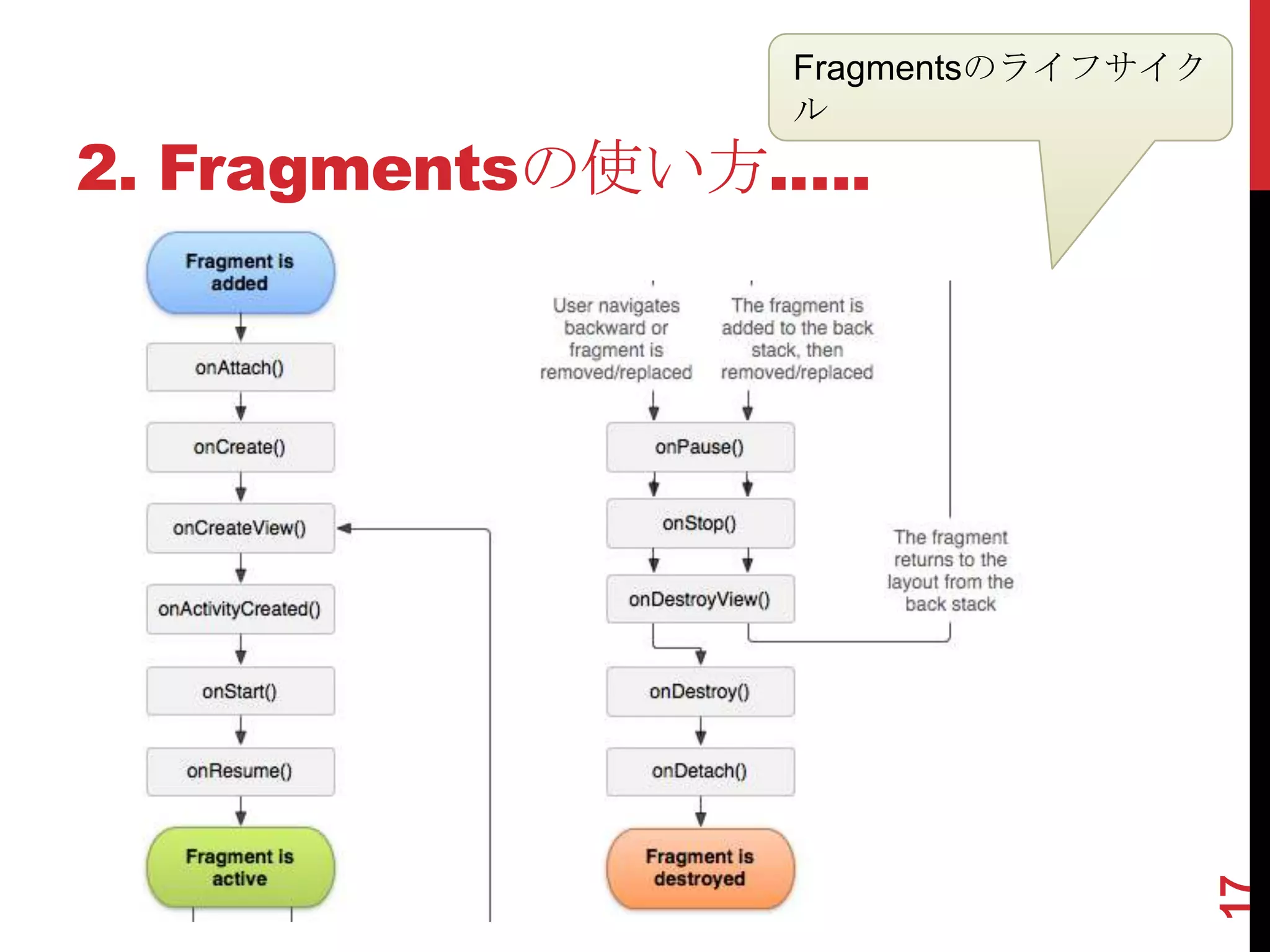
Fragmentsのライフサイク
                 ル
2. Fragmentsの使い方.….


                                    17
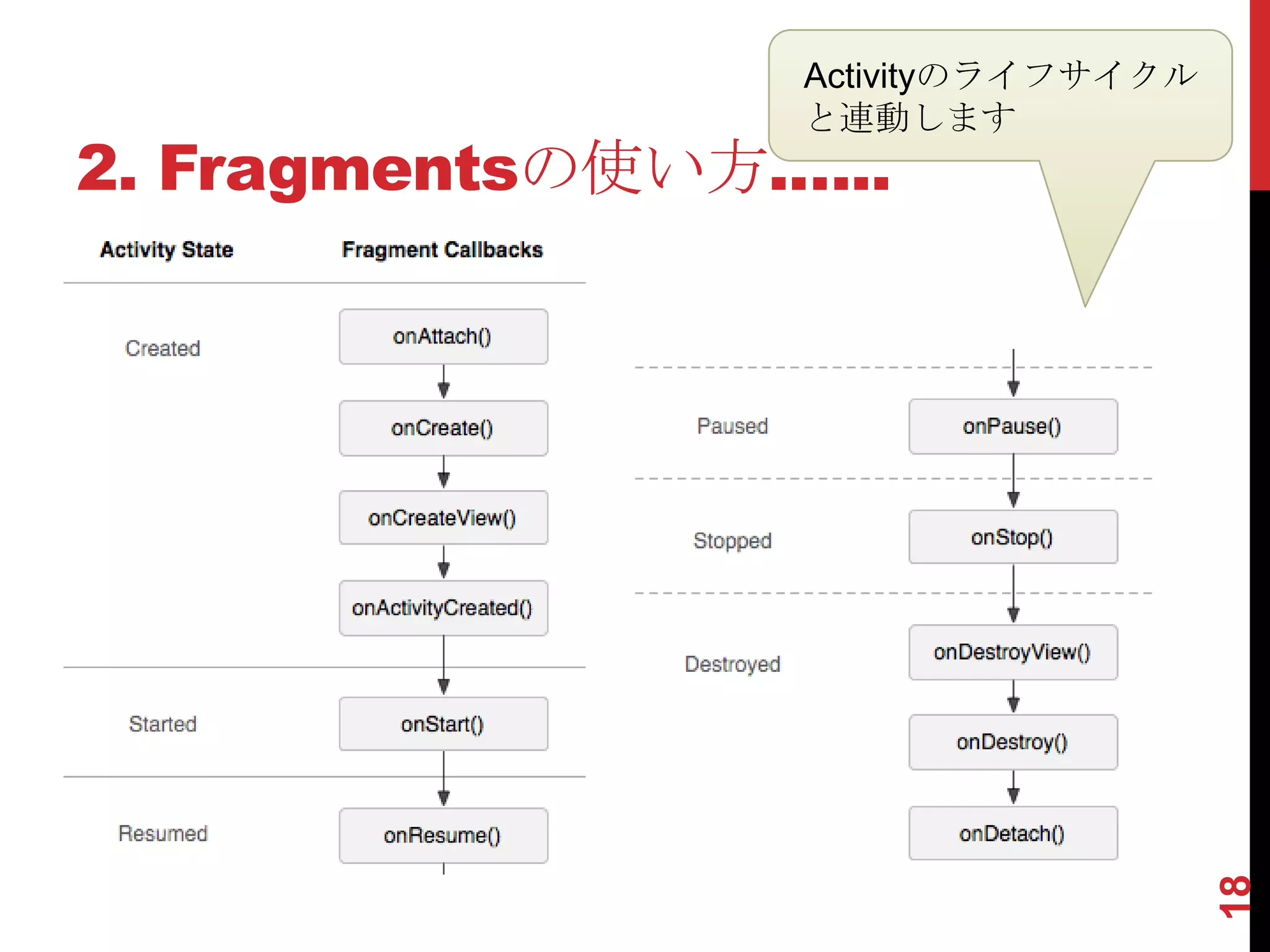
Activityのライフサイクル
                 と連動します
2. Fragmentsの使い方.…..


                                    18
2. Fragmentsの使い方.……
ところで...


【翻訳】に

 フラグメントは、アクティビティにおける動作や
ユーザーインターフェイスの部分を表す 〜

【特徴】に
 再利用ができる

とありましたよね。ということは……..


                          19
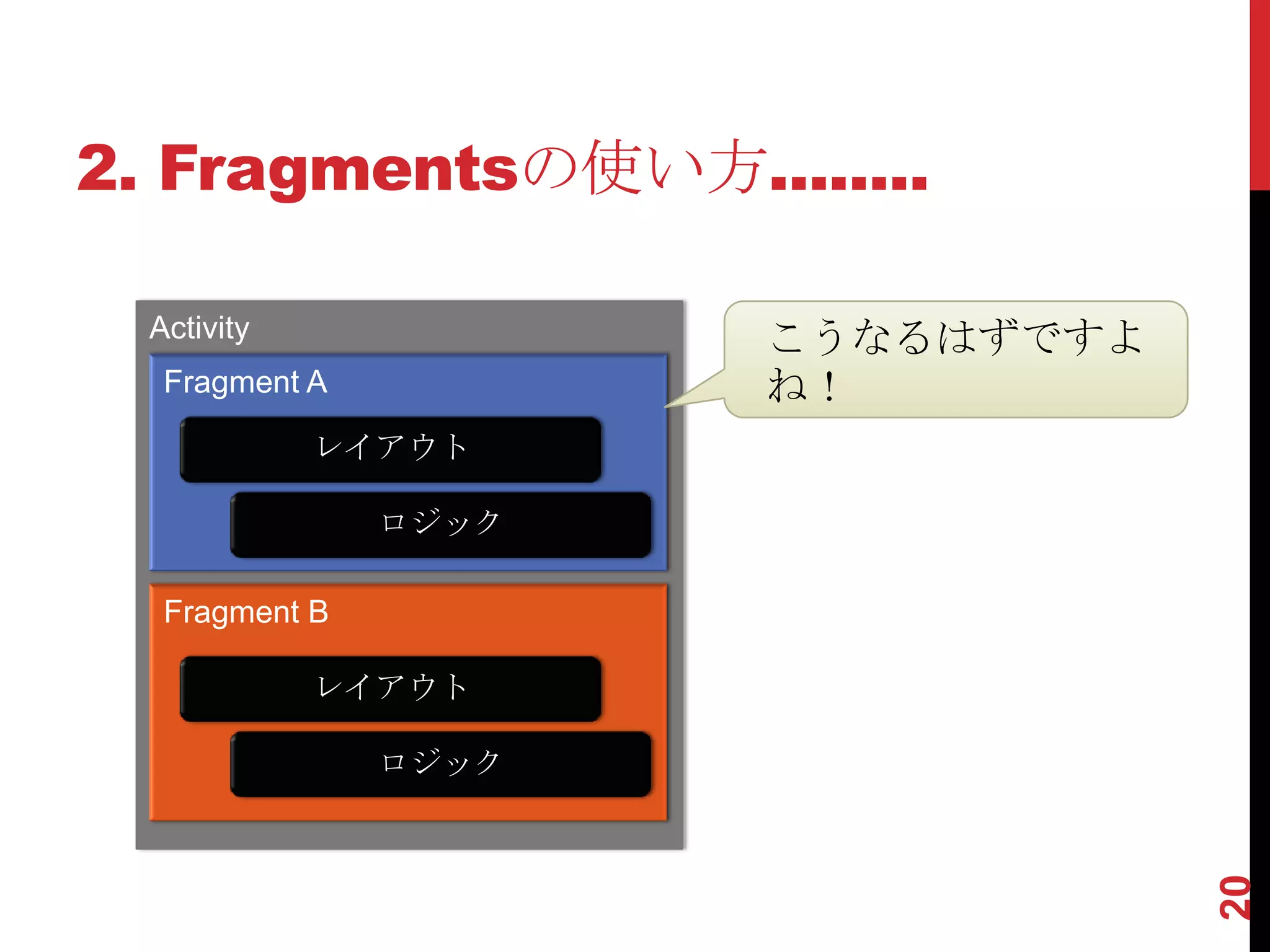
2. Fragmentsの使い方........

  Activity             こうなるはずですよ
   Fragment A          ね!
             レイアウト

                ロジック

   Fragment B

             レイアウト

                ロジック


                                   20
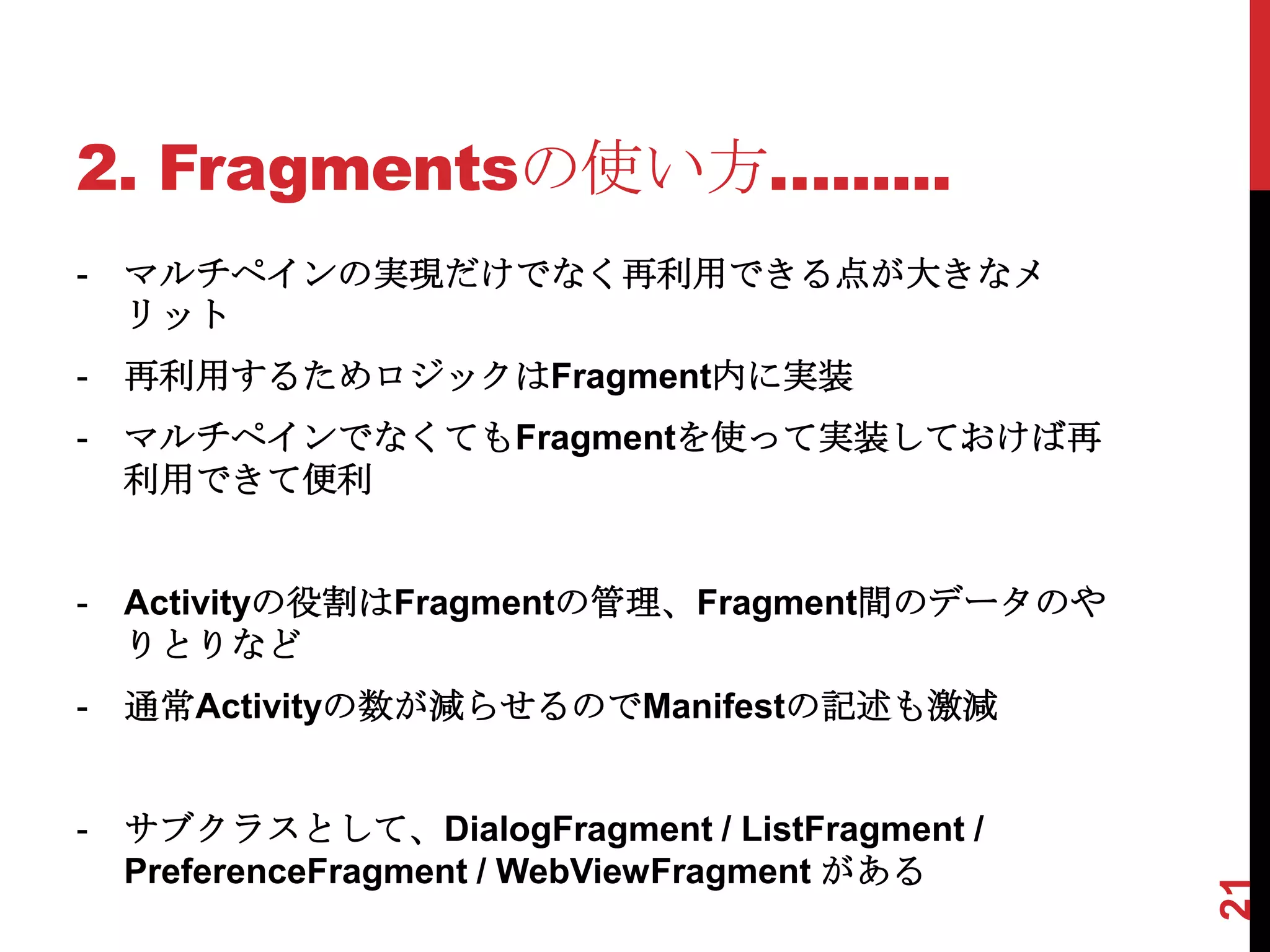
2. Fragmentsの使い方…......
-   マルチペインの実現だけでなく再利用できる点が大きなメ
    リット
-   再利用するためロジックはFragment内に実装
-   マルチペインでなくてもFragmentを使って実装しておけば再
    利用できて便利


-   Activityの役割はFragmentの管理、Fragment間のデータのや
    りとりなど
-   通常Activityの数が減らせるのでManifestの記述も激減


-   サブクラスとして、DialogFragment / ListFragment /
    PreferenceFragment / WebViewFragment がある


                                               21
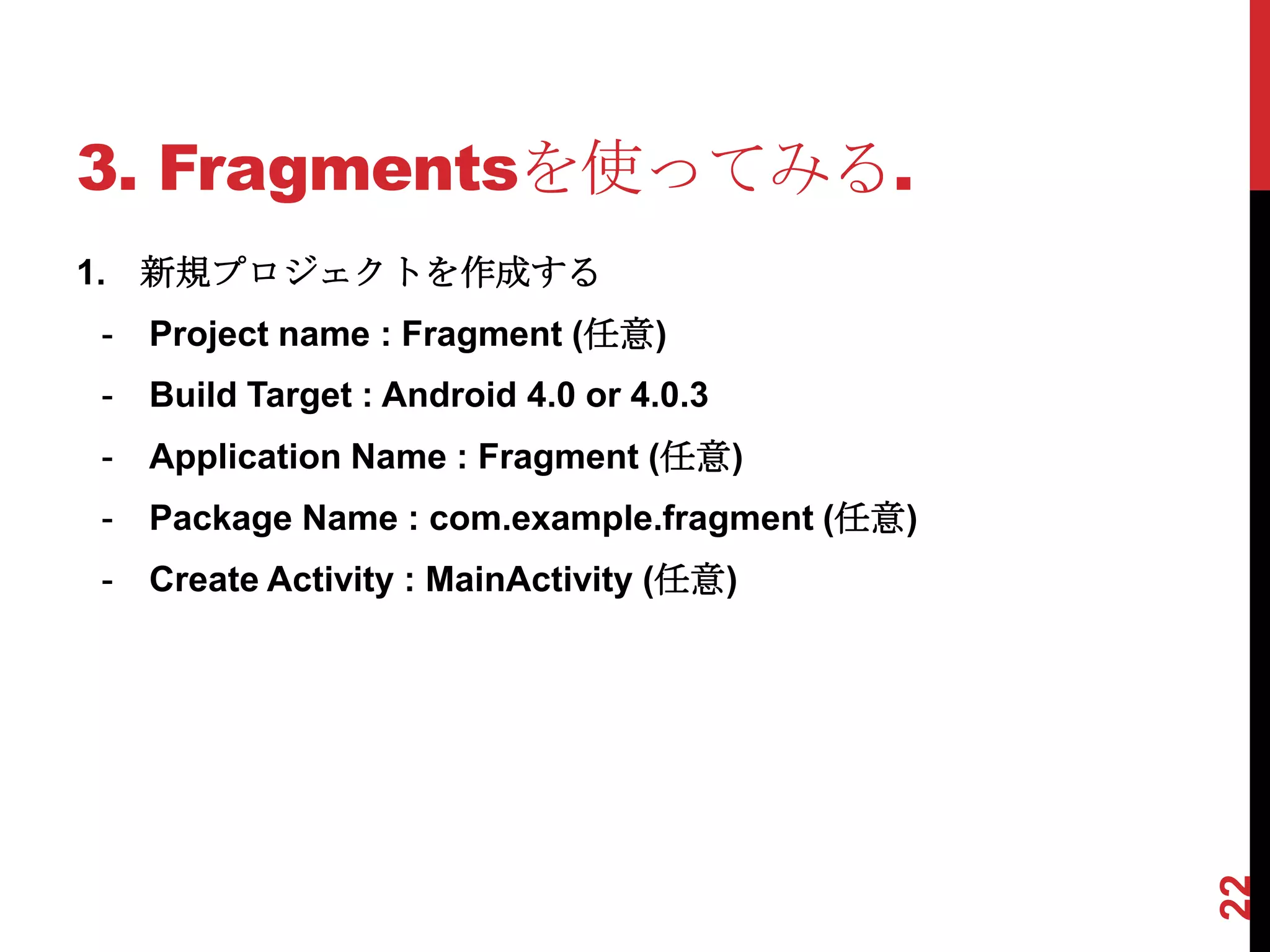
3. Fragmentsを使ってみる.
1. 新規プロジェクトを作成する
-   Project name : Fragment (任意)
-   Build Target : Android 4.0 or 4.0.3
-   Application Name : Fragment (任意)
-   Package Name : com.example.fragment (任意)
-   Create Activity : MainActivity (任意)


                                               22
3. Fragmentsを使ってみる..
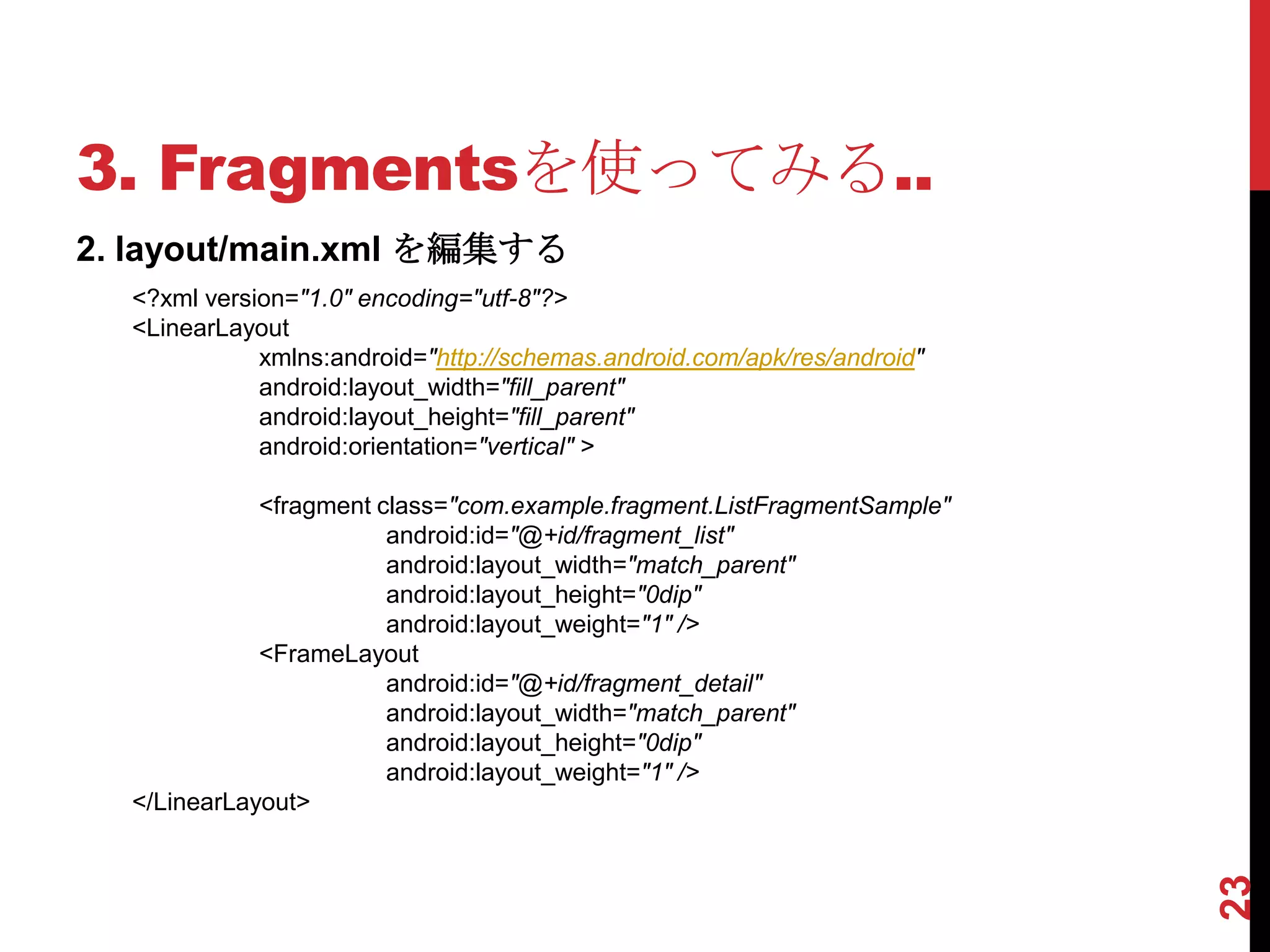
2. layout/main.xml を編集する
  <?xml version="1.0" encoding="utf-8"?>
  <LinearLayout
             xmlns:android="http://schemas.android.com/apk/res/android"
             android:layout_width="fill_parent"
             android:layout_height="fill_parent"
             android:orientation="vertical" >

             <fragment class="com.example.fragment.ListFragmentSample"
                        android:id="@+id/fragment_list"
                        android:layout_width="match_parent"
                        android:layout_height="0dip"
                        android:layout_weight="1" />
             <FrameLayout
                        android:id="@+id/fragment_detail"
                        android:layout_width="match_parent"
                        android:layout_height="0dip"
                        android:layout_weight="1" />
  </LinearLayout>


                                                                          23
3. Fragmentsを使ってみる…
3. ListFragmentSample.javaを作成する (extends ListFragment)
   private List<Map<String, Object>> list = new ArrayList<Map<String, Object>>();
   @Override
   public void onActivityCreated(Bundle savedInstanceState) {
              super.onActivityCreated(savedInstanceState);

             Map<String, Object> item1 = new HashMap<String, Object>();
             item1.put("ICON", Integer.valueOf(android.R.drawable.ic_menu_delete));
             item1.put("LABEL", "ゴミ箱");
             list.add(item1);
             Map<String, Object> item2 = new HashMap<String, Object>();
             item2.put("ICON", Integer.valueOf(android.R.drawable.ic_menu_camera));
             item2.put("LABEL", "カメラ");
             list.add(item2);
             SimpleAdapter adapter = new SimpleAdapter(
                                    getActivity(),
                                    list,
                                    android.R.layout.activity_list_item,
                                    new String[] { "LABEL", "ICON" },
                                    new int[] { android.R.id.text1, android.R.id.icon });
             setListAdapter(adapter);


                                                                                            24
   }
3. Fragmentsを使ってみる….
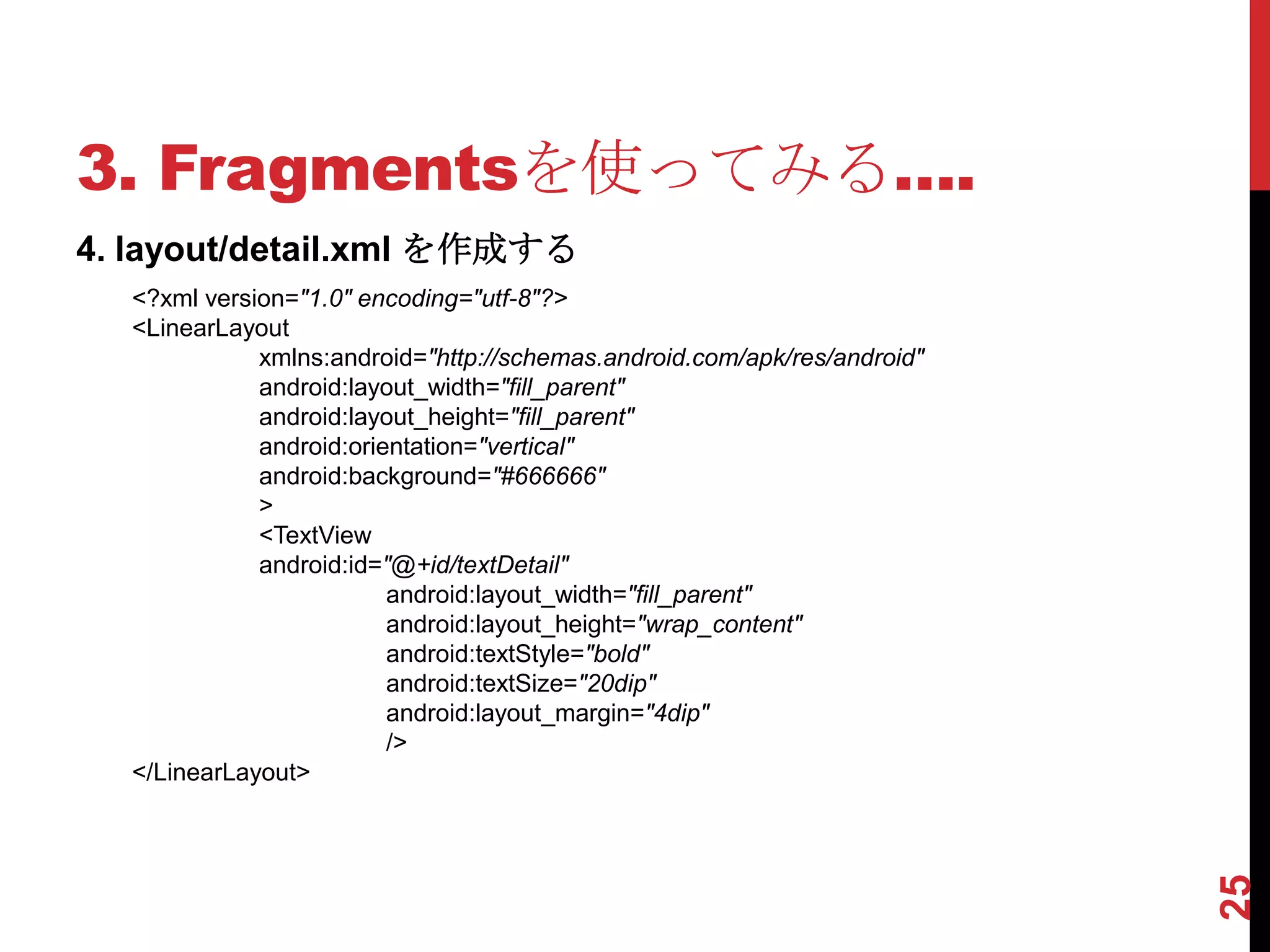
4. layout/detail.xml を作成する
  <?xml version="1.0" encoding="utf-8"?>
  <LinearLayout
             xmlns:android="http://schemas.android.com/apk/res/android"
             android:layout_width="fill_parent"
             android:layout_height="fill_parent"
             android:orientation="vertical"
             android:background="#666666"
             >
             <TextView
             android:id="@+id/textDetail"
                         android:layout_width="fill_parent"
                         android:layout_height="wrap_content"
                         android:textStyle="bold"
                         android:textSize="20dip"
                         android:layout_margin="4dip"
                         />
  </LinearLayout>


                                                                          25
3. Fragmentsを使ってみる…..
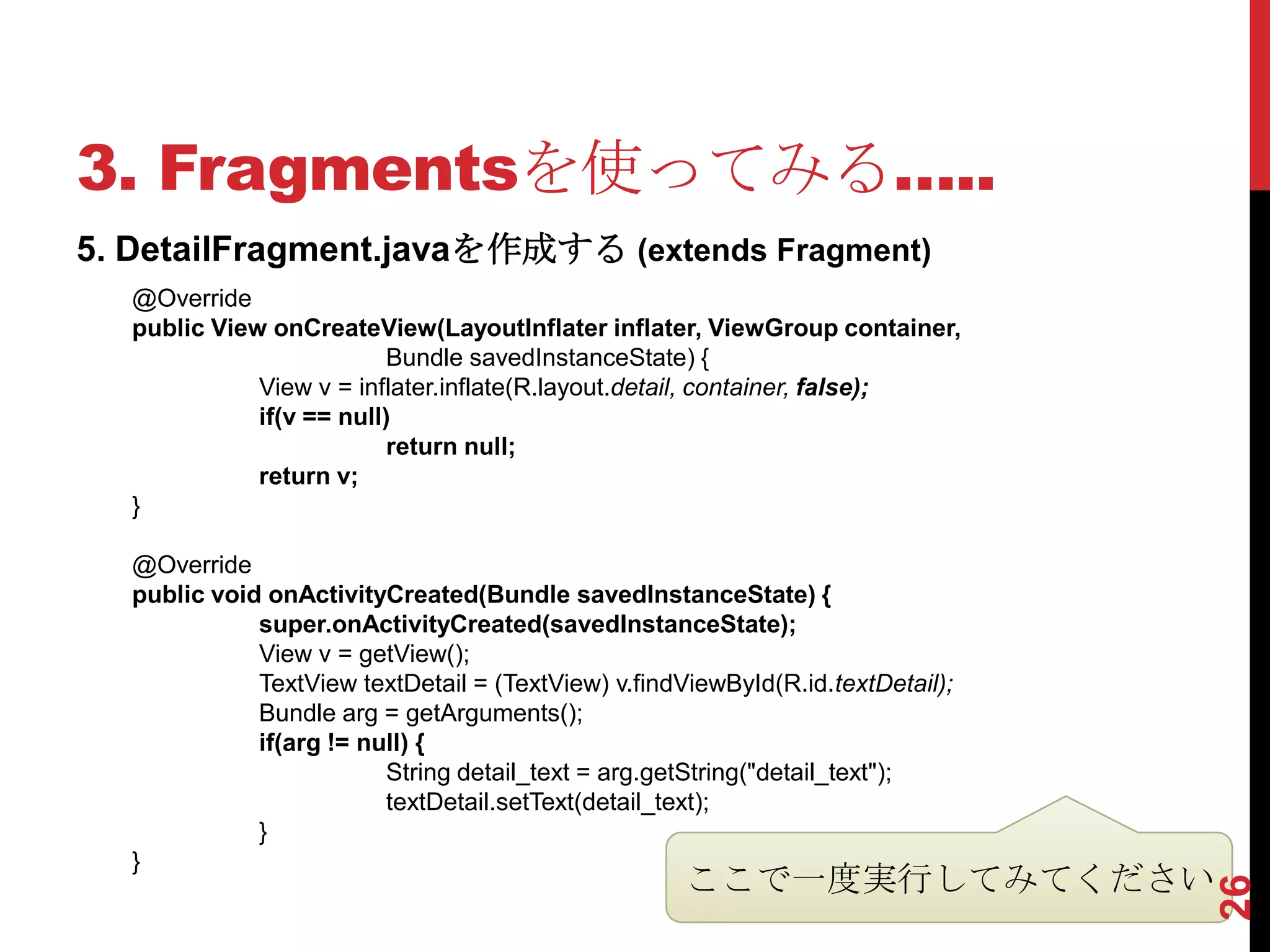
5. DetailFragment.javaを作成する (extends Fragment)
   @Override
   public View onCreateView(LayoutInflater inflater, ViewGroup container,
                           Bundle savedInstanceState) {
              View v = inflater.inflate(R.layout.detail, container, false);
              if(v == null)
                           return null;
              return v;
   }

   @Override
   public void onActivityCreated(Bundle savedInstanceState) {
              super.onActivityCreated(savedInstanceState);
              View v = getView();
              TextView textDetail = (TextView) v.findViewById(R.id.textDetail);
              Bundle arg = getArguments();
              if(arg != null) {
                          String detail_text = arg.getString("detail_text");
                          textDetail.setText(detail_text);
              }
   }
                                                      ここで一度実行してみてください


                                                                                  26
3. Fragmentsを使ってみる……
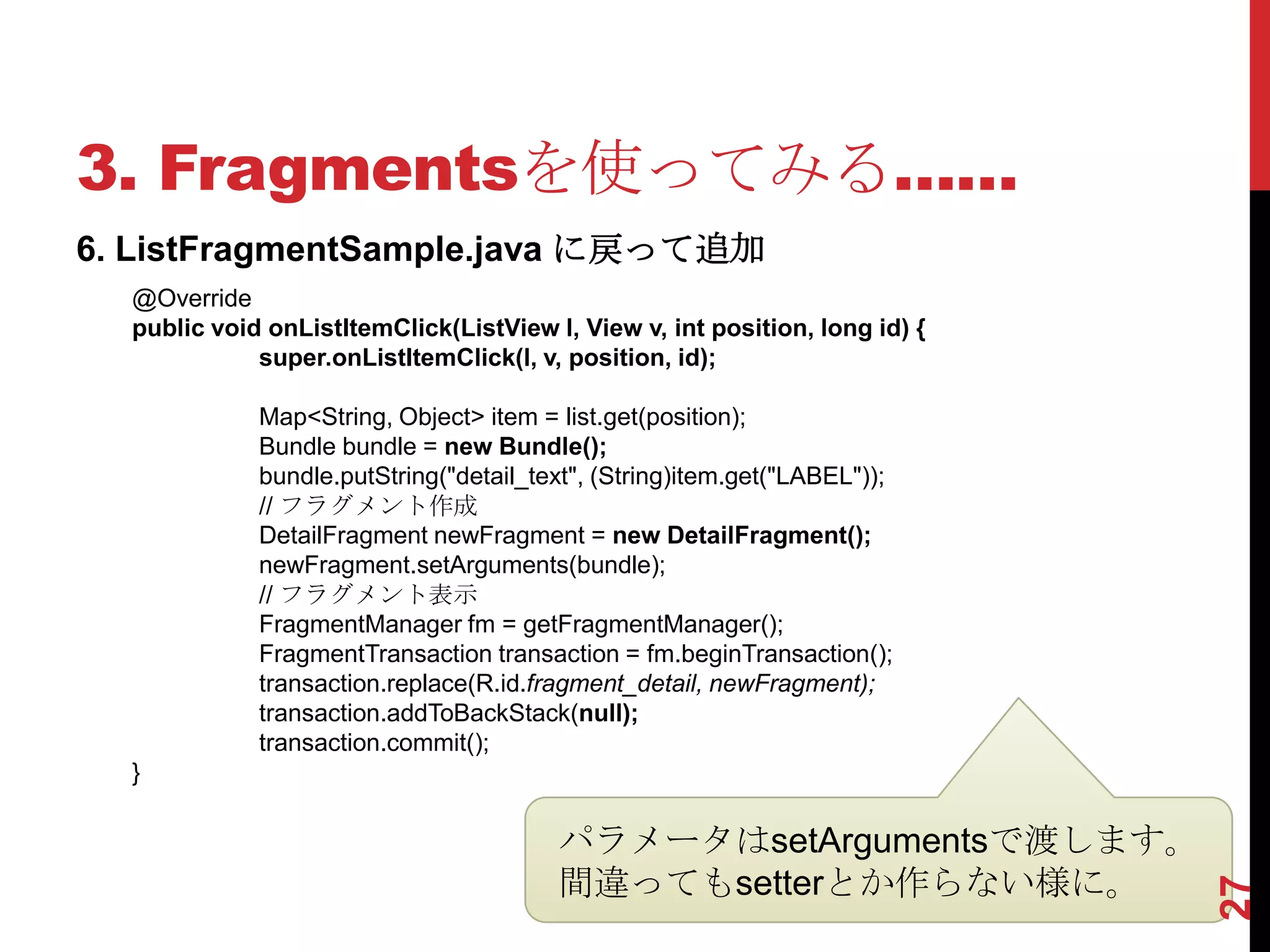
6. ListFragmentSample.java に戻って追加
  @Override
  public void onListItemClick(ListView l, View v, int position, long id) {
             super.onListItemClick(l, v, position, id);

             Map<String, Object> item = list.get(position);
             Bundle bundle = new Bundle();
             bundle.putString("detail_text", (String)item.get("LABEL"));
             // フラグメント作成
             DetailFragment newFragment = new DetailFragment();
             newFragment.setArguments(bundle);
             // フラグメント表示
             FragmentManager fm = getFragmentManager();
             FragmentTransaction transaction = fm.beginTransaction();
             transaction.replace(R.id.fragment_detail, newFragment);
             transaction.addToBackStack(null);
             transaction.commit();
  }

                                        パラメータはsetArgumentsで渡します。
                                        間違ってもsetterとか作らない様に。


                                                                             27
3. Fragmentsを使ってみる…….
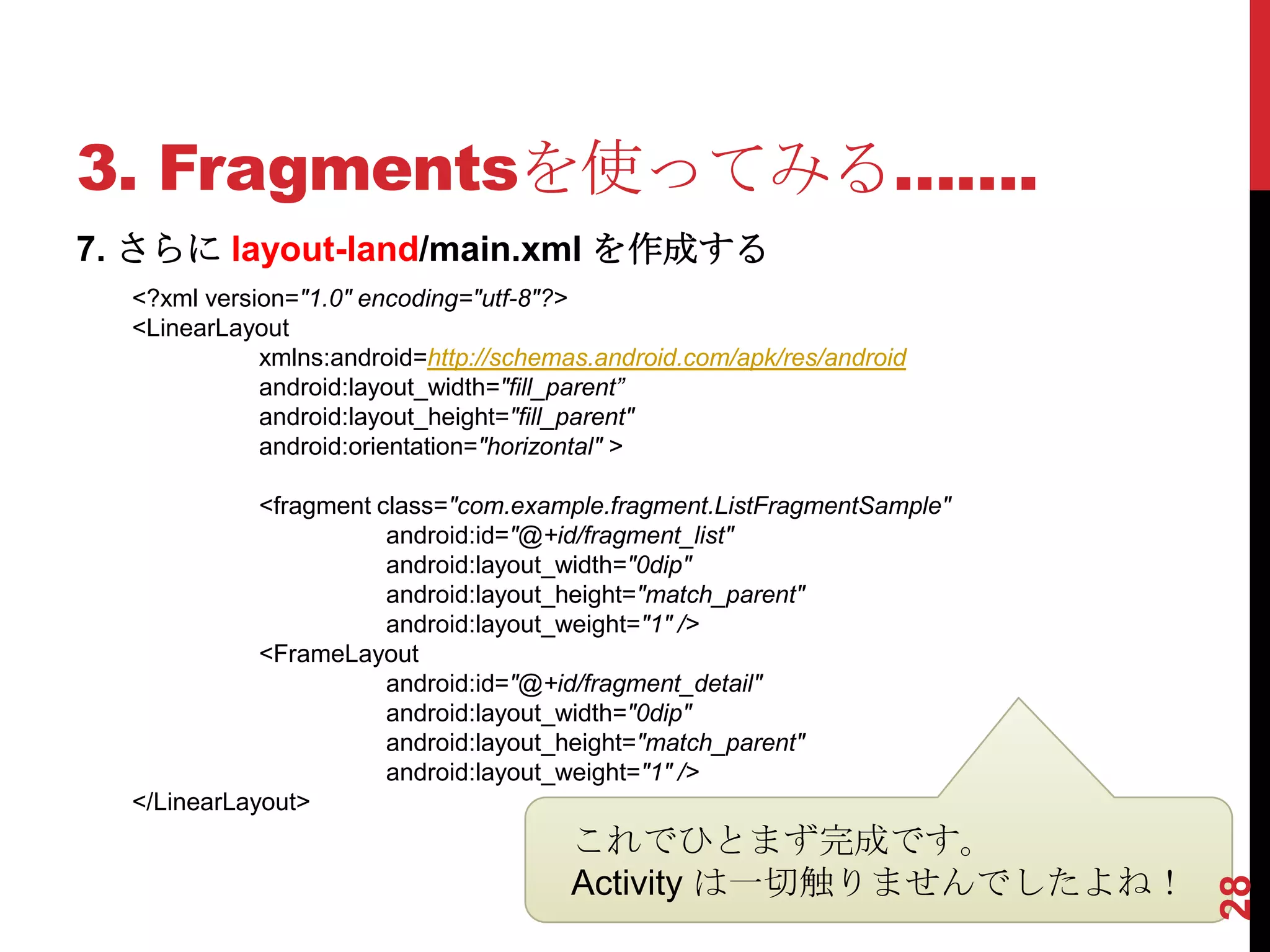
7. さらに layout-land/main.xml を作成する
  <?xml version="1.0" encoding="utf-8"?>
  <LinearLayout
             xmlns:android=http://schemas.android.com/apk/res/android
             android:layout_width="fill_parent”
             android:layout_height="fill_parent"
             android:orientation="horizontal" >

             <fragment class="com.example.fragment.ListFragmentSample"
                        android:id="@+id/fragment_list"
                        android:layout_width="0dip"
                        android:layout_height="match_parent"
                        android:layout_weight="1" />
             <FrameLayout
                        android:id="@+id/fragment_detail"
                        android:layout_width="0dip"
                        android:layout_height="match_parent"
                        android:layout_weight="1" />
  </LinearLayout>
                                        これでひとまず完成です。
                                        Activity は一切触りませんでしたよね!


                                                                         28
3. Fragmentsを使ってみる……..
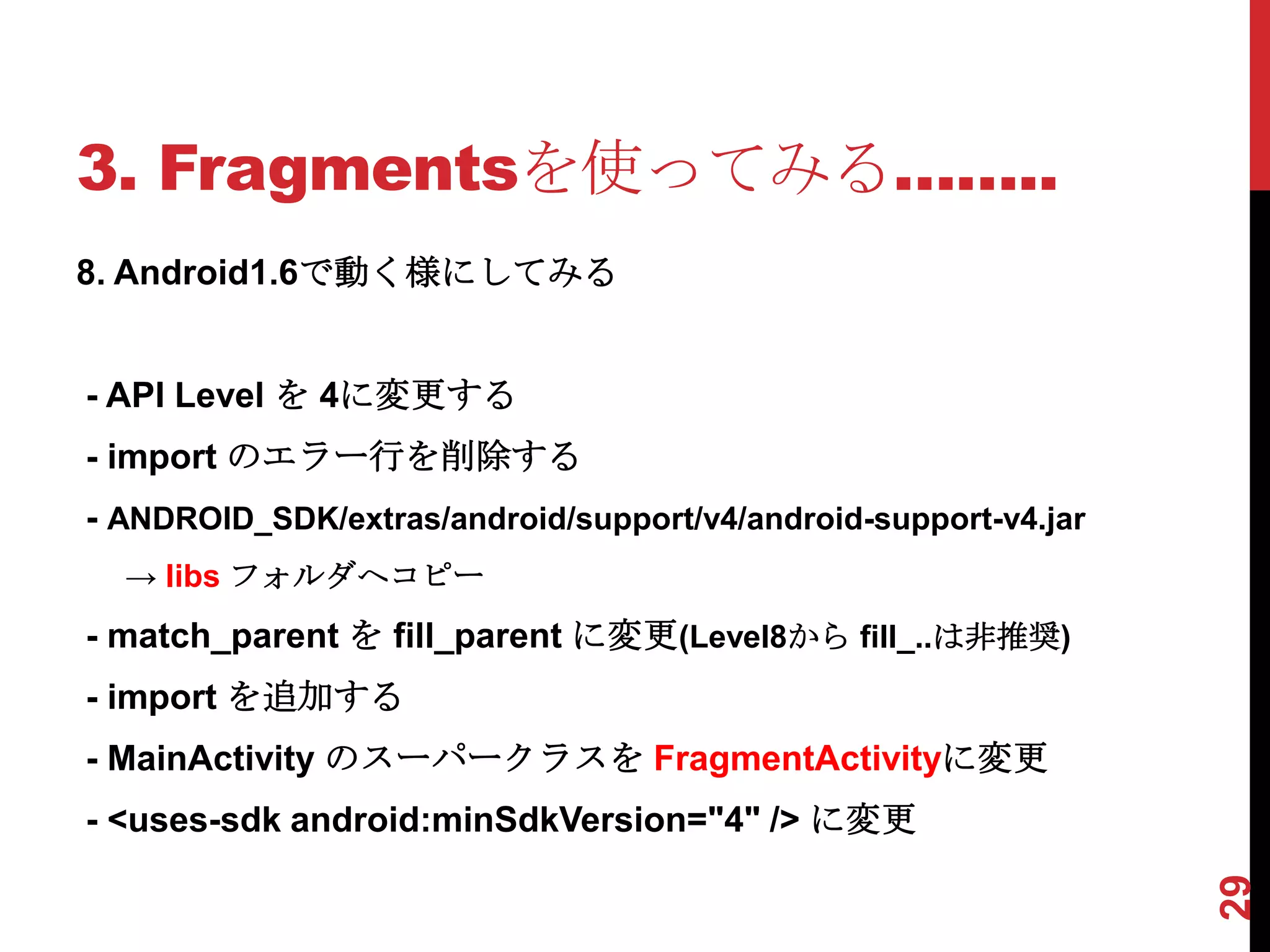
8. Android1.6で動く様にしてみる


- API Level を 4に変更する
- import のエラー行を削除する
- ANDROID_SDK/extras/android/support/v4/android-support-v4.jar
  → libs フォルダへコピー
- match_parent を fill_parent に変更(Level8から fill_..は非推奨)
- import を追加する
- MainActivity のスーパークラスを FragmentActivityに変更
- <uses-sdk android:minSdkVersion="4" /> に変更


                                                                 29
以 上


      30

Using the Fragments(Android)

  • 1.
    はじめての Fragments 2012 – 04- 24 株式会社グルーヴシステムズ 木下照章
  • 2.
    自己紹介 - 株式会社グルーヴシステムズ 代表取締役社長 - 制御系 → 業務系 → アプリ系(いまここ) - iOS / Androidアプリを多数制作 - Twitter ID : @metal_president 1
  • 3.
    AGENDA 1. Fragments とは 2.Fragments の使い方 3. Fragments を使ってみる 2
  • 4.
    コレですよね!? 1. Fragmentsとは. UIパーツ?便利なの? 3
  • 5.
  • 6.
    1. Fragmentsとは... A Fragmentrepresents a behavior or a portion of user interface in an Activity. You can combine multiple fragments in a single activity to build a multi-pane UI and reuse a fragment in multiple activities. You can think of a fragment as a modular section of an activity, which has its own lifecycle, receives its own input events, and which you can add or remove while the activity is running (sort of like a "sub activity" that you can reuse in different activities). A fragment must always be embedded in an activity and the fragment's lifecycle is directly affected by the host activity's lifecycle. For example, when the activity is paused, so are all fragments in it, and when the activity is destroyed, so are all fragments. However, while an activity is running (it is in the resumed lifecycle state), you can manipulate each fragment independently, such as add or remove them. When you perform such a fragment transaction, you can also add it to a back stack that's managed by the activity—each back stack entry in the activity is a record of the fragment transaction that occurred. The back stack allows the user to reverse a fragment transaction (navigate backwards), by pressing the Back button. When you add a fragment as a part of your activity layout, it lives in a ViewGroup inside the activity's view hierarchy and the fragment defines its own view layout. You can insert a fragment into your activity layout by declaring the fragment in the activity's layout file, as a <fragment> element, or from your application code by adding it to an existing ViewGroup. However, a fragment is not required to be a part of the activity layout; you may also use a fragment without its own UI as an invisible worker for the activity. ※ Android Developersサイトより抜粋 説明が長い… 5
  • 7.
    1. Fragmentsとは.... 翻訳を抜粋 フラグメントは、アクティビティにおける動作やユーザーイン ターフェイスの部分を表す 〜 マルチペインのUIを構築し、複数 のアクティビティでフラグメントを再利用するために単一のアク ティビティに複数のフラグメントを組み合わせることができます 〜 アクティビティの実行中に追加または削除することができま す。 フラグメントは常にアクティビティに埋め込まなければならず、 フラグメントのライフサイクルは直接ホスト·アクティビティの ライフサイクルに影響されます 〜 追加または削除するように、 独立して各フラグメントを操作することができます 〜 フラグメ ントのトランザクションを実行するときには、バックスタックに 追加することができ、ユーザーが[戻る]ボタンを押すことによっ て、フラグメントのトランザクションを逆にすることができます。 〜 〜アクティビティのレイアウト ファイル内に<fragment>要素 として宣言することによって、またはアプリケーションコードか らフラグメントを挿入することができます。 〜 6
  • 8.
    1. Fragmentsとは..... Fragmentsの特徴 - マルチペインUIを実現できる - 再利用ができる - Activity内に複数のFragmentsを表示できる - Activity表示中にFragmentsを追加/削除できる - FragmentsはActivityに埋め込んで使う - FragmentsはActivityのライフサイクルに影響される - 各Fragmentsを個別に操作できる - Fragmentsの追加/削除をバックスタックに追加し戻るボタ ンで戻ることができる - Layoutファイル内に <fragment>要素として宣言する 7
  • 9.
    1. Fragmentsとは...... Fragmentsスゴイ!! Fragments新しい! Fragmentsカッコいい 8
  • 10.
    1. Fragmentsとは....... ActivityGroupというものがあってですね… ActivityGroup Activity A Activity B 9
  • 11.
    1. Fragmentsとは........ このクラスは推奨されていません。 代わりに、新しいフラグメントと FragmentManager APIを使用して、これらはまた、 Androidの互換性パッケージを介して古いプラット フォーム上で利用可能です。 10
  • 12.
    1. Fragmentsとは......... このクラスは推奨されていません。 新しいアプリケーションはこのクラスの代わりに フラグメントを使用する必要があります。古いデ バイス上で実行するように継続するには、ダウン DONUTと互換性があるフラグメントAPIのバー ジョンを提供していますv4のサポートライブラリ を使用することができます。 11
  • 13.
    1. Fragmentsとは.......... - Fragments は ActivityGroup / TabActivity の代替(+α)クラス のようなもの - Android 1.6 以降なら v4 サポートライブラリでFragmentsが 使えるよ - 特にTabActivityは一般的に利用されてきたクラスなので、こ れから(4.0対応等)アプリを作る人は注意しましょう…一応動 きますが - クラスごと消されることがあるんですね… 12
  • 14.
    2. Fragmentsの使い方. API Level 使い方 3(1.5)以下 使えません。諦めましょう。 4〜9(1.6〜2.3) サポートパッケージを導入することで利用可能になります。 最新版はrevision7(2012-04-22現在) http://developer.android.com/sdk/compatibility-library.html 10〜13(3.0〜3.2) 標準で使えます。 14(4.0)〜 標準で使えます。 13
  • 15.
  • 16.
    2. Fragmentsの使い方... 1. Eclipseを起動します。 2.Android SDK Managerを起動します。 3. Packagesリストの ”Android Support Package” をチェッ クして Install ボタンをクリックします。Rev.7 が最新です。 15
  • 17.
    2. Fragmentsの使い方.… 【利用するクラス】 - android.app.Fragment Fragmentのクラス、Objectのサブクラスであることに注意 (View/Activity/Contextのサブクラスではありません) - android.app.FragmentManager ActivityとFragmentのインターフェースを担うabstractク ラス - android.app.FragmentTransaction Fragmentを操作する為のAPI 16
  • 18.
    Fragmentsのライフサイク ル 2. Fragmentsの使い方.…. 17
  • 19.
    Activityのライフサイクル と連動します 2. Fragmentsの使い方.….. 18
  • 20.
  • 21.
    2. Fragmentsの使い方........ Activity こうなるはずですよ Fragment A ね! レイアウト ロジック Fragment B レイアウト ロジック 20
  • 22.
    2. Fragmentsの使い方…...... - マルチペインの実現だけでなく再利用できる点が大きなメ リット - 再利用するためロジックはFragment内に実装 - マルチペインでなくてもFragmentを使って実装しておけば再 利用できて便利 - Activityの役割はFragmentの管理、Fragment間のデータのや りとりなど - 通常Activityの数が減らせるのでManifestの記述も激減 - サブクラスとして、DialogFragment / ListFragment / PreferenceFragment / WebViewFragment がある 21
  • 23.
    3. Fragmentsを使ってみる. 1. 新規プロジェクトを作成する - Project name : Fragment (任意) - Build Target : Android 4.0 or 4.0.3 - Application Name : Fragment (任意) - Package Name : com.example.fragment (任意) - Create Activity : MainActivity (任意) 22
  • 24.
    3. Fragmentsを使ってみる.. 2. layout/main.xmlを編集する <?xml version="1.0" encoding="utf-8"?> <LinearLayout xmlns:android="http://schemas.android.com/apk/res/android" android:layout_width="fill_parent" android:layout_height="fill_parent" android:orientation="vertical" > <fragment class="com.example.fragment.ListFragmentSample" android:id="@+id/fragment_list" android:layout_width="match_parent" android:layout_height="0dip" android:layout_weight="1" /> <FrameLayout android:id="@+id/fragment_detail" android:layout_width="match_parent" android:layout_height="0dip" android:layout_weight="1" /> </LinearLayout> 23
  • 25.
    3. Fragmentsを使ってみる… 3. ListFragmentSample.javaを作成する(extends ListFragment) private List<Map<String, Object>> list = new ArrayList<Map<String, Object>>(); @Override public void onActivityCreated(Bundle savedInstanceState) { super.onActivityCreated(savedInstanceState); Map<String, Object> item1 = new HashMap<String, Object>(); item1.put("ICON", Integer.valueOf(android.R.drawable.ic_menu_delete)); item1.put("LABEL", "ゴミ箱"); list.add(item1); Map<String, Object> item2 = new HashMap<String, Object>(); item2.put("ICON", Integer.valueOf(android.R.drawable.ic_menu_camera)); item2.put("LABEL", "カメラ"); list.add(item2); SimpleAdapter adapter = new SimpleAdapter( getActivity(), list, android.R.layout.activity_list_item, new String[] { "LABEL", "ICON" }, new int[] { android.R.id.text1, android.R.id.icon }); setListAdapter(adapter); 24 }
  • 26.
    3. Fragmentsを使ってみる…. 4. layout/detail.xmlを作成する <?xml version="1.0" encoding="utf-8"?> <LinearLayout xmlns:android="http://schemas.android.com/apk/res/android" android:layout_width="fill_parent" android:layout_height="fill_parent" android:orientation="vertical" android:background="#666666" > <TextView android:id="@+id/textDetail" android:layout_width="fill_parent" android:layout_height="wrap_content" android:textStyle="bold" android:textSize="20dip" android:layout_margin="4dip" /> </LinearLayout> 25
  • 27.
    3. Fragmentsを使ってみる….. 5. DetailFragment.javaを作成する(extends Fragment) @Override public View onCreateView(LayoutInflater inflater, ViewGroup container, Bundle savedInstanceState) { View v = inflater.inflate(R.layout.detail, container, false); if(v == null) return null; return v; } @Override public void onActivityCreated(Bundle savedInstanceState) { super.onActivityCreated(savedInstanceState); View v = getView(); TextView textDetail = (TextView) v.findViewById(R.id.textDetail); Bundle arg = getArguments(); if(arg != null) { String detail_text = arg.getString("detail_text"); textDetail.setText(detail_text); } } ここで一度実行してみてください 26
  • 28.
    3. Fragmentsを使ってみる…… 6. ListFragmentSample.javaに戻って追加 @Override public void onListItemClick(ListView l, View v, int position, long id) { super.onListItemClick(l, v, position, id); Map<String, Object> item = list.get(position); Bundle bundle = new Bundle(); bundle.putString("detail_text", (String)item.get("LABEL")); // フラグメント作成 DetailFragment newFragment = new DetailFragment(); newFragment.setArguments(bundle); // フラグメント表示 FragmentManager fm = getFragmentManager(); FragmentTransaction transaction = fm.beginTransaction(); transaction.replace(R.id.fragment_detail, newFragment); transaction.addToBackStack(null); transaction.commit(); } パラメータはsetArgumentsで渡します。 間違ってもsetterとか作らない様に。 27
  • 29.
    3. Fragmentsを使ってみる……. 7. さらにlayout-land/main.xml を作成する <?xml version="1.0" encoding="utf-8"?> <LinearLayout xmlns:android=http://schemas.android.com/apk/res/android android:layout_width="fill_parent” android:layout_height="fill_parent" android:orientation="horizontal" > <fragment class="com.example.fragment.ListFragmentSample" android:id="@+id/fragment_list" android:layout_width="0dip" android:layout_height="match_parent" android:layout_weight="1" /> <FrameLayout android:id="@+id/fragment_detail" android:layout_width="0dip" android:layout_height="match_parent" android:layout_weight="1" /> </LinearLayout> これでひとまず完成です。 Activity は一切触りませんでしたよね! 28
  • 30.
    3. Fragmentsを使ってみる…….. 8. Android1.6で動く様にしてみる -API Level を 4に変更する - import のエラー行を削除する - ANDROID_SDK/extras/android/support/v4/android-support-v4.jar → libs フォルダへコピー - match_parent を fill_parent に変更(Level8から fill_..は非推奨) - import を追加する - MainActivity のスーパークラスを FragmentActivityに変更 - <uses-sdk android:minSdkVersion="4" /> に変更 29
  • 31.