Download free for 30 days
Sign in
Upload
Language (EN)
Support
Business
Mobile
Social Media
Marketing
Technology
Art & Photos
Career
Design
Education
Presentations & Public Speaking
Government & Nonprofit
Healthcare
Internet
Law
Leadership & Management
Automotive
Engineering
Software
Recruiting & HR
Retail
Sales
Services
Science
Small Business & Entrepreneurship
Food
Environment
Economy & Finance
Data & Analytics
Investor Relations
Sports
Spiritual
News & Politics
Travel
Self Improvement
Real Estate
Entertainment & Humor
Health & Medicine
Devices & Hardware
Lifestyle
Change Language
Language
English
Español
Português
Français
Deutsche
Cancel
Save
EN
Uploaded by
toyship
496 views
Notifications in iOS10
notification handling in iOS10
Technology
◦
Read more
0
Save
Share
Embed
Embed presentation
Download
Download to read offline
1
/ 18
2
/ 18
3
/ 18
4
/ 18
5
/ 18
6
/ 18
7
/ 18
8
/ 18
9
/ 18
10
/ 18
11
/ 18
12
/ 18
13
/ 18
14
/ 18
15
/ 18
16
/ 18
17
/ 18
18
/ 18
More Related Content
PPTX
スタートアップ勉強会
by
Ken Haneda
PDF
Xcode bot
by
toyship
PPTX
Apple ios
by
DasunKalpana
PDF
Universal Link
by
toyship
PDF
Swift3 typecasting nested_type
by
Eunjoo Im
PDF
Study Swift
by
Akihiro Urushihara
PDF
みんなで Swift 復習会での談笑用スライド – in 札幌 1st′ #minna_de_swift
by
Tomohiro Kumagai
PDF
コードを書きやすくしてくれる Xcode の基本機能 #NSStudy #devsap
by
Tomohiro Kumagai
スタートアップ勉強会
by
Ken Haneda
Xcode bot
by
toyship
Apple ios
by
DasunKalpana
Universal Link
by
toyship
Swift3 typecasting nested_type
by
Eunjoo Im
Study Swift
by
Akihiro Urushihara
みんなで Swift 復習会での談笑用スライド – in 札幌 1st′ #minna_de_swift
by
Tomohiro Kumagai
コードを書きやすくしてくれる Xcode の基本機能 #NSStudy #devsap
by
Tomohiro Kumagai
Viewers also liked
PPTX
使った気になれるFirebase
by
Fukase Motohiko
PDF
AnyObject – 自分が見落としていた、基本の話
by
Tomohiro Kumagai
PDF
Swift 3 で新しくなったところ - 表面から見えにくいところを中心に紹介 #ISAOcorp
by
Tomohiro Kumagai
PDF
描画とビジネスをクリーンに分ける(公開用)
by
Kenji Tanaka
PPT
iOS 10 or Android Nougat? Who is leading the era
by
iMOBDEV Technologies Pvt. Ltd.
PDF
What's new Swift3
by
toyship
PDF
NS Prefix - そこから見渡す Swift 3 の景色 #startup_mobile
by
Tomohiro Kumagai
PDF
みんなで Swift 復習会での談笑用スライド – 6th #minna_de_swift
by
Tomohiro Kumagai
PDF
Swift イニシャライザー復習会 #love_swift #akibaswift #21cafe
by
Tomohiro Kumagai
使った気になれるFirebase
by
Fukase Motohiko
AnyObject – 自分が見落としていた、基本の話
by
Tomohiro Kumagai
Swift 3 で新しくなったところ - 表面から見えにくいところを中心に紹介 #ISAOcorp
by
Tomohiro Kumagai
描画とビジネスをクリーンに分ける(公開用)
by
Kenji Tanaka
iOS 10 or Android Nougat? Who is leading the era
by
iMOBDEV Technologies Pvt. Ltd.
What's new Swift3
by
toyship
NS Prefix - そこから見渡す Swift 3 の景色 #startup_mobile
by
Tomohiro Kumagai
みんなで Swift 復習会での談笑用スライド – 6th #minna_de_swift
by
Tomohiro Kumagai
Swift イニシャライザー復習会 #love_swift #akibaswift #21cafe
by
Tomohiro Kumagai
More from toyship
PDF
Time for Xcode Behavior
by
toyship
PDF
Can we live in a pure Swift world?
by
toyship
PDF
Swift Protocol and Selector
by
toyship
PDF
Xcode7時代のアプリ配布
by
toyship
PDF
My first tvOS
by
toyship
PDF
3D touch for iOS
by
toyship
PDF
Contents blocker on iOS9
by
toyship
PDF
Embedded framework and so on
by
toyship
PDF
はじめてのWKInterfaceController
by
toyship
PDF
App extension for iOS
by
toyship
PDF
サーバーからiOSアプリを変更する
by
toyship
PDF
AVSpeechSynthesizerとロケール
by
toyship
Time for Xcode Behavior
by
toyship
Can we live in a pure Swift world?
by
toyship
Swift Protocol and Selector
by
toyship
Xcode7時代のアプリ配布
by
toyship
My first tvOS
by
toyship
3D touch for iOS
by
toyship
Contents blocker on iOS9
by
toyship
Embedded framework and so on
by
toyship
はじめてのWKInterfaceController
by
toyship
App extension for iOS
by
toyship
サーバーからiOSアプリを変更する
by
toyship
AVSpeechSynthesizerとロケール
by
toyship
Notifications in iOS10
1.
No#fica#ons in iOS10 2016/07/21 @TachibanaKaoru
2.
自己紹介 フリーランスのiOSエンジニアをしていま す。 (2016年8月から!) • Twi%er: @TachibanaKaoru •
Blog : h%p://www.toyship.org/ • ボルダリグン好き
3.
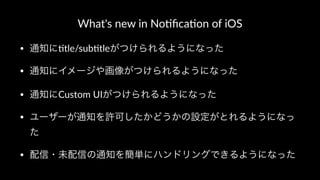
What's new in
No.fica.on of iOS • 通知に"tle/sub"tleがつけられるようになった • 通知にイメージや画像がつけられるようになった • 通知にCustom UIがつけられるようになった • ユーザーが通知を許可したかどうかの設定がとれるようになっ た • 配信・未配信の通知を簡単にハンドリングできるようになった
4.
配信・未配信の通知を簡単にハンド リングできるようになった
5.
Local No(fica(onとRemote No(fica(onが統 一されました。
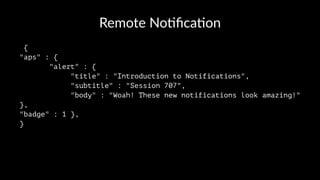
6.
Remote No(fica(on { "aps" :
{ "alert" : { "title" : "Introduction to Notifications", "subtitle" : "Session 707", "body" : "Woah! These new notifications look amazing!" }, "badge" : 1 }, }
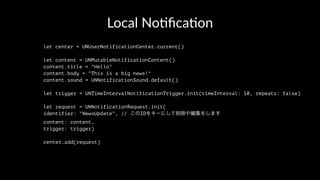
7.
Local No(fica(on let center
= UNUserNotificationCenter.current() let content = UNMutableNotificationContent() content.title = "Hello" content.body = "This is a big news!" content.sound = UNNotificationSound.default() let trigger = UNTimeIntervalNotificationTrigger.init(timeInterval: 10, repeats: false) let request = UNNotificationRequest.init( identifier: "NewsUpdate", // このIDをキーにして削除や編集をします content: content, trigger: trigger) center.add(request)
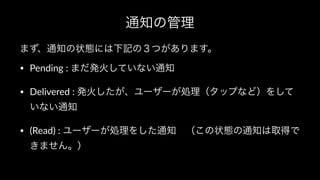
8.
通知の管理 まず、通知の状態には下記の3つがあります。 • Pending :
まだ発火していない通知 • Delivered : 発火したが、ユーザーが処理(タップなど)をして いない通知 • (Read) : ユーザーが処理をした通知 (この状態の通知は取得で きません。)
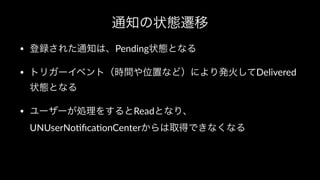
9.
通知の状態遷移 • 登録された通知は、Pending状態となる • トリガーイベント(時間や位置など)により発火してDelivered 状態となる •
ユーザーが処理をするとReadとなり、 UNUserNo2fica2onCenterからは取得できなくなる
10.
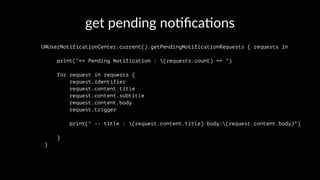
get pending no*fica*ons UNUserNotificationCenter.current().getPendingNotificationRequests
{ requests in print("== Pending Notification : (requests.count) == ") for request in requests { request.identifier request.content.title request.content.subtitle request.content.body request.trigger print(" -- title : (request.content.title) body:(request.content.body)") } }
11.
delete pending no+fica+ons //特定のpending通知を消す UNUserNotificationCenter.current().removePendingNotificationRequests(withIdentifiers:
["NewsUpdate","NewsDelivery"]) //全部のpending通知を消す UNUserNotificationCenter.current().removeAllPendingNotificationRequests()
12.
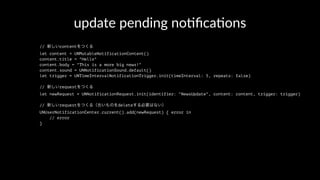
update pending no,fica,ons //
新しいcontentをつくる let content = UNMutableNotificationContent() content.title = "Hello" content.body = "This is a more big news!" content.sound = UNNotificationSound.default() let trigger = UNTimeIntervalNotificationTrigger.init(timeInterval: 5, repeats: false) // 新しいrequestをつくる let newRequest = UNNotificationRequest.init(identifier: "NewsUpdate", content: content, trigger: trigger) // 新しいrequestをつくる(古いものをdeleteする必要はない) UNUserNotificationCenter.current().add(newRequest) { error in // error }
13.
get delivered no,fica,ons UNUserNotificationCenter.current().getDeliveredNotifications
{ notifications in // [UNNotification]) print("== Delivred Notification : (notifications.count) == ") for notification in notifications { notification.date notification.request print(" -- title : (notification.request.content.title) body:(notification.request.content.body) date: (notification.date)") } }
14.
delete delivered no+fica+ons //特定のdeliverされた通知を消す UNUserNotificationCenter.current().removeDeliveredNotifications(withIdentifiers:
["NewsUpdate","NewsDelivery"]) //全部のdeliverされた通知を消す UNUserNotificationCenter.current().removeAllDeliveredNotifications()
15.
No#fica#on in ac#on •
アプリが Foregroundにある状態で通知が配信された場合に、シ ステムの通知画面をだせるようになりました。 func userNotificationCenter(_ center: UNUserNotificationCenter, willPresent notification: UNNotification, withCompletionHandler completionHandler: (UNNotificationPresentationOptions) -> Void) { print("! Notification came!(notification.request.content.title)") completionHandler([.alert, .sound])// これをいれておくと、システムの通知画面をだしてくれる }
16.
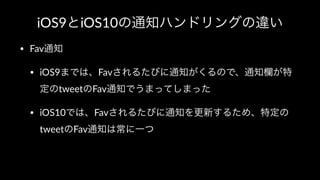
iOS9とiOS10の通知ハンドリングの違い • Fav通知 • iOS9までは、Favされるたびに通知がくるので、通知欄が特 定のtweetのFav通知でうまってしまった •
iOS10では、Favされるたびに通知を更新するため、特定の tweetのFav通知は常に一つ
17.
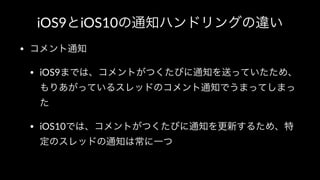
iOS9とiOS10の通知ハンドリングの違い • コメント通知 • iOS9までは、コメントがつくたびに通知を送っていたため、 もりあがっているスレッドのコメント通知でうまってしまっ た •
iOS10では、コメントがつくたびに通知を更新するため、特 定のスレッドの通知は常に一つ
18.
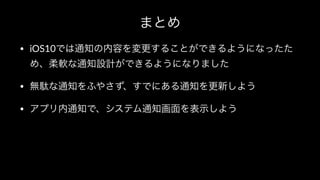
まとめ • iOS10では通知の内容を変更することができるようになったた め、柔軟な通知設計ができるようになりました • 無駄な通知をふやさず、すでにある通知を更新しよう •
アプリ内通知で、システム通知画面を表示しよう
Download

![delete pending no+fica+ons
//特定のpending通知を消す
UNUserNotificationCenter.current().removePendingNotificationRequests(withIdentifiers: ["NewsUpdate","NewsDelivery"])
//全部のpending通知を消す
UNUserNotificationCenter.current().removeAllPendingNotificationRequests()](https://image.slidesharecdn.com/notification-160721135657/85/Notifications-in-iOS10-11-320.jpg)
![get delivered no,fica,ons
UNUserNotificationCenter.current().getDeliveredNotifications { notifications in
// [UNNotification])
print("== Delivred Notification : (notifications.count) == ")
for notification in notifications {
notification.date
notification.request
print(" -- title : (notification.request.content.title) body:(notification.request.content.body) date: (notification.date)")
}
}](https://image.slidesharecdn.com/notification-160721135657/85/Notifications-in-iOS10-13-320.jpg)
![delete delivered no+fica+ons
//特定のdeliverされた通知を消す
UNUserNotificationCenter.current().removeDeliveredNotifications(withIdentifiers: ["NewsUpdate","NewsDelivery"])
//全部のdeliverされた通知を消す
UNUserNotificationCenter.current().removeAllDeliveredNotifications()](https://image.slidesharecdn.com/notification-160721135657/85/Notifications-in-iOS10-14-320.jpg)
![No#fica#on in ac#on
• アプリが Foregroundにある状態で通知が配信された場合に、シ
ステムの通知画面をだせるようになりました。
func userNotificationCenter(_ center: UNUserNotificationCenter, willPresent notification: UNNotification, withCompletionHandler completionHandler: (UNNotificationPresentationOptions) -> Void) {
print("! Notification came!(notification.request.content.title)")
completionHandler([.alert, .sound])// これをいれておくと、システムの通知画面をだしてくれる
}](https://image.slidesharecdn.com/notification-160721135657/85/Notifications-in-iOS10-15-320.jpg)