



Craig Hobbs, Solution Engineer, InfluxData
Building IoT Data Streams with
NiFi & InfluxDB
© 2019 InfluxData. All rights reserved.2
About Me
○ Craig Hobbs on Linkedin
○ @chobbs10 on Twitter
“I fight for the users”
Solution Architect, InfluxData
© 2019 InfluxData. All rights reserved.3
Agenda
• The IoT Challenge
• OPC-Based Data
• NiFi + Influx Solution
• Walk-Through of Basic Setup
• Q/A
© 2019 InfluxData. All rights reserved.4
“The World of IoT is Time Series Data”
Sensor data is all time-stamped to help you
understand how your processes and equipment are
doing over time to help further innovation and
improvement.
© 2019 InfluxData. All rights reserved.5
The IoT/IIoT Challenge
No incentive for HW vendors to provide an open communication
framework or interoperability creating vendor lock-in.
At the same time, value contained within these systems is massive,
and it’s only getting more important for enterprises to utilize this
data in process improvement, analytic models, business
automation, and performance visibility.
© 2019 InfluxData. All rights reserved.6
What is OPC UA
Based Data?
© 2019 InfluxData. All rights reserved.7
OPC UA
A “Clumsy” Definition
OPC Unified Architecture (OPC UA) is a
machine to machine communication
protocol for industrial automation focused
on communicating with industrial
equipment and systems for data collection
and control.
© 2019 InfluxData. All rights reserved.8
© 2019 InfluxData. All rights reserved.9
Why Industries use OPC UA ?
OPC UA was to provide a path forward from the original OPC
communications model that would better meet the emerging
needs of industrial automation.
By removing the barrier because of incompatibilities and
proprietary communication interfaces between different
suppliers' automation hardware and software, OPU UA makes
multi-vendor interoperability and "plug and play" connectivity a
reality.
© 2019 InfluxData. All rights reserved.10
But there are still big challenges
Even with OPC UA , existing systems that collect these data
streams were still very clunky with no real-time processing
capabilities.
The operational systems still rely on sampling or “lossy data”
approximation and limit access of the data to the local operator’s
machine.
© 2019 InfluxData. All rights reserved.11
What is
Apache NiFi?
© 2019 InfluxData. All rights reserved.12
Hello NIFI
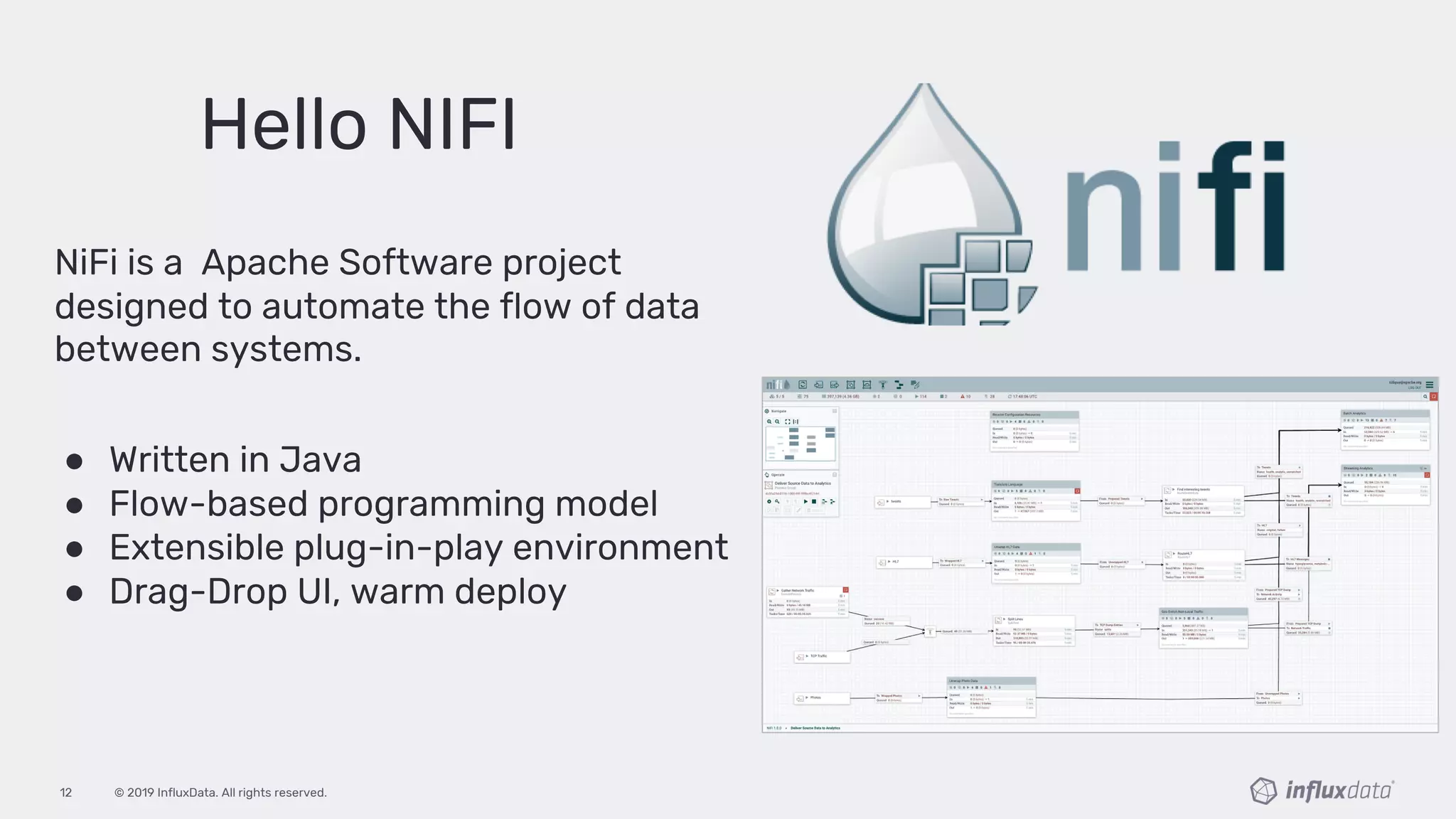
NiFi is a Apache Software project
designed to automate the flow of data
between systems.
● Written in Java
● Flow-based programming model
● Extensible plug-in-play environment
● Drag-Drop UI, warm deploy
© 2019 InfluxData. All rights reserved.13
What is the
InfluxDB Platform?
© 2019 InfluxData. All rights reserved.14
InfluxDB Platform
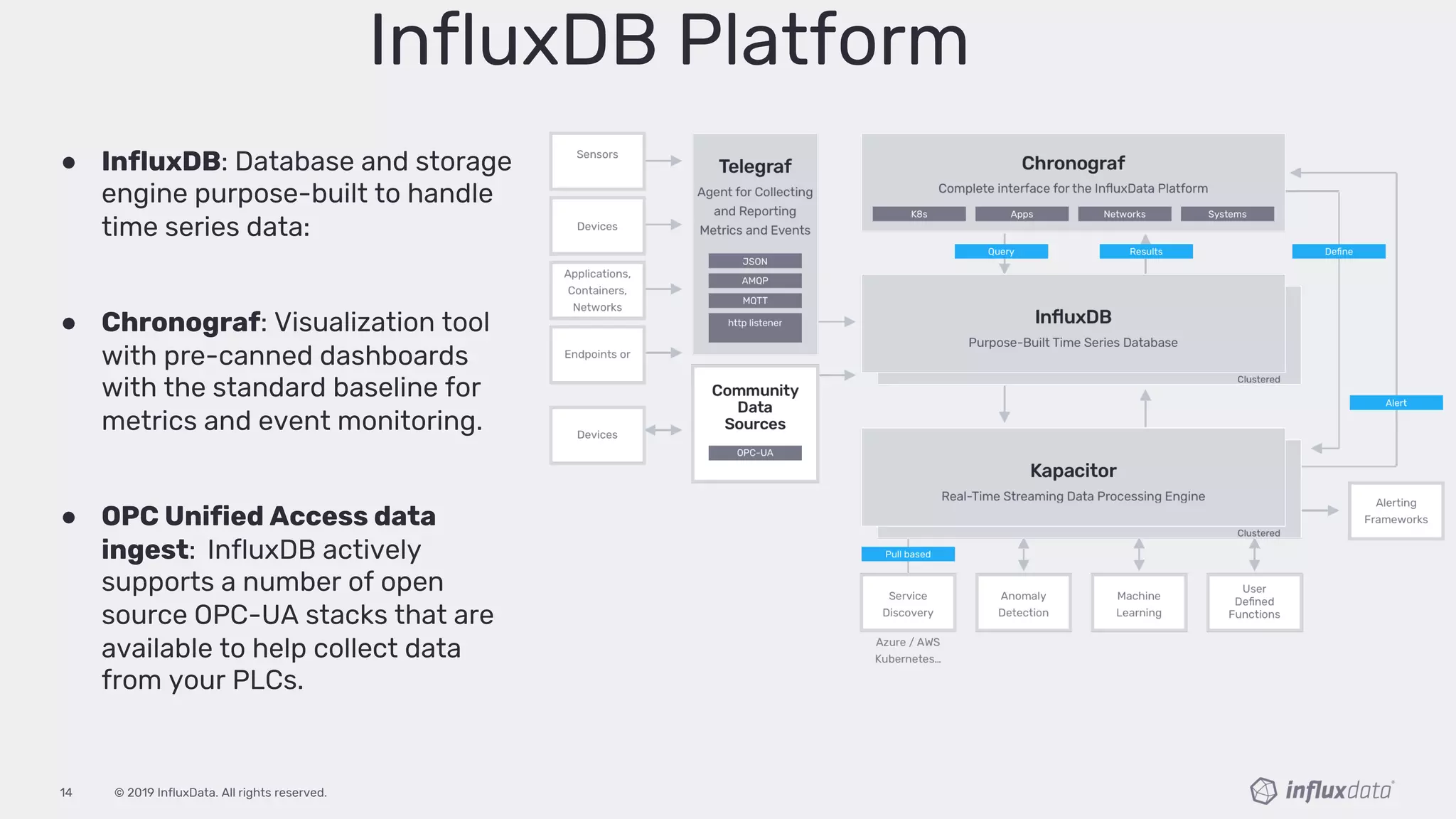
● InfluxDB: Database and storage
engine purpose-built to handle
time series data:
● Chronograf: Visualization tool
with pre-canned dashboards
with the standard baseline for
metrics and event monitoring.
● OPC Unified Access data
ingest: InfluxDB actively
supports a number of open
source OPC-UA stacks that are
available to help collect data
from your PLCs.
© 2019 InfluxData. All rights reserved.15
Why NiFi and InfluxDB?
By combining the two platforms industries can establish reliable
collection streams and that make data easily accessible.
This solution enables the enterprise to securely collect, process,
monitor and share data from their facilities across all business units
supporting a wide range of business-based use-cases.
© 2019 InfluxData. All rights reserved.16
● Reliable data-stream processing
● Enterprise wide reporting and monitoring
● Ingestion of large volumes
● Data shaping for enterprise consumption
● Real-time queries on large datasets
● Storage optimizations and compression
We work well
together I know,
right!
NiFi + InfluxDB
Better Together
© 2019 InfluxData. All rights reserved.17
Other advantages of bringing these together
• Scalability
• High-Availability
• Security
• Open Source
• Community Support
• No Development or Coding
• Real-Time Collection
• Flexible Deployment
• Data integration
• No Vendor Lock-in
© 2019 InfluxData. All rights reserved.18
Basic Setup
NIFI and InfluxDB / Better Togetherp
© 2019 InfluxData. All rights reserved.19
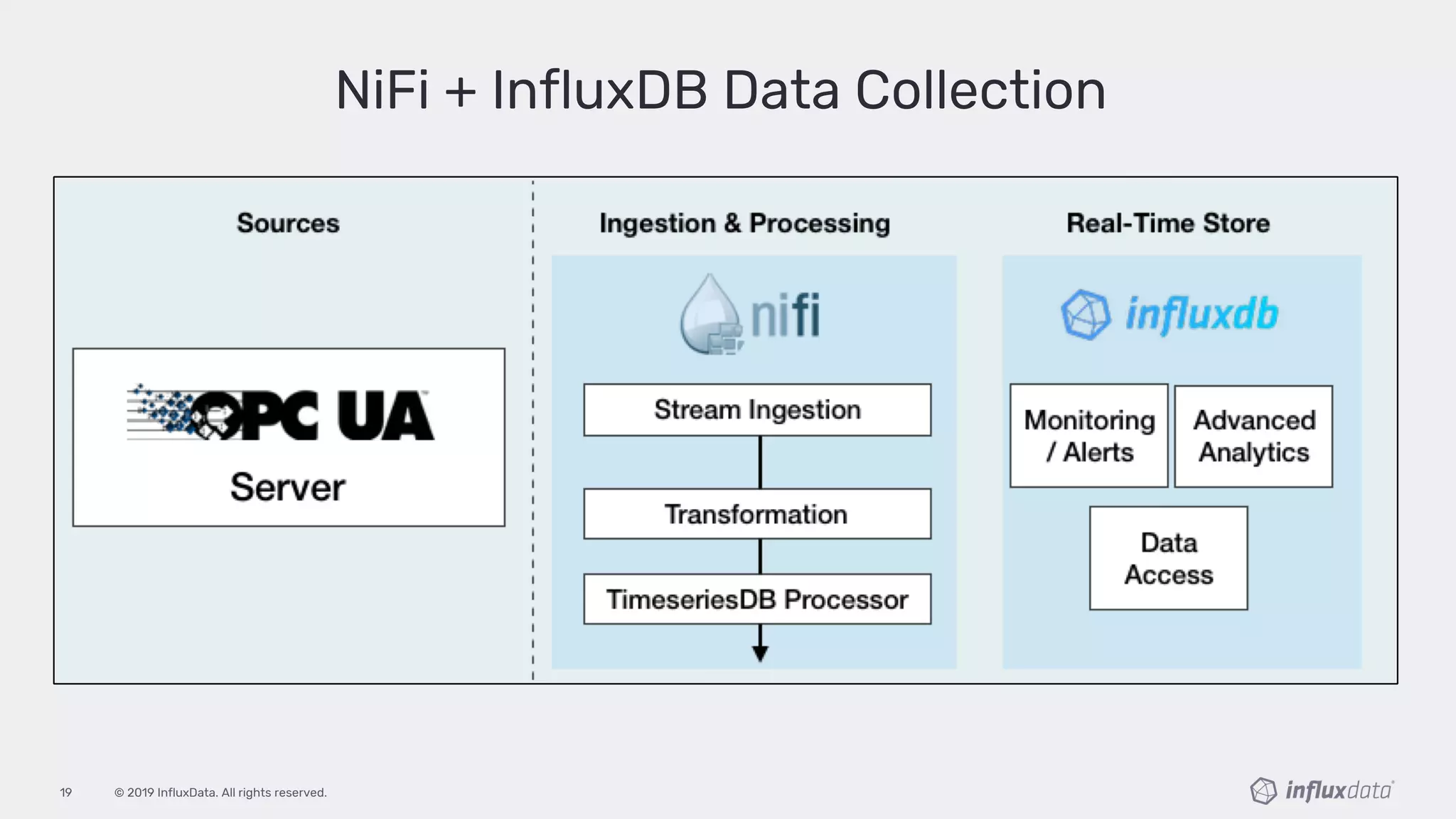
NiFi + InfluxDB Data Collection
© 2019 InfluxData. All rights reserved.20
Demo Time!
© 2019 InfluxData. All rights reserved.21
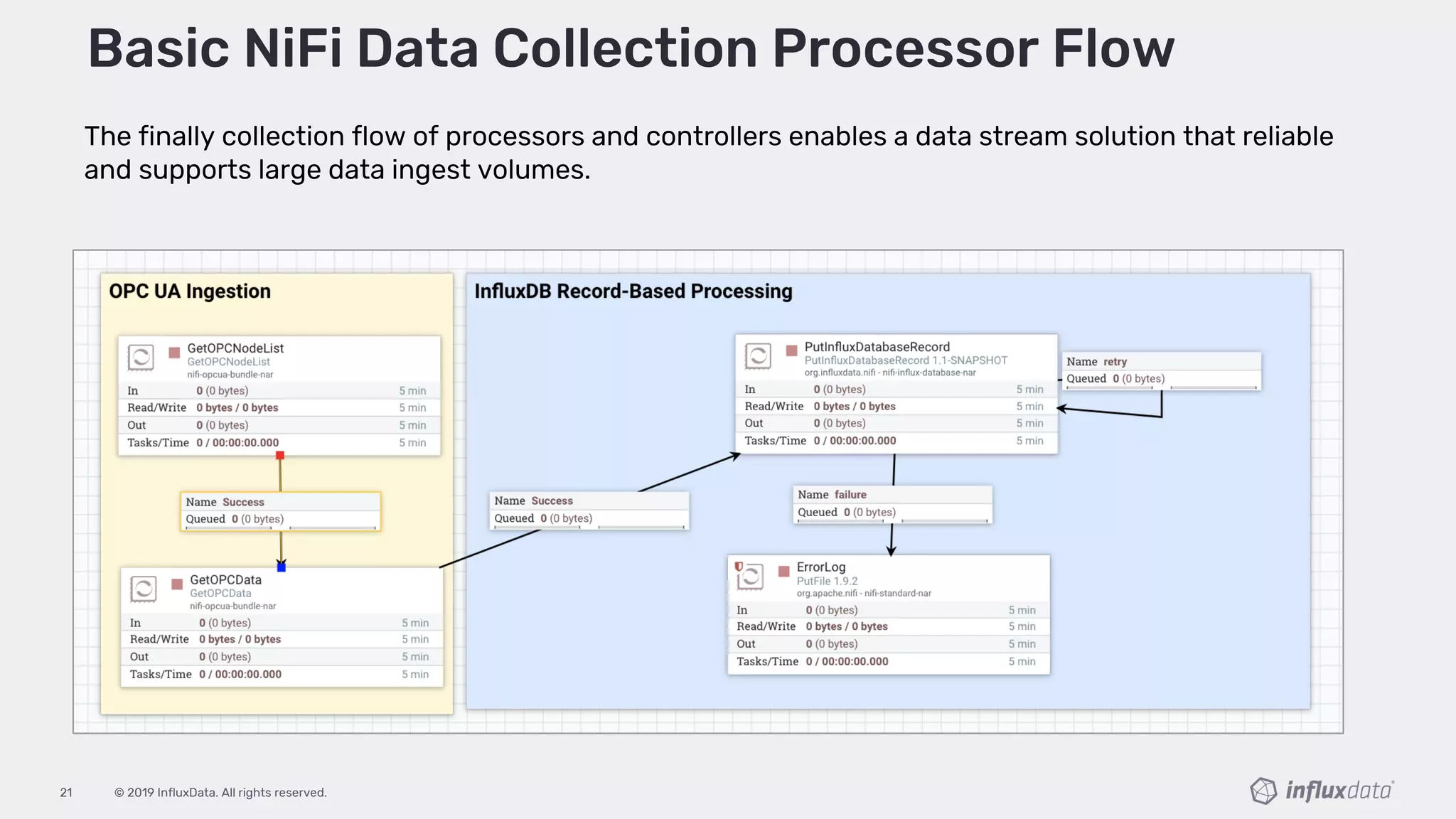
The finally collection flow of processors and controllers enables a data stream solution that reliable
and supports large data ingest volumes.
Basic NiFi Data Collection Processor Flow
© 2019 InfluxData. All rights reserved.22
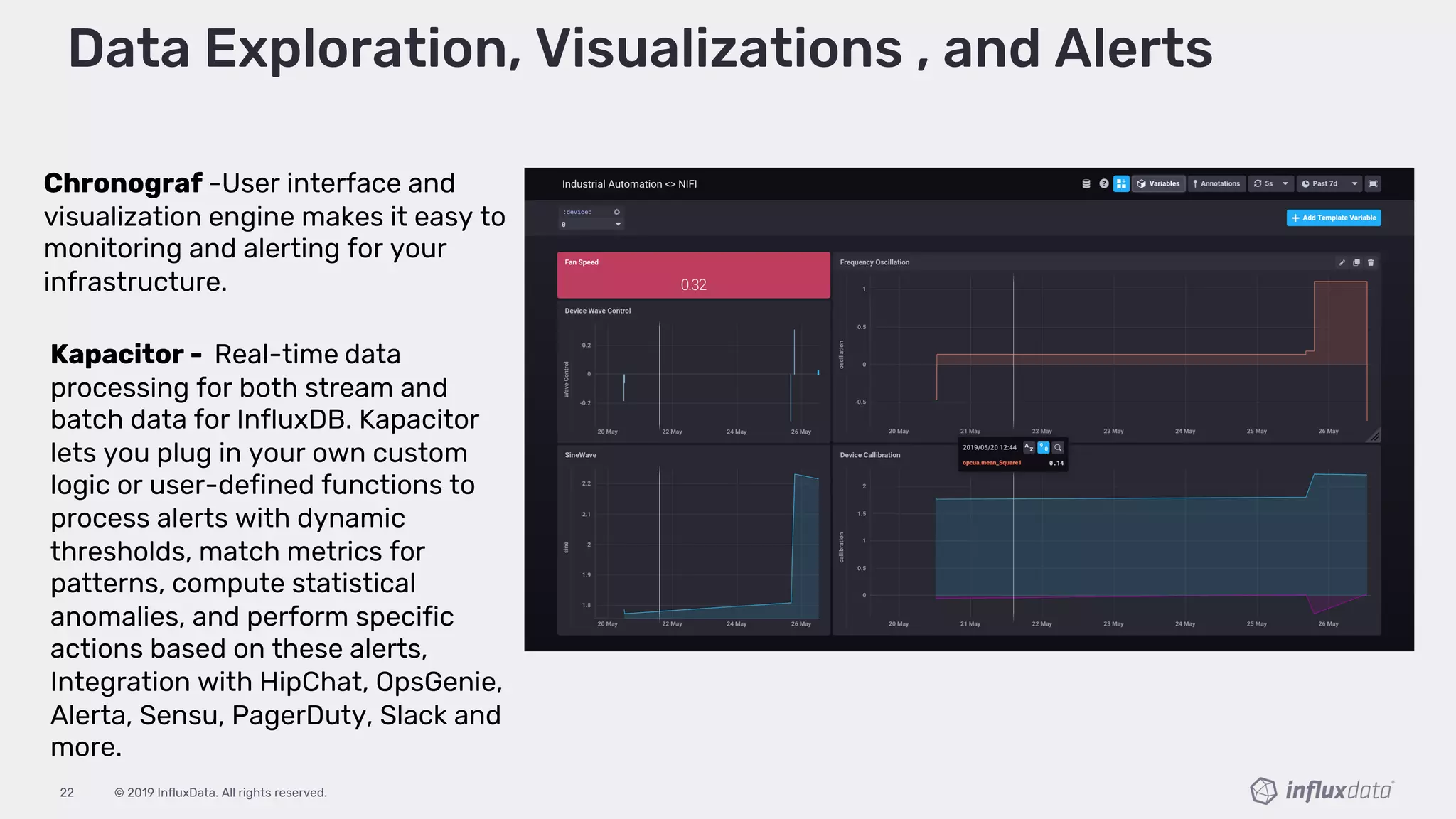
Data Exploration, Visualizations , and Alerts
Chronograf -User interface and
visualization engine makes it easy to
monitoring and alerting for your
infrastructure.
Kapacitor - Real-time data
processing for both stream and
batch data for InfluxDB. Kapacitor
lets you plug in your own custom
logic or user-defined functions to
process alerts with dynamic
thresholds, match metrics for
patterns, compute statistical
anomalies, and perform specific
actions based on these alerts,
Integration with HipChat, OpsGenie,
Alerta, Sensu, PagerDuty, Slack and
more.
© 2019 InfluxData. All rights reserved.23
Summary Review Thoughts...
Then check out the super-power
team of NiFi<>InfluxDB
So, if you are limited by the analytics capabilities of your traditional
automation systems and are looking to further leverage your big
data platform to securely collect, observe, and act-on across your
enterprise
© 2019 InfluxData. All rights reserved.24
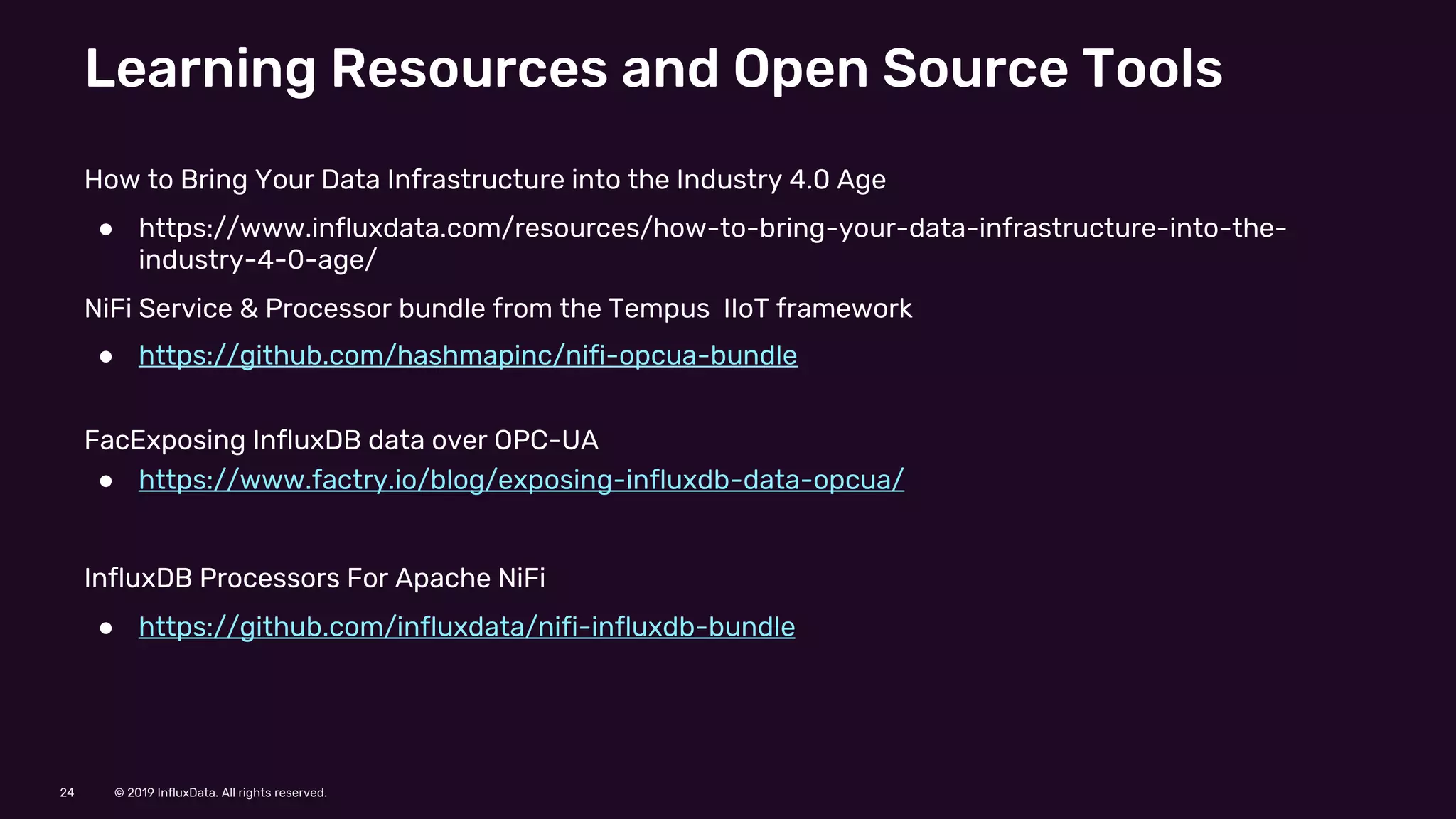
Learning Resources and Open Source Tools
How to Bring Your Data Infrastructure into the Industry 4.0 Age
● https://www.influxdata.com/resources/how-to-bring-your-data-infrastructure-into-the-
industry-4-0-age/
NiFi Service & Processor bundle from the Tempus IIoT framework
● https://github.com/hashmapinc/nifi-opcua-bundle
FacExposing InfluxDB data over OPC-UA
● https://www.factry.io/blog/exposing-influxdb-data-opcua/
InfluxDB Processors For Apache NiFi
● https://github.com/influxdata/nifi-influxdb-bundle
Twitter: @chobbs10
Email: craig@influxdata.com
© 2019 InfluxData. All rights reserved.26
Resources:
© 2019 InfluxData. All rights reserved.27
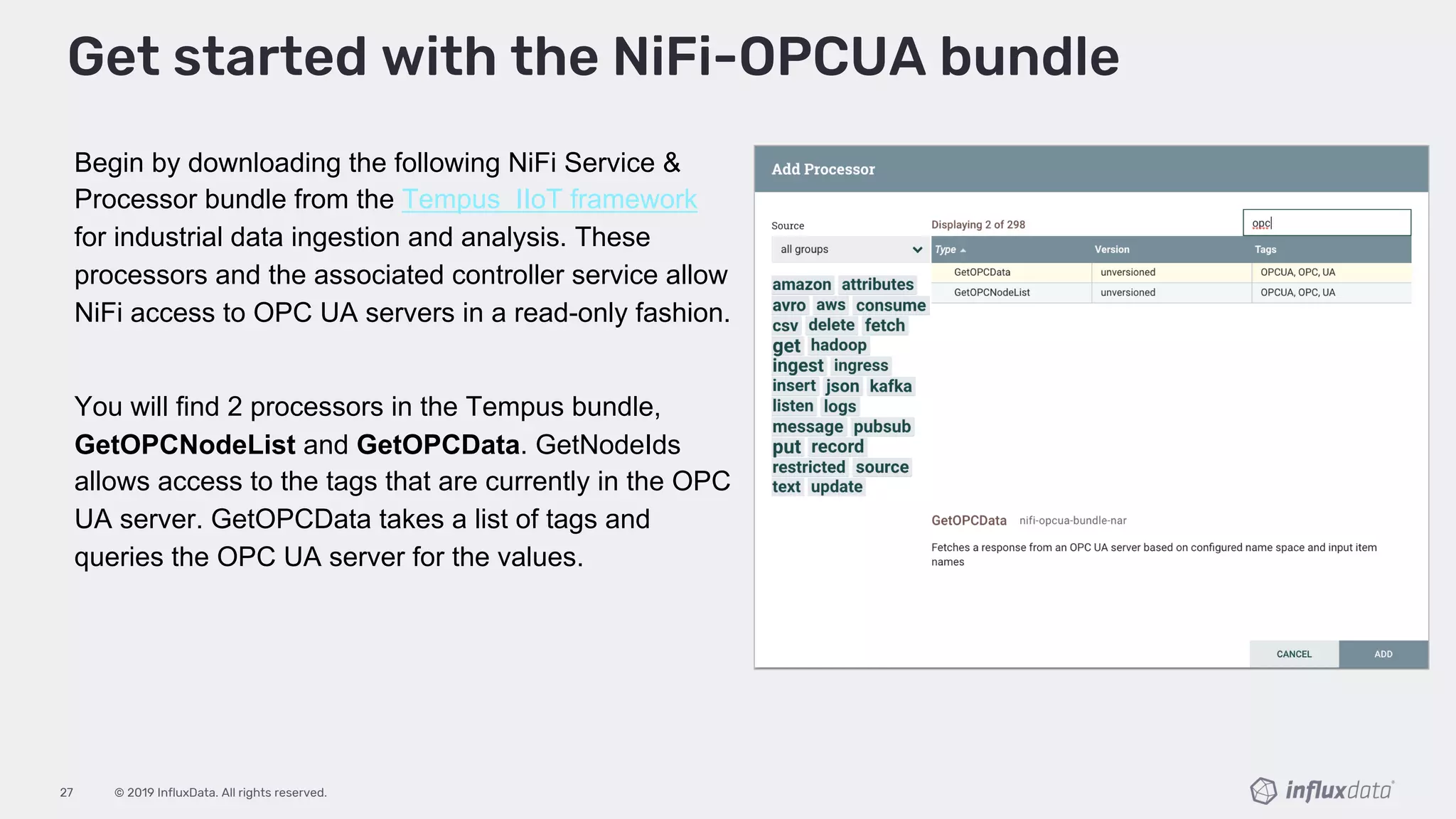
Begin by downloading the following NiFi Service &
Processor bundle from the Tempus IIoT framework
for industrial data ingestion and analysis. These
processors and the associated controller service allow
NiFi access to OPC UA servers in a read-only fashion.
You will find 2 processors in the Tempus bundle,
GetOPCNodeList and GetOPCData. GetNodeIds
allows access to the tags that are currently in the OPC
UA server. GetOPCData takes a list of tags and
queries the OPC UA server for the values.
Get started with the NiFi-OPCUA bundle
© 2019 InfluxData. All rights reserved.28
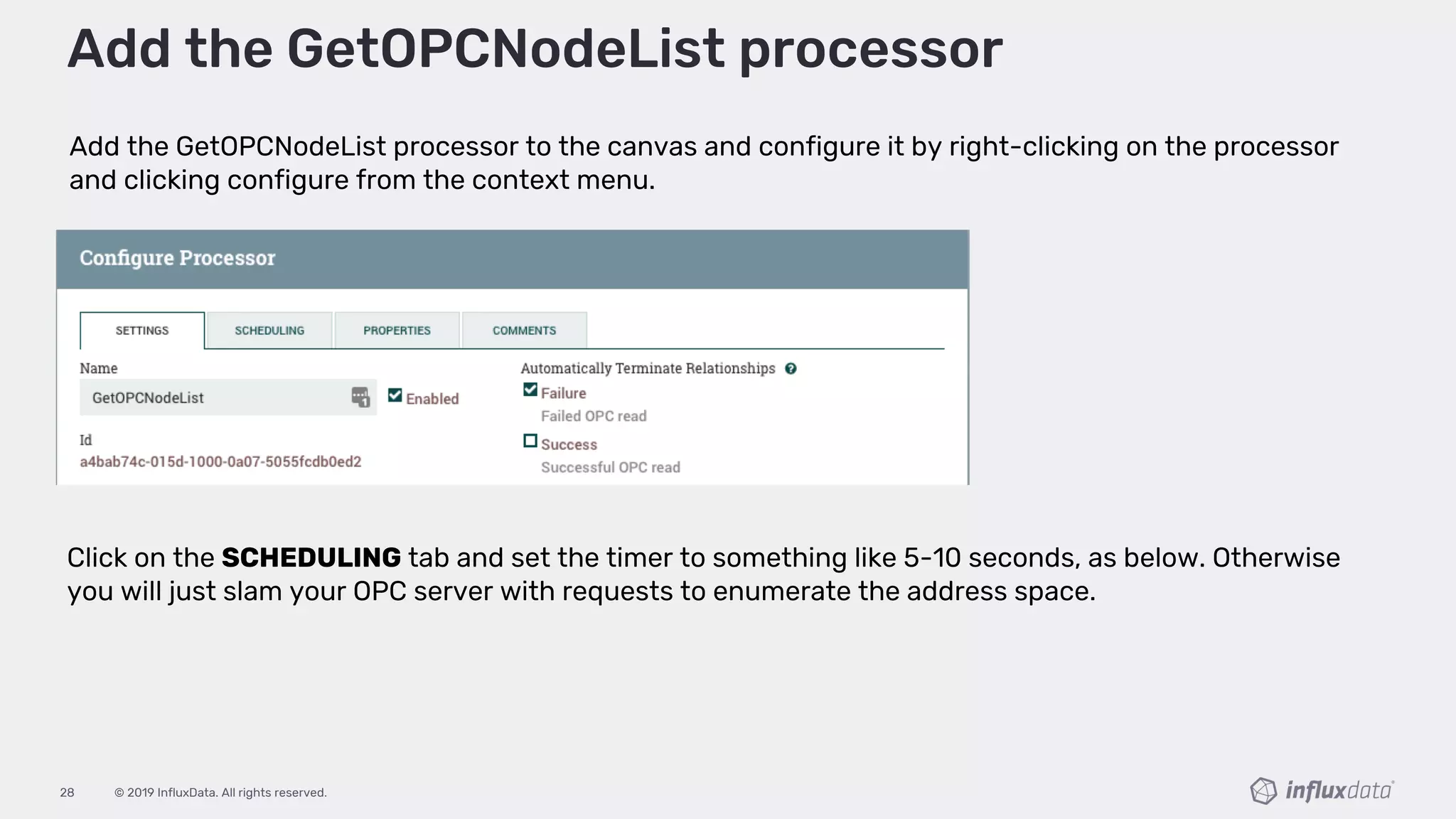
Add the GetOPCNodeList processor to the canvas and configure it by right-clicking on the processor
and clicking configure from the context menu.
Add the GetOPCNodeList processor
Click on the SCHEDULING tab and set the timer to something like 5-10 seconds, as below. Otherwise
you will just slam your OPC server with requests to enumerate the address space.
© 2019 InfluxData. All rights reserved.29
Configuring the GetOPCNodeList processor
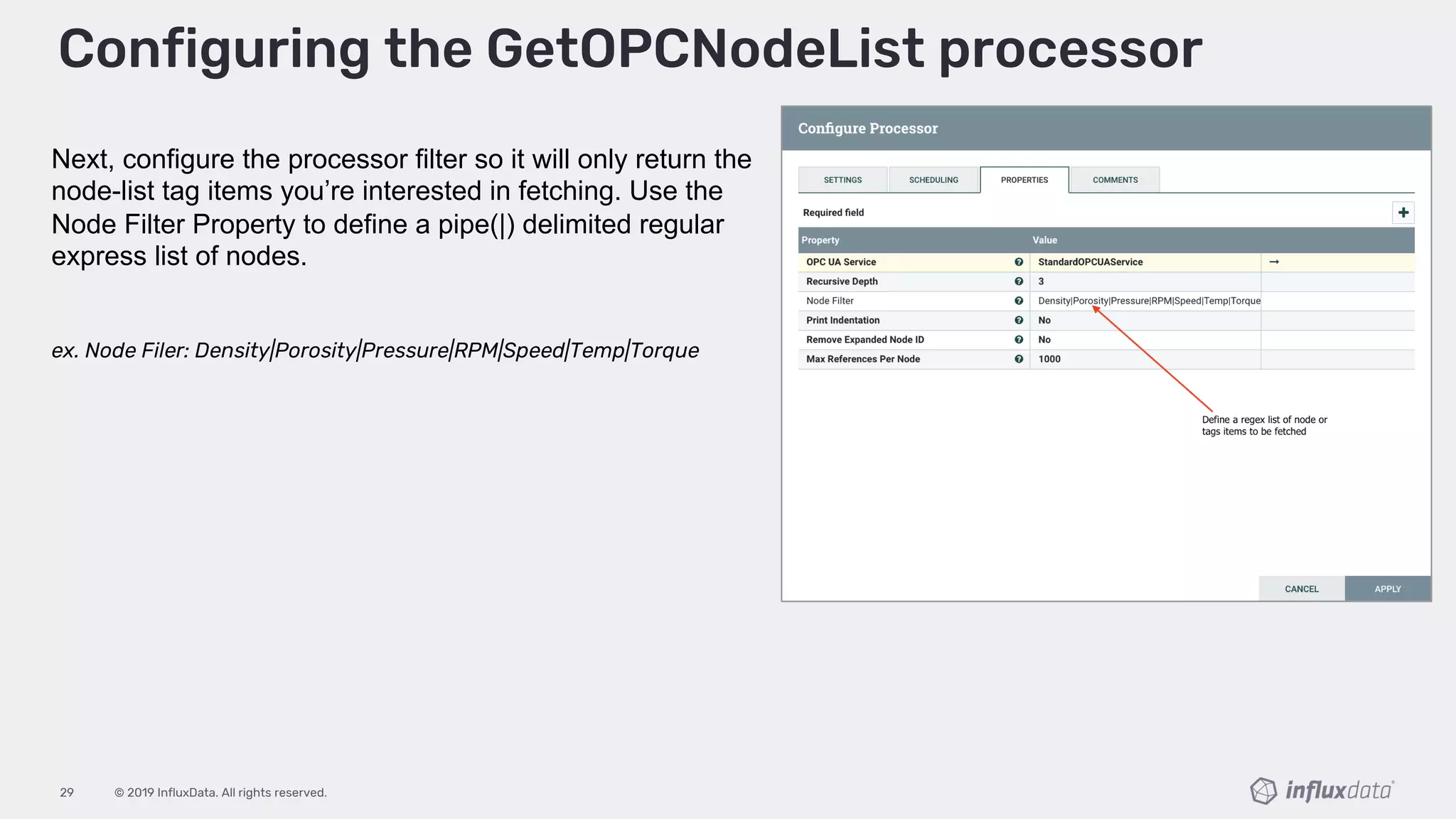
Next, configure the processor filter so it will only return the
node-list tag items you’re interested in fetching. Use the
Node Filter Property to define a pipe(|) delimited regular
express list of nodes.
ex. Node Filer: Density|Porosity|Pressure|RPM|Speed|Temp|Torque
© 2019 InfluxData. All rights reserved.30
Configuring the GetOPCNodeList processor
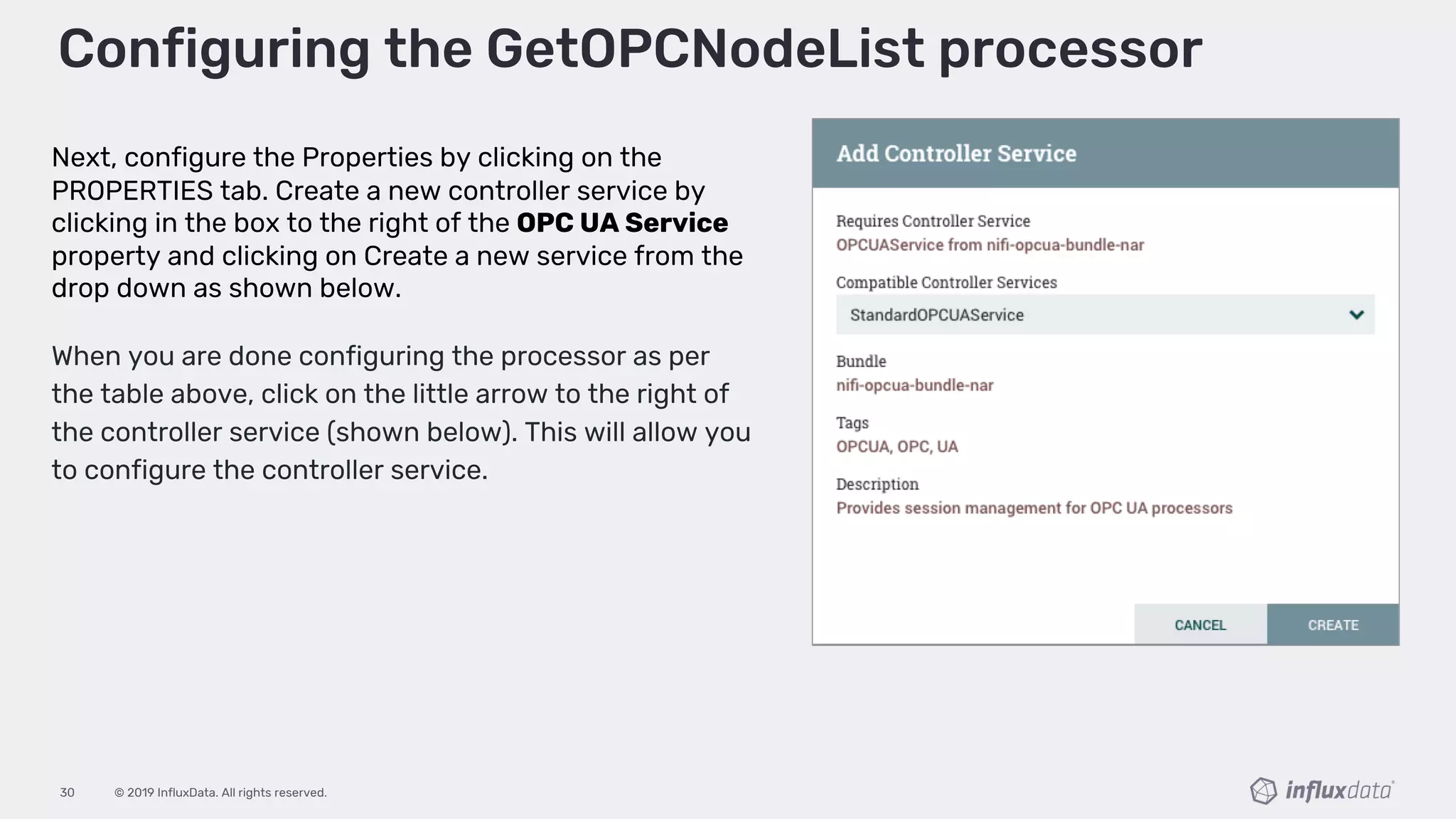
Next, configure the Properties by clicking on the
PROPERTIES tab. Create a new controller service by
clicking in the box to the right of the OPC UA Service
property and clicking on Create a new service from the
drop down as shown below.
When you are done configuring the processor as per
the table above, click on the little arrow to the right of
the controller service (shown below). This will allow you
to configure the controller service.
© 2019 InfluxData. All rights reserved.31
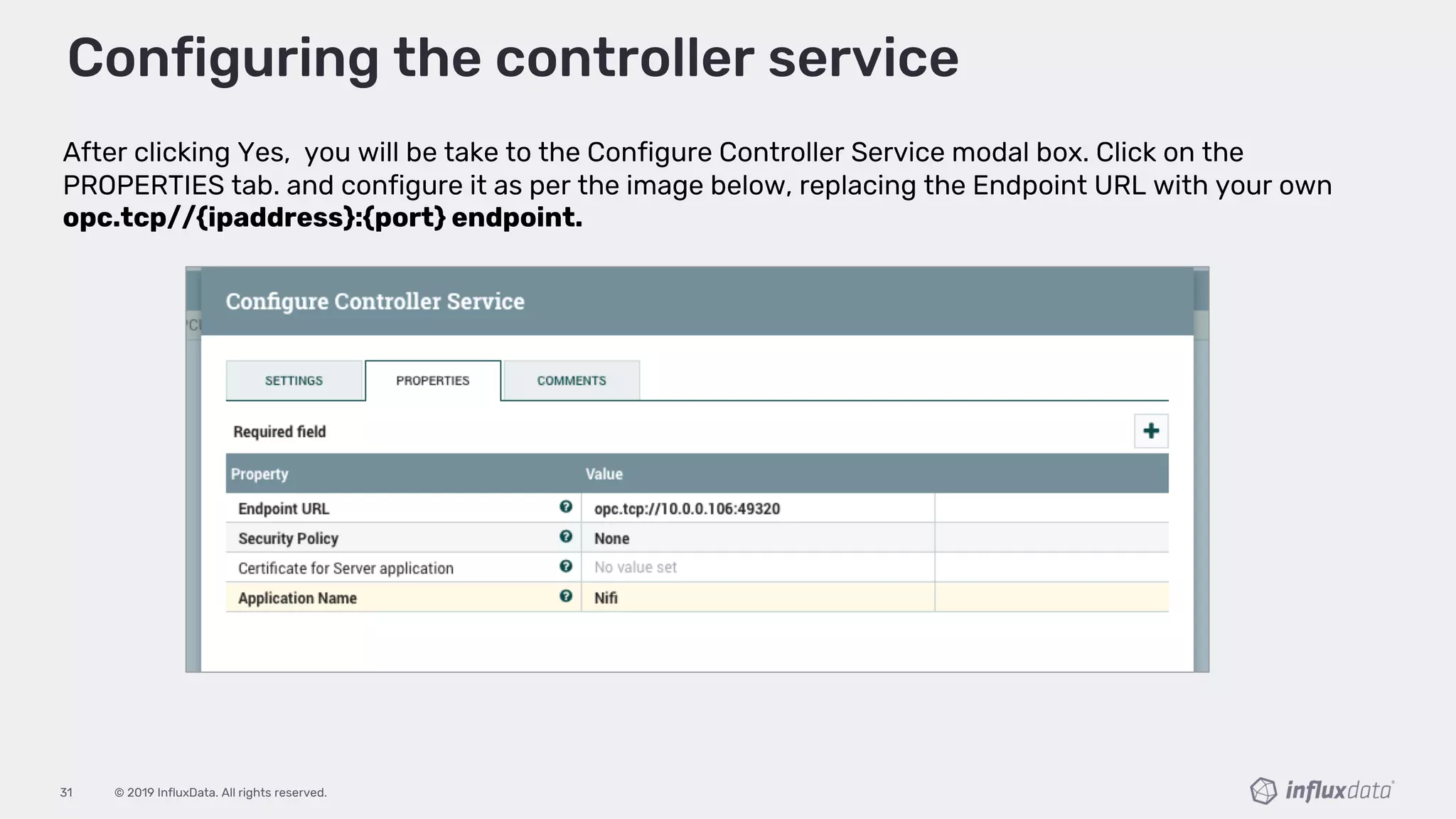
After clicking Yes, you will be take to the Configure Controller Service modal box. Click on the
PROPERTIES tab. and configure it as per the image below, replacing the Endpoint URL with your own
opc.tcp//{ipaddress}:{port} endpoint.
Configuring the controller service
© 2019 InfluxData. All rights reserved.32
Add the GetOPCData processor
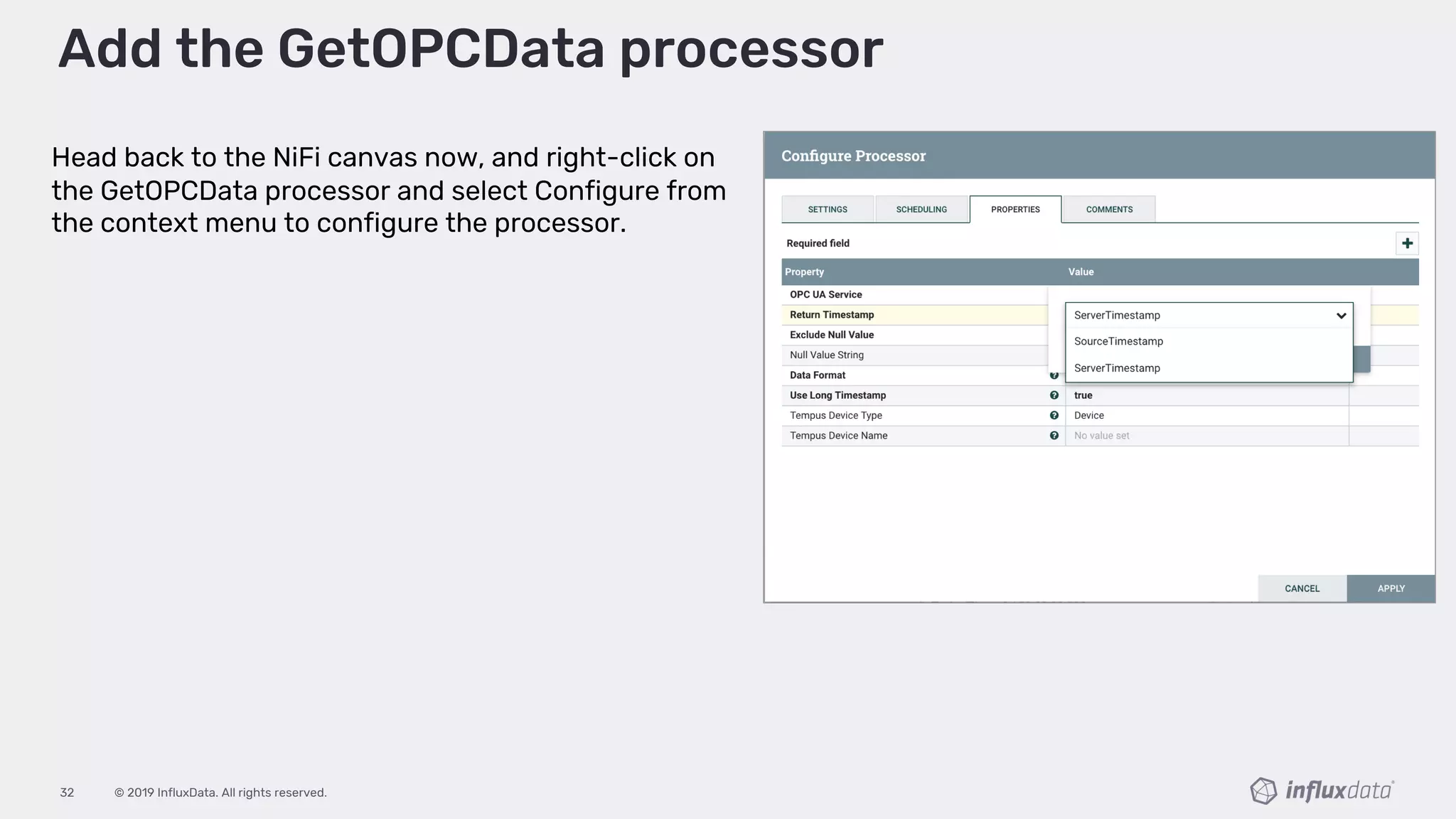
Head back to the NiFi canvas now, and right-click on
the GetOPCData processor and select Configure from
the context menu to configure the processor.
© 2019 InfluxData. All rights reserved.33
Configure the GetOPCData processor
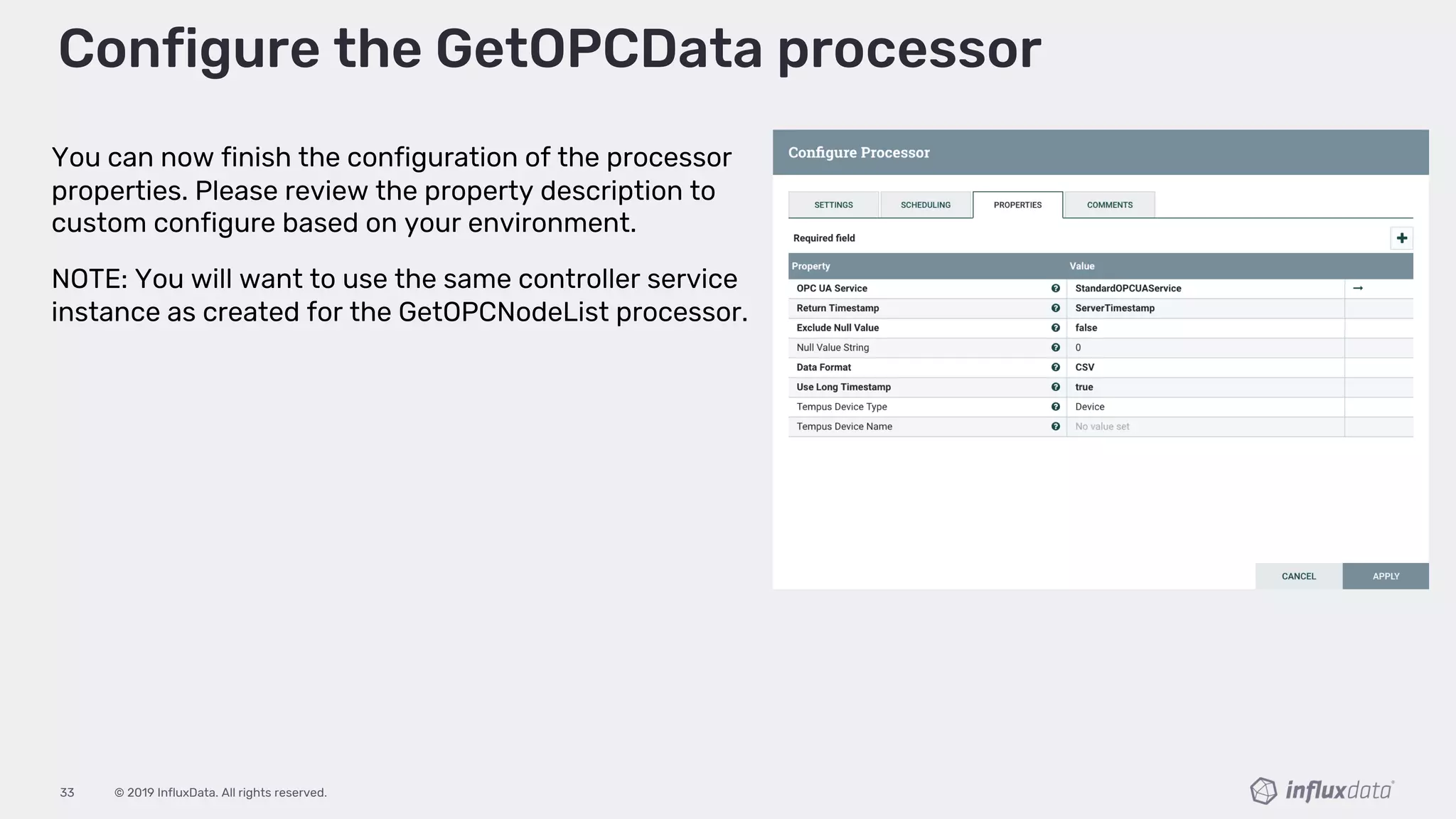
You can now finish the configuration of the processor
properties. Please review the property description to
custom configure based on your environment.
NOTE: You will want to use the same controller service
instance as created for the GetOPCNodeList processor.
© 2019 InfluxData. All rights reserved.34
Connect the GetOPCData GetOPCNodeList
processor
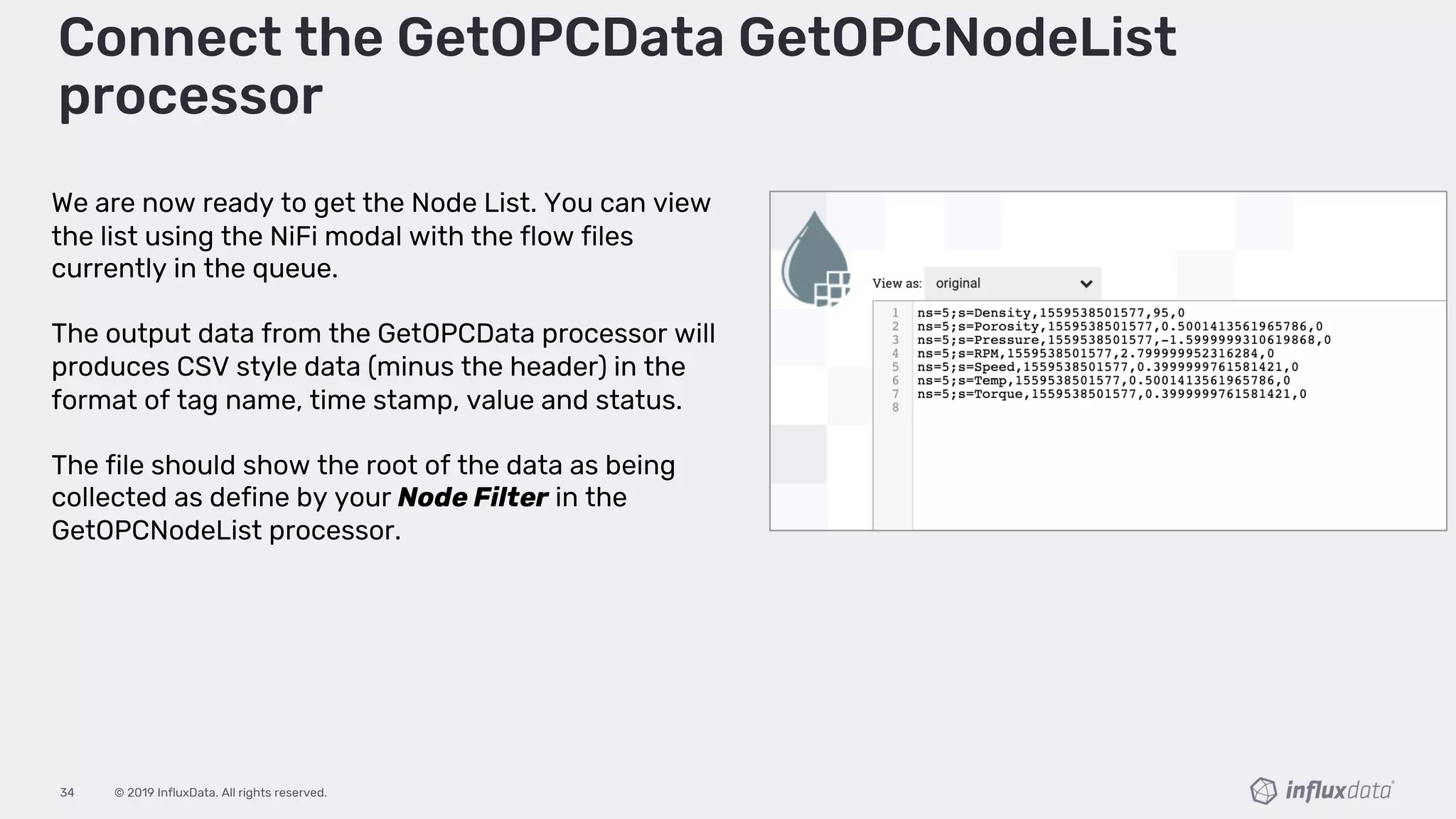
We are now ready to get the Node List. You can view
the list using the NiFi modal with the flow files
currently in the queue.
The output data from the GetOPCData processor will
produces CSV style data (minus the header) in the
format of tag name, time stamp, value and status.
The file should show the root of the data as being
collected as define by your Node Filter in the
GetOPCNodeList processor.
© 2019 InfluxData. All rights reserved.35
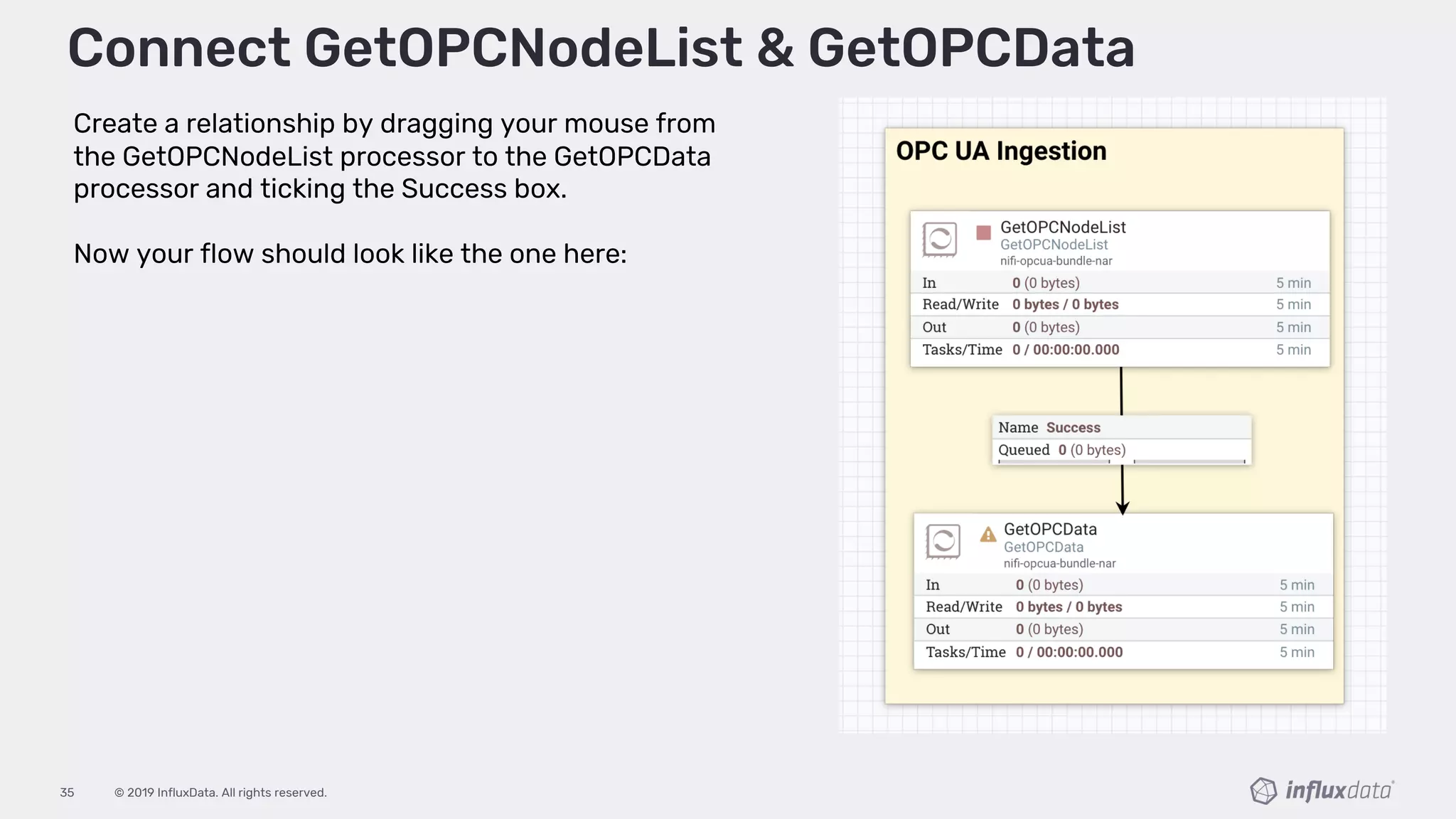
Create a relationship by dragging your mouse from
the GetOPCNodeList processor to the GetOPCData
processor and ticking the Success box.
Now your flow should look like the one here:
Connect GetOPCNodeList & GetOPCData
© 2019 InfluxData. All rights reserved.36
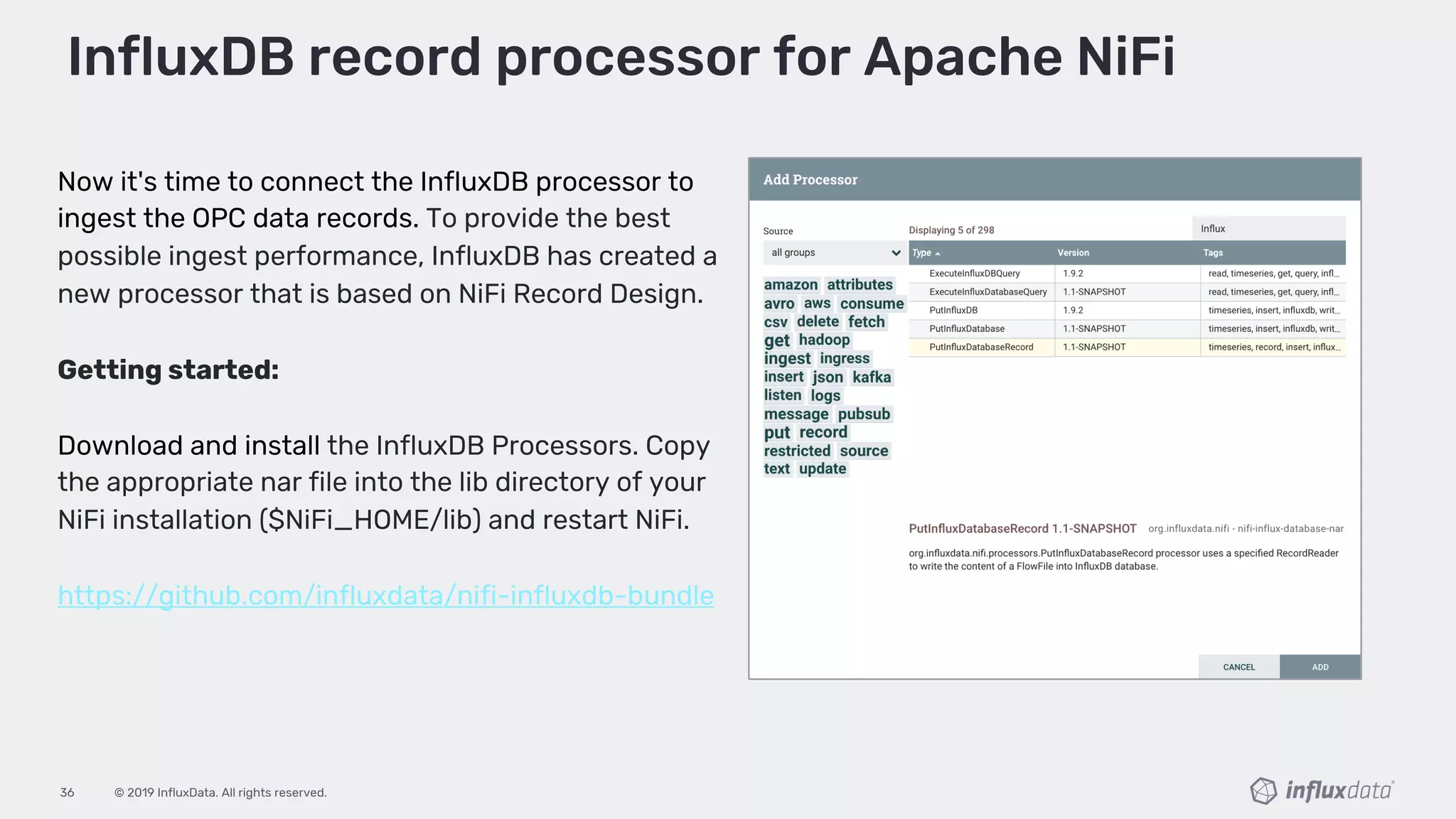
Now it's time to connect the InfluxDB processor to
ingest the OPC data records. To provide the best
possible ingest performance, InfluxDB has created a
new processor that is based on NiFi Record Design.
Getting started:
Download and install the InfluxDB Processors. Copy
the appropriate nar file into the lib directory of your
NiFi installation ($NiFi_HOME/lib) and restart NiFi.
https://github.com/influxdata/nifi-influxdb-bundle
InfluxDB record processor for Apache NiFi
© 2019 InfluxData. All rights reserved.37
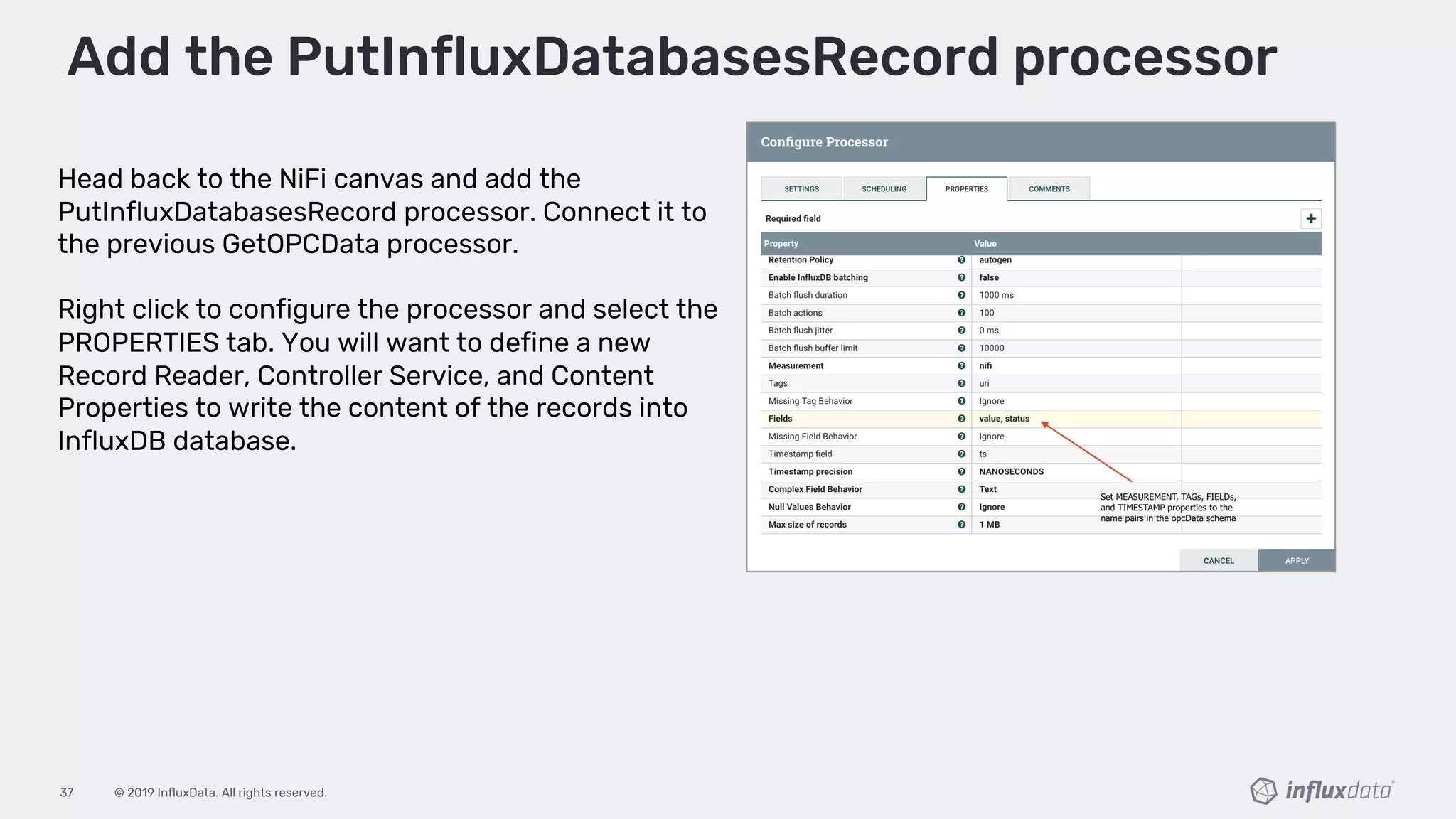
Head back to the NiFi canvas and add the
PutInfluxDatabasesRecord processor. Connect it to
the previous GetOPCData processor.
Right click to configure the processor and select the
PROPERTIES tab. You will want to define a new
Record Reader, Controller Service, and Content
Properties to write the content of the records into
InfluxDB database.
Add the PutInfluxDatabasesRecord processor
© 2019 InfluxData. All rights reserved.38
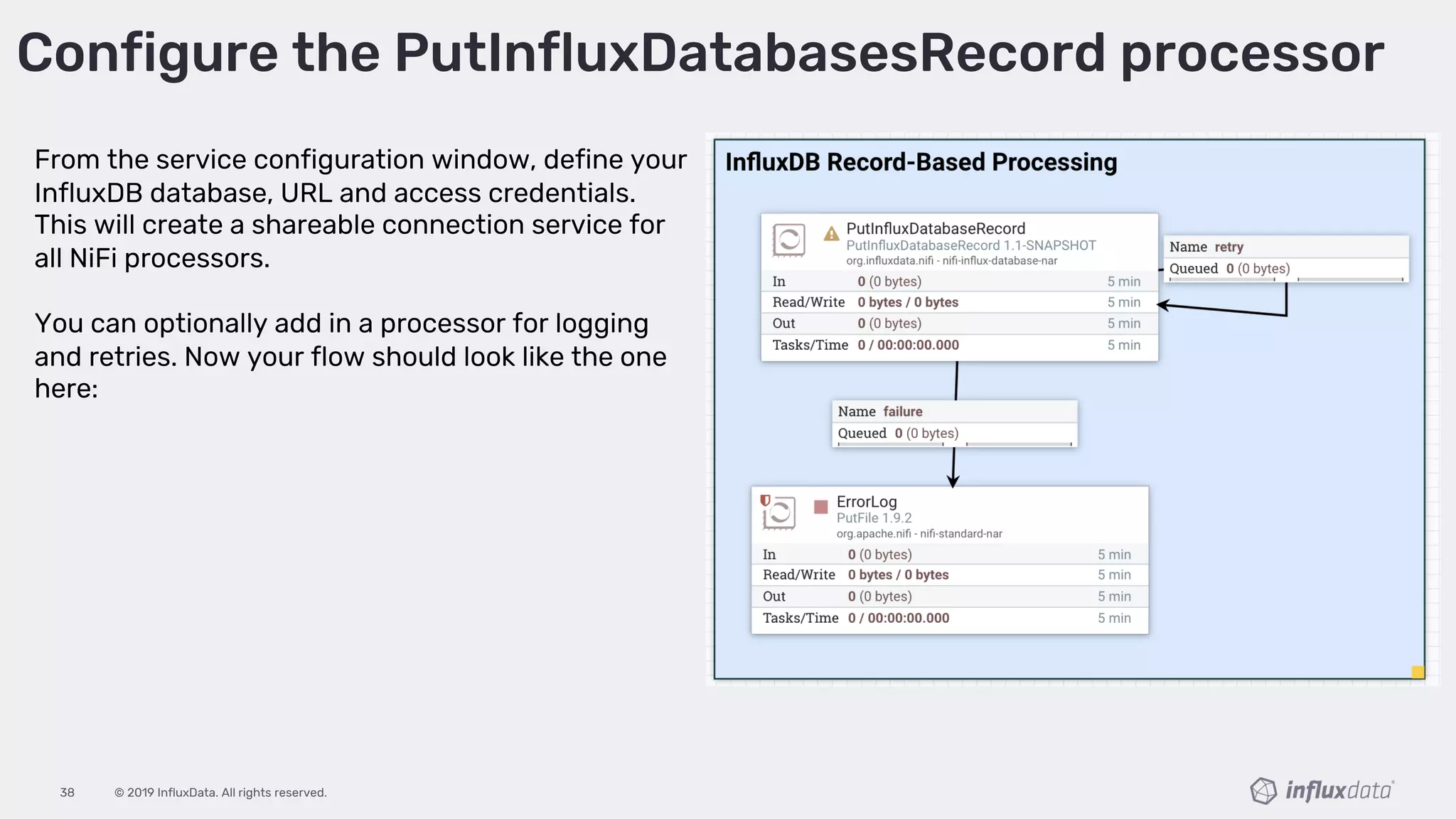
From the service configuration window, define your
InfluxDB database, URL and access credentials.
This will create a shareable connection service for
all NiFi processors.
You can optionally add in a processor for logging
and retries. Now your flow should look like the one
here:
Configure the PutInfluxDatabasesRecord processor
© 2019 InfluxData. All rights reserved.39
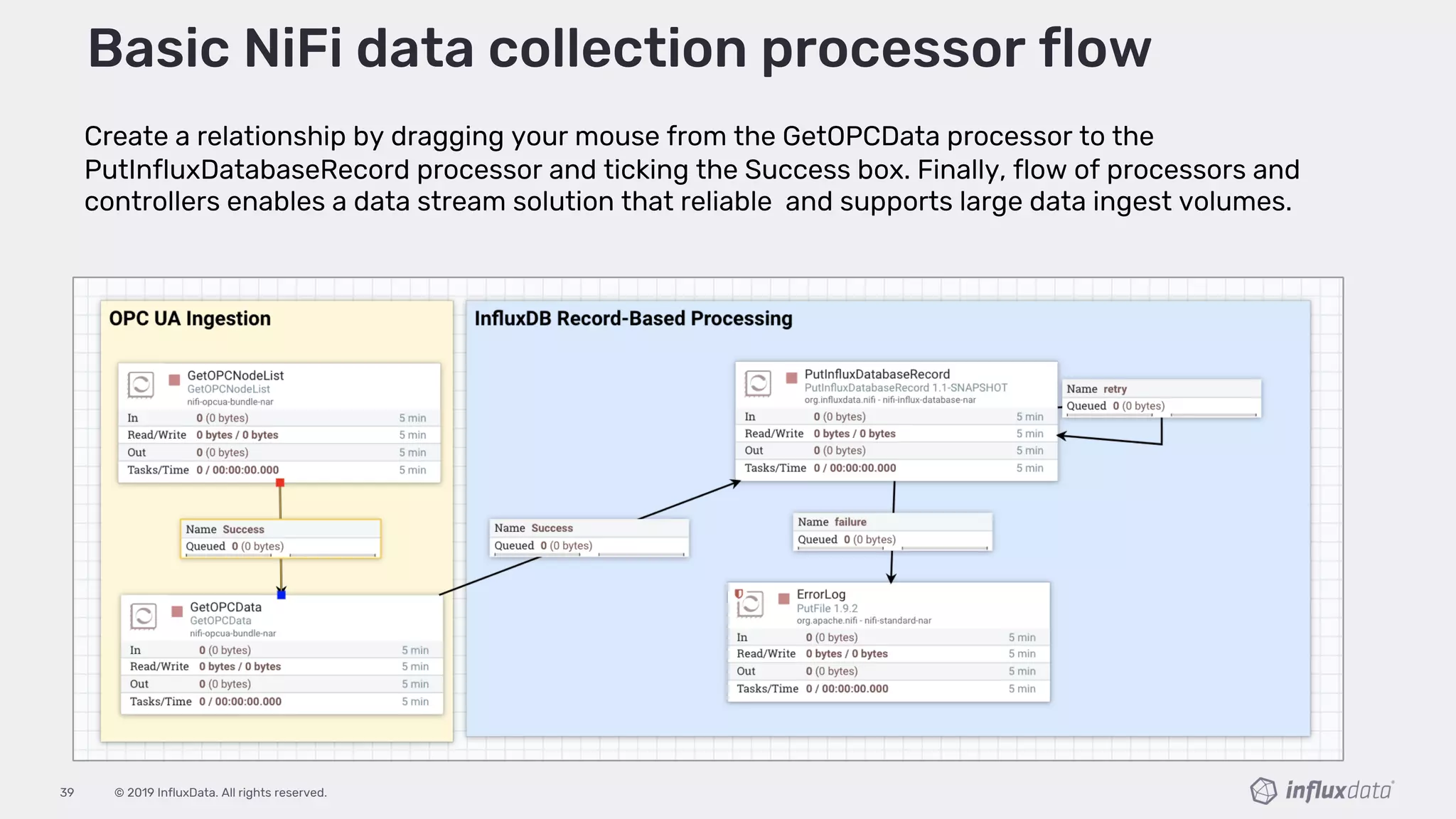
Create a relationship by dragging your mouse from the GetOPCData processor to the
PutInfluxDatabaseRecord processor and ticking the Success box. Finally, flow of processors and
controllers enables a data stream solution that reliable and supports large data ingest volumes.
Basic NiFi data collection processor flow

Building Your Data Streams for all the IoT

  • 1.
    Craig Hobbs, SolutionEngineer, InfluxData Building IoT Data Streams with NiFi & InfluxDB
  • 2.
    © 2019 InfluxData.All rights reserved.2 About Me ○ Craig Hobbs on Linkedin ○ @chobbs10 on Twitter “I fight for the users” Solution Architect, InfluxData
  • 3.
    © 2019 InfluxData.All rights reserved.3 Agenda • The IoT Challenge • OPC-Based Data • NiFi + Influx Solution • Walk-Through of Basic Setup • Q/A
  • 4.
    © 2019 InfluxData.All rights reserved.4 “The World of IoT is Time Series Data” Sensor data is all time-stamped to help you understand how your processes and equipment are doing over time to help further innovation and improvement.
  • 5.
    © 2019 InfluxData.All rights reserved.5 The IoT/IIoT Challenge No incentive for HW vendors to provide an open communication framework or interoperability creating vendor lock-in. At the same time, value contained within these systems is massive, and it’s only getting more important for enterprises to utilize this data in process improvement, analytic models, business automation, and performance visibility.
  • 6.
    © 2019 InfluxData.All rights reserved.6 What is OPC UA Based Data?
  • 7.
    © 2019 InfluxData.All rights reserved.7 OPC UA A “Clumsy” Definition OPC Unified Architecture (OPC UA) is a machine to machine communication protocol for industrial automation focused on communicating with industrial equipment and systems for data collection and control.
  • 8.
    © 2019 InfluxData.All rights reserved.8
  • 9.
    © 2019 InfluxData.All rights reserved.9 Why Industries use OPC UA ? OPC UA was to provide a path forward from the original OPC communications model that would better meet the emerging needs of industrial automation. By removing the barrier because of incompatibilities and proprietary communication interfaces between different suppliers' automation hardware and software, OPU UA makes multi-vendor interoperability and "plug and play" connectivity a reality.
  • 10.
    © 2019 InfluxData.All rights reserved.10 But there are still big challenges Even with OPC UA , existing systems that collect these data streams were still very clunky with no real-time processing capabilities. The operational systems still rely on sampling or “lossy data” approximation and limit access of the data to the local operator’s machine.
  • 11.
    © 2019 InfluxData.All rights reserved.11 What is Apache NiFi?
  • 12.
    © 2019 InfluxData.All rights reserved.12 Hello NIFI NiFi is a Apache Software project designed to automate the flow of data between systems. ● Written in Java ● Flow-based programming model ● Extensible plug-in-play environment ● Drag-Drop UI, warm deploy
  • 13.
    © 2019 InfluxData.All rights reserved.13 What is the InfluxDB Platform?
  • 14.
    © 2019 InfluxData.All rights reserved.14 InfluxDB Platform ● InfluxDB: Database and storage engine purpose-built to handle time series data: ● Chronograf: Visualization tool with pre-canned dashboards with the standard baseline for metrics and event monitoring. ● OPC Unified Access data ingest: InfluxDB actively supports a number of open source OPC-UA stacks that are available to help collect data from your PLCs.
  • 15.
    © 2019 InfluxData.All rights reserved.15 Why NiFi and InfluxDB? By combining the two platforms industries can establish reliable collection streams and that make data easily accessible. This solution enables the enterprise to securely collect, process, monitor and share data from their facilities across all business units supporting a wide range of business-based use-cases.
  • 16.
    © 2019 InfluxData.All rights reserved.16 ● Reliable data-stream processing ● Enterprise wide reporting and monitoring ● Ingestion of large volumes ● Data shaping for enterprise consumption ● Real-time queries on large datasets ● Storage optimizations and compression We work well together I know, right! NiFi + InfluxDB Better Together
  • 17.
    © 2019 InfluxData.All rights reserved.17 Other advantages of bringing these together • Scalability • High-Availability • Security • Open Source • Community Support • No Development or Coding • Real-Time Collection • Flexible Deployment • Data integration • No Vendor Lock-in
  • 18.
    © 2019 InfluxData.All rights reserved.18 Basic Setup NIFI and InfluxDB / Better Togetherp
  • 19.
    © 2019 InfluxData.All rights reserved.19 NiFi + InfluxDB Data Collection
  • 20.
    © 2019 InfluxData.All rights reserved.20 Demo Time!
  • 21.
    © 2019 InfluxData.All rights reserved.21 The finally collection flow of processors and controllers enables a data stream solution that reliable and supports large data ingest volumes. Basic NiFi Data Collection Processor Flow
  • 22.
    © 2019 InfluxData.All rights reserved.22 Data Exploration, Visualizations , and Alerts Chronograf -User interface and visualization engine makes it easy to monitoring and alerting for your infrastructure. Kapacitor - Real-time data processing for both stream and batch data for InfluxDB. Kapacitor lets you plug in your own custom logic or user-defined functions to process alerts with dynamic thresholds, match metrics for patterns, compute statistical anomalies, and perform specific actions based on these alerts, Integration with HipChat, OpsGenie, Alerta, Sensu, PagerDuty, Slack and more.
  • 23.
    © 2019 InfluxData.All rights reserved.23 Summary Review Thoughts... Then check out the super-power team of NiFi<>InfluxDB So, if you are limited by the analytics capabilities of your traditional automation systems and are looking to further leverage your big data platform to securely collect, observe, and act-on across your enterprise
  • 24.
    © 2019 InfluxData.All rights reserved.24 Learning Resources and Open Source Tools How to Bring Your Data Infrastructure into the Industry 4.0 Age ● https://www.influxdata.com/resources/how-to-bring-your-data-infrastructure-into-the- industry-4-0-age/ NiFi Service & Processor bundle from the Tempus IIoT framework ● https://github.com/hashmapinc/nifi-opcua-bundle FacExposing InfluxDB data over OPC-UA ● https://www.factry.io/blog/exposing-influxdb-data-opcua/ InfluxDB Processors For Apache NiFi ● https://github.com/influxdata/nifi-influxdb-bundle
  • 25.
  • 26.
    © 2019 InfluxData.All rights reserved.26 Resources:
  • 27.
    © 2019 InfluxData.All rights reserved.27 Begin by downloading the following NiFi Service & Processor bundle from the Tempus IIoT framework for industrial data ingestion and analysis. These processors and the associated controller service allow NiFi access to OPC UA servers in a read-only fashion. You will find 2 processors in the Tempus bundle, GetOPCNodeList and GetOPCData. GetNodeIds allows access to the tags that are currently in the OPC UA server. GetOPCData takes a list of tags and queries the OPC UA server for the values. Get started with the NiFi-OPCUA bundle
  • 28.
    © 2019 InfluxData.All rights reserved.28 Add the GetOPCNodeList processor to the canvas and configure it by right-clicking on the processor and clicking configure from the context menu. Add the GetOPCNodeList processor Click on the SCHEDULING tab and set the timer to something like 5-10 seconds, as below. Otherwise you will just slam your OPC server with requests to enumerate the address space.
  • 29.
    © 2019 InfluxData.All rights reserved.29 Configuring the GetOPCNodeList processor Next, configure the processor filter so it will only return the node-list tag items you’re interested in fetching. Use the Node Filter Property to define a pipe(|) delimited regular express list of nodes. ex. Node Filer: Density|Porosity|Pressure|RPM|Speed|Temp|Torque
  • 30.
    © 2019 InfluxData.All rights reserved.30 Configuring the GetOPCNodeList processor Next, configure the Properties by clicking on the PROPERTIES tab. Create a new controller service by clicking in the box to the right of the OPC UA Service property and clicking on Create a new service from the drop down as shown below. When you are done configuring the processor as per the table above, click on the little arrow to the right of the controller service (shown below). This will allow you to configure the controller service.
  • 31.
    © 2019 InfluxData.All rights reserved.31 After clicking Yes, you will be take to the Configure Controller Service modal box. Click on the PROPERTIES tab. and configure it as per the image below, replacing the Endpoint URL with your own opc.tcp//{ipaddress}:{port} endpoint. Configuring the controller service
  • 32.
    © 2019 InfluxData.All rights reserved.32 Add the GetOPCData processor Head back to the NiFi canvas now, and right-click on the GetOPCData processor and select Configure from the context menu to configure the processor.
  • 33.
    © 2019 InfluxData.All rights reserved.33 Configure the GetOPCData processor You can now finish the configuration of the processor properties. Please review the property description to custom configure based on your environment. NOTE: You will want to use the same controller service instance as created for the GetOPCNodeList processor.
  • 34.
    © 2019 InfluxData.All rights reserved.34 Connect the GetOPCData GetOPCNodeList processor We are now ready to get the Node List. You can view the list using the NiFi modal with the flow files currently in the queue. The output data from the GetOPCData processor will produces CSV style data (minus the header) in the format of tag name, time stamp, value and status. The file should show the root of the data as being collected as define by your Node Filter in the GetOPCNodeList processor.
  • 35.
    © 2019 InfluxData.All rights reserved.35 Create a relationship by dragging your mouse from the GetOPCNodeList processor to the GetOPCData processor and ticking the Success box. Now your flow should look like the one here: Connect GetOPCNodeList & GetOPCData
  • 36.
    © 2019 InfluxData.All rights reserved.36 Now it's time to connect the InfluxDB processor to ingest the OPC data records. To provide the best possible ingest performance, InfluxDB has created a new processor that is based on NiFi Record Design. Getting started: Download and install the InfluxDB Processors. Copy the appropriate nar file into the lib directory of your NiFi installation ($NiFi_HOME/lib) and restart NiFi. https://github.com/influxdata/nifi-influxdb-bundle InfluxDB record processor for Apache NiFi
  • 37.
    © 2019 InfluxData.All rights reserved.37 Head back to the NiFi canvas and add the PutInfluxDatabasesRecord processor. Connect it to the previous GetOPCData processor. Right click to configure the processor and select the PROPERTIES tab. You will want to define a new Record Reader, Controller Service, and Content Properties to write the content of the records into InfluxDB database. Add the PutInfluxDatabasesRecord processor
  • 38.
    © 2019 InfluxData.All rights reserved.38 From the service configuration window, define your InfluxDB database, URL and access credentials. This will create a shareable connection service for all NiFi processors. You can optionally add in a processor for logging and retries. Now your flow should look like the one here: Configure the PutInfluxDatabasesRecord processor
  • 39.
    © 2019 InfluxData.All rights reserved.39 Create a relationship by dragging your mouse from the GetOPCData processor to the PutInfluxDatabaseRecord processor and ticking the Success box. Finally, flow of processors and controllers enables a data stream solution that reliable and supports large data ingest volumes. Basic NiFi data collection processor flow