今日から始める Ansible
~ Ansible 101 ~
Hideki Saito
Software Maintenance Engineer/Red Hat K.K.
INSERT DESIGNATOR, IF NEEDED2
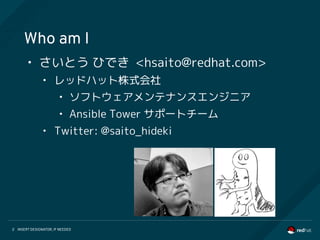
Who am I
• さいとう ひでき <@saito_hideki>
• レッドハット株式会社
• ソフトウェアメンテナンスエンジニア
• Ansible Tower サポートチーム
• Ansible ユーザグループ管理人
INSERT DESIGNATOR, IF NEEDED3
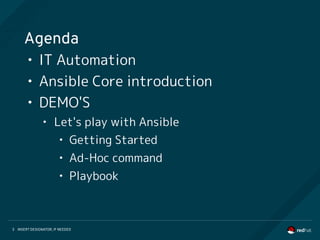
Agenda
• IT Automation
• Ansible Core introduction
• DEMO'S
• Let's play with Ansible
• Getting Started
• Ad-Hoc command
• Playbook
INSERT DESIGNATOR, IF NEEDED4
Motivation and Proposition
Automate routine work to operate IT system.
• Let's start with where we can automate easily.
• Let's start automation using script language that
anyone can easily understand.
●
Education and training for programming take a lot of time.
●
The IT system includes various kinds of hardware / software.
INSERT DESIGNATOR, IF NEEDED5
AUTOMATION FOR EVERYONE
• Ansible is an IT automation tool
• Goals are simplicity and ease-of-use
• Managing target via SSH transportation
• Management steps is written by YAML
• New release is provided approximately
every 2 months (Current 2.3.2)
• https://github.com/ansible/ansible
INSERT DESIGNATOR, IF NEEDED6
Introduce following components of
Ansible Core:
Ansible Core
Ansible Core is command-line IT automation Tool and libraries
1. Command Line Tools
2. Playbooks
3. Inventory
4. Modules
5. Plugins
INSERT DESIGNATOR, IF NEEDED7
COMMAND LINE TOOLS
Ansible Core contains some command line tools. Following 2 commands are
able to control your target hosts.
[Usage] ansible %Target% -i %Inventory% -m %Module%
$ ansible www -i inventory -m ping
[Usage] ansible %Target% -i %Inventory% -a %Ad-Hoc Command%
$ ansible www -i inventory -a “/sbin/reboot”
[Usage] ansible %Target% -i %Inventory% -m %Module%
$ ansible www -i inventory -m ping
[Usage] ansible %Target% -i %Inventory% -a %Ad-Hoc Command%
$ ansible www -i inventory -a “/sbin/reboot”
[Usage] ansible-playbook -i %Inventory% %Playbook%
$ ansible-playbook -i inventory playbook.yml
[Usage] ansible-playbook -i %Inventory% %Playbook%
$ ansible-playbook -i inventory playbook.yml
1. ansible command
2. ansible-playbook command
INSERT DESIGNATOR, IF NEEDED8
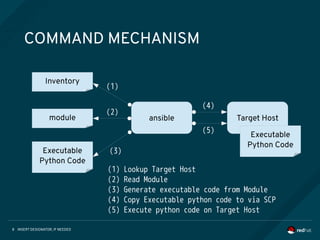
COMMAND MECHANISM
Target Hostmodule
Inventory
Executable
Python Code
Executable
Python Code
Executable
Python Code
ansible
(1)
(2)
(3)
(4)
(5)
(1) Lookup Target Host
(2) Read Module
(3) Generate executable code from Module
(4) Copy Executable python code to via SCP
(5) Execute python code on Target Host
INSERT DESIGNATOR, IF NEEDED9
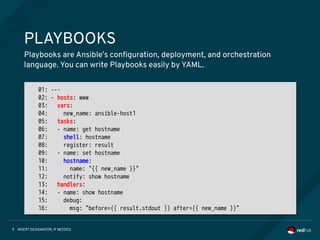
PLAYBOOKS
Playbooks are Ansible’s configuration, deployment, and orchestration
language. You can write Playbooks easily by YAML.
01: ---
02: - hosts: www
03: vars:
04: new_name: ansible-host1
05: tasks:
06: - name: get hostname
07: shell: hostname
08: register: result
09: - name: set hostname
10: hostname:
11: name: "{{ new_name }}"
12: notify: show hostname
13: handlers:
14: - name: show hostname
15: debug:
16: msg: "before={{ result.stdout }} after={{ new_name }}"
INSERT DESIGNATOR, IF NEEDED10
INVENTORY (STATIC)
Ansible is able to working against multiple system at the same time.
You can select portions of systems listed in the inventory at running time.
01: [localhost]
02: 127.0.0.1
03:
04: [staging]
05: 192.168.0.1
06: 192.168.0.2
07:
08: [production]
09: www1.example.com
10: www2.example.com
11:
12: [vars:local]
13: ansible_connection=local
01: [localhost]
02: 127.0.0.1
03:
04: [staging]
05: 192.168.0.1
06: 192.168.0.2
07:
08: [production]
09: www1.example.com
10: www2.example.com
11:
12: [vars:local]
13: ansible_connection=local
INSERT DESIGNATOR, IF NEEDED11
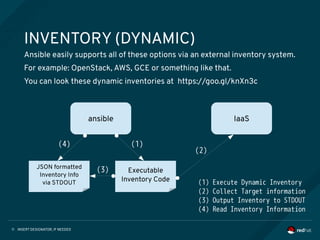
INVENTORY (DYNAMIC)
Ansible easily supports all of these options via an external inventory system.
For example: OpenStack, AWS, GCE or something like that.
You can look these dynamic inventories at https://goo.gl/knXn3c
ansible
Executable
Inventory Code
JSON formatted
Inventory Info
via STDOUT
IaaS
(1)
(2)
(3)
(4)
(1) Execute Dynamic Inventory
(2) Collect Target information
(3) Output Inventory to STDOUT
(4) Read Inventory Information
INSERT DESIGNATOR, IF NEEDED12
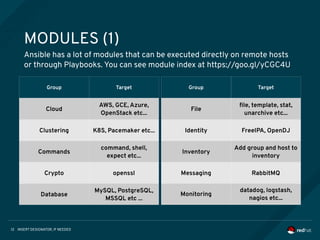
MODULES (1)
Ansible has a lot of modules that can be executed directly on remote hosts
or through Playbooks. You can see module index at https://goo.gl/yCGC4U
Group Target
Cloud
AWS, GCE, Azure,
OpenStack etc...
Clustering
Commands
Crypto
Database
Group Target
Cloud
AWS, GCE, Azure,
OpenStack etc...
Clustering K8S, Pacemaker etc...
Commands
command, shell,
expect etc...
Crypto openssl
Database
MySQL, PostgreSQL,
MSSQL etc ...
Group Target
Cloud
AWS, GCE, Azure,
OpenStack etc...
Clustering
Commands
Crypto
Database
Group Target
File
file, template, stat,
unarchive etc...
Identity FreeIPA, OpenDJ
Inventory
Add group and host to
inventory
Messaging RabbitMQ
Monitoring
datadog, logstash,
nagios etc...
INSERT DESIGNATOR, IF NEEDED13
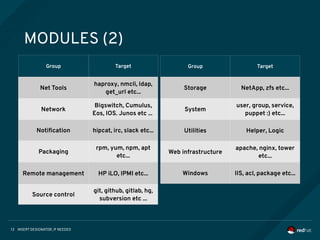
MODULES (2)
Group Target
Net Tools
haproxy, nmcli, ldap,
get_url etc...
Network
Bigswitch, Cumulus,
Eos, IOS. Junos etc ...
Notification hipcat, irc, slack etc...
Packaging
rpm, yum, npm, apt
etc...
Remote management HP iLO, IPMI etc...
Source control
git, github, gitlab, hg,
subversion etc ...
Group Target
Storage NetApp, zfs etc...
System
user, group, service,
puppet :) etc...
Utilities Helper, Logic
Web infrastructure
apache, nginx, tower
etc...
Windows IIS, acl, package etc...
INSERT DESIGNATOR, IF NEEDED14
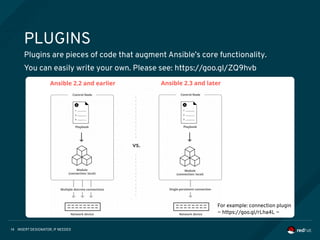
PLUGINS
Plugins are pieces of code that augment Ansible’s core functionality.
You can easily write your own. Please see: https://goo.gl/ZQ9hvb
For example: connection plugin
~ https://goo.gl/rLha4L ~
INSERT DESIGNATOR, IF NEEDED15
DEMO’S
• Let’s play with Ansible Core
• Getting Started
• Ad-Hoc command
• Playbook
INSERT DESIGNATOR, IF NEEDED16
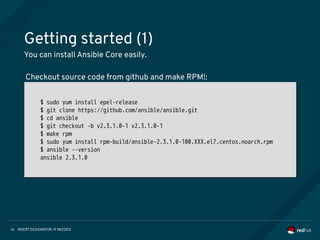
Getting started (1)
You can install Ansible Core easily.
$ sudo yum install epel-release
$ git clone https://github.com/ansible/ansible.git
$ cd ansible
$ git checkout -b v2.3.1.0-1 v2.3.1.0-1
$ make rpm
$ sudo yum install rpm-build/ansible-2.3.1.0-100.XXX.el7.centos.noarch.rpm
$ ansible --version
ansible 2.3.1.0
$ sudo yum install epel-release
$ git clone https://github.com/ansible/ansible.git
$ cd ansible
$ git checkout -b v2.3.1.0-1 v2.3.1.0-1
$ make rpm
$ sudo yum install rpm-build/ansible-2.3.1.0-100.XXX.el7.centos.noarch.rpm
$ ansible --version
ansible 2.3.1.0
Checkout source code from github and make RPM!:
INSERT DESIGNATOR, IF NEEDED17
Getting started (2)
Writing inventory file.
01: [linux]
02: 192.168.100.100 ansible_user=ec2-user
03: 192.168.100.101 ansible_user=ec2-user
04: 192.168.100.102 ansible_user=ec2-user
05:
06: [win]
07: WIN-PC1.example.com
08: WIN-PC2.example.com
09: WIN-PC3.example.com
10:
11: [win:vars]
12: ansible_port=5986
13: ansible_connection=winrm
14: ansible_winrm_server_cert_validation=ignore
15: ansible_winrm_transport=kerberos
16: ansible_winrm_kerberos_delegation=true
01: [linux]
02: 192.168.100.100 ansible_user=ec2-user
03: 192.168.100.101 ansible_user=ec2-user
04: 192.168.100.102 ansible_user=ec2-user
05:
06: [win]
07: WIN-PC1.example.com
08: WIN-PC2.example.com
09: WIN-PC3.example.com
10:
11: [win:vars]
12: ansible_port=5986
13: ansible_connection=winrm
14: ansible_winrm_server_cert_validation=ignore
15: ansible_winrm_transport=kerberos
16: ansible_winrm_kerberos_delegation=true
INSERT DESIGNATOR, IF NEEDED18
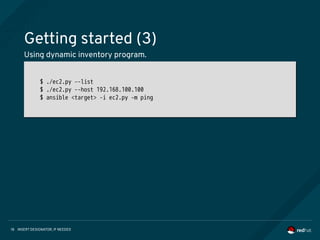
Getting started (3)
Using dynamic inventory program.
$ ./ec2.py –-list
$ ./ec2.py --host 192.168.100.100
$ ansible <target> -i ec2.py -m ping
$ ./ec2.py –-list
$ ./ec2.py --host 192.168.100.100
$ ansible <target> -i ec2.py -m ping
INSERT DESIGNATOR, IF NEEDED19
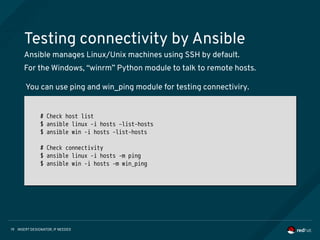
Testing connectivity by Ansible
Ansible manages Linux/Unix machines using SSH by default.
For the Windows, “winrm” Python module to talk to remote hosts.
# Check host list
$ ansible linux -i hosts –list-hosts
$ ansible win -i hosts –list-hosts
# Check connectivity
$ ansible linux -i hosts -m ping
$ ansible win -i hosts -m win_ping
# Check host list
$ ansible linux -i hosts –list-hosts
$ ansible win -i hosts –list-hosts
# Check connectivity
$ ansible linux -i hosts -m ping
$ ansible win -i hosts -m win_ping
You can use ping and win_ping module for testing connectiviry.
INSERT DESIGNATOR, IF NEEDED20
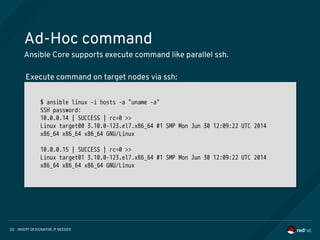
Ad-Hoc command
Ansible Core supports execute command like parallel ssh.
$ ansible linux -i hosts -a "uname -a"
SSH password:
10.0.0.14 | SUCCESS | rc=0 >>
Linux target00 3.10.0-123.el7.x86_64 #1 SMP Mon Jun 30 12:09:22 UTC 2014
x86_64 x86_64 x86_64 GNU/Linux
10.0.0.15 | SUCCESS | rc=0 >>
Linux target01 3.10.0-123.el7.x86_64 #1 SMP Mon Jun 30 12:09:22 UTC 2014
x86_64 x86_64 x86_64 GNU/Linux
$ ansible linux -i hosts -a "uname -a"
SSH password:
10.0.0.14 | SUCCESS | rc=0 >>
Linux target00 3.10.0-123.el7.x86_64 #1 SMP Mon Jun 30 12:09:22 UTC 2014
x86_64 x86_64 x86_64 GNU/Linux
10.0.0.15 | SUCCESS | rc=0 >>
Linux target01 3.10.0-123.el7.x86_64 #1 SMP Mon Jun 30 12:09:22 UTC 2014
x86_64 x86_64 x86_64 GNU/Linux
Execute command on target nodes via ssh:
INSERT DESIGNATOR, IF NEEDED21
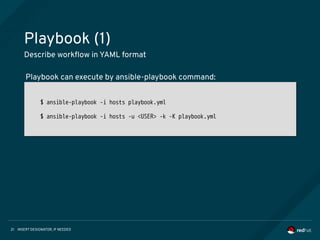
Playbook (1)
Describe workflow in YAML format
$ ansible-playbook -i hosts playbook.yml
$ ansible-playbook -i hosts -u <USER> -k -K playbook.yml
$ ansible-playbook -i hosts playbook.yml
$ ansible-playbook -i hosts -u <USER> -k -K playbook.yml
Playbook can execute by ansible-playbook command:
INSERT DESIGNATOR, IF NEEDED22
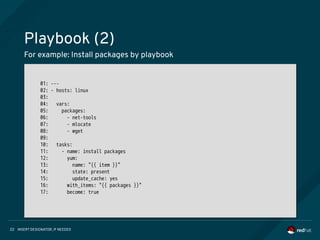
Playbook (2)
For example: Install packages by playbook
01: ---
02: - hosts: linux
03:
04: vars:
05: packages:
06: - net-tools
07: - mlocate
08: - wget
09:
10: tasks:
11: - name: install packages
12: yum:
13: name: "{{ item }}"
14: state: present
15: update_cache: yes
16: with_items: "{{ packages }}"
17: become: true
01: ---
02: - hosts: linux
03:
04: vars:
05: packages:
06: - net-tools
07: - mlocate
08: - wget
09:
10: tasks:
11: - name: install packages
12: yum:
13: name: "{{ item }}"
14: state: present
15: update_cache: yes
16: with_items: "{{ packages }}"
17: become: true
INSERT DESIGNATOR, IF NEEDED23
Playbook (3)
An operation is idempotent if the result of performing it once is exactly the
same as the result of performing it repeatedly without any intervening
actions.
# Try to launch playbook - 1st time (state: changed)
$ ansible-playbook -i hosts install_packages.yml
…
TASK [install packages]
**********************************************************************
changed: [172.31.3.136] => (item=[u'net-tools', u'mlocate', u'wget'])
...
# Try to launch playbook - 2nd time (state: ok)
$ ansible-playbook -i hosts install_packages.yml
…
TASK [install packages]
**********************************************************************
ok: [172.31.5.233] => (item=[u'net-tools', u'mlocate', u'wget'])
# Try to launch playbook - 1st time (state: changed)
$ ansible-playbook -i hosts install_packages.yml
…
TASK [install packages]
**********************************************************************
changed: [172.31.3.136] => (item=[u'net-tools', u'mlocate', u'wget'])
...
# Try to launch playbook - 2nd time (state: ok)
$ ansible-playbook -i hosts install_packages.yml
…
TASK [install packages]
**********************************************************************
ok: [172.31.5.233] => (item=[u'net-tools', u'mlocate', u'wget'])
INSERT DESIGNATOR, IF NEEDED24
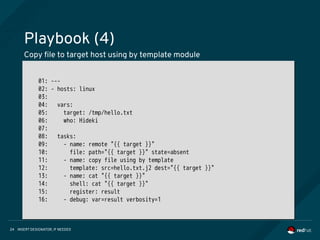
Playbook (4)
Copy file to target host using by template module
01: ---
02: - hosts: linux
03:
04: vars:
05: target: /tmp/hello.txt
06: who: Hideki
07:
08: tasks:
09: - name: remote "{{ target }}"
10: file: path="{{ target }}" state=absent
11: - name: copy file using by template
12: template: src=hello.txt.j2 dest="{{ target }}"
13: - name: cat "{{ target }}"
14: shell: cat "{{ target }}"
15: register: result
16: - debug: var=result verbosity=1
01: ---
02: - hosts: linux
03:
04: vars:
05: target: /tmp/hello.txt
06: who: Hideki
07:
08: tasks:
09: - name: remote "{{ target }}"
10: file: path="{{ target }}" state=absent
11: - name: copy file using by template
12: template: src=hello.txt.j2 dest="{{ target }}"
13: - name: cat "{{ target }}"
14: shell: cat "{{ target }}"
15: register: result
16: - debug: var=result verbosity=1
INSERT DESIGNATOR, IF NEEDED25
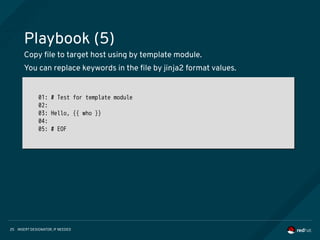
Playbook (5)
Copy file to target host using by template module.
You can replace keywords in the file by jinja2 format values.
01: # Test for template module
02:
03: Hello, {{ who }}
04:
05: # EOF
01: # Test for template module
02:
03: Hello, {{ who }}
04:
05: # EOF
INSERT DESIGNATOR, IF NEEDED26
Playbook (6)
Windows Support
1. Install krb packages and related python modules
2. Configure /etc/krb5.conf
3. kinit user@DOMAIN
- http://docs.ansible.com/ansible/latest/intro_windows.html
$ yum -y install python-devel krb5-devel krb5-libs krb5-workstation
$ pip install ntlm-auth==1.0.2
$ pip install pywinrm[kerberos]
$ pip install requests-kerberos
$ pip install pykerberos
$ sudo vi /etc/krb5.conf
$ kinit Administrator@EXAMPLE.COM
$ yum -y install python-devel krb5-devel krb5-libs krb5-workstation
$ pip install ntlm-auth==1.0.2
$ pip install pywinrm[kerberos]
$ pip install requests-kerberos
$ pip install pykerberos
$ sudo vi /etc/krb5.conf
$ kinit Administrator@EXAMPLE.COM
INSERT DESIGNATOR, IF NEEDED27
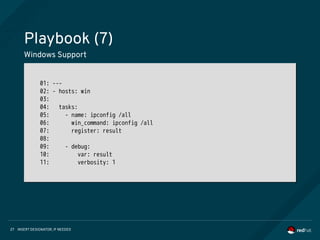
Playbook (7)
Windows Support
01: ---
02: - hosts: win
03:
04: tasks:
05: - name: ipconfig /all
06: win_command: ipconfig /all
07: register: result
08:
09: - debug:
10: var: result
11: verbosity: 1
01: ---
02: - hosts: win
03:
04: tasks:
05: - name: ipconfig /all
06: win_command: ipconfig /all
07: register: result
08:
09: - debug:
10: var: result
11: verbosity: 1
INSERT DESIGNATOR, IF NEEDED28
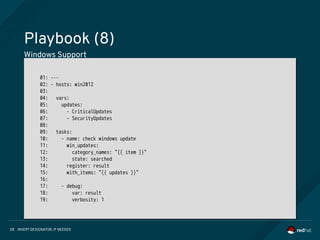
Playbook (8)
Windows Support
01: ---
02: - hosts: win2012
03:
04: vars:
05: updates:
06: - CriticalUpdates
07: - SecurityUpdates
08:
09: tasks:
10: - name: check windows update
11: win_updates:
12: category_names: "{{ item }}"
13: state: searched
14: register: result
15: with_items: "{{ updates }}"
16:
17: - debug:
18: var: result
19: verbosity: 1
01: ---
02: - hosts: win2012
03:
04: vars:
05: updates:
06: - CriticalUpdates
07: - SecurityUpdates
08:
09: tasks:
10: - name: check windows update
11: win_updates:
12: category_names: "{{ item }}"
13: state: searched
14: register: result
15: with_items: "{{ updates }}"
16:
17: - debug:
18: var: result
19: verbosity: 1
INSERT DESIGNATOR, IF NEEDED29
Modules document
You will see the documentation for modules by ansible-doc command
$ ansible-doc --help
Usage: ansible-doc [options] [module...]
Options:
-a, --all Show documentation for all modules
-h, --help show this help message and exit
-l, --list List available modules
-M MODULE_PATH, --module-path=MODULE_PATH
specify path(s) to module library (default=None)
-s, --snippet Show playbook snippet for specified module(s)
-v, --verbose verbose mode (-vvv for more, -vvvv to enable
connection debugging)
--version show program's version number and exit
$ ansible-doc --help
Usage: ansible-doc [options] [module...]
Options:
-a, --all Show documentation for all modules
-h, --help show this help message and exit
-l, --list List available modules
-M MODULE_PATH, --module-path=MODULE_PATH
specify path(s) to module library (default=None)
-s, --snippet Show playbook snippet for specified module(s)
-v, --verbose verbose mode (-vvv for more, -vvvv to enable
connection debugging)
--version show program's version number and exit
INSERT DESIGNATOR, IF NEEDED38
If you want to proceed to the next step,
I believe Ansible Core and Tower will help you.
THANK YOU
plus.google.com/+RedHat
linkedin.com/company/red-hat
youtube.com/user/RedHatVideos
facebook.com/redhatinc
twitter.com/RedHatNews

Ansible101

  • 1.
    今日から始める Ansible ~ Ansible101 ~ Hideki Saito Software Maintenance Engineer/Red Hat K.K.
  • 2.
    INSERT DESIGNATOR, IFNEEDED2 Who am I • さいとう ひでき <@saito_hideki> • レッドハット株式会社 • ソフトウェアメンテナンスエンジニア • Ansible Tower サポートチーム • Ansible ユーザグループ管理人
  • 3.
    INSERT DESIGNATOR, IFNEEDED3 Agenda • IT Automation • Ansible Core introduction • DEMO'S • Let's play with Ansible • Getting Started • Ad-Hoc command • Playbook
  • 4.
    INSERT DESIGNATOR, IFNEEDED4 Motivation and Proposition Automate routine work to operate IT system. • Let's start with where we can automate easily. • Let's start automation using script language that anyone can easily understand. ● Education and training for programming take a lot of time. ● The IT system includes various kinds of hardware / software.
  • 5.
    INSERT DESIGNATOR, IFNEEDED5 AUTOMATION FOR EVERYONE • Ansible is an IT automation tool • Goals are simplicity and ease-of-use • Managing target via SSH transportation • Management steps is written by YAML • New release is provided approximately every 2 months (Current 2.3.2) • https://github.com/ansible/ansible
  • 6.
    INSERT DESIGNATOR, IFNEEDED6 Introduce following components of Ansible Core: Ansible Core Ansible Core is command-line IT automation Tool and libraries 1. Command Line Tools 2. Playbooks 3. Inventory 4. Modules 5. Plugins
  • 7.
    INSERT DESIGNATOR, IFNEEDED7 COMMAND LINE TOOLS Ansible Core contains some command line tools. Following 2 commands are able to control your target hosts. [Usage] ansible %Target% -i %Inventory% -m %Module% $ ansible www -i inventory -m ping [Usage] ansible %Target% -i %Inventory% -a %Ad-Hoc Command% $ ansible www -i inventory -a “/sbin/reboot” [Usage] ansible %Target% -i %Inventory% -m %Module% $ ansible www -i inventory -m ping [Usage] ansible %Target% -i %Inventory% -a %Ad-Hoc Command% $ ansible www -i inventory -a “/sbin/reboot” [Usage] ansible-playbook -i %Inventory% %Playbook% $ ansible-playbook -i inventory playbook.yml [Usage] ansible-playbook -i %Inventory% %Playbook% $ ansible-playbook -i inventory playbook.yml 1. ansible command 2. ansible-playbook command
  • 8.
    INSERT DESIGNATOR, IFNEEDED8 COMMAND MECHANISM Target Hostmodule Inventory Executable Python Code Executable Python Code Executable Python Code ansible (1) (2) (3) (4) (5) (1) Lookup Target Host (2) Read Module (3) Generate executable code from Module (4) Copy Executable python code to via SCP (5) Execute python code on Target Host
  • 9.
    INSERT DESIGNATOR, IFNEEDED9 PLAYBOOKS Playbooks are Ansible’s configuration, deployment, and orchestration language. You can write Playbooks easily by YAML. 01: --- 02: - hosts: www 03: vars: 04: new_name: ansible-host1 05: tasks: 06: - name: get hostname 07: shell: hostname 08: register: result 09: - name: set hostname 10: hostname: 11: name: "{{ new_name }}" 12: notify: show hostname 13: handlers: 14: - name: show hostname 15: debug: 16: msg: "before={{ result.stdout }} after={{ new_name }}"
  • 10.
    INSERT DESIGNATOR, IFNEEDED10 INVENTORY (STATIC) Ansible is able to working against multiple system at the same time. You can select portions of systems listed in the inventory at running time. 01: [localhost] 02: 127.0.0.1 03: 04: [staging] 05: 192.168.0.1 06: 192.168.0.2 07: 08: [production] 09: www1.example.com 10: www2.example.com 11: 12: [vars:local] 13: ansible_connection=local 01: [localhost] 02: 127.0.0.1 03: 04: [staging] 05: 192.168.0.1 06: 192.168.0.2 07: 08: [production] 09: www1.example.com 10: www2.example.com 11: 12: [vars:local] 13: ansible_connection=local
  • 11.
    INSERT DESIGNATOR, IFNEEDED11 INVENTORY (DYNAMIC) Ansible easily supports all of these options via an external inventory system. For example: OpenStack, AWS, GCE or something like that. You can look these dynamic inventories at https://goo.gl/knXn3c ansible Executable Inventory Code JSON formatted Inventory Info via STDOUT IaaS (1) (2) (3) (4) (1) Execute Dynamic Inventory (2) Collect Target information (3) Output Inventory to STDOUT (4) Read Inventory Information
  • 12.
    INSERT DESIGNATOR, IFNEEDED12 MODULES (1) Ansible has a lot of modules that can be executed directly on remote hosts or through Playbooks. You can see module index at https://goo.gl/yCGC4U Group Target Cloud AWS, GCE, Azure, OpenStack etc... Clustering Commands Crypto Database Group Target Cloud AWS, GCE, Azure, OpenStack etc... Clustering K8S, Pacemaker etc... Commands command, shell, expect etc... Crypto openssl Database MySQL, PostgreSQL, MSSQL etc ... Group Target Cloud AWS, GCE, Azure, OpenStack etc... Clustering Commands Crypto Database Group Target File file, template, stat, unarchive etc... Identity FreeIPA, OpenDJ Inventory Add group and host to inventory Messaging RabbitMQ Monitoring datadog, logstash, nagios etc...
  • 13.
    INSERT DESIGNATOR, IFNEEDED13 MODULES (2) Group Target Net Tools haproxy, nmcli, ldap, get_url etc... Network Bigswitch, Cumulus, Eos, IOS. Junos etc ... Notification hipcat, irc, slack etc... Packaging rpm, yum, npm, apt etc... Remote management HP iLO, IPMI etc... Source control git, github, gitlab, hg, subversion etc ... Group Target Storage NetApp, zfs etc... System user, group, service, puppet :) etc... Utilities Helper, Logic Web infrastructure apache, nginx, tower etc... Windows IIS, acl, package etc...
  • 14.
    INSERT DESIGNATOR, IFNEEDED14 PLUGINS Plugins are pieces of code that augment Ansible’s core functionality. You can easily write your own. Please see: https://goo.gl/ZQ9hvb For example: connection plugin ~ https://goo.gl/rLha4L ~
  • 15.
    INSERT DESIGNATOR, IFNEEDED15 DEMO’S • Let’s play with Ansible Core • Getting Started • Ad-Hoc command • Playbook
  • 16.
    INSERT DESIGNATOR, IFNEEDED16 Getting started (1) You can install Ansible Core easily. $ sudo yum install epel-release $ git clone https://github.com/ansible/ansible.git $ cd ansible $ git checkout -b v2.3.1.0-1 v2.3.1.0-1 $ make rpm $ sudo yum install rpm-build/ansible-2.3.1.0-100.XXX.el7.centos.noarch.rpm $ ansible --version ansible 2.3.1.0 $ sudo yum install epel-release $ git clone https://github.com/ansible/ansible.git $ cd ansible $ git checkout -b v2.3.1.0-1 v2.3.1.0-1 $ make rpm $ sudo yum install rpm-build/ansible-2.3.1.0-100.XXX.el7.centos.noarch.rpm $ ansible --version ansible 2.3.1.0 Checkout source code from github and make RPM!:
  • 17.
    INSERT DESIGNATOR, IFNEEDED17 Getting started (2) Writing inventory file. 01: [linux] 02: 192.168.100.100 ansible_user=ec2-user 03: 192.168.100.101 ansible_user=ec2-user 04: 192.168.100.102 ansible_user=ec2-user 05: 06: [win] 07: WIN-PC1.example.com 08: WIN-PC2.example.com 09: WIN-PC3.example.com 10: 11: [win:vars] 12: ansible_port=5986 13: ansible_connection=winrm 14: ansible_winrm_server_cert_validation=ignore 15: ansible_winrm_transport=kerberos 16: ansible_winrm_kerberos_delegation=true 01: [linux] 02: 192.168.100.100 ansible_user=ec2-user 03: 192.168.100.101 ansible_user=ec2-user 04: 192.168.100.102 ansible_user=ec2-user 05: 06: [win] 07: WIN-PC1.example.com 08: WIN-PC2.example.com 09: WIN-PC3.example.com 10: 11: [win:vars] 12: ansible_port=5986 13: ansible_connection=winrm 14: ansible_winrm_server_cert_validation=ignore 15: ansible_winrm_transport=kerberos 16: ansible_winrm_kerberos_delegation=true
  • 18.
    INSERT DESIGNATOR, IFNEEDED18 Getting started (3) Using dynamic inventory program. $ ./ec2.py –-list $ ./ec2.py --host 192.168.100.100 $ ansible <target> -i ec2.py -m ping $ ./ec2.py –-list $ ./ec2.py --host 192.168.100.100 $ ansible <target> -i ec2.py -m ping
  • 19.
    INSERT DESIGNATOR, IFNEEDED19 Testing connectivity by Ansible Ansible manages Linux/Unix machines using SSH by default. For the Windows, “winrm” Python module to talk to remote hosts. # Check host list $ ansible linux -i hosts –list-hosts $ ansible win -i hosts –list-hosts # Check connectivity $ ansible linux -i hosts -m ping $ ansible win -i hosts -m win_ping # Check host list $ ansible linux -i hosts –list-hosts $ ansible win -i hosts –list-hosts # Check connectivity $ ansible linux -i hosts -m ping $ ansible win -i hosts -m win_ping You can use ping and win_ping module for testing connectiviry.
  • 20.
    INSERT DESIGNATOR, IFNEEDED20 Ad-Hoc command Ansible Core supports execute command like parallel ssh. $ ansible linux -i hosts -a "uname -a" SSH password: 10.0.0.14 | SUCCESS | rc=0 >> Linux target00 3.10.0-123.el7.x86_64 #1 SMP Mon Jun 30 12:09:22 UTC 2014 x86_64 x86_64 x86_64 GNU/Linux 10.0.0.15 | SUCCESS | rc=0 >> Linux target01 3.10.0-123.el7.x86_64 #1 SMP Mon Jun 30 12:09:22 UTC 2014 x86_64 x86_64 x86_64 GNU/Linux $ ansible linux -i hosts -a "uname -a" SSH password: 10.0.0.14 | SUCCESS | rc=0 >> Linux target00 3.10.0-123.el7.x86_64 #1 SMP Mon Jun 30 12:09:22 UTC 2014 x86_64 x86_64 x86_64 GNU/Linux 10.0.0.15 | SUCCESS | rc=0 >> Linux target01 3.10.0-123.el7.x86_64 #1 SMP Mon Jun 30 12:09:22 UTC 2014 x86_64 x86_64 x86_64 GNU/Linux Execute command on target nodes via ssh:
  • 21.
    INSERT DESIGNATOR, IFNEEDED21 Playbook (1) Describe workflow in YAML format $ ansible-playbook -i hosts playbook.yml $ ansible-playbook -i hosts -u <USER> -k -K playbook.yml $ ansible-playbook -i hosts playbook.yml $ ansible-playbook -i hosts -u <USER> -k -K playbook.yml Playbook can execute by ansible-playbook command:
  • 22.
    INSERT DESIGNATOR, IFNEEDED22 Playbook (2) For example: Install packages by playbook 01: --- 02: - hosts: linux 03: 04: vars: 05: packages: 06: - net-tools 07: - mlocate 08: - wget 09: 10: tasks: 11: - name: install packages 12: yum: 13: name: "{{ item }}" 14: state: present 15: update_cache: yes 16: with_items: "{{ packages }}" 17: become: true 01: --- 02: - hosts: linux 03: 04: vars: 05: packages: 06: - net-tools 07: - mlocate 08: - wget 09: 10: tasks: 11: - name: install packages 12: yum: 13: name: "{{ item }}" 14: state: present 15: update_cache: yes 16: with_items: "{{ packages }}" 17: become: true
  • 23.
    INSERT DESIGNATOR, IFNEEDED23 Playbook (3) An operation is idempotent if the result of performing it once is exactly the same as the result of performing it repeatedly without any intervening actions. # Try to launch playbook - 1st time (state: changed) $ ansible-playbook -i hosts install_packages.yml … TASK [install packages] ********************************************************************** changed: [172.31.3.136] => (item=[u'net-tools', u'mlocate', u'wget']) ... # Try to launch playbook - 2nd time (state: ok) $ ansible-playbook -i hosts install_packages.yml … TASK [install packages] ********************************************************************** ok: [172.31.5.233] => (item=[u'net-tools', u'mlocate', u'wget']) # Try to launch playbook - 1st time (state: changed) $ ansible-playbook -i hosts install_packages.yml … TASK [install packages] ********************************************************************** changed: [172.31.3.136] => (item=[u'net-tools', u'mlocate', u'wget']) ... # Try to launch playbook - 2nd time (state: ok) $ ansible-playbook -i hosts install_packages.yml … TASK [install packages] ********************************************************************** ok: [172.31.5.233] => (item=[u'net-tools', u'mlocate', u'wget'])
  • 24.
    INSERT DESIGNATOR, IFNEEDED24 Playbook (4) Copy file to target host using by template module 01: --- 02: - hosts: linux 03: 04: vars: 05: target: /tmp/hello.txt 06: who: Hideki 07: 08: tasks: 09: - name: remote "{{ target }}" 10: file: path="{{ target }}" state=absent 11: - name: copy file using by template 12: template: src=hello.txt.j2 dest="{{ target }}" 13: - name: cat "{{ target }}" 14: shell: cat "{{ target }}" 15: register: result 16: - debug: var=result verbosity=1 01: --- 02: - hosts: linux 03: 04: vars: 05: target: /tmp/hello.txt 06: who: Hideki 07: 08: tasks: 09: - name: remote "{{ target }}" 10: file: path="{{ target }}" state=absent 11: - name: copy file using by template 12: template: src=hello.txt.j2 dest="{{ target }}" 13: - name: cat "{{ target }}" 14: shell: cat "{{ target }}" 15: register: result 16: - debug: var=result verbosity=1
  • 25.
    INSERT DESIGNATOR, IFNEEDED25 Playbook (5) Copy file to target host using by template module. You can replace keywords in the file by jinja2 format values. 01: # Test for template module 02: 03: Hello, {{ who }} 04: 05: # EOF 01: # Test for template module 02: 03: Hello, {{ who }} 04: 05: # EOF
  • 26.
    INSERT DESIGNATOR, IFNEEDED26 Playbook (6) Windows Support 1. Install krb packages and related python modules 2. Configure /etc/krb5.conf 3. kinit user@DOMAIN - http://docs.ansible.com/ansible/latest/intro_windows.html $ yum -y install python-devel krb5-devel krb5-libs krb5-workstation $ pip install ntlm-auth==1.0.2 $ pip install pywinrm[kerberos] $ pip install requests-kerberos $ pip install pykerberos $ sudo vi /etc/krb5.conf $ kinit Administrator@EXAMPLE.COM $ yum -y install python-devel krb5-devel krb5-libs krb5-workstation $ pip install ntlm-auth==1.0.2 $ pip install pywinrm[kerberos] $ pip install requests-kerberos $ pip install pykerberos $ sudo vi /etc/krb5.conf $ kinit Administrator@EXAMPLE.COM
  • 27.
    INSERT DESIGNATOR, IFNEEDED27 Playbook (7) Windows Support 01: --- 02: - hosts: win 03: 04: tasks: 05: - name: ipconfig /all 06: win_command: ipconfig /all 07: register: result 08: 09: - debug: 10: var: result 11: verbosity: 1 01: --- 02: - hosts: win 03: 04: tasks: 05: - name: ipconfig /all 06: win_command: ipconfig /all 07: register: result 08: 09: - debug: 10: var: result 11: verbosity: 1
  • 28.
    INSERT DESIGNATOR, IFNEEDED28 Playbook (8) Windows Support 01: --- 02: - hosts: win2012 03: 04: vars: 05: updates: 06: - CriticalUpdates 07: - SecurityUpdates 08: 09: tasks: 10: - name: check windows update 11: win_updates: 12: category_names: "{{ item }}" 13: state: searched 14: register: result 15: with_items: "{{ updates }}" 16: 17: - debug: 18: var: result 19: verbosity: 1 01: --- 02: - hosts: win2012 03: 04: vars: 05: updates: 06: - CriticalUpdates 07: - SecurityUpdates 08: 09: tasks: 10: - name: check windows update 11: win_updates: 12: category_names: "{{ item }}" 13: state: searched 14: register: result 15: with_items: "{{ updates }}" 16: 17: - debug: 18: var: result 19: verbosity: 1
  • 29.
    INSERT DESIGNATOR, IFNEEDED29 Modules document You will see the documentation for modules by ansible-doc command $ ansible-doc --help Usage: ansible-doc [options] [module...] Options: -a, --all Show documentation for all modules -h, --help show this help message and exit -l, --list List available modules -M MODULE_PATH, --module-path=MODULE_PATH specify path(s) to module library (default=None) -s, --snippet Show playbook snippet for specified module(s) -v, --verbose verbose mode (-vvv for more, -vvvv to enable connection debugging) --version show program's version number and exit $ ansible-doc --help Usage: ansible-doc [options] [module...] Options: -a, --all Show documentation for all modules -h, --help show this help message and exit -l, --list List available modules -M MODULE_PATH, --module-path=MODULE_PATH specify path(s) to module library (default=None) -s, --snippet Show playbook snippet for specified module(s) -v, --verbose verbose mode (-vvv for more, -vvvv to enable connection debugging) --version show program's version number and exit
  • 30.
    INSERT DESIGNATOR, IFNEEDED38 If you want to proceed to the next step, I believe Ansible Core and Tower will help you.
  • 31.